
In this Article:
Try Kanbanchi now
Start your free trial


Time is the only nonrenewable asset. We all know this deep down, and we’ve all felt it at work: that specific kind of exhaustion where you’ve been at your desk for ten hours, yet you can’t quite point to a single finished task.
What you can all point to is endless notifications, quick Slack chats that end up taking too much time, and the headache-inducing switches between umpteen different browser tabs.
It’s not time we lack, it’s focus. So, why does it feel like we have less of it despite having more productivity apps than ever before?
The answer lies in improving efficiency. On one hand, thank goodness we’ve moved past leather-bound Filofaxes, Post-it notes, and the clock ticking away on the wall. Do we put too much faith in apps and software? Today, time management is this unwieldy digital space. It’s no longer just about remembering to do things. It’s about:
Choosing the best time management tools is an objective exercise. The tool that’s amazing for a sole trader probably won’t work for a team of twenty creatives.
The market is saturated with the online time management tools, but the real challenge is finding a solution that doesn’t just track your time but actually gives it back to you. We understand this, so the Kanbanchi team has put together this guide to cut through the noise. We aren’t just listing apps; we’re analyzing the strategies behind the best software for time management to help you build a workflow that sticks.
Whether you’re:
…You’re in the right place. It’s time to stop chasing the clock and start commanding it. Let’s set the clock and go!

Use the best time management tools to handle multiple tasks efficiently
Simple to-do lists and basic calendars are OK for small tasks. However, they crumble under the weight of a scaling business. As a team grows and you start to hear the well-worn phrase “I’ll get to it when I’ve got time…” that’s when you know you need to make some changes.
Without the best software for time management, your organization is essentially flying blind. You’re making guesses about capacity, deadlines, and profitability, guesses that usually lead to missed milestones and Friday evening panics (and a missed chance for an early pint).
Here is why switching to professional time management software is no longer optional in 2026:
In a remote or hybrid world, invisible work is the silent killer of productivity. Professional tools move work out of private inboxes and into shared, visual spaces.
Tracking time isn’t about micromanagement; it’s about ownership. When teams use professional time-management tools, they naturally become more mindful of how they allocate their deep work hours.
Burnout is rarely caused by hard work; it’s caused by unfair work. Without a professional system, reliable team members often get buried under more tasks, while others remain underutilized.
Every project you finish is a data point for the next one. Professional software helps you stop undercharging and over-promising.
If you can’t measure it, you can’t manage it. The transition to professional software helps you make every second count during a frantic working day.
Find more articles on Time Management

Leverage the best time management tools to plan schedules, track deadlines, and boost productivity using a calendar-based approach
When you search for the best tools for time management, you’re often met with a wall of apps that all look vaguely the same. However, the software market is actually divided into distinct areas.
The trick is not to find the most famous app, but the one that solves your specific pain point.
Let’s break down the four essential categories of the best online time management tools for 2026.
These tools are designed for one thing: precision.
They focus on the Start/Stop button and are the gold standard for freelancers and agencies who bill by the hour.
These apps act as a digital “do not disturb” sign.
They are built to protect your brain from the constant ping of notifications and the lure of social media.
These tools manage the “when” of your day.
They are the frontline defense against a calendar full of back-to-back meetings that leave no room for actual tasks.
This is where time tracking meets execution.
Instead of having a timer in one tab and your tasks in another, these tools bake time management directly into your workflow.
Here’s an at-a-glance guide to the different categories of Time Management Tools and who they’d suit best.
| Category | Primary Focus | Ideal User |
|---|---|---|
| Time Trackers | Accuracy & Invoicing | Freelancers, Lawyers |
| Focus Apps | Habit Building | Individual Contributors |
| Scheduling | Availability | Sales, HR, Executives |
| Integrated PM | Workflow & Results | Modern Teams, Agile Managers |
If time tracking were easy, every project would finish on Friday at 4:00 PM. The reality? Most teams treat time tracking as a chore and an administrative tax paid at the end of the week. This creates a significant gap between the data you have and the reality of how work gets done. Why are we still guessing how long projects take?
The problem is often one of three things:
When employees log their hours on Friday afternoon, they aren’t reporting data; they are reporting a hazy memory. Manual entry is the enemy of accuracy. We forget the quick 20-minute phone calls and the 15-minute email deep dives that all add up.
The Solution: Use a tool where the timer is one click away from the task itself. Don’t have to leave your workspace to start a clock? Then you won’t forget to do it!
The average professional switches between nearly 10 different apps a day. Jumping from one tool to another means you a) get frustrated and b ) lose context. This fragmentation doesn’t just waste time; it prevents you from concentrating effectively and requires constant refocusing.
The Solution: Consolidate. Look for one space where your tasks, files, and timers coexist.
Many teams track hours worked, but ignore cycle time. If a task takes two hours of actual work but sits in a Review column for four days, your problem isn’t the work; it’s the process.
The Solution: Search for project management software with the best cycle time reporting. You need to see the total elapsed time from Work Started to Work Delivered.
If your team lives in Google Workspace using Drive, Sheets, and Gmail all day, most of the best online time management tools will feel like an uninvited guest. They require separate logins, different file permissions, and a learning curve that eats up the very time you’re trying to save.
Kanbanchi is different. It is one of the best project time management software that lives exactly where you work. It doesn’t just connect to Google; it transforms your Google Drive into a visual, automated hub for productivity.
Integration: the Ultimate Time-Saver
When your time management tool is native to Google, the toggle tax disappears.
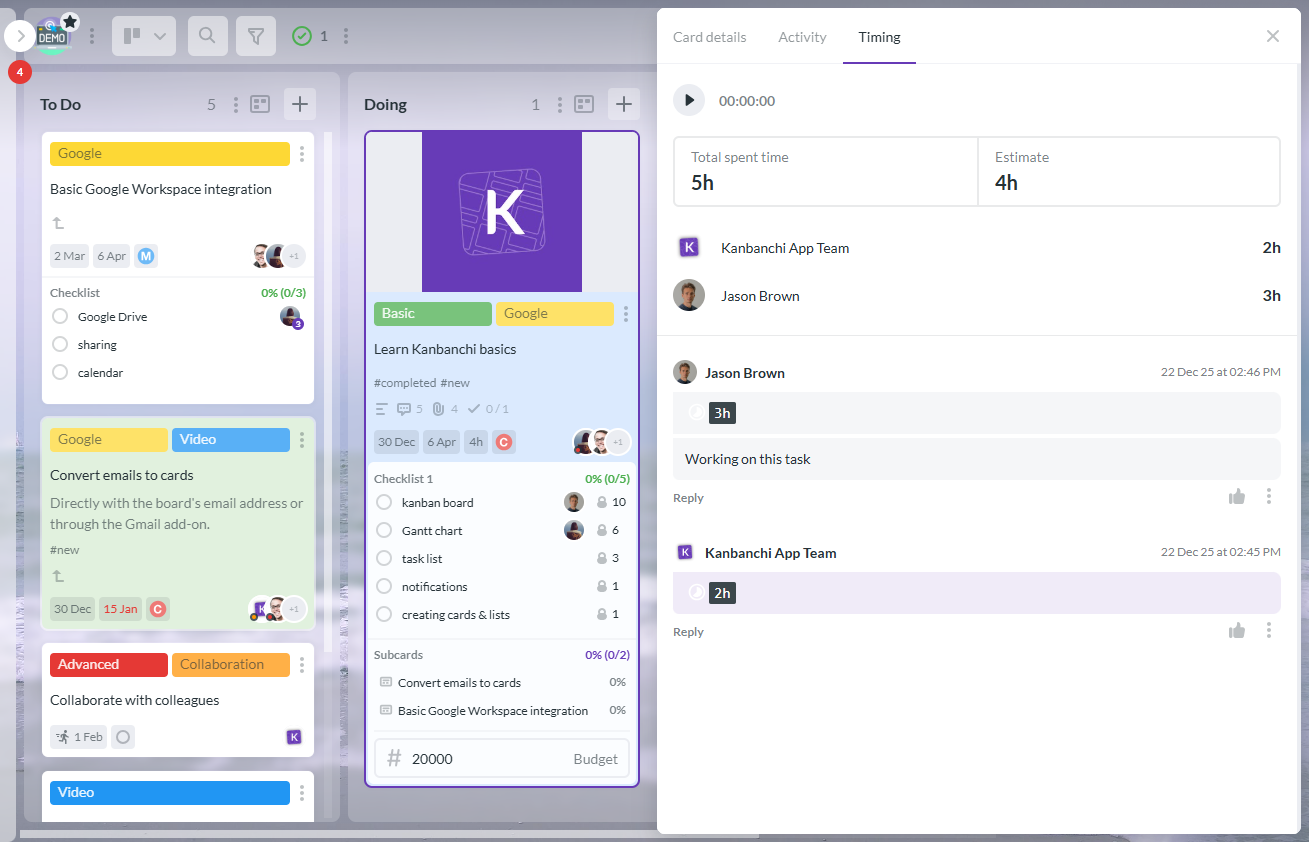
Kanbanchi Timing Tab for tracking time and managing tasks efficiently.
The fatal flaw of most time management apps is that they are disconnected from the work. Kanbanchi solves this by placing the timer exactly where the work happens: directly on the task card.
When you open a card to check a project’s requirements, the Start button is right there. By tracking time directly on the specific task, you no longer have to wonder, “Wait, was I working on the website redesign or the social media plan?” The data is captured in real time and perfectly synced with the specific deliverable.
Effective time management isn’t just about the minutes; it’s about the sequence.

Kanbanchi Workload View for visualizing and managing team tasks and time efficiently
Kanbanchi doesn’t just collect time; it analyzes it. Its features allow you to move beyond guessing and start optimizing.
In 2026, the best software for time management is the one that removes the friction between doing and tracking. By living inside Google Workspace, Kanbanchi gives you your focus back.
SIGN UP FOR A FREE TRIAL TODAY
Implementing a new time management system doesn’t have to be a project in itself. If you’re already using Google, you’re already 90% there. Kanbanchi is designed to be plug-and-play, enabling you to move from scattered tasks to a synchronized schedule in under ten minutes. Here is your roadmap to mastering time.
Forget complex software installations. As a native Google app, Kanbanchi lives in the Google Workspace Marketplace. Install Kanbanchi from Google Workspace Marketplace in several clicks.
Pro Tip: If you’re an admin, you can perform a Domain Install to give your entire team access instantly. No more waiting for everyone to create separate accounts.
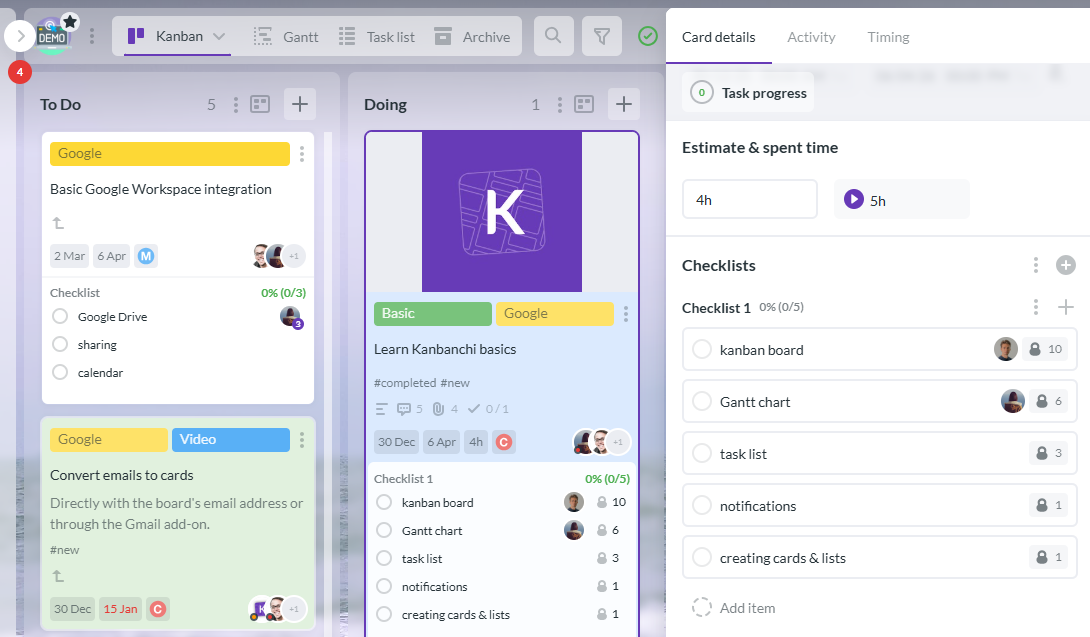
Kanbanchi’s Estimated Time and Time Tracker fields help manage tasks and track time effectively
Once you’ve opened a board, you’ll notice that time tracking isn’t a hidden feature, it’s built into the DNA of every task. Open any card on your Kanban board. In the right-hand panel, you’ll see the Timing section.
Pro tip: You can set an Estimated Time here. This is crucial for comparing your expectations with reality later. To start working, click the Start timer icon in the top panel.
This is where you move from tracking to optimizing. You can export the time tracker data to Google Sheets and analyze it to see how your team’s time is being allocated across tasks and team members.
A project board shows you the work; a calendar shows you the day. Syncing them ensures you never over-promise.
Pro tip: Start dates and due dates from your Kanbanchi cards will appear as events on your Google Calendar. If you move a deadline in Kanbanchi, it updates in your calendar.
In 2026, efficiency isn’t a luxury. It’s your staple for success. The best business process management software shouldn’t just store your tasks; it should propel your business forward by eliminating the manual friction that slows you down. By choosing a tool that integrates natively with your existing ecosystem, you reduce app fatigue and ensure that your team stays focused on what really matters: delivering value to your customers.
Finding the best time management tool shouldn’t be a full-time job! Still got some burning questions? To help you get the best time management software 2026, we’ve answered the most common questions from our community…
The best tool is the one that actually fits your existing workflow. If you are a solo freelancer, a simple tracker like Toggl might suffice. However, for teams, the best choice is an integrated platform like Kanbanchi. It combines task management with time tracking, ensuring you aren’t just logging hours, but moving projects forward.
In 2026, the trend is consolidation. Users are moving away from standalone apps and toward unified ecosystems. For Google Workspace users, Kanbanchi is widely considered the top choice because it eliminates the need for external accounts and keeps all project data within Google Drive.
Hours worked only tell you how much a person costs you. Cycle time indicates how quickly your business moves.



In this Article:
Start using Kanbanchi now
Start your free trial