
In this Article:
Try Kanbanchi now
Start your free trial


Globally, the interior design market has seen its popularity soar. Last year, the industry as a whole was valued at just under $138 billion. By 2030, it’s expected to reach $175 billion, with a CAGR of 4.3%. New home construction and people deciding to remodel their homes account for much of this rise. With this comes a need for design professionals to have reliable project management software. This is so they can stay on top of projects and cater to clients’ very specific needs. But in the past, it’s been problematic as they’ve relied on a mish-mash of tools like:
It’s an approach that’s inefficient and means that projects get delayed and budgets run over. The result is:
The solution? No more manual effort, but software that makes everything simple for designers. They need programs that integrate the visual elements critical to design:
With the logistics of procurement and site coordination. How to find a program that fits? That’s where Kanbanchi can help. We’ve crafted a guide to cut through the noise and evaluate the essential features required by modern design firms. In it, we’re going to analyze how dedicated design studio project management software provides the necessary structure, transparency, and integration to handle every phase of a project, from initial concepting to final client delivery.
Why can’t a simple spreadsheet or a general-purpose project management application handle a design firm’s workload? The nature of creative work, when combined with the unpredictable variables of construction work, can often create a perfect storm that’s difficult to navigate. Generic project management tools often fail to account for the creative ambiguity and material reality of a design project. For an interior designer, a project is rarely a simple A-to-B process; it’s a loop of revisions, product sourcing, and logistics that needs extensive tracking. Design studio task management faces three major points of friction that demand specialized software functionality:
For a client, it’s a huge emotional and financial investment. They’re deeply involved, and it means that elements of the project will often change. Managing these changes that can bloat the timeline and budget is a perpetual challenge. Software must provide a clear, auditable trail for every decision, ensuring client approvals are documented, and revisions don’t derail the entire schedule. This is often the biggest bottleneck in a project’s profitability.
Interior design often hinges on sourcing specialized, high-end, custom items. Tracking long, inconsistent, and often volatile lead times from multiple global vendors is a logistical nightmare. A single delay on some custom-built furniture or hand-designed wallpaper can impact the entire schedule. Home renovation project coordination requires a dedicated system to track Purchase Orders, delivery windows, and storage needs, far beyond what basic tools offer.
The installation phase is stressful and high-risk. It involves aligning the schedules of multiple specialty trades, including electricians, plumbers, millworkers, painters, and general installers. They’re all contingent on the precise, on-time delivery of materials. Misalignment can result in a costly site shutdown and the end of the project. A project management tool must provide visual timelines to map dependencies, ensuring, for example, that tiles are installed before the plumber begins final fixture placement.
The inability to visually track a project through these complex phases, from the abstract idea of a mood board to the concrete reality of a delivery truck, is why general design studio task management systems fall short. The ideal solution must be as visual, flexible, and integrated as the design process itself.
Once the client has approved a concept design, the project shifts from creative work to construction. This stage can be stressful. It is where project management directly impacts both the designer and the final client experience. Success hinges on precise scheduling and strict accountability.
Key moments include:
Maintaining vendor accountability and visualizing these complex timelines are paramount. Without precise scheduling tools and centralized documentation, the critical path quickly becomes the ‘critical mess’.
A successful project management solution for a design studio must be more than a simple to-do list; it must function as the centralized hub for creation and coordination between client and construction teams. When evaluating specialized design studio project management software, studios should look for these features, organized by their core function:
Kanbanchi excels in:
Its design allows studios to adapt the tool to their specific processes rather than forcing them to adapt to the software. So, with that in mind, let’s take a look at how it can help prevent chaos in interior design project management.
Kanbanchi can help solve the logistical challenges of modern design studios because it is the design studio project management software built for teams already running on Google Workspace. It is not merely a standalone tool that happens to integrate; it is a native extension that offers a robust, unified ecosystem, eliminating the friction of switching between apps. For a design studio owner or for interior decorator workflow management, the inherent advantage of this native integration is easy to see. For instance, their team might already use Google Drive for tear sheets, Gmail for vendor communication, and Google Docs for specifications. Kanbanchi unites these scattered assets into a single, cohesive workflow. It’s the smart choice for interior designers.
The cornerstone of Kanbanchi’s appeal is its seamless integration with Google Drive and the entire Workspace ecosystem.
Client approvals are a major bottleneck. Kanbanchi transforms this chaotic process into a structured pipeline:
Managing the flow of materials is a high-volume process that demands visual organization. Kanbanchi provides the ideal framework for this part of the process, which can be a big stressor:
Custom Procurement Board: A board can be built specifically for logistics, offering columns that mirror the physical reality of the supply chain, a textbook example of effective interior decorator workflow management: Sourcing, Quote Requested, Purchase Order Sent, In Production, Logistics/In Transit, Delivered to Warehouse, Installation Site.
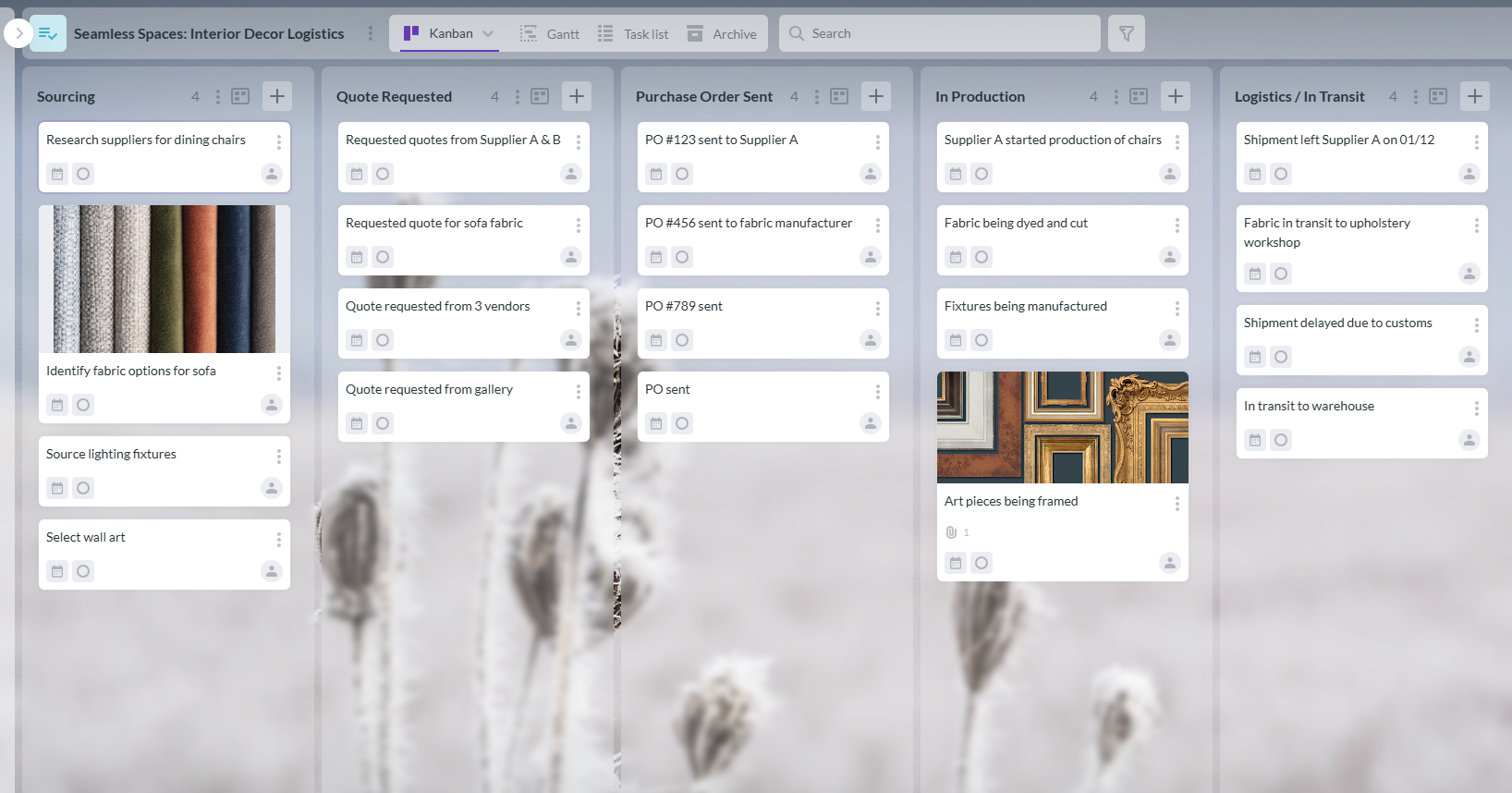
Screenshot of a Kanban board managing interior design logistics, illustrating task progress from sourcing to installation
Critical Information at a Glance: Each item’s card includes its supplier, cost, expected lead time, and status. Color-coded labels can highlight critical items or those at risk of delay.
The part Kanbanchi can play here is invaluable! It can act as the bridge between the visual, creative, but document-focused world of interior design and the organized, coordinated execution required for profitable project delivery.
You may also be interested in other Kanbanchi blog articles for businesses; check them out!
Let’s take a look at how Kanbanchi could help with a specific project. Remember, every interior project is unique and can have complexities far beyond just construction regulations.
There will always be the following things to think about:
As you can see, this environment demands rigorous commercial design project tracking to manage the increased volume of stakeholders and regulatory steps.
We’ve taken on a job with a commercial firm called Sumptuous Spaces. They’ve been hired to design and manage the fit-out of an 18,000 sq ft tech company headquarters.
They’re going to use a dedicated Kanbanchi board, structured around a funnel to manage the entire process:
| Kanban Column | Typical Tasks (Cards) | Kanbanchi Feature Highlight |
|---|---|---|
| Pre-Design/Permitting | Finalize Lease Documents; Submit Building Permit Application; Hire MEP Consultant. | Gantt Chart: Used to ensure the permit submission date is dependent on the lease finalization date. |
| Schematic Design | Client Sign-off on Adjacency Plan; Source Key Finishes (Commercial Grade); Budget Review with Project Controller. | Google Drive Attachments: Final PDF of permit submission and commercial-grade spec sheets are attached to the relevant cards. |
| Construction Docs | Issue Final Specs to GC for Bid; Final Review of Electrical Layout; Final Furniture Order POs. | Task Dependencies: The furniture order is linked to the budget review to prevent ordering before financial approval. |
| Construction/Install | Demolition Complete; Coordinate Low-Voltage Cabling; Final Installation of Wayfinding Signage. | Gantt Chart: Visual scheduling of all trades (electricians, IT, millworkers) to avoid costly overlaps or site conflicts. |
| Project Closeout | Final Client Walkthrough & Punch List; Receive Final As-Built Drawings; Invoice Client for Final Draw. | Due Dates & Assignees: The Punch List card is assigned to the Field Manager with a strict due date for closure. |
As you can see from the structure we’ve set out. It allows the project manager to report to the client instantly Plus the General Contractor and the internal design team to be aware of the precise status of any permit, order, or installation task. Using the Gantt view, Sumptuous Spaces can visually confirm that the 10-week custom millwork lead time blocks the start of the on-site carpentry work, ensuring all parties maintain schedule transparency. This level of visual control is essential for maintaining profitability in large-scale commercial design project tracking, and if Sumptuous Spaces uses this plan, they’ll find their project stays on track and ensures a satisfied client.
So, let’s dive deeper and look at how easy it is to set up a design workflow with Kanbanchi’s tools.
Transitioning your studio from a bunch of unlinked tools to a unified platform like Kanbanchi requires a clear, actionable plan. The key is to map your existing process clearly from:
Directly onto Kanbanchi’s customizable board structure. Here is an actionable, five-step guide for implementing effective design studio task management using Kanbanchi:
Do not try to manage all clients on a single board. Create a dedicated Kanbanchi board for each client project. This isolates the tasks, budget, and documents specific to that single project, maintaining clarity.
Effectively, this is your project pipeline. Columns represent the stages of your workflow. Define a set of standard columns that move the project from abstract design to physical reality. If you’re stuck for inspiration, you might want to think about including the following:
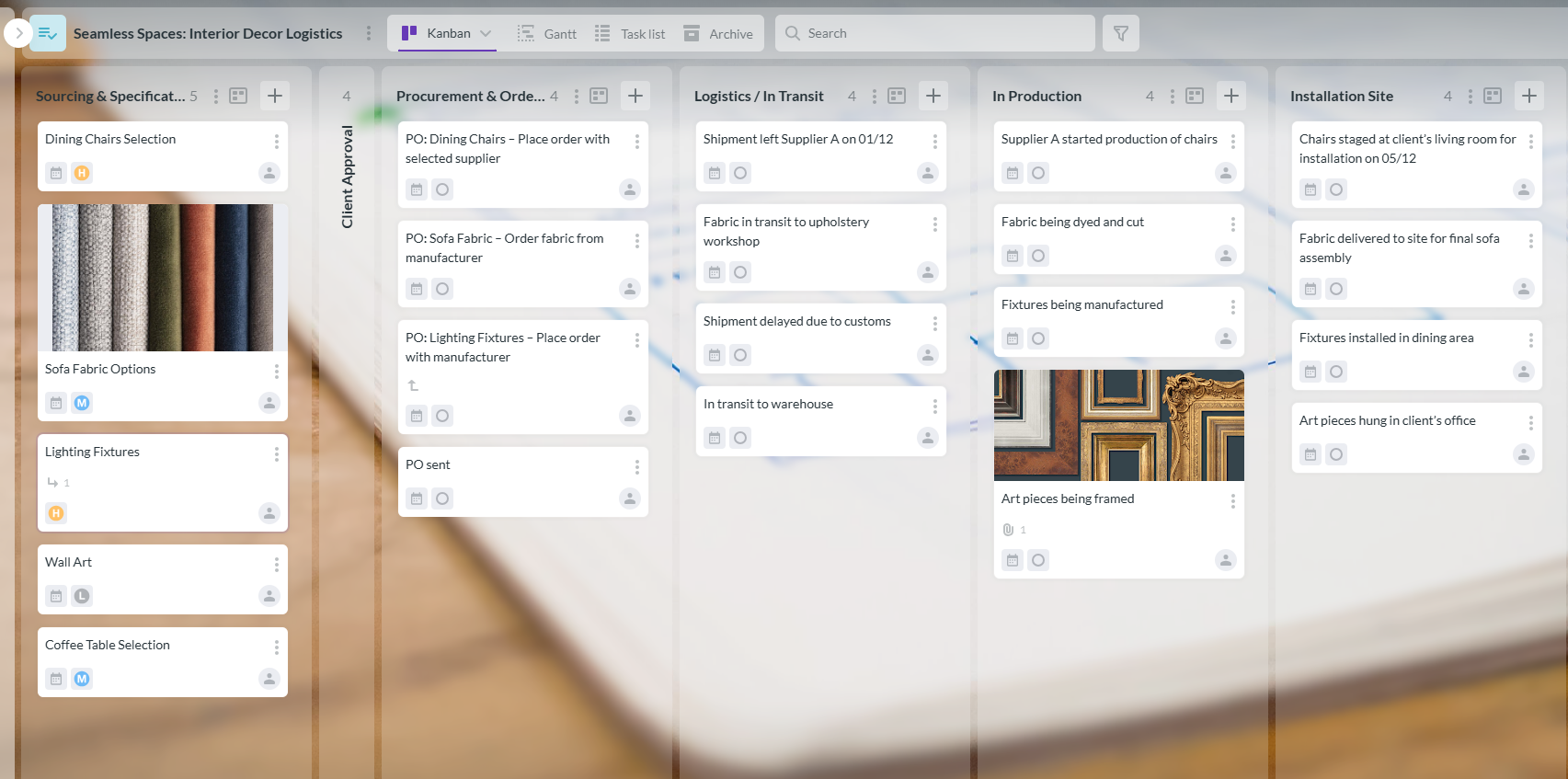
Screenshot of a Kanban board managing an interior design project, detailing tasks from sourcing and client approvals to procurement, logistics, on-site installation, and project closeout
Cards represent the individual actions or items. Be detailed here. Instead of a vague card like “Order Furniture,” create specific, trackable cards:
Assign an owner and a due date to every card. This clarifies who is responsible for what and when it is due.
This is the most critical step for a design studio. Immediately attach all relevant design assets to their corresponding card:
This centralizes all project documentation and tracks work.
For the physical, on-site phases (Columns 5, 6, and 7), switch to the Gantt chart view. Visually link tasks that are dependent on one another.
For instance, draw a line showing that a Painting task cannot start until a Custom Installation task is complete. This proactive scheduling is how successful design studio task management prevents costly on-site delays. Following these steps is the best way to achieve design success
Got any final questions you’d like to ask us? We’ve covered some of the most frequently asked ones below to close out our guide.
Visual tools like Kanban boards and Gantt charts are essential because design work is inherently visual. A designer needs to see everything, from creative ideas to the final installation, rather than just reading lines of text in a list. Visual clarity ensures every team member can understand the project’s status at a glance.
Kanbanchi manages revisions by centralizing documentation and approvals. When a change is requested, the task card is moved to a “Revision” column. New specifications are attached from Google Drive, and the team works off that updated document.
Once the revised design is approved, the new approval status is noted on the card, creating an auditable, time-stamped record of the change.
Yes. Kanbanchi’s structure is fully adaptable. Residential home renovation project coordination benefits from its focus on client approvals and procurement tracking. Large-scale commercial design project tracking leverages the Gantt chart to manage numerous vendors and complex regulatory dependencies among multiple stakeholders.
The main benefit is the elimination of friction. Because Kanbanchi is built into Google Workspace, design studios can seamlessly attach Google Drive files, use their existing Gmail accounts for communication, and log in easily. Native integration reduces administrative issues and ensures all project documents are live, current, and accessible from a single platform.



In this Article:
Start using Kanbanchi now
Start your free trial