
In this Article:
Try Kanbanchi now
Start your free trial


If your organization runs large programs and has dedicated schedulers, you’ve likely already heard of Microsoft Project. It’s often the go-to choice for “serious” project management software, and has been for three decades.
But its licensing and setup can cause problems, particularly if you want a simpler solution. And that’s why many firms looking for a Microsoft Project alternative come across Kanbanchi.
So, whether you’re close to a decision or are looking for specifics on each tool, keep reading this Kanbanchi vs Microsoft Project guide as we compare costs, onboarding, key features, and where the real differences show up once you’re past the sales page.
Organizations with large, resource-heavy programs that need critical path analysis and baseline tracking should choose Microsoft Project. Kanbanchi is a better fit if you want real project planning, including Gantt charts, without a steep learning curve or a second subscription on top of Microsoft 365. The overall Kanbanchi vs Microsoft Project decision comes down to how much time your team can give to learning the tool before being productive.
| Platform | Kanbanchi | Microsoft Project |
|---|---|---|
| G2 | 4.7/5 | 4.0/5 |
| Capterra | 4.5/5 | 4.4/5 |
G2 reviewers enjoy Microsoft Project’s scheduling depth and Microsoft 365 integration, while ease of setup and administration score noticeably lower than its usability numbers elsewhere on the platform. Users also cite strong resource and budget tracking, alongside a recurring complaint about cost and a steep learning curve.
Kanbanchi users on both review platforms mention onboarding speed and support quality most often, with ease of setup and use scoring above 9.4 out of 10 on G2.
Microsoft Project is Microsoft’s dedicated project management software. It’s sold as a one-time desktop license (Project Standard or Project Professional) or bundled into a cloud subscription now marketed under the Planner and Project name.
Project handles formal scheduling, resource management, budgeting, and reporting for complex projects and multi-phase programs, with resource leveling, baselines, and critical path analysis also built in. Microsoft merged Project into the same product line as Planner and To Do in 2025, as part of the broader Project Online retirement roadmap set for later in 2026.
Kanbanchi is project management software built around boards, lists, and cards. The platform is designed for Google Workspace project management, but there’s also a Microsoft 365 version available if you’d rather sign in through Microsoft. Kanbanchi layers Kanban, List, Gantt, Swimlane, and Team Workload views on one shared set of cards, instead of treating task tracking and advanced planning as separate products.
One of the tool’s biggest benefits is its simplicity. Small teams can run Kanbanchi as a basic Kanban board, then grow into subcards, dependencies, time tracking, and Gantt scheduling, without switching products or retraining anyone.
Both are legitimate project management and Gantt chart software options, but here’s how they compare point by point:
| Feature | Kanbanchi | Microsoft Project |
|---|---|---|
| Free Plan | Yes (unlimited users, unlimited projects, 36 active cards per project) | No |
| Kanban Board | Yes | No (task/board views only from Plan 1 upward) |
| Gantt Chart | Yes (Professional plan) | Yes (desktop and Plan 1 upward) |
| Task Dependencies | Yes (Professional plan) | Yes (Plan 1 upward; lead and lag on Plan 3) |
| Critical Path Analysis | No | Yes (desktop Professional and Plan 3) |
| Resource Leveling | No | Yes (desktop Professional) |
| Time Tracker | Yes (Professional plan) | Yes (desktop Professional, via timesheets) |
| Custom Fields | Yes (Professional+) | Yes |
| Team Workload View | Yes (Professional plan) | Partial (Team Planner, desktop Professional only) |
| Mobile App (iOS or Android) | Yes (Android) | No |
| Google Workspace Integration | Yes (native, 6 integration points) | No |
| Microsoft 365 Integration | Yes (separate Microsoft 365 version) | Yes (native) |
Open Microsoft Project Professional for the first time and you get a dense scheduling grid. You’ll see task names, durations, start and finish dates, predecessors, and resource names all in one table, with a Gantt bar running alongside. This depth is beneficial if you’re already trained on the interface, but there’s no simplified starting view for beginners.
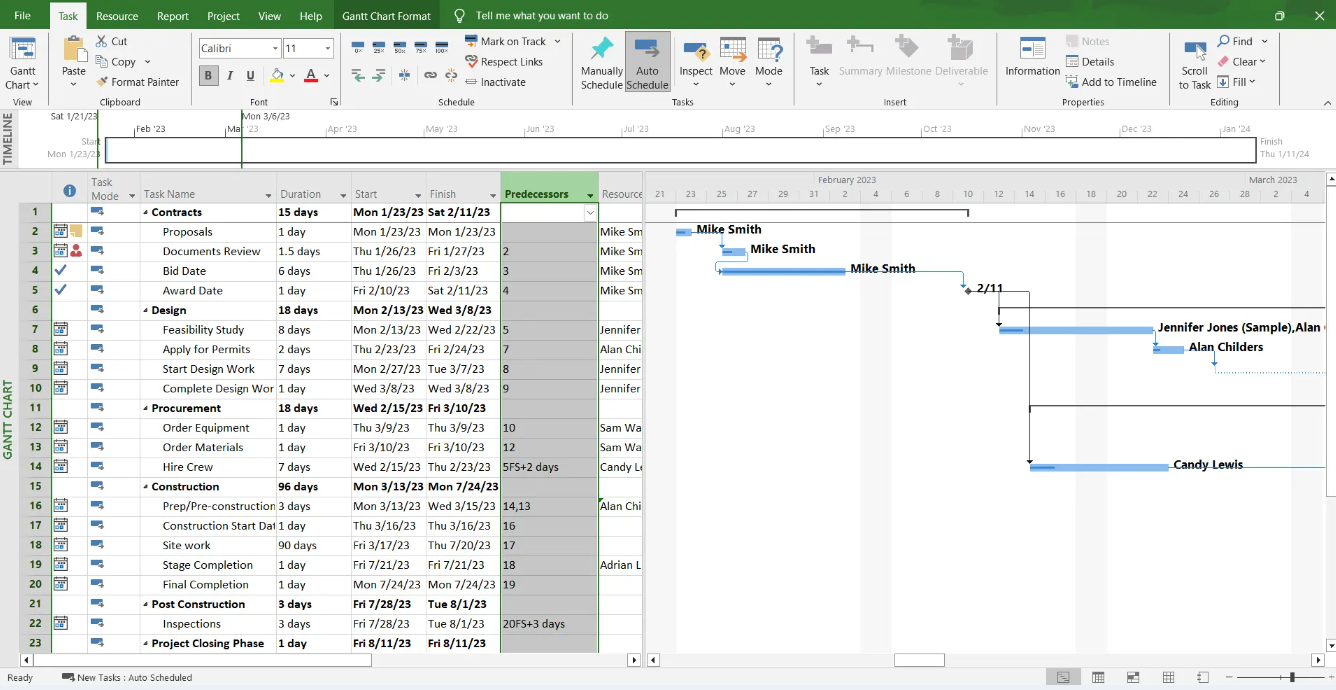
Microsoft Project timeline view with scheduled project tasks and milestones
Kanbanchi opens to a board, and the view switcher along the top, featuring Kanban, List, and Gantt views, is visible from the first screen.
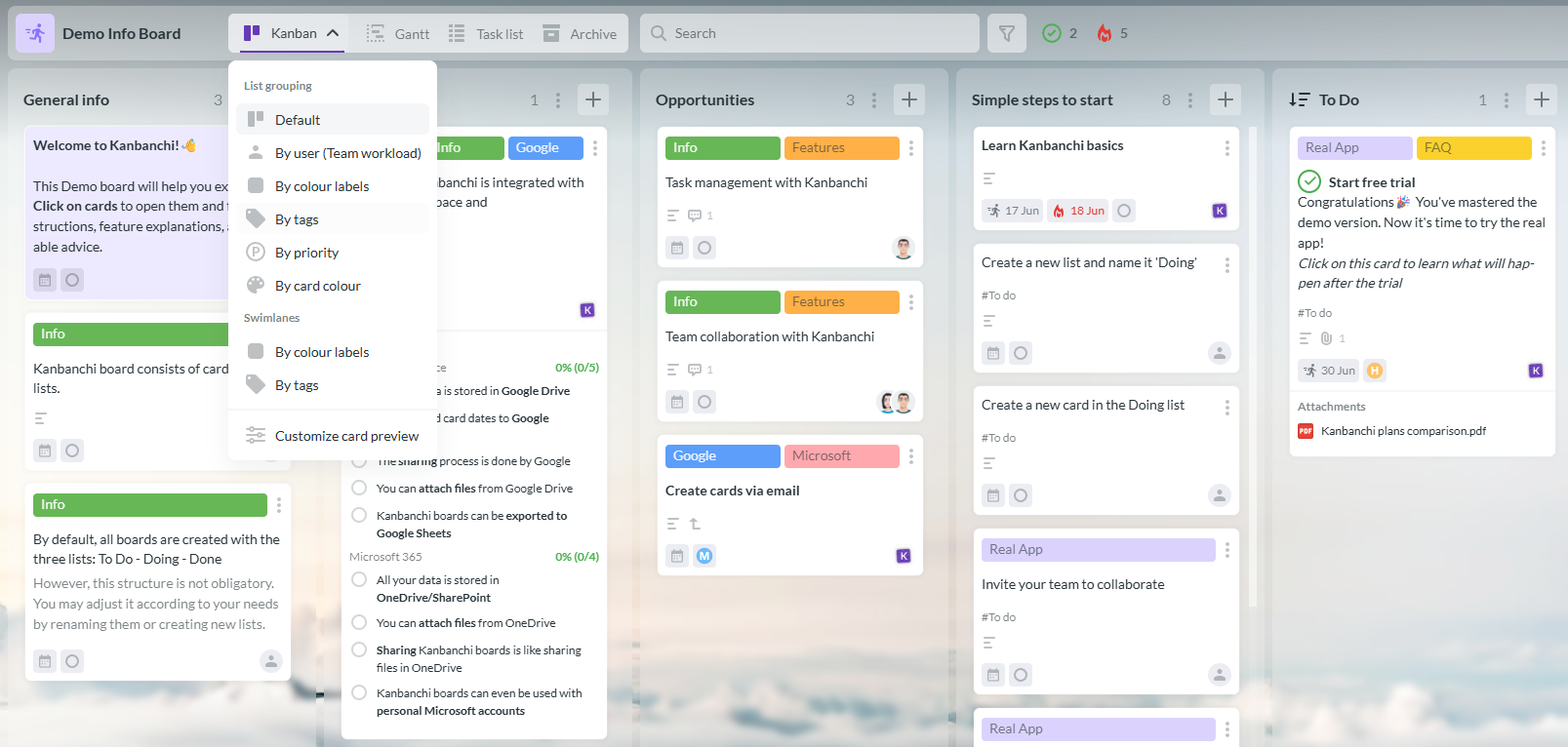
Kanbanchi demo board with view switcher for easily changing between different project views
You’ll see cards along the main part of the screen, which show assignees, due dates, and color labels, meaning you can simply scan the board and see each card’s status without opening them. The Gantt and workload views require just a five-minute walkthrough for beginners, not an entire training session.
Where the interface of both tools differs is who they’re designed for. Microsoft Project works best for dedicated schedulers, while Kanbanchi’s is more rewarding if you need productivity on day one without appointing one.
For a team without a full-time project manager, setup time often decides whether a tool gets used at all.
Every Microsoft Project user within your team will need a separate license and device to use the platform. There’s no built-in way for users to collaborate on the same schedule, unless you also add Project Server or a Plan 3 subscription.
Setting up a cloud-based plan is much faster, however, since they use your existing Microsoft 365 tenant. But Plan 3, the tier that includes real Project desktop and Project Online access, still costs $30 per user per month on top of your Microsoft 365 plan.
Kanbanchi’s setup is similar to creating a shared spreadsheet. You begin with a board, where you can add lists and invite people, then start building cards. This simplicity means you could have a nine-person board live and populated with a full campaign schedule within an hour, without a licensing call or an IT ticket.
Both Microsoft Project and Kanbanchi support the same core dependency types, but critical path scheduling is their biggest difference.
Microsoft Project’s desktop Professional edition supports finish-to-start, start-to-start, finish-to-finish, and start-to-finish task dependencies. It also has automatic resource leveling and full critical path calculation that flags exactly which tasks will delay the project if they’re not completed in time.
As Gantt chart software, Kanbanchi’s Professional plan flags date conflicts visually. Unlike Project, it doesn’t calculate critical path automatically. This doesn’t matter so much in practice, since the task driving a delay is usually obvious from the board already.

Kanbanchi Gantt chart for visual project scheduling and timeline management
Microsoft’s platform assumes the person working on the project here is a scheduling specialist, whereas Kanbanchi is designed for a manager who needs an answer fast.
Microsoft Project’s resource tools are ideal if you have several projects running together, particularly if you’re tracking headcount, cost rates, and utilization. The Desktop Professional plan adds resource pools and timesheets for payroll and invoicing, which is beneficial for project management officers comparing your planned budget to the actual spend.
Kanbanchi’s equivalent, the Team Workload view, can help you see the workload of every team member in seconds by grouping cards by assignee. It doesn’t replace a formal resource management office, but for most firms, it offers everything they need for day-to-day resource management.
One thing you may have already noticed about Microsoft Project pricing is that it isn’t one product with one single price.
As we’ve mentioned, the desktop app is a one-time purchase licensed to a single user on a single device, with no real-time collaboration built in. The cloud tier, on the other hand, is sold as Planner and Project Plan 1 or Plan 3. It’s a separate monthly subscription layered on top of a Microsoft 365 plan you likely already pay for.
But if you want the full desktop scheduling engine and cloud collaboration in the same environment, you’ll need to pay for both. That’s why many SMBs start searching for a Microsoft Project alternative.
Every tier on Kanbanchi, from the free plan through Enterprise, is the same web-based product with one underlying data model. This means you’ll never have to choose between a desktop tool with no collaboration and a lighter, collaboration-only platform.
In terms of permissions, those on Microsoft Project’s cloud tiers come directly from Microsoft Entra ID and the Microsoft 365 admin center. This is the same console you may already use for Teams and SharePoint.
On the other hand, the desktop edition has no built-in permission system at all. File-level access depends on how the .mpp file is stored, which is why many organizations pair it with Project Server or SharePoint for anything beyond a single scheduler’s use.
Kanbanchi’s permissions follow the sharing model of whichever ecosystem your boards live in. In the Google Workspace version, Owner, Editor, Commenter, and Viewer are the same as Google Drive’s own sharing logic, so there’s no second permission system to maintain. For the Microsoft 365 version, you’ll see the Write and Read permissions.

Does your security already run through the Microsoft 365 admin center? If you also need the desktop scheduling engine, Microsoft Project’s cloud tiers plug in with no extra setup. But if you want just one permission system that an IT-light team can actually manage, Kanbanchi avoids introducing a second one.
Microsoft Project’s integrations work entirely through the existing Microsoft ecosystem, and include:
This is great if you’re committed to Microsoft 365, but it means that Project doesn’t connect to any other Google Workspace project management tools at all.
Kanbanchi’s integrations cover the following areas for Microsoft Project Management:
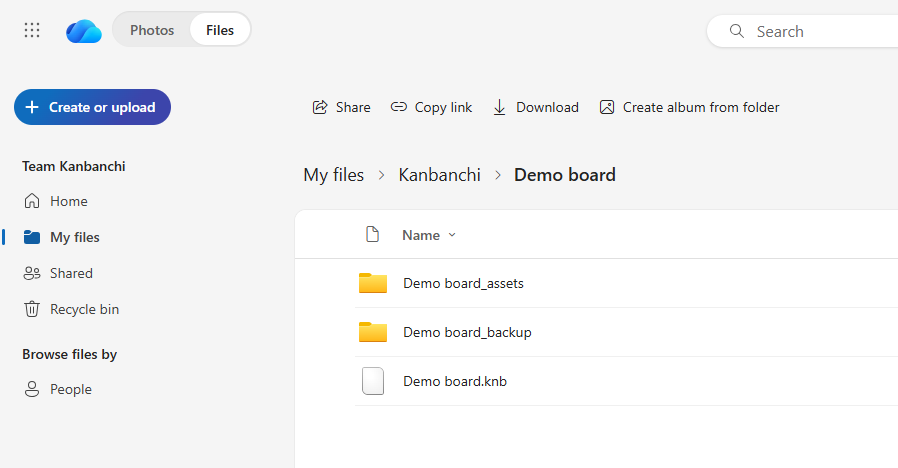
Kanbanchi OneDrive integration showing how project boards are organized and accessed through OneDrive
Additionally, Kanbanchi integrates with Google Workspace.
You may be surprised to find out that Microsoft Project has no official mobile app for iOS or Android, desktop or cloud. You can check your schedule from a phone, but only through a limited browser view of Project Online or Plan 3, or third-party apps that open .mpp files with varying fidelity. This is a real limitation for field-based construction project management.
Kanbanchi, on the other hand, does offer a mobile app for Android, which mirrors the desktop board experience much more closely. You can view boards, update cards, add comments, and check due dates, and the card layout scales down without losing the board’s visual structure.
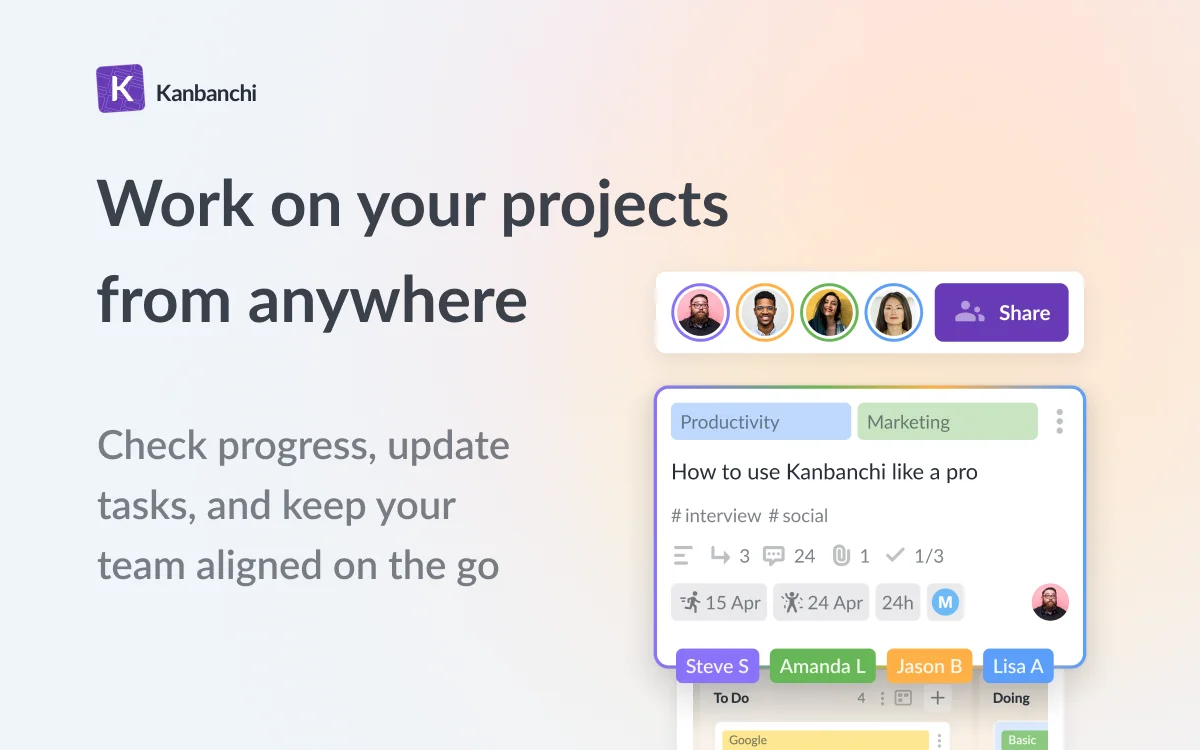
Kanbanchi Android app for managing project tasks and boards on the go
If you encounter any technical issues with Microsoft Project, there’s no dedicated support line. Instead, support runs through the general Microsoft 365 admin channels tied to your subscription tier, supplemented by Microsoft Learn documentation and a large ecosystem of third-party trainers. Extensive training resources do exist, though that typically means paying a consultant rather than reaching a specialist inside Microsoft.
Kanbanchi’s support isn’t gated by plan tier, meaning that all users get assistance. Reviewers on both G2 and Capterra mention that the team solves actual workflow problems rather than pointing you to a help article, a real strong point if you’re evaluating a Microsoft Project alternative because of support frustration with a larger vendor.
| Plan | Kanbanchi | Microsoft Project |
|---|---|---|
| Free | Yes (unlimited users, unlimited projects, 36 active cards per project) | No permanent free plan |
| Entry paid | Essential: $3.97/user/month annual; $5.99/user/month monthly | Project Standard 2024: $679.99 one-time (1 user, 1 device, no collaboration) |
| Mid tier | Premium: from $11.97/month | Project Professional 2024: $1,129.99 one-time, or Planner Plan 1: $10/user/month (cloud) |
| Full feature set | Professional: from $24.47/month | Planner and Project Plan 3: $30/user/month (adds baselines, critical path, Project desktop and Project Online access) |
| Enterprise | From $9.95/month (multi-level admin, Google Vault, dedicated account manager) | Project Server Subscription Edition: custom, partner-quoted (on-premises) |
Microsoft Project pricing depends on whether you buy the desktop app, the cloud subscription, or both.
The desktop edition is a one-time purchase through Project Standard 2024 or Project Professional 2024. They’re each licensed to one user on one device, with no ongoing fee, but no automatic updates beyond that version either.
The cloud tiers bill per user, per month. Planner in Microsoft 365 is included with an eligible subscription but offers only basic task tracking. Planner Plan 1 adds real dependencies and a Timeline view, and Planner and Project Plan 3 support baselines, critical path, and access to Project desktop and Project Online.
Here’s what this pricing model means for a 10-person team over 12 months.
Buying Project Professional 2024 outright costs $11,299.90 up front, with no built-in way for those licenses to share a live schedule. Choosing Plan 3 instead costs $3,600 per year, on top of whatever Microsoft 365 plan the team already pays for. This cost repeats annually rather than being a one-time purchase.
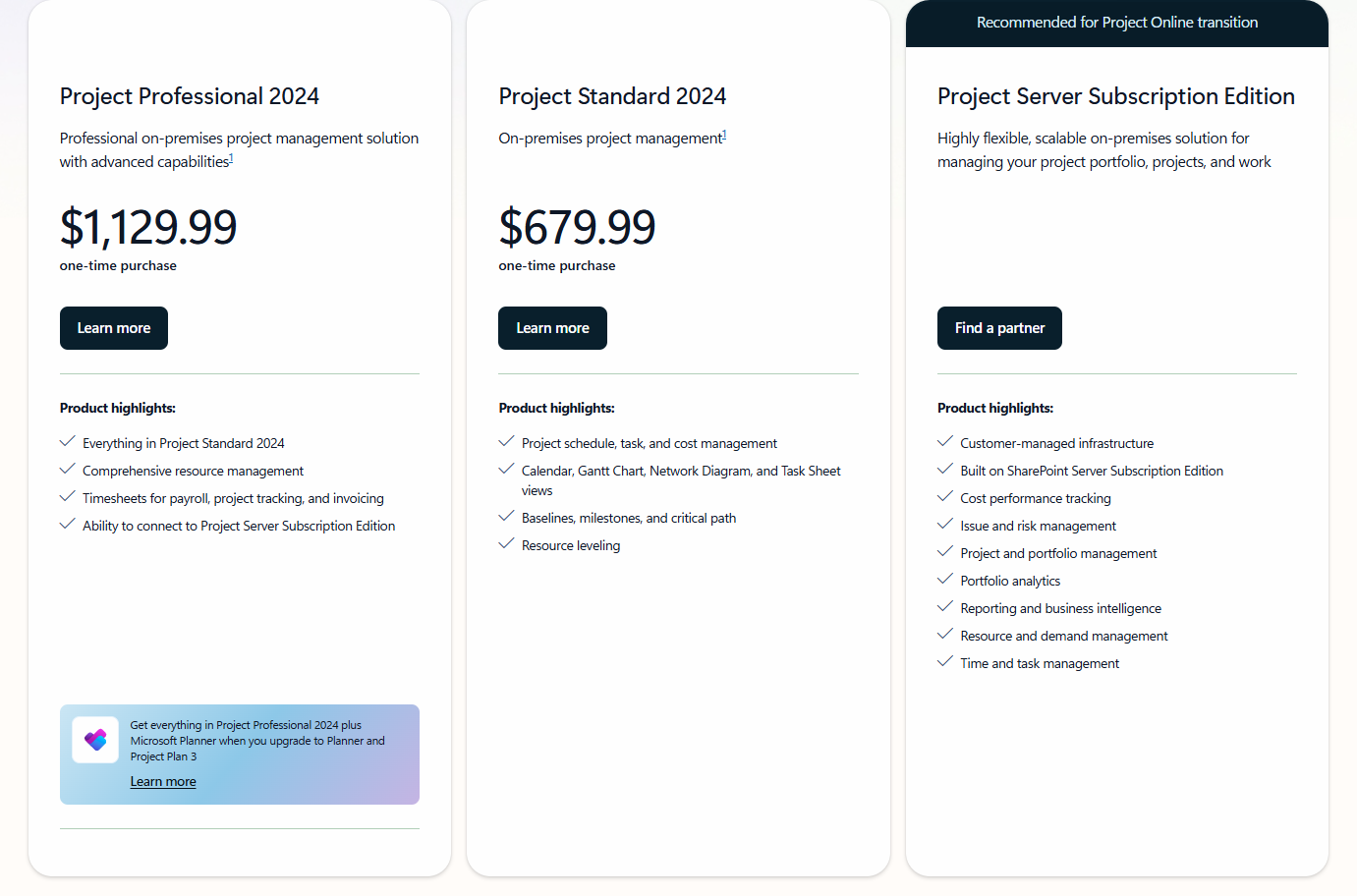
Microsoft Project pricing page with project management plans and subscription options
Kanbanchi’s pricing is simpler. It starts with a permanent free plan that’s capped at 36 active cards, with no time limit and unlimited users.
Paid pricing runs per seat, priced from 2 seats, with the cost dropping as the team size grows. OneDrive integration is included on every plan, and nonprofits and schools get a 25% discount on all annual plans other than Essential.
For that same 10-person team, a full year of Kanbanchi Professional costs well under $3,000 before the seat-based discount even applies.
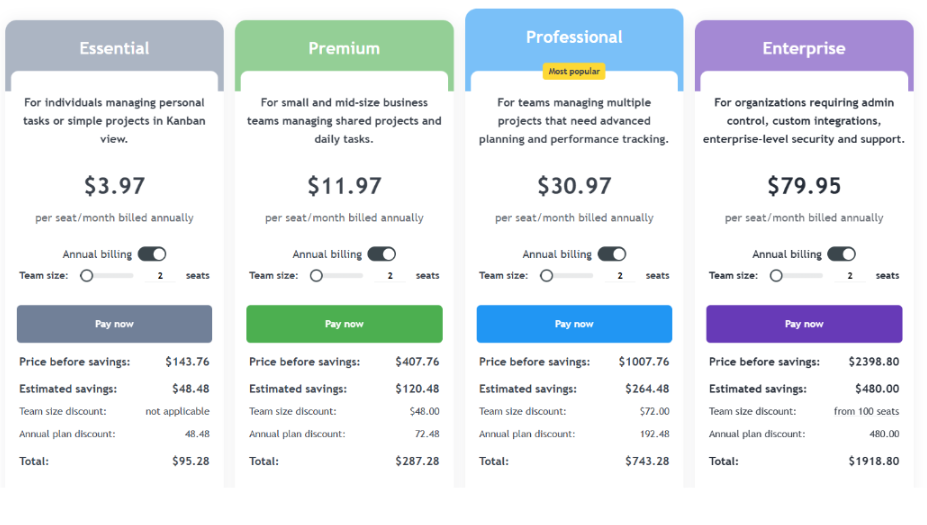
Kanbanchi pricing plans with features and subscription options for different team needs
| Choose Kanbanchi if… | Choose Microsoft Project if… |
|---|---|
| You want Gantt scheduling without a steep learning curve | You run large, multi-phase programs that need critical path and resource leveling |
| Your team needs to be productive within a day of signing up | Your organization already has trained schedulers or certified PMPs on staff |
| You run on Google Workspace | You are fully committed to Microsoft 365 for reporting and workflow automation |
| You want one predictable price with a real, permanent free plan | Budget allows for desktop licenses, a cloud subscription, or both |
So, which project management tool should you choose in this Kanbanchi vs Microsoft Project decision?
Choose Microsoft Project if you run large, resource-intensive programs that genuinely need critical path analysis and formal resource leveling. You’ll also need the training time to support it, along with the budget, since desktop licenses and cloud subscriptions are sold and billed separately.
Choose Kanbanchi if you want real project planning, including Gantt charts, dependencies, and workload visibility, without the licensing complexity or the steep learning curve. It’s a great Microsoft Project alternative if you’re looking for a tool that new hires can learn in just an afternoon.
Want to try it out for yourself? Try Kanbanchi for free today
Kanbanchi is a strong Microsoft Project alternative if you’re looking for Gantt charts, dependencies, and workload views without licensing complexity or a training curve. It’s not a replacement for critical path analysis or formal resource leveling on very large programs, but it covers the planning work most SMBs and mid-market teams do day to day.
Microsoft Project pricing starts at $679.99 for a one-time desktop license or $10 per user per month for cloud-based Plan 1, on top of an existing Microsoft 365 subscription. Kanbanchi charges from $3.97 per user per month on Essential.
Microsoft Project has no official mobile app for iOS or Android under any plan, desktop or cloud. Users can access a limited web view through a mobile browser. Kanbanchi’s mobile app, by contrast, mirrors the desktop board experience on Android.
Microsoft has confirmed that Project Online will be retired on September 30, 2026, pushing existing customers toward the cloud-based Planner and Project Plan 3 tier or an on-premises Project Server deployment. This Project Online retirement is prompting many teams to evaluate simpler alternatives at the same time.
Yes, Kanbanchi is easier for most teams to learn than Microsoft Project. Microsoft Project’s desktop interface is a full scheduling grid built for trained project managers, while Kanbanchi opens to a visual board that needs little explanation. Teams typically need a five-minute walkthrough for Kanbanchi’s Gantt and workload views, compared to a genuine learning curve for Microsoft Project’s scheduling engine.
Read more articles related to Project Management

In this Article:
Start using Kanbanchi now
Start your free trial