
In this Article:
Try Kanbanchi now
Start your free trial

The last few years have seen a remarkable change in the way we work and how companies operate. More professionals are insisting on remote and hybrid work. According to a study carried out by the Pew Research Center, 46% of workers who are either fully remote or hybrid say they’d be more likely to leave their job if they had to go back to full-time office work.
There’s no doubt that the rise of remote and hybrid work models has provided significant flexibility, but it has also introduced different challenges for teams, especially when it comes to project management. In-person check-ins and boardroom meetings are a thing of the past (mercifully, many might argue…), but it means there’s a need for a centralized, digital workspace to give everyone access to the tools they need to work effectively from home (or on the go).
What we’re seeing is that modern project management software for remote teams becomes an essential, non-negotiable tool. Modern remote team management platforms must address unique challenges: coordinating across 15+ time zones, enabling effective asynchronous communication, and maintaining team culture when face-to-face interactions are limited.
Success for remote teams means investing in a platform that is designed to:
The right software must be:
That’s why many organizations have already invested in Google Workspace; and while it’s a solid choice, it can be lacking for fully remote teams. For remote or hybrid teams operating on Google Workspace, which covers email, communication, document creation, and cloud storage, integration is not a luxury; it is the foundation of efficiency. Most non-native solutions require a multi-step process to connect to Google Drive. This often means:
The fragmentation creates data issues, compromises security, and wastes valuable time! It’s a fatal flaw in project management software for remote teams. Thinking about this, let’s move on to consider what remote teams must think about when they’re managing projects.
More articles about Remote Work here
These two phrases get used interchangeably, and they are not quite the same thing.
Project management software organizes work: tasks, owners, deadlines, dependencies, progress. It answers whether the project will land.
Remote team management software is a broader category that also covers the human side of distributed work: communication, availability across time zones, workload fairness, and the simple problem of a team that never occupies the same room.
Most teams need both, and in practice most buy one tool for the work and use their existing communication stack for the rest. What matters is that the tool handling the work is genuinely built for people who are not in the same place: it has to make status readable without a conversation, ownership obvious without a reminder, and progress visible without anyone being asked.
A tool that assumes a daily standup will fill in the gaps is not remote team management software, whatever it says on the pricing page.
It’s more than just about giving employees a shared Google Drive and a video conferencing link! These two factors are significant, but they don’t build a cohesive team. Some issues need to be addressed straight away.
If there’s no system in place like this, it leads to confusion, duplicated effort, and ultimately, missed deadlines. What’s the solution to these pain points? Implement a powerful, centralized platform that makes remote projects effortless.
Time-zone spread is the challenge that separates genuinely remote teams from teams that happen to work from home. Once your team spans more than about four hours, three things stop working.
Questions become day-long round trips. A clarification that takes ninety seconds in an office takes until tomorrow. The cost is not the ninety seconds; it is the task that sits untouched while someone waits.
Handovers happen invisibly. Work finishes on one side of the world and sits until the next person’s morning. Nobody is blocked, and nobody is idle, but the calendar keeps moving.
Presence stops meaning anything. Someone will always be offline. Availability tells you nothing useful about whether work is progressing.
What actually helps:
The underlying principle is that in a distributed team, the artifacts have to carry the meaning, because the people are not available to supply it.

Communication challenges in a remote team are often symptomatic of a deeper, structural issue: the lack of a single source of truth. When project details are fragmented across email chats or cloud folders, the risk of miscommunication skyrockets. To overcome this, remote teams must enforce two critical protocols: a commitment to clear documentation and the universal use of visual accountability tools
To reduce constant, real-time communication, a project management solution must contain all the information for everyone. It shifts the focus from asking where information is to knowing it is always attached to the work. It’ll effectively
When team members can instantly see the status of every task, ownership is clearer, and bottlenecks are exposed. This is where visual management methodologies like Kanban and Gantt charts come into their own.
Kanban Boards provide a high-level overview of the entire workflow. By simply looking at a board, a manager can see that a specific team member is blocking a task in the “Review” column or that the “In Progress” column is too congested. This transparency solves the “out of sight, out of mind” problem by making status impossible to hide.
For timeline-sensitive projects, the Gantt view provides a clear, visual representation of task dependencies and deadlines across time zones. This makes it easy to ensure milestones align and that a single delay does not unexpectedly cascade across the entire project plan.
By integrating clear communication channels with powerful visual tracking, the right tool transforms project management from a chaotic process into a streamlined, transparent workflow.
Choosing the best remote team collaboration software is not about finding the tool with the most features, but the right ones. For remote teams, core functionality must prioritize the following:
Here is a checklist of the non-negotiable features every remote project management solution should offer:
Here, we briefly review three leading project management tools, focusing on how their architecture and feature sets serve the unique demands of a fully distributed team. The primary keyword, project management software for remote teams, is central to this comparison.
| Platform | Best Suited For | Google Workspace (GWS) Integration | Core Feature Differentiator for Remote Teams |
|---|---|---|---|
| Kanbanchi | GWS-native, high-visibility teams | Native/Deep: Boards stored in Google Drive, one-click sign-on, Calendar sync, Gmail integration. | Single Source of Truth: Files remain secure in Drive. No need to re-upload or manage external storage. |
| Trello | Simple, small-scale Kanban workflows | Light: Integration via Power-Ups (add-ons). Requires configuration and may not be seamless. | Simplicity: Extremely easy to adopt for basic task tracking and pure Kanban use. |
| Asana | Cross-functional project coordination | Moderate: Integrations for Drive/Gmail exist but operate outside the core GWS environment. | Work Portfolios: Strong functionality for viewing the status of multiple, interconnected projects. |
| Monday.com | Highly customized, visual workflow builders | Moderate: Offers various app connectors, but the platform is not native to the GWS environment. | Customization: Excellent for building bespoke dashboards and highly specific visual reports. |
| ClickUp | All-in-one customizable workspace for cross-functional teams | Drive/Gmail integrations available, not native | Highly Customizable Workflows: Multiple views, automation, docs & tasks in one hub |
| Smartsheet | Data-heavy, spreadsheet-oriented or enterprise-scale projects | Moderate: Drive integration available | Spreadsheet-Style Control: Ideal for structured planning, complex timelines & reporting |
| Jira | Software development, Agile/Scrum teams | Moderate: Standard integration options for Drive/Gmail | Deep Issue Tracking: Robust backlog, sprints, automation & developer-friendly workflows |
| Notion | Documentation-heavy teams needing tasks + knowledge base in one place | Light: Integrations via API or third-party connectors | Docs + Tasks in One Workspace: Combines wikis, project pages, and databases |
| Wrike | Cross-functional collaboration with strong reporting and workflow automation | Moderate: Connectors available but not native | Enterprise-Grade Workflow & Reporting: Detailed dashboards, workload views, automation |

A look at Kanbanchi’s intuitive project management dashboard: an efficient workspace designed to help remote teams organize tasks, track progress, and collaborate in real time
Rating: 4.7*
Why it works for remote teams:
Kanbanchi was built inside Google Workspace rather than connected to it afterward, which eliminates sync issues, reduces onboarding friction, and keeps distributed teams working from one source of truth.
Strengths:
Disadvantages:
Plan, prioritize, and manage your projects effortlessly with Kanbanchi - the all-in-one project management tool built for Google Workspace users.
Get a free trial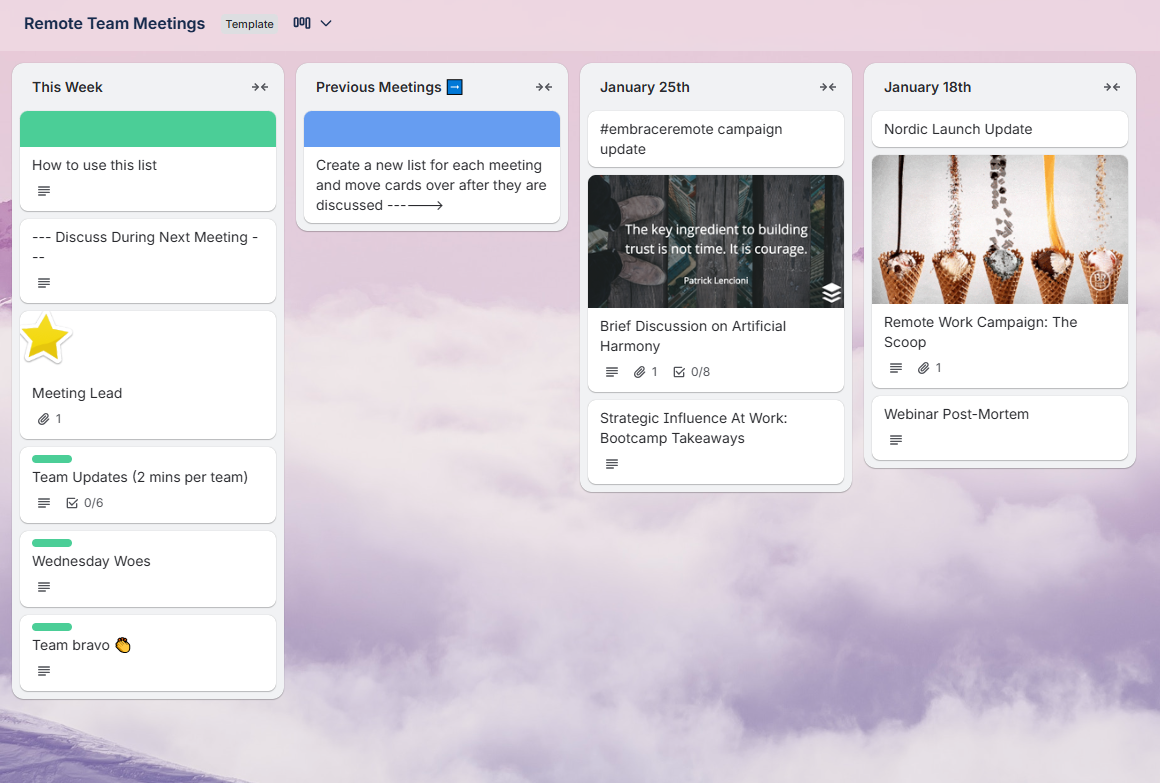
A Trello board showcasing task lists, cards, and collaboration tools that help remote teams stay organized and manage projects efficiently
Rating: 4.4*
Why it works for remote teams:
Trello’s strength lies in its simplicity and visual Kanban-board interface. It’s easy to spin up boards, assign cards, move tasks through stages, and get an immediate view of who’s doing what. That makes it ideal for small or distributed teams who want a lightweight, no-frills way to track work.
Strengths:
Disadvantages:
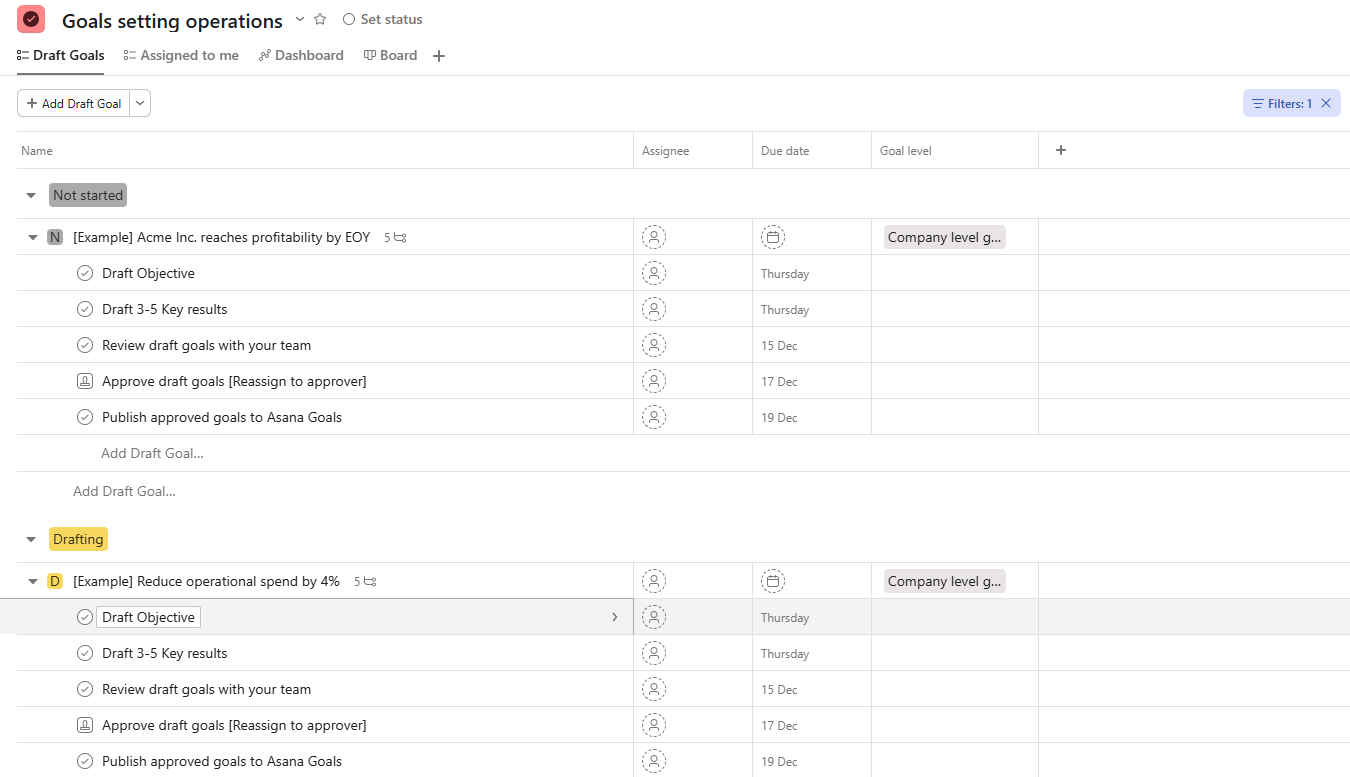
An Asana project view featuring organized tasks, timelines, and collaboration tools that help remote teams manage work more efficiently
Rating: 4.4*
Why it works for remote teams:
Asana offers more structure and flexibility than Trello, with multiple project views (lists, boards, calendar, timeline), task dependencies, and features intended for teams managing more complex or longer-term projects. This makes it well suited to remote teams that need clarity, accountability, and coordination across different work streams.
Strengths:
Disadvantages:
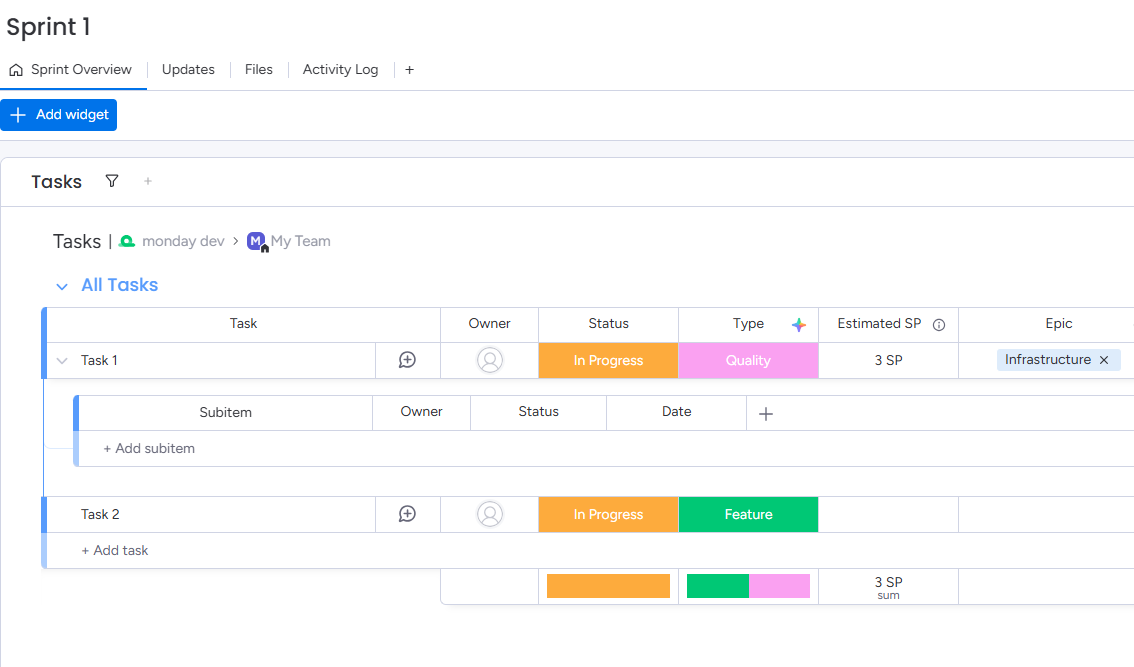
A Monday.com board displaying tasks, subtasks, statuses, and types for easy remote team project management
Rating: 4.7*
Why it works for remote teams:
monday.com combines visual appeal with flexibility: colorful, customizable boards plus dashboards, automations, and a variety of project-management views. This flexibility benefits remote teams, especially cross-functional or multi-project teams, who need to see different slices of work (tasks, timelines, workloads) in ways that fit their roles.
Strengths:
Disadvantages:
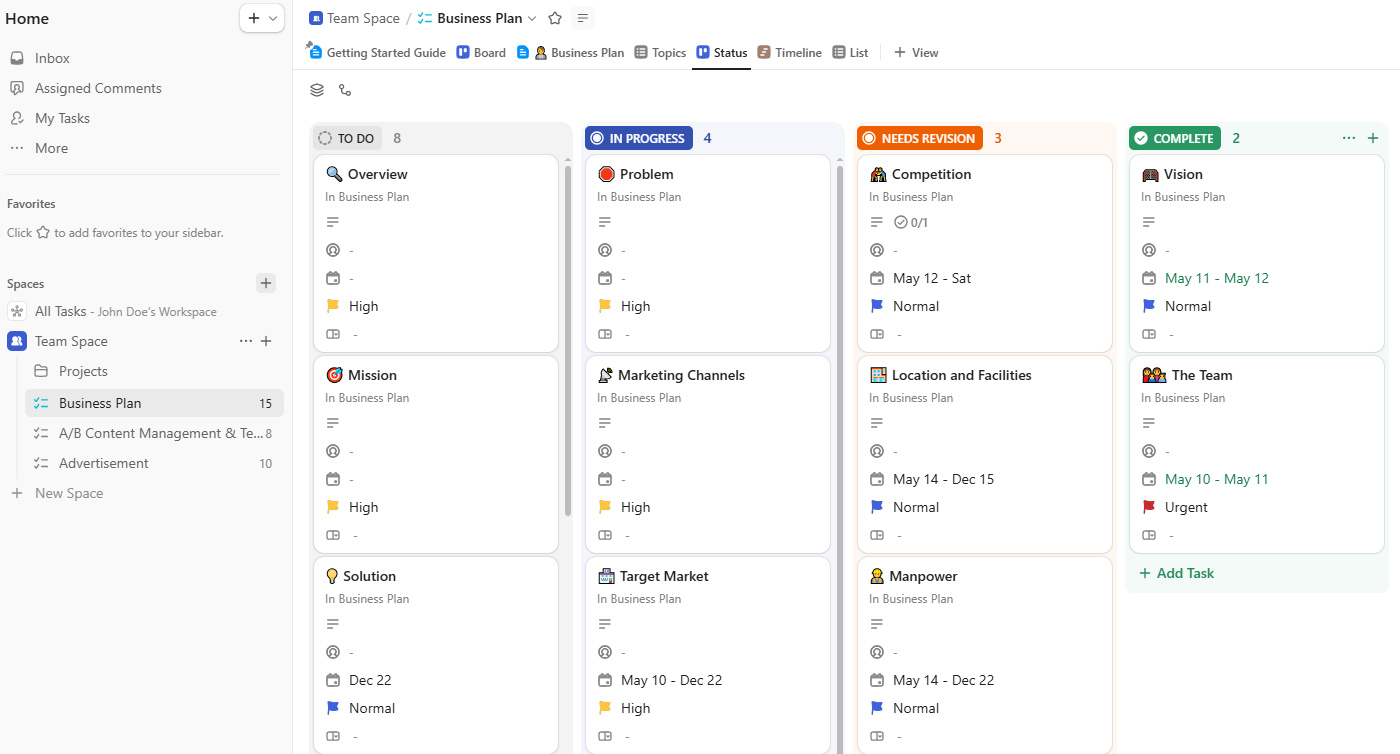
A ClickUp board displaying tasks and subtasks to help remote teams organize and manage projects efficiently
Rating: 4.7*
Why it works for remote teams:
ClickUp consolidates tasks, documents, chat, whiteboards, and reporting into a single interface. Remote teams benefit from its flexibility, deep customization, and powerful automations.
Strengths:
Disadvantages:

A Smartsheet dashboard helping remote teams collaborate, plan, and manage projects efficiently
Rating: 4.4*
Why it works for remote teams:
Ideal for distributed teams managing structured, data-heavy workflows. Smartsheet’s spreadsheet-like interface is excellent for planning across multiple dependencies and large datasets.
Strengths:
Disadvantages:

A Jira dashboard helping remote teams manage projects, track progress, and collaborate efficiently
Rating: 4.3*
Why it works for remote teams:
Jira excels in environments using Agile, Scrum, or Kanban. With distributed development teams, its sprint management, backlog structure, dev tool integrations, and automations help maintain discipline.
Strengths:
Disadvantages:
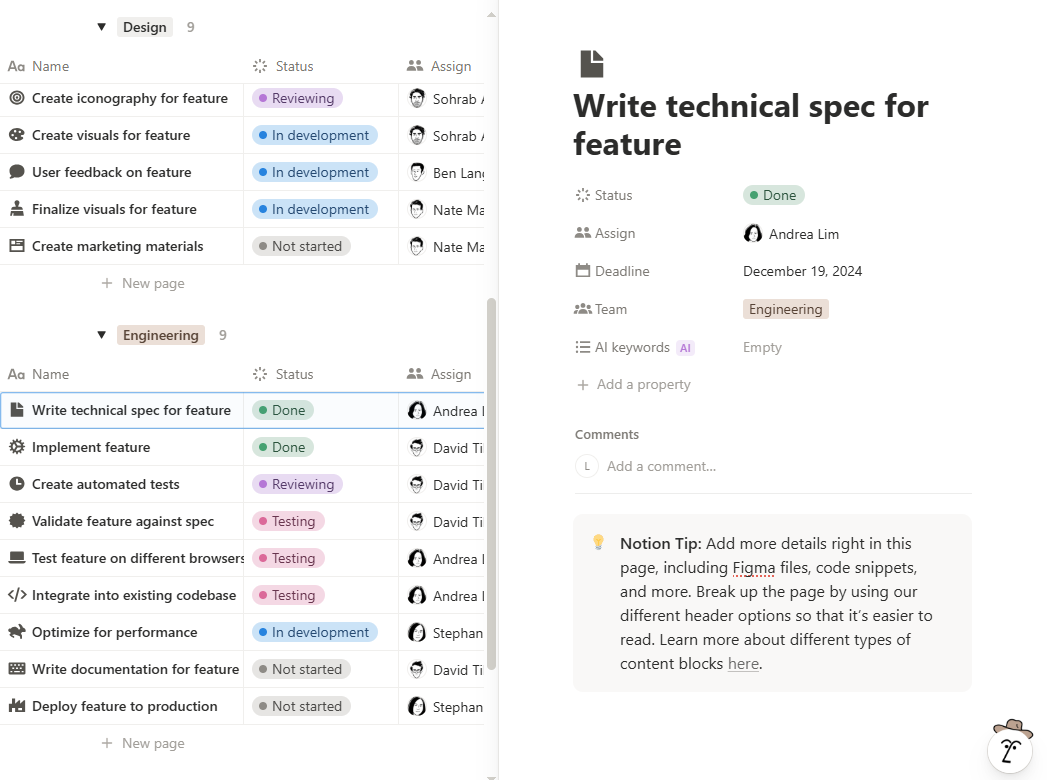
A Notion workspace helping remote teams organize projects, collaborate, and streamline workflows efficiently
Rating: 4.6*
Why it works for remote teams:
Notion blends project management with documentation, wikis, SOPs, and databases. This makes it effective for distributed teams who want tasks, knowledge bases, and process documentation all in one workspace.
Strengths:
Disadvantages:
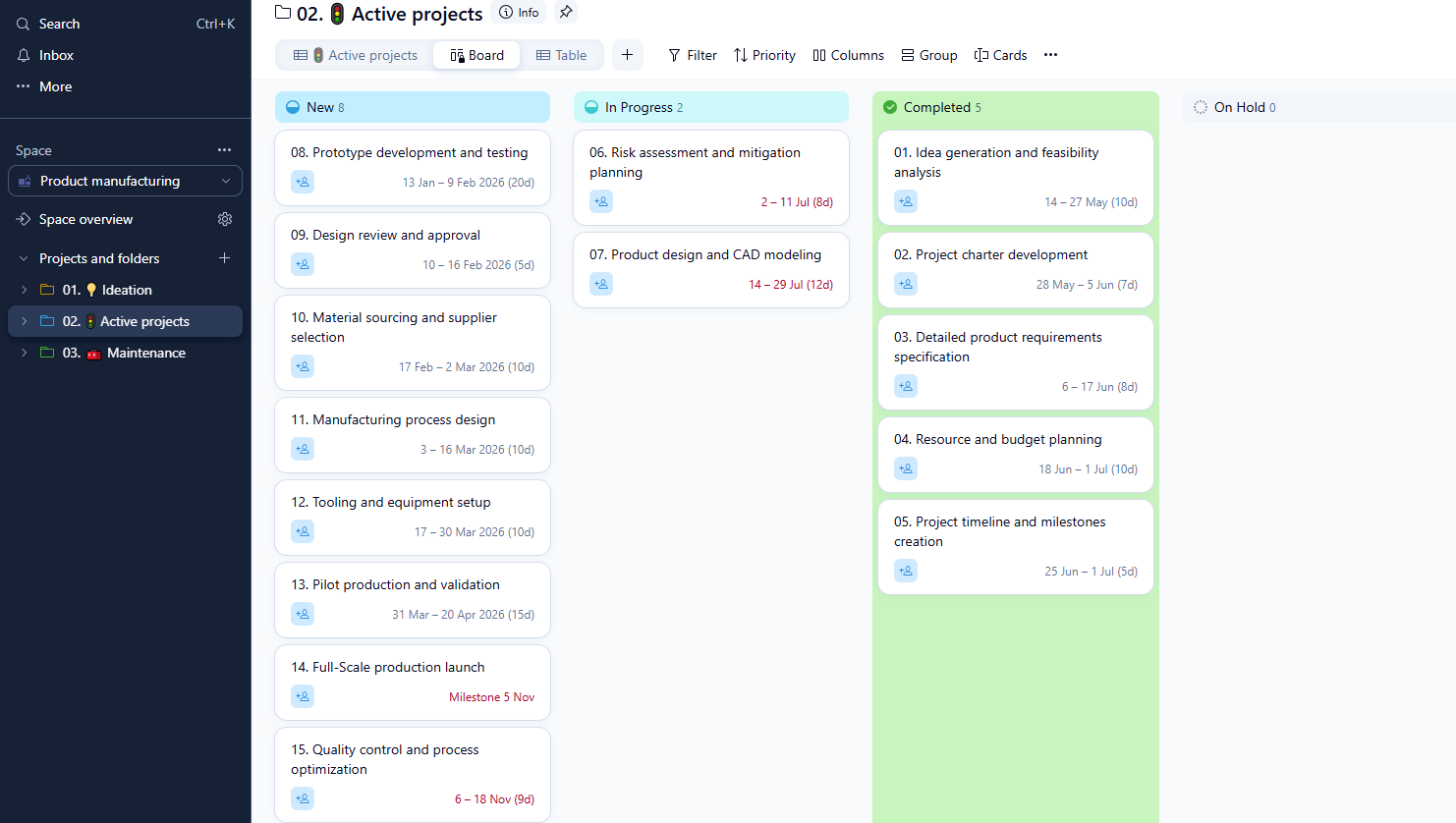
A Wrike dashboard helping remote teams plan, collaborate, and manage projects efficiently
Rating: 4.2*
Why it works for remote teams:
Wrike supports enterprise-grade planning with strong reporting, workload balancing, time tracking, and automation. Ideal for distributed teams with complex cross-department projects.
Strengths:
Disadvantages:
*Ratings provided by G2
Kanbanchi was built inside the Google ecosystem. This deep, native integration is what makes it a solid choice for a remote team using Google Workspace. Why? Let’s explore…
By eliminating issues with your project management platform and your core productivity suite, Kanbanchi creates a unified, efficient, and secure workspace for your distributed team.
Implementing new project management software for remote teams should not be a project in its own right! Kanbanchi is designed for immediate integration into an existing Google Workspace environment. Follow these steps to establish a transparent, efficient remote workflow:
The first step is a direct Google sign-in. There are no separate accounts or passwords to manage.
Set up a primary board for your remote team. Define your Kanban columns to reflect your specific remote workflow stages:
Create a card for every task. The card is the single source of truth for all remote work:
Make use of the native Kanbanchi-Google Drive integration. When creating a card for a new blog post, design asset, or specification document:
The board gives you day-to-day visibility, but management questions usually need data.
Because it’s your spreadsheet, you can shape reporting around the metrics your organization tracks rather than around a fixed set of built-in charts. Time tracker data can be included in the export.
By following these simple steps, remote teams can collaborate without ever leaving the familiar Google Workspace ecosystem.
Want to know more about how we can assist with all your project management software needs?
If you still have questions about project management software for remote teams, our final section should help.
It depends on what you need it to manage. For coordinating projects and tasks across a distributed team, the tools compared above all work, and the right one usually comes down to which ecosystem you already use. Teams on Google Workspace get the least friction from something built natively inside it. For the wider human side of remote management (communication, availability, culture), most teams combine a project tool with the chat and video stack they already have, rather than looking for one product that does everything.
Native integration is critical because it centralizes both work and data. Non-native apps require you to upload and store files on a third-party server, creating data redundancy and compliance risk. Kanbanchi stores project boards and links all attachments directly from Google Drive. This means files never leave Google’s secure ecosystem, and your team only manages one login. The seamless sync with Calendar, Drive, and Gmail maximizes workflow efficiency.
Kanbanchi addresses time zone conflicts in three key ways:
Visibility is the single greatest predictor of success when managing remote team members. A lack of visibility leads to distrust, micromanagement, and duplicated effort. A visual PM tool like Kanbanchi provides complete transparency, acting as a virtual boardroom.
By making project status transparent and accessible to everyone at any time, Kanbanchi shifts the focus of management from monitoring to enabling productive work. There is more on where that line sits in our guide to remote project tracking without surveillance.
No, Kanbanchi is designed to integrate with them, not replace them. Your Google Docs, Sheets, and Slides remain the primary documentation tools. Kanbanchi’s role is to serve as the visual layer that brings scattered documents together into a plan. You continue to create and edit your documents in Drive, but you link them to the relevant Kanbanchi card. This gives you the best of both worlds: robust document creation, powerful task management, and workflow visualization.
The landscape of remote team management software has matured significantly, with specialized platforms now addressing the complex challenges of coordinating distributed teams, facilitating asynchronous communication, and enabling cross-timezone collaboration. As 22.8% of the US workforce continues working remotely, organizations must move beyond basic project management tools to platforms explicitly designed for the nuances of distributed work.
The best remote team management software for 2026-2027 combines intuitive usability with sophisticated features that address real-world remote work challenges, including maintaining team culture across distances, coordinating projects across multiple time zones, and ensuring productivity without micromanagement. Kanbanchi exemplifies this balance by providing enterprise-grade capabilities through familiar Google Workspace integration, eliminating the learning curve that often impedes remote team adoption of new tools.
Ready to transform your remote team’s productivity? Begin your evaluation by considering platforms that align with your existing technology investments and team preferences. For Google Workspace users, Kanbanchi’s seamless integration and comprehensive feature set provide an ideal foundation for achieving success as a distributed team. Begin with free trials to validate team adoption, then scale selectively based on proven value rather than the abundance of features.



In this Article:
Start using Kanbanchi now
Start your free trial