
In this Article:
Try Kanbanchi now
Start your free trial


Are you managing your team’s tasks, or are you managing chaos and clinging on by your fingertips?
These days, there’s not much between high performance and imminent burnout, and the line has become razor-thin. We’ve all seen it:
If your team feels like they are constantly underwater, the problem isn’t their work ethic; it’s more than likely your systems.
Workload management is the art and science of distributing work fairly and efficiently across your team.
It’s the difference between:
and
While busy is a frantic state of being, effective is a sustainable way of working.
But here is the catch: you can’t manage what you can’t see. If your team’s workload is buried in individual email threads, scattered across private spreadsheets, or locked inside a project management tool that no one actually enjoys using, you are flying blind.
In this definitive guide from the team here at Kanbanchi, we’re going to pull back the curtain on effective workload management. We’ll explore how to view capacity, prevent overwhelm from breaking your top performers, and, most importantly, how to integrate all this directly into the Google Workspace tools you already use every day.
Ask a dozen managers to define ‘what is workload management’?… and most will tell you it’s just a fancy term for delegating.
They are wrong.
Delegation is the act of handing a task to a person.
Workload management is the strategic process of ensuring that a person has the time, tools, and mental bandwidth to complete a task without sacrificing the quality of the work or their own sanity.
Think of your team like a power grid.
If you plug too many high-voltage appliances into a single outlet, the breaker trips.
In an office setting, that tripped breaker looks like
Effective workload management requires three distinct pillars:
You must be able to see everyone’s plate at once. Not just the tasks assigned to them, but the estimated time those tasks will take.
Assigning a task to the available person isn’t as effective as assigning it to the right person.
Workload is dynamic. A true management system allows you to pivot when a client changes their mind or a team member takes an unexpected sick day.
Managing workload has evolved beyond the simple 9-to-5 mindset. It now involves:
…before the crash happens.
It isn’t about squeezing every last drop of productivity out of your employees. It’s about setting a sustainable pace that enables consistent, high-quality output over the long haul.
What are the major upsides of better workload management?
Why should you care about rebalancing a few tasks?
Effective workload management is the secret ingredient that separates high-retention companies from those with a revolving-door policy. When you get this right, you aren’t just checking boxes; you are building a resilient organization.
Here is what happens when you stop guessing and start managing.
Burnout isn’t caused by working hard; it’s caused by working without a visible finish line. By managing team workload transparently, you signal to your employees that you value their time.
When people see that their manager is actively protecting their capacity, their internal battery stays charged longer.
Have you ever tried to rush a complex report at 5:00 PM on a Friday? The quality suffers. When a team member is overloaded, they move into survival mode, doing the bare minimum just to clear the deck.
Managing workload properly ensures every task gets the focus and headspace it deserves.
Resentment is a silent team killer.
It grows when the reliable person is rewarded with more work while others coast.
When you understand your team’s true capacity, your deadlines actually mean something. You stop saying ‘We’ll try to have it by Friday’ and start saying ‘The data shows we will be finished by Thursday.’ This level of professional predictability is what builds client trust and secures bigger contracts.
With all this considered, are there workable strategies for making this easier?
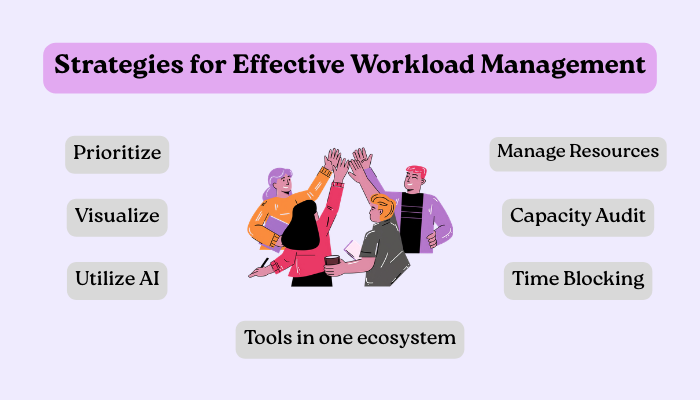
Tips and techniques for staying organized and managing tasks efficiently
Strategy is where everything gets sorted out.
To move from theory to results, you need a solid framework. Here are seven tactical ways to master effective workload management this year.
You can’t manage what you’ve not measured.
Ask your team to track their time for one week, not for surveillance, but for data.
You’ll likely find that hidden tasks, meetings, emails, and Slack pings are eating up 40% of their day. Subtract this from their 37-hour week, and you’ll get their actual capacity.
Not all tasks are created equal. Choose the prioritization approach that fits your team.
Lists are where tasks go to die.
Use a visual board to move tasks through To Do, In Progress, and Done.
This creates an instant heat map of your team’s progress. If the In Progress column is overflowing, you’ve found your bottleneck.
The average worker toggles between apps 1,200 times a day.
Every switch is a leak in your team’s focus. Choose a tool that keeps your files, chats, and tasks in one ecosystem.
If you use Google Workspace, your workload tool should live there too.
Encourage your team to block their calendars for deep work.
During these blocks, no new tasks should be assigned, and meetings are off-limits. This protects the most valuable asset you have: your team’s concentrated attention.
Managing team workload means moving tasks from the overloaded Hero to the underutilized Supporter.
If one person has 30 hours of work scheduled and another has 10, shift the cards. Don’t wait for the Hero to burn out before you redistribute.
Modern tools can now analyze your past 3 months of performance to predict whether a future project is realistic.
Use AI to run what-if scenarios: “If we take on this new client, will our current team hit the red zone by October?”
So, how do you manage this if you’re working within Google Workspace? We’ll cover this next…
If your team lives in Google Docs, Sheets, and Gmail, why are you leaving that ecosystem to manage your work?
Most managers make the mistake of choosing a best-of-breed tool that exists in a vacuum. Every time a team member has to download a file from Drive to upload it into a separate project tool, your effective workload management strategy takes a hit.
The most efficient teams are those that use a single workspace that works for everyone.
Managing workload is significantly easier when your tasks, files, and schedule are tethered together.
Don’t let requests die in an inbox. Turn an email directly into a task card so it enters the visibility queue immediately.
Stop attaching versions. Link the live Google Doc to the task. When the document grows, the task context grows with it.
A task without a slot on a calendar is just a wish. Native integration ensures that when you assign a deadline, it appears in the team member’s Google Calendar.
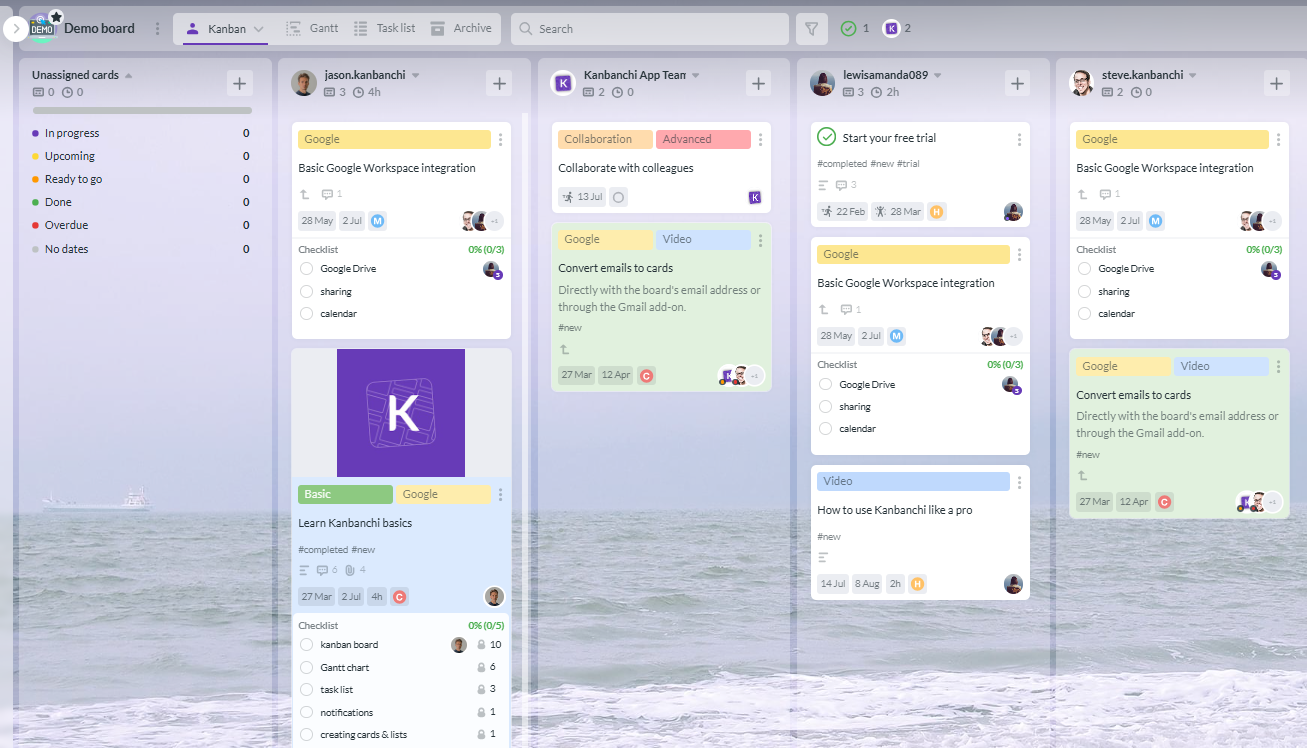
Visual overview of team tasks, estimated versus actual time, and balanced workload for better project management
With Kanbanchi for Google Workspace, you get more than a Kanban board. You also get tools that help you see who’s doing what and manage workload smoothly.
Team Workload View
Switch to the Team Workload view to see each person’s tasks grouped in their own list. This gives you a snapshot of everyone’s progress and workload in one place.
Balanced Assignments
Unsure who has the capacity? The view shows task groupings so you can quickly spot where effort is concentrated and balance assignments across your team.
Personal Focus with My Work
Flip to My Work to concentrate on your own priorities — see what’s on your plate and what needs attention first.
Faster Decisions and Fair Distribution
Together with workload summaries and progress indicators, these views help you distribute tasks fairly and make planning decisions without guesswork.
Estimate vs Time Spent
Compare estimated time for tasks with actual time spent to track progress, identify bottlenecks, and improve planning accuracy.
Start a free Kanbanchi trial now
By managing team workload inside the Google environment, you reduce the mental tax of app-switching.
Your team doesn’t have to learn a new, complex system; they can just keep working where they already are, with a powerful new layer of clarity on top.
The market is flooded with tools promising to revolutionize your productivity. However, most software falls into one of two traps it’s either a:
Or
When you are managing workload, the tool you choose determines whether your team adopts the system or ignores it.
Many platforms try to be everything:
This often leads to bloatware, where 80% of the features go unused.
Instead, look for a tool that follows the Best-of-Suite philosophy. This means choosing a specialized task manager that plugs into the suite you already use (like Google Workspace). You get the power of advanced resource leveling without the friction of a whole new ecosystem.
Can you see team capacity on a timeline, or just a list of names?
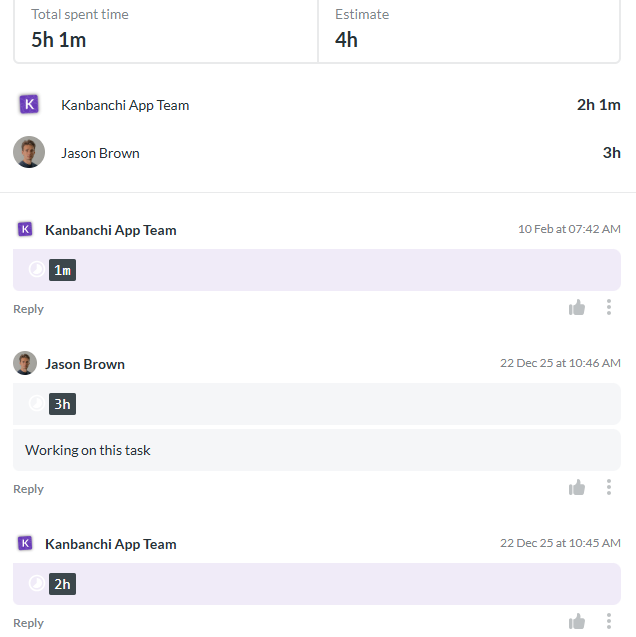
Compare estimated time and actual time spent on tasks to track progress and improve planning
Does the tool allow you to compare Estimated Time vs. Actual Time?
Can a new hire understand the board in under 5 minutes?
Does it work with your existing storage (Google Drive), or does it force you to move files into its own cloud?
For teams focused on effective workload management, integration isn’t just a feature; it’s the foundation. Tools like Kanbanchi aren’t just connected to Google; they are built on Google.
This means your security settings, user permissions, and file structure are already in place. You don’t have to spend hours setting up a new database. You simply log in with your Google account and start balancing your team’s energy.
Choose Kanbanchi and find the best way to balance your workload.
Start a free Kanbanchi trial now
Let’s end our roundup with a few of the most commonly asked questions on managing team workloads.
Resource management is the macro view; it’s about having the right people, budget, and equipment available for a project. Workload management is the micro view; it’s the day-to-day balance of tasks assigned to those people. You need resource management to start a project, but you need workload management to finish it without burning everyone out.
It is tempting to give your best work to your best people, but this is a recipe for losing your top talent. Use a visual workload tool to show the data. If your star player is in the red, you must deprioritize their non-essential tasks or move them to a team member with green capacity.
You can, but you shouldn’t. Spreadsheets are static and die the moment someone forgets to update a cell. These days, managing team workload requires dynamic data. You need a system that, if a task deadline moves, automatically updates the team’s capacity view in real time.
More content related to workload management here



In this Article:
Start using Kanbanchi now
Start your free trial