
What is Enterprise Management System (EMS)? Kanbanchi as the EMS
Enterprise Management System (EMS), or just Enterprise System (ES), is, in a narrow sense, a software package that a large company or organization (enterprise) uses for its routine operations. Such systems support geographically dispersed IT infrastructures with many different processes that need to be maintained simultaneously. Usually, EMS includes several pre-installed software and apps that everyone in a company can use as corporate tools for cross-department collaboration.
In this guide, we’ll explore EMS in depth and also showcase Kanbanchi – the app chosen by many enterprises.
Enterprise Management Solutions are different from those suitable for small and medium-sized organizations. However, there are tools designed to support your business at any scale, such as Google Workspace or Microsoft 365. Most EMS solutions include capabilities that support all core business areas. Sales, Customer Relations, HR, Project management, and others.
Usually, the Enterprise Management System is a package or set of tools that different departments use. They form a neat, connected infrastructure that allows people within the company to easily share their data, regardless of which group they belong to. An even better approach is to have a single flexible app that every group within a large enterprise can tune to meet their needs.
What is an Enterprise Management System?
If you ask five different IT directors for the meaning of EMS software, you might get five different answers! That’s because an EMS is a broad category. However, at its most fundamental level, an Enterprise Management System (EMS) is a holistic software solution that integrates all the different facets of a business’s operations into a single, cohesive environment.

Think of it as the central nervous system of a company. While a standard app might manage a single task, an enterprise management system manages interactions among tasks, people, and data across different geographies. It provides a unified platform for:
- Resource Planning: Managing assets and capital.
- Project Portfolio Management: Overseeing hundreds of initiatives simultaneously.
- Information Flow: Ensuring that data from the sales floor reaches the executive dashboard instantly.
Why the Enterprise Part Matters
The Enterprise in EMS refers to the complexity, not just the size. You could be an SME with a relatively small but stable outreach, or a big company. If your operations require a high degree of coordination across geographically dispersed IT infrastructures, you are in the enterprise territory.
In the past, these systems were on-site efforts: expensive, rigid, and requiring a small army of consultants to maintain. Today, the modern EMS enterprise management system is cloud-based, flexible, and often built directly into the tools your team collaborates with and uses every day.
The Difference Between EMS and EPM
Sometimes, the terms Enterprise Management Systems and Enterprise Project Management (EPM) may be used interchangeably, but they have very different meanings. EPM may be part of EMS, but in most cases, EMS includes more software. On rare occasions, the EPM tool can form the entire EMS, mostly at early enterprise stages.
EMS Software Meaning in 2026
Today, the meaning has evolved. It is no longer just about storing data. It’s about data intelligence. A modern EMS doesn’t just tell you what happened yesterday; it uses real-time visuals to show you what is happening right now and predicts where any delays will appear tomorrow. For organizations living in the Google ecosystem, for example, this means moving away from fragmented tools and toward a unified command center where your emails, files, and project boards all speak the same language.
EMS vs. ERP: Understanding the Difference
In the corporate world, acronyms are often thrown around interchangeably, leading to alphabet soup confusion. One of the most common mix-ups is between an Enterprise Management System (EMS) and an Enterprise Resource Planning (ERP). While they may seem the same, they serve different strategic purposes. Understanding this distinction is the key to choosing a system that scales with you rather than one that boxes you in.
ERP: The Internal Engine
Think of ERP as the back-office engine. Its primary focus is on integrating internal business processes, finance, human resources, inventory management, and manufacturing into a single database. Stats show that across the EU, as many as 43% of businesses are investing in this kind of tech.
| Focus | Architecture | Goal |
|---|---|---|
| Internal operational efficiency | Fixed, modular, and often rigid | To ensure that your accounting software knows exactly what your warehouse is doing in real-time |
EMS: The Central Command Center
An EMS enterprise management system is a broader, more strategic umbrella. While an ERP focuses on the resources, an EMS focuses on the entire enterprise, including external relationships and long-term data intelligence.
| Focus | Architecture | Goal |
|---|---|---|
| Holistic organizational performance (internal + external) | Flexible and data-driven; it often sits on top of existing databases | To provide a single source of truth that includes not just internal operations, but also customer relationships (CRM), supply chain logistics, and high-level project portfolio management |
Which One Do You Actually Need?
If your goal is purely to automate your payroll and track raw materials, an ERP might be enough. However, if you are looking for project management with kanban capabilities, real-time advanced analytics, and the ability to pivot your entire strategy based on market data, you are looking for an EMS.
In many modern organizations, the two aren’t mutually exclusive. An ERP often acts as a core module inside a larger enterprise management system. The EMS provides the flexible human-centric interface (like Kanbanchi) where the actual work happens, while the ERP handles the heavy-duty transactional data in the background.
The 5 Essential Pillars of High-Performance EMS
An enterprise management system is only as strong as the foundation on which it sits. If you treat an EMS as just a digital filing cabinet, you’ll never see a return on your investment. To achieve true operational excellence, your system must support five specific pillars. These are the structural supports that turn a software package into a competitive advantage.
1. Strategic Governance
Governance isn’t about bureaucracy; it’s about clarity. A high-performance EMS provides a decision-making framework. It asks:
- Who owns which data?
- How are priorities set?
By automating the rules of engagement, an EMS ensures that everyone, from the satellite office to the headquarters, is playing by the same playbook.
2. People and Structure
Systems don’t complete projects; people do. A modern EMS software means includes the ability to manage your human capital effectively.
This pillar ensures that the right talent is assigned to the right tasks based on real-time capacity and skill sets. It transforms teams into high-performance units that are synchronized rather than just busy.
3. Integrated Technology
This pillar is about the seamless flow of data. Your EMS must connect your:
- CRM,
- Project boards
- Financial data
When these systems are stymied, information gets lost. When they are integrated (especially within an ecosystem like Google Workspace), information becomes actionable intelligence.
4. Core Processes and Flow
Every enterprise is a collection of processes. Whether it’s Lead-to-Onboarding-Client or Concept-to-Launch, your EMS must visualize these flows.
This is where using Kanban for project management becomes a pillar of the enterprise. By visualizing the process, you can identify where work stalls and optimize the Value Stream for maximum speed.
5. Support Systems and Feedback Loops
How do you know if you are winning? High-performance management requires continuous feedback. This pillar involves reporting and analytics that show your cycle time and resource utilization. A system without a feedback loop is just a record-keeper; a system with one is a growth engine.
Core Benefits: Why Your SME Needs an EMS
1. Everyone Sees The Same Data
In a fragmented business, the left hand rarely knows what the right hand is doing. Marketing is launching a campaign for a product that the development team hasn’t finished yet. An EMS creates a single workspace for all. When everyone sees the same data in real-time, miscommunication drops and alignment skyrockets.
2. Scale Up Without Stress
Growth usually entails significant administrative overhead. More people usually means more meetings and more emails. However, a cloud-based EMS enterprise management system allows you to scale your operations without exponentially increasing your IT burden. You can add new departments, regions, or product lines to the existing framework with minimal friction.
3. Real-Time Data Insights
Legacy management relied on post-mortem reports. Looking at what happened last month or in the previous cycle. In 2026, that’s too slow. An EMS provides live dashboards. You can see project delays as they happen, monitor budgets in real-time, and shift resources to prevent a crisis before it occurs.
4. Risk Mitigation
For large enterprises, a single compliance error can cost millions. An EMS automates the guardrails of your business. It tracks every change, maintains an audit trail, and ensures that processes comply with industry regulations. This baked-in security is far more reliable than a manual checklist.
5. Increased Profitability
By identifying bottlenecks and automating repetitive administrative tasks, an EMS lowers your cost per unit of work. Whether you are a service agency or a manufacturer, doing things faster and with fewer errors directly increases your profit margins.
Kanbanchi: Enterprise Management in Your Familiar Ecosystem (Google or Microsoft)
Kanbanchi is an EPM tool that can be part of EMS because it is flexible enough to meet the needs of many business areas. For a modern organization, your enterprise management system shouldn’t be a destination; it should be an environment.
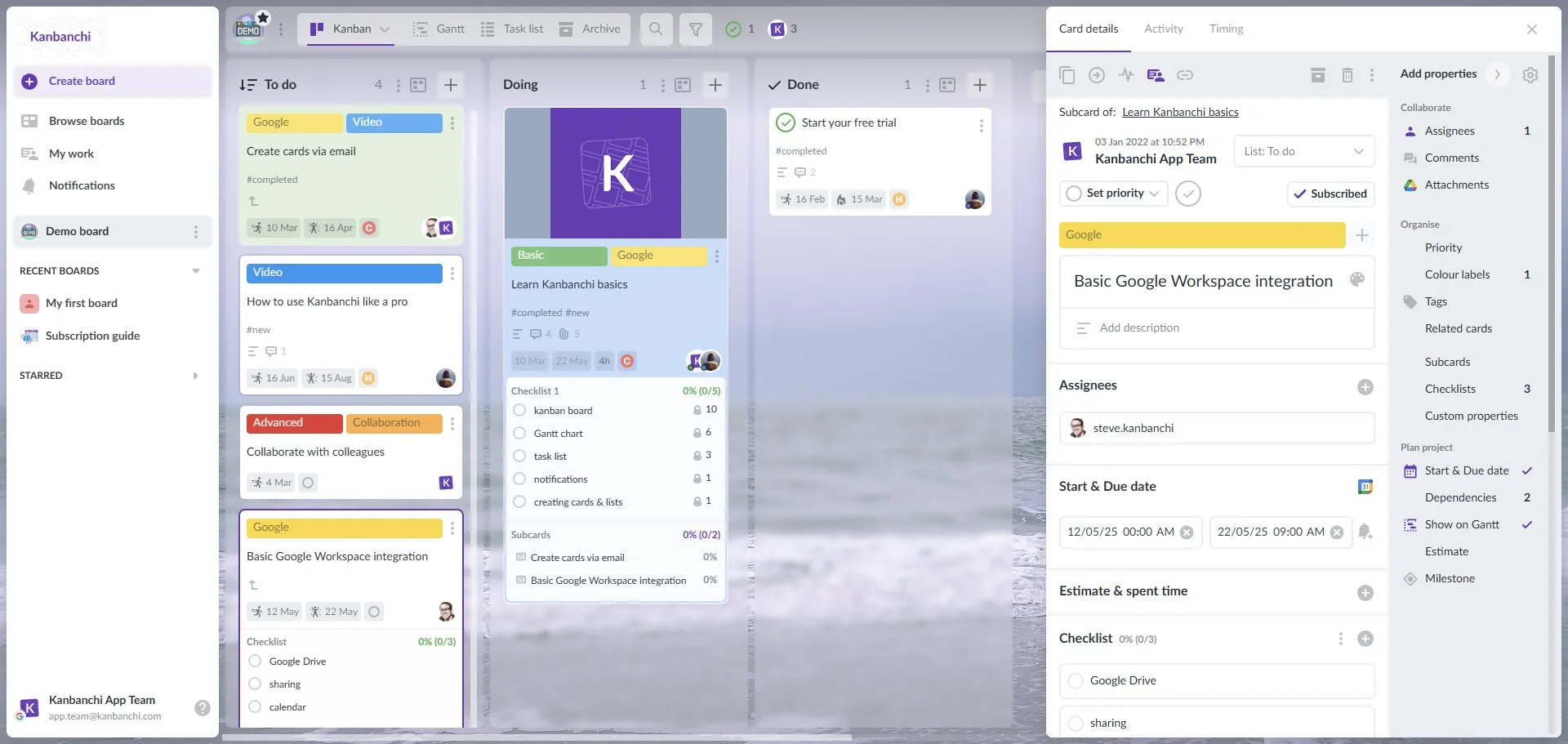
Kanbanchi interface showcasing a Kanban board as one of the best tools for EPM
The mistake many companies make is trying to bolt on a third-party EMS that requires its own login, database, and learning curve. This creates extra work, and ultimately leads to frustration and team members abandoning the software…
This is where Kanbanchi steps up to transform the enterprise experience. For example, Kanbanchi can operate as a native Google Workspace tool, turning your existing ecosystem into a professional-grade EMS.
Case Study: Your Company Relies on Google Workspace
Many enterprises are already living in Google Workspace.
- Your documents are in Drive
- Your communication is in Gmail
- Your schedule is in Calendar
Security by Google
You don’t have to worry about a new software’s security protocols. Your boards are stored in Google Drive, inheriting all the enterprise-grade encryption and permissions you already trust.

Kanbanchi allows teams to manage projects and store creative assets directly in Google Drive, keeping work organized and accessible
Simple login
Using Single Sign-On (SSO) with Google means your IT department doesn’t have to manage another set of credentials, and your employees have one less password to forget.

Kanbanchi boards are files inside Google Drive and follow the same sharing settings: they can be easily accessed with a Google account
Effortless collabs
You can attach a Google Sheet to a Kanban card and edit it in real-time without leaving your management dashboard. The data stays in one place, but the visibility is everywhere.
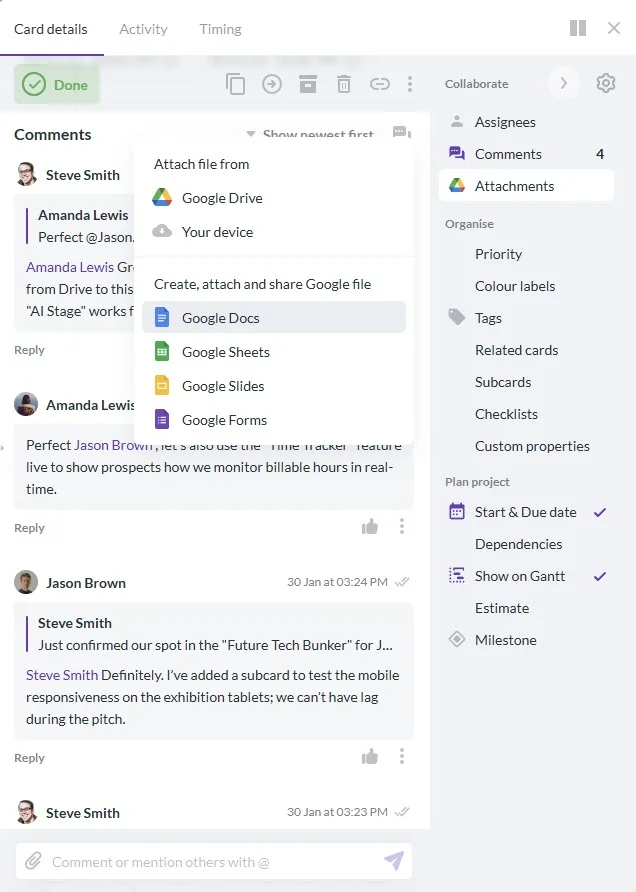
Kanbanchi even allows teams to generate new Google Docs, Sheets, and Slides directly from a task card, ensuring assets are instantly linked and organized within Google Drive
Scaling Without Shifting
Transitioning to an EMS enterprise management system often feels like moving house: painful and disruptive. But when you use a tool like Kanbanchi within Google or Microsoft, it feels more like an upgrade to your existing home.
- You keep your files where they are.
- You keep your team in the interface they know.
- You simply add the extra layer that large-scale operations require.
This native approach ensures that your EMS isn’t just something management bought, but something the team actually uses.
Start your free Kanbanchi trial
Types of Enterprise Management Systems and Their Functions
Not every enterprise management system is built for the same purpose. Depending on your industry and your specific pain points, you might prioritize different types of EMS. While the goal of all enterprise management systems is integration, they usually fall into a few primary categories. Understanding these helps you identify which modules are non-negotiable for your business.
1. Customer Relationship Management (CRM)
For many organizations, the EMS starts with the customer. A CRM module manages every interaction from the first marketing touchpoint to the final sale. It ensures that customer data isn’t locked in a sales rep’s inbox but is available to the entire enterprise for better service and forecasting.
2. Supply Chain Management (SCM)
In manufacturing or retail, the EMS enterprise management system must track the movement of goods. This function manages everything from raw material procurement to final delivery. The goal here is to reduce waste and ensure that the supply chain is resilient enough to handle global market shifts.
3. Project Portfolio Management (PPM)
This is the brain of the operation. While a project manager looks at one project, an enterprise looks at the portfolio.
| Function | Visualization | Impact |
|---|---|---|
| Aligning every project with the company’s strategic goals | Using tools like Kanbanchi to see how resources are balanced across 50 different initiatives simultaneously | Ensuring that your team isn’t working hard on the wrong things |
4. Human Capital Management (HCM)
Your people are your most expensive and valuable asset. An HCM module within an EMS tracks:
- Recruitment
- Performance
- Payroll
- Professional development
When this is integrated with your project management, you can see exactly how employee performance correlates with project success.
5. Financial Management
This is the traditional ERP core. It handles general ledgers, accounts payable, and risk management. By linking financial data to real-time project progress, leadership can see a project’s earned value as it happens, rather than waiting for an end-of-quarter audit.
Frequently Asked Questions about EMS
We’ll end our guide with some frequently asked questions teams have about starting to use an EMS.
What is the primary role of enterprise management?
The primary role is to harmonize the various moving parts of a large organization. It serves as a single source of truth, ensuring data flows seamlessly across departments such as Finance, HR, and Operations, and enabling unified strategic execution.
Is an EMS only for Fortune 500 companies?
No! While Enterprise implies size, it actually refers to complexity. Any growing business that manages multiple departments, remote teams, or complex project portfolios needs an EMS to prevent operational silos and data fragmentation.
Can we implement an EMS without replacing our current tools?
Yes. Modern solutions like Kanbanchi let you layer enterprise-grade management on top of your existing Google Workspace or Microsoft environment. This means you gain the power of an EMS without the rip-and-replace cost of legacy software.