
How to increase productivity using a Kanban board online?
The Kanban methodology has helped revolutionize the way we work. While it was created in Japan back in the mid-20th century, it is still used in modern teams as a way of visualizing work online. This approach uses Kanban boards, which began as a manual system involving paper cards getting moved across a physical board.
However, the system has proved to be ideal for use in modern teams working remotely or in a hybrid manner. A board is divided into columns covering the stages a task needs to go through, such as to-do, in progress, and completed.
By adding this timeless way of managing tasks to modern, sophisticated online environments, we can increase productivity and efficiency. The emergence of online Kanban boards lets us see at a glance how our tasks are progressing and whether there are any bottlenecks to be removed.
Physical boards simply can’t match the way that online versions provide a centralized, reliable source of data that is updated in real-time. We can now share the current situation instantly with colleagues and stakeholders, no matter where in the world they’re located.

A physical board has some disadvantages compared to the Kanban board online: stickers fall down, you have to rewrite them…
Physical vs. Digital: Why Move Your Kanban Board Online?
Project transparency used to involve sticking colorful notes onto a whiteboard, meaning that they needed to be moved manually every time a task was carried out. This worked well for many years, but digital boards are now available to give us a more efficient way of tracking tasks without the limitations of physical boards.
Moving to an online Kanban board isn’t just about using the latest technology to make your office look neater. It’s also a way to introduce a fundamental shift in the way that you handle your tasks and collaborate with colleagues.
We can see the major benefits of making this switch by looking at each of the areas where a digital Kanban board makes a big difference. The following are some of the most important points.
Real-Time Accessibility and 24/7 Collaboration
With remote working now crucial to many companies, it’s clear that being able to access their to-do lists and update them conveniently is a major factor. The old-fashioned approach of a physical whiteboard simply wouldn’t work in the modern office setting.
This is why the virtual boards that are constantly synchronized provide an invaluable way of keeping everyone up to date with the latest developments. Each team member can log in at any time and from any location.
This approach means that everyone knows exactly where each task is at and who is dealing with it, with automatic notifications removing the risk of a communication failure. It also allows real-time collaboration where two or more remote colleagues can update the progress at the same time.
Better Security and Version Control
One of the major problems with those physical Kanban boards of the past was the risk of someone accidentally updating them with the wrong details, or even causing the whole thing to be lost or ruined.
The comprehensive security that is now available for digital versions means that this is no longer an issue. With access permissions and automated backups, there is now no reason to worry about the data being lost or corrupted.
More Details and More Convenience
Moving a small physical card across the wall is a simple yet highly effective method of tracking progress. Yet, it had another drawback that has now been resolved thanks to the online version. This is the way that those small cards could only fit a limited amount of information on them before becoming messy and confusing.
The arrival of online Kanban software means that we can now add all of the relevant details easily. By linking project documentation to the task, it also becomes easier to track everything conveniently and without any confusion. Even the most complex task becomes easier to handle.
Online Kanban Board At Work
Kanban is highly recommended for small business owners and entrepreneurs. It is easier to assess your progress when you are working in a large organisation alongside many team members. It’s quite a challenge to keep yourself motivated when you are on your own.
When you have a small team to lead, there is always a need to boost morale and let people know why their work is equally important. Although an online Kanban board can never substitute for verbal communication, it can help you in this area.
Team members get excited and work more efficiently when they see cards moving up the board. They feel important when they see how their small tasks fit into the bigger picture. Another great aspect of using a Kanban board is that you get foresight. It’s easier to remember every task.
For large business owners and managers, online Kanban boards offer a great deal more. It’s possible that you are working on multiple projects and different teams. It gets very difficult to keep informed about every task. However, it’s important to stay well-informed so that you know the project is moving in the right direction.
With Kanban boards, you can achieve higher productivity without any stress. Kanban is a pull system. A worker can pull as much work as he can complete rather than having work pushed towards him. Kanban is a great way of increasing team collaboration. Each day, you can gather around a table and discuss the project, new ideas, and progress. Every team member will know where the project stands because they can see it on the online Kanban dashboard.
An added advantage of online Kanban boards is that you can calculate necessary statistics during and after project completion. These statistics can help you overcome potential problems and bottlenecks.
Kanban Board (online) At Home
Family like a team has its collective goals and each family member needs to display good teamwork. When you stick together and help each other out, you live a happier life. How about letting an online Kanban board improve your personal life?
For those of us who have to manage work, family and social life, having an online Kanban board is bliss. We need to focus on many tasks simultaneously to have a successful and balanced life. It’s a talent to manage all three. It’s all about managing priorities and paying attention to the right task at the right time.
A Kanban board makes the entire workload visible. And when used at home, it keeps you and your family motivated and improves your communication.
Another major advantage of using a Kanban board in your personal life is that you can keep track of your expenses. When you see all your work on the board, it gets easier to work out the time and money it will require.
Related article: Kanban Templates: From Chaos to Easy Task Implementation
Kanban At Class
The Kanban board is equally great for students, especially at the college level. With so many assignments, projects, tests and competitions going on, you practically have no time to attend all the parties and gatherings. Kanban can help you there.
After finishing one task, move it along the virtual board and start on the next step. You will feel motivated to work on the tasks as you see their progress along with the board.
The online Kanban board – Kanbanchi can be used at work, at home or at class. Check out the benefits of this app for any of the three aspects of life.
How to Use Kanban to Increase Productivity in 2026
The way we work has changed massively in recent years, so it’s easy to see why old-fashioned productivity solutions no longer work like they used to. This means that we need new solutions that help us to increase productivity in this new setting.
By using the Kanban methodology correctly with the latest technology, you can continue to make the most of this clever approach while also benefiting from current software. Take a look at how the core principles of Kanban are used effectively in this online approach.
Visualizing the Workflow
Making the work visible to everyone is the first important point that we need to consider when boosting productivity. This is a particularly important point with remote teams, as tasks are often buried in email threads or chats.
By using a digital Kanban board, all of the tasks are clearly shown as individual cards. In addition, all of the different stages that the task needs to go through are shown as columns. This makes the whole process transparent and easy for team members to follow.
Visualizing the workflow in this way lets you identify bottlenecks just by looking at the screen. If a project is stalled or running behind, you can see exactly why this is happening, which is the first step to solving the issues.
It also creates a culture of ownership, since each card is assigned to someone who is expected to take it through the different stages. There is no doubt over who is responsible for every task ¡, or when it needs to be done by.
Limiting Work-in-Progress
Constantly switching between different tasks and leaving some jobs unfinished is one of the biggest concerns in the modern business world. This can lead to tasks being left unfinished until they’ve turned urgent, or getting confused with other tasks.
Adopting a Kanban approach means that there is a limit on the number of tasks that can be in the “doing” stage at any time. Using Kanban to increase productivity forces team members to concentrate on the tasks in front of them, rather than having a large number of alternatives that they can jump between.
Changing to this mindset helps to reduce the time wasted on unfinished tasks that don´t provide value. The team´s energy is directed into the areas where they can make a positive impact by completing something.
This also feeds into a healthy way of working where managers don’t overload their team members. Instead, they’re given the right amount of work, taking into account the outstanding tasks that everyone can see. Team leaders can see at a glance how much more work someone can handle without being under excessive pressure.
Managing and Optimizing Flow
Managing the workflow wisely has become one of the major challenges in every company. While the emphasis was once placed on managing the people in the team, it has now moved to making sure that the work flows through the different stages.
This involves monitoring the lead time, which tells us how long it takes for a task to move through from the request stage to delivery. On the other hand, the cycle time tells us how long is spent actively working on the task.
These metrics can be seen easily in Kanban software. This means that it can be used to analyze the time taken for each task and work out how to include continuous improvement measures.
Features of The Best Online Kanban Board for Google Workspace?
Changing to the best Kanban board online is a smart move, but how can you make sure that it fits your current way of working? With many teams now carrying out most of their daily tasks in the Google Workspace ecosystem, choosing native Google integration for task tracking is worth considering.
Workspace is typically used for email (Gmail), documents (Docs), and meetings (Meet). Sheets and Slides are among the other useful apps that can help teams organize their work, with Drive storing everything securely in the cloud.
The Power of Native-Level Integration
By using a Kanban board with native integration, you get the seamless experience of everything feeling that it’s in the right place. You don’t need to worry about having to learn new tools or jumping across different tabs to find what you’re looking for.
Google users who are familiar with the look and feel of apps like Gmail and Drive can adapt effortlessly to the new way of working while using tools that they’ve already learned to use. In this way, managing tasks using the Kanban technique is as easy as sending emails and storing documents in Drive.
Shared Drive Integration
This is a key feature, since it allows all team members to safely store and access their documents. It’s a crucial step because it means that the company’s existing securities and permissions are seamlessly transferred across to their project work.
This feature also means that attaching files to a task is a simple process. It allows team members to find the documents they need directly from a task on the Kanban board, adding an even greater level of efficiency.
Integrated Gantt Charts
The task-based approach of a Kanban board is ideal for day-to-day use. Yet, there are also times when being able to see the bigger picture is essential.
This is where having Gantt chart functionality on your software is a huge boost. It lets you see all your milestones and how they relate to one another. Adjusting a date on your Gann chart should automatically lead to the Kanban card updating, meaning that you always have the latest information on the screen.
Native Time Tracking
The all-important native feel is also found in the time tracking element. This is where team members can enter a card and start tracking time right away. By doing this, you get detailed reports that can be easily exported to Google Sheets when needed.
Without third-party time-tracking apps, the performance data is kept within the Google ecosystem. It helps simplify the working process by ensuring that nothing slips through the cracks and gets lost.
Meet Kanbanchi – The Top-Rated Online Kanban Board for Teams
The task of managing projects using Google Workspace becomes a lot easier when you have a tool that brings together all of the different apps smoothly. This is where Kanbanchi comes in, by giving you a professional, centralized hub from where you can control your tasks and data.
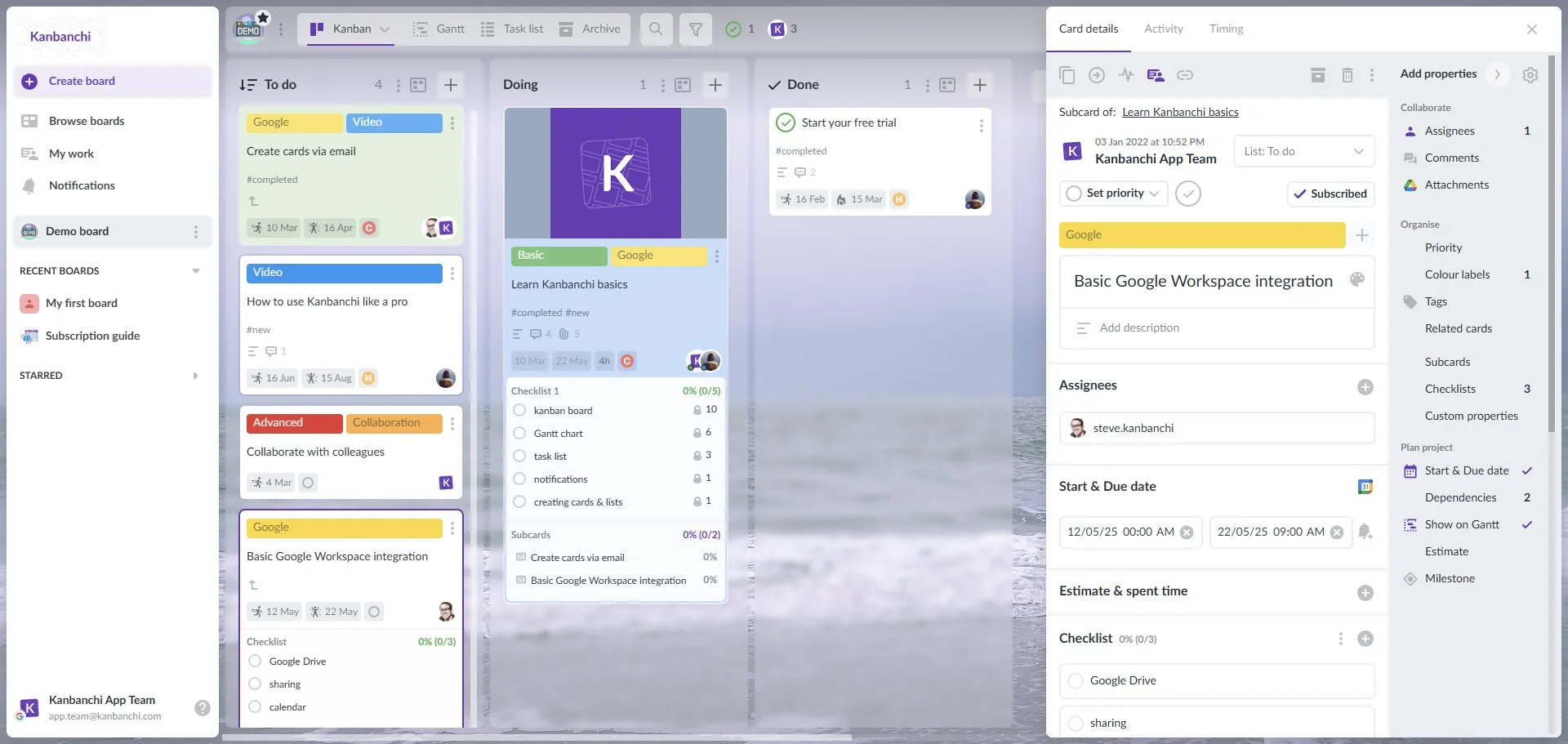
Kanbanchi interface showcasing Kanban board
Since it’s integrated with Workspace at a native level, it acts as the perfect bridge between your daily tasks and the tools that you need to access to carry them out.
Convert Emails to Actionable Cards
Your Gmail account is where a lot of your tasks and projects begin. Yet, this means that there’s a risk of losing the details on long threads. The good news is that you can transform any email into an actionable card with just a single click.
In this way, Kanbanchi turns your inbox into a more valuable tool that lets you jump straight to a Kanban card. The email subject is used as the title of the card, with the body of the message becoming the description.
Real-Time Collaboration and Syncing
The real-time collaboration on Kanbanchi is similar to the way that you and your colleagues can edit a Google Doc or Sheet at the same time. It means that the information on your Kanban boards online on the screen is always up-to-date and ready for you to use.
As soon as someone updates a card or moves it to a different column, everyone else can see what has been done. Since the boards are stored as Google Drive files, you can easily control the access permissions based on your existing Google groups.
Visual Priority Sorting
Having a cluttered board is one of the biggest obstacles to good productivity levels. If all of your tasks look the same, team members may struggle to understand which are the most urgent items. This can lead to the workflow process stalling or being delayed.
By adding robust visual priority sorting tools, you can make sure that the team can cut through the noise and fully understand what needs to be done first. A combination of custom tags, color-coding, and the right positioning means that each list is easy to prioritize.
Start your free Kanbanchi trial now
Step-by-Step: Setting Up Your Online Kanban Board in Minutes
It only takes a few minutes to get up and running with Kanbanchu, giving you the benefits of a professional Kanban board right away. You just need to follow these steps to get started without any delay.
Step 1: Install from Marketplace
The first thing you need to do when using Kanban to increase productivity is install Kanbanchi from the Google Workspace Marketplace. Head to the Marketplace, then search for Kanbanchi.
When you click “install”, you’ll be asked to grant the necessary permissions. This approach means that you now have Kanbanchi natively integrated on your Google app launcher, so you easily access it along with the likes of Drive and Gmail.
Step 2: Connect Google Account
The next step is to launch Kanbanchi and sign in using your existing Google password credentials. This allows you to start using it without the inconvenience of having to set up new password details and create a new profile.
At this point, Kanbanchi will be able to sync automatically the contents of your Google Contacts. It’s an important step, because it gives you a way to start assigning tasks to team members without having to import any contact details.
Step 3: Create Boards from Emails
You’ll now be able to use the powerful Kanbanchi features, such as being able to turn Gmail threads directly into Kanban cards.
This is done using the Kanbanchi Gmail Add-on. Whether it’s an internal briefing message or a formal client request, you can simply create a new task without having to leave your inbox. This removes the risk of vital information being lost in an email thread.
Step 4: Use Gantt and Kanban Views
Using Kanban cards gives you a smart way of looking after your tasks. This is ideal in the following situations.
- Daily meeting updates.
- Tracking the current flow of the to-do list.
In other situations, you might find that Gantt charts are ideal for the following.
- Longer-term planning.
- To map out dependencies.
- Set project milestones.
- See how any task delays would impact the overall project timeline.
You can just toggle between these views as you want to change them according to your current needs.
Have you already tested Kanbanchi?
FAQ: Common Questions About Online Kanban Boards
What is a Kanban tool used for?
This is a visual project management tool that is used to let teams see their workflow details. It is considered to be a tool that increases efficiency, which is done by dividing tasks into columns that show what stage they are each at.
What are the benefits?
A Kanban board online transforms unclear or abstract to-do lists into a clear, visual approach where it’s easy to see the status of the project and its different tasks.
Can I integrate with other tools?
Digital Kanban boards can be integrated with other online tools to make them even more effective. In the case of Kanbanchi, the native integration with Google Workspace that it offers means that it can be used with tools such as Gmail, Drive, Docs, and Calendar easily.