
In this Article:
Try Kanbanchi now
Start your free trial


Choosing between Kanban and Scrum is not an Agile terminology exercise. For a team lead, operations manager, or business owner, the question is practical: which method will make work clearer, delivery more predictable, and collaboration easier?
Both work. Both can help teams move faster and reduce confusion. But they solve different problems. Scrum gives teams a structured rhythm for planning and delivery. Kanban gives teams a visual, flexible way to manage work as it flows through the system.
If your team is growing, remote, cross-functional, or working inside Google Workspace or Microsoft 365, the right answer depends less on Agile theory and more on how your work actually arrives, changes, and gets completed.
Kanban is a workflow management method. It visualizes work on a board, limits overload, and helps teams improve how tasks move from request to completion. It began at Toyota in the 1940s as a production control system, and was later adopted by IT, software, and business teams. It’s especially useful when work arrives continuously, and priorities change often.
Scrum is a delivery framework. It organizes work into fixed periods called sprints, usually one to four weeks. The team plans what it will complete, works toward that commitment, reviews the outcome, and improves in the next cycle. It emerged in the 1980s, when Western business leaders began studying the team-based approach used at Japanese companies such as Canon and Honda, and the empowerment of self-organizing teams remains central to it.
The official Scrum Guide defines Scrum as a lightweight framework for generating value through adaptive solutions to complex problems. The Kanban Guide describes Kanban as a strategy for optimizing the flow of value through a process, using a visual workflow, work-in-progress limits, and continuous improvement.
In everyday management language: Scrum answers “what can we commit to delivering in the next sprint?” Kanban answers “what is happening now, what is blocked, and how do we keep work moving?”
| Factor | Kanban | Scrum |
|---|---|---|
| Planning style | Continuous planning | Sprint‑based planning |
| Best for | Ongoing work, support, operations, changing priorities | Product development, project delivery, defined increments |
| Work intake | New tasks added when capacity exists | New work usually waits for the next sprint |
| Roles | Flexible – existing roles can stay | Defined: Product Owner, Scrum Master, Developers |
| Meetings | As needed, often lighter | Sprint planning, daily scrum, review, retrospective |
| Change during work | Easier to adapt | Changes usually controlled during the sprint |
| Performance focus | Flow, cycle time, bottlenecks, work in progress | Sprint goals, velocity, increment completion |
| Management value | Real‑time visibility into workload | Predictable delivery cadence and commitment |
This table can make Scrum look rigid, and Kanban look flexible, which is too simplistic. Scrum’s structure is often exactly what a team with scattered priorities needs. Kanban’s flexibility is only powerful if someone actively manages capacity.
Advantages
Drawbacks
Advantages
Drawbacks
Customer support, HR operations, marketing requests, finance approvals, IT service tasks, legal reviews, content production, and administrative work arrive throughout the week. Stopping everything to plan a two-week sprint feels artificial in these environments.
Kanban lets the team visualize incoming work, prioritize it, and pull new tasks only when capacity exists.
A client escalation appears. A stakeholder asks for a revised deliverable. A compliance issue needs attention. Kanban handles this naturally because the workflow is continuous. You can reorder and reprioritize without breaking a sprint commitment.
The tradeoff is discipline. Without limits, the board becomes an unlimited dumping ground.
Kanban is easier to introduce because it can reflect how your team already works. No renamed roles, no new ceremonies. Map the current workflow (To Do, In Progress, Review, Done) and start there.
Then improve gradually. Where does work pile up? Which steps create delays? Is too much in progress at once? Those questions improve the process without an organizational shift.
If your team is new to visual work management, our Kanban project management guide explains the method in more depth.
Software development is the classic case, but Scrum also works for product launches, course development, internal tool rollouts, and process redesign. Anywhere the team delivers usable increments.
The sprint creates a planning horizon. For managers, that’s a useful cadence for forecasting and stakeholder alignment.
Scrum makes commitments visible. The team doesn’t just collect tasks; it discusses what can realistically be done and inspects the result. That’s valuable when a team struggles with shifting priorities, unclear ownership, or work that never quite finishes.
If executives, clients, or department heads need regular progress reviews, sprint reviews give them a recurring slot. It doesn’t guarantee predictability in complex work, but it creates a shared rhythm many organizations find easier to manage than continuous ad hoc updates.

This comparison shows the practical difference between continuous flow in Kanban and sprint-based planning in Scrum
Scrum plans at sprint boundaries and protects that focus, which reduces context switching. Kanban plans continuously, which supports responsiveness but requires clear policies about priority, urgency, and capacity.
Does your team benefit more from protected focus, or from fast reprioritization?
Scrum defines roles: the Product Owner manages backlog value, the Scrum Master helps the team use Scrum well, and Developers create the increment. Kanban requires no new roles; existing job titles stay, and only the flow of work changes. That makes Kanban easier to adopt outside traditional product teams.
Does your team need role clarity from a formal framework, or would a lighter process be easier?
Scrum has a clear event structure. For some teams that improves communication; for others it feels heavy when the work doesn’t fit sprint planning. Kanban usually has fewer required meetings, though many teams still run daily check-ins, replenishment sessions and retrospectives shaped around flow rather than sprint boundaries.
Would scheduled ceremonies create alignment, or slow down work that changes daily?
Kanban teams track cycle time, lead time, throughput, and work in progress. These show how quickly work moves and where bottlenecks form.
Scrum teams track sprint goal completion, velocity, burndown, and backlog progress. These show planning accuracy and delivery rhythm.
Neither set should be used to pressure individuals. They’re most useful when they reveal system problems: too much work in progress, unclear requirements, repeated review delays.
| If this describes your team | Lean toward |
|---|---|
| Work arrives unpredictably throughout the week | Kanban |
| Work can be planned in meaningful batches | Scrum |
| Priorities change often | Kanban |
| The team needs stronger delivery discipline | Scrum |
| You want a lighter process change | Kanban |
| You need formal roles and ceremonies | Scrum |
| You manage service, support, admin or operations work | Kanban |
| You manage product development or launch work | Scrum |
| Stakeholders need regular demos or reviews | Scrum |
| Managers need real‑time workload visibility | Kanban |
| Your team is larger than about ten people | Kanban, or split into Scrum teams |
A rule of thumb: choose Scrum when the team needs cadence, commitment, and structured inspection. Choose Kanban when the team needs flow, flexibility, and workload visibility.
Many teams find that neither pure method fits. They want Scrum’s planning discipline with Kanban’s flexibility, or Kanban’s visual workflow with regular retrospectives.
Scrumban combines both. It usually uses a Kanban board with work-in-progress limits, while keeping selected Scrum practices such as planning, reviews, or retrospectives.
The main risk is a vague process with no clear rules. If you combine methods, be explicit: decide how work enters the board, when priorities can change, which meetings are required, and how you measure progress.
Our guide to combining Kanban and Scrum in a hybrid workflow covers how to set this up in practice.
Choosing Scrum because it sounds more Agile. If your work is mostly reactive or service-based, sprint commitments create friction, and you’ll spend time replanning work that never fit the model.
Choosing Kanban and ignoring work in progress. A board with lists and cards isn’t a system. If everyone keeps starting new tasks, Kanban becomes a colorful to-do list. WIP limits are what protect focus and expose bottlenecks.
Treating it as a one-time decision. A startup might begin with Kanban because everything changes, then move toward Scrum as the roadmap firms up. An enterprise department might start with Scrum and add Kanban practices for urgent requests. Review the method periodically.
A method is only useful if the team applies it consistently, and that’s where software matters.
For a small team, a basic board may be enough. As teams grow, managers usually need more than lists and cards: task ownership, timelines, file attachments, comments, deadlines, calendar visibility, data exports, and permissions that match company policy.
This matters most for organizations already on Google Workspace or Microsoft 365. If conversations happen in Gmail, files live in Drive or SharePoint, and deadlines belong on calendars, the project tool should work inside that environment rather than create another disconnected place to check.
Kanbanchi supports both approaches: Kanban boards for daily execution and a Gantt chart for schedule planning, which addresses Kanban’s weakest point, the absence of dates. It also has built-in time tracking to understand effort, and integration with Google Drive, Gmail, Google Calendar, and Microsoft 365 storage.
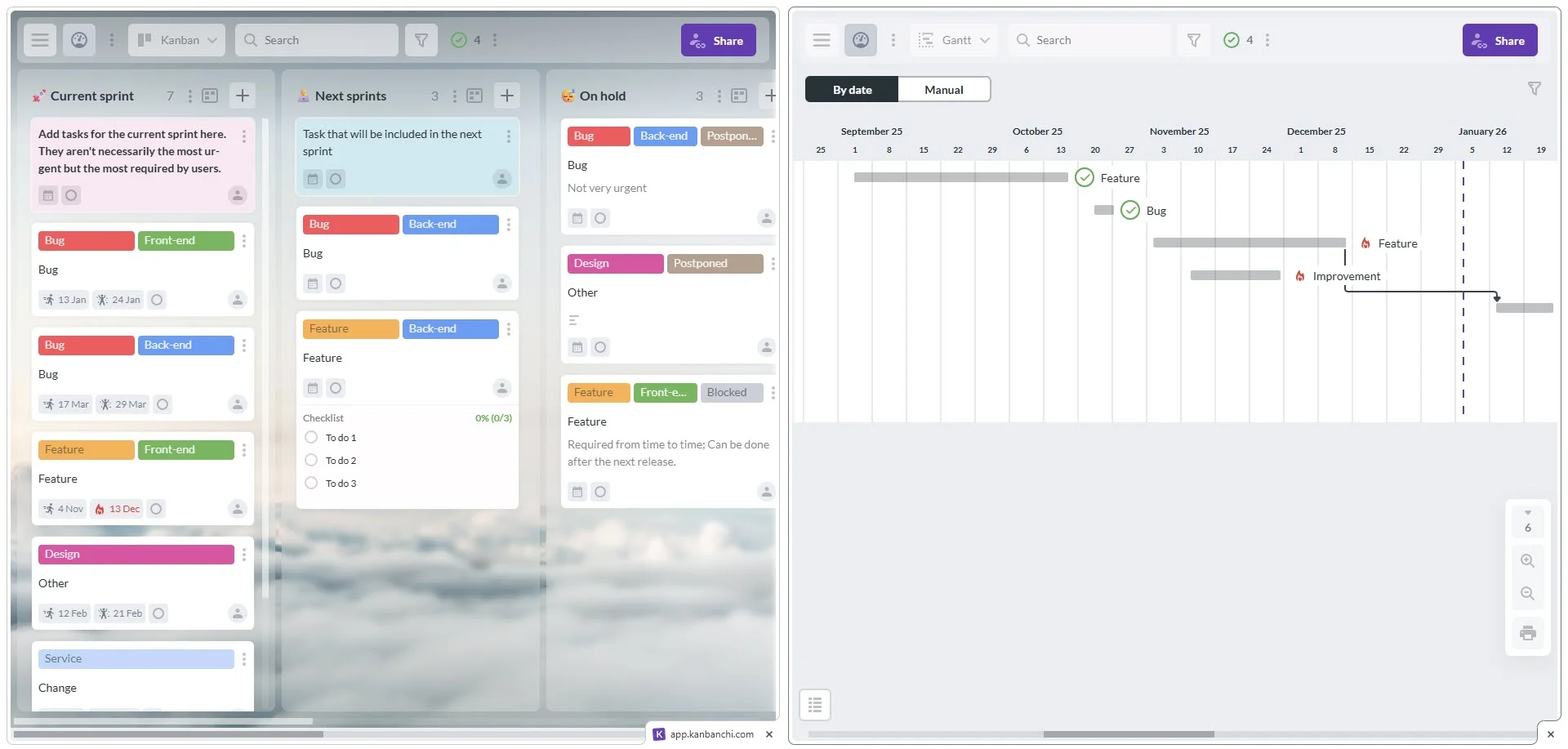
In Kanbanchi, you can switch between a Kanban board and a Gantt chart in one click
The tool won’t decide the method. It determines whether the chosen method survives contact with a busy week.
For a closer look at how the board setup differs between methods, see Scrum boards and Kanban boards.
Choose Kanban if you need visibility, flexibility, and smoother task flow. Strongest for teams managing ongoing work, frequent requests, changing priorities or cross-functional operations.
Choose Scrum if you need structure, sprint goals, role clarity, and predictable review cycles. Strongest for product, software and project teams that can plan in short increments.
Choose a hybrid if you need both: sprint-like planning for strategic work and Kanban flow for operational requests. Many business teams don’t fit neatly into either category.
The best method is the one your team will use consistently. Start with how work really happens, choose the lightest process that solves your current problems, and improve from there.
Plan, prioritize, and manage your projects effortlessly with Kanbanchi - the all-in-one project management tool built for Google Workspace users.
Get a free trialKanban is usually easier to start, because it requires no new roles or fixed ceremonies and can reflect how your team already works. Effective Kanban still needs discipline, particularly around limiting work in progress. Without that, it becomes a to-do list with columns.
Scrum is widely used in software because it supports incremental delivery, backlog refinement and regular stakeholder feedback. That said, software teams handling support, maintenance or rapidly changing priorities often prefer Kanban or a hybrid.
Yes, and many do. Combining Scrum’s planning and review practices with a Kanban board and WIP limits is common enough to have its own name, Scrumban. The important part is defining the rules explicitly rather than ending up with a vague process.
Two stand out. It has no built-in sense of dates, so a board tells you what stage work is in but not whether the deadline still holds. Teams with hard deadlines usually pair it with a timeline. And it optimizes flow rather than strategy, so it won’t tell you whether you’re working on the right things.
Scope creep during sprints if the boundary isn’t protected, a reliance on experienced and self-organizing teams, and poor scaling: beyond about ten people, sprints and ceremonies usually need splitting into multiple teams.
Kanban gives stronger real-time visibility into current workload and bottlenecks. Scrum gives visibility through sprint planning, reviews, and delivery trends. It depends on whether you need continuous operational visibility or structured delivery checkpoints.
Not necessarily. A flexible project management tool can support both. What matters is that it lets the team visualize work, assign ownership, manage deadlines, and track progress inside the systems they already use.
Read more articles related to Kanban and Agile

In this Article:
Start using Kanbanchi now
Start your free trial