
In this Article:
Try Kanbanchi now
Start your free trial


What does your sales pipeline look like as we head further into the year? For many sales managers, the end of each quarter feels less like a finish line to head towards and more like an unpredictable guessing game with no answers in sight.
You and your team can see the revenue numbers, but can’t quite pinpoint why one region soared while another stalled.
These days, managing by gut feeling should be a thing of the past. There’s no need to rely on it when there are other better techniques to try!
And that’s where Sales Tracking Software can step in to assist.
It’s evolved from simple digital ledgers into something much more tangible, which can help automate tasks and predict revenue with a click of a button. This new breed of software doesn’t just record what happened; it predicts what will happen.
It can analyze buyers’ thoughts, automate all the tedious logging reps hate, and provide a visual command center that turns raw data into a clear path to winning every single quarter, every time.
Whether you’re a startup founder looking to close your first ten enterprise deals or a seasoned SME owner, choosing the right software for sales tracking is the most important decision you’ll make this year. It is the difference between firefighting and proactive growth.
In this guide, Kanbanchi will reveal what we think are the 12 best solutions for 2026. We’ll explore everything from the heavy hitters to visual execution layers (like our software) that bridge the gap between your CRM and your daily workflow.
Are you ready to stop chasing data and start chasing deals? Let’s look at why your old tracking methods are holding you back.
According to the latest data, the sales automation software market continues to grow exponentially. By 2030, it’s predicted to be worth $19.5 billion. If your sales tracking still involves a shared Excel sheet or a CRM that feels like a 1990s database, you’re behind the times, and you’re also likely to be losing money.
The biggest enemy of an effective sales team is friction, and traditional tracking methods are riddled with it.
When a sales rep has to spend 20 minutes manually logging every email, call, and meeting, they aren’t selling. They’re performing data entry.
The result? Poor adoption and data, with a pipeline that looks healthy on paper but is actually full of zombie deals.
The spreadsheet nightmare is real. Manual tracking leads to:
| Issue | Description |
|---|---|
| Information Silos | One rep has the key contact info in their Gmail, while the official tracker is three weeks out of date. |
| Human Error | A missing zero on a deal value or a forgotten follow-up date can skew your entire forecast. |
| Zero Visibility | Managers can’t see the workings of a deal, only the final result. If a deal sits in Discovery for 45 days, traditional trackers won’t raise a red flag until it’s too late. |
Tracking sales software has shifted from:
to
Modern SMEs are looking for Revenue Intelligence. This means your software should:
So, be honest and ask yourself the following questions:
If you’ve answered ‘no’ to these, then you aren’t tracking; you’re just documenting the past.
It becomes an issue because data without insight is just noise, and a tracking tool should work for the salesperson, not the other way around.
It ultimately leads to the question: Why are you paying for a CRM if your team ends up spending Sunday nights panicking, mainlining caffeine, and fixing data?
Let’s concentrate on being positive. If your current software (or lack thereof) is affecting your ability to keep your sales pipeline in check, it’s time to shop around and invest in the best. Get something your team will use and love from the outset.
With this in mind, here are what we think are the 12 best sales tracking software tools for 2026.
Read more about business operations here
Choosing the right sales team tracking software is a big decision. These days, the market is split between:
Here is our breakdown of the top contenders.
| Sales Software Tool | At A Glance |
|---|---|
| HubSpot | Teams that need marketing and sales software. |
| Salesforce | Big companies that need a solid, reliable system. |
| Pipedrive | SMEs focused on sales. |
| Monday | Teams that need flexibility in their sales tracking. |
| Salesflare | Smaller teams that need lots of help with tracking pipelines. |
| Zoho CRM | Teams that need an affordable, user-friendly option. |
| Zendesk Sell | If your team relies heavily on phone calls and virtual meetings for sales. |
| Freshsales | SMEs that really want a lot of AI tools to help with sales. |
| Keap | Perfect for solopreneurs and small teams that need reliable sales tracking. |
| Close CRM | Best for high-volume sales teams that handle a lot of phone comms. |
| Copper CRM | Great for teams who want to stick with Google native options. |
| Outreach | Big sales teams that do a lot of prospecting for leads. |
HubSpot remains a favorite among mid-market teams for its seamless interface and powerful automation.
Best For: Scaling teams that need marketing and sales on one platform.
This is often referred to as the IBM of the sales world. Salesforce Sales Cloud offers unparalleled customization for global enterprises.
Best For: Large organizations with complex, multi-layered sales cycles.
Pipedrive was designed by salespeople, for salespeople. It focuses on the actions that lead to a close.
Best For: Small to mid-sized teams that prioritize visual pipeline management.
Built on the flexible Monday.com framework, this CRM is highly visual and endlessly adaptable. It’s favored by a lot of SMEs.
Best For: Teams that want to build their own unique tracking workflows.
Salesflare is sales tracking software that specializes in zero-input data. It automatically pulls info from your email, calendar, and social media.
Best For: Small B2B teams who hate manual data entry.
Zoho offers a vast suite of features at a fraction of the cost of its competitors, so it’s favored by businesses that are perhaps running on a tighter budget or want something that is ‘lighter’ to use.
Best For: Small businesses looking for an affordable, full-featured CRM.
Formerly known as Base CRM, Zendesk Sell integrates your sales tracking directly into your communication stack.
Best For: Teams that rely heavily on phone and email outreach.
Part of the Freshworks family, Freshsales uses Freddy AI to score leads and predict deal success.
Best For: Teams that want AI guidance without the complexity of Salesforce.
Keap (formerly Infusionsoft) combines CRM with sophisticated marketing automation, making it a great all-rounder for SMEs to try out.
Best For: Service-based small businesses, solopreneurs, and teams that need better options for payments.
Close is built for high-volume sales teams that live on the phone and need a great option for regular communications.
Best For: Inside sales teams and SDRs.
Copper is the only CRM recommended by Google. It lives inside your Gmail inbox, so it’s perfect if your team is already familiar with this ecosystem and wants something that offers seamless continuation.
Best For: Google Workspace power users who don’t want to leave their browser.
Outreach is technically a sales execution platform that layers over your CRM to track every rep’s activity.
Best For: Large SDR/BDR teams focused on prospecting.
Those are the key runners and riders, but how do you know which will be the best tool for you?
Start a free Kanbanchi trial now
The marketplace for sales-tracking software is pretty full, as you can see. To cut through the noise, you need to look past the flashy UI and focus on the mechanics of what will work best for you and your team’s needs.
High-performance teams prioritize these four pillars when selecting their stack:
Knowing what’s happening is one thing; knowing what to prioritize is another. Look for tools that help you:
The less your team has to manually record their work, the better. The ideal system should sync:
You can’t manage what you can’t see. Effective tools provide:
Teams already embedded in a productivity ecosystem need tools that connect natively:
And this is where Kanbanchi can fit neatly into your team’s plans. Whichever sales tracking software solution you choose, you can rely on our platform to plug any gaps and add a seamless layer of integration to your work.
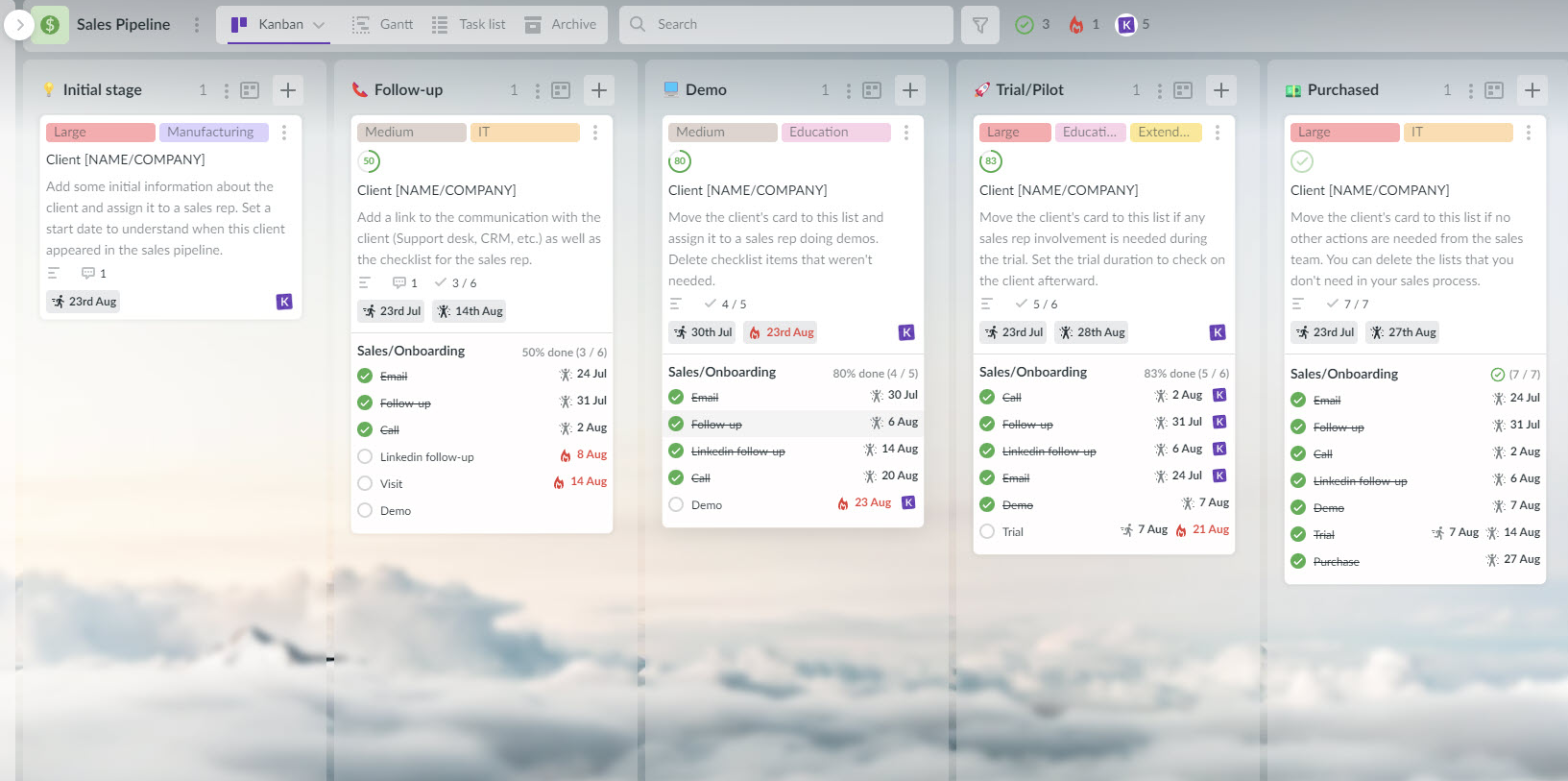
Whether you need a platform that supports just a few clients or something that’ll support a few hundred people, we can help you on your way to making the most of your sales pipeline. Kanbanchi is a Google-native program that works with existing systems to enhance them.
Once all that’s tackled and your system is in place, you can concentrate on delivering results and not worrying about whether you’ve got a software program that will play ball!
If all this has convinced you to start planning ahead and thinking about how great sales-tracking software solutions might fit into your workflow, get in touch with the Kanbanchi team today.
We can discuss your main priorities and how we can help deliver the results you and your team need. Choose Kanbanchi to find the best software for everyone on your team.
Start a free Kanbanchi trial now
We’ll end our comprehensive round-up with some of the regular queries SME owners have when it comes to the topic of getting to grips with sales tracking software.
If there’s anything else you’d like to ask us on the topic, feel free to drop us a line, and we’d be happy to discuss it with you.
For small businesses, HubSpot (for its free tier) and Pipedrive (for its simplicity) are excellent.
If you are already using Google Workspace, Kanbanchi provides a unique visual layer that turns your Drive into a powerful sales tracking engine without the enterprise price tag.
It reduces revenue leak.
By highlighting stagnant deals and automating follow-ups, the software ensures that high-value prospects don’t fall through the cracks. It also allows managers to coach reps based on real activity data rather than estimates.
A CRM (Customer Relationship Management) is a database that stores all your customer information. Sales tracking software is the functional layer that monitors the movement and performance of those customers through your sales funnel.
Most modern CRMs include tracking features, but many teams add a visual execution tool to manage the actual work.
Start a free Kanbanchi trial now



In this Article:
Start using Kanbanchi now
Start your free trial