-  views

Best Scrum Project Management Software: Top 10 Tools to Improve Agile Delivery in 2026

Try Kanbanchi now

Start your free trial

 

Collection of leading scrum and agile project management tool logos

Scrum’s an essential part of modern project delivery. Teams across lots of different departments rely on it as a framework to manage fast-moving workflows, short delivery cycles, and those ever-changing client goalposts! The rise of Scrum brings a critical challenge: choosing the right tool to support it. Scrum can be easily applied in various teams, including:

  • Software development
  • IT
  • Marketing
  • Product operations
  • Non-technical departments

After all, a Scrum team is only as effective as the system supporting its backlogs, sprints, boards, and collaboration. When a tool isn’t built for Agile or can’t reflect how teams actually work, everyone feels it immediately. Sprint goals become fuzzy. Priorities shift without visibility. Burndown charts don’t reflect real progress. No one has the same view of the work. The right Scrum project management software eliminates these disconnects:

  • It gives teams clarity
  • It gives Product Owners control
  • It gives Scrum Masters rhythm and predictability

And most importantly, it gives everyone a shared understanding of what getting the task done really means.

Research from McKinsey shows Agile teams often perform better than non-Agile ones, with 93% reporting higher customer satisfaction than companies that don’t use such a technique. 

In 2026, the market’s crowded. Dozens of platforms out there claim to be Agile-friendly, yet only a handful truly support Scrum at its core. That’s why this guide focuses on the best Scrum project management software available today, with a practical comparison of the tools that matter.

You’ll find:

  • What Scrum teams actually need from their software
  • Why many generic project tools fall short
  • Core features that define top-tier Scrum platforms
  • A full comparison of the 10 best Scrum tools of 2026
  • A deep look at how Kanbanchi supports Agile delivery inside Google Workspace
  • A step-by-step walkthrough for setting up a Scrum workflow in Kanbanchi
  • Clear answers to common questions Scrum teams ask when choosing a tool

Let’s begin by exploring why traditional project software often fails Scrum teams and what you should look for instead.

What Scrum Teams Really Need: Why Generic Tools Fall Short

Scrum looks simple on paper: short sprints, a clear backlog, defined roles, and continuous improvement. But anyone who has worked on a real Scrum team knows how quickly things get complicated when the wrong tools are in place.

Generic project management tools often try to cover every use case. In practice, that means they rarely go deep enough into the specifics that Scrum demands. The result: friction, manual workarounds, and processes that feel heavier than they should.

Sprint Planning Becomes a Manual Puzzle

Without a proper sprint backlog interface, teams end up juggling loads of spreadsheets, docs, or static lists. And when priorities shift, updating those separate files creates a mess of duplicated work. A Scrum-ready tool needs to make sprint creation easy:

  • Drag-and-drop backlog items
  • Clear display of team capacity
  • Fast reordering of priorities

Generic tools just don’t offer this kind of dynamic environment.

Backlogs Lose Structure and Meaning

The product backlog isn’t just a list of tasks, it’s a living blueprint of customer value. Tools without a discernible hierarchy, custom fields, or dependency visualization make work sessions longer and less effective. Teams struggle to see the bigger picture, and Product Owners lose an important lever for decision-making.

No Built-in Support for Scrum Ceremonies

Daily standups, sprint reviews, retrospectives, Scrum practices rely heavily on transparency. Without the right views:

  • Standups become status meetings
  • Reviews lose structure
  • Retrospectives lack insights from card histories or activity logs

Scrum software must give teams everything they need to run rituals smoothly.

Collaboration Happens in Too Many Places

When discussions are spread across email threads, chat tools, random documents, or disconnected comments, information scatters across tools.

Scrum thrives on shared context. Generic platforms don’t create a central source of truth. Scrum-ready software should support:

  • In-card discussions
  • File attachments
  • Real-time updates

Workflows Don’t Match How Scrum Teams Actually Operate

Scrum isn’t linear. It requires adaptable boards, column customization, WIP limits, labels, and flexible views. Generic tools seldom give teams this level of control. Scrum teams need software that reflects the way they work: fast, iterative, collaborative, and highly visual. Now that we’ve covered the gaps in conventional platforms, the next section explores the features that truly define the best Scrum project management software in 2026.

Key Features of the Best Scrum Project Management Software

The best Scrum software shares a common theme: it supports agility without slowing teams down. While platforms package features differently, high-performing Scrum teams consistently rely on a set of essential capabilities.

Scrum moves quickly. Software’s got to move even faster.

Clear Backlog Management Tools

Scrum backlogs evolve constantly. Teams need tools that make prioritization simple and transparent.
Look for:

  • Easy prioritization
  • Custom fields (story points, effort estimates, acceptance criteria)
  • Multiple backlog views (list, board, grouped)
  • Easy filtering and tagging

These help Product Owners refine and manage the backlog with minimal friction.

Sprint Planning Workflows

Effective sprint planning needs structure, not chaos. Scrum software should let teams:

  • Build sprint backlogs directly from the main backlog
  • See team capacity and workload distribution
  • Assign story points quickly
  • Reorder issues as priorities shift

Planning becomes smoother when tools reduce manual work.

Scrum & Kanban Hybrid Boards

Scrum and Kanban often blend in real teams. Tools that support hybrid workflows offer more flexibility, such as:

  • Columns for each workflow stage
  • WIP limits
  • Swimlanes for priorities or teams
  • Drag-and-drop cards with real-time updates

Delivery Metrics & Bottlenecks Visibility

Scrum thrives on transparency, and dashboards should update automatically as work flows across the board. Beyond standard delivery metrics, teams benefit from features that clearly differentiate bottlenecks — such as card aging, blocked work indicators, and time-in-state analysis. Together, these insights help Scrum Masters identify bottlenecks early and understand why work is slowing down. With easy exports for sharing snapshots with stakeholders, teams can quickly communicate progress without maintaining manual reports.

Collaboration That Mirrors Real Workflows

Scrum teams interact constantly—standups, quick syncs, reviews. Software should centralize conversations through:

  • In-card discussions
  • File sharing
  • Mentions and notifications
  • Seamless integration with everyday tools

Multiple Views for Different Roles

Scrum teams span multiple responsibilities, and each role benefits from a tailored view powered by the right tools:

  • Product Owner: A prioritized task list with grouped backlog items to manage scope, sequencing, and value delivery
  • Scrum Master: A Kanban board focused on workflow health, WIP limits, and bottleneck visibility
  • Developers: A personal task list showing clearly defined in-progress work and next actions
  • Stakeholders: A high-level Gantt view or grouped summary highlighting milestones, dependencies, and timelines

Automation & Workflow Controls

Automated reminders, recurring tasks, and status updates save time. Scrum teams benefit from:

  • Automated card movement
  • Recurring sprint tasks
  • Templates
  • Deadline reminders

A tool that reduces repetitive work amplifies team velocity.

Sprint Planning and Backlog Management

Sprint planning is the heartbeat of Scrum. Teams gather to choose what can be achieved within a sprint, clarify requirements, and ensure the sprint goal is realistic.

Good software makes this process intuitive.

A strong sprint planning interface has:

  • A clear view of the product backlog
  • Capacity indicators
  • Story point estimation fields
  • Sprint assignment
  • Visibility of dependencies

Teams shouldn’t fight with their software during planning. Everything should happen in a single interface.

The goal: a smooth planning session where everyone sees the same plan, the same priorities, and the same commitments.

Kanban + Scrum Boards for Visual Workflow

Although Scrum is structured, its boards must still be flexible. Hybrid Scrum/Kanban boards combine iterative delivery with flow-based clarity.

A great Scrum board should offer:

  • Columns that reflect real team workflows
  • WIP limits to control overloading
  • Swimlanes for epics or priority groupings
  • Card details at a glance
  • Visual cues for blockers or high-priority tasks

Many Scrum teams evolve into Scrumban over time. Tools that support hybrid models reduce friction and help teams scale their process naturally.

Full Comparison: 10 Best Scrum Project Management Software for 2026

Here are the top Scrum tools worth considering in 2026, each evaluated for strengths, limitations, and ideal use cases.

Application Name Best For (Scrum & Agile Use) Rating
Kanbanchi Google Workspace‑dependent Scrum teams needing native Kanban, Gantt, and backlog views directly on top of Drive/Calendar, with low setup overhead. Approx. 4.7 / 5 on review sites.
Jira Engineering and product teams running Scrum or Kanban in the Atlassian ecosystem, with advanced backlogs, sprints, and roadmaps. Commonly rated around 4.3–4.4 / 5 on major review sites.
ClickUp Scrum teams that want highly flexible workflows (sprints, docs, whiteboards, backlogs) in one tool and can handle a steeper learning curve. Often rated ≈4.7 / 5 on software review platforms.
Asana Cross‑functional Scrum teams that value simple task/board views plus a Timeline for high‑level sprint and release planning. Frequently sits around 4.4–4.7 / 5 on review sites.
Monday.com Scrum‑ish teams that want colorful boards, custom dashboards and automations for sprint tracking and stakeholder status. Typically ≈4.7 / 5 on review platforms.
Wrike Large organizations and PMOs running multiple Scrum teams, needing portfolio‑level views, workload, and advanced reporting. Commonly around 4.2 / 5 on review sites.
Trello Small Scrum or Kanban teams that want ultra‑simple boards and only occasional timelines via add‑ons. Often rated ≈4.4 / 5.
Azure DevOps Microsoft‑centric engineering teams running Scrum with tight links to repos, pipelines, and work items. Typically shows mid‑4.x ratings on review sites.
Notion Smaller Scrum teams needing flexible, doc‑plus‑board workspaces and custom backlogs more than rigid tooling. Frequently around mid‑4.x out of 5 on review platforms.
Zoho Sprints Small–mid Scrum teams wanting a lightweight, Scrum‑specific backlog/sprint tool, especially if already in Zoho. Usually appears around low‑ to mid‑4.x / 5 on review sites.

Kanbanchi

Kanbanchi scrum board showing sprint tasks, backlog items, and workflow progress

Kanbanchi is one of the best scrum project management tools, offering intuitive boards for planning sprints, tracking tasks, and managing agile workflows efficiently.

Kanbanchi is the best option for Google Workspace users. A premium project management solution built specifically for Google Workspace integration. It provides robust Gantt, Kanban, and Task List views. They’re all natively integrated with the tools your team already uses daily.

Product Owners can organize backlog items, add custom fields, and attach Google Docs containing requirements or designs. Developers can comment directly inside cards for clarification.

In Kanbanchi, cards move cleanly across customizable columns. Teams can create separate lanes for backlog items, sprint items, or special priority tasks. The smooth drag-and-drop experience, paired with real-time updates through Google Workspace, makes daily standups more focused and productive.

Best for: Google Workspace-dependent teams and organizations requiring a secure, collaborative, and deeply integrated visual project management platform.

Pros

  • Zero learning curve for Google Workspace users; feels like a native Google app.
  • Superior security and compliance, as it doesn’t store your data on its own servers.
  • The Dependencies feature is clear and immediately highlights potential project delays.

Cons:

  • The primary focus is the Google ecosystem, making it less ideal for teams committed to Microsoft 365 or to entirely custom environments.

Pricing

  • Free plan available, limited to 36 cards.
  • Paid plans offer features such as: Gantt Chart, Time Tracker, and advanced reports, and are competitively priced for teams.

SIGN-UP FOR A FREE TRIAL NOW

Jira

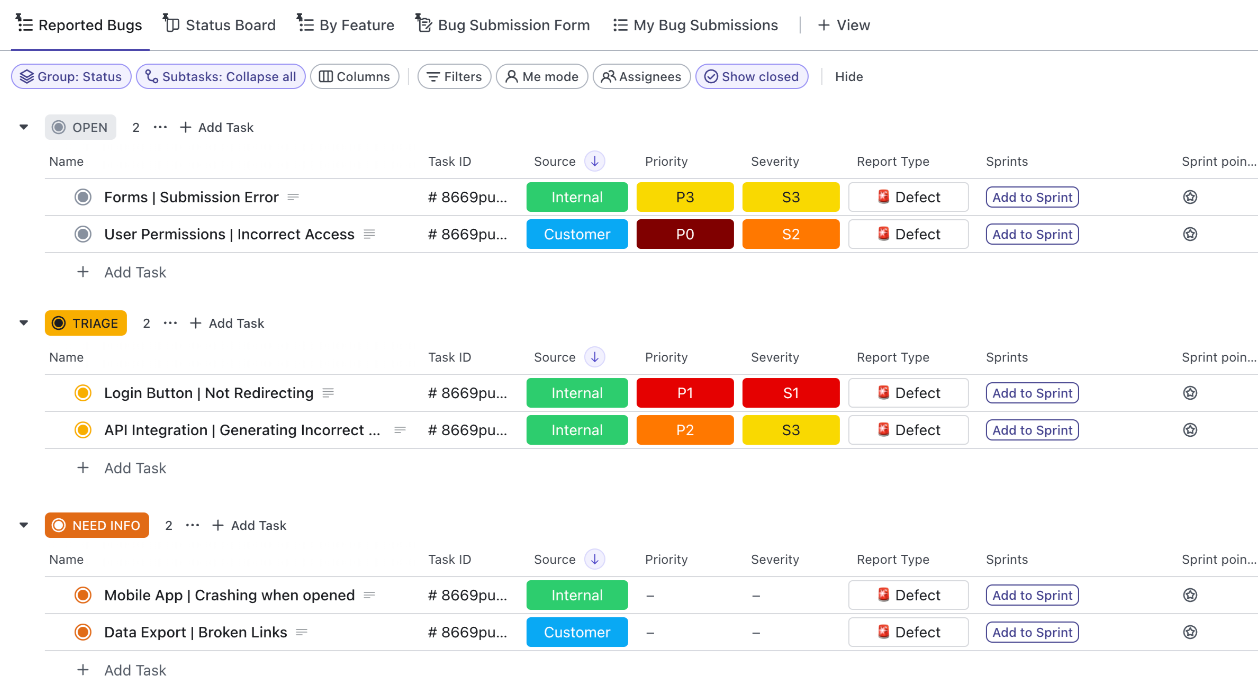
Example of a Jira scrum board for managing agile sprints

Jira offers powerful scrum project management features for agile teams of all sizes

Jira is the industry standard for Agile development. Seamlessly maps Scrum and Kanban boards onto a visual timeline.

Best for: Software development teams already committed to the Atlassian ecosystem. 
Pros

  • Good integration with software development workflows and Atlassian products.
  • Powerful filtering and issue tracking.

Cons

  • Some features require add-on or require the Premium/Enterprise tier, making it costly.
  • Too complex for non-technical teams like Marketing or HR.

Pricing

  • Free plan available
  • Advanced Roadmaps for other functionality requires the Premium tier and starts at approximately $15.25 per user/month.

ClickUp

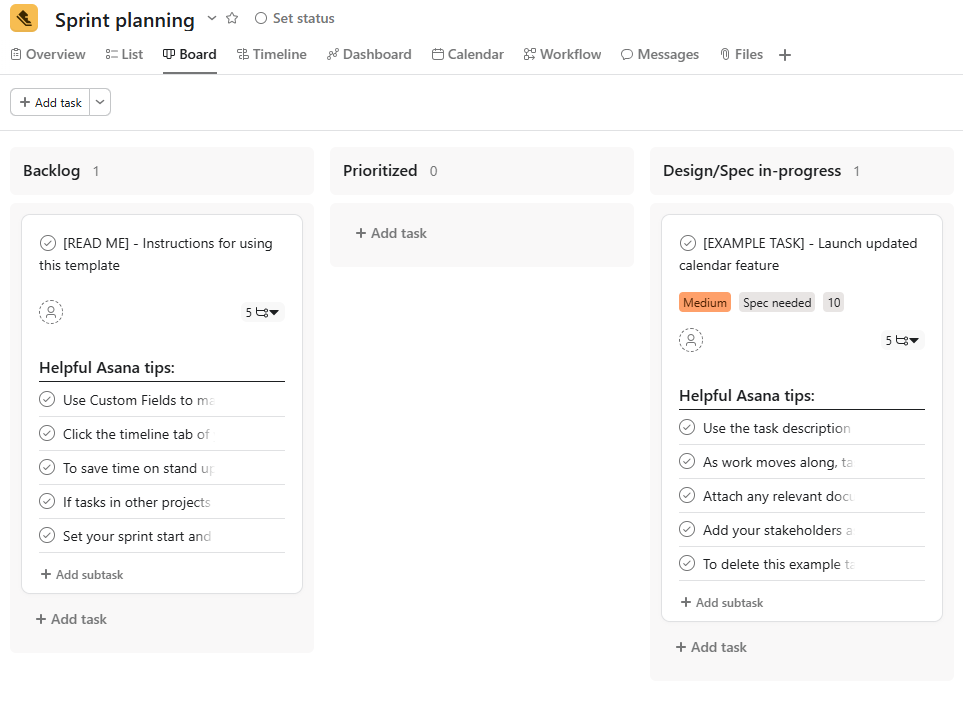
ClickUp scrum board showing sprint tasks, backlog, and task statuses

ClickUp provides flexible scrum project management tools for planning sprints, managing tasks, and tracking agile progress.

ClickUp aims to be the one app that replaces them all. Has a comprehensive feature set that supports highly customized workflows.

Best for: Teams needing a highly flexible platform with powerful customization and a wealth of features, though this often comes with a learning curve.
Pros

  • Customizable, so if you can imagine a workflow, you can build it.
  • Strong feature set, including native time tracking and documentation tools.

Cons

  • Too many overwhelming features for new users or smaller teams looking for simplicity.
  • Gantt charts are not available in the Free or lower-tier plans.

Pricing

  • Free plan available but with limited features. 
  • Paid tiers range from around $7 per user/month, with some features often locked behind mid- to high-tier subscriptions.

Asana

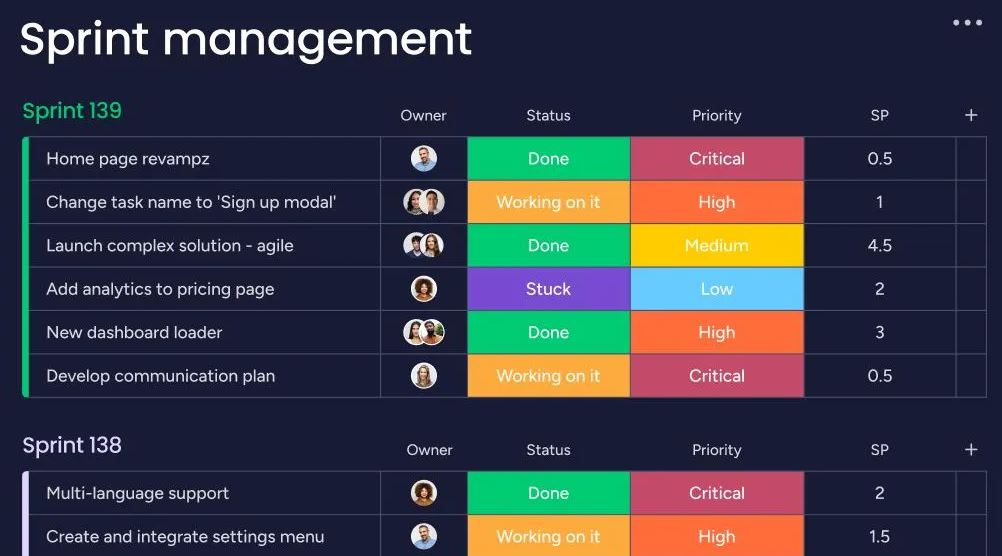
Asana scrum board showing sprint tasks, backlog items, and workflow stages

Asana supports scrum project management with tools for sprint planning, task tracking, and agile collaboration

Asana is known for its focus on clarity and task management. Its Timeline view acts as its Gantt chart, focusing on scheduling and dependency visualization.

Best for: Large, cross-functional teams that prioritize simple, task-based workflows and communication.
Pros

  • User-friendly and visually clean.
  • Strong at managing a high volume of tasks and subtasks.

Cons

  • The Gantt features are often too basic and lack advanced resource allocation or cost tracking found in dedicated project planning tools.
  • Gantt/Timeline view is not available on the Free or Starter tiers.

Pricing

  • Free tier.
  • Paid plans starting around $10.99 per user/month unlock the essential Timeline/Gantt view.

Monday.com

Monday.com scrum board showing sprint tasks, backlog, and workflow progress

Monday.com provides scrum project management features for planning sprints, tracking tasks, and managing agile workflows

Monday is a work operating system that offers customizability and a colorful interface. 

Best for: Teams building highly customized workflows and those who appreciate a colorful, modern interface.
Pros

  • Engaging interface that drives user adoption.
  • Good for connecting different departments and projects.

Cons

  • The core Gantt chart lacks critical advanced features, such as resource allocation, cost tracking, and support for complex dependencies.
  • The Gantt view is available only on the Standard tier and above.

Pricing

  • Free plan available. 
  • Paid plans start at approximately $9 per user/month, with the critical views often requiring a higher-tier plan.

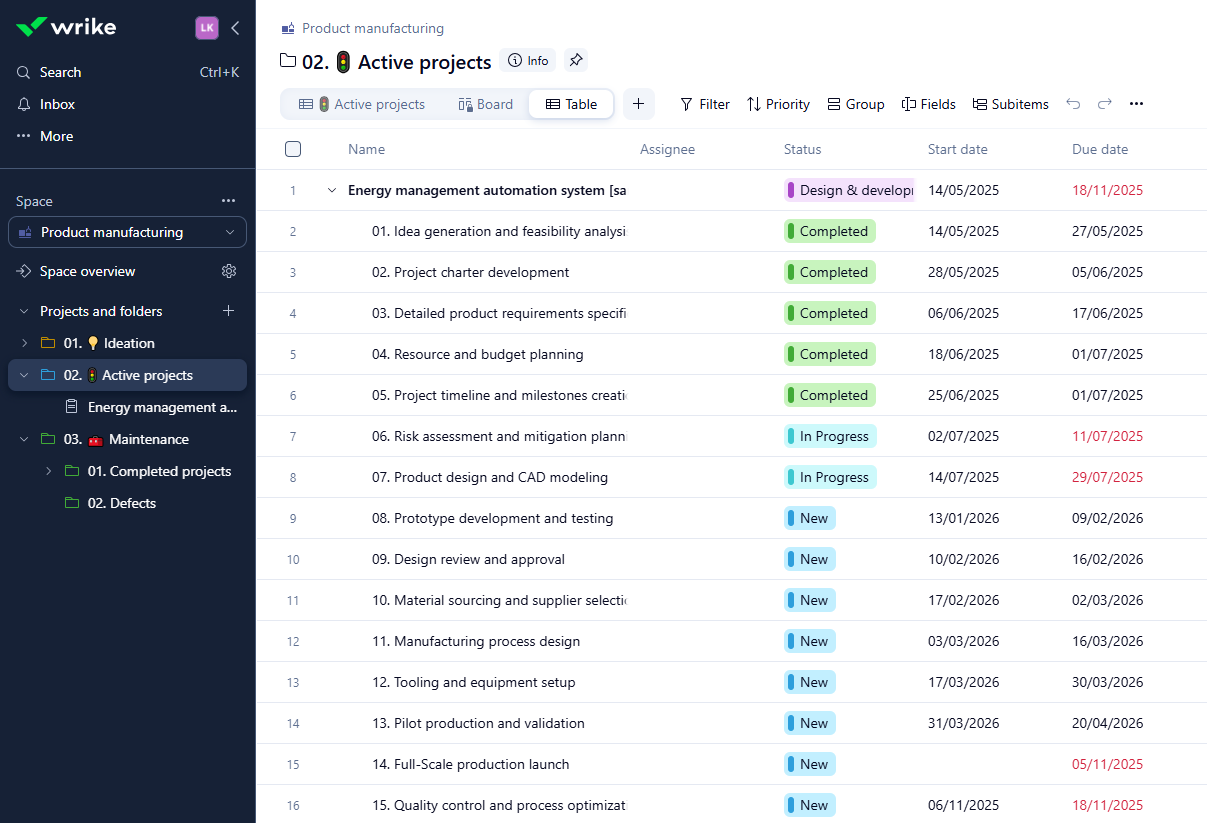
Wrike

Wrike scrum board showing sprint tasks, task priorities, and team workflow progress

Wrike helps teams manage scrum projects with tools for sprint planning, prioritizing tasks, and monitoring team progress

Wrike is an enterprise-grade work management platform known for its scalability and powerful reporting. 

Best for: Large organizations, PMOs, and complex marketing or creative teams that need a tool for high-level portfolio management and strong collaboration.
Pros

  • Highly scalable and secure for enterprise use.
  • Strong collaboration features, including in-line commenting and document proofing.

Cons

  • Can be overly complex for small teams or simple projects, leading to feature overload.
  • Pricing quickly becomes expensive as teams grow.

Pricing

  • Free plan available (limited to 5 users). 
  • Paid plans start at roughly $9.80 per user/month.

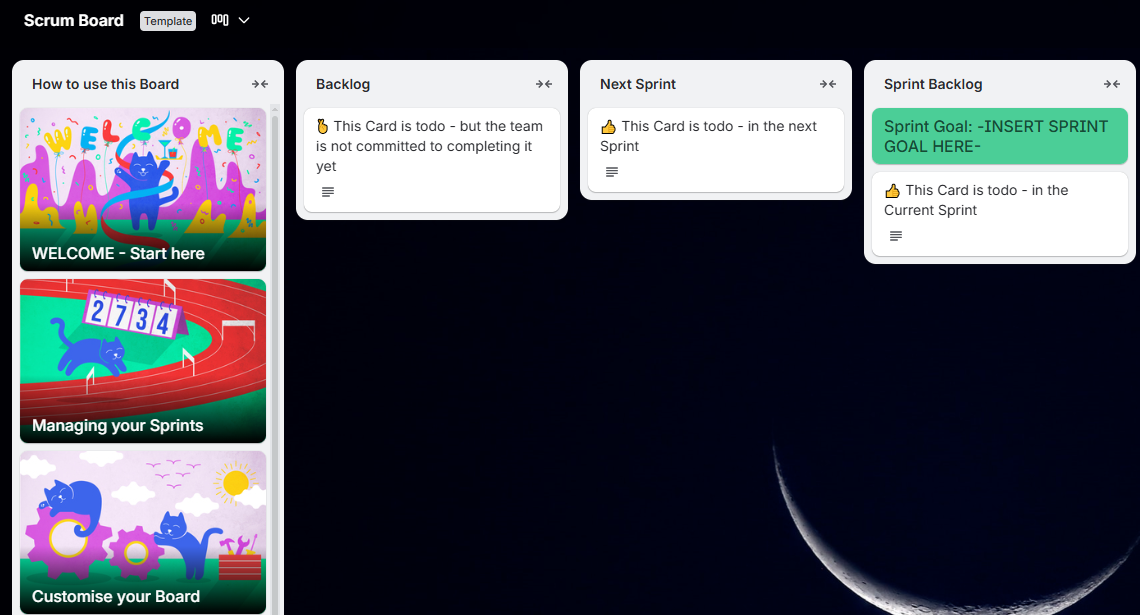
Trello 

Trello scrum board showing sprint tasks, backlog items, and workflow columns

Trello offers scrum project management tools for planning sprints, organizing tasks, and tracking agile progress

Trello will integrate with powerful third-party tools such to add timeline functionality.

Best for: Small teams that primarily use Kanban but occasionally need a simple timeline view without migrating their existing Trello data.
Pros

  • Easy to use and maintain.
  • Leverages familiar Trello interface.

Cons

  • Relies on third-party integrations, which can introduce cost and maintenance overhead.
  • Lacks the advanced resource management 
  • Lacks critical path analysis

Pricing

  • Free plan available. 
  • Power-Ups require a paid Trello subscription or a separate subscription to the third-party provider.

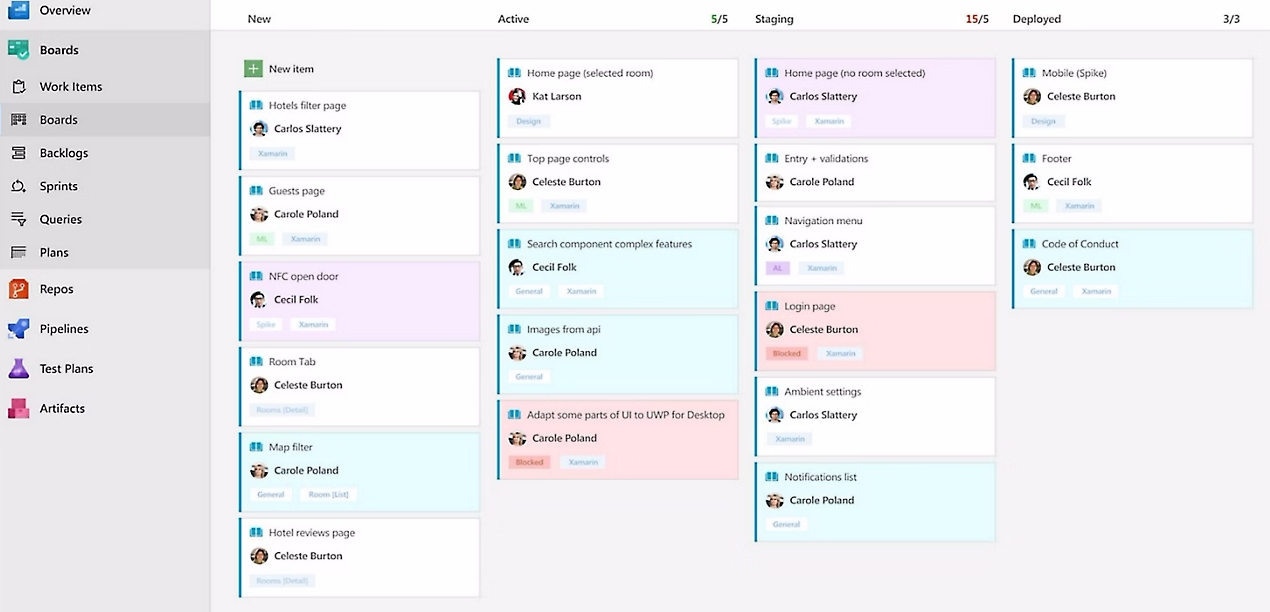
Azure DevOps

Azure DevOps scrum board showing sprint tasks, backlog items, and workflow progress

Azure DevOps provides scrum project management features for planning sprints, tracking tasks, and managing agile workflows

Azure DevOps is Microsoft’s SaaS platform that effectively manages the entire software development lifecycle. 

Best for: Excellent for engineering teams in Microsoft environments 
Pros

  • Scalable and flexible for Scrum
  • Deep sprint, repo, and CI/CD integration.

Cons

  • Steep learning curve
  • Difficult to integrate with non-Microsoft tools 
  • Costly

Pricing

  • Free plan available but with limited features
  • Basic and test plans from $52

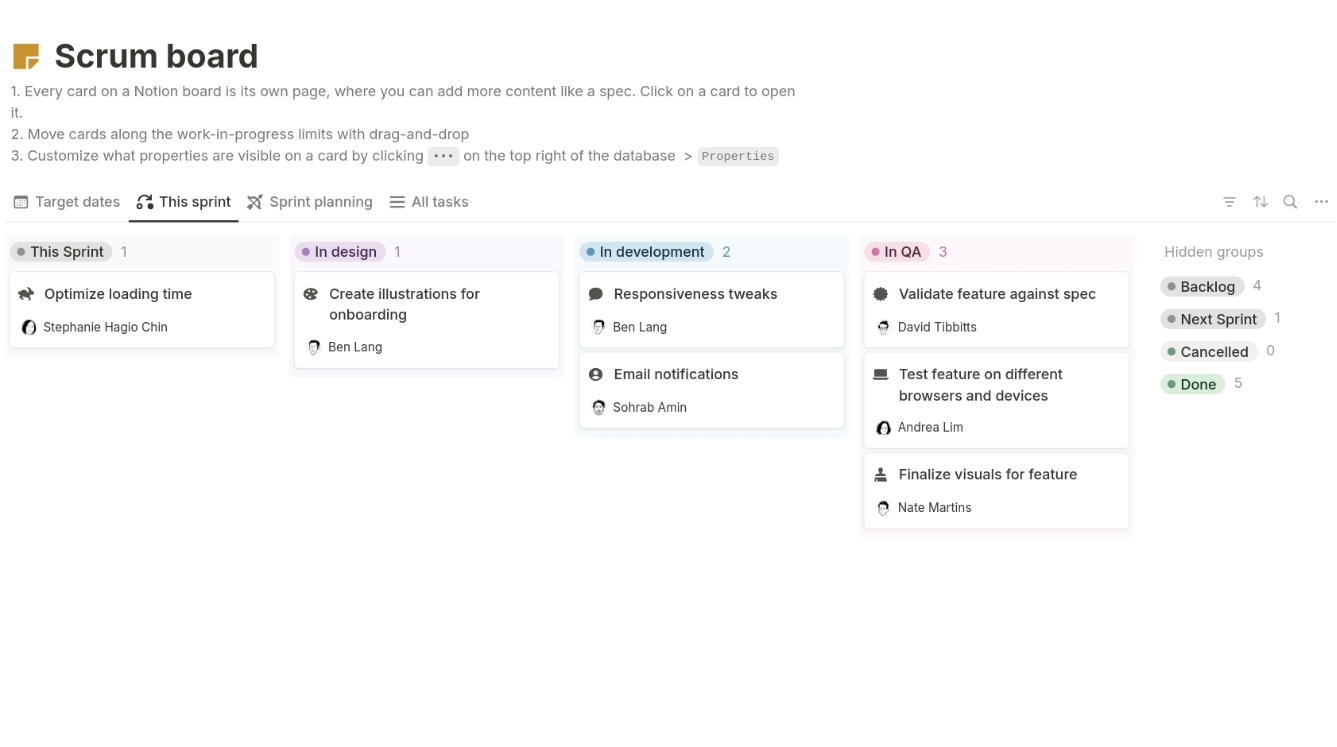
Notion

Notion scrum board showing sprint tasks, backlog items, and workflow progress

Notion provides scrum project management features for planning sprints, organizing tasks.

Notion is an all-in-one productivity and collaboration tool that functions as a customizable digital workspace.

Best for: Small teams that need real flexibility in their software. 

Pros

  • Flexible database-driven workflows.
  • Powerful database features. 

Cons

  • Scrum setups require more manual configuration.
  • Steep learning curve for users can be off putting
  • Can be overly complex

Pricing

  • Free plan available
  • Basic plans from $10

Zoho Sprints

Zoho Sprints scrum board showing sprint tasks, backlog items, and workflow progress

Zoho Sprints offers scrum project management tools.

Zoho Sprints is a cloud-based agile project management tool designed to help teams, particularly those following the Scrum methodology

Best for: Small to medium teams who want simple Scrum software to use

Pros

  • A lightweight Scrum-specific tool.
  • Good for SMBs wanting structure without the overhead of larger platforms.

Cons

  • Users say it can be glitchy
  • Lacks advanced features
  • Tricky to learn if you’re not familiar with Zoho

Pricing

  • Free plan for 3 users
  • Tiers start from $1 per month

Using Kanbanchi as an Agile Project Hub in Google Workspace

Imagine a product team managing a quarterly release cycle. They run two-week sprints, handle continuous delivery, and collaborate across design, QA, engineering, and support. Here’s how Kanbanchi acts as their Agile hub:

Backlog Management

The Product Owner organizes backlog items in Kanbanchi:

  • Story points (via custom properties)
  • Priority
  • Epic
  • Status

Google Docs containing specs or designs are attached directly to cards.

Sprint Planning

  1. The team drags prioritized cards from the backlog to the sprint list.
  2. Dependencies appear in Gantt view, reducing the risk of unplanned blockers.

Daily Standups

  1. The board becomes the single source of truth.
  2. Every card update is recorded in Activity.
  3. Team members comment directly on tasks, mention colleagues, and attach files.

Kanbanchi’s native Workspace integration keeps everything lightweight, accessible, and highly collaborative.

Step-by-Step: Setting Up a Scrum Workflow in Kanbanchi

Teams can set up Scrum workflows in Kanbanchi within minutes.

1. Create the Product Backlog

  1. Start by building a board.
  2. Add cards for every task, feature, or bug.
  3. Use labels and custom fields to categorize by epic, story points, and priority.

2. Configure Sprint Columns

Add columns such as:

  • Backlog
  • Sprint Backlog
  • In Progress
  • In Review
  • Done

This forms the core of your Scrum board.

3. Add Story Points and Acceptance Criteria

Use custom fields to capture:

  • Story points
  • Additional task metadata

Teams stay aligned when every card displays the right context.

4. Use Gantt View for Visibility

Switch to Gantt view to map dependencies. This helps teams align sprints with larger roadmaps or release plans.

5. Track Sprint Progress Automatically

As cards move, Kanbanchi updates sprint progress in real time. Scrum Masters get instant insights through automated tracking.

6. Run Standups Inside the Board

Use the Kanban view during daily Scrum. Everything is clear, visual, and easy to discuss. It’s so simple to run an effective Scrum workflow with us. By choosing Kanbanchi, you are investing in a future where Agile project planning becomes a seamless extension of your daily work in Google. Choose integrated tools, like Kanbanchi, and you’ll get the most powerful visualization tools like Scrum, Kanban, and Gantt, and native compatibility with Google Workspace.

If you want the best Scrum software for your team, alongside all the benefits a Kanban board then your tried and trusted solution is straightforward: Kanbanchi. 

For seamless project management solutions with Google Workspace

Try Kanbanchi Today

FAQs Scrum Project Management Software

What is Scrum project management software?

It’s software designed to support Agile teams with sprint planning, backlog organization, Scrum boards, and performance tracking. It helps teams manage work in short cycles and adapt quickly to changes.

Is Kanbanchi suitable for Scrum teams?

Yes. Kanbanchi supports backlog management, customizable Scrum boards, Gantt timelines, and Google Workspace collaboration—making it ideal for organizations already using Google tools.

What’s the difference between Scrum boards and Kanban boards?

Scrum boards reset every sprint, focusing on time-boxed delivery.
Kanban boards track continuous flow.
Many teams use a hybrid—Scrumban—which Kanbanchi supports.

How do I choose the best Scrum project management software?

Look for ease of use, backlog management tools, sprint planning workflows, charts, integrations with your existing tools, and flexible board customization. Choose the platform that matches your team size and process maturity.

What’s the best Scrum software for Google Workspace users?

Kanbanchi stands out because it’s built natively for Google Workspace. Cards, comments, file sharing, and collaboration all work directly with Drive, Docs, Sheets, Gmail, and Calendar.


SIGN-UP FOR A FREE TRIAL NOW

    MultipleAuthors\Classes\Objects\Author Object
    (
        [term_id] => 918
        [term:MultipleAuthors\Classes\Objects\Author:private] => 
        [metaCache:MultipleAuthors\Classes\Objects\Author:private] => Array
            (
                [user_email] => lyubov.kozlova@kanbanchi.com
                [user_id] => 7
                [first_name] => Lyubov Kozlova
                [last_name] => 
                [job_title] => Blog editor and PM expert at Kanbanchi
                [description] => Helping Project Managers Use Kanbanchi for Effective Team Collaboration
                [user_url] => https://uk.linkedin.com/in/lyubov-kozlova-167906181
            )
    
        [userObject:MultipleAuthors\Classes\Objects\Author:private] => WP_User Object
            (
                [data] => stdClass Object
                    (
                        [ID] => 7
                        [user_login] => lyubov.kozlova
                        [user_pass] => $wp$2y$10$GPJi4BJo10p1GiS9f9aHZOJSmPdgPi1hpFiwLGdEULUf5r0oHbJ06
                        [user_nicename] => lyubov-kozlova
                        [user_email] => lyubov.kozlova@kanbanchi.com
                        [user_url] => https://uk.linkedin.com/in/lyubov-kozlova-167906181
                        [user_registered] => 2019-03-21 13:04:32
                        [user_activation_key] => 
                        [user_status] => 0
                        [display_name] => Lyubov Kozlova
                    )
    
                [ID] => 7
                [caps] => Array
                    (
                        [editor] => 1
                        [author] => 1
                        [contributor] => 1
                    )
    
                [cap_key] => wp_capabilities
                [roles] => Array
                    (
                        [0] => editor
                        [1] => author
                        [2] => contributor
                    )
    
                [allcaps] => Array
                    (
                        [moderate_comments] => 1
                        [manage_categories] => 1
                        [manage_links] => 1
                        [upload_files] => 1
                        [unfiltered_html] => 1
                        [edit_posts] => 1
                        [edit_others_posts] => 1
                        [edit_published_posts] => 1
                        [publish_posts] => 1
                        [edit_pages] => 1
                        [read] => 1
                        [level_7] => 1
                        [level_6] => 1
                        [level_5] => 1
                        [level_4] => 1
                        [level_3] => 1
                        [level_2] => 1
                        [level_1] => 1
                        [level_0] => 1
                        [edit_others_pages] => 1
                        [edit_published_pages] => 1
                        [publish_pages] => 1
                        [delete_pages] => 1
                        [delete_others_pages] => 1
                        [delete_published_pages] => 1
                        [delete_posts] => 1
                        [delete_others_posts] => 1
                        [delete_published_posts] => 1
                        [delete_private_posts] => 1
                        [edit_private_posts] => 1
                        [read_private_posts] => 1
                        [delete_private_pages] => 1
                        [edit_private_pages] => 1
                        [read_private_pages] => 1
                        [wpseo_bulk_edit] => 1
                        [copy_posts] => 1
                        [ppma_edit_post_authors] => 1
                        [ppma_edit_own_profile] => 1
                        [editor] => 1
                        [author] => 1
                        [contributor] => 1
                    )
    
                [filter] => 
                [site_id:WP_User:private] => 1
            )
    
        [hasCustomAvatar:MultipleAuthors\Classes\Objects\Author:private] => 1
        [customAvatarUrl:MultipleAuthors\Classes\Objects\Author:private] => Array
            (
                [url] => https://www.kanbanchi.com/wp-content/uploads/2025/08/photo_2019-01-17_12-45-57-1.jpg
                [url2x] => https://www.kanbanchi.com/wp-content/uploads/2025/08/photo_2019-01-17_12-45-57-1.jpg
            )
    
        [avatarUrl:MultipleAuthors\Classes\Objects\Author:private] => 
        [avatarBySize:MultipleAuthors\Classes\Objects\Author:private] => Array
            (
                [96] => 
                [80] => 
                [50] => 
            )
    
    )
    
  • Blog editor and PM expert at Kanbanchi

    Helping Project Managers Use Kanbanchi for Effective Team Collaboration

    All articles
Share

Try Kanbanchi now

  • Collaborate seamlessly
    with your team
  • Integrate Kanbanchi
    with Google or Microsoft
  • Manage all your work in one place
Start for free

Start using Kanbanchi now

Start your free trial