-  views

15 Best Creative Workflow Management Software for Agencies in 2026

Try Kanbanchi now

Start your free trial

 

Creative workflow management software for organizing projects, tasks, and team collaboration.

In 2026, the difference between a good agency and a great one isn’t just about talent; it’s about process as well. You can have the best team members in the world, but if they can’t work together in tandem, then it’s about as much use as a fish on a bicycle (kudos if you’re old enough to remember the Ogilvy & Mather ad campaign)… These days, ace teams have moved beyond messy spreadsheets and endless email chains. They’re now using creative workflow management software to fortify their focus time. 

Ever felt like your creative genius is being held hostage by a messy inbox? You’re in the middle of a killer campaign, and then it happens….

  • A notification pings…Then another… 
  • A client wants a quick review of a project you completed last week. 
  • A teammate is asking where the latest version of a logo has disappeared to. 

Suddenly, your creative time has been swallowed up by administrative chaos that you can’t put off. Nodding along? You aren’t alone. We all know that creative work isn’t a neat, straight line! But that doesn’t mean it’s got to be a hotch-potch of unfinished tasks piling up, either. 

But with a sea of tools claiming to be the all-in-one go-to solution, how do you find the one that actually understands the nuances of a creative agency? It can feel a bit overwhelming, right? 

Don’t worry, we’re here to help you pick out the right tool. So, whether you are a small design studio or a massive marketing department integrated into Google Workspace, Kanbanchi’s guide will walk you through the top 15 solutions to help you reclaim your time and your sanity.

Are you ready to start your next creative campaign with purpose? Then let’s get it up and running for you. 

Top 15 Creative Workflow Management Software 2026

  • Kanbanchi: Best for Google Workspace teams who want lightweight project management inside Drive.
  • Monday.com: Ideal for teams needing a flexible, visual way to organize multiple projects.
  • ClickUp: Great for teams wanting an all-in-one workspace for tasks, docs, and tracking.
  • Asana: Suited for teams managing small to large projects with clear task overviews.
  • Wrike: Works well for teams handling multiple projects requiring structured workflows.
  • Productive.io: Best for teams combining project management with time and resource tracking.
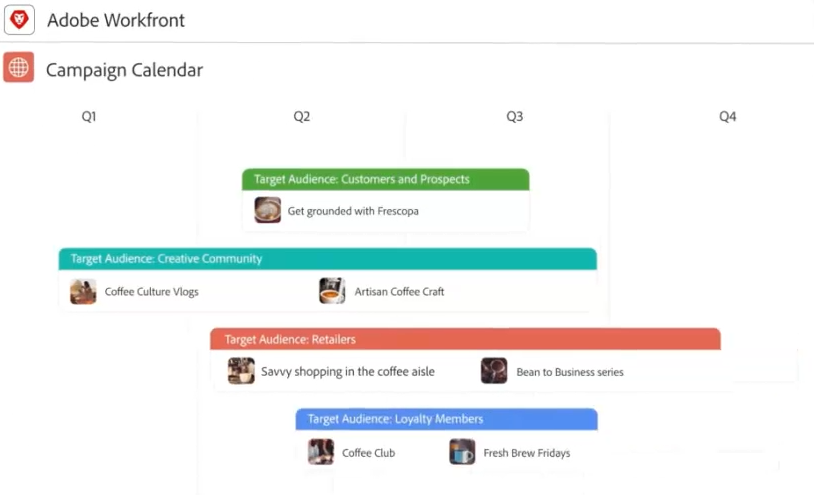
  • Adobe Workfront: Good for teams managing large-scale campaigns or enterprise projects.
  • Planable: Designed for social media teams to plan and coordinate content campaigns.
  • Teamwork: Ideal for teams needing a simple platform to manage projects and progress.
  • Airtable: Great for teams wanting a flexible, database-style approach to projects and collaboration.
  • Notion: Suited for teams needing a flexible workspace for projects and documents.
  • Filestage: Best for teams focused on creative review and approval workflows.
  • Ziflow: Works well for teams streamlining review cycles and feedback efficiently.
  • Scoro: Ideal for teams combining project management and task tracking in one platform.
  • Nifty: Great for teams wanting a centralized workspace to manage projects and collaboration.

Creative Teams Need Creative Workflow Management

Let’s be honest: standard project management tools can sometimes feel like wearing a suit that’s three sizes too small! 

They’re often built for software developers or accountants, focusing on rigid Done/Not Done logic that doesn’t account for the iterative nature of creativity. Creative teams need something different. They need the room to breathe, but they also need guardrails. 

Here is why specialized software is no longer a luxury: it’s a survival requirement.

1. Centralized Team Communication

Stop hunting for feedback in the Deleted Items folder! When your communication is centralized, every comment, critique, and “can you just…?” (oh, how we love one of those…) request lives exactly where the work is happening. It creates a single area that keeps everyone from the intern to the Creative Director on the same page.

2. Document and Asset Tracking

Does “Is this ‘v2_final’ or ‘v2_final_FINAL_FOR_REAL’?” sound familiar? Thought so…

Creative workflow tools eliminate versioning nightmares. By tracking documents and assets within the task, you ensure the designer is always working on the right brief and the client is always reviewing the right draft.

3. Managing Time and Capacity

Creativity cannot be infinitely scaled, but it can be managed. 

Good software helps you visualize team capacity and can answer questions like: 

  1. Are your designers burnt out? 
  2. Is your copywriter sitting idle? 

Data-driven insights help you balance workloads and set realistic deadlines that avoid 5.00 pm on Friday crunch sessions.

4. Streamlining the Approval Loop

The biggest bottleneck in any creative agency is the approval process. 

Specialized tools offer proofing and annotation features, allowing clients or stakeholders to leave feedback directly on the image or video file. 

No more vague “can you just alter the blue bit of text on the top left-hand corner?” Just a pinpointed comment that tells the designer exactly what needs to change.

5. Integration with Existing Ecosystems

Most creative teams live in two places: 

  1. Their design suite (Adobe, Canva, Figma)…and 
  2. Their communication suite (Google Workspace or Microsoft 365). 

A great workflow tool doesn’t ask you to leave these environments; it bridges the gap between them.

The bottom line is that workflow management isn’t about adding more ‘work about work’. It’s about removing the friction that stops you from doing what you were hired to do: create.

More articles about Project Management

Key Features to Look For in Creative Agency Software

Choosing a tool isn’t just about the prettiest interface; it’s about the mechanics under the hood. For a creative agency, specific non-negotiable features separate a generic task list from a true workflow engine.

We reckon there are five things to look out for when you’re weighing up your options. 

1. Visual Task Management like Kanban & Gantt

Creatives are visual by nature. A wall of text is where productivity goes to die. 

Look for software that offers Kanban boards to track design stages and Gantt charts to visualize how a task delay (e.g., a late copy draft) affects the final launch date. 

Ensure the tool allows you to toggle between views instantly, too. 

2. Built-in Proofing and Approval Tools

The Feedback Loop from Hell happens when comments are scattered across: 

  • Slack
  • Email, and 
  • Documents

The best tools have native proofing. This allows everyone involved in a task to click directly on an image or video to leave a comment. Other great tools to look for are: 

  • Version Control: Can you view the Before and After side by side?
  • Audit Trails: Can you prove who approved what and when?

3. Smart Resource & Capacity Planning

Can your lead designer actually take on that new branding project? 

Without resource management, you’re just guessing. Look for Workload View features that show you exactly how many hours each team member has booked. 

This prevents burnout and helps you set deadlines that are realistically achievable.

4. Client Collaboration Portals

You want clients to see the progress, but you don’t necessarily want them to see your internal messy drafts or frantic team chats. 

Specialized software offers private vs. public comments and dedicated client portals that let them view only what you’ve cleared for their eyes.

5. Seamless Ecosystem Integration

Your workflow software should be the glue that holds everything together. 

It needs to play nice with the tools your team already uses every day, like your: 

  • Creative Suite: Adobe Creative Cloud or Figma.
  • Productivity Tools: Deep integration with Google Workspace (Drive, Calendar, and Gmail) is essential for agencies seeking to avoid constant context switching.

With all that in mind, what do we think are the best creative workflow management software solutions for 2026? We’ve put together our final list below. 

Check out some of Kanbanchi’s success stories

The Best Creative Workflow Management Software: Top 15 Ratings

There are so many tools vying for your attention, so we’ve cut through the noise to bring you the top contenders for 2026. And it doesn’t matter whether you’re a boutique studio or a sprawling global agency; one of these will likely become your new operational home.
1. Kanbanchi

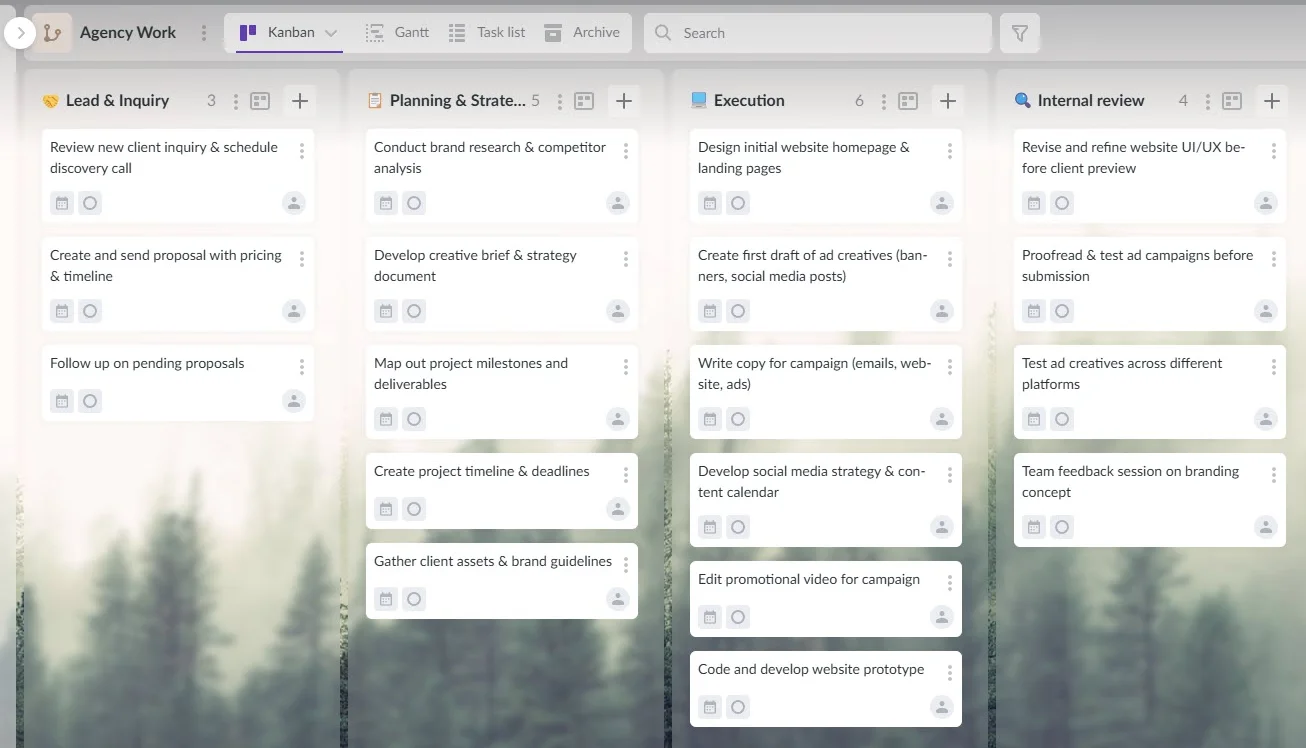
Kanbanchi project board inside Google Drive showing a creative workflow with tasks, timelines, and team collaboration

Kanbanchi helps creative teams manage projects directly inside Google Drive, combining visual task boards, timelines, and real-time collaboration.

Kanbanchi isn’t just a tool; it’s an extension of your Google ecosystem. As a creative workflow management software, Kanbanchi stands out by embedding project management directly into the tools creative teams already use daily. It lives inside your Google Drive, meaning your project boards are as accessible as a Google Doc.

This native integration makes Kanbanchi an ideal project management solution for creative teams that rely on Google Workspace for file sharing, collaboration, and communication.

Best For: Google Workspace power users and agencies seeking a seamless native feel.

It’s particularly well-suited for marketing teams, design studios, and creative agencies that need flexibility without sacrificing structure or visibility.

Key Features:

  • Colour labels and tags to categorize tasks
  • Gantt charts
  • Time tracking
  • Google Drive attachments
  • Direct Gmail integration (turn emails into tasks)

These features support end-to-end creative workflow management, from initial ideation and content planning to production timelines and delivery tracking.

Pros

  • Zero learning curve for Google users
  • Highly secure
  • Very affordable

Compared to more complex creative project management software, Kanbanchi offers a lightweight yet powerful alternative that keeps teams focused on creativity rather than configuration.

Cons

  • Primarily built for the Google environment

That focus, however, is exactly what makes Kanbanchi such a strong choice for creative teams that already rely on Google Workspace and want a lightweight, flexible workflow tool that doesn’t get in the way of creative thinking.

START A FREE TRIAL TODAY

2. Monday.com

Monday.com workspace showing a creative team collaborating on projects

Ideal for marketing teams, agencies, and creative departments, Monday.com platform helps teams stay aligned and manage projects efficiently.

Monday.com is famous for its colorful, “building-block” approach. It’s highly flexible, allowing you to build a CRM, a content calendar, or a video production pipeline on the same platform.

Best For: Visual teams who love customization.

Key Features: 

  • Over 200 templates, 
  • No-code automations, 
  • Native proofing (on Pro plans)

Pros

  • Highly visual
  • Good mobile app

Cons

  • Can get expensive quickly
  • 3-seat minimum requirement

3. ClickUp

ClickUp workspace showing a creative team collaborating on projects and tasks

ClickUp is used by marketing teams, creative agencies, and content studios to manage projects and coordinate team work.

ClickUp is the heavyweight of features. It combines documents, goals, whiteboards, and tasks into a single digital workspace.

Best For: Agencies seeking a single tool to replace them all.

Key Features: 

  • 15+ task views
  • built-in screen recording (Clip)
  • AI-powered standups

Pros

  • Offers decent enough value for money
  • Has a large feature set

Cons

  • Steep learning curve for teams that aren’t used to software
  • Can feel almost too operationally busy for simple teams

4. Asana

Asana workspace showing a creative team managing projects and tasks

Marketing teams, creative agencies, and content studios use Asana to organize projects and track team work.

Asana excels at Work Graph logic, helping teams understand how a single design task connects to a multimillion-dollar campaign goal.

Best For: Marketing teams focused on pipeline visibility and coordination.

Key Features

  • Workflow Builder
  • advanced reporting, 
  • A Goal tracker for OKRs.

Pros 

  • Quite intuitive
  • Decent automation rules

Cons

  • Heavy focus on collaboration 
  • Lack of financial/budget tracking options for teams

5. Wrike

Wrike workspace is a creative workflow management software

Used by teams in marketing, creative, and content production, Wrike helps organize and track projects.

Wrike is built for Creative Ops. It excels at well-structured intake forms and at managing complex, multi-layered tasks for teams working in sprints. 

Best For: Large-scale creative operations and enterprise agencies.

Key Features: 

  • Dynamic request forms
  • Adobe Creative Cloud integration
  • AI risk prediction

Pros

  • Good for scaling
  • Has great security options for teams

Cons

  • Interface can feel a bit too corporate compared to more nimble tools
  • It’s a bit trickier to learn than other tools on the market 

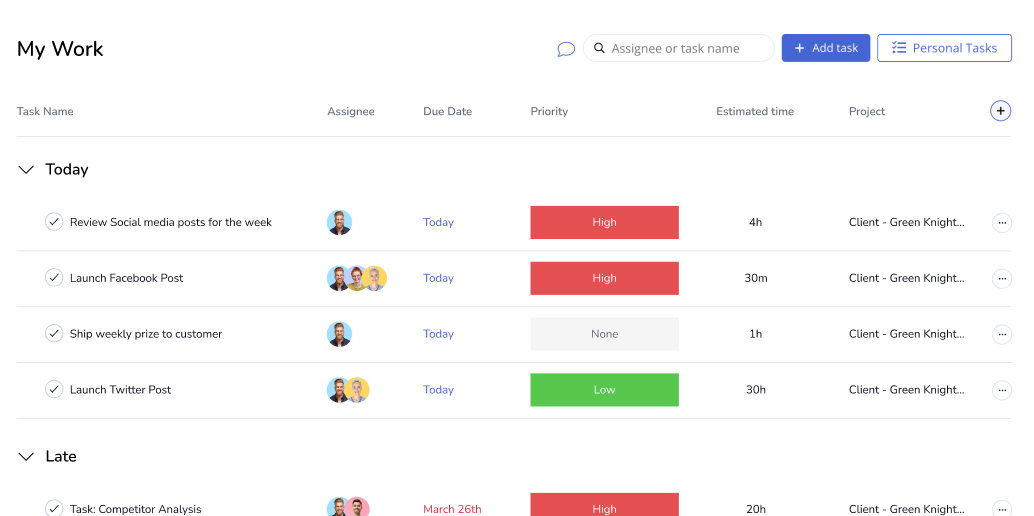
6. Productive.io

Productive.io is a creative workflow management software

Teams use Productive.io to keep projects on track and make collaboration smoother.

Productive is unique for combining project management with agency finances. It tracks your billable hours and tells you if a project is actually profitable.

Best For: Agencies that care about the bottom line.

Key Features
  • Sales CRM
  • Resource planning
  • Real-time profitability tracking

Pros

  • All-in-one for agency owners

Cons

  1. Might be overkill for pure creative teams that don’t handle billing
  2. A complex range of financial options might put smaller teams off

7. Adobe Workfront

Adobe Workfront workspace showing a team managing projects and collaborating

Teams use Adobe Workfront to turn complex projects into clear, manageable workflows.

If your day starts and ends in Photoshop or Premiere, then Workfront offers deep, native connectivity that few can match. 

Best For: Teams living exclusively in the Adobe ecosystem and who are already familiar with it. 

Key Features

  • Strategic portfolio management
  • High-level capacity planning

Pros

  • Probably the best tool for heavy video and design production

Cons

  • Very high price point that might rule it out for small teams on a tight budget
  • Has a complex setup best tackled by IT teams

8. Planable

Planable workspace showing a team planning social media campaigns

Teams use Planable to organize, review, and coordinate social media campaigns, keeping content and schedules aligned.

Planable is laser-focused on one thing: getting content approved. It offers a WYSIWG: What You See Is What You Get preview of social posts.

Best For: Social media and content agencies that are small or scaling up. 

Key Features
  • Multi-level approval workflows
  • Good social media scheduling tools

Pros

  • Simplest approval process on the market

Cons

  1. Limited to social/content workflows
  2. No use to teams who need other services

9. Teamwork.com

Teamwork workspace showing a team coordinating projects and tasks

Teams use Teamwork to organize projects, track progress, and keep everyone aligned on tasks and deadlines.

Teamwork lets you bring your clients into the platform for free, giving them a window into the project without exposing your internal discussions.

Best For: Client-facing agencies that need to work in better tandem with them

Key Features

  • Integrated helpdesk
  • Billing and finance options
  • Decent client collaboration portals

Pros

  • Great for transparency and trust-building
  • Enhances client relationships 

Cons

  • The user interface can feel a bit dated to some
  • Paid plans are steeply priced and not competitive enough

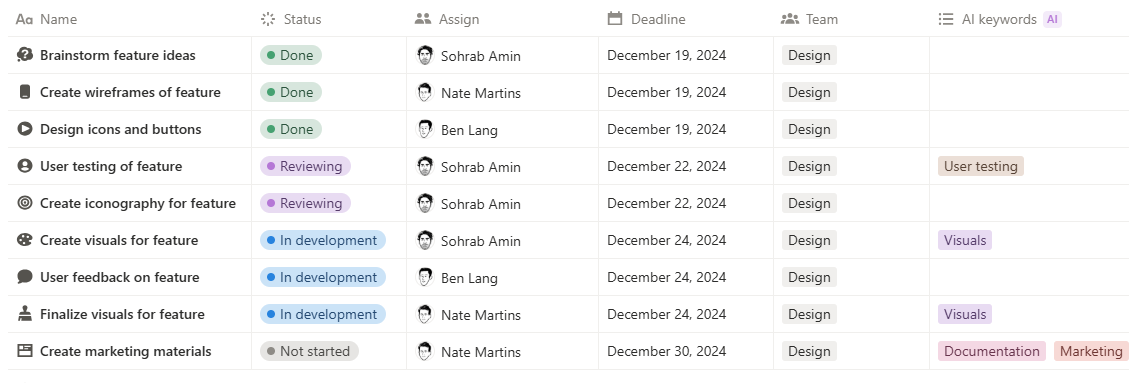
10. Airtable

Airtable workspace showing a team managing projects and data collaboratively

From planning to execution, Airtable helps teams coordinate work and stay on track.

Airtable is part-database, part-spreadsheet. It’s perfect for managing large asset banks or complex content calendars for teams running multiple creative campaigns simultaneously. 

Best For: Data-heavy creative teams such as editorial or video libraries. 

Key Features
  • Custom metadata schemas
  • Good interface design

Pros

  • Offers decent flexibility for data lovers

Cons

  • Requires teams to build their own tool
  • It’s not an out-of-the-box task manager
  • Can be complex to learn from the outset

11. Notion

Notion workspace showing a team managing projects and collaborating on tasks

From planning to execution, Notion allows teams to coordinate projects and streamline collaboration.

Notion is where the brief lives. It’s the ultimate wiki that happens to have a project board attached to it. 

Best For: Documentation-first teams and small studios.

Key features

  • AI powered tool
  • Real-time collaboration
  • Good databases

Pros

  • A minimalist tool so great for teams who don’t want clutter
  • Great for long-form writing.

Cons

  • Lacks advanced PM features 
  • No Gantt dependencies
  • No time tracking

12. Filestage

Filestage workspace showing a team reviewing and managing creative projects

Teams use Filestage to review, organize, and keep creative projects on track from start to finish.

Filestage is a cloud-based proofing platform that streamlines content review and approval for creative marketing teams. It’s not a full PM tool, but a specialist in feedback. If you just need a place to sign off on art, this is it.

Best For: Dedicated review and approval of work. 

Key Features

  • Fully cloud-based for ease of use

Pros

  • User-Friendly
  • No Registration required

Cons

  • High cost and is expensive compared to more flexible or simpler alternatives.
  • Some users report glitches with notifications 

13. Ziflow

Ziflow workspace showing a team reviewing and collaborating on projects

Ziflow helps teams coordinate feedback and keep projects moving smoothly.

This is an enterprise-grade online proofing platform designed to streamline the review and approval of creative content, including videos, websites, and documents. Again, this isn’t a full PM tool, but worth including for those who don’t need a whole set of features. 

Best For: Compliance-heavy creative proofing and for enterprise marketing teams that need audit trails for every revision.

Key features

  • Versatile proofing tool
  • Integrates with Adobe

Pros

  • Has a decent enough automated workflow
  • Offers centralized feedback for everyone

Cons

  • Expensive to run and might not work for small teams
  • Notification management can be difficult to control

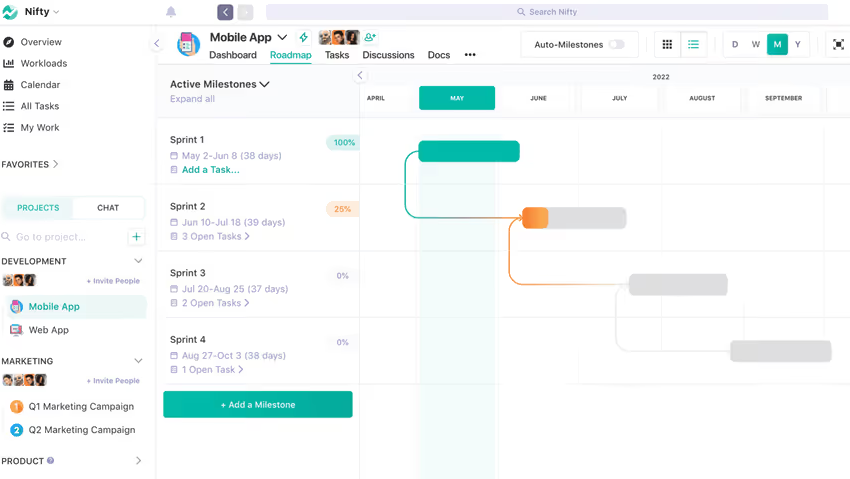
14. Scoro

Scoro workspace showing a team managing projects and collaborating

Scoro aligns tasks, deadlines, and collaboration in one workspace.

This is a robust, all-in-one business management software tool designed for agencies and professional services. It combines quoting, project management, and reporting into a single platform. 

Best For: Operations-heavy agencies.

Key features
  • Highly customisable 
  • Good task manager

Pros

  • Can help with streamlining the billing process for financial teams
  • Offers good collaboration options

Cons

  • Its integration capabilities aren’t always successful (such as with Outlook)
  • It can be costly to set up and run

15. Nifty

Nifty workspace showing a team collaborating and managing projects

From planning to execution, Nifty helps teams stay coordinated and on track.

A solid mid-tier tool that bridges the gap between simplicity and power. It’s an all-in-one project management tool with a visual interface, list views, and a built-in team chat. 

Best For: Consolidating multiple projects into one Master view.

Key features

  • Intuitive visual workface
  • Offers a mobile app

Pros

  • Decent client collaboration options
  • No real learning curve

Cons

  • The mobile app is good, but limited
  • Reporting and analytics aren’t as comprehensive as they could be

So, you’ve read our rundown. Now, here’s why we think Kanbanchi is a great solution for your creative workflow management. 

Why Kanbanchi is the Best Choice for Creative Teams on Google Workspace

If your agency runs on Google Workspace, you’ve likely felt the friction of using outside tools. 

You have to:

  • Create new logins
  • Manually upload files from Drive, and
  • Constantly flip between tabs just to check an email.

Kanbanchi is different. It wasn’t just integrated with Google; it was built for it.
1. No New Logins, No Learning Curve

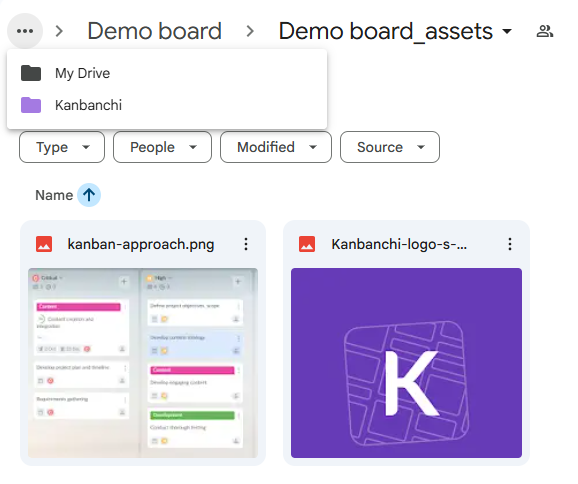
Kanbanchi creative workflow management software in Google Drive interface showing project boards and stored assets

Kanbanchi allows teams to manage projects and store creative assets directly in Google Drive, keeping work organized and accessible.

Kanbanchi lives right inside your Google ecosystem. You sign in with your existing Google account, and your project boards are stored as files directly in your Google Drive. 

For a creative team, this means your work and your management are finally in the same place. If you can use a Google Doc, you can use Kanbanchi.

2. The Gmail-to-Task Magic

We’ve all been there: a client sends a project-changing request via email, and it immediately gets buried under 50 other messages. 

With the Kanbanchi for Gmail add-on, you can turn that email into a task card on your Kanban board with one click. 

The email subject becomes the title, and the body becomes the description. No more copying and pasting, just seamless action.

3. Board-specific Permissions

Tired of manually managing who can see or edit each project?

Kanbanchi lets you set board-specific access permissions, so you control exactly who can view or edit each board. Whether it’s a design review or a client campaign, team members only see what they’re meant to.

It’s enterprise-grade security with flexible access control, without the administrative headache.

4. Direct Drive & Calendar Sync

Need to attach a high-res mockup to a task? Pick it directly from your Drive or Shared Drive without downloading a thing. 

Want to see your deadlines in your personal schedule? Kanbanchi pushes start and due dates directly to your Google Calendar. 

It ensures that your due date isn’t just a number on a board, it’s a blocked-off slot in your day.

5. Data Security

In an age of data privacy concerns, Kanbanchi gives you peace of mind. Because your boards are stored in your own Google Drive, you own your data. 

It adheres to your company’s existing Google security policies, making it a favorite among IT departments and creative directors alike.

The Kanbanchi Advantage: It’s the only tool that makes Google Workspace feel like a fully functional project management suite.

Kanbanchi makes a neat fit into your team when you’re ready to start your next creative marketing campaign. 

Why? It’s easy to install, and for most, there’s virtually no learning curve. Whatever stage you’re at in your search for creative workflow software, Kanbanchi seamlessly integrates with your systems, workflows, and team to ensure success. 

Get in touch, and we can chat about Kanhanchi with you. Let’s get the important conversations started. Make your next marketing campaign a surefire success with our help. 

TRY KANBANCHI TODAY

FAQs: Choosing Your Creative Workflow Tool

If we’ve left any unanswered questions for you about finding the best creative workflow tool, here are some of the most frequently posed ones for you to check out. 

What is the difference between project management and workflow management?

Think of project management as the macro view. It’s about deadlines, budgets, and specific goals with a clear start and end (like a 3-month rebranding project). 

Workflow management is the micro view. It’s the repeatable, step-by-step process your team follows every single time you produce an asset, from the initial brief to the final export. One manages the project; the other manages the process.

How does workflow software actually save creative teams time?

The biggest time-sink in any agency isn’t the creative work; it’s the ‘work about work.’ Workflow software automates manual tasks like:

  • Notifications: Automatically pinging a designer when a brief is ready.
  • Status Updates: Moving a task from In Progress to Ready for Review without an email.
  • Centralization: Reducing the 30 minutes a day spent searching for the latest version of a file.

What is the best creative project management software for Google Workspace users?

For teams that live in Drive and Gmail, Kanbanchi is the undisputed leader. Unlike third-party tools that require constant context switching, Kanbanchi feels like a native part of your Google Workspace. 

It stores data in your Drive and lets you convert emails into tasks instantly, keeping your workflow unified.

How can agencies manage client approvals more efficiently?

The secret is moving away from email. Use a tool like Kanbanchi. This allows clients to leave comments directly on the tasks. 

It creates a clear audit trail and ensures your team never misses a v3 revision request hidden in a long email thread.
    MultipleAuthors\Classes\Objects\Author Object
    (
        [term_id] => 918
        [term:MultipleAuthors\Classes\Objects\Author:private] => 
        [metaCache:MultipleAuthors\Classes\Objects\Author:private] => Array
            (
                [user_email] => lyubov.kozlova@kanbanchi.com
                [user_id] => 7
                [first_name] => Lyubov Kozlova
                [last_name] => 
                [job_title] => Blog editor and PM expert at Kanbanchi
                [description] => Helping Project Managers Use Kanbanchi for Effective Team Collaboration
                [user_url] => https://uk.linkedin.com/in/lyubov-kozlova-167906181
            )
    
        [userObject:MultipleAuthors\Classes\Objects\Author:private] => WP_User Object
            (
                [data] => stdClass Object
                    (
                        [ID] => 7
                        [user_login] => lyubov.kozlova
                        [user_pass] => $wp$2y$10$GPJi4BJo10p1GiS9f9aHZOJSmPdgPi1hpFiwLGdEULUf5r0oHbJ06
                        [user_nicename] => lyubov-kozlova
                        [user_email] => lyubov.kozlova@kanbanchi.com
                        [user_url] => https://uk.linkedin.com/in/lyubov-kozlova-167906181
                        [user_registered] => 2019-03-21 13:04:32
                        [user_activation_key] => 
                        [user_status] => 0
                        [display_name] => Lyubov Kozlova
                    )
    
                [ID] => 7
                [caps] => Array
                    (
                        [editor] => 1
                        [author] => 1
                        [contributor] => 1
                    )
    
                [cap_key] => wp_capabilities
                [roles] => Array
                    (
                        [0] => editor
                        [1] => author
                        [2] => contributor
                    )
    
                [allcaps] => Array
                    (
                        [moderate_comments] => 1
                        [manage_categories] => 1
                        [manage_links] => 1
                        [upload_files] => 1
                        [unfiltered_html] => 1
                        [edit_posts] => 1
                        [edit_others_posts] => 1
                        [edit_published_posts] => 1
                        [publish_posts] => 1
                        [edit_pages] => 1
                        [read] => 1
                        [level_7] => 1
                        [level_6] => 1
                        [level_5] => 1
                        [level_4] => 1
                        [level_3] => 1
                        [level_2] => 1
                        [level_1] => 1
                        [level_0] => 1
                        [edit_others_pages] => 1
                        [edit_published_pages] => 1
                        [publish_pages] => 1
                        [delete_pages] => 1
                        [delete_others_pages] => 1
                        [delete_published_pages] => 1
                        [delete_posts] => 1
                        [delete_others_posts] => 1
                        [delete_published_posts] => 1
                        [delete_private_posts] => 1
                        [edit_private_posts] => 1
                        [read_private_posts] => 1
                        [delete_private_pages] => 1
                        [edit_private_pages] => 1
                        [read_private_pages] => 1
                        [wpseo_bulk_edit] => 1
                        [copy_posts] => 1
                        [ppma_edit_post_authors] => 1
                        [ppma_edit_own_profile] => 1
                        [editor] => 1
                        [author] => 1
                        [contributor] => 1
                    )
    
                [filter] => 
                [site_id:WP_User:private] => 1
            )
    
        [hasCustomAvatar:MultipleAuthors\Classes\Objects\Author:private] => 1
        [customAvatarUrl:MultipleAuthors\Classes\Objects\Author:private] => Array
            (
                [url] => https://www.kanbanchi.com/wp-content/uploads/2025/08/photo_2019-01-17_12-45-57-1.jpg
                [url2x] => https://www.kanbanchi.com/wp-content/uploads/2025/08/photo_2019-01-17_12-45-57-1.jpg
            )
    
        [avatarUrl:MultipleAuthors\Classes\Objects\Author:private] => 
        [avatarBySize:MultipleAuthors\Classes\Objects\Author:private] => Array
            (
                [96] => 
                [80] => 
                [50] => 
            )
    
    )
    
  • Blog editor and PM expert at Kanbanchi

    Helping Project Managers Use Kanbanchi for Effective Team Collaboration

    All articles
Share

Try Kanbanchi now

  • Collaborate seamlessly
    with your team
  • Integrate Kanbanchi
    with Google or Microsoft
  • Manage all your work in one place
Start for free

Start using Kanbanchi now

Start your free trial