-  views

Best Agile Project Management Software: Top 15 Tools for 2026

Try Kanbanchi now

Start your free trial

 

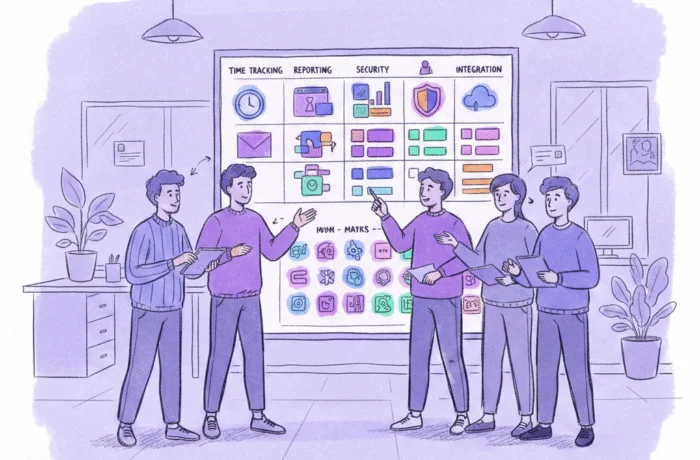
An illustration of a five-person agile team choosing software

Following my recent post with the 18 Best Strategic Planning Tools for Agile Growth in 2026, in this guide, the team here at Kanbanch is breaking down the 15 best agile project management software tools available in 2026 to help you ship faster and smarter.

Does your team ever feel like they’re wading through treacle in hiking boots, just to get the simplest tasks out on time? You’re not the only ones. In today’s business landscape, speed is a survival trait; therefore, what slows you can ultimately pull you down. Still trying to manage complex, shifting projects with rigid, linear plans? Then you’re likely feeling the friction. The truth is, the Waterfall method we’ve all used (where everything is mapped out from day one) can’t keep up with the rapid workflow changes we see. That’s not to say it’s wrong to use it, but you might need a rethink.

This is where Agile Project Management steps in. Agile isn’t just the next trendiest thing; it’s a mindset focused on breaking unwieldy projects into manageable walks in the park! It’s about delivering value to your customers with a click and the flexibility to pivot when market conditions change unexpectedly. But to run an agile team effectively, you need the right digital infrastructure. Statistics show that Agile projects are roughly 21% more successful than traditional projects. The right software isn’t just a cost; it’s a performance multiplier.

What Makes a Great Agile Project Management Tool?

Choosing an agile tool is about more than just a slick interface. It’s about finding the right project management platform that embodies the Agile Manifesto: prioritizing people and interactions over rigid processes. In 2026, a truly great agile tool must excel in these four areas:

1. Superior Visibility

Agile thrives on transparency. Everyone on the team should be able to see exactly what’s in the backlog, what’s currently in progress, and where the bottlenecks are. That’s why you need: 

  • Kanban Boards: Perfect for continuous flow, allowing you to visualize work and limit Work in Progress (WIP) to prevent burnout.
  • Scrum Boards: Essential for sprint-based teams, helping you manage fixed-length iterations and track progress toward a specific sprint goal.

2. Backlog & Sprint Management

Your backlog shouldn’t be a black hole of forgotten ideas. A top-tier tool makes it easy to: 

  • Monitor your backlog
  • Prioritize task management, and 
  • Drag tasks into an active sprint 

With zero friction and 100% accountability. 

3. Real-Time Collaboration & Feedback Loops

Agile is for team players. The best tools have built-in communication features:

  • Comments
  • Mentions, and 
  • File sharing

It keeps the conversation happening on the task, not buried in a separate Slack, email, or other messenger thread.

4. Native Ecosystem Integration

Too many tools that spoil the tech broth are a major productivity killer. Your agile software should play nicely with the apps you already use

For many of us, that means a tool that lives and breathes within Google Workspace, allowing you to turn a Google Doc idea into a task or sync a sprint deadline with your Google Calendar.

For the other half of businesses, it’s the app that connects with already used Microsoft products and can be accessed from the Microsoft account list of apps.

Taking all this into consideration, let’s now think about finding the right agile project management software tool for your team.

Read more blogs on Project Management

Top 15 Agile Project Management Software (2026 Best)

Navigating the sea of project tools can feel like a sprint in itself. To save you time, we’ve vetted the top 15 agile contenders for 2026, categorizing them by their “Agile Superpower.”

1. Kanbanchi

Kanbanchi is the go-to for teams tired of what we call tool sprawl. It lives inside your Google Drive, turning your familiar workspace into a professional agile environment with one click.
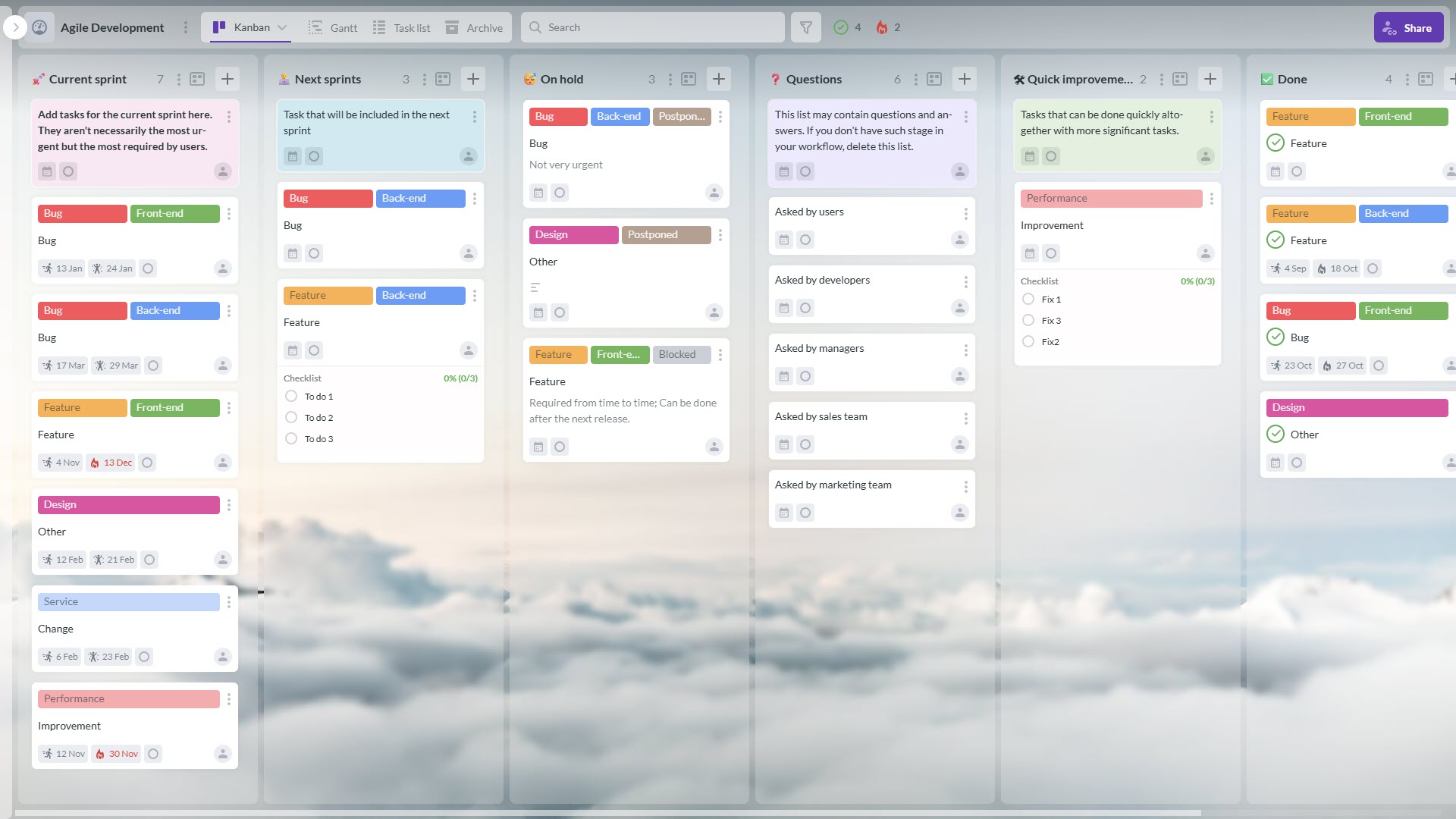
Kanban board used for the agile development

Kanbanchi provides a tool to support agile and digital transformation in project management

Best For: Seamless Agile execution within Google Workspace.

Key Features: One-click switch between Kanban and Gantt, Google Calendar sync, and native Google Drive security.

Pros:

  1. Zero learning curve for Google users
  2. Inherits enterprise-level security
Cons:

Most powerful when used within the Google ecosystem

START YOUR FREE TRIAL TODAY

2. Jira

It’s considered an industry standard for developers, and Jira offers deep, under-the-hood agile metrics that developers love.

A Jira active sprint board displaying user stories in columns like To Do, In Progress, and Done for a software team

Jira remains the industry standard for many technical agile teams

Best For: Technical software development and complex Scrum teams.

Pros:

  1. Robust burndown charts
  2. A massive integration library
Cons:

  1. Can be notoriously complex to set up
  2. The interface often feels clunky to non-developers

3. Monday Dev

Monday Dev is a highly colorful, intuitive platform that makes tracking Work in Progress actually look good for teams.

A screenshot of a <yoastmark class=

Best For: Visualizing cross-functional agile workflows for everyone

Pros:

  1. Extremely visual
  2. Powerful automation builders
Cons:

  1. Advanced agile features are available only with higher-tier plans
  2. Is a bit more complex to learn

4. ClickUp

ClickUp attempts to replace every app your team already has by offering docs, goals, and sprints in one place.

A <yoastmark class=

Best For: All-in-one consolidation for high-growth startups.

Pros:

  1. Good levels of customization
  2. The ClickUp Brain AI for task automation
Cons:

Too many features can clutter the interface and cause system lag

5. Asana

Asana excels at taking agile principles and making them accessible to marketing, HR, and design teams.

An Asana timeline view illustrating task dependencies and project milestones for a creative team

Asana’s timeline for the marketing team showcases a colorful interface

Best For: Fast adoption across non-technical agile teams.

Pros:

  1. Beautiful UI
  2. Easy to visualize task dependencies
Cons:

Lacks the deep dev-centric features (like native bug tracking) found in Jira

6. Zoho Sprints

A dedicated agile tool that focuses on planning and tracking sprints without the enterprise price tag, so great if your team is operating on a budget and wants a smaller-scale tool to try. 

A Zoho Sprints Scrum board showing backlog items moving through a standard sprint cycle

Zoho Sprints provides essential agile features like backlog management and timesheets

Best For: Backlog management for small Scrum teams.

Pros:

  1. Affordable
  2. Built-in timesheets and meeting planners
Cons:

  1. UI feels a bit dated compared to modern Work OS platforms
  2. May not be suitable for teams wanting something more comprehensive

7. Trello

Trello is the original king of the Kanban board, keeping agile simple for small teams and personal projects. Its post-it note feel keeps things simple and workable. 
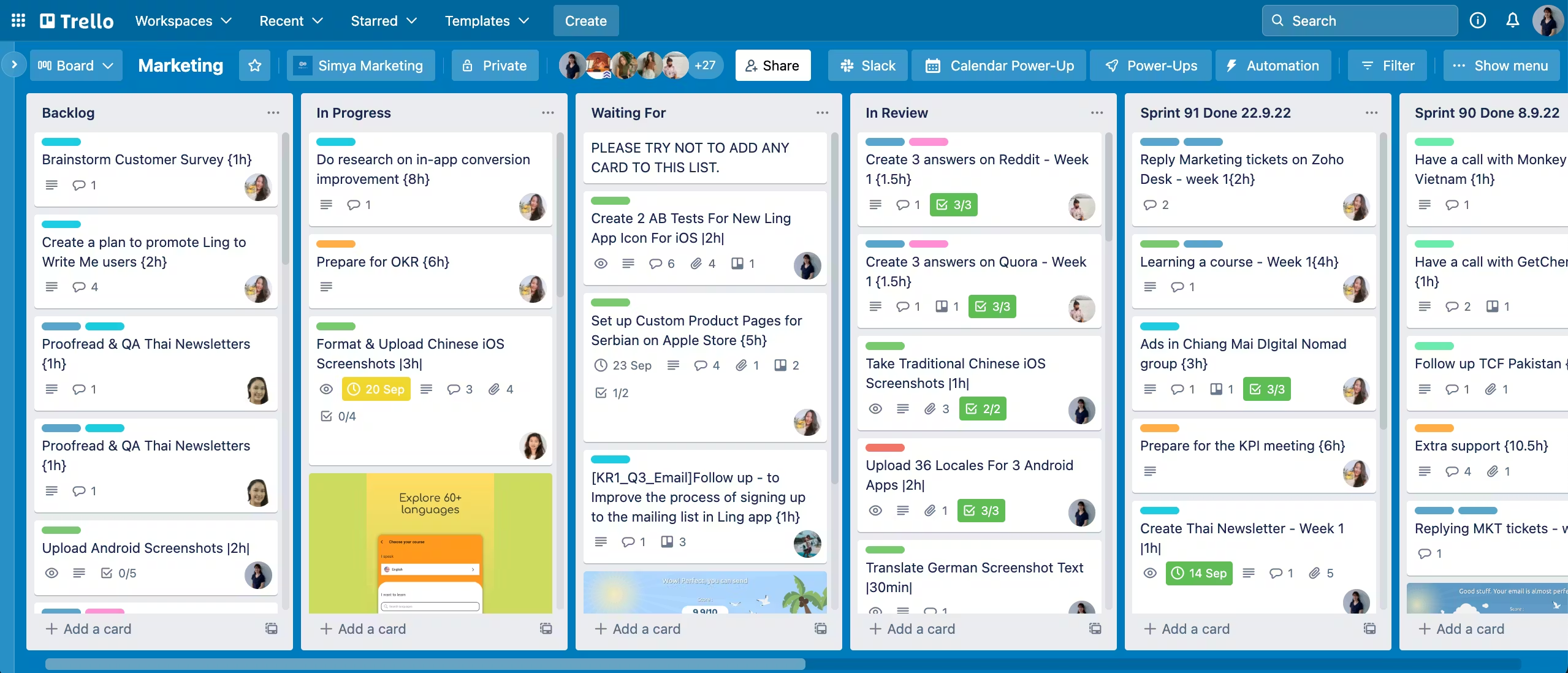
A simple Trello Kanban board with cards organized into "Backlog," "Current Sprint," and "Completed sprints" lists.

Trello’s “post-it note” simplicity is perfect for small teams managing straightforward agile workflows

Best For: Simple, lightweight Kanban workflows.

Pros:

  1. Highly intuitive
  2. Power-Ups allow for custom expansions
Cons:

Not suitable for complex projects requiring detailed reporting or resource management

8. Wrike

Wrike bridges the gap between traditional project management and agile flexibility for large organizations.

A <yoastmark class=

Best For: Complex, cross-departmental enterprise agile projects.

Pros:

  1. Strong proofing and approval tools
  2. Interactive Gantt charts
Cons:

  1. Can be overwhelming for small teams
  2. Steep price point

9. Smartsheet

Smartsheet takes the rows and columns you know and adds powerful automation and agile board views. A good option for teams who are primarily used to working with spreadsheets and like that format. 

A Smartsheet "Card View" interface that transforms spreadsheet data into a visual agile board

Smartsheet combines familiar spreadsheet functionality with board views

Best For: Spreadsheet-loving teams transitioning to agile.

Pros:

  1. Enterprise-level security
  2. Great for data-heavy projects
Cons:

  1. No free plan
  2. Can feel like an upgraded Excel rather than a native agile app

10. Linear

Linear is built for speed and streamlined workflows, and is favored by modern tech startups for its intuitive design and quick setup. 
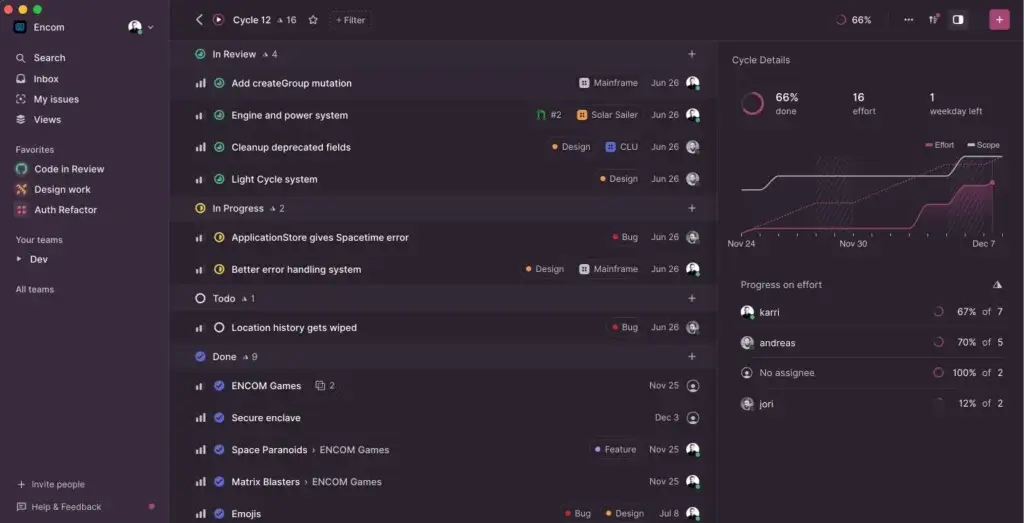
The <yoastmark class=

Best For: High-performance engineering teams seeking speed.

Pros:

  1. Lightning-fast UI
  2. Keyboard-centric navigation
Cons:

  1. Strictly focused on software teams
  2. Lacks features for general business use

11. Miro

While primarily a whiteboard, Miro’s agile templates are perfect for sprint retrospectives and PI planning.

Miro sprint retrospective board template

Miro’s infinite canvas for conducting interactive sprint retrospectives and PI planning sessions

Best For: Collaborative agile ceremonies and Whiteboard planning.

Pros:

  1. Intuitive interface
  2. Lots of useful integrations with other apps
Cons:

  1. Larger boards can suffer from glitches and lags
  2. Not a tool to actually track task performance

12. Notion

Perfect for teams that need to house their Agile Playbook right next to their active sprint boards and require a tool that “does everything in one space”. 

Notion agile sprint board template

Notion is a highly customizable tool suitable for agile project management

Best For: Document-heavy agile teams (wikis and boards).

Pros:

  1. All-in-one workspace for teams that require ease
  2. Easy customization
Cons:

  1. No ability to work offline
  2. It isn’t easy to learn for teams that aren’t familiar with the software of this type

13. Teamwork.com

A robust client-facing app that helpfully includes billing and invoicing features that align with your agile delivery cycles.

A Teamwork.com task board highlighting client deliverables, billable hours, and project milestones

Teamwork.com aligns agile delivery cycles with client invoicing and budget tracking, because its focus is small agencies and studios

Best For: Agile agencies managing client-facing work.

Pros:

  1. Built for teamwork, but with clients in mind
  2. Simple interface that most people can get to grips with
Cons:

  1. It’s not cheap to buy, and it’s difficult to set up
  2. Users report that the CRM doesn’t work properly

14. Nifty

Nifty is a great app for automating roadmap progress as tasks are completed, keeping stakeholders in the loop without manual updates.

A <yoastmark class=

Best For: Unifying project management into one simplified hub.

Pros:

  1. Flexible Kanban lists
  2. Good collaboration tools
Cons:

  1. Restrictive reporting 
  2. The mobile app is somewhat lacking

15. Zenhub

Zenhub sits directly within GitHub, allowing developers to manage agile sprints without leaving their code repository, making it a handy app for software developers.

A <yoastmark class=

Best For: GitHub-native development teams.

Pros:

  1. Effective automation for workflows
  2. Integrated with GitHub, so it works seamlessly with it
Cons:

  1. Some devs say the interface is cluttered and feels messy
  2. Larger projects can suffer from glitches and lags

With these 15 powerful options on the table, how do you narrow it down to the one?

How to Choose the Right Agile Tool for Your Team

Selecting agile software isn’t about finding the tool with the most features; it’s about finding the one that fits your team’s unique rhythm and technical stack. Here is a four-step framework to help you make an informed decision:

1. Define Your Agile Methodology

Are you a strict Scrum shop, or do you prefer the continuous flow of Kanban?

  • For Scrum: Look for tools with robust backlog grooming, sprint planning, and automatic burndown charts to track velocity.
  • For Kanban: Prioritize visual clarity, Work in Progress (WIP) limits, and cumulative flow diagrams to spot bottlenecks early.
  • For Scrum/ScrumBan: Ensure the tool is flexible enough to support both fixed iterations and continuous delivery.

2. Assess Your Existing Tech Stack

Agile is about speed, and nothing slows it down like manual data entry.

  • Google Workspace Users: If your team relies on Google Drive and Gmail, a native tool like Kanbanchi will save you hours of context switching by keeping your strategy within your existing ecosystem.
  • Developer-Heavy Teams: If you’re building complex software, integrations with GitHub, Bitbucket, or Jira are non-negotiable for keeping code and tasks aligned.

3. Consider Team Size and Scalability

A tool that works for a five-person startup might buckle under the weight of a 500-person enterprise.

  • Small Teams (5-10 people): Focus on a low learning curve and nimble interfaces. Don’t pay for enterprise features you won’t use.
  • Scaling Organizations: You need to be able to roll up individual team progress into high-level business goals.
  • Large Enterprises: Look for the software that can equally support complex projects and not overwhelm small teams, and that’s able to allow cross-department collaboration.

4. Human-Centric Design

Agile is ultimately about people. If the software is too complex, your team will stop using it, and your agile transformation will fail.

  • Ease of Use: During your trial period, note how many clicks it takes to complete basic tasks. If it’s more than three, it might be too much friction.
  • Collaborative Features: Does the tool encourage interaction? Look for robust commenting, @mentions, and real-time updates to keep the conversation flowing.

That’s our overview of the best tools for teams of different sizes and needs, and how to find the right one for your needs.

Kanbanchi as the Best Agile Project Management Software

The Best Agile Tool for Google Workspace Users

If your team lives in Google Docs, Gmail, and Drive, you’ve likely noticed a frustrating wall between your work and your agile tool. Most software treats Google Workspace like a third-party add-on. Kanbanchi treats it like home. As the only project management tool natively built for the Google ecosystem, Kanbanchi eliminates any frustrating context switching between tasks, so your work flows easily.

Kanbanchi board sharing settings combined with Google Drive's sharing

Kanbanchi boards are files inside Google Drive and follow the same sharing settings. Can be easily accessed with a Google account

Kanbanchi for Microsoft

If your team relies on Microsoft apps, you can sign in using your Microsoft account. In this case, Kanbanchi will directly sit inside OneDrive, and depending on your Microsoft account type (individual or corporate), it can also live in SharePoint. Behaving like one of the Microsoft apps provides the same seamless experience for teams on Microsoft 365.

A screenshot of the Microsoft 365 "Apps dashboard" displaying the Kanbanchi icon alongside standard apps like Excel, Outlook, and OneDrive

Experience a seamless workflow by accessing Kanbanchi directly from your Microsoft apps dashboard, just like any other native Microsoft 365 application

1. Zero Infrastructure, but Maximum Security

Forget about managing yet another set of login credentials. Kanbanchi uses Google Single Sign-On (SSO) or Microsoft account sign-in, so your team can sprint in seconds with their existing accounts.

  • Stored in Your Google Drive or OneDrive: Your project boards aren’t hidden on a mysterious external server. They live in your Google Drive or OneDrive/SharePoint as files and automatically inherit your organization’s existing sharing and security permissions.
  • No Learning Curve: The interface is so intuitive that even the less tech-savvy member on your team will spend minimal time learning the tool and more time moving cards to Done.

2. Turn Emails into Agile Tasks Instantly

Agile is about responding to change, and often that change arrives in your inbox. With the Kanbanchi for Gmail Add-on or Board Email, you can turn a client’s feedback or a new requirement into a task card without leaving your email (Gmail or Outlook).

  • Preserve Context: The email subject becomes the task title, and the body becomes the description.
  • One-Click Conversion: No more manual data entry or copy-pasting between tabs.

3. From Kanban to Gantt in One Click

True agility requires the ability to switch perspectives. Kanbanchi allows you to manage the daily flow on a Kanban board while visualizing the long-term roadmap on a Gantt chart.

4. Effortless Collaboration

In Kanbanchi, the task card is where everything you need to know lives. 

  • Direct Attachments: Attach Google Docs, Sheets, or Slides directly to a card. Similarly, attach MS Docs, Excel tables, etc. Your team always works on the latest version, no duplicates, no confusion.
  • Real-Time Sync: Changes reflect instantly for all users. Whether you’re in a daily stand-up or a remote retrospective, everyone sees the same board at the same time.

Want to find the right agile project management software tool for your team, to make every project a 100% success? Try Kanbanchi today and get the results you need.

FAQ: Agile Project Management Software

Our guide should have covered all bases, but if you have any other questions, we’ve put together an FAQ section that should answer them. 

Which is better: Scrum or Kanban?

Neither is objectively better; it depends on your team’s workflow.

  • Choose Scrum if you have a stable team working on complex, finite projects that benefit from structured, time-boxed iterations (sprints).
  • Choose Kanban if you manage continuous streams of work (such as support tickets or content creation) where priorities shift daily, and flexibility is more important than fixed deadlines.

Many teams now use Scrumban, a hybrid that uses Scrum’s planning structure but Kanban’s visual boards and WIP limits for execution.

Can I use agile project management for small teams?

Absolutely. In fact, smaller teams (under 10 people) often see the most dramatic results from Agile because they can communicate faster. For small to medium-sized teams, Kanban is often preferred over Scrum because it requires fewer formal roles (such as a dedicated Scrum Master) and less meeting overhead.

What is the best free agile project management tool?

If you’re on a budget in 2026, you have excellent options, such as Kanbanchi, which offers a robust free tier for Google Workspace users who need basic Kanban functionality. It requires no setup or downtime, and there’s little to no learning curve for users. 

Do I need a certification to use agile software?

While software is intuitive, the methodology takes practice. You don’t need a certification to click buttons in a tool, but understanding the why behind sprint retrospectives or WIP limits will make your tool 10x more effective. Many teams start with the tool and then invest in a Certified Scrum Master (CSM) or Agile Coach to refine their process.

You may also be interested in other blogs from Kanbanchi:
How to Build an Effective Kanban System in Your Business in 10 Steps
Why Hybrid Project Management Software is the Future
    MultipleAuthors\Classes\Objects\Author Object
    (
        [term_id] => 973
        [term:MultipleAuthors\Classes\Objects\Author:private] => 
        [metaCache:MultipleAuthors\Classes\Objects\Author:private] => Array
            (
                [user_email] => olga.alekseeva@kanbanchi.com
                [user_id] => 20
                [first_name] => Olga Alekseeva
                [last_name] => 
                [job_title] => Growth hacking expert with over 10 years of experience with Kanbanchi
                [description] => Olga wears multiple hats across marketing, sales, product, and ops after 10+ years in the SaaS world. She is passionate about helping teams streamline their workflows with Kanbanchi and Google Workspace or Microsoft 365. "When I'm not optimizing processes or writing guides, I'm probably tweaking our product roadmap or diving into the latest productivity tools".
                [user_url] => https://linkedin.com/in/olgksv
            )
    
        [userObject:MultipleAuthors\Classes\Objects\Author:private] => WP_User Object
            (
                [data] => stdClass Object
                    (
                        [ID] => 20
                        [user_login] => olga.alekseeva
                        [user_pass] => $wp$2y$10$WuiuvYMj7CDnLrRbWchEkuBwKzmbBakK64Uk5c68bDY3qA46MFam6
                        [user_nicename] => olga-alekseeva
                        [user_email] => olga.alekseeva@kanbanchi.com
                        [user_url] => https://linkedin.com/in/olgksv
                        [user_registered] => 2025-09-03 15:47:58
                        [user_activation_key] => 
                        [user_status] => 0
                        [display_name] => Olga Alekseeva
                    )
    
                [ID] => 20
                [caps] => Array
                    (
                        [editor] => 1
                        [author] => 1
                        [contributor] => 1
                        [wpseo_editor] => 1
                        [wpseo_manager] => 1
                    )
    
                [cap_key] => wp_capabilities
                [roles] => Array
                    (
                        [0] => editor
                        [1] => author
                        [2] => contributor
                        [3] => wpseo_editor
                        [4] => wpseo_manager
                    )
    
                [allcaps] => Array
                    (
                        [moderate_comments] => 1
                        [manage_categories] => 1
                        [manage_links] => 1
                        [upload_files] => 1
                        [unfiltered_html] => 1
                        [edit_posts] => 1
                        [edit_others_posts] => 1
                        [edit_published_posts] => 1
                        [publish_posts] => 1
                        [edit_pages] => 1
                        [read] => 1
                        [level_7] => 1
                        [level_6] => 1
                        [level_5] => 1
                        [level_4] => 1
                        [level_3] => 1
                        [level_2] => 1
                        [level_1] => 1
                        [level_0] => 1
                        [edit_others_pages] => 1
                        [edit_published_pages] => 1
                        [publish_pages] => 1
                        [delete_pages] => 1
                        [delete_others_pages] => 1
                        [delete_published_pages] => 1
                        [delete_posts] => 1
                        [delete_others_posts] => 1
                        [delete_published_posts] => 1
                        [delete_private_posts] => 1
                        [edit_private_posts] => 1
                        [read_private_posts] => 1
                        [delete_private_pages] => 1
                        [edit_private_pages] => 1
                        [read_private_pages] => 1
                        [wpseo_bulk_edit] => 1
                        [copy_posts] => 1
                        [ppma_edit_post_authors] => 1
                        [ppma_edit_own_profile] => 1
                        [wpseo_edit_advanced_metadata] => 1
                        [wpseo_manage_options] => 1
                        [view_site_health_checks] => 1
                        [editor] => 1
                        [author] => 1
                        [contributor] => 1
                        [wpseo_editor] => 1
                        [wpseo_manager] => 1
                    )
    
                [filter] => 
                [site_id:WP_User:private] => 1
            )
    
        [hasCustomAvatar:MultipleAuthors\Classes\Objects\Author:private] => 1
        [customAvatarUrl:MultipleAuthors\Classes\Objects\Author:private] => Array
            (
                [url] => https://www.kanbanchi.com/wp-content/uploads/2025/09/photo_2024-04-10_17-25-16.jpg
                [url2x] => https://www.kanbanchi.com/wp-content/uploads/2025/09/photo_2024-04-10_17-25-16.jpg
            )
    
        [avatarUrl:MultipleAuthors\Classes\Objects\Author:private] => 
        [avatarBySize:MultipleAuthors\Classes\Objects\Author:private] => Array
            (
                [96] => 
                [80] => 
                [50] => 
            )
    
    )
    
  • Growth hacking expert with over 10 years of experience with Kanbanchi

    Olga wears multiple hats across marketing, sales, product, and ops after 10+ years in the SaaS world. She is passionate about helping teams streamline their workflows with Kanbanchi and Google Workspace or Microsoft 365. "When I'm not optimizing processes or writing guides, I'm probably tweaking our product roadmap or diving into the latest productivity tools".

    All articles
Share

Try Kanbanchi now

  • Collaborate seamlessly
    with your team
  • Integrate Kanbanchi
    with Google or Microsoft
  • Manage all your work in one place
Start for free

Start using Kanbanchi now

Start your free trial