
In this Article:
Try Kanbanchi now
Start your free trial

Running software development projects requires great organization and tracking. Using a Gantt chart for software development is one recommended way of doing this, but how does it work?
The key for software and product development teams is to combine speed and agility with accuracy. Even a team that uses an Agile approach needs to have access to a visual timeline to guide them.
Gantt charts provide a link between the tasks that need to be carried out and the overall milestones. This means that everyone in the team knows what they need to do and is aware of the timescale for doing it.
The Gantt method also means that the interdependencies are shown. In this way, everyone knows the potential effect of not completing a task or milestone on time. Developers, PMs, and stakeholders need Gantt charts for a clearer visual path to follow.
This contrasts with Kanban and Scrum, which are largely status-oriented, while Gantt is time-oriented. By using Kanbanchi, you get to combine both of these approaches for a complete view of the full project. Switch between views to see the tasks and the timelines, as needed.
We’ll be looking at the different ways that Gantt charts are used to make life easier for software development teams. We will then delve into some of the best ways to make the most of these charts by using Kanbanchi.
A Gantt chart is a crucial element of the software development life cycle (SDLC). These projects tend to involve many moving parts that need to be carefully coordinated for it to be a success. This kind of project chart is vital for teams to keep an eye on the progress of every element.
Day-to-day tasks can be handled using Kanban boards and various other tools. However, Gantt charts excel in pulling it all together. This is where we can see what effect a delay in one part of the project may have elsewhere.
You can visualize the entire SDLC in this way. All the phases, like requirements, design, development, testing, and deployment, can be viewed on a single timeline that lets you see how each stage is linked to others.
It gives you a way to handle complex dependencies and deal with possible bottlenecks that could derail the project otherwise. The ripple effect means that any change to the path is automatically updated so that you can see what it means for all the affected changes.
In terms of tracking milestones, the fact that they are shown on Gantt charts as diamonds helps them to stand out. This helps boost stakeholder communication and increase team morale, as they offer visible signs of progress.
There is no need to only verbally reassure stakeholders that everyone is working hard, since the completed milestones that they see prove that progress has been made.
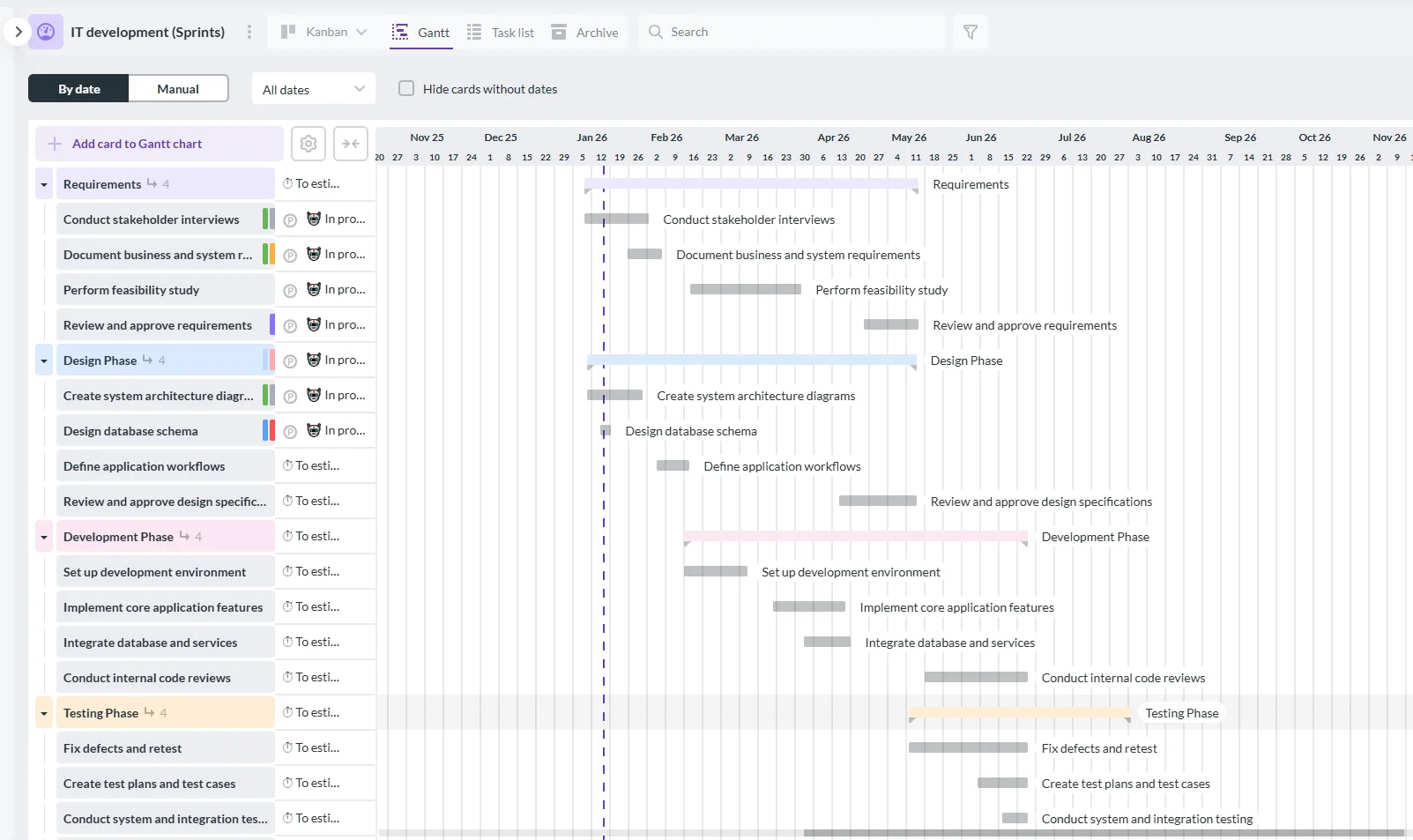
Example of a Gantt chart in Kanbanchi visualizing the software development lifecycle, with clear phases for requirements, design, development, testing, and deployment organized as summary tasks.
With its linear and visual approach, a Gantt chart is ideal for mapping out the standard SDLC phases. Requirement, design, development, testing, and deployment are each major phases that can be converted into a summary task.
This type of high-level task is generally represented by a bar that is thicker and darker than others. It may also be shown as a bracket that covers all of the tasks in it.
For example, the requirement stage is the starting point. It may include elements such as stakeholder interviews and a feasibility study. After this, the design stage is whether items such as database design and architecture diagrams may be introduced.
By having a clear visual approach, each stage is easy to find. Meanwhile, the whole project can be viewed when necessary. Sequential dependencies are easy to see, which is great news for the whole team, as they can follow the project flow from start to finish.
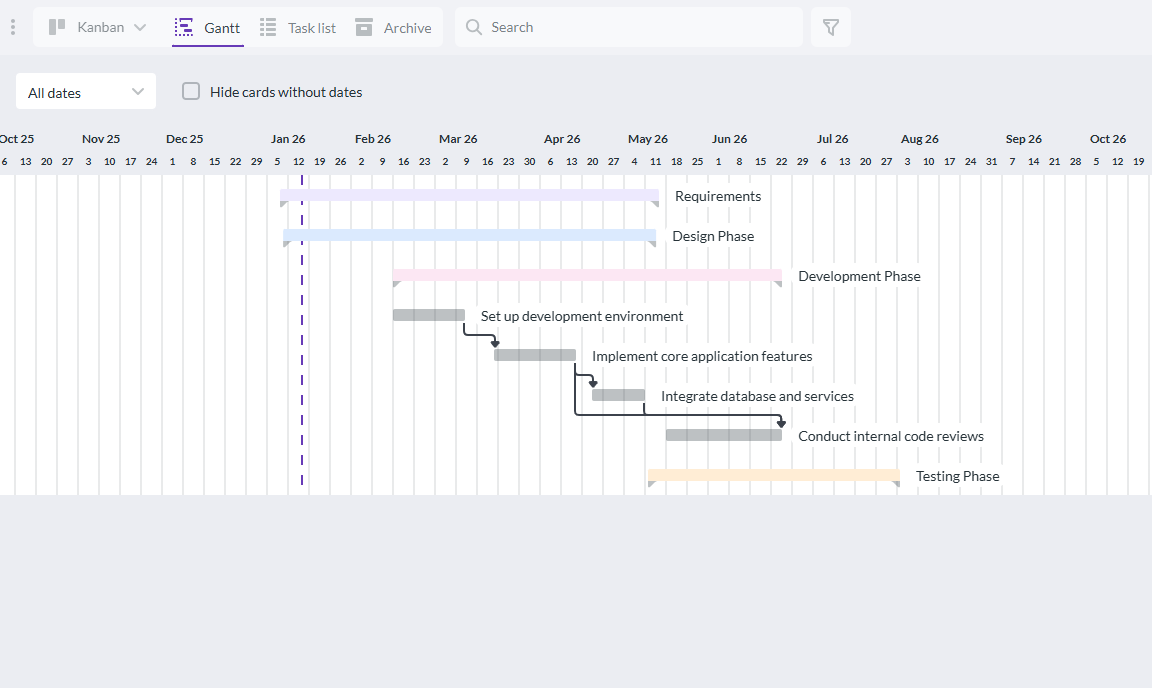
Example of a Kanbanchi Gantt chart illustrating software development task dependencies, including finish-to-start and finish-to-finish relationships.
Dependencies determine how the project is going to flow. They tell us the order in which tasks need to be completed, and where bottlenecks can occur if they don’t go smoothly.
Finish-to-start dependencies are known as the logical chain. This tells us that the first task needs to be completed before the next one can begin. It’s shown on a Gantt chart as an arrow connecting the task bars.
Start-to-start tasks let us see that the second task can start at the same time as the first one. This is shown through an arrow that goes directly from the start of the first task to the start of the next one. This could be front-end coding in the second task, which can’t begin until the earlier task for the API design is finished.
As well as clearly identifying the critical path, this also helps avoid the risk of errors cascading from one stage to the next. In addition, it means that any idle time is easily noticed.
The process of building a Gantt chart for software development involves various stages that you need to get right. By following the steps listed below, you can make sure that you get the right balance between the structure you need for the timeline and the flexibility of Agile projects.
The work breakdown structure (WBS) is where you outline the different elements that make up the project. This could be three or four chunks that you feel make it more manageable.
In this stage, you can choose to include epics as summary tasks that make up your main bars on the Gantt chart. Sprints are then added as time blocks, with epics mapped across them.
While you can make a professional estimate of the time needed to carry out the tasks, you need to add a buffer to the Gantt. This gives you some valuable breathing space if there are any unexpected delays.
The critical path will be clearly highlighted once you mark the project dependencies. This is a crucial task, since the dependencies need to be marked correctly, so you can easily see how the project needs to flow.
The baseline is a snapshot taken of the original plan that helps show your progress compared to what was expected. This is typically shown as a gray bar or shadow between the active elements. Monitor the percentage completed each week to see how the project is progressing.
The switch from manual Gantt charts to digital versions should be smooth. We still need to maintain many of the classic best practices, with the convenience of online tools making it easier to do so now. The following best practices let you make the most of digital Gantt charts.
The baseline is crucial because it tells you exactly what the original, approved plan was about. Set and lock it as soon as the planning phase is completed, but before any coding is carried out. The option to show the baseline is included in most Gantt software and lets you see it at all times.
This is important because you can see at a glance how the project has varied from the original plan. For example, you can use it to show stakeholders how delays in a certain stage have affected the overall timeline.
The percentage of the project completed can be a misleading figure. Thankfully, by using the latest Gantt chart software for product development, you can track your progress more effectively. This lets you see any tasks that are at-risk and gauge the knock-on effect it will have.
Use the traffic light colors to quickly scan the chart for signs of problems.
Managing your resources is one of the most important aspects of running any project. Using an online view of the resources makes it easier to keep track. Choose a team member to see how many cards are currently assigned to them. You can then drag to other team members any cards that they won’t be able to handle. Another smart tip involves putting generic titles in the tasks at first, only naming team members once you’re closer to the start date.
One of the most valuable aspects of Gantt charts on Kanbanchi is the easy communication within your team that it offers. With task dependencies visible and real-time updates, it’s easy for team members to collaborate and stakeholders to stay in the loop.
All of these factors show why the upgrade to online Gantt chart software for product development has become a vital part of any business plan. Rather than relying on old-fashioned whiteboard charts, you can now incorporate all of the best features into a modern, flexible online tool.
The percentage of complete reading tells you how much of a project has been completed. The percentage complete tool works out the progress of a task by looking at the sub-tasks. Let’s say that it has two sub-stacks of equal duration, and one is completed while the other hasn’t been started. In this case, it will show 50% progress.
Tracking the dependecnies is more effective because it tells you the longest series of dependent tasks that have to be completed to reach a successful project conclusion. Any slippage on these tasks means that the whole project suffers the same slippage.
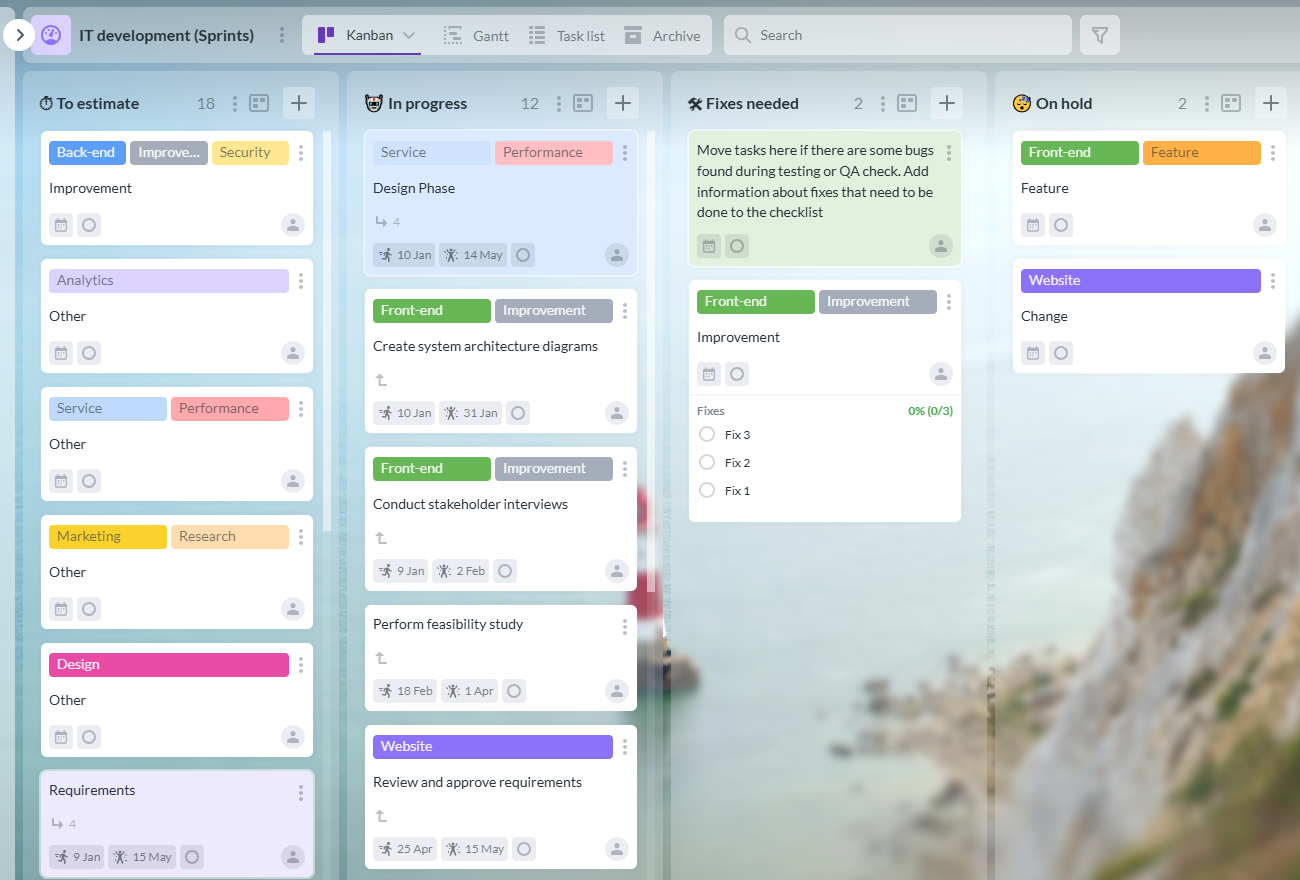
Kanbanchi Kanban board illustrating the software development lifecycle, with tasks organized by phases alongside a Gantt chart overview.
Kanbanchi provides a seamless way of combining your use of Google Workspace with your Gantt charts and team collaboration. It allows you to use Google Drive as a storage solution for your project data. This approach adds to the security and convenience of your documents.
The automatic process for converting Gmail messages to tasks is another benefit worth considering. This allows you to quickly turn feedback or bugs into new tasks that easily slip onto your Gantt chart.
The way that the Google Calendar can be synchronized gives another advantage for your workflow. It means that team members and stakeholders can see important information, such as milestones and release dates, without even having to open the Gantt chart.
Kanbanchi’s Gantt view is designed for quick setup. The integration with Google ensures a shallow learning curve. So, your team can start using it right away.
The Gantt view gives you all of the classic project tasks view that we’ve looked at here. You can also use the one-click method to quickly transition from the high-level timeline view to a look at the daily Kanban execution board.
Visual dependencies are used to make it easier to see the relationship between tasks. Finish-to-start lines are easily drawn between tasks, allowing you to see the impact if any task were to slip.
Using Kanbanchi as your Gantt chart for software development gives you a variety of useful benefits. The smooth integration with Google Workspace and the way that tasks can be visualized make this a powerful tool for managing software projects.
A series of tasks can be quickly gathered into coherent tasks that follow a visible dependency chain. This allows strong dependence management where you choose how the tasks are linked. By tracking your Gantt chart closely, you can see any potential issues before they blow up.
Give Kanbanchi a try to see how it makes your project management smoother. This approach to using a Gantt chart for software development gives you complete control over your tasks and milestones.
No, these project charts aren’t anti-Agile. However, some people get this impression because they were often misused in Agile environments in the past. The emergence of flexible software development tools means that an Agile Gantt can be taken easily and conveniently.
Yes, the ability to accurately manage your project resources is one of the key reasons for using Gantt chart software for product development. It gives you a list of who is carrying out your tasks, letting you see if anyone is being over-utilized or under-utilized.


In this Article:
Start using Kanbanchi now
Start your free trial