
In this Article:
Try Kanbanchi now
Start your free trial


Choosing a project tracking platform is not simply a software purchase. It is a decision about how your team will see work, share responsibility, spot risks, and make decisions every day.
For a team of 5-15 people, the right platform may replace scattered spreadsheets and long status meetings. For a department or enterprise, it may become the operating layer that connects people, deadlines, files, reporting, and governance across many projects. In both cases, the goal is the same: make work visible enough that leaders can act early, not after deadlines slip. A useful project-tracking platform integrates status, ownership, timing, and project files so managers do not have to manually chase updates.
A strong project tracking platform should help you answer four questions quickly:
Organizations that invest in stronger project management capabilities are better positioned to deliver intended outcomes. The platform you choose is not the whole solution, but it can either support those capabilities or make them harder to build.
More articles on Team management here
The easiest mistake is comparing platforms by the number of features on a pricing page. More features do not automatically mean better tracking. A platform fits your team when it supports how people already plan, communicate, and report work, while improving the parts that are currently painful.
For example, a marketing team may care most about campaign stages, approvals, assets, and launch dates. An operations team may need recurring work, workload balance, and process visibility. An IT or product team may focus on sprints, dependencies, bugs, and release timelines. A leadership team may want cross-project reporting and a reliable view of what is delayed or under-resourced.
The right question is not which platform is the most powerful. The better question is which platform your team will consistently use.
Before looking at tools, list the decisions you need to make every week. A business owner may need to know which client projects need attention. A team lead may need to redistribute work before someone becomes overloaded. A project manager may need to understand whether a deadline is realistic.
If the platform does not make those decisions easier, it will become another place where people enter updates after the real work has already happened elsewhere.
Most teams have recurring patterns. Sales teams run pipelines and handoffs. HR teams manage hiring, onboarding, and policy rollouts. Marketing teams plan campaigns, content, creative reviews, and experiments. Your platform should fit the shape of the work, not force every team into the same template.
A practical way to avoid overbuying or underbuying is to map out the work you need to track before evaluating vendors. Use the table below as a starting point.
| Tracking need | Why it matters | Platform capabilities to look for |
|---|---|---|
| Task status | Shows whether work is planned, active, blocked, or completed | Assignees, watchers, or subscribers, comments, notifications |
| Ownership | Prevents confusion about who is responsible | Assignees, watchers, or subscribers, comments, notifications |
| Timing | Helps leaders protect deadlines and plan capacity | Start dates, due dates, calendar sync, Gantt charts |
| Dependencies | Shows how one delay affects other work | Timeline planning, linked tasks, milestones, dependency views |
| Workload | Reduces bottlenecks and overload | Team workload views, priorities, time estimates, time tracking |
| Files and context | Keeps documents close to the task | Drive, OneDrive, SharePoint, or file storage integration |
| Governance | Supports security and consistent processes | Permissions, enterprise controls, backups, templates |
This exercise often reveals that the most important requirement is not a niche feature. It is the ability to keep tasks, timelines, people, and files connected within a single workflow.
Once you know what needs to be tracked, compare platforms against the criteria below. These are especially important for business owners and team leads who need a system that can scale from a small team to multiple departments.
The platform should make work understandable at a glance. For many teams, this means a visual board where tasks move through columns such as Backlog, In Progress, Review, and Done. For others, it may mean a list view for dense task management or swimlanes to separate projects, clients, departments, or priorities.
Look for flexibility without unnecessary complexity. A good project tracking platform should let teams view the same work from different angles while maintaining a single underlying source of truth.
If your team works toward deadlines, launches, milestones, or client commitments, task lists alone are not enough. You need timeline planning. A Gantt chart is especially useful when tasks overlap, depend on one another, or must be rescheduled as priorities change.
This matters because many projects fail gradually. One small delay affects the next task, then the review stage, then the final delivery date. A timeline view helps managers see the ripple effect early enough to adjust.
Tracking is only useful when every task has clear ownership. Each important item should show who is responsible, when it is due, its priority, and the progress made.
A platform should also support different levels of responsibility. Sometimes one person owns the task, several people collaborate, and a manager simply needs notifications. If the tool cannot clearly reflect those roles, accountability will shift back to meetings and chat messages.
Time tracking is not necessary for every team, but it becomes valuable when you need to understand effort, profitability, resource allocation, or estimate accuracy. This is especially true for agencies, consultants, service teams, and internal teams that handle many requests.
The best setup is one where time tracking lives close to the work itself. If people have to use a separate timer, spreadsheet, or reporting app, data quality usually drops.
A project tracking platform should reduce app switching, not create more of it. If your company runs on Google Workspace, your ideal platform should work naturally with Google Drive, Gmail, Google Calendar, and Google authentication. If your company uses Microsoft 365, check how the platform connects to OneDrive, SharePoint, Outlook, and Teams workflows.
This is more than convenience. Integration affects adoption, file control, permissions, and security. When project files live where your company already manages documents, teams are less likely to duplicate data or lose context.
Leaders need answers without having to ask everyone for updates. Look for reporting that shows completed work, overdue items, workload, time spent, upcoming deadlines, and project progress.
The reporting layer does not have to be complicated. It does need to be reliable. If managers still need to copy data into spreadsheets every Friday, the platform is not really solving the tracking problem.
For growing teams and enterprises, security is a buying criterion, not a technical detail. Ask how the platform handles access rights, external sharing, data storage, backups, user management, and compliance requirements.
This is especially important if you collaborate with contractors, clients, partners, or multiple departments. The right platform should allow transparency without giving everyone access to everything.
A technically strong platform can still fail if the team finds it intimidating. Adoption depends on how quickly people can create tasks, update statuses, attach files, comment, filter work, and find their own responsibilities.
During evaluation, pay close attention to the first 30 minutes of use. If experienced team members need extensive training for basic actions, occasional users will struggle even more.
Different teams often choose different platforms for valid reasons. The table below can help you translate your team type into practical selection criteria.
| Team type | What they usually need to track | Best-fit capabilities |
|---|---|---|
| Small business team | Campaign stages, content production, creative reviews, and launch dates | Simple boards, notifications, file attachments, and calendar sync |
| Marketing team | Recurring processes, handoffs, bottlenecks, and workload | Kanban boards, templates, due dates, asset storage, and timeline view |
| Operations team | Hiring pipelines, onboarding, policy updates, and cross-functional tasks | Swimlanes, filters, time tracking, workload reports |
| Product or IT team | Backlogs, sprints, dependencies, releases, bugs | Boards, priorities, subcards, Gantt chart, custom fields |
| HR team | Deliverables, approvals, communication, and billable time | Templates, checklists, shared files, and role-based access |
| Executive or PMO team | Multiple projects’ statuses, risks, resource use, and performance | Multiple projects’ statuses, risks, resource use, and performance |
| Client-facing team | External sharing, file integration, time tracking, and timeline planning | External sharing, file integration, time tracking, and timeline planning |
A platform that fits one team may not fit another. However, if multiple departments need to collaborate, choose a system flexible enough to support different workflows without fragmenting company-wide visibility.
After you define your needs, create a shortlist of 3-5 platforms and score them consistently. This prevents the loudest opinion in the room from driving the decision.
| Evaluation area | Suggested weight | What good looks like |
|---|---|---|
| Workflow fit | 25% | The platform matches how the team plans and executes work |
| Integrations | 20% | Tasks, files, email, and calendars connect to existing tools |
| Visibility and reporting | 20% | Managers can see status, risks, workload, and progress quickly |
| Ease of use | 15% | Team members can update work without heavy training |
| Security and administration | 10% | Permissions, sharing, backups, and governance meet company needs |
| Scalability | 10% | The platform can grow from one team to multiple teams or departments |
Adjust the weights based on your organization. A regulated enterprise may give security a higher weight. A fast-moving startup may prioritize ease of use and workflow fit. A service business may weigh time tracking and reporting more heavily.
A demo can show what a platform can do. A pilot shows whether it fits your team. Use a real project, real users, and real deadlines.
A useful pilot does not need to last months. Two weeks is often enough to reveal whether the tool improves visibility or simply adds another administrative layer.
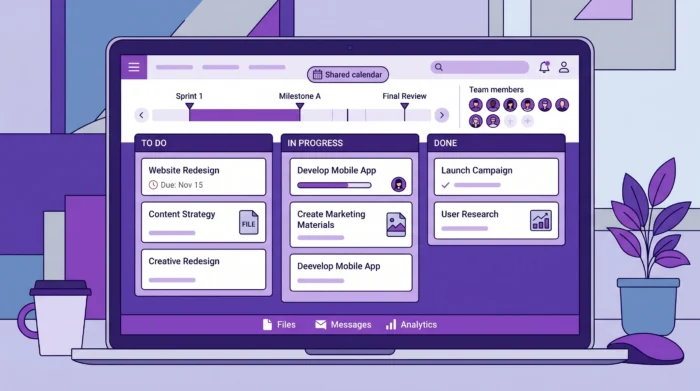
Some problems only become obvious after a team starts using the platform. Look for these warning signs during evaluation:
If you see several of these red flags during a pilot, do not assume training will fix everything. Sometimes the tool is simply not aligned with the way your team works.
Kanbanchi is designed for teams that want visual project and task management inside the ecosystems they already use. It is especially relevant for organizations using Google Workspace, and it also supports Microsoft 365 compatibility.
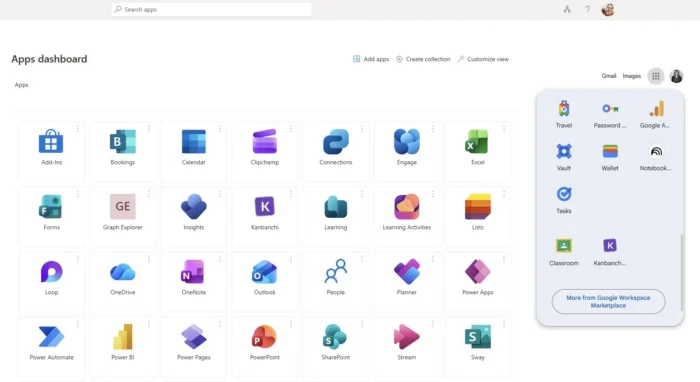
For Google Workspace teams, Kanbanchi connects project work with Google Drive, Shared Drives, Gmail, and Google Calendar. Teams can create and share project boards and cards, attach files from Google Drive or Shared Drives, create cards from Gmail, sync events with Google Calendar, and export board data to Google Sheets. Boards can be created as files in Google Drive, with Shared Drives available for Enterprise users.
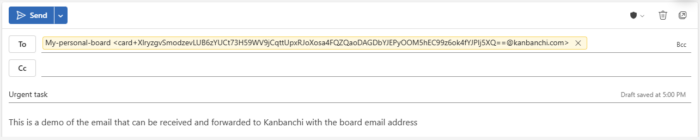
For Microsoft users and teams, Kanbanchi offers integration with OneDrive and SharePoint for project work. Teams can add project boards to SharePoint sites to make them easily accessible to everyone. Also, Kanbanchi offers an easy way of creating project tasks from emails in Outlook.
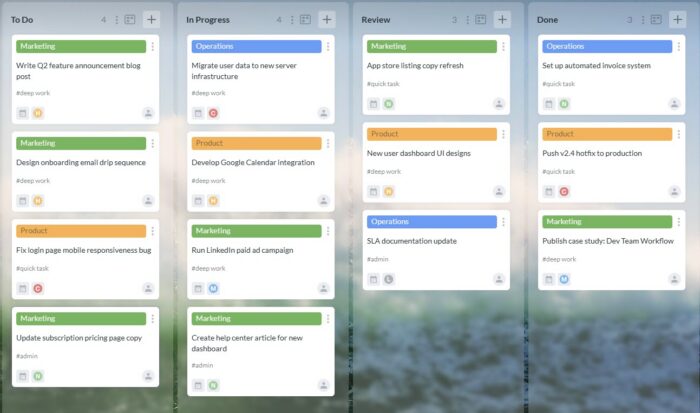
For teams that need more than a basic task list, Kanbanchi combines Kanban boards, Gantt charts, time tracking, list views, swimlanes, subcards, templates, reports, and backups. That means a team can visualize active work on a board, review timelines in a Gantt chart, track time on cards, and report progress without moving the project into a separate system.
Kanbanchi is a strong fit if your team wants:
It may not be the only system your business uses. A CRM, ERP, help desk, or specialist development tool may still have a place. But for teams that need a practical project-tracking layer integrated with their everyday workspace, Kanbanchi is built around that need.
Before you make a final decision, ask practical questions that reflect real usage. Vendor answers should be specific, not vague.
| Question | Why it matters |
|---|---|
| How quickly can a new user understand their tasks? | Adoption depends on everyday usability |
| Can we view the same work as a board, a list, and a timeline? | Different roles need different views |
| How are files stored and shared? | File control affects security and collaboration |
| Can we track time without a separate app? | Effort data is more accurate when tracking is close to the task |
| Can managers report across users or boards? | Leadership needs visibility beyond one project |
| What happens when a project changes? | The platform should support rescheduling and reprioritization |
| Can we import existing work? | Migration effort affects rollout speed |
| How does external sharing work? | Client and partner collaboration needs control |
The buying process should not end with a feature checklist. It should end with confidence that the platform will make your team more coordinated, not more burdened.
You may also be interested in reading our guide
Task Management Software That Helps Teams Move Faster
A project tracking platform is software that helps teams monitor tasks, owners, deadlines, progress, dependencies, files, and project status in one place. It is broader than a simple to-do list because it supports collaboration, visibility, reporting, and management decisions.
Project management includes planning, execution, communication, risk management, and delivery. Project tracking focuses on visibility into progress, ownership, timing, and issues. A good platform supports both by turning plans into trackable daily work.
The most important features are workflow visibility, clear ownership, due dates, timeline planning, file integration, reporting, notifications, and permissions. For many teams, time tracking, templates, calendar sync, and Gantt charts are also important.
Your team has likely outgrown spreadsheets if updates are inconsistent, tasks have unclear owners, deadlines are missed without warning, files are scattered, or managers spend too much time asking for status updates. Spreadsheets can work for static lists, but they struggle with live collaboration and changing project timelines.
Usually, yes. If your team already works in Google Drive, Gmail, Google Calendar, and Google Sheets, a Google-integrated platform reduces app switching and keeps project context close to your files and communication. It can also make adoption easier because the platform fits existing habits.
A focused pilot can often run for two weeks. The key is to use a real project with real tasks, deadlines, files, and team members. At the end, evaluate whether visibility improved, updates became easier, and managers had better information for decisions.
The best project tracking platform is the one that fits your team’s work, integrates with your existing tools, and gives leaders reliable visibility without creating unnecessary admin.
If your team works in Google Workspace or Microsoft 365 and needs visual boards, timeline planning, time tracking, file integration, and practical reporting in one place, Kanbanchi is built for that workflow. Explore how it can help your team track projects more clearly, collaborate more smoothly, and stay focused on delivery.
Sign up for a free Kanbanchi trial now


In this Article:
Start using Kanbanchi now
Start your free trial