
In this Article:
Try Kanbanchi now
Start your free trial


HR is no longer a back-of-the-office function where you only talk to someone if there’s a problem with pay, or you need advice. Today, HR is kind of like the hub for:
But with this expanded role comes a huge increase in diversity and complexity. Not to mention some serious questions that need thoughtful answers.
The answer isn’t just better HR, it’s actually getting involved with professional HR project management.
If you’ve ever felt like your team is treading water or if your thoughtful initiatives are always being derailed by workplace flare-ups, you’re not alone. Loads of HR leaders struggle because they are trying to manage 2026-level projects with the same tools they used 20 years ago. And that’s what slows everything down.
All of these are obstacles to progress. To succeed today, HR needs a structured, visual methodology that turns chaotic staff initiatives that confuse and overwhelm into predictable, successful outcomes. Kanbanchi’s guide to the best HR project management tips will show you how it’s all done, whether you’re a newbie to the profession or an experienced hand who feels they just need a no-nonsense refresher.
At its core, human resources project management is the application of project management principles and phases (1. Planning; 2. Executing; 3. Monitoring; 4. Closing) to HR-specific initiatives. It is the bridge between HR Operations and HR Strategy.
To master project management in Human Resources, you must first understand where your daily work ends and a project begins:
When you treat a major initiative (like a digital transformation) as just another task on the HR manager’s desk, it often lacks the necessary focus and resources. By labeling it as a project, you assign:
In 2026, the rise of People Operations (PeopleOps) has made this distinction critical. We are seeing a shift where HR teams are structured like agile software teams, using sprints to tackle hiring surges and data-driven dashboards to monitor employee engagement.
Whether you call it project management for human resources or simply getting things done, the goal remains the same: ensuring that your people strategy actually delivers the business results it promised.
If you are an HR professional in 2026, your to-do list likely looks very different from how it did even five years ago. You aren’t just filing paperwork; you are
Without a structured project management for HR approach, these initiatives often suffer from drift. That is to say, they take longer than expected, cost more than budgeted, and fail to deliver the intended impact. Here is why adopting a project-first mindset is no longer optional for People Operations.
In many HR departments, project status is locked in a single manager’s head or a private email thread. This lack of visibility leads to duplicated efforts and missed deadlines.
Make a shift: By using project management software for HR, every stakeholder can see exactly who is responsible for what. There’s no need for lots of unnecessary comms, complicated meetings, or conversations that could have been a quick message.
The benefits of the shift: Accountability is built into the workflow. When a Policy Draft is delayed, the entire team is immediately notified, enabling a quick pivot before the rollout date is compromised.
HR teams are notoriously prone to burnout because their work is often invisible. It’s ironic, given what they’re trying to do for the rest of the workforce, when you think about it. It’s hard to say no to a new initiative when you can’t visually demonstrate that your team is already at 100% capacity.
Make a shift: Visual tools in HR Project Management software, like Kanban boards and Gantt charts, make the departmental workload tangible.
The benefits of the shift: You can manage resources effectively, preventing bottlenecks and ensuring employees are neither over-allocated nor underutilized.
Modern HR projects, like a digital transformation or a new benefits rollout, require constant collaboration with IT, Finance, and Legal.
Make a shift: A shared project environment breaks down these silos and means that everyone involved can see what needs to be done and when it needs to be completed.
The benefits of the shift: Instead of requesting an Update via a 30-minute meeting, a Finance lead can simply check the project board to see the latest budget approvals. There’s no need for long, convoluted email chains in which information gets lost.
Every HR project ultimately impacts the employee. A disorganized onboarding process or a late payroll transition isn’t just an admin error; it’s a failure of the employee experience.
Make a shift: Standardized, repeatable project templates ensure a consistent, high-quality experience for every staff member.
The benefits of the shift: You build a People First brand where employees feel supported by efficient, reliable systems.
In 2026, HR’s value isn’t measured by how many emails you send, but by the successful delivery of people-centric outcomes. Project management software is the engine that drives those outcomes and is becoming a core component of good HR practice for both the staff who use it and the employees who stand to gain.
Read more HR-related blogs here
The beauty of human resources project management is its versatility. It transforms vague intentions into structured workflows.
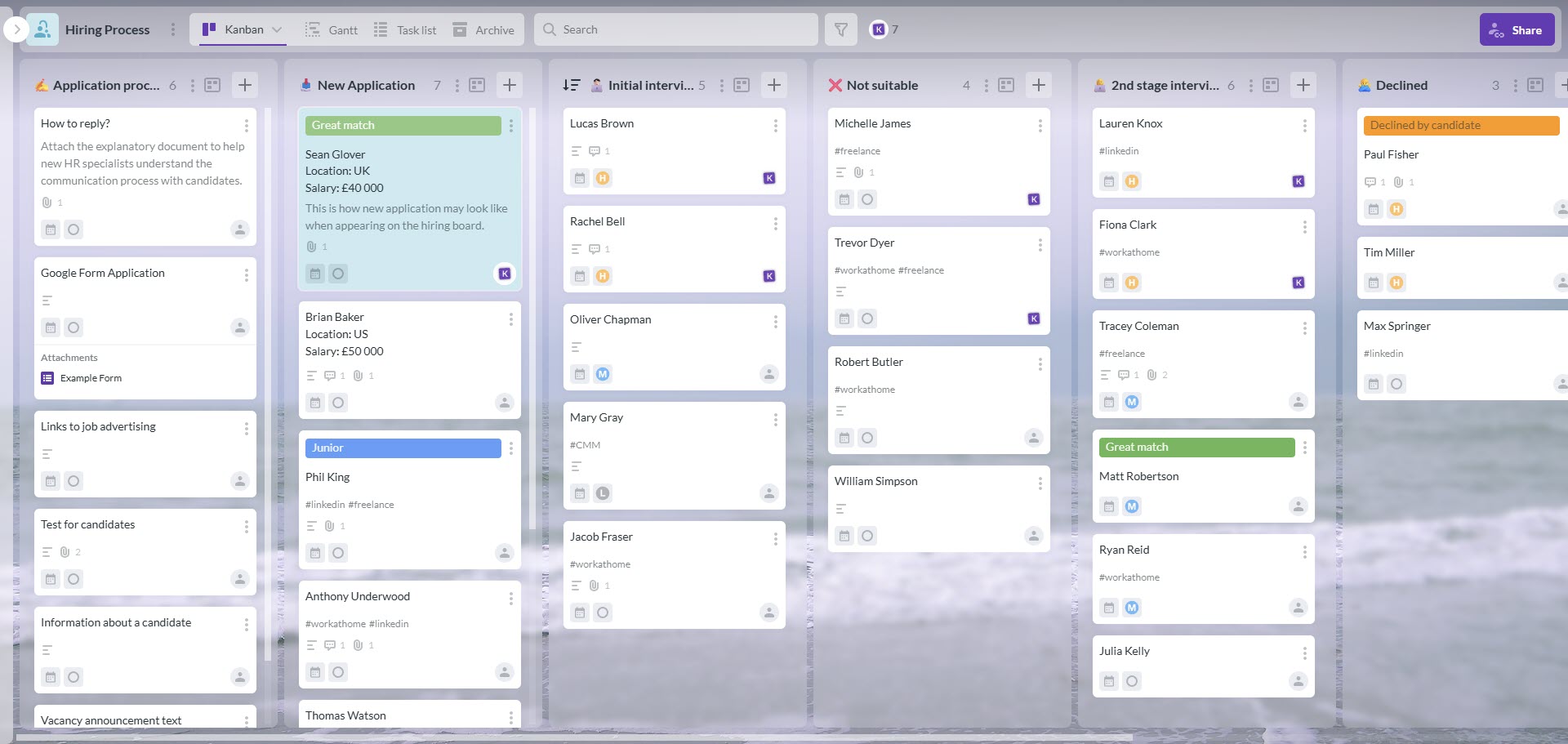
The beauty of human resources project management is its versatility. By mapping out your hiring process on a visual board, you instantly transform vague intentions into a clearly structured workflow, ensuring no candidate falls through the cracks from the initial application to the final interview.
Whether you are a small team or a global enterprise, applying a project-based lens to these common HR scenarios will immediately reduce chaos and improve outcomes.
Here are four high-impact HR project management examples illustrating the transition from administrative to strategic execution.
When a company scales rapidly, perhaps hiring 50 or more engineers in a single quarter, traditional email-based tracking breaks down.
The Project: Coordinate the end-to-end recruitment funnel for a new department.
Key Tasks:
The Advantages of Using Project Management Software
Instead of asking, “Where are we with the Frontend Lead?”, the recruiter can instantly see the candidate’s status on a visual board.
Onboarding is the most critical phase of the employee lifecycle. In a remote or hybrid world in 2026, a check-the-box approach isn’t enough.
The Project: Create a standardized First 90 Days journey for all international hires in the company
Key Tasks
The Advantages of Using Project Management Software
Standardized templates ensure no new hire is forgotten, regardless of their time zone or manager. Employees feel valued from the outset and know where to find any information they need about their onboarding.
Switching your HR Information System (HRIS) is a massive technical undertaking. This is project management for human resources at its purest.
The Project: Migrate all employee data to a new platform without service interruption.
Key Tasks
The Advantages of Using Project Management Software
By mapping dependencies, the HR lead knows that Training cannot begin until Data Migration is 100% verified. Systems operate in a logical sequence.
Whether it’s a new Right to Disconnect policy or an AI Ethics guideline, a rollout is a project that requires clear communication and compliance tracking. Staff need to know they can check in and update at a moment’s notice and see who (and who hasn’t) done their due diligence.
The Project: Introduce and verify acknowledgment of a new global policy.
Key Tasks
The Advantages of Using Project Management Software
You can instantly report to leadership on the percentage of completion and identify specific departments that need follow-up with just a quick click and view.
HR teams often find themselves caught between two extremes.
On one hand, you have traditional HRIS platforms that are great for records but terrible for managing a dynamic project.
On the other hand, you have high-level project management tools designed for software developers that feel like trying to fly a spaceship just to go to the grocery store.
The key to successful human resources project management isn’t finding the most complex tool; it’s finding the most adoptable one.
In 2026, the best project management software for HR is one that meets your team where they already live. For most organizations, that home is Google Workspace, although some may also prefer Microsoft tools.
When software is native to your ecosystem, it doesn’t just link to your files; it shares the same DNA. Kanbanchi’s Google Workspace version, for example, offers three massive advantages for HR:
If your team knows how to use Google Drive and Gmail, they already know how to use Kanbanchi. There’s no alien interface to learn, which is critical for HR teams who need to onboard non-technical stakeholders quickly.
HR data is sensitive. Because Kanbanchi stores your project boards directly in your Google Drive, your data stays within your organization’s existing security perimeter. You don’t have to worry about a third-party cloud having its own separate (and potentially weaker) security rules.
In a standard setup, a candidate’s resume is in Drive, the interview feedback is in a Doc, and the recruiter’s update is in a private email. In Kanbanchi, you attach that Doc and Drive file directly to a card. The conversation happens on the card. Everything stays together.
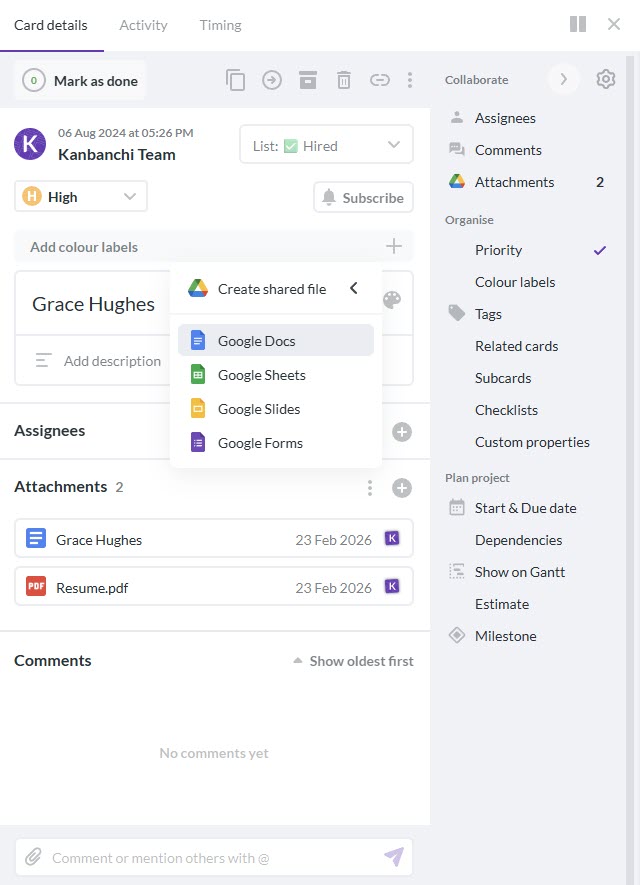
The best project management software for HR allows you to attach Drive files directly to the task card, ensuring the entire conversation happens in one single source of truth
To move from a spreadsheet to a professional workflow, look for these three specific views within your software:
By choosing a tool that feels like a natural extension of your daily apps, you remove the technical noise and allow your team to focus on what they do best: managing people.
Start a free Kanbanchi trial now
Transitioning from handling requests to running projects doesn’t happen overnight, but it does follow a repeatable blueprint.
In 2026, HR leaders are using the Project Management Body of Knowledge (PMBOK) standards, tailored for the human element, to ensure their initiatives actually stick.
Here is the 5-step lifecycle for a successful HR project.
Before you open a single document, you must define what success looks like.
Create a brief Project Charter.
A clear business case and official approval to move forward mean you can get started on the project without delay.
This is where many HR teams skip ahead. Take our advice: don’t! You need to break the big idea into manageable chunks.
Build a Work Breakdown Structure (WBS). Identify the resources you need and set a realistic budget.
Use a Gantt Chart to map out dependencies. If Manager Training depends on Policy Approval, the Gantt chart will make that link visible, and you can take action on it.
Otherwise known as the Doing phase. This is where your HR team starts interviewing, training, or migrating data.
Assign tasks to team members with clear deadlines. The role of the project manager here is to clear roadblocks and ensure communication remains fluid.
Use the Kanbanchi for Gmail add-on to turn stakeholder feedback directly into actionable tasks on your board.
Execution and monitoring happen at the same time. You need to ensure the project doesn’t suffer from scope creep.
Track KPIs (Key Performance Indicators) and compare actual progress against your initial plan. You can then go on to make adjustments as they’re needed.
Real-time visibility. If the recruitment drive is lagging, you can reallocate resources before the hiring deadline. It’s so handy when you need to take action right away, but can’t see the wood for the trees.
A project isn’t finished just because the Go-Live date has passed and the work’s all been signed off satisfactorily.
Once the hard work is done, conduct a Post-Mortem or Retro session. What went well? What would we do differently next time? Make comprehensive notes and use them in all your future campaigns.
Formal sign-off and an archived project board that serves as a template for future success. You’ve got the know-how and the confidence to move forward and understand how to work on future projects for maximum success.
So ultimately, what can we surmise from all this? Your HR workflows will be all the better, slicker, and more professional for engaging with and adopting great project management software from an expert company like Kanbanchi.
It’ll unify everyone’s workflows, making everyday tasks easy to automate. Communication becomes so much easier and less time-consuming as everyone can see at a glance what needs to be done, when, and how long it should take.
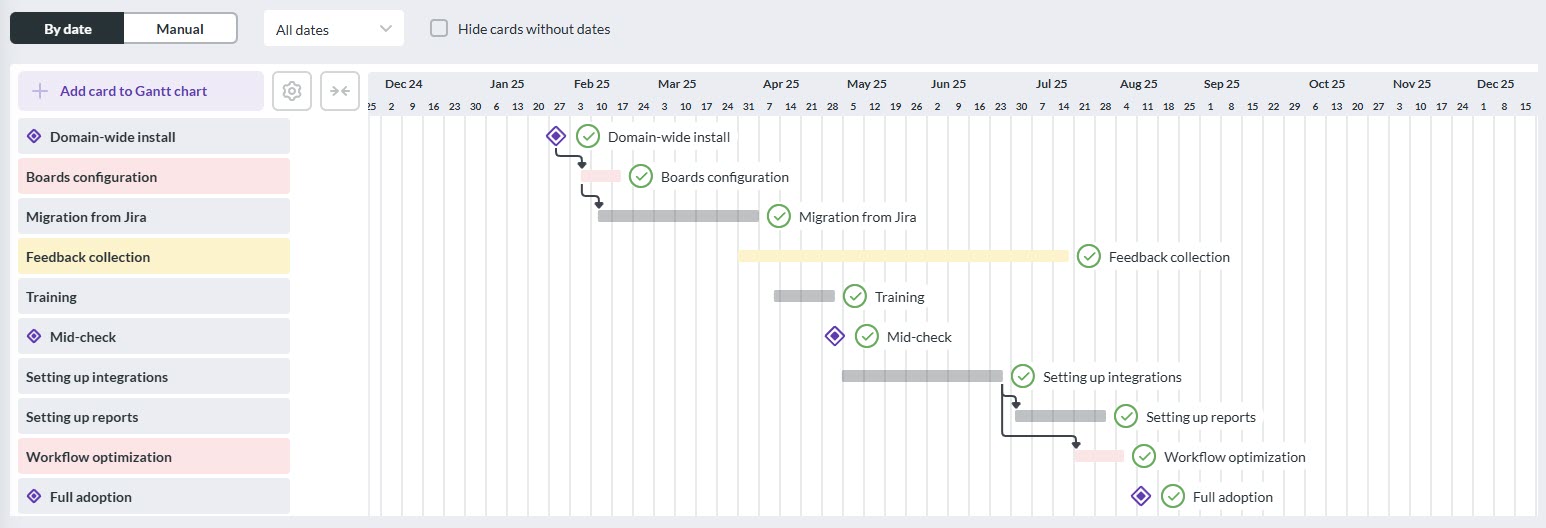
Tasks, timelines, and dependencies are especially visual on the Gantt chart view, allowing every team member to see at a glance exactly what needs to be done and when.
Tasks can be edited and updated, and everyone will be notified instantly. There’s no more need for endless meetings or long emails that achieve nothing except burnout and confusion!
No matter which department your team member belongs to (or whether it’s for your own HR team internally), they’ll be able to instantly access and understand all the information they need. With the click of a mouse.
If all this sounds like it could be right up your street, then get in touch with the team at Kanbanchi today, and let’s chat about the ways in which our team can work with you to get the results you need.
Let’s make your HR team the best-in-class. Try Kanbanchi today
If you’ve got any other burning issues we’ve not covered in our HR guide, then take a look through our most commonly asked questions to find succinct answers.
Just like traditional project management, HR projects follow a lifecycle:
Common examples include:
Each of these has a clear start and finish, as well as a measurable outcome.
The best tool is one your team will actually use! For teams already using Google Workspace, a native tool like Kanbanchi is ideal. It integrates directly with your Google Drive and Calendar, ensuring that sensitive employee data stays within your secure ecosystem while providing the visual clarity of Kanban boards and Gantt charts.

In this Article:
Start using Kanbanchi now
Start your free trial