
In this Article:
Try Kanbanchi now
Start your free trial

Looking for a new project management tool? If so, the Kanbanchi vs Autodesk BIM 360 comparison is one you’ll want to consider.
What you may not know, however, is that BIM 360 isn’t really BIM 360 anymore. Autodesk folded it into Autodesk Construction Cloud, then renamed that platform Autodesk Forma in March 2026, so the product you’re researching now ships under new branding.
Don’t worry if this sounds a little complicated. In this guide, we’ll explain exactly what you can expect from the new Autodesk BIM 360 and how it compares to Kanbanchi. We also cover what each tool costs, how long it takes to get running, and which one fits construction, architecture, and internal project work best.
Autodesk BIM 360, now sold as Autodesk Forma’s Build and Data Management products, is the stronger choice for general contractors and design teams actively coordinating BIM. It’s also best if you run clash detection and formal RFI and submittal workflows on large projects. Kanbanchi fits construction companies, subcontractors, and internal teams who need clear project and task tracking, without paying for BIM tooling they won’t use.
| Platform | Kanbanchi | Autodesk BIM 360 (Forma) |
|---|---|---|
| G2 rating | 4.7 / 5 | 4.4 / 5 |
| Capterra rating | 4.5 / 5 | 4.3 / 5 |
Autodesk’s construction platform is praised by G2 reviewers for strong document control and model coordination features. However, it loses points for its difficult setup. Capterra reviewers also cite strong field-to-office collaboration alongside recurring comments about cost. Kanbanchi’s high ratings on both G2 and Capterra come from praise about its fast onboarding speed and great support quality.
Autodesk BIM 360 initially launched in 2015 as Autodesk’s cloud platform for construction document management and BIM coordination. The platform gave contractors, architects, engineers, and owners a shared space to store drawings, as well as review 3D models for clashes and track RFIs and submittals.
Autodesk later folded BIM 360 into Autodesk Construction Cloud. Now, it’s renamed Autodesk Forma. All of the functionalities that were once under the BIM 360 name now live inside Forma Build, Forma Data Management, and Model Coordination.
If you’re searching for an Autodesk BIM 360 alternative, it’s important to know that the demo you book will reference Forma, not BIM 360, even though sales conversations may still use the old name.
Kanbanchi is project management software built around boards, lists, and cards. It’s designed primarily for Google Workspace project management, with a Microsoft 365 version if you sign in through Microsoft instead. The software layers Kanban, List, Gantt, Swimlane, and Team Workload views over the same cards, rather than one dense interface that serves every project role.
One of Kanbanchi’s clearest strengths as an Autodesk BIM 360 is its usability. Small teams can run it as a basic Kanban board, then add subcards, dependencies, time tracking, and Gantt scheduling as their work grows.
The biggest difference in any Kanbachi vs Autodesk BIM 360 comparison is that these platforms fall into different categories of construction project management software, competing for some of the same budget. Several BIM 360 (Forma) capabilities, like model coordination, have no real Kanbanchi equivalent, and Kanbanchi’s board-based flexibility has no real BIM 360 equivalent, either, as you can see from their features side-by-side:
| Feature | Kanbanchi | Autodesk BIM 360 (Forma) |
|---|---|---|
| Task/card-based project tracking | Yes | Limited (Issues module, not a board model) |
| Gantt chart | Yes (Professional+) | Limited (phase scheduling, not a native Gantt) |
| BIM model coordination and clash detection | No | Yes |
| RFIs and submittals | No | Yes, with audit trails |
| Drawing sheet management and markup | No (file attachments only) | Yes |
| Custom Fields | Yes (Professional+) | Yes |
| Time tracking | Yes (Professional+) | Limited (via Cost Management module) |
| Team workload view | Yes (Professional+) | No dedicated equivalent |
| Free Plan | Yes (unlimited users, unlimited projects, 36 active cards per project) | No |
| Mobile App (iOS or Android) | Yes | Yes |
| Google Workspace integration | Yes (native) | Limited (via third-party marketplace) |
Autodesk Forma’s Build dashboard is designed around modules, including. Documents, RFIs, Submittals, Issues, and Cost. It’s genuinely capable if you’re a dedicated project engineer or BIM coordinator, but there’s no simplified starting view for smaller crews that are looking for a simple task list.
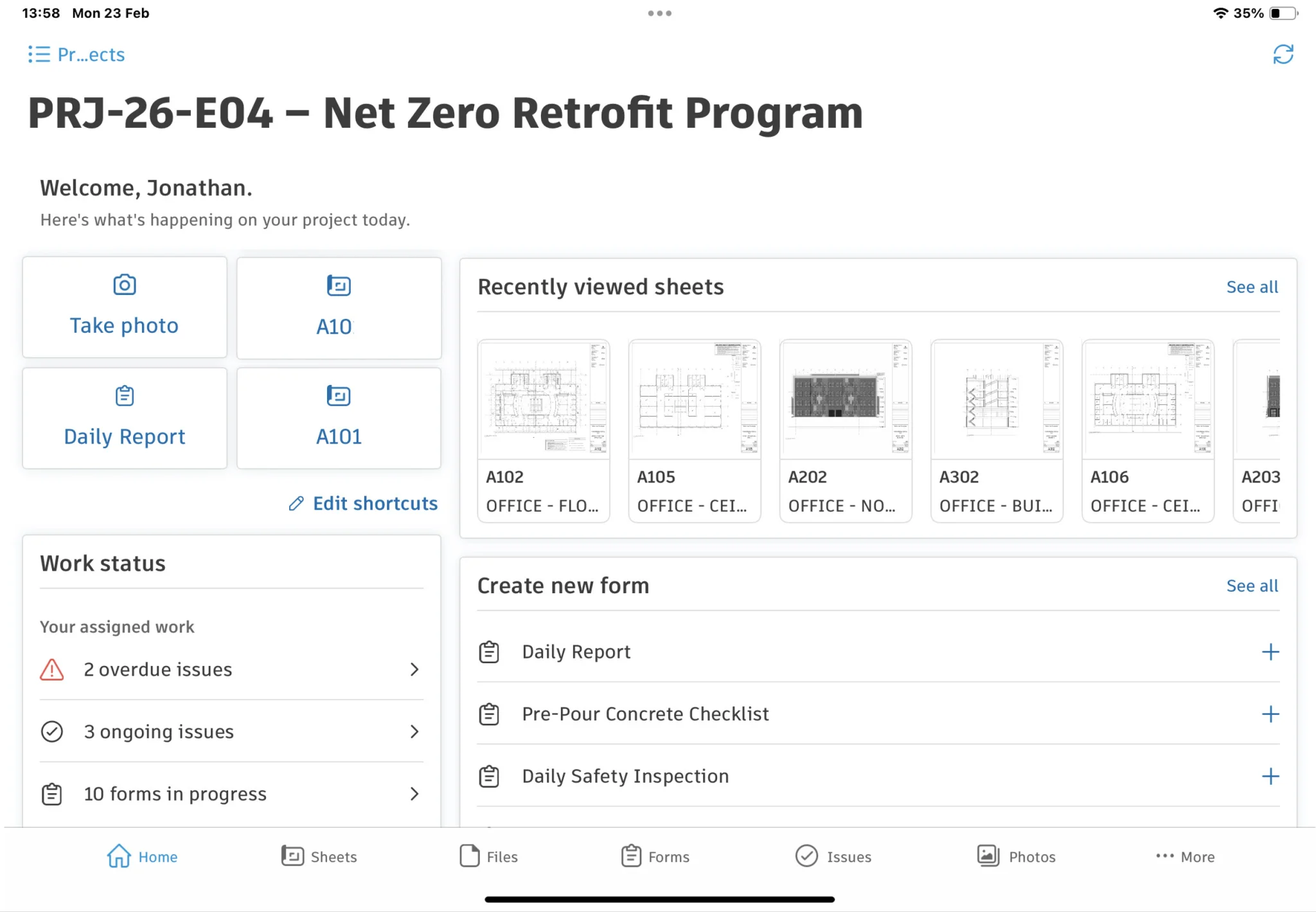
Autodesk BIM 360 provides document management, issue tracking, and collaboration features for construction and BIM projects.
Kanbanchi opens straight to a board. There’s a view switcher at the top for Kanban, List, Gantt, and Team Workload, which is visible from the first screen, with cards showing assignees, due dates, and color labels on their face.
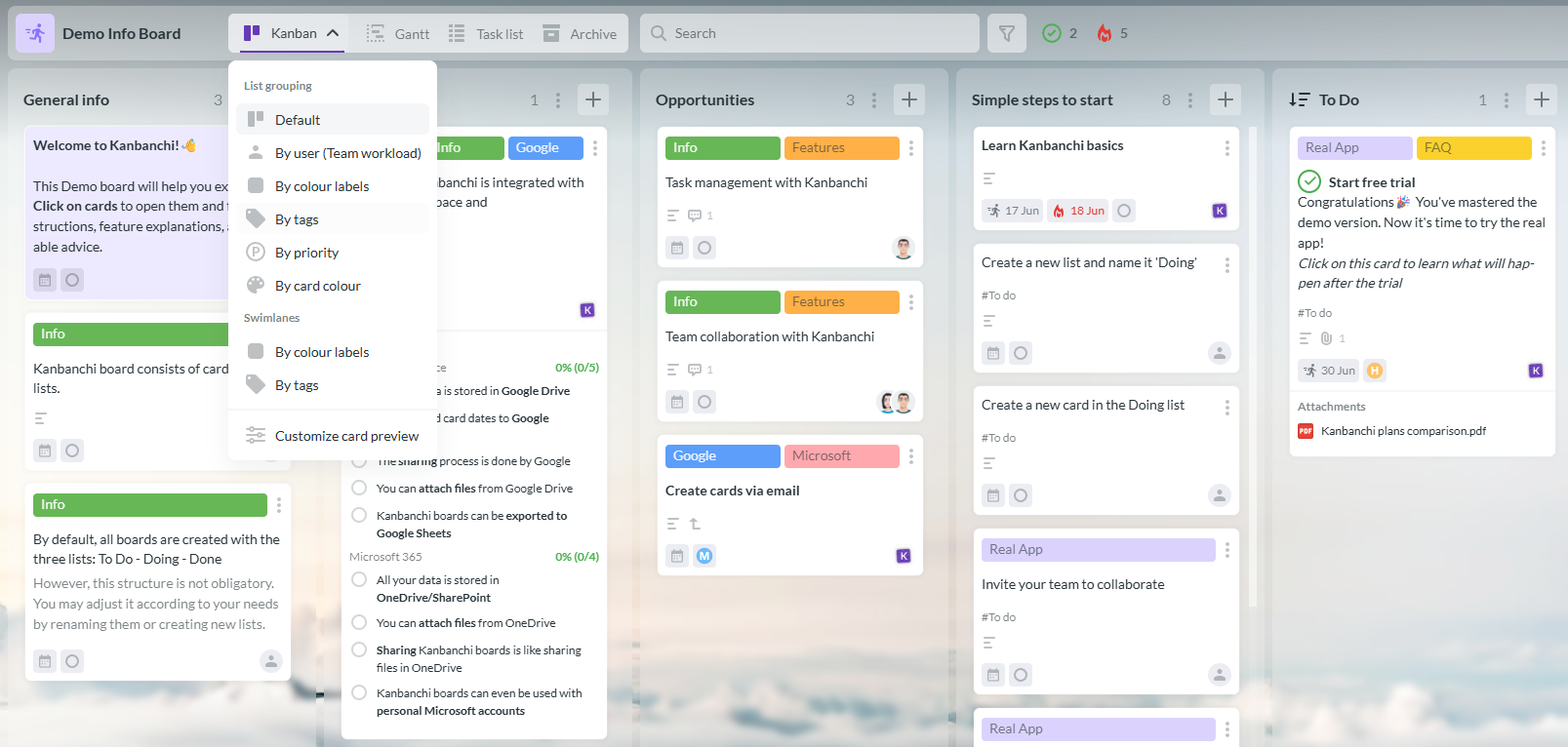
The Kanbanchi demo board provides a visual workspace for managing projects with Kanban boards, Gantt charts, and Google Workspace integration.
This means you only need to scan the board to see a card’s status, without actually opening it. That’s a real benefit if you’re moving from shared spreadsheets to a dedicated project management tool. The board itself needs no explanation, and the Gantt and workload views take just a short walkthrough.
Overall, Forma Build’s dashboard works well for project engineers who use submittals daily. As a common Autodesk BIM 360 alternative, Kanbanchi is best for smaller teams who want visibility but don’t have a dedicated administrator.
Don’t have a BIM coordinator on your team? Setup time can determine whether team members really make the most of the tool or refuse to use it from day one.
Autodesk Forma Build’s setup involves configuring project templates, defining RFI and submittal workflows, connecting Model Coordination for 3D files, and assigning module-level permissions per collaborator. The Autodesk BIM 360 pricing page (now Forma) mentions expert delivery services for exactly this reason, ensuring these workflows are implemented properly.
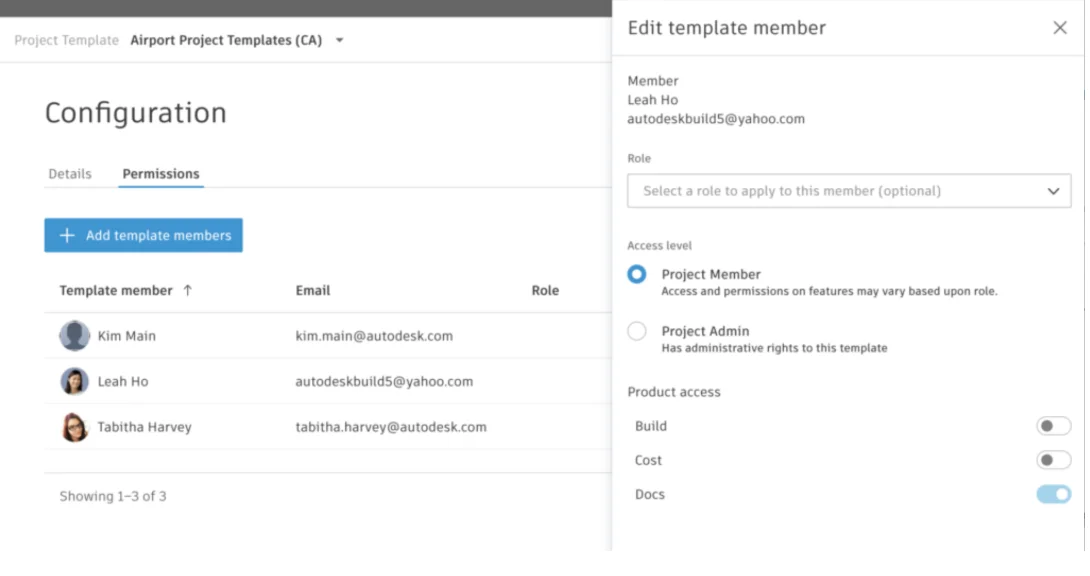
Autodesk BIM 360 guides administrators through project setup, including project details, team access, and collaboration settings.
Kanbanchi’s simple setup involves creating a board, adding lists, inviting the crew, and adding cards. No licensing calls are needed here. Instead, your team can quickly get boards up and running all within a single afternoon.
Four key areas make the real difference in a Kanbanchi vs Autodesk BIM 360 comparison: document handling, BIM coordination, scheduling, and how the platforms handle a project from day one. Let’s take a closer look at each area:
Autodesk Forma’s Data Management module (formerly BIM 360 Docs) is built for document control, something that Kanbanchi doesn’t attempt to replicate. It features:
In contrast, Kanbanchi handles files as attachments on cards, pulled directly from Google Drive or Shared Drives without duplicate copies. It’s great for general project documentation well, but not drawing-specific version control.
The difference here is that Forma suits teams managing controlled drawing sets across contractors, while Kanbanchi suits is best for contracts and reference files rather than revised drawings.
Autodesk Forma’s Model Coordination tools let you overlay architectural, structural, and MEP models. You’ll also benefit from automatic clash detection, which then allows you to route issues to the responsible trade. Its Build module manages formal RFIs and submittals with full audit trails, a workflow required on most commercial and public projects.
Kanbanchi isn’t an Autodesk BIM 360 alternative in this category. It has no BIM coordination, clash detection, or formal RFI and submittal tracking. And while a card can represent an RFI as a task with a due date and assignee, it won’t manage the review chain Forma tracks natively.
Forma Build does include scheduling tools for milestones and phase tracking. However, it’s generally recommended to use them alongside a dedicated tool like Primavera P6, not as the primary scheduling platform.
Kanbanchi’s Gantt view, on the Professional plan, is built to handle scheduling on the same boards you use for daily task tracking. Its Gantt chart handles task dependencies, milestones, and drag-to-reschedule planning, so one tool covers both the plan and the work.
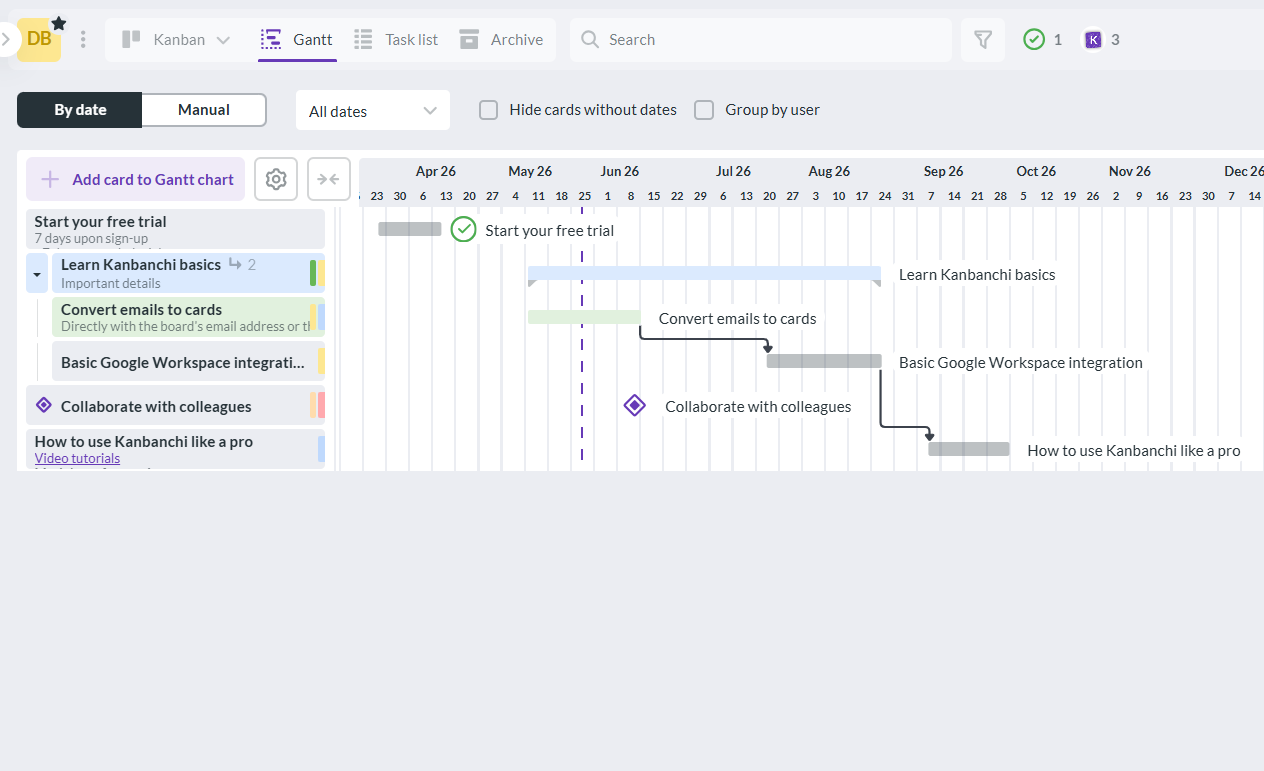
Kanbanchi’s Gantt chart helps teams plan project schedules, manage task dependencies, and monitor progress within Google Workspace.
So, what do these features look like if you’re using either tool?
Imagine you’re starting a small project, say a tenant improvement or punch-list phase. A project engineer creating a project from a template in Forma Build will set up Issues and Forms for punch-list items, then assign module permissions per subcontractor before any items can be logged.
On the flip side, a superintendent using Kanbanchi creates a board, adds lists for each phase, and adds cards for punch-list items, with assignees and due dates. Team Workload shows who has the biggest workload.
Forma’s process produces a more auditable record, while Kanbanchi produces a working board much faster.
Permissions and compliance deserve real attention in this Kanbanchi vs Autodesk BIM 360 comparison, since BIM 360 and its Forma successor are built for commercial and public construction work.
Autodesk Forma’s permission model is granular, meaning access can be defined either by module (Documents, Issues, Cost, Model Coordination), by company, or by role. If you’re a general contractor, this is beneficial if you don’t want subcontractors to be able to see each other’s cost data. Autodesk holds SOC 2 Type II and ISO 27001, 27017, and 27018 certifications, and its platform is GDPR compliant.
Kanbanchi’s permissions are based on Google Workspace’s sharing model: Owner, Editor, Commenter, and Viewer map directly to Google Drive’s sharing logic, so there’s no second permission system to maintain.. Kanbanchi holds SOC 2 Type II, ISO 27001, and GDPR compliance directly, with Google Groups support on Enterprise.
There are over 400 pre-built integrations in Autodesk Forma, from ERPs and CRMs to analytical tools. It’s ideal for large contractors running Autodesk products alongside accounting systems, but not if you prefer working with Google Workspace project management tools.
That’s what makes Kanbanchi’s integrations so distinct. Kanbanchi’s integration story runs the opposite direction. Its six integration points cover most of what a construction back-office team needs for Google Workspace project management:
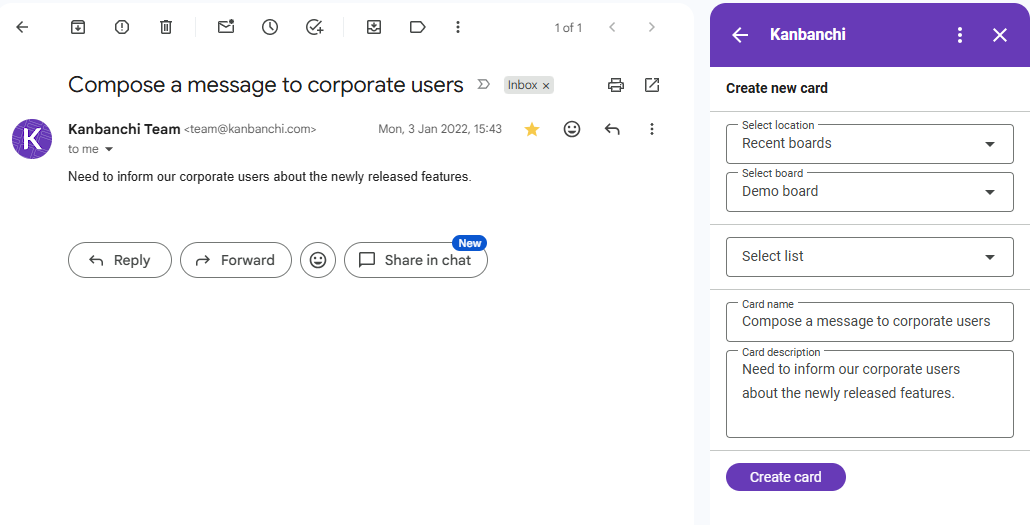
The Kanbanchi Gmail add-on lets users create and update tasks without leaving Gmail, helping teams turn emails into actionable work.
Kanbanchi’s Microsoft 365 version uses a similar approach to integrations as Google Workspace project management model, just adapted if you’re signing in through Microsoft instead.
For field-heavy document work, Forma’s app is built for the job. For general task visibility on the move, Kanbanchi’s app covers the same ground its desktop version does
Autodesk’s Forma mobile app, available for iOS and Android is built for field-heavy document work. You can pull up a drawing set and log any issues with a photo, without returning to a laptop. Reviewers note the field markup and photo-tagging tools are strong, though the app has the same module-heavy structure as desktop.
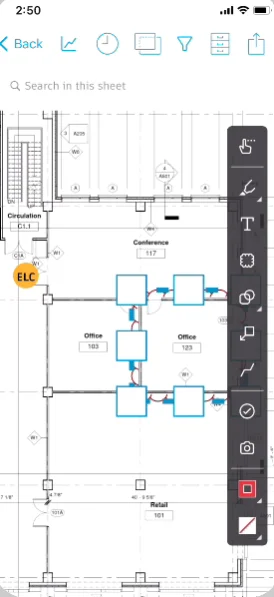
The Autodesk BIM 360 mobile app enables teams to access project information, manage issues, and collaborate from the construction site.
Kanbanchi’s mobile app, available for Android, is better for general task visibility, and doesn’t offer a construction-specific field module. It mirrors the desktop board experience well, allowing you to view boards, update cards, add comments, and check due dates without losing the board’s structure.
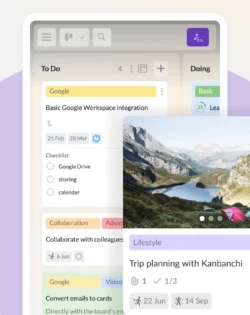
The Kanbanchi mobile app lets teams manage tasks and projects from anywhere.
The depth of support you receive from Autodesk depends on the subscription level.
Expert support is available 24 hours a day, Monday through Friday, alongside a network of certified resellers, but whether you get a fast answer rests on which reseller or tier your company is on.
Kanbanchi’s support isn’t determined by plan tier. All customers receive the same response quality, whether you’re a property management client running on the free plan or a paying Enterprise account asking about custom properties.
Reviewers on both G2 and Capterra mention that the customer service team solves actual workflow problems rather than pointing to a help article. And this distinction is one that stands out if you’re considering an Autodesk BIM 360 alternative, particularly after a frustrating support experience elsewhere.
BIM 360 pricing is difficult to determine. Autodesk doesn’t publish self-serve pricing for BIM 360 or its Forma successor. Instead, you’ll need to request a quote, and the cost depends on which modules and how many users are involved.
Third-party estimates put per-user costs for Autodesk Build at $135-$165 per user per month billed by seat, with unlimited-user packages requiring a custom quote. There isn’t a free plan, though limited free trials exist for products like Forma Build Essentials.
Kanbanchi’s pricing is much simpler, and one reason why it comes up so often as an Autodesk BIM 360 alternative in budget-conscious searches.
The free plan is permanent, with unlimited users and projects, capped at 36 active cards per project. Paid pricing runs per seat, from 2 seats, with cost dropping as the team grows, and nonprofits and educators get a 25% discount on annual plans other than Essential.
Take a look at the table below for tier-by-tier pricing:
| Plan | Autodesk BIM 360 (Forma) | Kanbanchi |
|---|---|---|
| Free plan | No | Yes (unlimited users, unlimited projects, 36 active cards per project) |
| Entry tier | Custom quote (Forma Data Management estimated from around $500/year) | Essential: $3.97/user/month (annual) or $5.99/user/month (monthly) |
| Mid tier | Custom quote (Autodesk Build estimated $135–165/user/month) | Premium: from $11.97/month |
| Advanced tier | Custom quote (full Model Management bundle) | Professional: from $24.47/month |
| Enterprise | Custom quote | Enterprise: from $9.95/month |
| Discounts | Not publicly stated | 25% off annual plans other than Essential for nonprofits and schools |
Considering these pricing structures for a 10-person team over 12 months, the gap is stark. At the lower end of third-party estimates, you’ll pay around $16,200 a year on Autodesk Build alone, against well under $3,000 a year on Kanbanchi Professional.
While that comparison might not seem entirely fair (the products cover different ground), if you’re a back-office team that doesn’t need BIM coordination, paying BIM 360 pricing for general project tracking is difficult to justify.
| Choose Kanbanchi if… | Choose Autodesk BIM 360 (Forma) if… |
|---|---|
| You need clear project and task tracking without a 3D model in the workflow | You run active BIM model coordination and need automatic clash detection |
| Your team wants Google Workspace project management built in, not bolted on | Your contracts require formal RFI and submittal audit trails |
| You want a transparent, permanent free plan before committing budget | You manage controlled drawing sets across many subcontractors |
| You need a tool a new hire can learn in an afternoon | You have a dedicated BIM coordinator or project engineer to administer the platform |
Whether the right decision is Kanbanchi or Autodesk BIM 360 depends on the size of your team and your budget, plus the type of project management work you need the platform for.
Autodesk BIM 360, now sold under the Autodesk Forma name, is the better pick if your projects involve active BIM coordination, formal RFIs and submittals, or controlled drawing sets shared across many subcontractors. Just be sure you have the budget for a sales conversation rather than a published price, since BIM 360 pricing is quote-based across the board.
But if you’re looking for a simpler solution that offers project and task tracking for a smaller team (without needing to appoint a BIM coordinator first), choose Kanbanchi. It’s a common Autodesk BIM 360 alternative for construction back-office teams who already use Google Workspace and found BIM 360 built for a bigger, more model-heavy operation than theirs.
Looking for construction project management software that doesn’t require a licensing conversation to understand what it costs? Start your Kanbanchi free trial today.
Kanbanchi is a strong Autodesk BIM 360 alternative for teams that need general project and task tracking without BIM coordination or formal RFI and submittal workflows. It isn’t a replacement for clash detection or controlled drawing management on large BIM-heavy projects, but for most back-office and internal teams, it covers the planning work they actually do.
BIM 360 pricing is quote-based, with third-party estimates placing per-user costs for Autodesk Build around $135-$165 per user per month. Kanbanchi charges from $3.97 per user per month on Essential, with a permanent free plan available and no sales call required to see the cost.
Autodesk folded BIM 360 into Autodesk Construction Cloud, and renamed that combined platform Autodesk Forma in March 2026. The functionality once sold as BIM 360 now ships as Forma Build, Forma Data Management, and Model Coordination, though some sales materials and search terms still reference the original BIM 360 name.
Yes, Kanbanchi was built first for Google Workspace project management, with single sign-on, Google Calendar sync, a Gmail add-on for creating cards from email, and direct Google Drive integration. A Microsoft 365 version is also available for teams that prefer Microsoft sign-in.
Kanbanchi is easier to learn for most teams. Its board interface needs little explanation, while Autodesk Forma’s module-based structure, covering Documents, Issues, Submittals, and Cost, assumes a trained project engineer or BIM coordinator managing the setup. Teams without that role in place typically get running on Kanbanchi within a single day.
Read more articles related to Project Management
In this Article:
Start using Kanbanchi now
Start your free trial