
In this Article:
Try Kanbanchi now
Start your free trial


Do you prefer to organize your workload around Gantt charts? Well, the bad news is that if you’re looking for a project management tool, but are on a budget, Freedcamp may not be the one for you.
It’s got a great free plan and several benefits for smaller firms and freelancers, though Gantt charts and custom fields sit behind a paid tier. So, what’s the solution? If your team already works in Google Workspace, Kanbanchi could be the answer.
But before you commit to either tool, it’s important to take an honest look at Kanbanchi vs Freedcamp, as they work well for organizations of different sizes, with distinct budgets, and who take different approaches to project management. Keep reading as we compare both, with real pricing and setup times.
As project management software for Google Workspace, Kanbanchi is the best pick if you prefer to store your boards directly in Drive. It’s also ideal if you’re looking for a Gmail add-on for creating cards from email, and security certifications held directly by the company rather than inherited from a host. Freedcamp better suits freelancers and smaller firms wanting a permanent free plan bundled with a CRM, a wiki, and invoicing.
Here’s how Kanbanchi vs Freedcamp compare on the two review platforms most buyers check first:
| Platform | Kanbanchi | Freedcamp |
|---|---|---|
| G2 | 4.7 / 5 (95 reviews) | 4.5 / 5 (157 reviews) |
| Capterra | 4.5 / 5 (292 reviews) | 4.7 / 5 (502 reviews) |
Kanbanchi is rated higher on G2 for its ease of setup and support quality. But on Capterra, Freedcamp actually outscores Kanbanchi. A typical Freedcamp review praises the free plan’s generosity and fast support, though several mention a steeper learning curve once workspaces grow into more of its bundled apps.
Freedcamp is a modular project management platform built around its free plan. Every tier, including free, includes unlimited projects, storage, users, and a range of core apps that cover:
Upgrade to a paid tier and you’ll be able to access a wiki, CRM, invoicing through Invoices+, and a Gantt chart.
Freedcamp markets itself towards freelancers and nonprofits, as well as small businesses wanting tasks and light CRM in one subscription.
Kanbanchi is project management software for Google Workspace, and there’s also a Microsoft 365 version available. It stores the project boards you create directly in Google Drive, as files that behave like any other Drive document. Sharing also follows Google setup.
This means that Kanban boards, Gantt charts, List View, Team Workload view, Swimlanes, and time tracking are all included in one simple data model, which can be made more complex (if necessary) as your project grows.
| Feature | Kanbanchi | Freedcamp |
|---|---|---|
| Free Plan | Yes (unlimited users, unlimited projects, 36 active cards per project) | Yes (permanent, unlimited users and projects, 10MB file size limit) |
| Pricing Model | Per-seat, discounted from 2 seats | Per active user, collaborators free on paid plans |
| Kanban Board | Yes (all plans) | Yes (all plans) |
| Table / List View | Yes (all plans) | Yes (Business+) |
| Gantt Chart | Yes (Professional+) | Yes (Business+) |
| Time Tracker | Yes (Professional+) | Yes (all plans) |
| Team Workload View | Yes (Professional+) | No dedicated workload view |
| Recurring Tasks | Yes (Premium+) | Yes (all plans) |
| Custom Fields | Yes (Professional+) | Yes (Business+) |
| Built-in CRM / Invoicing | No | Yes (Business+) |
| Google Workspace (native) | Yes (boards stored as Drive files) | Connector-based (Drive/OneDrive/Dropbox, Pro+) |
| Mobile App (iOS or Android) | Yes | Yes |
| SSO | Yes (all plans via Google/Microsoft) | Yes (SAML, Enterprise only, beta) |
| Public API | No public API described | Yes (all plans, including free) |
| Org-level SOC 2 / ISO 27001 | Yes | No (inherited from hosting provider) |
Freedcamp’s dashboard features a sidebar listing every available app: Tasks, Discussions, Files, Milestones, Calendar, Time, and, on paid plans, Wiki, CRM, Issue Tracker, and Invoices+.

Freedcamp provides a central workspace for managing projects, organizing tasks, and collaborating with team members.
That sidebar can be pretty overwhelming at first as you try to decide whether a task belongs in the Tasks app or a new project, particularly if you’re new to project management or Kanban board software. However, the process does seem to become easier to navigate as you gain more experience.
What makes Kanbanchi different is that the tool opens straight to a board. Creating a card from here is straightforward and takes just seconds, even without a walkthrough of the tool.
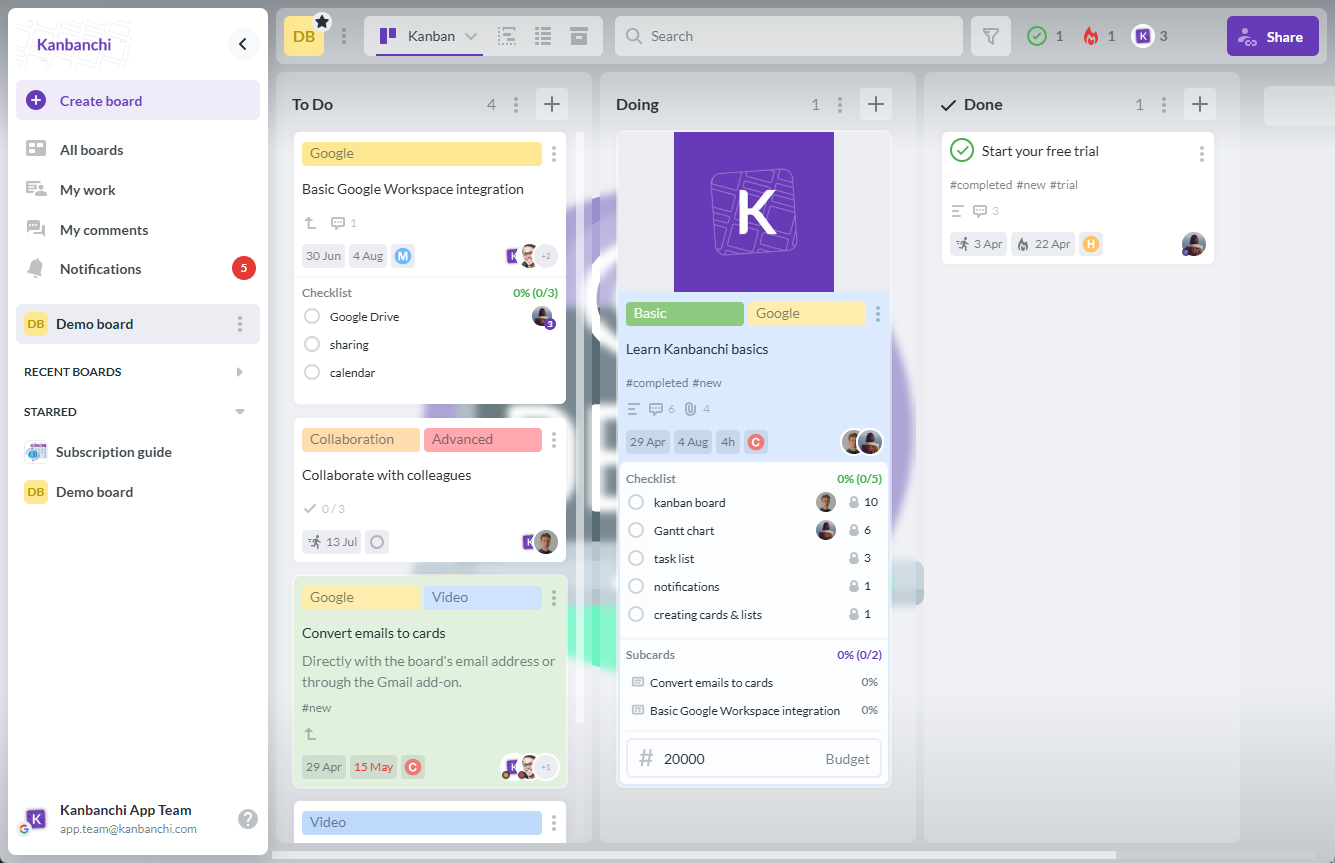
Kanbanchi offers a visual project management workspace where teams can organize tasks, track progress, and collaborate using Kanban boards.
Setup time is one of the areas where Kanbanchi vs Freedcamp differ most, and an important factor to consider if straightforward team task management is a priority.
Freedcamp’s account creation may take seconds, but to create a usable project, you’ll need to first choose which apps to activate. This gives a basic to-do list, and you’ll then have to upgrade to Business for custom fields or a Gantt timeline.
On the other hand, sign in to Kanbanchi with a Google account and it creates a board with your Drive storage already connected, and lists and card fields set up. You can then invite your team and start working on a project within the same day.
Tasks are the core units in Freedcamp, and they’re organized alongside wiki pages, CRM contracts, invoices, and tracked issues within each project. This bundling approach is a real advantage for small consultancy firms, but larger accounts often find the interface harder to navigate as they switch more of these units on.
Kanbanchi’s core unit, the card, arrives fully formed, holding everything from assignees and dates to estimates, attachments, comments, subcards, dependencies, and custom properties without setup. List View, Gantt Chart, Team Workload, and Swimlanes are all views of that same card, so all team members can see the same day.
The key distinction here is that Kanbanchi is purely project management software for Google Workspace. It doesn’t try to be a CRM or invoicing tool, and if you already have one, its narrower focus means less to learn.
Available on the paid Business and Enterprise plans, Freedcamp’s Gantt Chart now includes a time-tracked column showing planned versus actual effort in one view. Time tracking itself, though, is free on every Freedcamp plan, which is for solo freelancers logging billable hours without paying anything.

Freedcamp’s Gantt chart helps teams visualize project schedules, manage task timelines, and track progress across projects.
You’ll need Professional or above to access Kanbanchi’s Gantt Chart. However, it runs on the same board data used for Kanban and List View, so dates set on a card appear on the timeline automatically, alongside time tracking and Team Workload at the same tier.
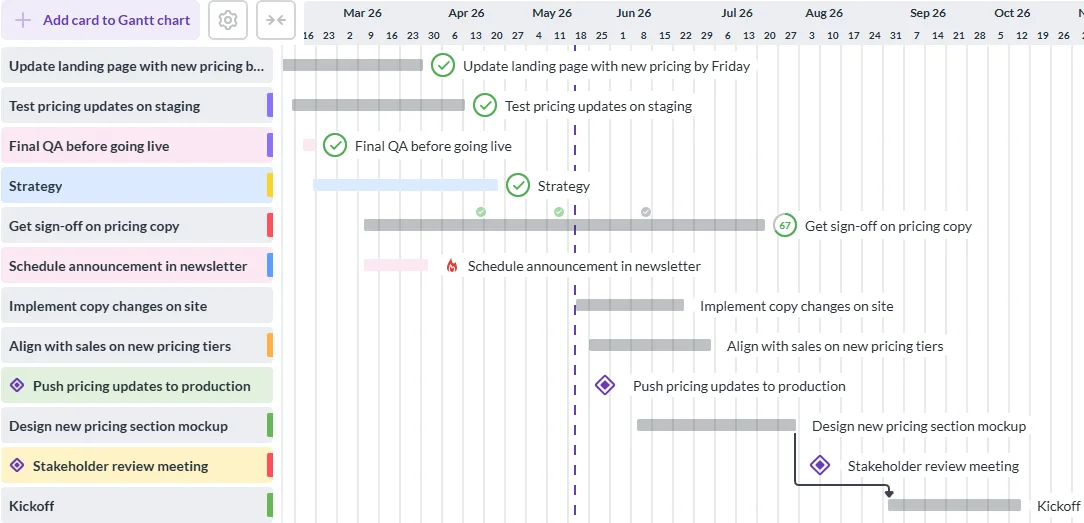
Kanbanchi’s Gantt chart helps teams plan project timelines, visualize task dependencies, and track progress in a single workspace.
Freedcamp has a public API and Zapier integration on every plan, including free, meaning you can connect thousands of other apps without upgrading. Kanbanchi doesn’t currently offer a public API, but most Google Workspace teams don’t need one, since card creation from Gmail and Google Forms via Google Script covers most automations.
In terms of security, Freedcamp’s own documentation states that its AWS hosting environment maintains ISO 27001 compliance, PCI certification, and SOC reports, backed by quarterly third-party audits. That’s reasonable, but it’s certification held by the infrastructure provider rather than an independent audit of Freedcamp, and Freedcamp doesn’t publicly claim to be HIPAA compliant.
Kanbanchi is verified by an independent audit to hold SOC 2 Type II and ISO 27001 certification directly. It also has CASA Tier II certification built on the OWASP ASVS framework, and adheres to GDPR and HIPAA requirements.
In simpler terms, this means it stores no customer data inside the application, since everything remains in the user’s own Google Drive. That’s an important point for regulated buyers.
On permissions, Freedcamp offers project- and group-level access with Read-Only and Guest collaborator roles that stay free on paid plans. Note that SSO with SAML is Enterprise-only and marked beta, as is two-factor authentication. Kanbanchi offers single sign-on on every plan, including free, with permissions coming directly from Google and sharing extended to Google Groups on Enterprise.

Freedcamp’s SSO feature enables organizations to simplify user access and manage authentication through a centralized login system.
Kanbanchi’s six native integrations are all built around Google Workspace:
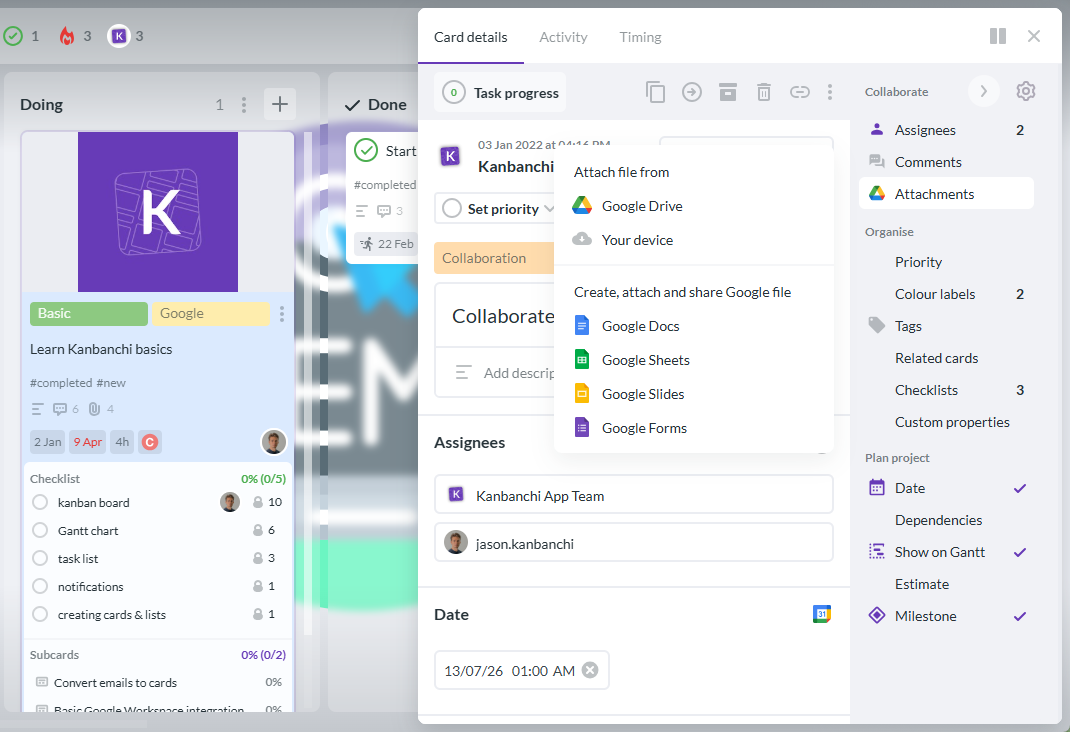
Kanbanchi integrates with Google Drive, allowing users to attach and manage project files directly within task cards.
With Freedcamp, the integrations focus on file storage: Google Drive, OneDrive, and Dropbox linking are available on Pro and above, plus Google Calendar sync. There’s also Zapier, which connects roughly 9,000 other apps if you have the time to build them into your project. What it doesn’t offer, however, is deeper Google Workspace integration beyond file linking. There’s no Gmail add-on for creating tasks from email, for example.
If you’re comparing Kanbanchi vs Freedcamp directly on custom connections, Freedcamp’s API access undoubtedly wins. But if you’re already working inside Google’s ecosystem and run your calendar, email, and files through Google Workspace, Kanbanchi is better here.
If it’s project work on the go you’re most interested in, the Kanbanchi vs Freedcamp review is pretty even, as both tools offer free iOS or Android apps.
But in practice, many Freedcamp users mention the mobile app trailing the desktop version, with some reporting trouble viewing full project boards from a phone. Kanbanchi’s mobile app uses the same board model as desktop, so checking a board or moving a card works the same regardless of device.
Freedcamp’s guaranteed under one-day response is a huge benefit if you choose the Enterprise plan, and its 4.7 customer support score on Capterra reflects that responsiveness. If not, you aren’t left without – Freedcamp offers email, FAQs, live chat, and 24/7 live representative access even on the free tier.
Kanbanchi’s support is a recurring theme in reviews. Users describe a team that understands the product rather than reading from a script, without needing several ticket escalations to really solve the issue.
| Plan tier | Kanbanchi (annual billing) | Freedcamp (annual billing) |
|---|---|---|
| Free | Unlimited users/projects, 36 active cards/project | Unlimited users/projects, 10MB file limit |
| Entry paid | Essential, $3.97/user/month | Pro, $1.49/user/month |
| Mid paid | Premium, from $11.97/month | Business, $7.49/user/month |
| Advanced paid | Professional, from $24.47/month | Gantt and custom fields included in Business above |
| Top tier | Enterprise, from $9.95/month | Enterprise, $16.99/user/month |
Freedcamp pricing starts with the Free plan, which includes unlimited projects, tasks, storage, and users with a 10MB file limit. Pro adds Drive, OneDrive, and Dropbox linking, while the Gantt Chart, custom fields, Wiki, and CRM features are accessible through Business. Enterprise offers volume discounts and is best for more complex projects and advanced workflows, featuring SSO and two-factor authentication.

Freedcamp’s pricing page displays available plans and features to help teams choose the right project management solution.
Other than the free tier, Kanbanchi’s pricing begins with the Essential plan. Investing in Premium adds multiple board views and card templates, while the higher Professional plan also includes the Gantt Chart, time tracker, and Team Workload views. Enterprise goes even further with multi-level admin controls and a designated account manager.

Kanbanchi’s pricing page highlights available plans and features designed for teams managing tasks, workflows, and projects.
What makes Kanbanchi so unique if you’re looking for Freedcamp alternatives is that Drive integration is included on every plan. Freedcamp pricing reserves Drive linking for Pro and above.
Another point of difference is the free plans. Kanbanchi has no cap on users or projects, and is limited only to 36 active cards per board. The Freedcamp free plan also has no user or project cap, but restricts files at 10MB and withholds Drive linking and the Gantt Chart until a paid upgrade.
Nonprofits and educational institutions also get a 25% discount on Kanbanchi’s annual plans other than Essential. Freedcamp runs a separate nonprofit application instead of a flat published discount.
To get a Gantt chart and custom fields through one of the Freedcamp pricing plans, you’ll need to purchase Business at $7.49 per user monthly, or $898.80 a year for 10 people.
The equivalent Kanbanchi tier, Professional, is priced per seat starting from $30.97 monthly at the base rate, with the per-seat cost decreasing as your team grows. So, for smaller teams under 10, Freedcamp Business has a lower per-seat price.
However, Kanbanchi has the cost advantage on its free plan. Unlimited users and projects are available at no charge, against Freedcamp’s 10MB file cap and absence of the Gantt chart feature on free.
| Choose Kanbanchi if… | Choose Freedcamp if… |
|---|---|
| Your team runs on Google Workspace and wants boards stored directly in Drive | You’re a freelancer or very small team wanting a CRM, invoicing, and tasks in one login |
| You want work moving inside minutes of signing in | You need API or Zapier access without paying for a higher tier |
| You need Gantt charts, time tracking, and workload views without a CRM bundled in | Time tracking on the free plan matters more than a Gantt chart |
| SSO on every plan, including free, is a requirement | You’re comfortable with SSO limited to a beta Enterprise feature |
| You want support that solves problems rather than reading from a script | Your team is outside the Google or Microsoft ecosystem |
Tasks, a CRM, a wiki, invoicing, and a public API, all reachable from a subscription that stays free for solo use, are undoubtedly where Freedcamp wins this Kanbanchi vs Freedcamp comparison. Its low price also makes the platform an ideal choice for freelancers or small nonprofits that would otherwise juggle three or four separate tools.
But if you want Kanban board software with Gantt Scheduling and Team Workload views, without a CRM, invoicing tool, and wiki bundled into every seat, Kanbanchi is the more practical answer. You get that depth inside a single workflow – a board that works the moment a Google Workspace user signs in, Gantt charts and time tracking without an app-switching detour, and security certifications held directly rather than borrowed from a host.
Ready to see if it works for you? Discover a board built for Google Workspace, not a bundle of apps to configure, by trying Kanbanchi for free today.
For teams focused on tasks, Gantt scheduling, and Google Workspace integration, Kanbanchi is the stronger pick in a Kanbanchi vs Freedcamp comparison. Freedcamp wins for small teams or freelancers wanting a CRM, invoicing, and a public API bundled with task management.
Yes, the Freedcamp free plan is permanent, with unlimited users, projects, and storage, though file uploads are capped at 10MB and Drive linking and the Gantt Chart need a paid upgrade. Kanbanchi’s free plan has no user or project cap, limited only to 36 active cards per board.
Kanbanchi is one of the strongest Freedcamp alternatives for Google Workspace teams. It stores boards directly in Drive, includes a Gmail add-on for creating cards from email, and offers single sign-on on every plan, including free, none of which Freedcamp’s connector-based Drive linking replicates.
Freedcamp pricing costs $1.49 per user monthly for Pro and $7.49 for Business, both billed annually, with Gantt charts and custom fields on Business. Kanbanchi charges $3.97 per user monthly for Essential and from $24.47 per user monthly for Professional, which includes Gantt. Freedcamp Business has the lower per-seat cost if you’re looking for Gantt access.
No, the Freedcamp API and Zapier integration are free on every plan, while Kanbanchi doesn’t currently publish a public API. Teams wanting to script custom automations or connect project data to internal systems may prefer Freedcamp specifically for that reason, even if Kanbanchi wins elsewhere.
Kanbanchi holds SOC 2 Type II, ISO 27001, and CASA certification through independent audits of the company itself, plus GDPR and HIPAA compliance. Freedcamp’s ISO 27001 and SOC compliance come from its AWS hosting environment rather than an independent audit of Freedcamp, and it doesn’t publicly claim HIPAA compliance.
Read more articles related to Project Management


In this Article:
Start using Kanbanchi now
Start your free trial