
In this Article:
Try Kanbanchi now
Start your free trial

Not every organization takes the same approach to project management. Some prefer traditional predictive planning, like the waterfall method. Others go with more visual Kanban boards.
That’s why choosing project management software that suits your unique needs is important. And if you’re comparing Kanbanchi vs Smartsheet, you’re looking at two tools that take fundamentally different approaches. While Kanbanchi’s visual boards are built natively inside Google Workspace, Smartsheet is a spreadsheet-first platform aimed at mid-market and enterprise teams.
Whether you’re looking for a Smartsheet alternative or want to better understand what Kanbanchi offers we provide honest specifics on pricing, setup, integrations, and day-to-day experience in this guide to help you make the right choice.
Kanbanchi is the stronger pick for Google Workspace teams that want fast onboarding, a clean board interface, and project data stored directly in Drive. Smartsheet suits enterprise teams who are already comfortable in spreadsheet-style interfaces, need advanced cross-project dashboards, prefer automation at scale, or are looking for deep Microsoft 365 integration. As a Smartsheet alternative, Kanbanchi delivers what the former tool promises at a lower cost, without the setup overhead.
Kanbanchi holds a 4.7/5 score on G2, while ease of setup and use is rated 9.4-9.5/10. Users say it’s one of the fastest project management for Google Workspace tools to set up, citing both the intuitive interface and the quality of the support team.
Smartsheet’s G2 score is 4.4, with considerably lower ease of set up ratings. The Smartsheet learning curve is one of the tool’s most frequently cited complaints.

Launched in 2006, Smartsheet has now become an established name in project management software, especially in sectors where structured data management is a priority (construction, manufacturing, professional services). Its grid view is purpose-built for tracking tasks and projects, but it also layers other cross-sheet dashboards, along with Gantt, Calendar, Card, and Timeline views to offer automation and governance at scale.
What makes Kanbanchi structurally different from most project management for Google Workspace software is that it stores project data directly in Google Drive. Access and permissions follow your existing Google Admin setup, which means adding someone to a board works the same as sharing a Drive file.
Another unique feature is its multiple views, from Kanban and List to Gantt, Swimlane, and Team Workload, which are provided across the same underlying data model. Users describe Kanbanchi as the most intuitive option in its category, and its support team is frequently called out by name in reviews.
| Feature | Kanbanchi | Smartsheet |
|---|---|---|
| Free Plan | Yes (unlimited users, unlimited projects, 36 active cards per project) | No (free trial only) |
| Kanban/Board View | Yes | Yes |
| Gantt Chart | Yes (Professional+) | Yes |
| List View | Yes (Premium+) | Yes (Grid is core view) |
| Team Workload View | Yes (Professional+) | Yes (Business+) |
| Swimlanes | Yes (Professional+) | Yes |
| Time Tracker | Yes (Professional+) | No (requires add-on) |
| Subcards/Subtasks | Yes (Premium+) | Yes |
| Custom Fields | Yes (Professional+) | Yes |
| Automation | Yes (Premium+) | Yes (250/month Pro; unlimited Business+) |
| Google Workspace Integration | Native (boards stored in Drive) | Connector-based |
| Mobile App (iOS or Android) | Yes | Yes |
| SSO | Yes (Enterprise) | Yes (Enterprise) |
| Dashboards | Export to Google Sheets (can be used on Google Data Studio) | Yes (Business+) |
Open Smartsheet for the first time and you’ll see something quite familiar: a grid. This is intentional, since Smartsheet is built for users who already rely on spreadsheets and want the same structured project management approach.
The familiarity makes a straightforward transition for these users. But if you don’t already use spreadsheets, there’s a noticeable adjustment period. A steep “learning curve” is among the most commonly cited negatives on Smartsheet review websites, with thousands of individual mentions on G2.
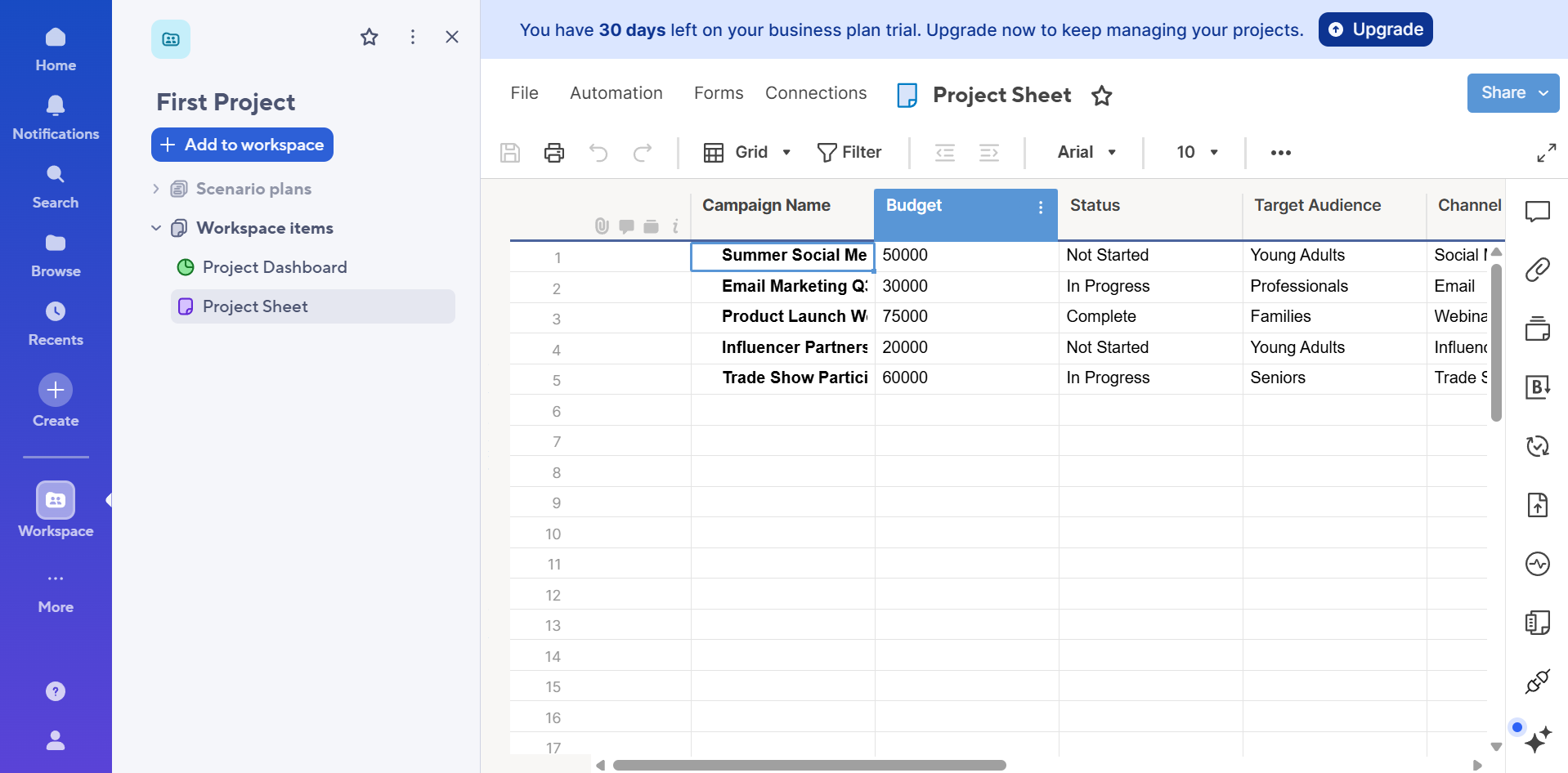
Smartsheet’s advanced features create the most friction – formulas, cross-sheet references, conditional formatting, and automation rules each have their own syntax and setup flows, meaning that only the person who builds the Smartsheet environment fully understands it. So, if the project manager of the original sheets moves on, the team is left managing a system they can’t confidently edit.
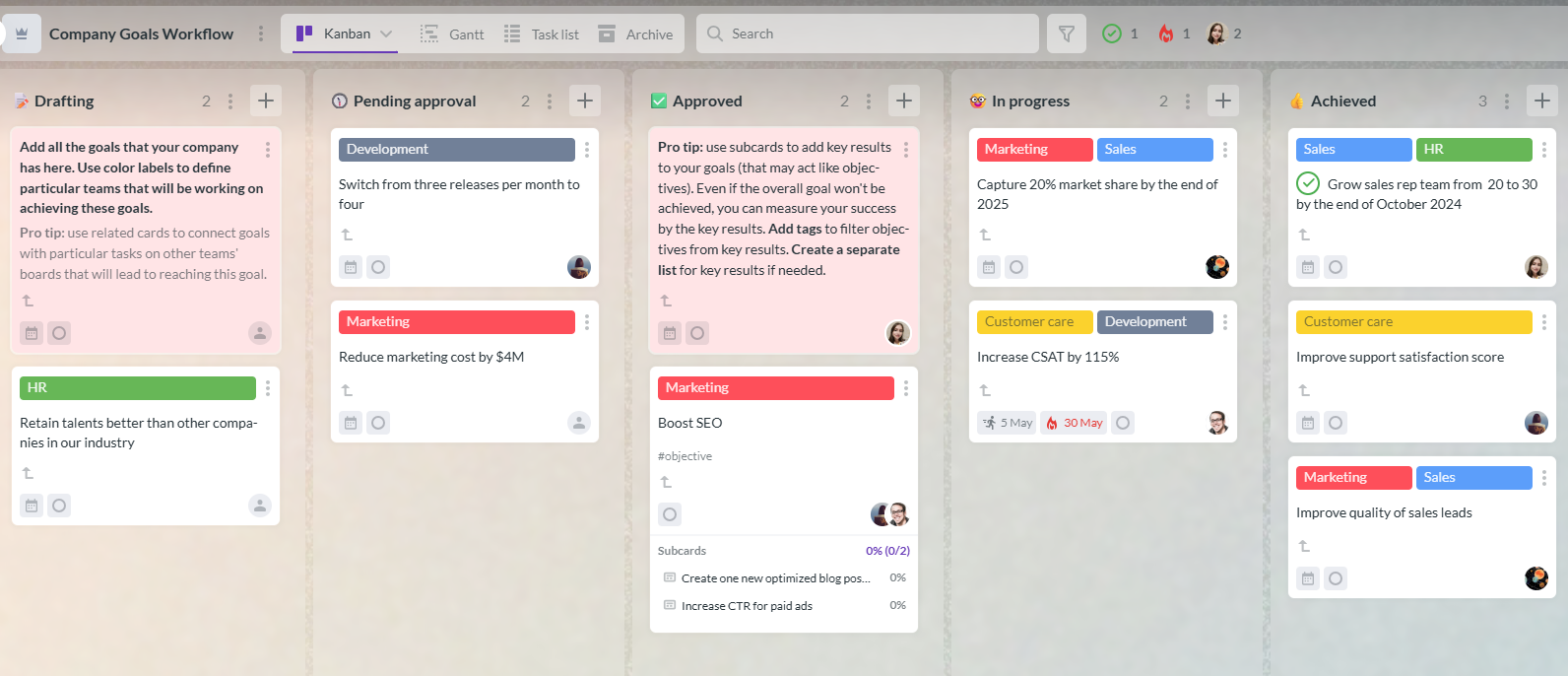
On the other hand, no setup is required to understand Kanbanchi’s board layout. Cards and visual statuses are visible the moment a new user arrives, which is why those who already use Google products describe the interaction patterns as immediately familiar.
All tools, including the Gantt chart and time tracker, are a click away from the main board, and you can begin creating tasks from day one.
Say a new project management tool takes two weeks to configure before you can properly use it. That’s two weeks of setup time and costs before your team sees any real efficiency benefits, especially if you’re an SMB without a dedicated IT function.
Building sheet structures, setting up automations, configuring dashboards, and creating cross-sheet formulas all take time with Smartsheet. The platform has extensive documentation and training resources, but to improve time-to-productivity you’ll need a dedicated person to oversee the setup. This isn’t always manageable for smaller organizations trying to replace a shared spreadsheet, and can feel like a lot before you even start tracking real work.
Most Kanbanchi users report being productive on their first day, thanks to a board structure that’s immediately visible. Adding columns, creating cards, assigning team members, and setting due dates take minutes, not hours. And because your boards live in Drive, sharing with the rest of the team follows the same permissions flow the team already uses for every other document.
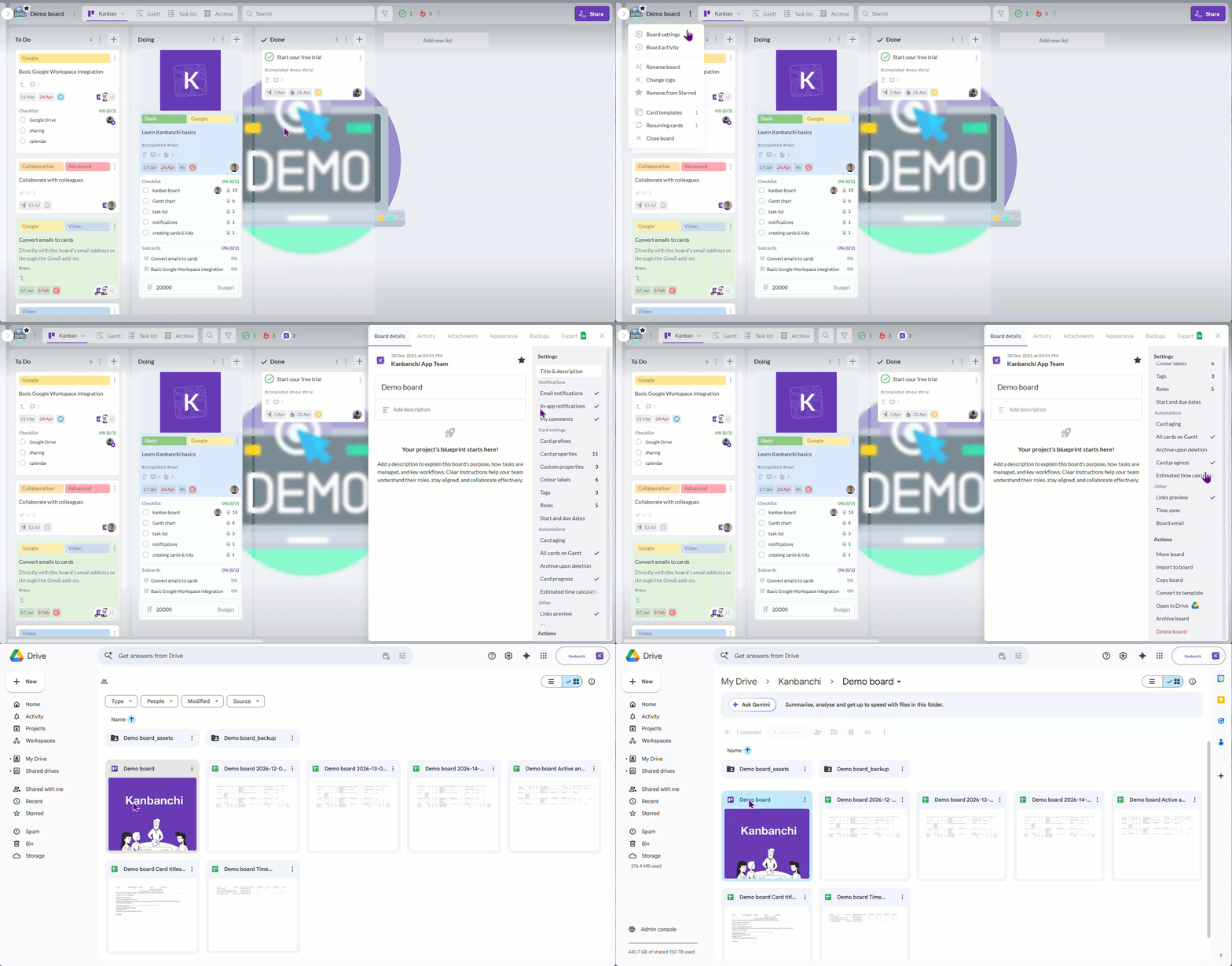
Both tools organize work into projects containing tasks, with support for subtasks.
Smartsheet uses rows on a sheet and indent levels to create parent-child relationships, which is ideal for traditional project plans. However, for complex projects with more items, this model can be overwhelming to look at.
Kanbanchi structures tasks into boards, lists, cards, and subcards (available on the Premium plan and above). The visual board setup makes status and ownership immediately readable without needing to break down complex row data.
Smartsheet and Kanbanchi offer a range of genuinely strong views. But where they differ is what’s available with each plan.
Smartsheet’s Gantt chart supports critical path highlighting, baseline tracking, and dependency management. The card view gives a kanban-style representation of the same grid data. Timeline view, available on Business and above, adds a roadmap perspective for teams managing multiple concurrent projects.
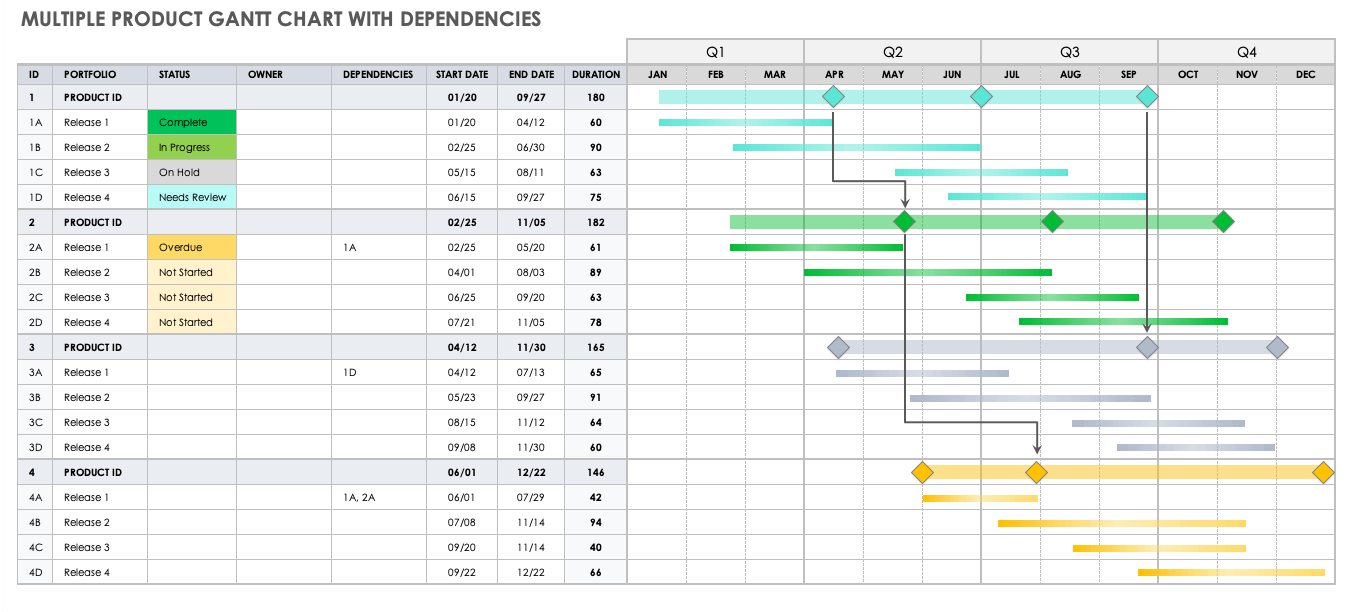
All Kanbanchi tiers, for instance, feature Kanban and List views, including the free tier. Gantt, Swimlanes, and Team Workload views are added with the Professional Plan. Smartsheet’s card view offers a Kanban-style representation of the same grid data that’s available as a Gantt chart.
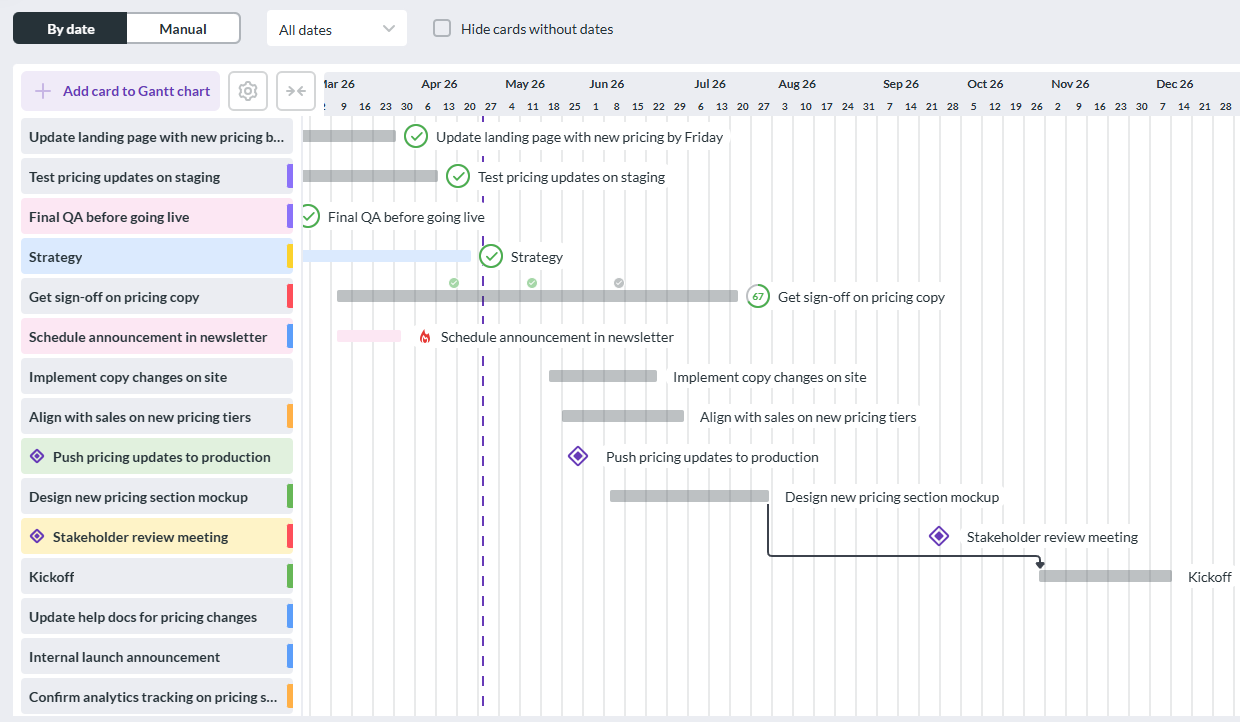
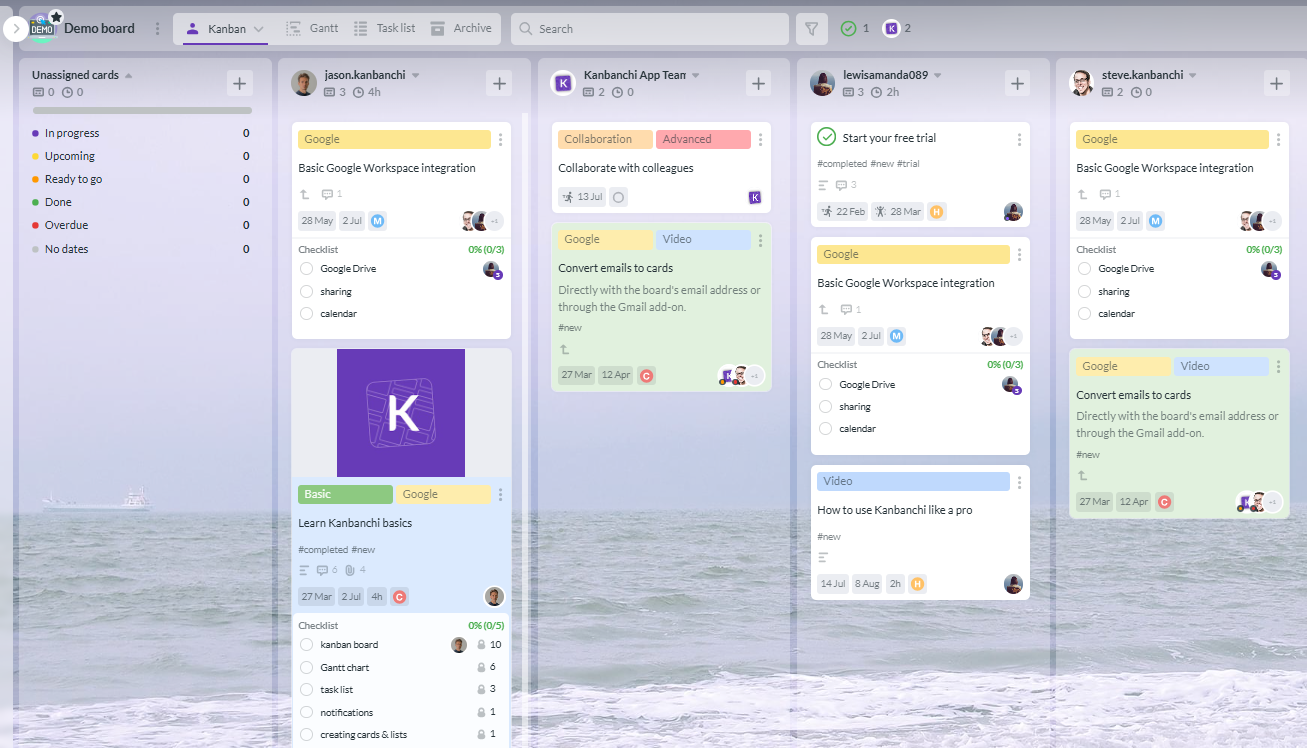
A Timeline view is also available on the Smartsheet Business plan and above, which gives a useful perspective if you’re managing multiple projects. Kanbanchi’s workload view shows managers how tasks are distributed across the team. With Smartsheet, this feature is reserved for Business-tier customers only, and is accessed via a separately priced Resource Management add on.
Smartsheet’s Business plan includes unlimited automations, and the rule builder covers everything from simple notification triggers to multi-step conditional workflows. Kanbanchi also includes automations on all paid plans covering common triggers like status changes and due date alerts.
Smartsheet is a strong choice if you need sophisticated automations built into your project management software, although Kanbanchi can handle most SMB workflows without the configuration complexity of Smartsheet’s automation builder.
Time tracking is another example of where you’ll need to purchase the Resource Management add-on to access Smartsheet’s full feature range. You can also use a third-party integration.
Kanbanchi includes a built-in time tracker on its Professional plan, so you can log time directly against cards without needing a separate tool. The Team Workload view also shows task distribution in a visual format that’s easy to act on.
Smartsheet’s granular permission levels (Owner, Admin, Editor, Commenter, and Viewer) are managed inside a second system. The Business and Enterprise Smartsheet plans, depending on which one you choose, unlock even more advanced controls:
The difference between Kanbanchi vs Smartsheet here is that Kanbanchi’s permissions are managed directly in Google Admin, with SSO included in Google’s existing authentication infrastructure.They’re the same as standard Drive Sharing rules that your Google Workspace team will already understand, featuring Owner, Editor, Commenter, and Viewer roles. Like Smartsheet, the Enterprise plan adds multi-level admin controls, plus Shared Drives support and sharing with Google Groups.
This may not seem like an important point to consider when first choosing between the two. However, maintaining a single permission system can make a huge difference to operational costs, particularly for SMBs without a dedicated IT department.
In terms of native integrations, Smartsheet has real depth with its REST API. It connects to over 1,000 tools, including Microsoft 365, and also offers integrations like Salesforce and ServiceNow, which are ideal if you’re managing multi-system workflows.
Where Kanbanchi’s Google Workspace integration differs is that it isn’t a connector – it’s native architecture. The six specific integration points are:
Whether Kanbanchi vs Smartsheet is best for your team depends on which workflows you use daily. Smartsheet’s integration catalog is generally larger, but if you work outside Google Workspace, Kanbanchi connects to a more focused set of third-party tools.
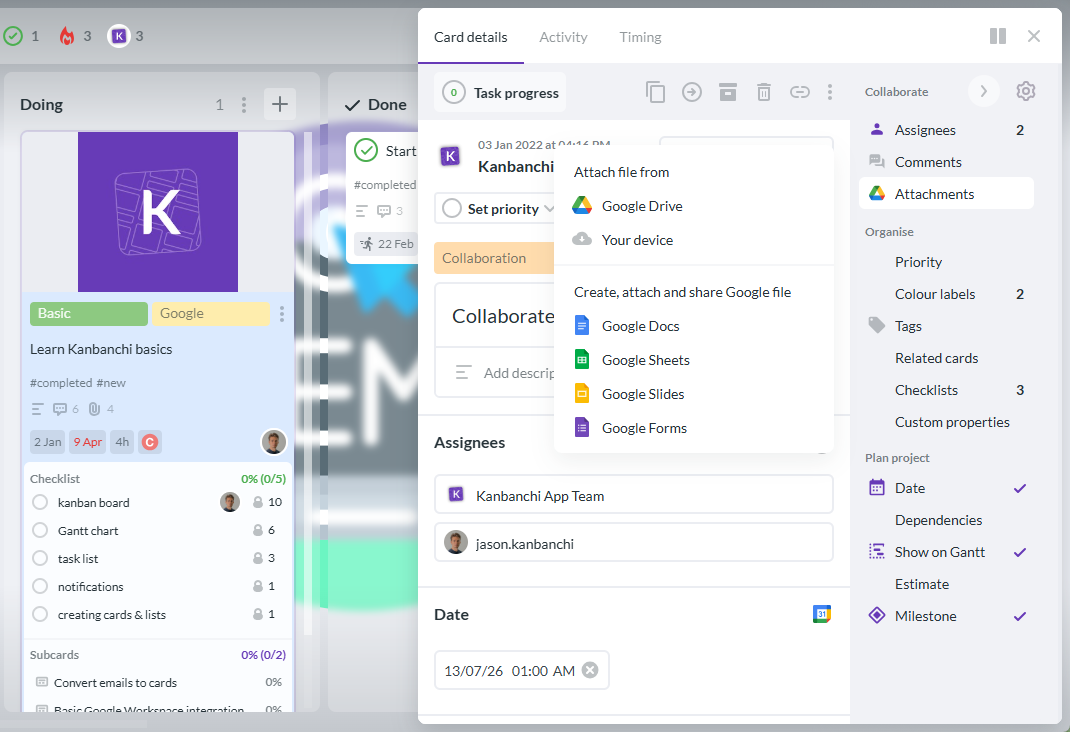
You can access Kanbanchi on Android and Smartsheet on both iOS and Android.
Poor performance on complex sheets and occasional freezing when updating large, formula-heavy projects make up Smartsheet’s mobile app reviews. It does, however, seem to work well for more straightforward projects.
Kanbanchi’s mobile app is consistent with the desktop board experience. Users can view boards, create and update cards, add comments, check due dates, and track progress, all on a clean interface that scales to smaller screens. And because the board model is visual by design, it translates well to mobile without needing extensive navigation.
It’s bad news for free trial users in this category – Smartsheet offers limited customer support here, since options are tiered by plan. Pro and Business customers can reach the team through online channels with standard response windows, while those on Enterprise receive dedicated account management and more direct technical access.
Kanbanchi’s support model works differently, with the quality and accessibility of support staying the same across all tiers.
The team is consistently praised in user reviews for genuine product expertise and the ability to solve real business problems. This comes particularly from teams who have switched to Kanbanchi from larger platforms, where raising consecutive support tickets on workflow problems resulted in scripted responses that didn’t address the issue at hand.
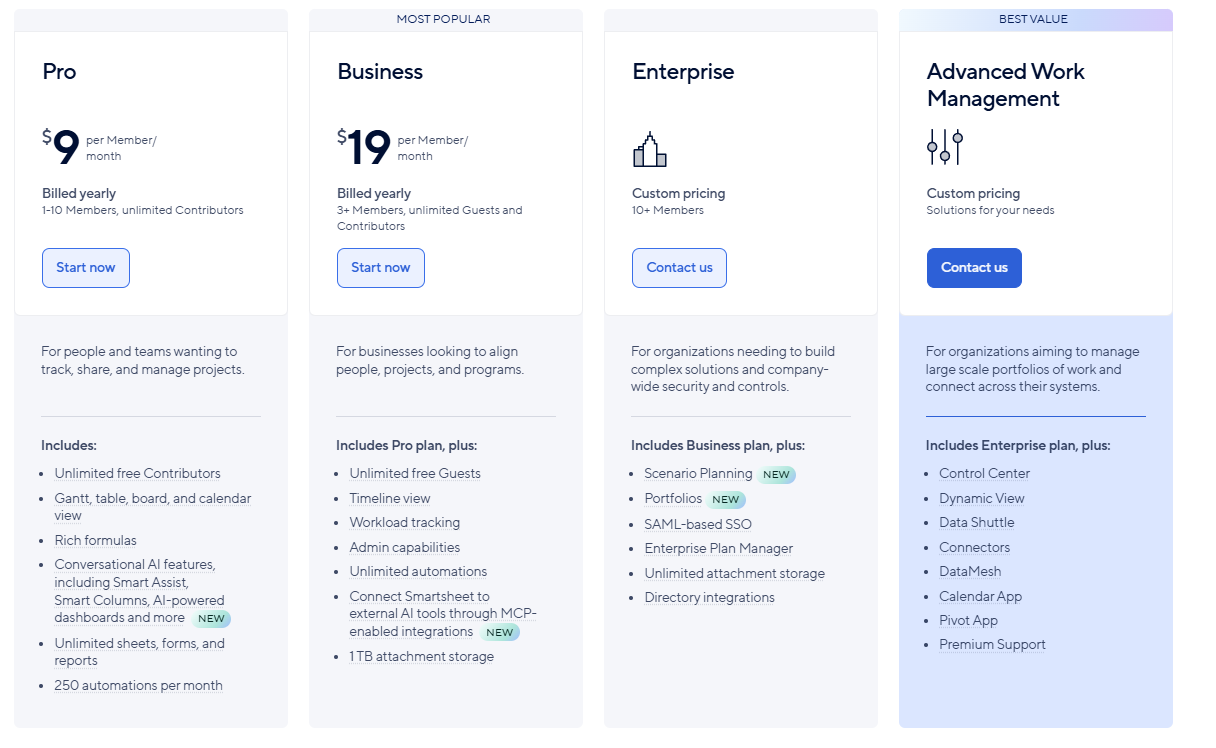
In terms of Smartsheet pricing, the Pro plan costs $9 per user per month (billed annually), while the higher Business tier is $19. The Enterprise plan requires a custom quote, but you’ll need a minimum of 10 users here. There’s no permanent free plan, but you can sign up for a free trial to evaluate the platform before committing.
These costs may seem reasonable at first glance, but the per-user cost doesn’t end there. Several project management features that you’d expect as standard require premium add-ons priced separately from the base plan, including:
This means a 10-person Business team that requires Resource Management can easily reach $350 to $400 per month in total costs.
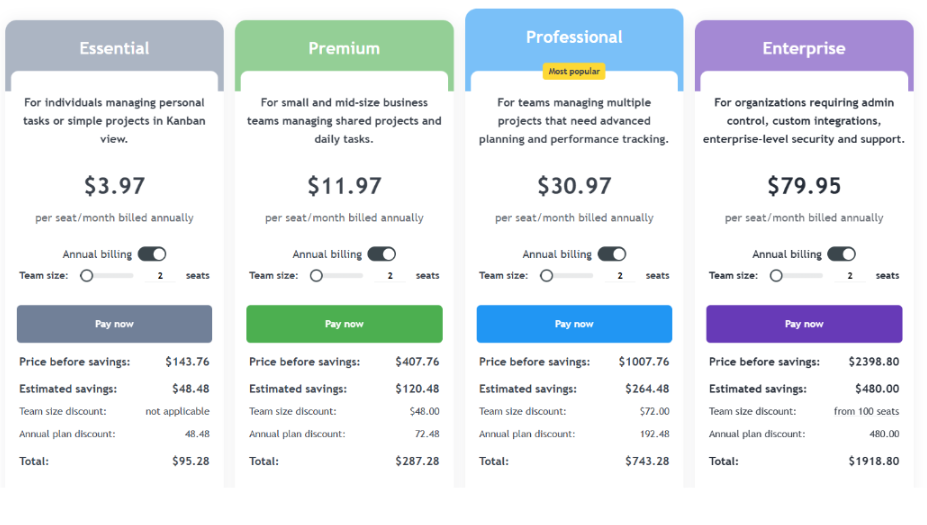
Kanbanchi’s free plan has no time limit, offering unlimited users and unlimited projects, with a limit of 36 active cards per project. This makes it a real, usable product for small or early-stage teams.
Paid plans are priced with a discount from 2 seats, with the per-user cost decreasing as the team grows:
Google Drive integration is included on all plans, including the free plan. Educational institutions and nonprofits also qualify for a 25% discount on all annually billed plans, other than Essential.
| Choose Kanbanchi if… | Choose Smartsheet if… |
|---|---|
| Your team runs on Google Workspace and wants native Drive integration | You need enterprise-scale automation and cross-project dashboards |
| Fast onboarding is a priority and setup time is a real cost | Your team is comfortable in spreadsheet-style interfaces |
| You want a permanent free plan before committing any budget | You need deep Salesforce, Jira, or Microsoft 365 integration at enterprise depth |
| You need built-in time tracking without paying for an add-on | You are in a sector where Smartsheet has established templates |
| Support quality matters as much as the feature count | You are managing complex programs requiring baseline tracking and critical path |
| Budget predictability matters and you want no surprise add-on costs | You have an IT team to own setup and ongoing administration |
So, when comparing Kanbanchi vs Smartsheet, which should be your winner? The right choice depends on what your team needs from a project management tool rather than what looks most impressive on a feature list.
Smartsheet is a capable platform for enterprise teams who are comfortable using advanced automation in spreadsheet environments. The platform is also a great selection for those needing dashboard reporting or deep Salesforce and Microsoft 365 integration, if you have the setup time and IT support to configure it properly.
But if you’re a business already running on Google Workspace, Kanbanchi delivers more of what matters: a clean interface that takes minutes to understand, project data stored where the rest of the team’s files already live, built-in time tracking and workload visibility without add-on fees, and support that solves real problems. The free plan means you can test it, too, before spending anything.
Is getting your team productive quickly, without a complex setup phase or unpredictable add-on costs, the priority in your Kanbanchi vs Smartsheet decision? If so, Kanbanchi is the stronger pick here.
Try Kanbanchi for free today and discover how long it takes your team to start running real work.
Kanbanchi offers a fast onboarding process and a clean interface that fits into your existing workflows, requiring minimal training. Smartsheet’s spreadsheet-first model and per-user pricing structure, plus the cost of add-ons for features like resource management, makes it harder to justify for teams under 20 people.
Smartsheet doesn’t currently offer a permanent free plan. Instead, it provides a free trial to evaluate the platform before committing to a paid subscription. Kanbanchi has a permanent free plan with unlimited users and unlimited projects, limited to 36 active cards per project, with no trial period or expiration date.
Kanbanchi integrates with Google Workspace natively. Boards are stored directly in your Google Drive, permissions follow your Google Admin setup, and the platform connects to Google Calendar, Gmail, Google Forms, Shared Drives, and Google Groups. This is architecturally different from a connector-based integration, and it means your admin staff manages board access in the same place they manage everything else.
Smartsheet’s most commonly cited weaknesses are its learning curve, its mobile app performance on complex sheets, and its add-on pricing model. Several features that teams expect as standard, including resource management and advanced dynamic views, require separately priced premium applications on top of the base plan.
Yes, Kanbanchi supports data import and the board structure is straightforward to set up from scratch. Users often find that re-creating their project structure in Kanbanchi’s visual board model takes less time than expected, partly because the board format makes it easier to see exactly what needs to be carried across.
Kanbanchi’s Essential plan starts at $3.97 per user per month on annual billing. Smartsheet’s Pro plan starts at $9 per user per month. For mid-tier functionality including Gantt charts, time tracking, and workload views, Kanbanchi’s Professional plan is priced from $24.47 per month for the whole team, while the equivalent Smartsheet setup on Business plus add-ons can cost several times more.
Read more articles related to Project Management


In this Article:
Start using Kanbanchi now
Start your free trial