
In this Article:
Try Kanbanchi now
Start your free trial

A huge 77% of companies are now either using or exploring the use of AI for their businesses. And 70% have already integrated it into their project management processes.
If you’re one of these organizations, you may have already heard of Notion and the Notion AI brand. As one of the main Notion alternatives, you’ve likely heard of Kanbanchi too, and may be wondering: which is the best tool for team task management? Can Notion actually handle real project management, or do you need a tool built for the job?
In this guide, we explore Kanbanchi vs Notion pricing, Google Workspace integration, setup time, and the day-to-day experience of using each to help you make the right decision.
Kanbanchi is the stronger pick for Google Workspace teams that need a purpose-built task management tool with Gantt charts, time tracking, and workload views from day one. It stores your project data directly in Drive, and onboarding and setup take hours, rather than weeks. Notion is a better fit if your primary need is documentation, wikis, and knowledge management, with just light project tracking requirements.
| Platform | Kanbanchi | Notion |
|---|---|---|
| G2 | 4.7 / 5 (95 reviews) | 4.6 / 5 (12,027 reviews) |
| Capterra | 4.5 / 5 (292 reviews) | 4.7 / 5 (2,763 reviews) |
Notion’s review volume is far larger, which reflects its broader market presence (but not necessarily its superior performance) in this Kanbanchi vs Notion comparison.
On G2, Kanbanchi scores 9.5/10 for ease of setup and 9.4 for ease of use. Teams looking for project management software for Google Workspace consistently mention support quality as a standout factor.
In any Notion review, its tendency to overwhelm new users is the most-cited complaint. Users consistently highlight Kanbanchi’s support team as a genuine differentiator on Capterra.
Notion launched in 2016 and has since developed into one of the largest productivity software user bases. It’s primarily a knowledge management and documentation platform, letting users create pages, databases, wikis, and notes within a flexible block-based editor. Over time, Notion added project tracking, Kanban views, and a growing AI feature suite under the Notion AI brand.
The platform serves startups, design teams, content operations, and engineering departments who want a single workspace for docs and work coordination. However, it also integrates with several third-party tools through connectors. G2 categorizes Notion under “Knowledge Management” rather than project management software, reflecting where its genuine strengths lie.
Kanbanchi is project management software for Google Workspace, with a Microsoft 365 version also available. What’s different about this tool is where it stores your data. Project boards live directly in Google Drive as files that behave like any other Drive document, and permissions follow your existing Google Admin setup. That means accessing a board feels just like opening a shared Drive file.
Kanbanchi brings multiple views (Kanban boards, Gantt charts, List view, Team Workload view, Swimlanes, and time tracking) together within a single data model, making it a strong option for team task management across complex or simple workflows.
| Feature | Kanbanchi | Notion |
|---|---|---|
| Free Plan | Yes (unlimited users, unlimited projects, 36 active cards per project) | Yes (limited collaborative blocks for teams; 10 guests; 7-day page history) |
| Kanban Board | Yes (all plans) | Yes (all plans) |
| Gantt Chart | Yes (Professional+) | No native Gantt; timeline view (Plus+) |
| Time Tracker | Yes (Professional+) | No |
| Team Workload View | Yes (Professional+) | No |
| Task Dependencies | Yes (Professional+) | Basic only (Plus+) |
| Recurring Tasks | Yes (Premium+) | No native recurring tasks |
| Custom Fields | Yes (Professional+) | Yes (all plans) |
| Automation | Yes (Premium+) | Basic (Plus+); advanced (Business+) |
| Built-in Docs and Wikis | No | Yes |
| Google Workspace (native) | Yes (boards stored as Drive files) | Connector integration |
| Microsoft 365 | Yes | Yes |
| Mobile App (iOS or Android) | Yes | Yes |
| SSO | Google and Microsoft (all plans) | Business plan only ($20/member/month) |
| SOC 2 Type II | Yes | Yes |
Comparing Kanbanchi vs Notion closely on features, it’s clear that Kanbanchi is designed for task-driven workflows, with native time tracking, a proper Gantt chart, and workload visibility built in. Notion is stronger on documentation and knowledge base capabilities.
Both tools support Kanban board software basics and task creation. But their differences quickly become evident when we consider project complexity or time and workload tracking.
Open both tools, and you’ll notice the interface difference in Kanbanchi vs Notion immediately.
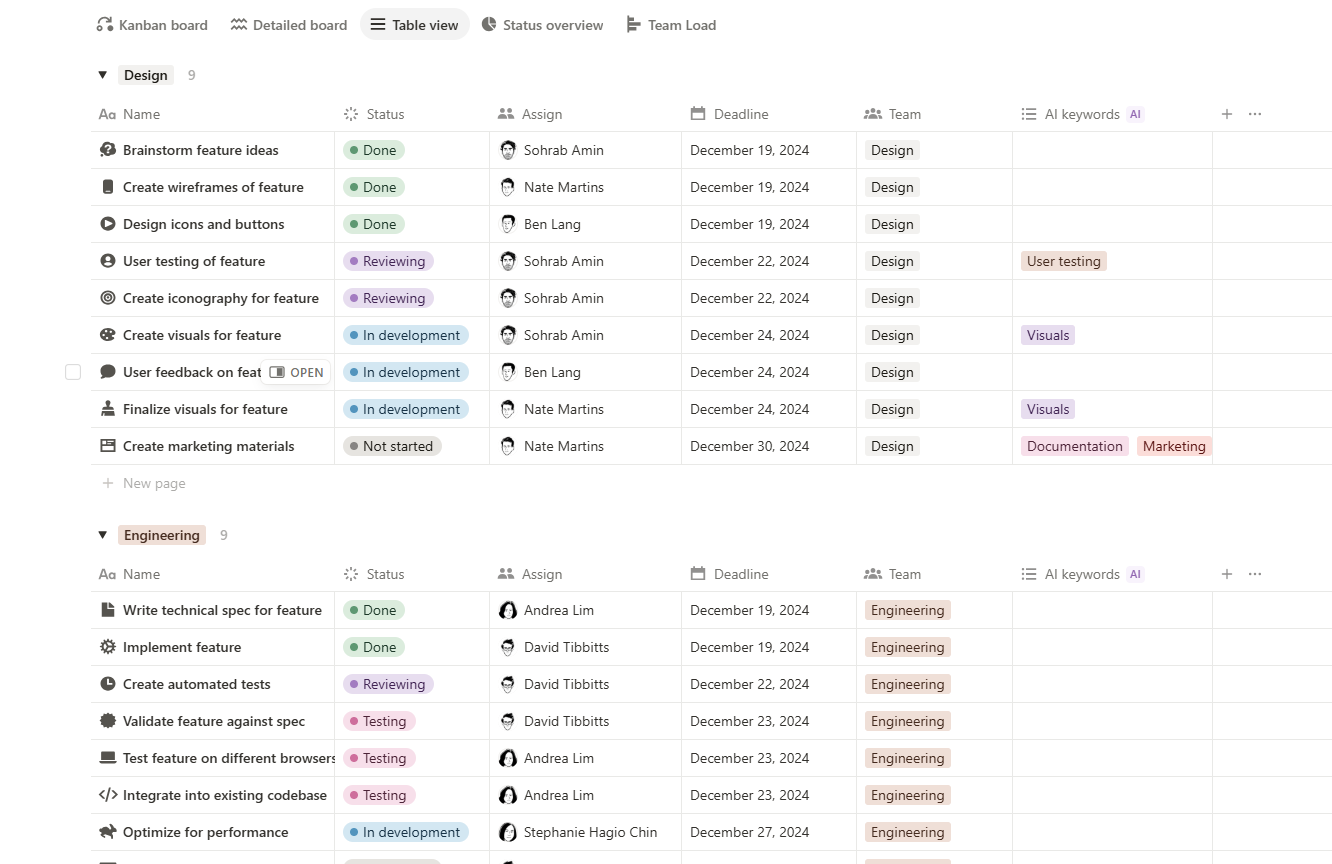
Kanban board in Notion with tasks arranged across workflow stages, highlighting Notion’s project management approach compared with Kanbanchi
Notion presents a near-blank canvas, meaning you can build almost anything. This flexibility may seem great at first. But without a designed workspace structure, new users face a blank page and a block menu they haven’t yet learned to interpret, and most need someone to design their Notion environment before productive use begins.
This is the most consistent pattern in Notion review feedback, and it’s why setup complexity appears in many G2 negative mentions.
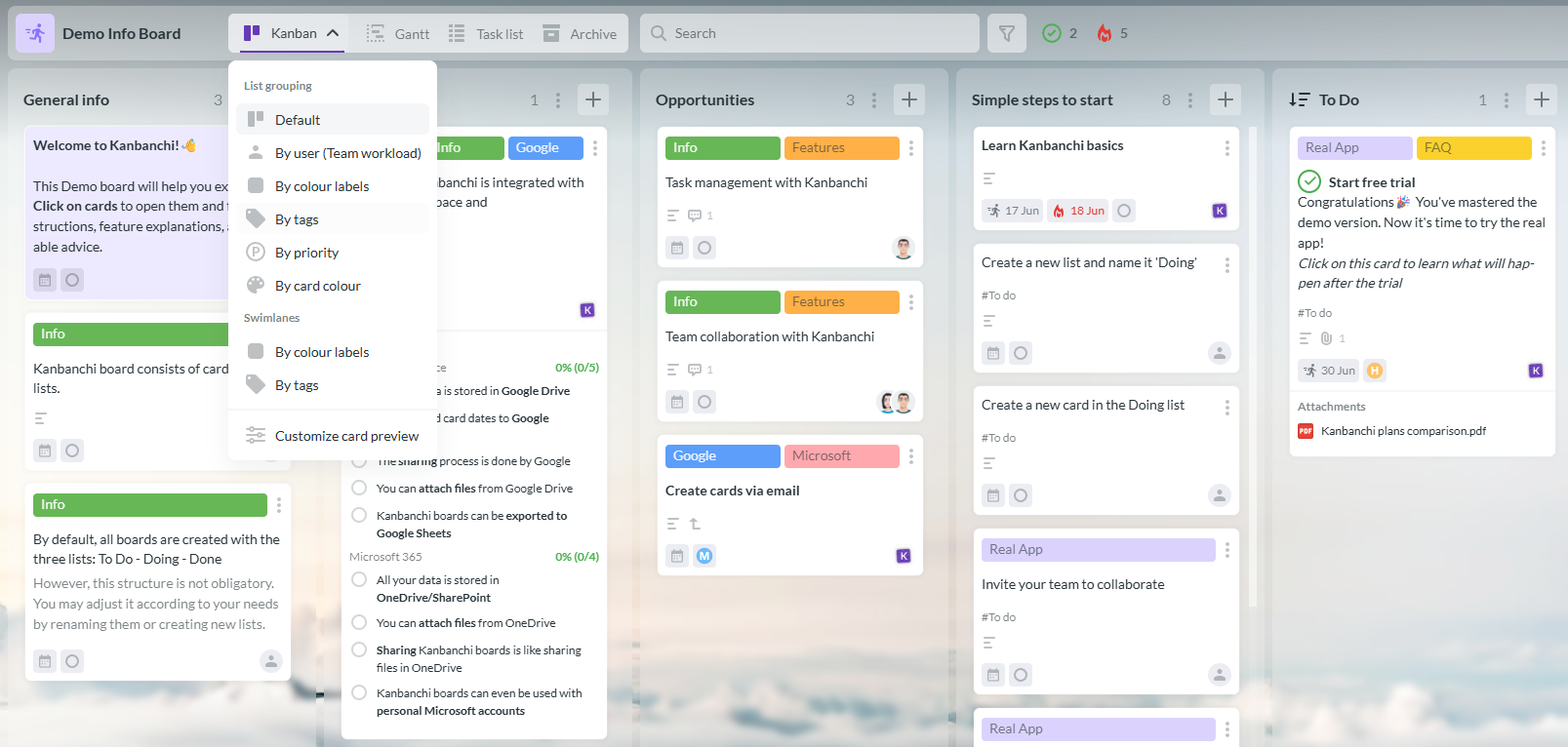
Kanbanchi Kanban board interface with cards, columns, and task management features designed for Google Workspace users
On the other hand, Kanbanchi opens straight to a board, where your lists are visible, and cards can be created in seconds. The visual model is immediately clear, even to someone who’s never used Kanban board software before.
Run an onboarding session, and you’ll see a big difference in first-day productivity. With Kanbanchi, work is assigned within the first fifteen minutes, but those using Notion are still discussing how to structure their workspace an hour in.
Along with general ease of use, Notion’s flexible interface also impacts onboarding. You’ll need to build projects and databases with the right properties and create templates for common task types before using it for team task management – and that’s before you’ve had chance to explain the system to the rest of the team.
In practice, getting to a point where Notion project management is genuinely useful typically takes between two and five days of setup work. This is a huge potential barrier for small businesses that need to start managing work quickly.
With Kanbanchi, the free 7-day trial includes all features to evaluate the tool properly, and most teams are running active work within a day of signing up. There’s also no dedicated setup work beforehand. This difference in onboarding time is one of the most practical advantages for SMBs.
Kanban boards are a key feature of both products, but while this may make them look similar, the experience of managing real work is unique in each.
In Kanbanchi, for instance, Kanban boards are the primary interface. Cards contain all operational details, including:
Moving a card through lists reflects actual workflow progress, and the board is the main place where work gets done.
Kanban views are just one way to display a database in Notion. The underlying structure is a page with properties, which works well for content operations or intake workflows where cards genuinely function as documents. If you’re managing a large volume of tasks and tracking workload across lots of people, this database-as-Kanban approach has limits.
Kanbanchi’s Gantt chart is available on the Professional plan and above, and shows everything from task timelines and milestones to dependencies in a standard project planning format. And these dependencies carry proper logic: you can set tasks to start only after another is complete, and the timeline reflects those relationships.
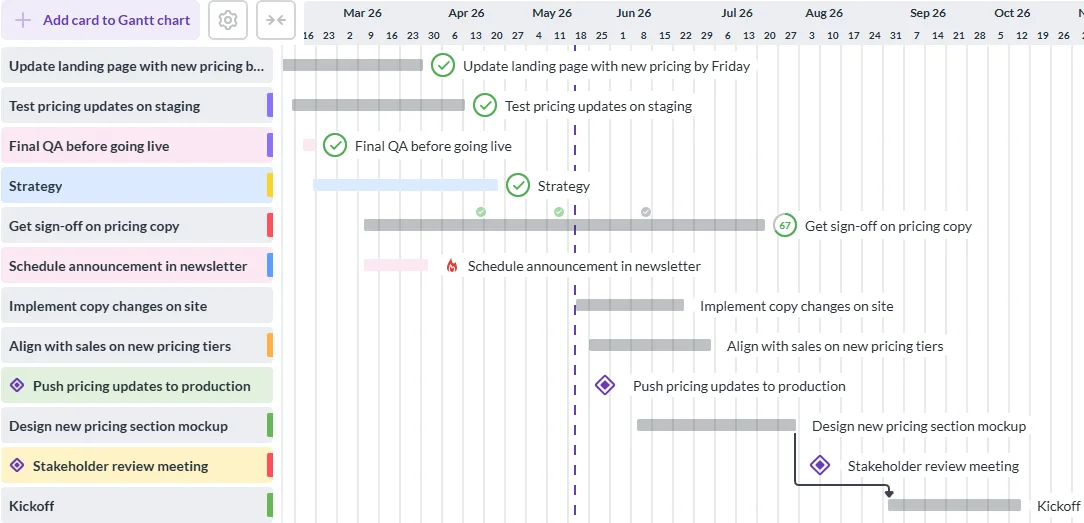
Kanbanchi Gantt chart view for visualizing project timelines, task dependencies, and deadlines alongside Kanban workflows
Notion’s timeline view (often described as its Gantt equivalent) places database entries on a time axis, which is useful for visualizing schedules at a high level.

Notion Timeline view for planning projects, visualizing deadlines, and tracking tasks across a project schedule
One of Notion’s biggest drawbacks in this category is that it lacks the dependency logic that project managers often use for sequencing work. There’s no critical path, lead, or lag time, and it also fails to offer automatic rescheduling when an upstream task shifts.
Another feature that’s exclusive to Kanbanchi’s Professional plan is native team tracking, which Notion doesn’t include. If you choose Notion project management, this means you’ll also need to find a separate tool that handles time tracking and workload views.
Team members log time against individual cards with Kanbanchi, so managers can see estimates against actuals across the board. The Team Workload view shows how much is assigned to each person over any date range, making it straightforward to redistribute work when someone is overloaded.
Select any plan from Premium and up, and you’ll experience Kanbanchi’s automation workflows through recurring cards, card and board templates, and status-based progression rules.
Notion’s automation is broader at higher tiers: the Business plan opens up database automations beyond button-only triggers. This offers more range, especially if you’ve got more sophisticated automation requirements. As we’ve already mentioned here, however, the setup complexity is much higher than for Kanbanchi.
Since Kanbanchi works directly in Google Workspace, its permissions follow Google’s infrastructure exactly.
Boards inherit sharing rules from Drive, and adding someone to a board works the same way as sharing any Drive file. Single sign-on works via your Google account on every Kanbanchi plan, including free.
In terms of security, Notion pricing makes SSO expensive, as it’s only accessible via the Business plan (the most expensive self-serve tier) at $20 per member per month. Granular database permissions are also Business-only.
Both tools hold SOC 2 Type II, but Kanbanchi’s security certifications are much more extensive: ISO 27001, GDPR, HIPAA, and CASA certifications, with Google Vault available on the Enterprise plan. This is a particular benefit of Kanbanchi vs Notion worth noting if your organization operates in a regulated industry.
Kanbanchi is built directly inside Google Workspace, with project boards in Drive and familiar Google Workspace permissions. This architecture is incredibly beneficial if your team already uses Google Workspace.
The six Google Workspace integrations that all Kanbanchi plans feature, including free, are:
Notion also works with Google Drive and Gmail, but through a connector rather than native storage. Files can be embedded in Notion pages, and the Gmail add-on allows saving emails to Notion.
On the flip side, Notion’s broader catalog is a genuine strength if you require integrations to GitHub, Jira, Asana, Figma, and similar tools. These are available on Business plans via premium connections.
Both Kanbanchi and Notion have iOS or Android apps, which work generally well for viewing and updating work on the go.
Kanbanchi’s app is as visually clean as the desktop version, making it straightforward to check board status, or add a comment from a phone. The layout adapts well to smaller screens, and core task management functions are accessible without workarounds.
Notion’s mobile app has a more mixed track record in user reviews. iOS performance is generally consistent, but it’s Android performance where most users struggle: typing lag, slow page loads, sync delays, and occasional crashes appear consistently across review platforms.
Editing databases on a phone is widely described as a degraded experience compared to desktop, so it’s worth testing Notion before committing if you rely on mobile access throughout the working day.

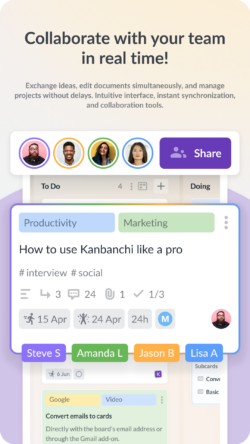
If you’re an SMB without a dedicated specialist to help set up and train the team on a new tool, support quality directly impacts the value you get from it. And it’s also one of the clearest differentiators in this Kanbanchi vs Notion review – while Notion’s model is mainly email-based, every Kanbanchi customer receives dedicated, expert customer support.
Quality support is highlighted repeatedly in Kanbanchi reviews, with users describing a team that’s focused on actually solving specific problems (not just working through a script). They also seem to understand the product deeply.
All Notion plans below Enterprise receive support via email, with typical response times of 48 to 72 hours.
| Plan | Kanbanchi | Notion |
|---|---|---|
| Free | Yes (permanent; unlimited users and projects; 36 active cards per board) | Yes (limited collaborative blocks for teams; 7-day history; 10 guests; 5MB file uploads) |
| Entry paid | Essential: $3.97/user/month (annual billing) | Plus: $10/member/month (annual billing) |
| Mid tier | Premium: from $11.97/month | Business: $20/member/month (annual billing) |
| Full feature set | Professional: from $24.47/month | Business: $20/member/month (Gantt not included) |
| Enterprise | From $9.95/month | Custom pricing via sales |
You may not initially notice it, but there’s a pretty important Kanbanchi vs Notion price gap once you factor in what each plan actually includes.
Notion pricing is per member and scales with team size. The Notion free plan restricts collaborative blocks for teams of two or more members and limits page history to 7 days, making it best suited to solo users.
You get unlimited blocks and guests, as well as a 30-day page history with Notion Plus. Notion Business at $20 per member per month is required for SAML SSO, full Notion AI access, and private teamspaces. Neither paid tier includes a free trial period, other than a Notion AI trial with Plus.
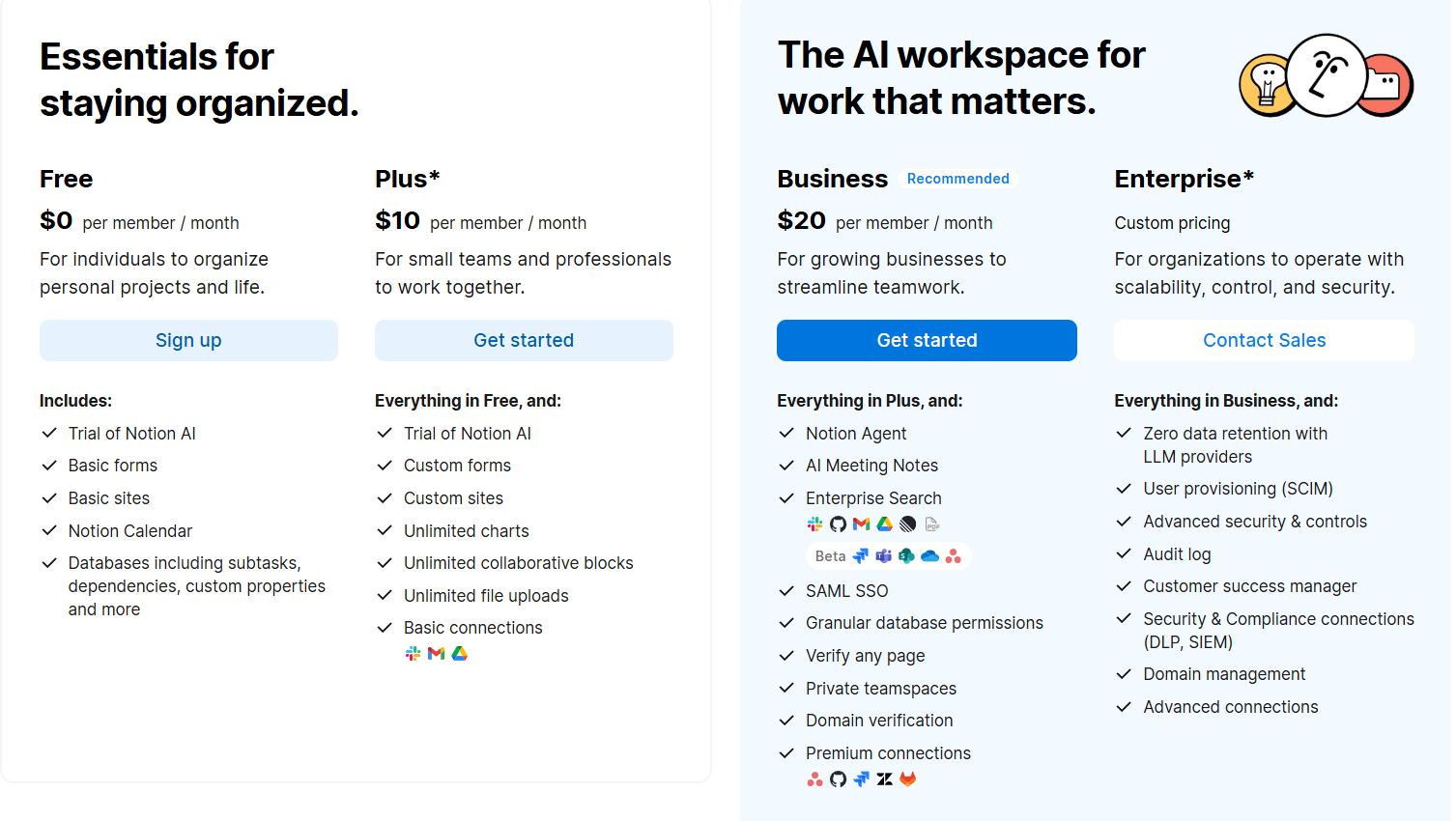
Notion pricing overview highlighting available plans and subscription options for teams and individuals in comparison with Kanbanchi
On the Kanbanchi side, the free plan is permanent with no time limit, and the only feature constraint is 36 active cards per board. Google Drive integration is included on every Kanbanchi plan, including free, and Premium adds export to Google Sheets and data collection from Google Forms. New users also receive an Enterprise plan trial on sign-up, allowing you to test the full feature set before selecting a paid tier.
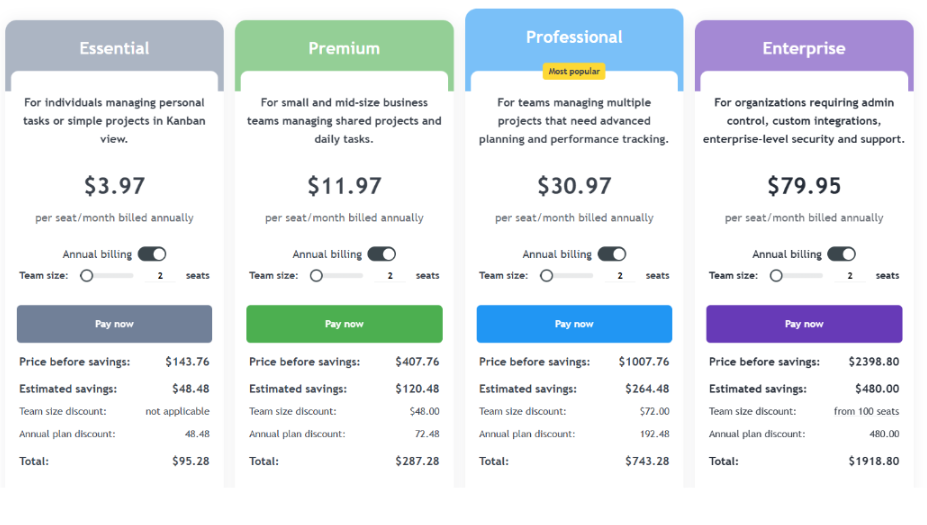
Kanbanchi pricing overview showing available plans and features for teams comparing project management tools
Let’s consider Kanbanchi vs Notion pricing for a ten-person team.
Notion Plus costs $100 per month, or $1,200 per year, while Business is $200 per month, or $2,400 per year. The Business plan is the minimum tier for most Google Workspace teams that need enforced SSO.
Then, you’ve got Kanbanchi’s Essential plan, which costs approximately $476 per year for ten people on annual billing. That’s less than a quarter of Notion Business for the same team size. Kanbanchi pricing is custom from two seats, meaning volume discounts apply even at minimum team sizes. And, even better, educational institutions and nonprofits qualify for a 25% discount on all annually-billed Kanbanchi plans except Essential.
| Choose Kanbanchi if… | Choose Notion if… |
|---|---|
| Your team runs on Google Workspace and wants boards stored in Drive | Your primary need is documentation, wikis, or knowledge management |
| You need time tracking, Gantt charts, or Team Workload views | You are a solo user or small team with light task tracking needs |
| You want SSO without a $20/seat price requirement | You need one platform for docs, notes, and tasks together |
| You need a team to be productive within a day of signing up | You are already invested in the Notion ecosystem |
| Pricing transparency and value for money matter | You need broad third-party integrations or Notion AI features |
| Support quality and response time are important to you | AI-assisted writing and knowledge management are core requirements |
There’s no doubt in our Kanbanchi vs Notion comparison that both tools are strong. But for those evaluating Notion alternatives, it’s the distinct areas they excel in that make Kanbanchi the best choice for project and team task management.
Notion is an excellent knowledge management and documentation platform. So, if documentation and flexible knowledge bases are your primary needs, Notion could be beneficial.
But in terms of Notion project management, there’s no native time tracking, workload view, or Gantt chart with proper dependency logic, and support is limited to email with a 48-to-72-hour wait for non-Enterprise users.
Kanbanchi is purpose-built as project management software for Google Workspace, which is clear in everything from setup time and day-to-day usability to the feature set you get for the cost.
The overall takeaway? Start with Kanbanchi if project management is your goal. The free plan is permanent, and you can test the full Enterprise feature set before committing to a paid tier.
Kanbanchi is a better choice if you need task-focused features like time tracking, Gantt charts, and team workload views. Notion excels at documentation and knowledge management but lacks native project management capabilities, including time tracking and workload visibility. If managing tasks and projects is the primary goal, Kanbanchi is built for it.
Notion connects to Google Workspace through integrations rather than native storage. You can embed Drive files in Notion pages and use the Gmail add-on to save emails, but Notion stores workspace data on its own servers. Google Calendar sync is one-way, and SAML SSO requires the Business plan at $20 per member per month.
Kanbanchi is one of the top Notion alternatives for teams working inside Google Workspace. It stores boards directly in Drive, integrates natively with Google Calendar, Gmail, and Google Forms, and offers SSO via Google account on every plan, including free. This native fit makes a real difference if you’re already running on Google’s infrastructure.
Yes, the Notion free plan has no time limit, but it restricts collaborative blocks for teams with two or more members and limits file uploads to 5MB per file. It also caps external guests at 10,and provides only 7 days of page history. This makes the free plan best suited to solo users rather than collaborative teams.
Notion Plus costs $10 per member per month on annual billing. Notion Business, required for SAML SSO and full Notion AI, costs $20 per member per month. Kanbanchi Essential costs $3.97 per user per month on annual billing. The full Kanbanchi feature set is available from $24.47 per month, with volume discounts applied from two seats.
The Notion learning curve is the most common complaint in user reviews, appearing in nearly 2,000 of 12,000+ G2 reviews. New users face a near-blank canvas that requires real system design before it becomes useful for team collaboration. Most teams need between two and five days of configuration work before running productive workflows.
Read more articles related to Project Management


In this Article:
Start using Kanbanchi now
Start your free trial