
In this Article:
Try Kanbanchi now
Start your free trial

There’s no doubt that Slack is a great communication tool. Messages move fast across channels and huddles replace meetings. There are even Lists that come in pretty handy for project tracking if you don’t feel like opening a separate app.
But the platform often leaves users asking one question: Does Slack’s task tracking hold up once projects get complicated, or is it time to add dedicated Google Workspace project management software? We answer that question and explain whether you really need to find a Slack alternative for project management in this Kanbanchi vs Slack comparison.
Slack is the stronger choice for real-time team communication and cross-department updates. It’s also the best platform for working with people outside your organization through Slack Connect. However, Kanbanchi is a better choice for planning, assigning, and tracking work. Slack’s task tool, Lists, is a spreadsheet-style add-on locked behind a paid plan rather than a board, Gantt chart, or workload view.
| Platform | Kanbanchi | Slack |
|---|---|---|
| G2 rating | 4.7 / 5 | 4.5 / 5 |
| Capterra rating | 4.5 / 5 | 4.7 / 5 |
Slack reviewers on G2 consistently enjoy the platform’s channel organization and how quickly it replaces scattered email threads. It holds an even stronger rating on Capterra, though some of its main complaints include notification overload and difficulty finding older messages. Kanbanchi’s ease of use and support quality are mentioned most often across both its G2 and Capterra profiles.
Slack launched in 2013 as a team messaging app built to replace internal email, organizing conversations into channels instead of inboxes. Salesforce acquired the company in 2021, and Slack now sits at the center of Salesforce’s push into workplace AI through its Agentforce agents.
Beyond messaging, the communication tool offers huddles for quick audio and video calls, Canvas for lightweight documents, and Workflow Builder for no-code automation. Its newest feature, introduced in 2025, is Slack Lists, which allows you to track tasks without leaving a channel.
Kanbanchi is purpose-built for Google Workspace project management, with a Microsoft 365 version for those who sign in through Microsoft. It uses boards, lists, and cards, and every task is its own card. Each card comes complete with an assignee, due date, checklist, attachments, and comment thread, viewable across Kanban, List, Gantt, and Team Workload views.
If you already use Google Drive or Microsoft 365, Kanbanchi adds structured task tracking on top of the storage and identity you already pay for, rather than asking you to adopt a second platform.
| Feature | Kanbanchi | Slack |
|---|---|---|
| Core purpose | Visual project and task management | Team messaging and communication |
| Board/Kanban view | Yes | No (Lists is a table view, not a board) |
| Gantt chart | Yes (Professional+) | No |
| Team Workload view | Yes (Professional+) | No |
| Task list with fields | Yes | Yes (Lists, Pro plan and above) |
| Custom Fields | Yes (Professional+) | Limited custom fields in Lists |
| Real-time messaging/channels | No | Yes |
| Video huddles | No | Yes |
| Free Plan | Yes (unlimited users, unlimited projects, 36 active cards per project) | Yes (90-day message history, no Lists access) |
| Mobile App (iOS or Android) | Yes | Yes |
| Google Workspace integration | Native, deep | Via app integrations |
Open Slack and you land in your channel sidebar. Threads are on the left and messages are in the middle, ready for you to start typing straight away. It’s a familiar layout if you’ve used a chat app before, and most people need no training to send a message or join a huddle.
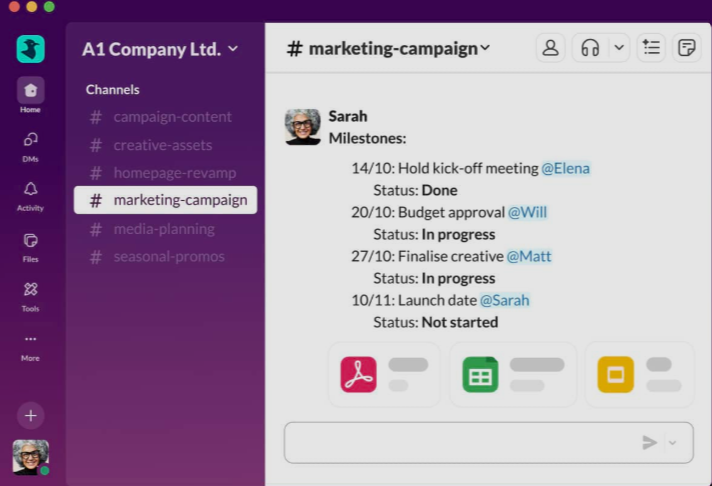
Slack channels keep team conversations organized by project, topic, or department.
Lists have their own separate tab, structured like a spreadsheet with rows for tasks and columns for fields like assignee, due date, and status. This layout is functional, but it doesn’t visually communicate progress the way a board does.
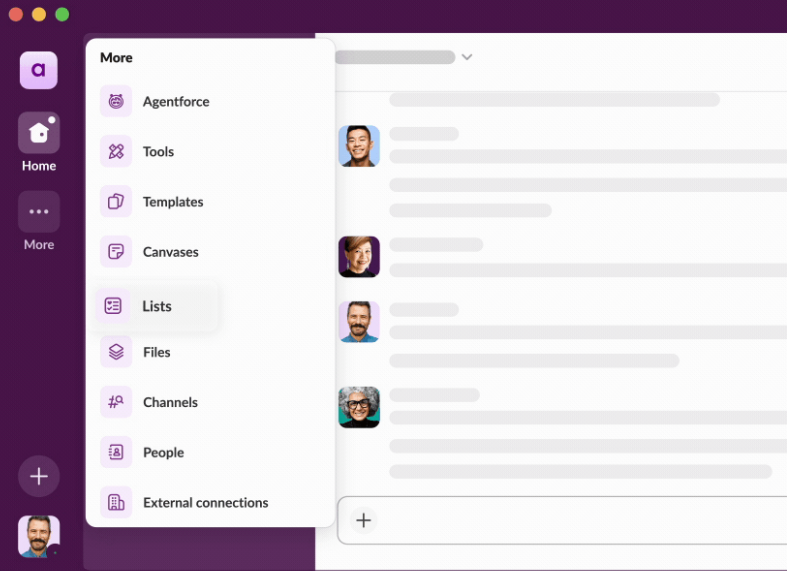
Slack Lists help teams organize tasks and track work within Slack.
Kanbanchi opens straight to a board, where you’ll see Kanban, List, Gantt, and Team Workload visible as tabs from the first screen. This layout is easy to scan and makes it easy to identify task status, since every card shows assignees, due dates, and color labels.
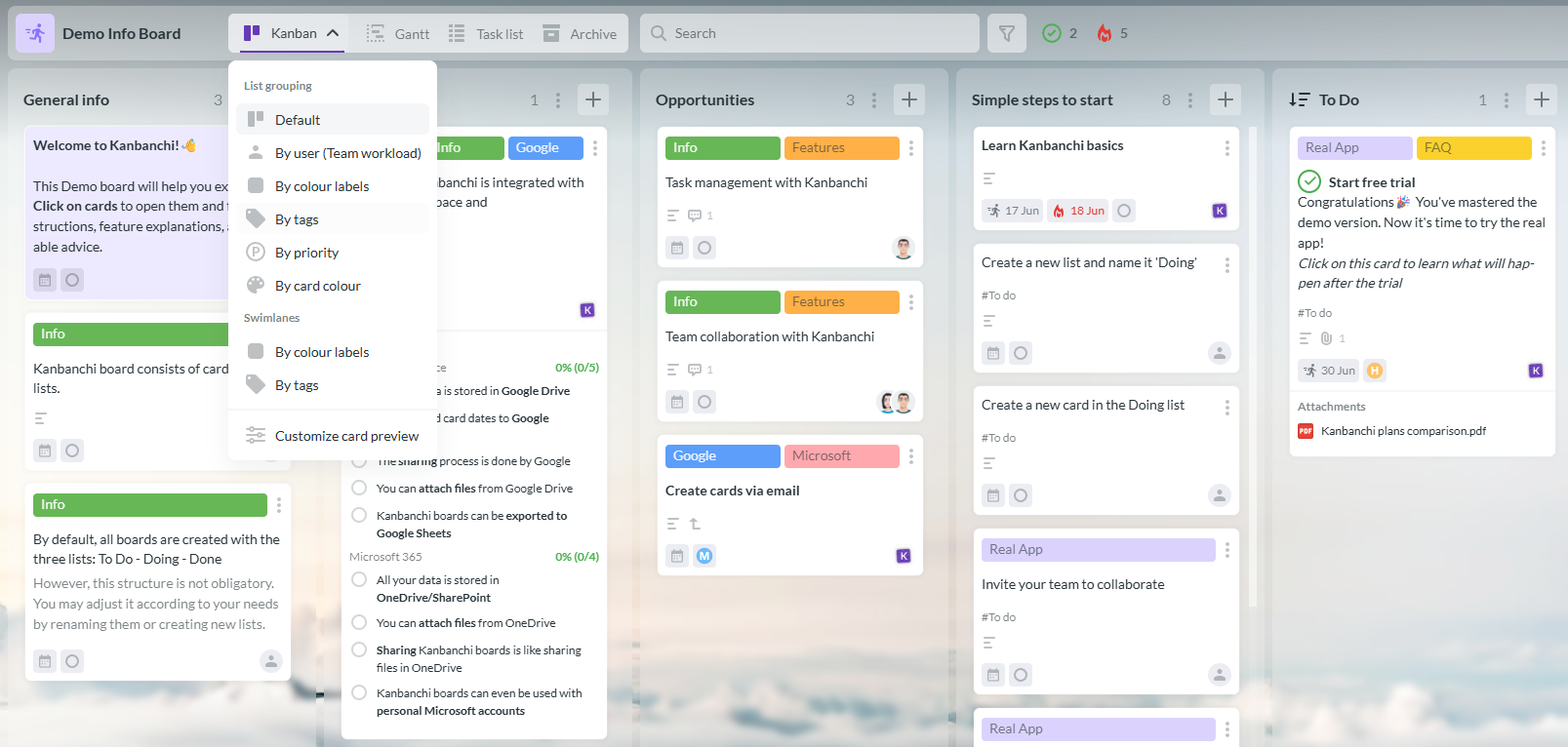
Kanbanchi board provides a visual overview of tasks, projects, and workflow progress.
Slack is the more rewarding tool if you plan projects through conversations. Kanbanchi works better for those who work in tasks and stages, which matters more once a project becomes more complex.
Slack is fast to start: create a workspace, invite the team, and messages are flowing within minutes. But Lists isn’t available on the Free plan, so a team wanting to track tasks first has to upgrade to Pro, then build a list from scratch or a template, add fields, and train people to check a table instead of a conversation.
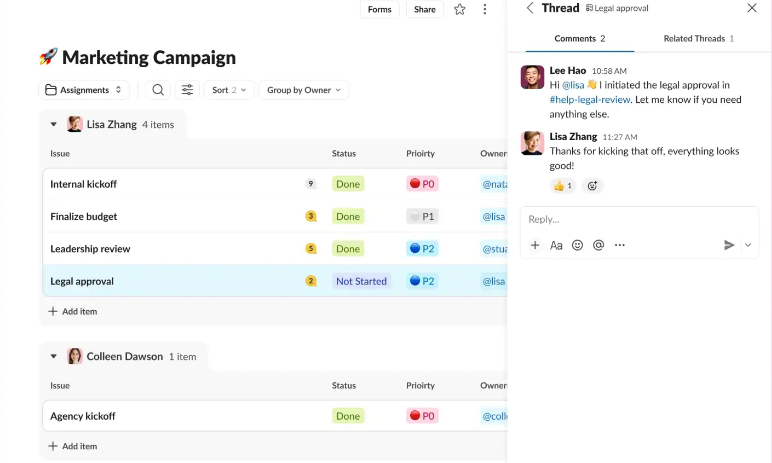
Slack Lists let teams track tasks by status and monitor progress in one workspace.
Kanbanchi’s boards are built for tasks specifically, like shared spreadsheets. You begin by creating a board, then adding lists for each stage of work. Invite your team members and begin adding cards, optionally from a board template instead of a blank canvas.
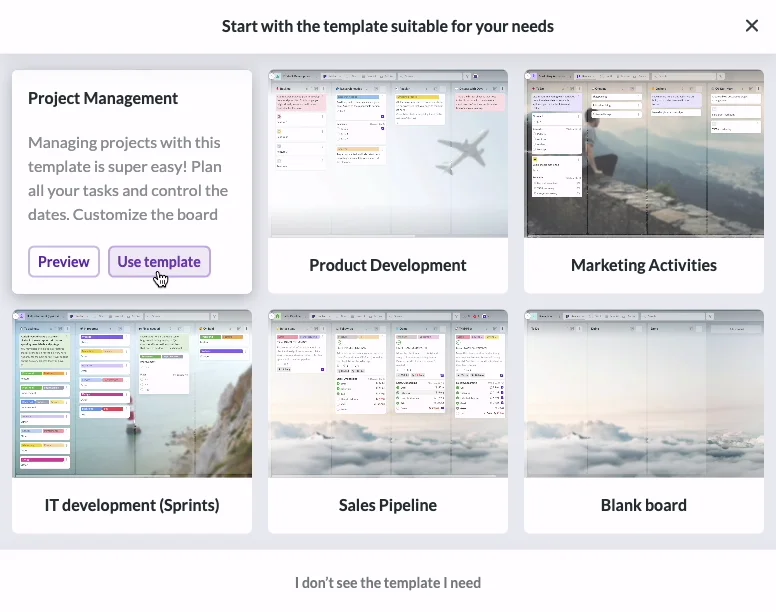
Kanbanchi templates provide a quick and easy way to start projects with pre-built board structures.
Both tools are quick to open an account with, but only Kanbanchi has dedicated board, timeline, and workload views.
Slack’s newest Lists feature is a real step up from simply pinning a to-do message in a channel, and that’s why Salesforce markets it as Slack’s answer to project management. It provides four base fields (completion, name, assignee, due date) with the option to add more, plus grouped and filtered views.
But, in practice, it’s still simply a list. There’s no board to drag a card across, and no dedicated workload view showing who’s overloaded this week. There isn’t a Gantt chart, either.
Kanbanchi’s card is a structured object with a title, description, assignee, dates, checklist, comments, and custom properties. You can filter cards in List View or plot them on a timeline in Gantt, and can read the entire board’s status in one glance instead of scrolling through a table.
Try setting up the same content calendar in both tools and you’ll immediately notice a difference. In Slack, it’s one list with a status column. With Kanbanchi, you get a board with a list per stage, cards that move visually as work progresses, and a Gantt view showing publish dates against each other.
Channels, threads, huddles, and Slack Connect let teams communicate in real time and loop in people outside the company without switching tools. This is something Kanbanchi doesn’t attempt at all, making Slack the right choice if you need to increase communication speed.
Kanbanchi’s collaboration works inside cards instead. Comments, @mentions, and an activity feed track what changed and who changed it, tied directly to the task rather than a running conversation.
Slack’s Workflow Builder allows you to automate a wide range of routine steps in the workspace, like form submissions or approval requests, without writing code. Business+ adds conditional branching for more complex logic.
Kanbanchi’s automations work differently and are purpose-built around moving tasks from ‘open’ to ‘done.’ Recurring cards regenerate themselves on a schedule, card templates standardize repeat task types, and status mapping can move cards automatically based on your changes.
Data encryption, alongside two-factor authentication and single sign-on, is available at every Slack pricing tier. However, accessing the rest of its admin controls depends on which plan you choose.
Go with Pro, and you’ll get access to logs and customer user groups. Business+ adds custom data retention policies and data exports for all workspace messages, while Enterprise+ adds even more: custom roles, audit logs, native data loss prevention, and HIPAA compliance support.
Kanbanchi’s sharing follows Google Drive’s own permission model (Owner, Editor, Commenter, and Viewer), so your administrator won’t need to learn a second permission system. Sharing with Google Groups is available on Enterprise.
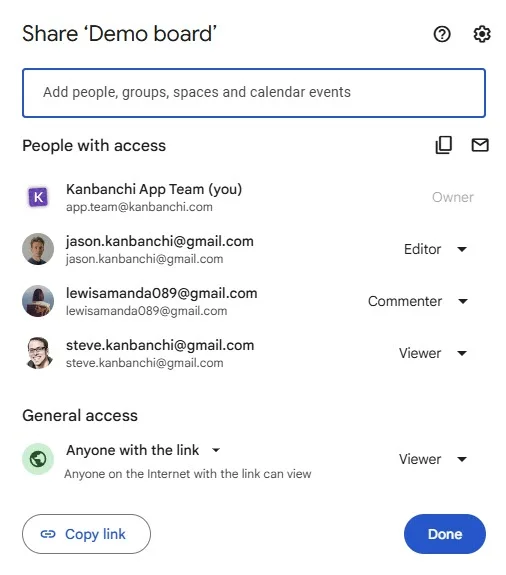
Kanbanchi uses Google sharing permissions to make it easy to share boards with team members.
Slack’s compliance is much deeper at the top tier, largely because it handles sensitive conversations across an entire organization. Kanbanchi’s is narrower but simpler, as board permissions are the same as your existing setup.
The Slack App Directory features over 2,600 apps, from Google Drive and Zoom to Jira and Asana. You’ll also find custom workflow steps to connect org-specific systems through Slack’s APIs. The idea of this extensive integration catalog is to use Slack as a notification hub for every other tool you use.
Kanbanchi may not have so many integrations, but the ones they do offer run much deeper for Google Workspace project management. These integrations include:
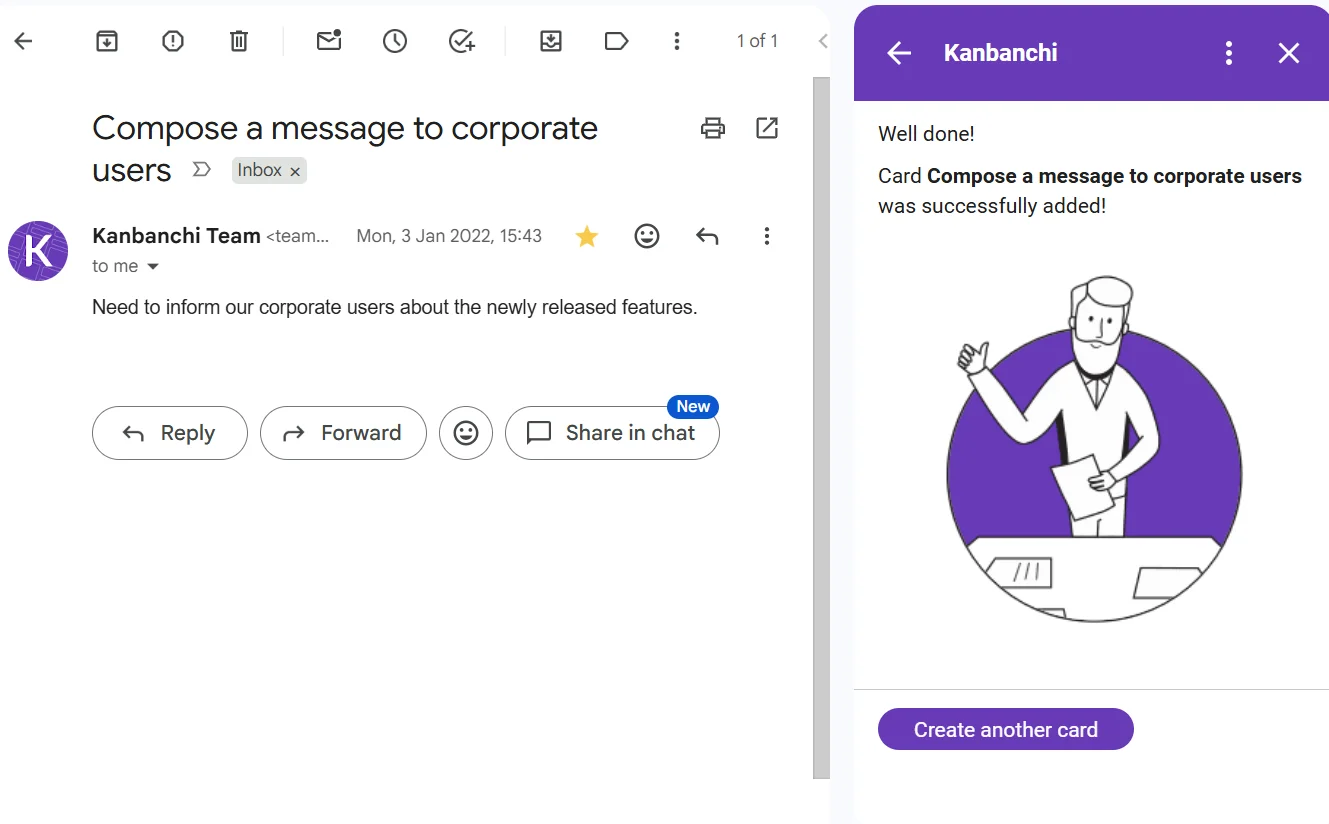
The Kanbanchi Gmail add-on connects email and task management within Google Workspace.
The Microsoft 365 version mirrors the same integration model if you prefer to sign in through Microsoft instead.
One other important point is that Kanbanchi doesn’t have a native Slack integration of its own, meaning you can’t route its notifications through Slack channels.
So, if you’re looking for one hub that connects multiple unrelated tools, Slack’s catalog wins easily. But for task tracking that fits neatly into Google Workspace, Kanbanchi’s integration points are a better fit.
All of your channels, threads, huddles, and Lists are reachable on the go through Slack’s iOS and Android apps. It’s rated 4.1/5 on the Apple Store and 4.7/5 on Google Play, with reviewers generally positive about reliability. However, some flag inconsistent notifications.
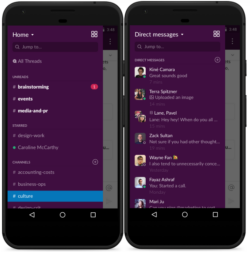
Slack mobile gives users access to team communication and work from anywhere.
Kanbanchi’s mobile app, available for Android, mirrors its desktop board experience well, rather than offering a chat-first layout. You can view boards, update cards, add comments, and check due dates without losing the board’s structure on a smaller screen.
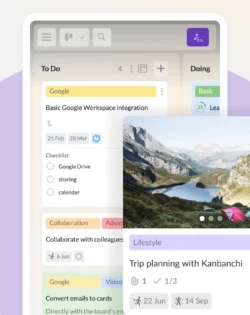
The Kanbanchi Android app lets users manage boards, tasks, and project work on the go.
Slack’s app is ideal for conversations on the go, whereas Kanbanchi works best for checking or updating a task list away from your desk.
If you’re a free plan user, there’s no direct support channel for Slack. Instead, you’ll only have access to self-service help center articles, and will need to upgrade to Pro for 24/7 support access. Business+ adds a 4-hour first-response guarantee, and through Enterprise+, you can access 24/7 priority support with the same 4-hour guarantee, backed by an account team for larger organizations.
Kanbanchi’s support isn’t gated by plan tier in the same way, and all customers benefit from the quality, personalized service of the platform’s support team. Every plan, including the free plan, gets access to support and the knowledge base, with Professional and Enterprise adding priority handling.
| Plan tier | Kanbanchi (annual) | Slack (annual) |
|---|---|---|
| Free | Unlimited users/projects, 36 cards/project | 90-day history, no Lists |
| Entry paid | $3.97/user/mo (Essential) | $7.25/user/mo (Pro, adds Lists) |
| Mid tier | From $11.97/mo (Premium) | $15/user/mo (Business+) |
| Advanced | From $24.47/mo (Professional: Gantt + workload) | Custom (Enterprise+) |
| Top tier | From $9.95/mo (Enterprise) | Custom (Enterprise+) |
Slack currently features four pricing tiers. This includes the Free plan, which offers 90 days of message history, huddles limited to one-to-one calls, and no access to Lists. There’s also the Pro plan, which adds unlimited message history, Lists, Workflow Builder, and 24/7 support, or upgrade to Business+ to get a 4-hour support response guarantee, AI-powered translations and recaps, and data exports. Enterprise+ is custom-quoted and unlocks enterprise search, native data loss prevention, and HIPAA compliance support.
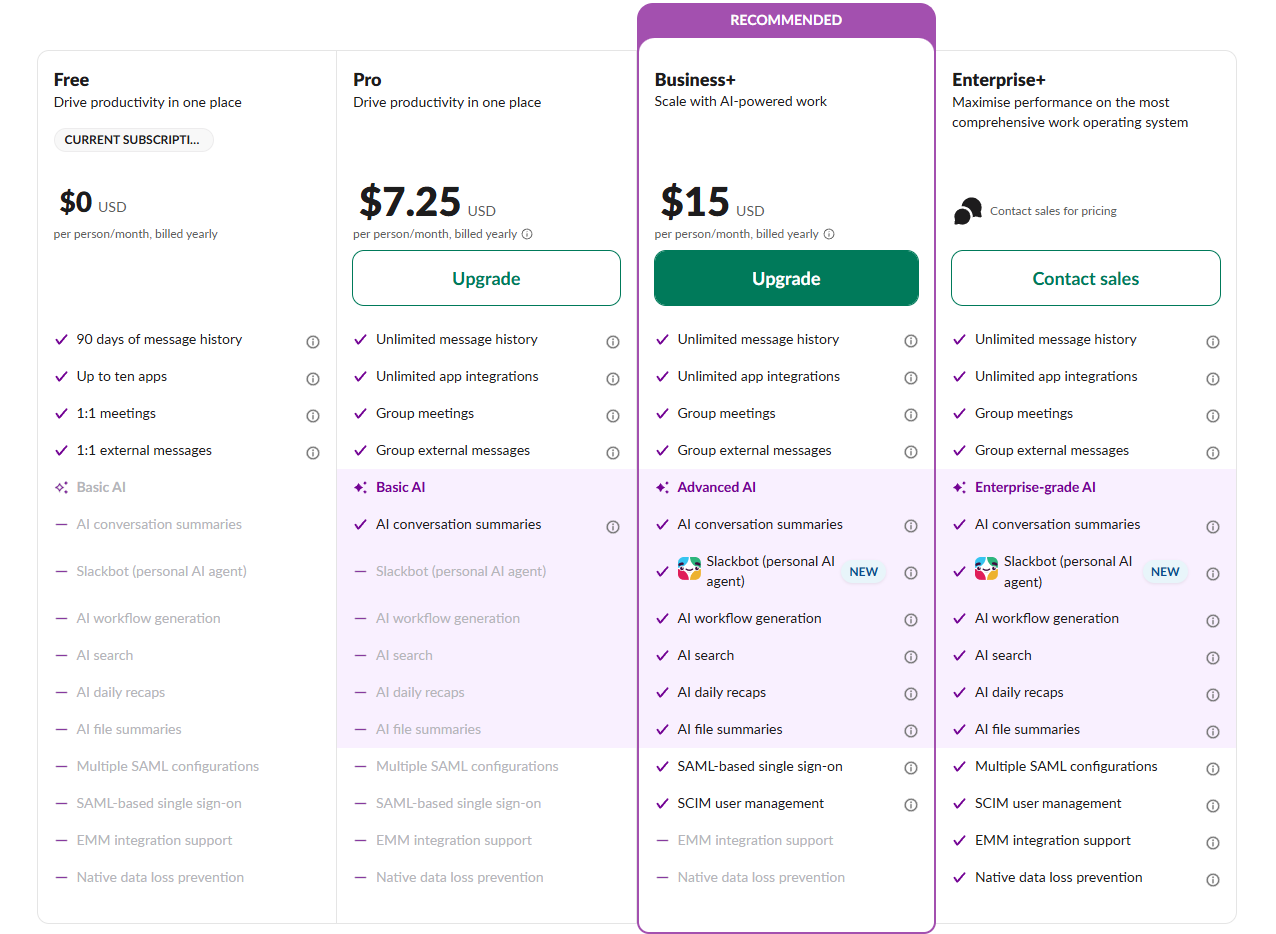
Slack pricing information compares available options and features for different teams.
Kanbanchi’s fixed or per-team custom pricing runs per seat, with discounts applied as a team grows. Essential is a fixed per user per month cost, for instance, while Premium starts from $11.97 per user per month annually, custom-priced from 2 seats. Professional is the most popular tier, adding everything from Gantt charts and Swimlanes to time tracker data export and priority support. The top Enterprise tier also allows multi-level admin, sharing with Google groups, Shared Drives and Google Vault integration, and a designated account manager.
The free plan is permanent, starts automatically after a free trial, with unlimited users and projects, capped at 36 active cards per project. Nonprofits and schools get a 25% discount on annual Premium, Professional, and Enterprise plans.
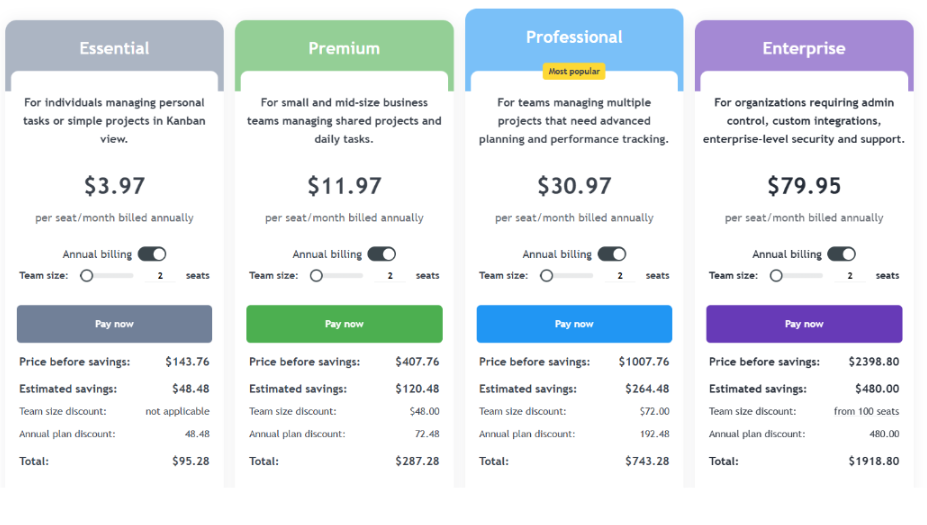
Kanbanchi pricing information compares available plans and features for different team needs.
Let’s consider what these costs would look like in Kanbanchi vs Slack for a 10-person team over a year, comparing their cheapest plans that include task tracking.
On Slack Pro, the team would pay $7.25 per user per month, or $870 a year, for unlimited message history and access to Lists.
Kanbanchi Professional costs $24.47 per user per month. This means the same team pays roughly $2,937 a year, but gets Gantt scheduling, Team Workload views, and a board interface that no Slack plan offers at any price.
Here, the honest conclusion isn’t necessarily “which is cheaper?” Most teams end up paying for both Slack for daily communication, and Kanbanchi for the planning work Slack’s cheapest task-capable tier doesn’t cover.
Here’s an honest look at both tools side by side, whether you’re vetting Kanbanchi as a Slack alternative for project management or considering Slack for the first time.
| Choose Kanbanchi if… | Choose Slack if… |
|---|---|
| Your main need is planning and tracking work visually | Your main need is real-time team communication |
| You need a Gantt chart or workload view | You regularly collaborate with people outside your company |
| You’re already running Google Workspace or Microsoft 365 | You want one hub connecting dozens of other tools |
| You’ve outgrown a table-style task list | A simple task list alongside chat is genuinely enough |
Our honest verdict in this Kanbanchi vs Slack comparison is that there’s no single winner. Each tool solves a different problem, and many organizations end up using both to cover their project management and communication needs.
But if you’re only investing in one, here’s our recommendation. Choose Slack if your priority is fast, organized communication, and if working with external partners through Slack Connect matters to your daily operations. Its Lists feature is a solid improvement over a to-do buried in a channel, even if it stops short of real project management software.
Choose Kanbanchi if you need a solid Google Workspace project management tool, especially if you’re already running on Google Workspace or Microsoft 365. It’s also the best choice if you’ve outgrown table-style task lists and need an actual board, Gantt chart, or workload view. As a Slack alternative for project management specifically, not communication, Kanbanchi is built for the planning work that Slack’s Lists feature wasn’t designed for.
Ready to move task tracking out of your communication channel and onto a purpose-built board? Start your free Kanbanchi trial today.
Kanbanchi is a strong Slack alternative for project management if you need a board, Gantt chart, or workload view, since Slack’s Lists feature offers task tracking as a table rather than visual planning. Most teams keep Slack for communication and add Kanbanchi for the actual project work that follows.
Yes, Slack offers project management through a feature called Lists, available on Pro plans and above. This lets teams track tasks with fields like assignee, due date, and status. It lacks a board view, Gantt chart, or dedicated workload view, though, so you’ll quickly outgrow it if you’re managing several projects at once.
Slack Pro, the cheapest plan that includes Lists, costs $7.25 per user per month on annual billing. Kanbanchi starts at $3.97 per user per month on Essential, with a permanent free plan also available. Slack’s plans are designed for communication with task tracking layered on top, while Kanbanchi sells structured project management built from the ground up.
Slack’s Lists can work well enough for simple tasks. Once a project needs visual status tracking, task dependencies, or a timeline view, most organizations add dedicated task management software like Kanbanchi rather than stretching Lists past what it was ever built to handle.
Kanbanchi doesn’t currently offer a native Slack integration. Teams that route most of their notifications through Slack channels should factor this in when comparing the two, since updates made on a Kanbanchi board won’t automatically post into Slack without a separate connector tool in between.
Read more articles related to Project Management



In this Article:
Start using Kanbanchi now
Start your free trial