
In this Article:
Try Kanbanchi now
Start your free trial

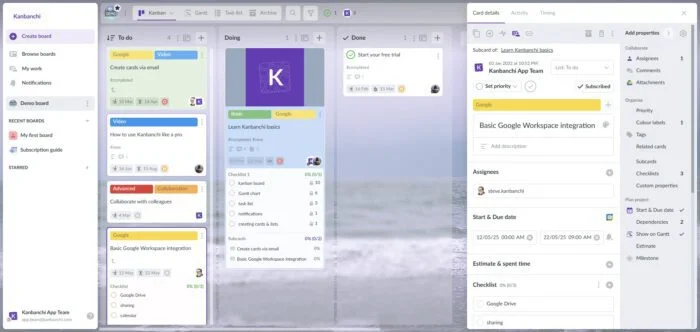
This article will give you a complete answer to the question, “What is Kanbanchi?” – what the app is, what you can do with it, and how to start using it. If you’re new to Kanbanchi, this is the place to start.
Kanbanchi is a visual collaboration and task management tool designed to give you and your team more control over your project processes. It is built first and foremost for the Google Workspace environment, which means everything you need to get started can be accessed with your Google account. It also works with Microsoft 365 for teams who prefer that ecosystem, but its roots and its deepest integrations are in Google.
At its simplest, Kanbanchi lets you create tasks, organize them on a visual board, assign them to people, attach files, set dates, track progress, and talk about the work in one place, without leaving the tools you already use every day.
Kanbanchi is software designed to help teams share and track multiple projects and tasks from one place. With its easy-to-use interface, you can create, assign, schedule, and communicate about all of your shared work in a single tool, and stop losing details in email threads or scattered documents.
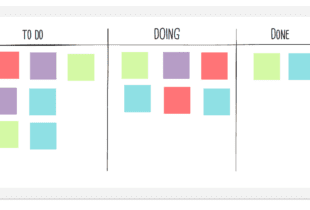
We have built the whole product around one simple, visual model that anyone can understand in a few minutes:
You move a card from one list to the next as the work progresses. That’s the core idea. From there, each card can hold as much or as little detail as you need: assignees, due dates, checklists, attachments, comments, time estimates, and more.
Kanbanchi works for both large organizations and small teams. Teams use it to plan and manage projects, schedule work for colleagues, set deadlines, discuss tasks with one another, share files, and get instant updates on progress. Because everyone is looking at the same board in real time, it replaces a lot of status-check meetings and “where are we on this?” messages.
Crucially, Kanbanchi complements the Google Workspace apps you already use rather than competing with them. To get started, you only need to sign in with your Google account. Your boards are saved as files in your Google Drive and behave like any other file there, which means you can share them and manage who has access, exactly the way you already manage documents and spreadsheets. You can also attach Google Docs and Sheets to cards, and add card dates to your Google Calendar.
Kanbanchi is flexible enough to fit many kinds of work. Here are the most common ways teams use it.
For teams that want a straightforward, visual way to run projects, Kanbanchi lets you manage work from start to finish in a single tool. You can break a project into tasks, assign owners, set deadlines, track progress, and keep every related file and conversation attached to the relevant card. Over time, your boards become a centralized, reusable resource for how your team delivers work.
Kanbanchi is a lightweight, flexible tool for teams working in an agile way. It’s a natural fit for Kanban and Scrum-style workflows. You can visualize your pipeline, limit work in progress, communicate requirements, manage scope, and track delivery, all while collaborating in real time with teammates anywhere. If you’re new to the method itself, our explainer on what a Kanban board is is a good starting point.
Kanbanchi gives distributed teams one shared, always-current view of who is doing what. Wherever your team members are, they can plan projects, pick up tasks, comment, and see updates the moment they happen. All they need is an internet connection. Instead of chasing people for status updates, everyone can simply look at the board. For a deeper look at running a distributed team, see our guide on how to effectively manage remote employees.
Not every board is a formal project. Teams use Kanbanchi for recurring operational work: content calendars, hiring pipelines, support queues, onboarding checklists. Individuals use it to organize their own tasks. Because a board can be as simple as three columns or as detailed as a full project plan, it scales to whatever you need.
Once you understand the board–list–card model, everything else in Kanbanchi is just a way to add detail to your work or to see it from a different angle. Here are the pieces that matter most.
A card is the heart of Kanbanchi. Open one, and you can add a description, assign one or more people, set start and due dates, attach files from Google Drive or your computer, and hold the whole conversation about that task in its comments, including @mentions to pull in a colleague.
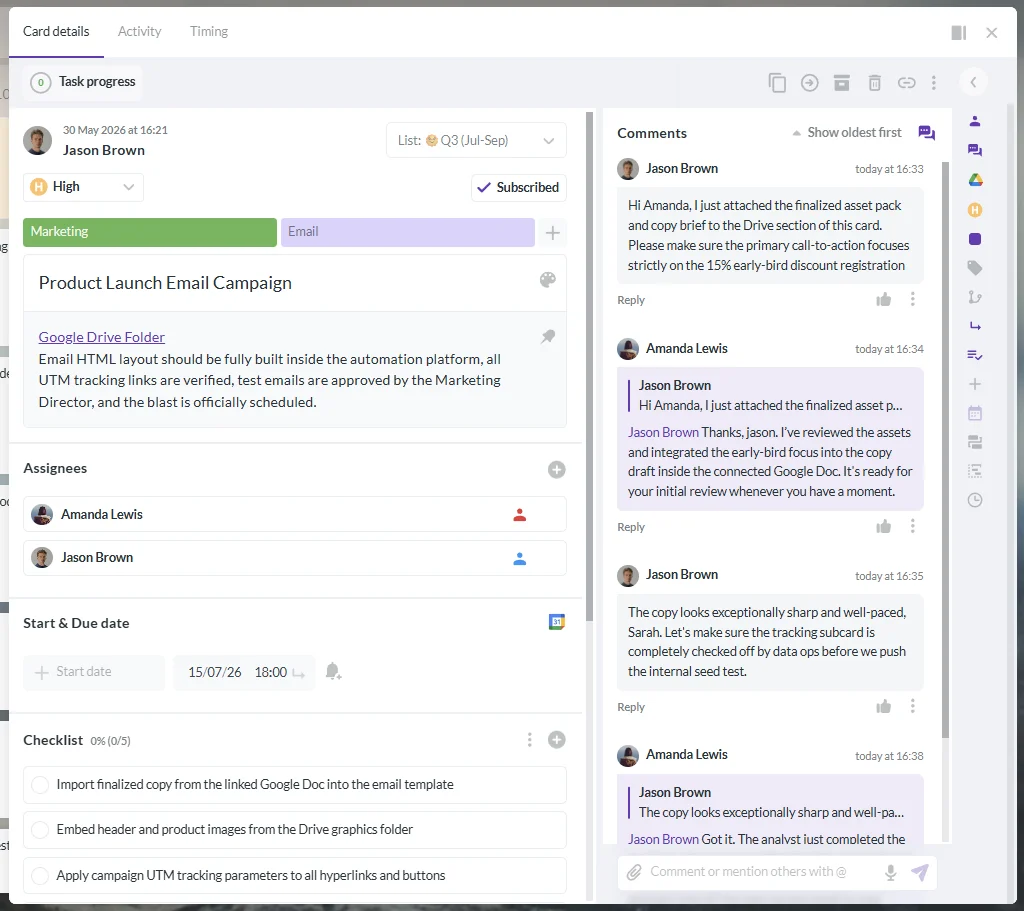
Cards go further than a simple to-do item. You can add checklists to break a task into steps, and turn any checklist item into its own card. Another option is to create subcards under a parent (or “epic”) card, so a large piece of work can be broken into smaller real tasks that each have their own owners and dates. Inside a card, you can set priorities, add tags and color labels for classification, and create custom properties, extra fields like text, number, date, or dropdown, to adapt cards to your specific business.
One of the most useful things about Kanbanchi is that your work exists once but can be viewed in several ways. You never rebuild your tasks in a separate tool; you just switch the view:
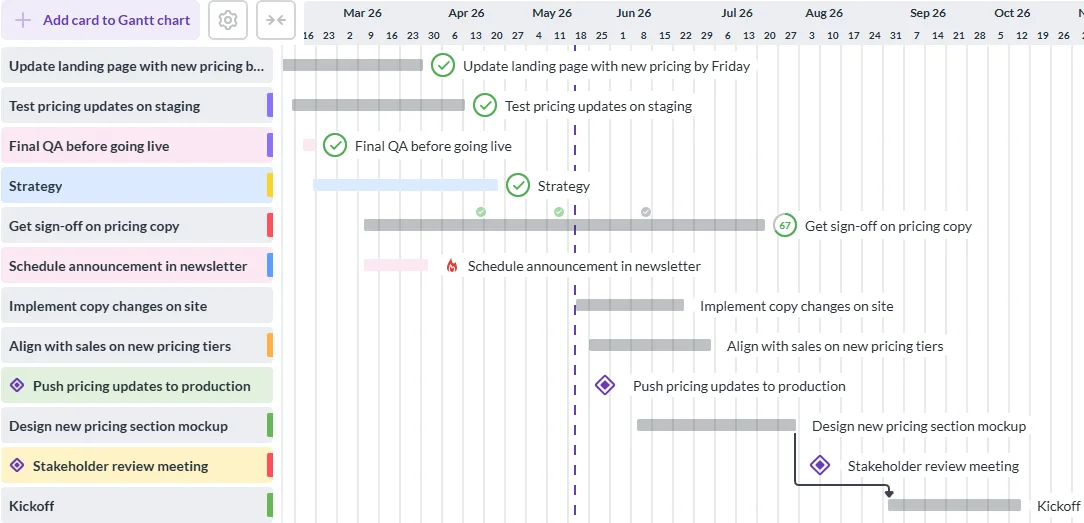
The Gantt Chart is one of Kanbanchi’s most-loved features. It converts your existing board into a timeline in one click. No separate planning file to maintain. You’ll see how tasks relate in time and understand the chronology of your project, and you can adjust a schedule simply by dragging the edge of a bar. You can also set dependencies between tasks and mark milestones for key dates. Any change you make on the Gantt Chart is reflected back on the Kanban board, and vice versa, because both are views of the same data.
Kanbanchi includes a built-in Time Tracker. You can start and stop a timer directly on a card, log time manually, record estimates against actual time spent, and review how much time work is taking across your team. Because time is recorded right on the task, there’s no separate tracking app to reconcile.
To save your team from rebuilding the same structures over and over, Kanbanchi supports board templates and card templates for repeatable work, and recurring cards that automatically recreate tasks on a schedule. These are useful for weekly checks, monthly reports, or any routine. Boards can also enforce consistency with default and required properties, so a card can’t be closed until it has the information your team needs.
You don’t have to start from scratch. Kanbanchi lets you import boards from Trello, Jira, and CSV files, so migrating an existing project is straightforward. There’s also a board email address that turns incoming emails into cards automatically, and, on Google Workspace, a Gmail add-on so you can create a task straight from an email.
When it comes to reporting, Kanbanchi takes a practical approach: you can export your board data to Google Sheets and build any kind of custom report or dashboard on top of it using Google’s own tools, such as Google Data Studio. This keeps your analytics as flexible as you need and living in the Google environment you already work in.
Sign up for a free trial of Kanbanchi now
There are many task and project management tools available. What makes Kanbanchi distinctive is the combination of two things.
First, it gives you a genuinely clear visual model. Boards hold lists, lists hold cards, and cards hold the details. That simplicity means non-technical teammates can pick it up quickly. Most people are productive within their first few minutes in the app.
Second, Kanbanchi is designed to feel like part of your existing ecosystem rather than a separate universe you have to log into and maintain. Your boards live in Google Drive. Access follows the sharing rules you already use for your files. Your attachments stay in Drive rather than being copied into yet another system. For organizations already standardized on Google Workspace (or on Microsoft 365), that ecosystem fit is often the deciding factor, because it means adoption without friction, new logins, or a separate permissions model to manage. Larger organizations can install Kanbanchi across their whole domain from the admin panel; you can read more on the enterprise page.
The result is a tool that can be a simple three-column board for one person and a full project-planning environment for a large distributed team, using the same underlying model the whole way.
Getting started with Kanbanchi is quick and requires no installation; you access it in your browser at app.kanbanchi.com by signing in with your Google or Microsoft account.
Kanbanchi offers several paid plans and a free version that includes the app’s advanced features. On the free plan, the main limit is the number of cards per board: 36 cards per board, after which a board becomes read-only until you upgrade. Paid plans start at $5.99 per user/month, and a 7-day free trial gives you access to all premium features so you can explore everything before committing.
The best way to understand Kanbanchi is to try it. Create a board for your team, add the tasks you’re working on right now, share it with a couple of colleagues, and move a few cards from To Do to Done. In ten minutes you’ll have a feel for how it fits your workflow. You can grow from that simple start into scheduling, time tracking, and full project planning whenever you’re ready.
Kanbanchi has a free version that includes its advanced features, with a limit of 36 cards per board. Once a board passes that limit, it becomes read-only. Paid plans, which remove that limit and add more, start at $5.99 per user/month, and there’s a 7-day free trial of all premium features.
No. Google Workspace includes Gmail, Drive, Calendar, Docs, and Sheets, but it doesn’t include a full Kanban board for team project management. Kanbanchi was built specifically to fill that gap. It adds visual boards, Gantt charts, and time tracking while integrating directly with your Google tools and storing your boards in Google Drive.
On the Google version, your boards are saved as files in your own Google Drive and follow the same access and sharing rules as your other Drive files, and your attachments remain stored in Drive rather than copied elsewhere. Some operational data, such as comments and activity, is maintained by Kanbanchi to make the app’s features work. Sharing and ownership generally follow your existing Google Drive logic.

In this Article:
Start using Kanbanchi now
Start your free trial