
In this Article:
Try Kanbanchi now
Start your free trial

If you’re looking for a new project management tool, you’ve more than likely stumbled across Kanbanchi and Wrike. While they’re both more than capable of coordinating your daily workflows, there’s one genuine difference: their philosophies.
Wrike is a feature-rich platform designed specifically for large enterprise teams. Kanbanchi is designed to be project management software for Google Workspace, and is especially made for those who want to start working right away, rather than spending hours configuring.
In this Kanbanchi vs Wrike guide, we provide honest details on everything you need to know to make an informed decision on which tool is best for your team, from integrations and setup to pricing.
If you’re a Google Workspace team looking for a fast setup and predictable pricing, Kanbanchi is our recommendation. It’s best for teams of up to 50 people who want to run real work from day one, but don’t have a dedicated tool administrator. Wrike is the right fit for larger enterprises that run complex, cross-functional programs and are prepared to invest time and a substantial budget in platform configuration and onboarding.
Here’s how Kanbanchi vs Wrike compare across the two main software review platforms:
| Platform | Kanbanchi | Wrike |
|---|---|---|
| G2 | 4.7 / 5 | 4.2 / 5 |
| Capterra | 4.7 / 5 | 4.4 / 5 |
Kanbanchi’s ease-of-setup scores 9.5/10 on G2, while ease of use is rated 9.4. It’s consistently described as one of the fastest project management tools for boosting productivity, with users highlighting the clean interface and quality of support.
On the other hand, read any Wrike review and the phrase “learning curve” appears among the top two most cited complaints. Ease-of-setup scores even lower. Wrike’s overall Capterra rating is 4.4/5 from over 3,000 verified reviews, with customer service complaints concentrated in the lower ratings.
Launched in 2006, Wrike is now one of the most recognized enterprise project management platforms for organizations running complex, cross-functional workflows. The platform delivers a wide range of features, including Kanban boards, Gantt charts, resource management, advanced dashboards, and a growing AI layer. These tools are a genuine strength for large or growing teams operating in marketing, PMO, IT, operations, and professional services functions.
Kanbanchi is a simple project management tool built natively for Google Workspace, with a Microsoft 365 version also available. What makes Kanbanchi different from other similar platforms is that it stores your data directly in Google Drive, as files that behave like any other Drive document. Permissions follow your existing Google Admin setup, so adding someone to a board works the same way as sharing a Drive file.
If you’re looking for project management software for Google Workspace, Kanbanchi’s wide range of views work across a single data model. Google Vault is supported on the Enterprise plan, while all tiers benefit from SOC 2 Type II, ISO 27001, GDPR, HIPAA, and CASA certifications.
| Feature | Kanbanchi | Wrike |
|---|---|---|
| Free Plan | Yes (unlimited users, unlimited projects, 36 active cards per project) | Yes (basic task management and boards only) |
| Kanban Board | Yes (all plans) | Yes (all plans) |
| Gantt Chart | Yes (Professional+) | Yes (Team+) |
| Time Tracker | Yes (Professional+) | Yes (Business+) |
| Swimlanes | Yes (Professional+) | Yes (Business+) |
| Team Workload View | Yes (Professional+) | Yes (Business+) |
| Task Dependencies | Yes (Professional+) | Yes (Team+) |
| Recurring Tasks | Yes (Premium+) | Yes (Business+) |
| Custom Fields | Yes (Professional+) | Yes (Business+) |
| Automation | Yes (Premium+) | Yes (Business+) |
| Google Workspace (native) | Yes (boards stored as Drive files) | Connector integration |
| Microsoft 365 | Yes | Yes |
| Mobile App (iOS or Android) | Yes | Yes |
| SOC 2 Type II | Yes | Yes |
| SSO | Google/Microsoft (all plans) | Google (Business+), SAML (Enterprise) |
Put both tools in front of a new user, and they’ll quickly notice the interface difference in Kanbanchi vs Wrike.
Looking at its interface, it’s clear why “steep learning curve” and “complex interface” rank among the top complaints in Wrike’s review database. The Spaces, Folders, Projects, and Tasks, with multiple navigation panes, are built for power and scale, with dense notification streams and configuration options suiting large enterprise teams well. This is unlikely to work quite so well on a day-to-day basis or during the initial setup without a dedicated admin team, though.
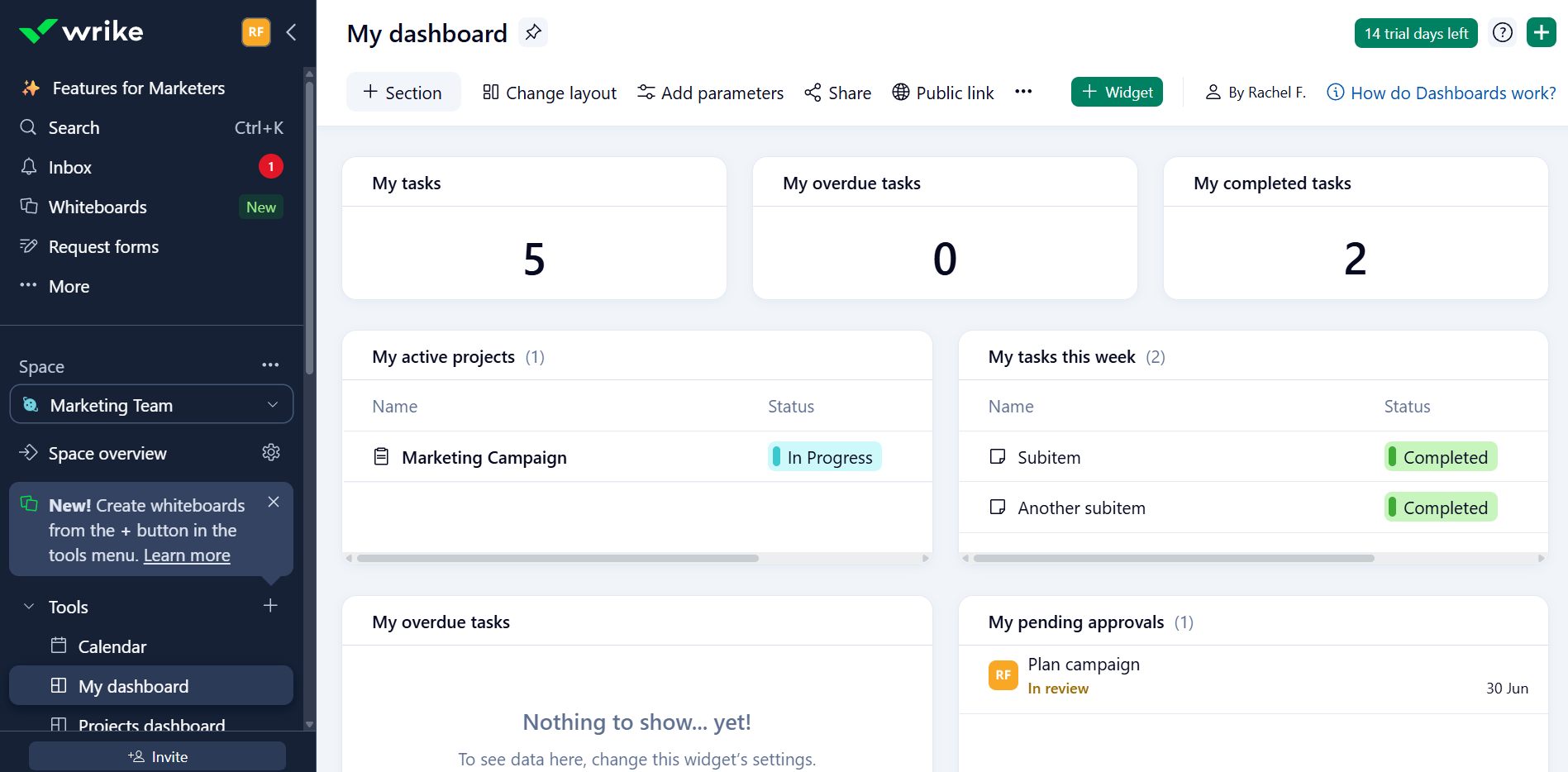
Wrike interface with task management, project planning, and collaboration features.
Kanbanchi takes the opposite approach: boards contain lists, and lists contain cards. It’s a three-level structure that most new users understand without a training session, reflected by a G2 ease-of-use rating of 9.4/10.
Teams can open Kanbanchi for the first time and build a working project board in under 20 minutes. Getting a comparable structure in Wrike means configuring Space and Folder hierarchies first, before deciding how status columns map to real workflow stages. Then, the whole team must learn how to use that hierarchy consistently before they start working.
Kanbanchi’s ease of use and accessibility also come without sacrificing capability. The tool supports subcards, task dependencies, recurring cards, card templates, Gantt planning, custom properties, and workload tracking, making it ideal for running complex projects every day.
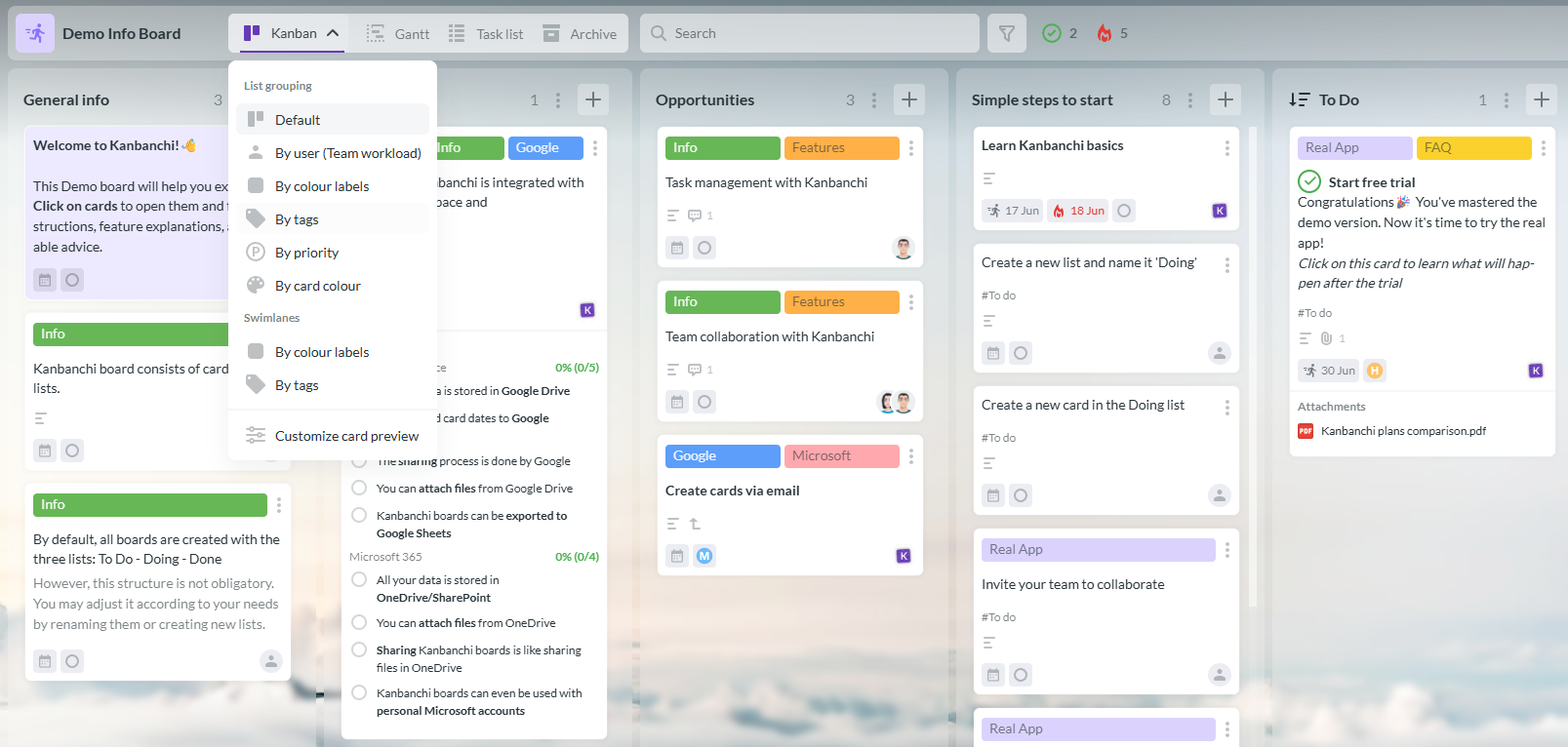
Kanbanchi interface with a visual Kanban board, task management tools, and seamless Google Workspace integration.
One of the less visible differences in this Kanbanchi vs Wrike comparison, but one of the most important for your organization’s productivity, is the onboarding process.
Wrike’s own website recommends that all new teams work with a consultant during onboarding, suggesting it’s a complex process. Specifically, teams of 20 or more should use guided deployment, which is a paid add-on.
Kanbanchi’s model is fully self-service, meaning there’s no mandatory consultant. You also won’t need to agree on a prerequisite folder architecture before the first board goes live. Signing in with an existing Google account takes seconds for Google Workspace users, and boards are stored in Drive alongside existing work.
The Kanbanchi app closes that major gap in time-to-productivity, which is one of the most underestimated factors when evaluating Wrike alternatives in this category, especially if you already use Google Workspace.
Kanbanchi and Wrike offer everything you need to effectively manage projects, but where they differ is in how your work is structured and what it takes to get from setup to running. Here’s a full comparison of their main features:
The way that Kanbanchi and Wrike handle project management is similar to their setup processes – Kanbanchi’s is naturally easier to understand from the start, so you can get productive straight away.
Tasks on each platform are created the same way, with assignees, due dates, priorities, comments, file attachments, and status tracking. But this changes when you’re building projects, with Wrike using a multi-level hierarchy of Spaces, Folders, Projects, and Tasks. Your team must decide upfront how those levels relate to each other before anyone can start working productively.
Kanbanchi has a unique board, to list, to card model, which removes this decision. The same cards also support subcards, dependencies, milestones, and custom properties without changing anything.
Kanbanchi’s views all come from the same data set, and you can switch between them in just a single click. They include:
Wrike offers a broader range, including Table and Calendar views. The main difference here is that these views often need panel configuration before they display what you expect, while Kanbanchi’s are ready immediately.
If most of your departments have structured, repeatable processes, Wrike’s Business plan should offer all the automations you need, from multi-step triggers to conditional rules and approvals.
Kanbanchi handles automation through recurring cards, card templates, status-based rules, and Google Forms pipelines via Google Script. These workflows cover the options that many SMBs need to save time during daily project management tasks.
Wrike offers a more advanced BI reporting option, which is available only on the Pinnacle tier. It adds customizable dashboards, forecasting, and third-party data connectors to its other project management features, and is a strong offering for most enterprise teams. Kanbanchi’s approach is slightly different – your boards are visual by design and work well for stakeholder updates. Direct export to Google Sheets is available from Premium, and the data also transfers easily into Google Data Studio or Power BI.

Wrike reporting dashboard with project analytics and customizable team performance reports.
Wrike’s role-based permissions are available from the Business plan, with SSO on Business and above. It holds SOC 2 Type II, ISO 27001, GDPR, and EU data hosting, with Enterprise plans adding SAML-based SSO and more granular admin controls. These enterprise-grade certifications offer a reasonable compliance foundation for regulated industries.
Kanbanchi’s permission model actually works inside Google environment. You are sharing your Kanbanchi board via the same mechanism you use to share a Google Doc.
SSO via Google is available on all plans, including the free tier. It also has many of the same security certifications as Wrike, but with the addition of HIPAA and CASA, plus Google Vault on Enterprise. That combination of native Drive storage with HIPAA compliance and Google Vault is a major differentiator for education and healthcare organizations, and something Wrike doesn’t match at equivalent plan levels.
If you’re comparing project management software for Google Workspace, the integration differences between Kanbanchi vs Wrike is where you should pay real attention.
Wrike offers over 400 integrations to help you create a diverse tool stack: Slack, Microsoft Teams, Salesforce, Jira, Adobe Creative Cloud, Zoom, and Google Workspace are just some of the highlights.
The architectural difference matters, though. Wrike connects to Google Workspace as a third-party integration. Kanbanchi stores boards as Google Drive files, so the connection is a native part of the Google ecosystem rather than a bridge between two separate systems.
Board permissions in Kanbanchi follow Drive sharing rules automatically, and there’s no separate permission layer to maintain in sync. It features seven native Google Workspace integration points:
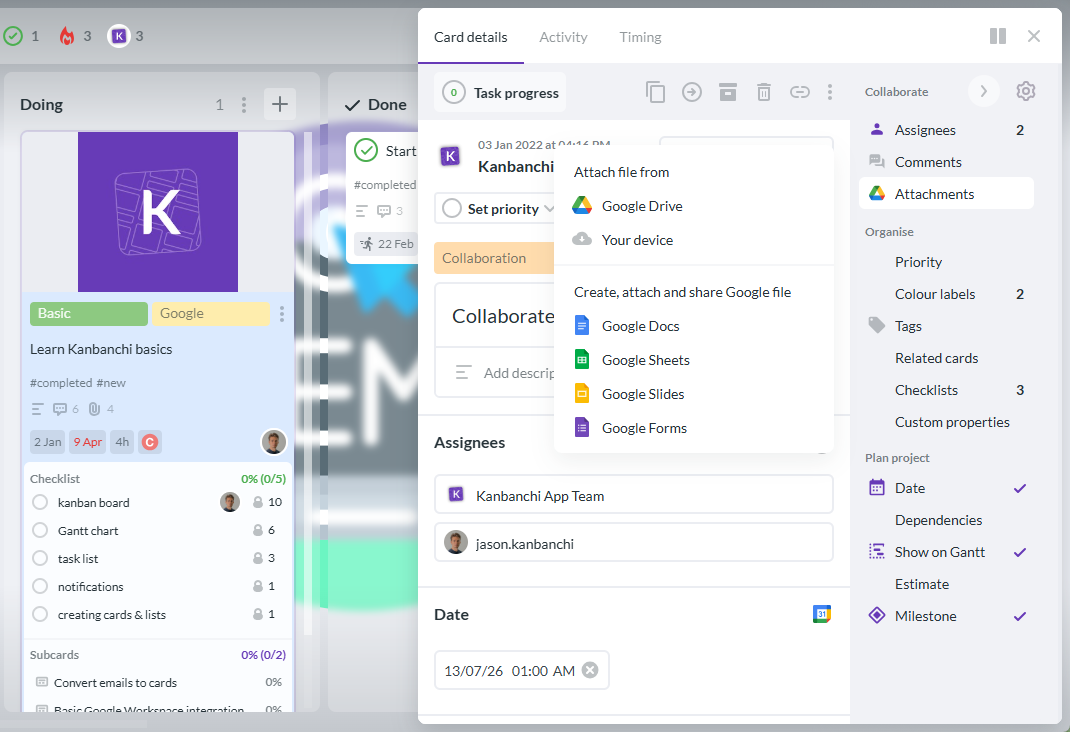
Attach Google Drive files directly to Kanbanchi cards to keep project documents organized and accessible.
Kanbanchi also has a Microsoft 365 version with equivalent integration for OneDrive, SharePoint, and Microsoft sign-in if you’re not running on Google tools.
It’s clear so far in this Kanbanchi vs Wrike review that each tool suits teams with distinct needs. However, both work well if you need to manage projects on the go, with native apps for iOS and Android.
The Wrike app covers core task updates, comments, and notifications, and the January 2026 update added AI-powered smart replies and a Priority Inbox. Anything more complex than this, however, tends to require desktop use – reviews consistently note dashboard editing, automation rule changes, and complex Gantt adjustments as key examples.

Wrike offers a consistent project management experience across desktop and mobile devices.
Kanbanchi’s Android app gives users access to boards, cards, comments, and due dates. Like Wrike, this is ideal if your mobile workflows are basic and include reviewing work or staying updated with notifications. But neither tool replaces the desktop entirely, which is consistent across most project management tools in this category.
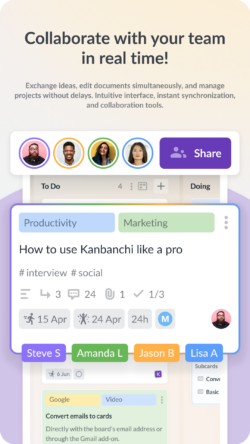
Kanbanchi for Android lets you manage projects, update tasks, and collaborate from anywhere.
Support is one of the clearest differentiators in this Kanbanchi vs Wrike review, particularly when it comes to those first few weeks using your chosen tool. This is important when choosing the right platform, as the quality of this early support can determine whether it gets embedded into your workflow or abandoned after the trial period ends.
With Kanbanchi, G2 and Capterra reviewers frequently cite the support team by name. They describe them as solving actual business problems rather than following a script, answering questions that documentation doesn’t fully cover during the initial setup process.
On the flip side, Wrike users on the Standard plan benefit from live chat. This is redirected to an AI chatbot out of hours. Many of Wrike’s one-star reviews come from response quality ,with long-term users noting a shift from direct phone support to slower, scripted email responses. Premium support packages offer 24/5 live agent access, but at an additional cost.
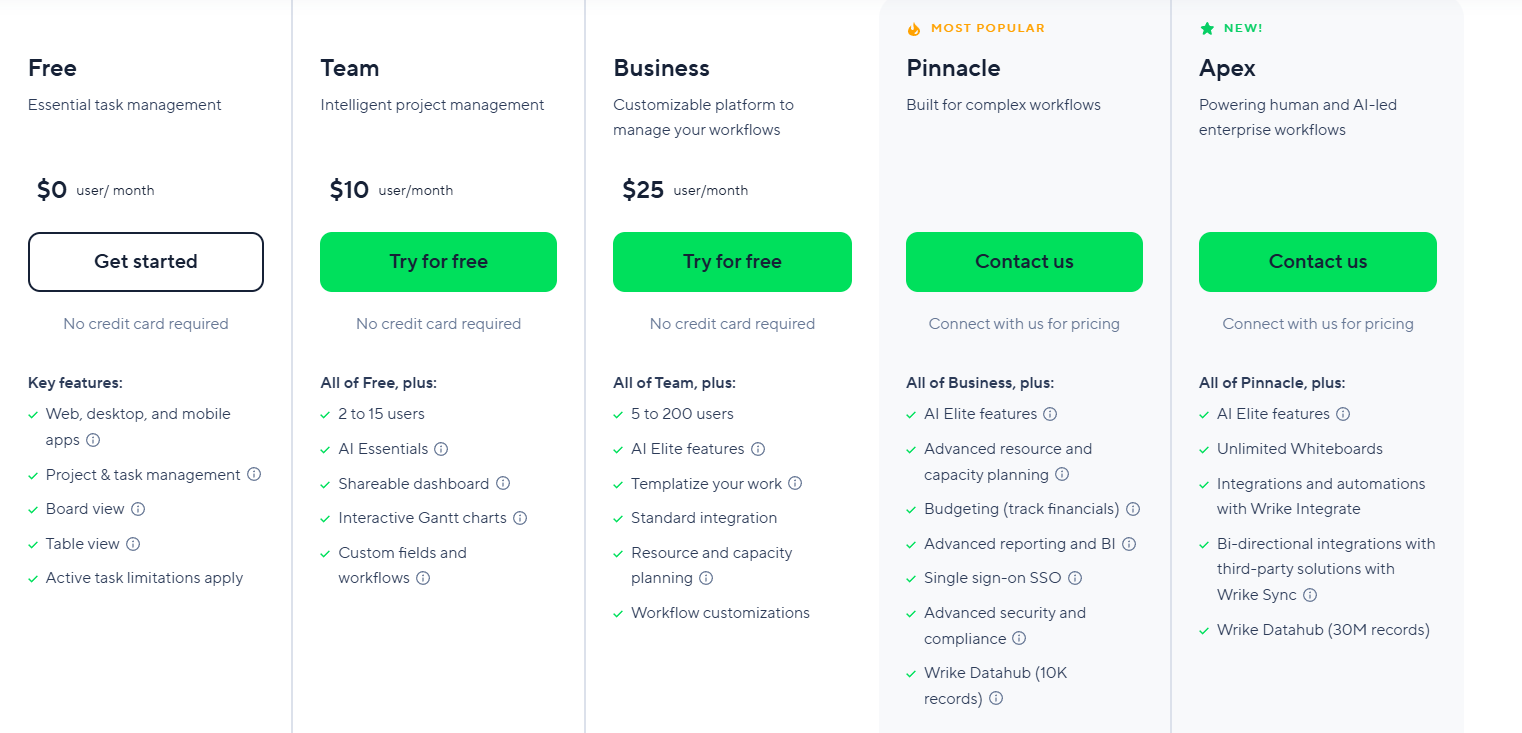
Wrike pricing plans and included features for teams of different sizes.
Here’s an overview of Wrike’s annual billing plans:
One aspect of Wrike pricing that we shouldn’t skip over is subscriptions, which are sold in seat bundles instead of individual licenses. Plans are sold in groups of five, up to 30 seats, meaning a team of 12 must purchase 15 seats.
That’s $1,800 per year for 12 people on the Team plan ($10/user). At $25/user on Business, the same team pays at least $3,750 per year. With add-ons like the Whiteboard feature, you’re adding an extra $15/user/month on plans below Apex. If you’re evaluating Wrike alternatives and are on a budget, this bundling is a key detail to factor into your calculations.

Wrike add-ons pricing overview highlighting extra costs for extending project management capabilities in the Kanbanchi vs Wrike comparison
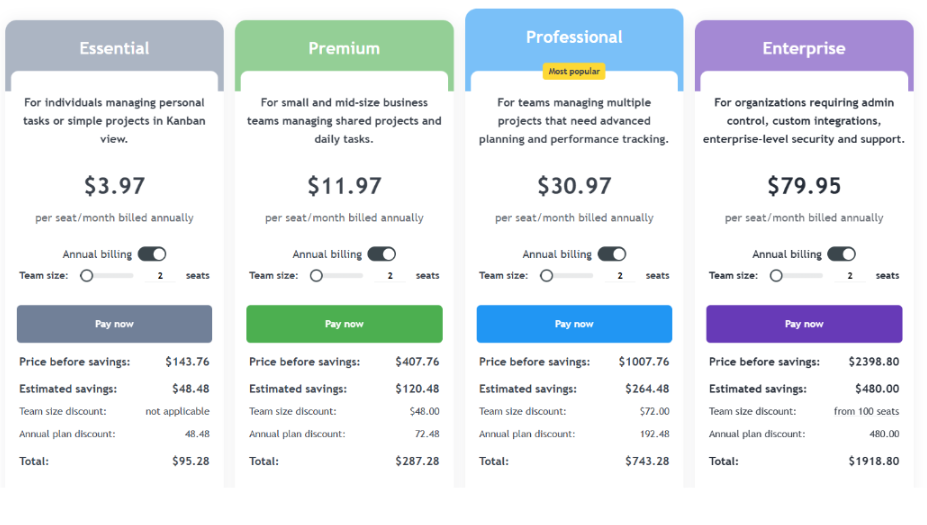
Kanbanchi pricing overview highlighting the cost structure and subscription options compared with Wrike
You may purchase even just one-seat subscription in Kanbanchi. Custom discounts are applied if 2+ seats are purchased. The more seats purchased, the greater the per-seat discount. Google Drive integration is included on every plan, including the free tier, and premium adds deeper integration, including export to Google Sheets and Google Forms data collection.
Educational institutions and nonprofits also receive a 25% discount on all annually billed plans except Essential.
| Choose Kanbanchi if… | Choose Wrike if… |
|---|---|
| Your team needs to start fast | Your team has 50+ users running complex, cross-functional programs |
| You run on Google Workspace and want boards stored in Drive | You need advanced AI agents and enterprise BI dashboards |
| You want support that solves real problems rather than routes through a bot | You have a dedicated admin or operations team to manage the platform |
| You want a simple project management tool that new users understand immediately | Your workflows need multi-level folder hierarchies across departments |
| You want a permanent free plan with no time limit | You need deep third-party integrations beyond Google’s ecosystem |
| You want per-seat pricing without seat bundle rounding | Budget allows for enterprise-scale tooling and professional onboarding |
It’s clear that Wrike has more features. But the real question in this Kanbanchi vs Wrike decision is whether you have the administrative capacity and budget to get real value from these features. And for most SMBs or those looking for project management software for Google Workspace, the honest answer is no.
Kanbanchi’s Kanban boards, Gantt planning, time tracking, task dependencies, swimlanes, and team workload management are easy to understand from day one. Permissions are managed by an easy Google interface, and the support team treats configuration questions as problems genuinely worth solving. For anyone looking for a simple project management tool that grows with their work without growing their complexity, Kanbanchi is the stronger choice.
If you’re evaluating Wrike alternatives and want to see how Kanbanchi fits your project workflows, start a free trial today.
Kanbanchi is typically the better fit for teams who are already using Google Workspace. It sets up faster, requires no admin expertise to configure, and prices predictably without seat bundle rounding. Wrike’s depth becomes an advantage at enterprise scale, but for smaller teams, the setup overhead outweighs the extra capability.
Yes, the Wrike free plan includes unlimited users with basic task management and Kanban board access. Gantt charts, automation, and advanced integrations are available on the Team plan ($10/user/month on annual billing) and above. Accounts revert to the free tier after a 14-day free trial unless a paid subscription is purchased.
Kanbanchi stores boards as Google Drive files and connects natively with Google Calendar for task dates, Gmail for card creation from emails, Google Sheets for export, Shared Drives, Google Groups on Enterprise, and Google Forms via Google Script. The sharing process is handled by Google.
Wrike’s cheapest paid plan is the Team plan at $10/user/month on annual billing, available for teams of 2 to 15 users. The Wrike pricing model sells subscriptions in seat bundles: up to 30 seats are sold in groups of five, so a team of 12 must purchase 15 seats. The Business plan starts at $25/user/month and adds automation, SSO, and custom workflows.
The Wrike learning curve is one of its most frequently cited drawbacks in third-party Wrike reviews. The platform’s Spaces-Folders-Projects hierarchy, configurable status workflows, and high default notification volume require meaningful setup time. Wrike itself recommends professional services onboarding for new teams of 20 or more, which highlights the complexity involved.
Kanbanchi can replace Wrike for most SMBs and Kanban board software users on Google Workspace. Kanbanchi covers task management, Gantt planning, time tracking, task dependencies, swimlanes, and workload views. The exception is large enterprise operations with complex AI automation needs, cross-project BI dashboards, and a dedicated platform administrator. Wrike’s additional depth has a genuine purpose in those cases.
Read more articles related to Project Management


In this Article:
Start using Kanbanchi now
Start your free trial