
In this Article:
Try Kanbanchi now
Start your free trial


If you’ve been relying on Microsoft Project Online to keep your team’s complex schedules, resource allocations, and portfolios in check, you’ve likely heard the ticking clock. It’s not just a rumor or a minor update. Microsoft has officially set the stage for a major transition. The tool that has served as the backbone for thousands of enterprise projects for years is headed for retirement.
And while September 2026 might feel like a distant milestone for some, in the world of project management, where data integrity and workflow continuity are everything, the time to start planning your exit strategy is yesterday. CIO’s John Reuben agrees and says it’s “a chance to future-proof how their org plans and executes.”
But here is the real question: Are you looking for just another tool, or are you looking for an opportunity to finally modernize how your team works?
For many, the Microsoft Project alternatives online search isn’t just about finding a replacement; it’s about escaping the clunky, overly complex interfaces of the past and moving toward something that actually encourages collaboration rather than making it a chore.
In this guide, we’re going to:
Most importantly, we’ll explore why moving to a flexible, intuitive alternative can transform this forced migration into a strategic advantage for your team.
Let’s dive into the details of the shutdown and the future of your project management for you and your SME.
The retirement date is 30 September 2026. The date that actually matters to you is about a month earlier.
Two reasons. First, the OData feed you export through is throttled – there is a ceiling on how fast data comes out, and large portfolios take days rather than hours. Second, every Project Online customer in the world will be exporting during September. Throughput will not improve under that load.
There may be an informal read-only period after the cutover. There is no contractual guarantee of one, and planning around a maybe is not a plan.
Treat 1 September as the date your data must be fully extracted and verified. Not started, verified, meaning someone has opened the exports and confirmed they contain what you think they contain.
If you are reading this in late August, that changes what to do first. A full platform migration takes twelve to sixteen weeks, and there is no longer time for one before the cutover. Export first, choose your destination afterward. Data you have extracted keeps its options open indefinitely. Data still in Project Online on 1 October does not.
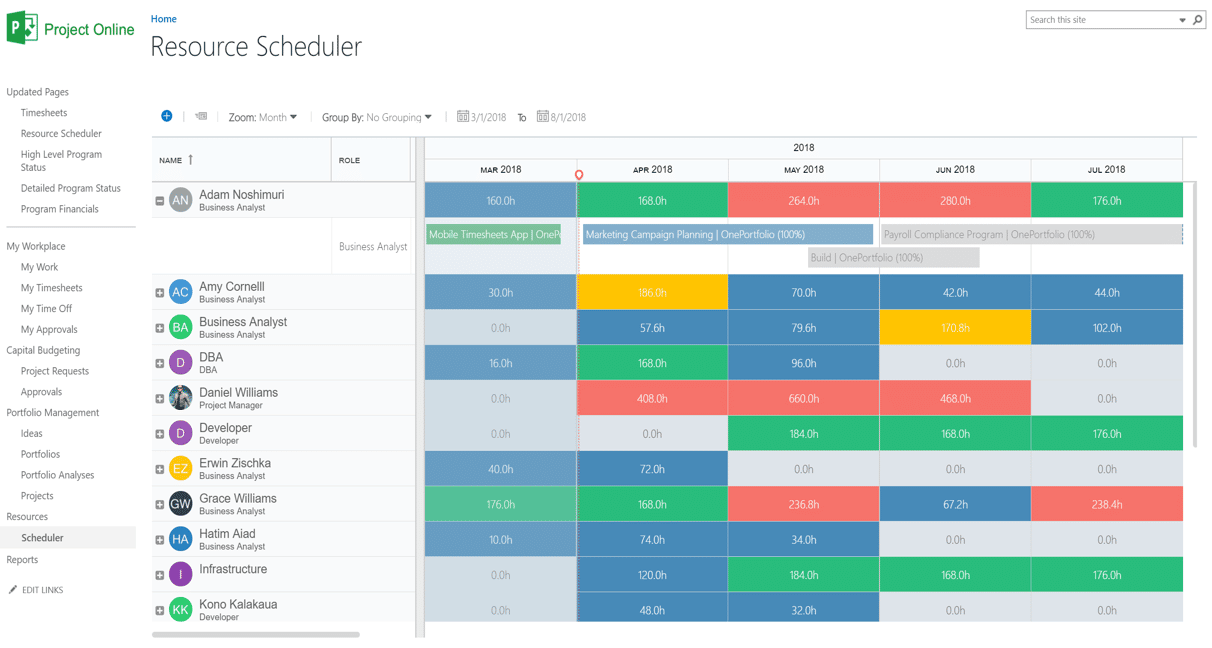
The retirement of Microsoft Project Online has prompted teams to reassess their project planning software.
The tech world moves so fast these days, and even giants like Microsoft eventually outgrow their legacy systems. Microsoft’s direction of travel points toward the new Planner, but the picture is more confusing than that, because one of the products people assume is the destination has already gone. However, for current users, this transition can feel like a big change that they’re either not ready for or simply don’t want.
While the official retirement is often discussed as being in September 2026, the transition phases begin much sooner. What are they?
As of December 2025, Microsoft is no longer investing in new features for Project Online. The focus has shifted entirely to modern web-based solutions. It’s during this phase that users should start to focus on finding a replacement.
This is not an end-of-support date. It is a shutdown.
On 30 September 2026, Project Web App stops serving. The OData reporting feed returns 410 Gone. Desktop client synchronization breaks. Timesheets stop. The Enterprise Resource Pool becomes unreachable. All of it at once, because it all depends on the same service.
There is no partial mode where schedules stay readable, but timesheets stop. There is no announced read-only window. Microsoft has confirmed that project data in the service will no longer be accessible after that date.
What survives: your SharePoint project sites. Those are SharePoint Online content, and they persist – documents, lists, libraries.
What does not: everything in the scheduling database. Project schedules, baselines, resource assignments, custom fields, timesheets, risks, issues, and reporting history all live there, not in SharePoint. If you have not exported it, it is gone.
Project Online’s governance layer – project types, demand management, stage-gate approvals – ran on SharePoint 2013 workflows. Microsoft retired those on 2 April 2026.
If your PMO depends on workflow-driven approvals or demand management, those processes stopped working roughly six months before the platform itself goes dark. Some teams have been running manual workarounds since spring without connecting it to the retirement.
Worth checking now, because it changes what “migrate the workflow” means. In many cases, there is no live workflow left to migrate – only the documented process, which has to be rebuilt in whatever comes next.
In technical terms, deprecation is a polite way of saying the software is on life support. Microsoft is signaling that the underlying technology for Project Online (built on SharePoint) is being replaced by the Power Platform.
This is a fundamental shift in how data is stored and managed. Because the new Microsoft Project for the web is built on a completely different database (Dataverse), there is no simple ‘click to upgrade’ button. Every team currently using Project Online is facing a mandatory Microsoft Project Online migration.
Staying on a deprecated platform isn’t just about missing out on new features. It introduces three major risks:
The announcement of Microsoft Project retirement has sent shockwaves through project management offices, but for many teams, it was simply the final push they needed to move on.
While Microsoft suggests Project For The Web (now part of the new Microsoft Planner) as the natural successor, a significant gap exists between what long-time users need and what the new ecosystem offers.
No, and not for the reason most people expect. Project for the Web no longer exists as a separate product. It was retired on 1 August 2025, along with the Project and Roadmap apps in Teams, and folded into Microsoft Planner.
This is the most common confusion about the retirement. Teams searching for a Project for the Web migration path are looking for something discontinued a year before Project Online.
What Microsoft actually offers is Microsoft Planner, with the paid Planner Premium tier carrying the scheduling features. Whether that works depends entirely on how you used Project Online.
Planner Premium is a reasonable fit for teams running independent schedules and straightforward task tracking.
It is not a like-for-like replacement for a PMO. The limits that matter: roughly 3,000 tasks and 10 custom fields per project, simplified resource management compared with Project Online’s leveling, and reduced baseline and dependency logic. If you rely on cross-project dependencies, portfolio capacity planning, or custom workflow, you are choosing a new platform rather than upgrading to a successor.
Microsoft’s other stated path is Project Server Subscription Edition – the on-premises product, suited to organizations that want the full Project data model and are prepared to run infrastructure.
Beyond the retirement date, teams are hunting for a Microsoft Project alternative online to escape the persistent pain points of the legacy system:
So, what to do? You’ve been happily using Microsoft Project Online and know you need an alternative. We’ve put together a list of five of the tools we think would do a great job of replacing it for your team.
Three costs, and only one is licensing.
The tool. Per-user pricing on most alternatives, with a wide range. Model it at your real headcount, not your pilot’s.
The extraction. If your portfolio is large, custom-field-heavy, or integration-heavy, the export is a project in itself. Some teams do it in-house, some use migration specialists. The variable is complexity, not size.
The rebuild. Power BI reports, integrations, and workflows do not migrate. They get rebuilt. This is the routinely underestimated line, and it is developer time rather than license spend.
One honest note: teams commonly find 30-50% more migration scope than their first estimate, because the inventory surfaces projects, reports, and integrations nobody remembered.
If you are moving away from the legacy feel of Microsoft, you’re likely looking for a tool that balances power with a modern, intuitive interface. Here are the top five Microsoft Project Online alternatives leading the market in 2026.

Kanbanchi stands out as the best alternative to Microsoft Project Online, offering an intuitive and user-friendly project management experience that helps teams transition smoothly.
For teams that want a Microsoft Project Online replacement without leaving their familiar cloud ecosystem, Kanbanchi is the standout choice. It bridges the gap between simple task lists and heavy enterprise planning.
Best for: Agile teams and PMOs who need high-level visibility without the 200-page manual, and teams looking for a smooth transition after Microsoft Project Online’s retirement.
Seamlessly switches between a flexible Kanban board and a professional-grade Gantt chart, allowing teams to plan visually while keeping track of dependencies and deadlines, making it a strong candidate among Microsoft Project Online alternatives.
It offers the most intuitive online experience while maintaining professional project logic, making it ideal for organizations facing the Microsoft Project Online end of support. Kanbanchi’s integration with Microsoft ensures that users can continue working within familiar environments, and its OneDrive integration makes file sharing seamless.
In short, Kanbanchi offers an intuitive, cloud-based project management solution that balances simplicity with powerful features, helping teams stay organized and efficient.
START YOUR FREE KANBANCHI TRIAL TODAY

monday.com offers a flexible project management platform for teams exploring alternatives to Microsoft Project Online
Monday has become synonymous with “visual” work management. It moves away from the rigid rows of MS Project and replaces them with highly customizable, color-coded boards.
Best for: Teams that prioritize aesthetic clarity and cross-departmental transparency.

“Asana provides a modern project management interface that helps teams organize tasks, collaborate, and keep track of project progress, making it a viable alternative to Microsoft Project Online.
If your main grievance with MS Project was the lack of communication, Asana is a solid Project Online replacement. It’s built to reduce “work about work” by keeping conversations tied directly to tasks.
Best for: Marketing, creative, and operational teams focusing on fast-moving workflows.

Wrike provides a collaborative project management platform suitable for teams transitioning from Microsoft Project Online
Wrike is often cited as the closest feature-for-feature match for Microsoft Project, making it a strong candidate for a Microsoft Project Online migration for large corporations.
Best for: Large-scale organizations with complex, cross-functional dependencies.

Smartsheet offers a flexible approach to project management as an alternative to Microsoft Project Online
For those who loved MS Project’s grid view, Smartsheet offers a familiar spreadsheet-style interface with modern database power underneath.
Best for: Finance, data-heavy project offices, and fans of Excel.
Picking a replacement for a tool like Microsoft Project isn’t just about getting the same features; you need to think about your team’s work habits. If your organization is already familiar with Microsoft products, you don’t want a system that means everyone’s got to learn something new from scratch.
We reckon that two of the biggest bugbears in a software rollout are security and ease of access. Kanbanchi removes these barriers by allowing you to sign in directly with your Microsoft account.
The biggest fear for those leaving Microsoft Project is losing the Timeline power. Kanbanchi provides a professional-grade Gantt Chart that will feel instantly familiar to any MS Project veteran.
In the old world of Microsoft Project Online, you were often stuck with a rigid grid formulation. Kanbanchi can bring you the best of both worlds so you get the grid plan, but with visual boards. You can plan your high-level strategy on the Gantt Chart for the stakeholders, while your team executes daily work on a fluid Kanban board. Updates on the board are reflected in the timeline instantly. It’s a unified source of truth that bridges the gap between management and execution.
Kanbanchi isn’t just a place to store tasks; it’s a communication hub.
START YOUR FREE KANBANCHI TRIAL TODAY
A full migration takes twelve to sixteen weeks. If you have not started, you are not completing one before 30 September, and pretending otherwise leads to rushed decisions about a platform you will live with for years.
The sequence that works from here separates the urgent from the important.
Nothing else matters until the data is out. Extract, in this order:
Then verify. Open the exports. Confirm row counts match. Confirm the baselines came across. An export nobody has checked is not a backup.
With the data safe, this stops being urgent and starts being important. Match it to how you actually used Project Online: light task tracking, schedule-driven delivery, or full portfolio management.
Pilot with a single department before rolling out. This can continue past 30 September without risk, because your data is already out.
Power BI reports reading the OData feed stop the day the tenant goes dark. Custom integrations built on CSOM or REST stop with them. Anything talking to Project Online needs repointing or rewriting, and that needs developer hours you should be booking now.
Kanbanchi will fit neatly into your team when you decide to upgrade from Microsoft Project Online. There won’t be a steep learning curve for anyone, and once you get started, it’ll be like it’s been part of your team since day one.
When you choose to upgrade to a tool like Kanbanchi that seamlessly melds with your systems, workflows, and team, success is a given.
Why not test Kanbanchi for your team? Making the transition from Microsoft Project Online to Kanbanchi is better done sooner rather than later, to ensure your operations continue to run smoothly.
If you’ve still got one or two questions about Microsoft Project Online, then check out our FAQ section below, and hopefully we’ll have you covered.
Microsoft has officially confirmed that Project Online will be retired on September 30, 2026. After this date, the Project Web App (PWA) and all associated data will become completely inaccessible. There is no grace period, so your migration must be finalized before this cutoff to avoid total data loss.
Yes! The Microsoft Project desktop client (Standard and Professional versions) is not affected by this retirement.
You can continue to use the desktop app for local scheduling. However, the Online synchronization and centralized portfolio features will disappear, meaning you’ll need a new way to share those files with your team, which is where a tool like Kanbanchi becomes essential for centralized collaboration.
The best alternative depends on your team’s complexity. For those who want to maintain professional Gantt capabilities while gaining a modern, visual interface, Kanbanchi is widely considered the top choice. It offers the professional logic of MS Project with the agility of a web-based Kanban tool, all accessible via your existing Microsoft login.
Your scheduling data becomes inaccessible. Project schedules, baselines, resource assignments, timesheets and reporting history live in Project Online’s database and go with the service.
Your SharePoint project sites survive – they are SharePoint Online content and are not part of the retirement. That distinction catches teams out, because documents look safe while the schedules behind them are not.
Export before 1 September. There is no guaranteed read-only period afterward.
No. Project For The Web (now transitioning into the new Microsoft Planner) is a completely different product built on a different database (Dataverse).
It lacks many of the deep enterprise features found in Project Online, such as robust resource leveling and complex baselining, which is why many users are looking at third-party Microsoft Project alternatives online to fill the gap.
On 30 September 2026, Project Online stops serving. Project Web App, the OData feed, timesheets and the resource pool all go at once. Data not exported becomes inaccessible, with no announced read-only window. Your SharePoint project sites survive; your schedules, baselines and timesheets do not.
Around 1 September 2026, not 30 September. The OData feed is throttled, and every customer will be exporting simultaneously in September. Allow time to verify the exports too – an unchecked export is not a backup.
Project for the Web was retired on 1 August 2025 and folded into Microsoft Planner. It is not a destination. Microsoft’s paths are Planner (with Planner Premium for scheduling) or Project Server Subscription Edition.
Microsoft has not provided a one-click path that preserves the full Project Online data model. Native export via .mpp files and the OData feed is free but manual. Third-party migration specialists exist and are worth considering for large or integration-heavy portfolios.
No. SharePoint project sites are SharePoint Online content and are not part of this retirement. What goes is the scheduling database – schedules, baselines, resource assignments, and timesheets.



In this Article:
Start using Kanbanchi now
Start your free trial