
In this Article:
Try Kanbanchi now
Start your free trial


Small business teams often reach a breaking point with spreadsheets, email threads, chat messages, and “quick” status meetings. At first, these tools feel flexible and inexpensive. Then projects multiply, deadlines overlap, files get buried, and no one has a reliable answer to the question every business owner asks: “What is everyone working on right now?”
That is where project management software for small business teams becomes a practical growth tool, not just another app. The right platform gives your team one place to plan work, assign responsibility, track progress, store context, and spot delays before they become expensive.
For teams already working in Google Workspace or Microsoft 365, the best choice is often not the tool with the longest feature list. It is the one your team will actually adopt because it fits into the way they already work.
Small businesses usually operate with lean teams. One person may manage sales follow-ups, client delivery, internal operations, and vendor coordination in the same week. That flexibility is valuable, but it also creates hidden risks when work is not visible.
If your team is still coordinating work through email, shared spreadsheets, or personal to-do lists, you may already be feeling the friction. The signs are easy to recognize:
These are not “people problems” in most cases. They are system problems. When work is scattered, even a talented team will lose time to searching, clarifying, and redoing tasks.
A team of three can often manage work informally. A team of eight starts to need structure. A team of 20 needs shared visibility, consistent workflows, and reporting. Without that, the business owner becomes the routing system for every question.
Good project management software makes work visible without forcing constant meetings. A project board can show what is planned, what is in progress, what is blocked, and what is done. A timeline can show whether deadlines are realistic. A time tracker can help managers understand where effort actually goes.
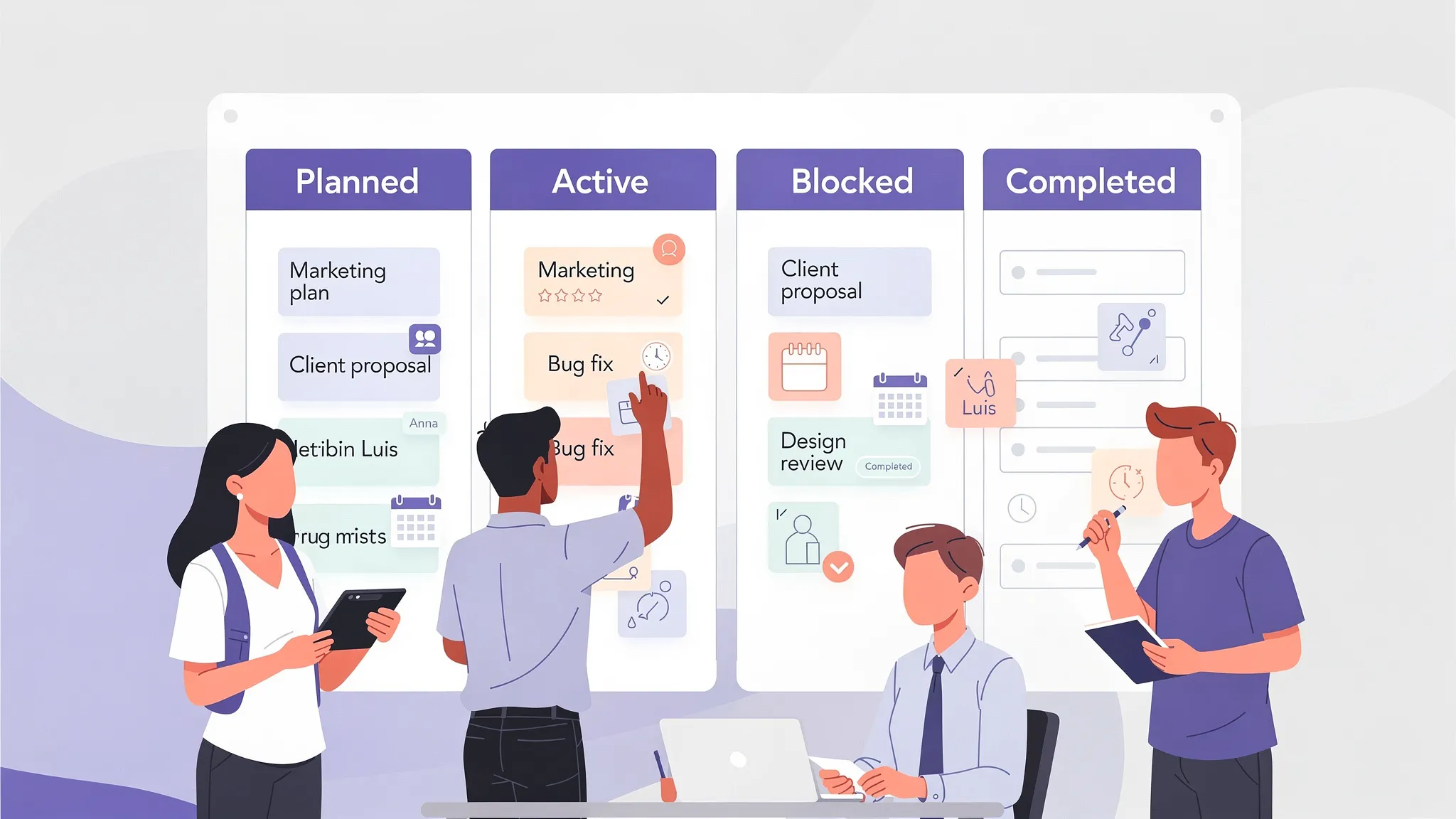
Small business teams need enough structure to stay organized, but not so much complexity that adoption slows down. The best tool should be simple for everyday users and powerful enough for managers who need planning, reporting, and accountability.
A Kanban board is one of the easiest ways for small teams to organize work. Tasks move across columns such as To Do, In Progress, Review, and Done. This makes progress understandable at a glance, even for people who are not trained project managers.
Visual boards work especially well for marketing campaigns, client onboarding, HR processes, product development, operations, and internal improvement projects. They help the team answer practical questions quickly: What should I work on next? Who owns this? Is anything stuck?
A board shows workflow. A timeline shows schedule. Small businesses need both because tasks rarely happen in isolation. A missed approval may delay a launch. A late vendor response may affect a client deadline. A hiring process may depend on interviews, contracts, equipment, and onboarding steps.
A Gantt chart helps you see how tasks relate over time. It is especially useful when you manage projects with milestones, dependencies, or fixed delivery dates.
Time tracking is not only for billing. It helps small business leaders understand capacity. If a task estimated at two hours regularly takes six, your planning needs adjustment. If one team member is overloaded while another has available capacity, you can rebalance work before morale or quality drops.
For small teams, time tracking should be easy to use. If logging time takes too much effort, people will not do it consistently.
This is one of the biggest buying criteria for small businesses. If your company runs on Google Workspace, your project management tool should work naturally with Google Drive, Gmail, and Google Calendar. If your company uses Microsoft 365, it should fit with OneDrive or SharePoint.
The goal is to reduce app switching, not add another disconnected place where information gets lost.
Small businesses may be smaller than enterprises, but they still handle sensitive data: customer documents, contracts, budgets, HR information, product plans, and vendor files. Your project management software should respect your organization’s sharing policies and support secure collaboration.
This becomes even more important when you work with external contractors, agencies, clients, or suppliers.
The right platform should map directly to your team’s daily problems. Use the table below as a practical buying checklist.
| Small business challenge | Feature to look for | Why it matters |
|---|---|---|
| Too many status meetings | Visual Kanban boards | Managers can see progress without asking everyone individually |
| Missed or unclear deadlines | Gantt chart and calendar sync | Teams can connect tasks to dates and see timeline risks earlier |
| Scattered files | Drive, OneDrive, or SharePoint integration | Project context and documents stay connected to tasks |
| Unclear ownership | Task assignments and notifications | Every task has an accountable person |
| Repetitive work | Board and card templates | Teams can reuse proven processes instead of rebuilding from scratch |
| Poor capacity planning | Time tracking and reports | Leaders can compare estimates with actual effort |
| Growing number of projects | Filters, tags, swimlanes, and list views | Teams can organize work by project, priority, department, or status |
| External collaboration | Controlled sharing | Partners and clients can be included according to company policy |
Small business teams rarely have time for complex software rollouts. If a tool feels disconnected from the company’s daily work, adoption becomes a leadership burden. People return to email, spreadsheets, and chat because that is where they already spend time.
A project management tool integrated with your existing workspace reduces that resistance.
Kanbanchi is designed for Google Workspace project management. Teams can create and share project boards, attach files from Google Drive and Shared Drives, add events to Google Calendar, and create cards from Gmail. Board data can also be exported to Google Sheets when teams need spreadsheet-based analysis or reporting.
This matters because small businesses often depend on Google Workspace as their operational hub. Documents, proposals, briefs, meeting notes, and client assets already live in Drive. Keeping project tasks connected to those files reduces searching and duplication.
Kanbanchi is also compatible with Microsoft 365. Teams can work with OneDrive and SharePoint storage, allowing project information to stay connected to the Microsoft environment many organizations already use.
For small businesses that use both ecosystems, or are transitioning from one to another, compatibility can prevent unnecessary disruption.
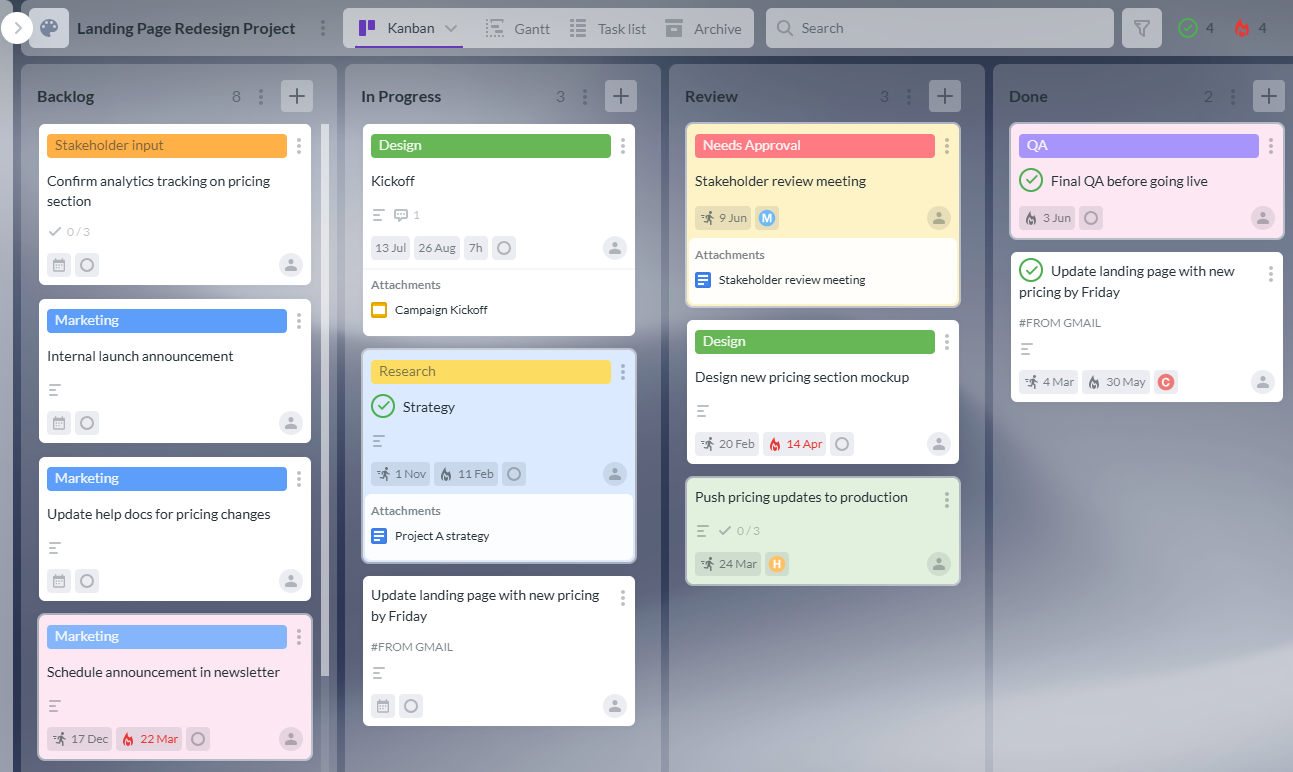
Kanbanchi brings together visual task management, timeline planning, time tracking, and workspace integration in one tool. That combination is especially useful for small business teams that need a practical system without enterprise-level complexity.
Kanbanchi boards help teams organize work into lists and cards. Each card can represent a task, deliverable, request, bug, campaign asset, client action item, or internal process step.
Teams can use tags, color labels, filters, priorities, checklists, comments, and assignments to keep work clear. For larger boards, swimlanes can visually separate multiple projects, clients, workstreams, or departments on the same board.
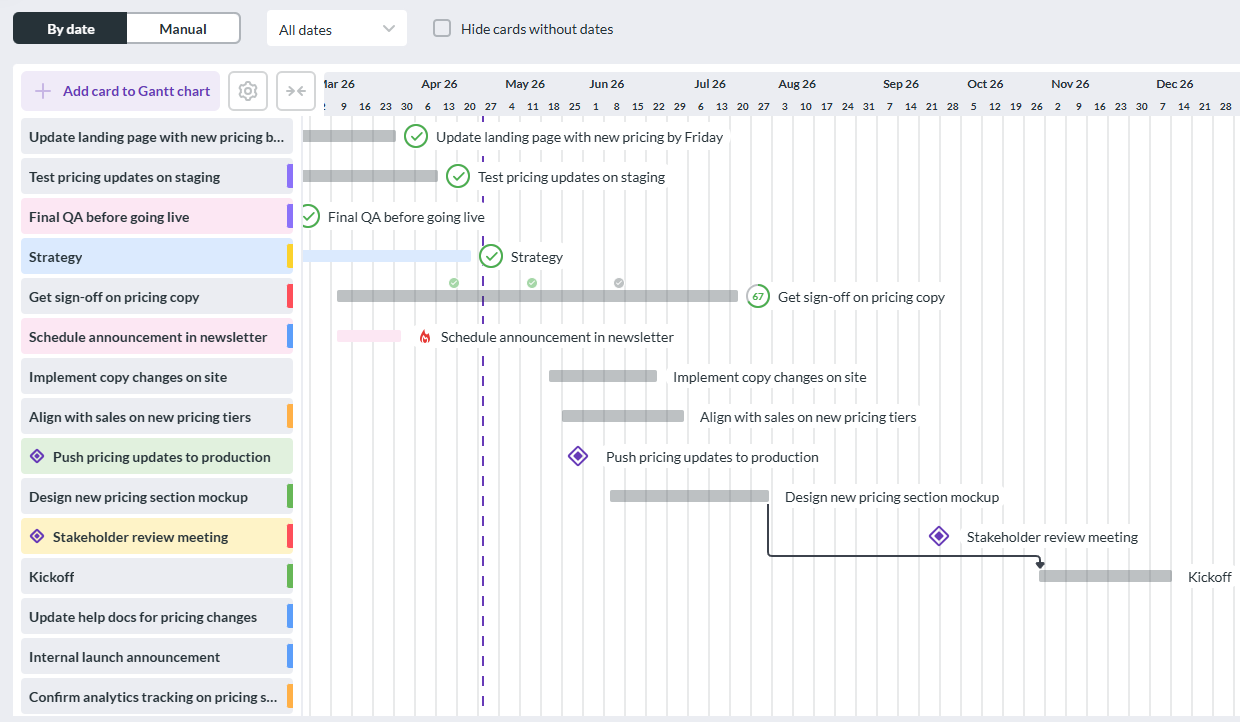
A small business team may start with a simple board, then need timeline visibility as projects become more complex. Kanbanchi lets teams convert board data into a Gantt chart, making it easier to plan schedules visually and understand how tasks relate in time.
This is helpful for product launches, website redesigns, event planning, client implementations, hiring plans, construction coordination, procurement workflows, and operational improvement projects.
Kanbanchi’s Time Tracker lets users track time directly on cards. Managers can review timing data to understand team effort and improve future estimates.
For small businesses, this can support better pricing, better staffing decisions, and more realistic project planning. It can also help identify recurring work that should be simplified, automated, or delegated.
Many tasks begin as emails. With Kanbanchi, teams can create cards from Gmail using the Gmail add-on or by emailing a board’s unique address. This helps prevent important requests from staying buried in inboxes.
Calendar sync helps connect work to schedules. Drive integration keeps files close to the task they support. Together, these features make Kanbanchi feel like part of the existing workspace rather than a separate system.
Start free trial of Kanbanchi now
Choosing project management software should be treated like a business decision, not a feature comparison contest. The “best” tool is the one that fits your workflow, team habits, security needs, and growth plans.
Before reviewing tools, define the problems you need to solve first. For example, your top three may be client delivery, marketing campaign coordination, and internal operations. Another business may care most about product development, support tickets, and hiring.
Once you know your use cases, evaluate software against those specific workflows. A tool may look impressive in a demo but still fail if it does not support the way your team actually works.
Some small businesses need a lightweight board for task visibility. Others need timelines, dependencies, time tracking, reports, templates, and external collaboration. Choose a tool that supports where you are now and where you expect to be in the next 12 to 24 months.
The common mistake is choosing a tool that is either too basic or too complex. Too basic, and you will outgrow it quickly. Too complex, and your team may resist using it.
Subscription price is only one part of cost. Also consider onboarding time, admin effort, training, migration, support, and the cost of work staying fragmented.
Do not evaluate software only with a sample board. Use a real upcoming project. Add actual tasks, owners, files, dates, and comments. Ask your team to work in the tool for a short pilot period, then review what improved and what felt difficult.
A practical pilot should answer these questions:
You may also be interested in other Kanbanchi blog articles for business owners; check them out!
Let’s say a small business is preparing to launch a new service. The team includes the owner, a marketing lead, a sales lead, an operations manager, and two external contractors.
The team could create a Kanbanchi board with lists such as Backlog, Ready, In Progress, Waiting for Review, Blocked, and Done. Each card represents a specific deliverable: landing page copy, pricing review, sales deck, email campaign, contractor agreement, support documentation, and launch checklist.
Color tags can identify work type, such as marketing, sales, operations, legal, or customer support. Priorities can highlight urgent items. Checklists can break complex cards into smaller steps.
Once tasks are defined, the team can switch to the Gantt chart to plan dates. The launch date becomes the anchor. Key milestones include final offer approval, website readiness, email campaign approval, sales enablement, and launch day.
If the website copy is delayed, the team can see which downstream tasks may be affected. This is the difference between discovering a problem early and realizing it during launch week.
Files from Google Drive can be attached to relevant cards, such as the service brief, design files, copy drafts, and sales materials. Comments keep discussions tied to the task instead of scattered across email and chat.
The owner can check the board for progress. Team members can see their assignments. Contractors can collaborate where appropriate based on sharing settings.
Software helps, but it cannot fix unclear processes by itself. To get value from project management software, small businesses need a simple operating rhythm.
Start with one or two important workflows. A company-wide rollout can wait until your team has a working model. Too many boards at the beginning can create confusion and inconsistent habits.
A project board should be where work happens, not just where managers ask people to update status. If team members do not use cards to communicate, attach files, and track progress, the board becomes another admin layer.
Every task should have a clear owner. A card assigned to “the team” usually means no one is accountable. Assign work to a person, even if others contribute.
A small business changes quickly. Review your workflow regularly. Remove columns no one uses. Add templates for repeated work. Adjust tags, priorities, and views as the business grows.
A good rollout does not need to be complicated. In fact, small businesses usually get better results when they start with a clear, lightweight process.
| Rollout step | What to do | Success signal |
|---|---|---|
| Choose one pilot project | Pick a real project with multiple people and a clear deadline | The team has a practical reason to use the tool |
| Build a simple board | Start with 4 to 6 workflow columns | Everyone understands the process quickly |
| Add owners and due dates | Assign every active task to a person | Work stops falling through the cracks |
| Attach key files | Connect Drive, OneDrive, or SharePoint files to tasks | People stop searching across multiple tools |
| Review weekly | Use the board in status meetings | Meetings become shorter and more specific |
| Create templates | Turn repeated workflows into reusable boards or cards | Future projects start faster |
Kanbanchi is a strong fit for small business teams that want visual project management inside the tools they already use. It is especially relevant if your team:
Small businesses do not need more software noise. They need a central place where work is clear, priorities are visible, and progress is easier to manage.
Start free trial of Kanbanchi now
The best choice depends on your workflow, team size, and existing tools. For teams using Google Workspace or Microsoft 365, Kanbanchi is a strong option because it combines Kanban boards, Gantt charts, time tracking, file integration, and task collaboration in one platform.
Yes, once work involves multiple people, deadlines, files, approvals, or recurring processes. Project management software reduces scattered communication and gives owners and team leads a reliable view of progress.
A spreadsheet can work for a simple task list, but it becomes difficult to manage as projects grow. Spreadsheets usually lack visual workflow tracking, connected discussions, automated notifications, time tracking, and dynamic timeline planning.
Start with task ownership, due dates, visual boards, file attachments, notifications, and calendar visibility. As your team grows, add Gantt charts, time tracking, templates, reporting, and more advanced organization with tags, filters, and swimlanes.
A small team can often pilot a simple board within a few days. The key is to start with one real project, keep the workflow simple, and review the board regularly until it becomes part of everyday work.
If your team already uses Google Workspace or Microsoft 365, Kanbanchi can help you manage projects without moving work into a disconnected system. Create visual boards, plan timelines with Gantt charts, track time, attach files, create tasks from Gmail, and keep everyone aligned from one shared workspace.
Try Kanbanchi and give your small business team a clearer way to plan, manage, and deliver work.
Start free trial of Kanbanchi now



In this Article:
Start using Kanbanchi now
Start your free trial