
In this Article:
Try Kanbanchi now
Start your free trial

A deadline is only useful if the team believes it and the plan behind it can survive real work. Yet many schedules are still built from best-case estimates, scattered spreadsheets, and status updates that arrive after the risk is already visible to everyone except the project owner.
That is where project schedule tools make a difference. The best tools do more than place tasks on a calendar. They connect work, owners, dependencies, files, time, and updates so managers can see whether a date is realistic before the team misses it.
For business owners, operations leaders, and project managers, the goal is not to create a prettier timeline. The goal is to build a schedule that helps people make better decisions: what should start first, what can wait, who is overloaded, and which deadline needs attention now.
A realistic project schedule is not simply a list of dates. It is a working model of how the project will be delivered. It accounts for task order, available capacity, dependencies, risk, and the fact that priorities change.
The most common scheduling mistake is treating deadlines as commitments before the work has been broken down. A project may have one final due date, but dozens or hundreds of smaller decisions determine whether that date is achievable. If those smaller tasks are invisible, the final deadline becomes a guess.
Every task on a reliable schedule should answer four basic questions: what needs to happen, who owns it, when it starts, and when it must be done. If any of those details are missing, the schedule may look complete while hiding execution risk.
For example, “Launch campaign by June 30” is not a schedule. It is an outcome. A working schedule includes copywriting, design, landing page setup, approvals, tracking links, QA, stakeholder review, and launch coordination. Each task needs an owner and a time window.
Dependencies are where many schedules break. A designer cannot finalize assets until the copy is approved. Sales cannot start outreach until the product sheet is ready. A developer cannot test an integration until credentials arrive from a vendor.
Good scheduling tools make these relationships visible. When one task moves, the team can see what else is affected. Without that visibility, small delays quietly become major deadline problems.
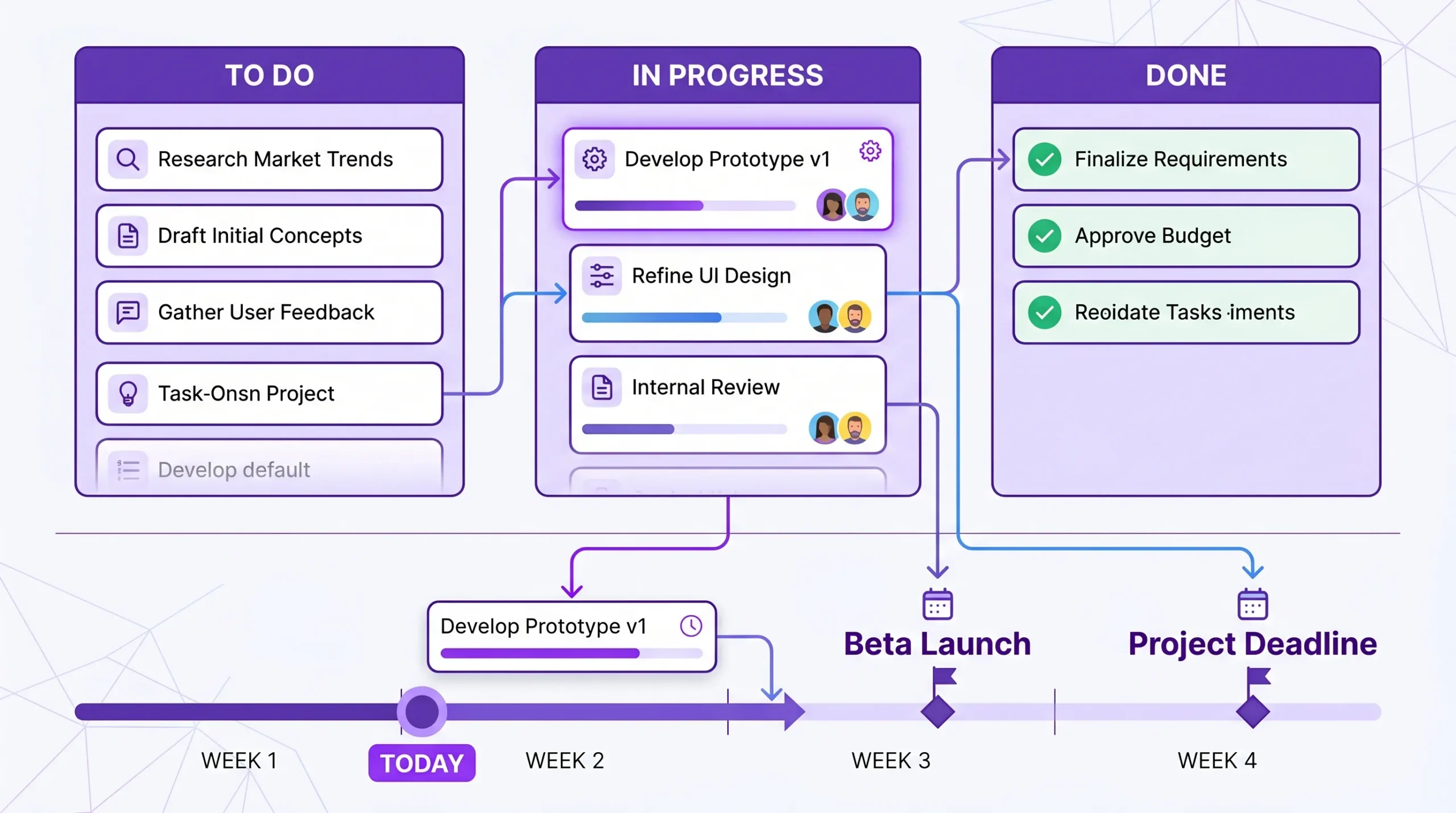
A schedule should update as work moves. If the team reports progress manually once a week, the plan is already behind reality. Strong project schedule tools connect the timeline to the task workflow, so leaders see work moving from “To do” to “In progress” to “Done” and can compare planned dates with actual execution.
| Weak scheduling signal | Realistic scheduling signal |
|---|---|
| A single final deadline with no task breakdown | Milestones, task owners, start dates, and due dates |
| Estimates were reviewed with the people doing the work | Files, comments, and tasks are stored separately |
| Dependencies tracked in someone’s head | Dependencies visible on a shared timeline |
| Status updates collected manually | Progress reflected through task movement and updates |
| The schedule is reviewed only when something slips | The schedule is reviewed at a regular cadence |
| The work context is attached to the task itself | The schedule is reviewed at a regular cadence |
There is no single perfect scheduling format for every team. A simple internal initiative may only need a board and dates. A complex cross-functional project may need a full timeline with dependencies, milestones, and reporting.
The key is choosing a tool that matches the way your team plans and executes work.
Spreadsheets are familiar and flexible. Many teams begin with Google Sheets or Excel because they are easy to share and customize. Calendars are useful when the main question is “what happens on which day?”
These options are acceptable for very small projects, but they often become fragile as teams grow. Dependencies are manual, updates rely on discipline, and task-level collaboration usually happens somewhere else.
If your team already uses spreadsheets, you can still improve scheduling discipline by defining clear owners, adding status fields, and reviewing changes weekly. But once the schedule becomes a coordination hub, spreadsheets usually require too much manual maintenance.
Gantt charts are built for schedule visibility. They show tasks on a timeline, making it easier to understand sequence, duration, overlap, and dependencies. They are especially useful for projects with fixed deadlines, phased delivery, or many related tasks.
A Gantt chart becomes more valuable when it is connected to the team’s daily work. If managers update the Gantt chart separately from the task board, the timeline may become a presentation artifact instead of a living plan.
Kanban boards are excellent for showing workflow. They help teams understand what is waiting, what is in progress, and what is done. This makes them practical for day-to-day execution, especially when work changes often.
The limitation of a board alone is that it may not show how work fits across time. A team can be busy and still miss a deadline if the timeline is unclear. That is why many teams benefit from combining Kanban with a Gantt chart or calendar view.
Kanbanchi is designed around this combined approach. Teams can manage tasks on a Kanban board, then view the same work as a timeline when they need to plan dates, dependencies, and milestones. It is helping teams move from task execution to timeline planning without switching systems.
All-in-one tools combine scheduling, task tracking, collaboration, files, reporting, and sometimes time tracking. They are best for teams that need one source of truth across departments or client projects.
The risk with all-in-one software is complexity. If the tool requires too much setup or training, adoption drops, and people return to spreadsheets or chat messages. Look for a platform that fits your existing ecosystem, especially if your company already relies on Google Workspace or Microsoft 365.
| Tool type | Best for | Main limitation | Realism check |
|---|---|---|---|
| Spreadsheet | Simple plans and early drafts | Manual updates and weak dependency tracking | Can everyone see the current status without asking? |
| Calendar | Meetings, events, and date reminders | Poor task detail and limited workflow visibility | Does the calendar show the work required before the event? |
| Gantt chart | Timeline planning and dependencies | Can become separate from daily execution | Does the timeline update when task details change? |
| Kanban board | Workflow visibility and task ownership | Needs timeline support for date-sensitive work | Can managers see both status and deadlines? |
| All-in-one platform | Cross-functional project execution | Can be overcomplicated if poorly configured | Does the tool reduce status meetings and manual reporting? |
When evaluating project schedule tools, focus on features that make the schedule more accurate, not just more visual. A beautiful timeline still fails if it ignores workload, dependencies, and actual progress.
A Gantt chart should help managers test schedule changes quickly. If a task moves by three days, what happens to the next task? Does the milestone still make sense? Which team members need to know?
Drag-and-drop rescheduling, dependency visibility, and milestone tracking help teams respond before delays become emergencies. The point is not to lock the plan forever. The point is to see the consequences of change early.
Schedules are realistic when they reflect how people actually work. A visual board gives teams an immediate view of task status and helps managers spot bottlenecks.
For example, if too many cards are sitting in review, the issue may not be effort estimation. It may be an approval bottleneck. A timeline alone may show that tasks are late, but a board shows where work is getting stuck.
Estimates improve when teams compare planned time with actual time. Built-in time tracking helps managers understand whether tasks are consistently underestimated, whether certain work types require more review, or whether one department is carrying hidden effort.
Kanbanchi includes a Time Tracker that lets users track time directly on cards. Timing data can help leaders improve future schedules instead of repeating the same optimistic estimates.
A schedule should meet people where they already manage their day. Calendar integration helps deadlines and important task periods become visible outside the project management tool.
Kanbanchi can push card dates to Google Calendar, which is useful for teams already working in Google Workspace. This helps connect project plans with daily time management, while keeping the task itself in the project board.
A schedule becomes harder to trust when files, comments, and decisions are scattered across email threads, folders, and chats. The best scheduling tools keep the task context close to the work.
Kanbanchi lets teams attach files from Google Drive and Shared Drives. For Microsoft 365 users, it also supports compatibility with OneDrive and SharePoint. This matters because realistic scheduling depends on access to the right inputs at the right time.
Leaders need more than task lists. They need to answer questions such as which projects are slipping, how much work is in progress, and where estimates are consistently inaccurate.
Kanbanchi can export board data to Google Sheets and supports extracting data for reporting dashboards such as Google Looker Studio. For teams that need operational visibility, this helps turn project activity into management insight.

A tool alone will not fix unrealistic planning. The team also needs a repeatable scheduling process. Use the following workflow when planning a new project or repairing a schedule that keeps slipping.
Begin by defining the project outcome and major deliverables. Then break each deliverable into tasks small enough to assign, estimate, and track.
A good rule of thumb: if a task is too broad for one person to explain its next action, it needs to be split. “Prepare launch” is too broad. “Draft launch email,” “Review pricing page,” and “Schedule customer announcement” are trackable tasks.
Managers often underestimate effort because they see the end result, not the invisible steps. Ask task owners to estimate duration and effort, then discuss assumptions.
This is where time tracking data becomes useful. If similar tasks usually take six hours across three business days, planning them as a same-day activity creates unnecessary risk.
Dependencies should be identified before the deadline is confirmed. If three teams depend on one approval, that approval is a schedule risk. If a vendor input is required, the schedule should include follow-up time and a fallback plan.
For complex deadlines, consider using a workback planning approach. Kanbanchi’s guide to workback schedules explains how to plan backward from a fixed launch date.
Buffers are not padding for poor performance. They are a planned response to uncertainty. Add buffer time around approvals, vendor handoffs, QA, legal review, executive decisions, and any work the team has not done before.
The more unknowns a project has, the less useful a best-case schedule becomes. A realistic schedule gives uncertainty a place to live.
Schedules should be reviewed before they cause trouble. For many teams, a weekly review is enough. Fast-moving projects may need shorter check-ins.
| Review cadence | Best for | What to check |
|---|---|---|
| Daily | Urgent launches, incident response, short sprints | Blockers, overdue tasks, same-day dependencies |
| Weekly | Most business projects | Trends, resource constraints, and cross-project conflicts |
| Biweekly | Longer strategic initiatives | Milestones, assumptions, scope changes, stakeholder decisions |
| Monthly | Portfolio or leadership review | Trends, resource constraints, and cross-project conflicts |
Kanbanchi is built for teams that want visual project management inside the tools they already use. For Google Workspace users, it integrates with Google Drive, Shared Drives, Gmail, Google Calendar, and Google Sheets. It also supports Microsoft 365 environments through OneDrive and SharePoint compatibility.
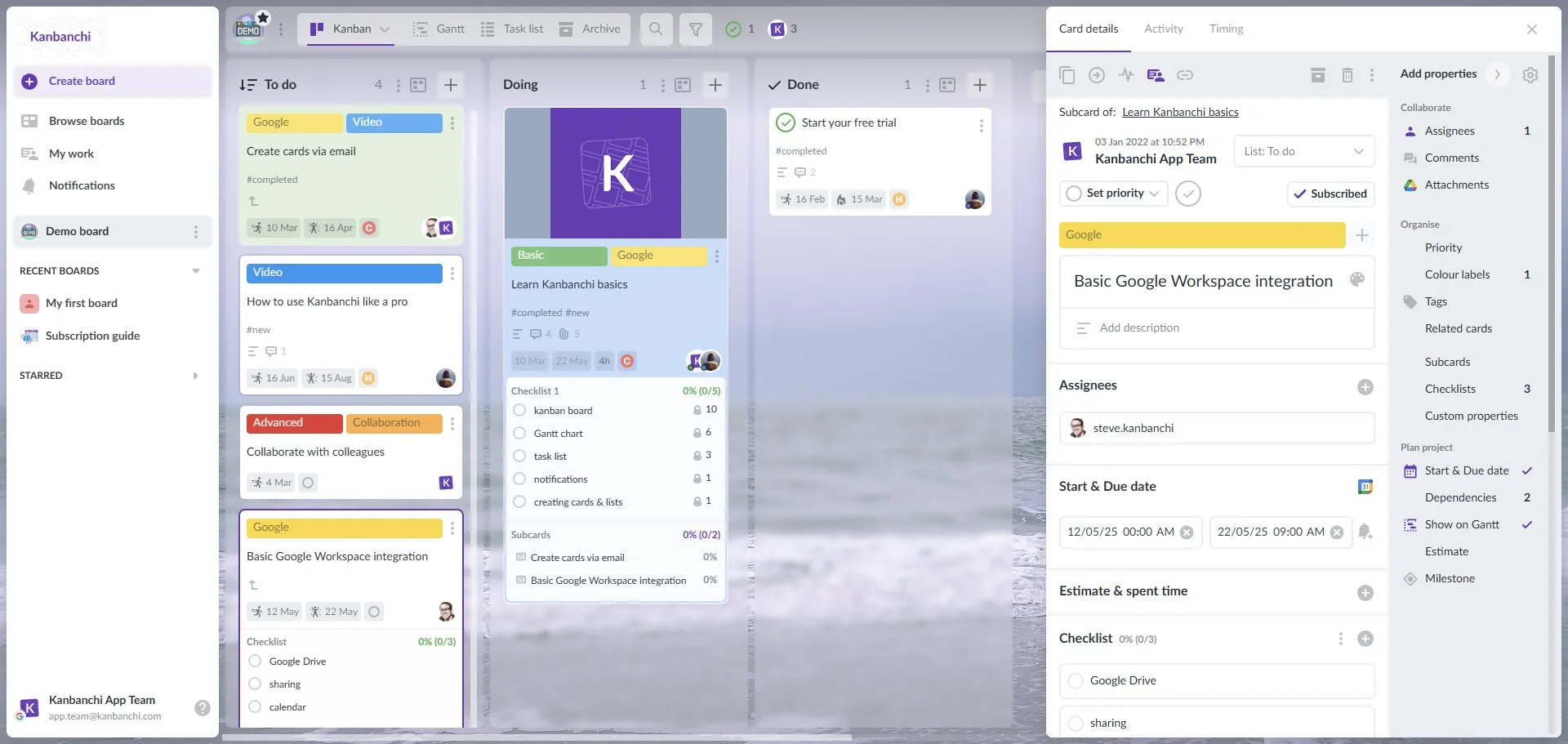
The practical advantage is that teams can manage the schedule and the work in one place. A project manager can plan deadlines on a Gantt chart, while team members execute tasks on a Kanban board. The same cards can contain descriptions, owners, dates, checklists, comments, priorities, tags, subcards, and attached files.
This reduces the gap between “the plan” and “the work.” When schedules live in one tool and execution happens elsewhere, managers spend time reconciling information. When the board, timeline, files, and updates are connected, the schedule is easier to trust.
Imagine a team onboarding a new enterprise customer. The final deadline is the go-live date, but the project includes account setup, data collection, configuration, training, security review, stakeholder approval, and launch support.
In Kanbanchi, the team can create cards for each task, assign owners, add start and due dates, attach files from Google Drive or OneDrive, and use checklists for smaller steps. The project manager can switch to the Gantt chart to see whether the timeline is realistic and adjust dependencies or dates when something changes.
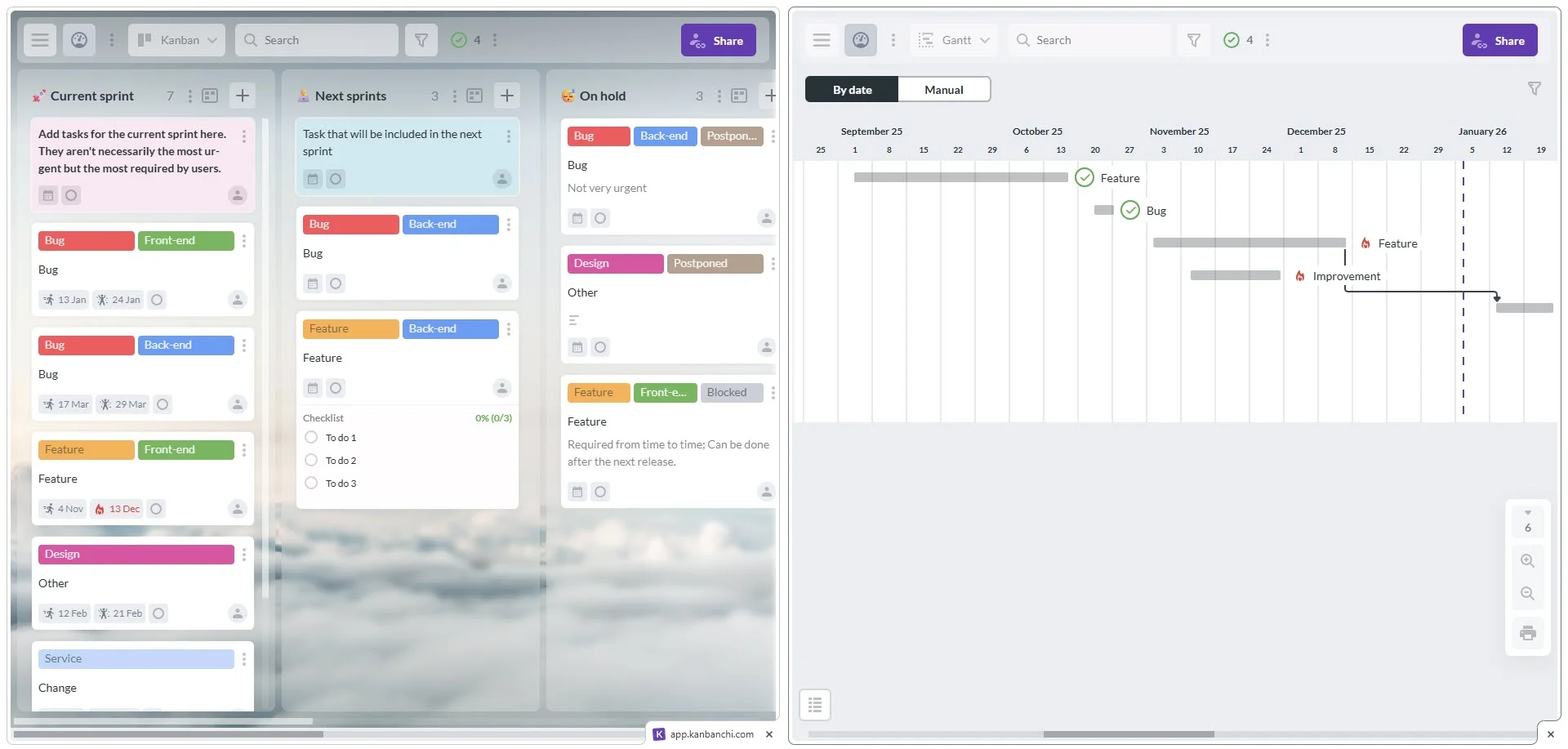
If a customer delays approval, the manager can update the relevant task and review the downstream impact. If training takes longer than expected, time tracking data can improve the next onboarding schedule. If leadership needs a report, board data can be exported to Google Sheets.
Sign up for a free trial of Kanbanchi
Before choosing software, clarify what problem you are solving. Some teams need better timeline planning. Others need task ownership, file organization, time tracking, or executive reporting. The right tool should remove friction from your process, not add another place to update work. Use this checklist when comparing options:
| Selection question | Why it matters |
|---|---|
| Can the tool show both task status and timeline? | Teams need execution visibility and schedule visibility. |
| Can dependencies be represented clearly? | Hidden dependencies are a major cause of missed deadlines. |
| Does it fit our existing workspace? | Adoption improves when the tool works with Google Workspace or Microsoft 365. |
| Can team members update work easily? | A schedule is only accurate if people keep it current. |
| Does it support file attachments and comments? | Context reduces delays caused by searching for information. |
| Can we track time or compare estimates with actuals? | Better historical data leads to more realistic future planning. |
| Can managers export or report on project data? | Leadership needs visibility across projects, not just individual tasks. |
| Does the vendor support security and compliance needs? | Business and enterprise teams need confidence in how work data is handled. |
A strong scheduling tool should help your team answer “Are we still on track?” without a long meeting. If the answer requires searching through spreadsheets, emails, chats, and calendars, your schedule is not acting as a source of truth.
Even with the right software, teams can still create weak schedules. Avoid these common patterns.
A person may be available on the calendar but still not have capacity for deep work. Meetings, support requests, reviews, and management duties all consume time. Realistic scheduling accounts for the difference between someone being “free” and someone being able to finish a task well.
Approvals often take longer than execution. Legal, finance, executive, customer, or vendor reviews should appear as real tasks with owners and due dates. If approval time is invisible, the project will look shorter than it really is.
Too much active work makes every deadline less predictable. Kanban boards help teams see work in progress and identify overload. When everything is urgent, the schedule becomes a list of competing hopes.
A schedule should be a decision-making tool, not a historical record. If dates are updated only after they are missed, the team loses the chance to adjust scope, sequence, or resources early.
Project schedule tools are software applications that help teams plan, sequence, assign, and track work over time. They may include timelines, Gantt charts, Kanban boards, calendars, dependencies, time tracking, and reporting.
They make deadlines more realistic by connecting dates to actual tasks, owners, dependencies, and progress. Instead of relying on a static plan, teams can see what is delayed, what is blocked, and what needs to change.
A Gantt chart is very useful for timeline planning, but it works best when connected to daily task execution. Many teams benefit from using a Gantt chart together with a Kanban board, so they can manage both workflow and deadlines.
Google Workspace teams should look for Drive integration, Google Calendar support, Gmail task creation, easy sharing, secure permissions, and export options to Google Sheets or reporting tools. This keeps project scheduling close to the apps the team already uses.
Most business projects should be reviewed weekly, while urgent or fast-moving projects may need daily updates. The schedule should be updated whenever a dependency, deadline, owner, or major assumption changes.
Realistic deadlines come from visible work, clear ownership, connected files, accurate progress, and schedules that change when reality changes. The right project schedule tools help teams stop guessing and start managing deadlines with evidence.
If your team works in Google Workspace or Microsoft 365, Kanbanchi brings Kanban boards, Gantt charts, time tracking, file integration, calendar sync, and reporting support into one visual project management tool.
Try Kanbanchi to plan projects, track execution, and keep deadlines realistic from the first task to final delivery.


In this Article:
Start using Kanbanchi now
Start your free trial