-  views

What is a Workback Plan/Workback Schedule? The Essential Guide to Backward Planning with Kanbanchi

Try Kanbanchi now

Start your free trial

 

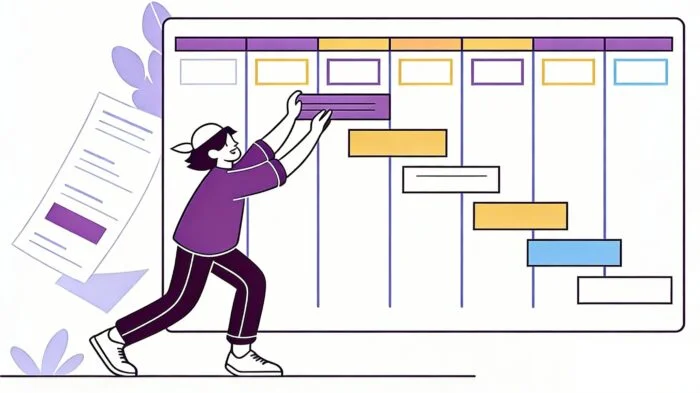
Illustration of a project manager creating a workback schedule on a Gantt chart with color-coded timeline bars and hierarchical task breakdown in Kanbanchi

Ever looked at a creeping deadline on your calendar and felt that familiar pit of dread in your stomach? You and your team know it’s a huge challenge, and a lot’s riding on the end product (not least your sanity). 

We’ve all been there – even us here at Kanbanchi!

Let’s say you have a product launch, a major corporate event, or a client delivery set for three months from today. It’s only natural to start planning now: adding tasks as they come to mind. 

That’s all well and good. Until you get to two weeks before the finish line…and realize you’ve missed three critical tasks. 

Suddenly, your smooth project has turned into a fire drill, and you’ve no idea where the extinguishers are. 

This is the fundamental flaw of traditional forward planning. When you plan from the present toward the future, it’s remarkably easy to underestimate the time required for the final, most crucial stages.

But what if you flipped the script? Welcome to the world of the workback plan… 

Instead of starting with “What can we do today?”, you start with the finish line and move backward. Instead, you ask yourself and your team, “What must happen immediately before we cross the finish line?” By doing this, you end up creating a bulletproof roadmap that accounts for every second of your timeline.

Not convinced yet? I’ll aim to change that. In our guide, we’re going to break down:

  1. What is a workback plan?
  2. Why it’s the secret weapon of world-class project managers
  3. How you can use Kanbanchi for your schedule so you never have to “guess” at a deadline again.

Ready to walk back to project success? Let’s go!

The Difference Between a Traditional Schedule and a Workback Schedule

The Institute of Project Management states that “Time when managed well becomes a strategic asset.” So to understand the power of a workback plan, we first need to look at how most teams handle a workback schedule, or rather, how they fail to…

Traditional (Forward) Planning:

What does a standard schedule look like?

  • You start at Point A (today) and…
  • Move toward Point B (the deadline). 

You estimate how long each task will take: first, second, and third. 

The problem: If Task 1 runs over by 3 days, Point B moves further away. You are pushing the project toward a deadline that may or may not be realistic.

Workback Planning (Backward Scheduling):

A workback schedule is a goal-oriented methodology: 

  1. First, pin Point B (the deadline) to the calendar. Then, you work in reverse. 
  2. To launch on December 1st, we must complete final QA by November 25th.
  3. To have QA done by then, the build must be finished by November 15th.
Why this shift matters:
  • Realistic Deadlines: It immediately reveals whether your target date is physically impossible before you even start.
  • Prioritization: It outlines the sequence of tasks that must be completed on time for the project to succeed.
  • Stress Reduction: Because you’ve already accounted for the buffer time at the end, the final weeks of a project become a victory lap rather than a sprint.

Whether you call it a workback plan or a workback schedule, the philosophy is the same: the goal dictates the timeline, not the other way around.

How to Create a Workback Plan in 5 Steps

It’s a counterintuitive way to think. Our brains are wired to think chronologically; it’s only natural to think about moving forward and not back. However, once you master the reverse engineering mindset, you’ll find that your projects become significantly more predictable.

Let me try to convince you further. I’ve put together a 5-step process for building a solid workback schedule:

1. Set Your Deadline in Stone

Start at the very end. It doesn’t matter whether it’s a product launch or a company event; this date is your endpoint. Mark it clearly on your calendar. It’s the non-negotiable anchor for your entire workback plan.

2. Identify Major Milestones

What are the big rocks you’ve got to shift to climb to the top of your mountain? 

Example: Before a website goes live, it needs client approval. Before approval, it needs a beta version. List these high-level stages in reverse order.

  1. Launch Day
  2. Final QA/Testing
  3. Client Review/Feedback
  4. Core Development
  5. Design and Wireframing
  6. Initial Strategy/Project Kick-off

3. Estimate How Long the Plan will Take

Assign a time value to each milestone. 

Example: How long does the team actually need for QA? 

If it takes three days, give it five. When building a workback schedule, it’s the perfect time to add buffer zones to protect your team from burnout.

4. Determine Task Dependencies

This is perhaps the part of the workback plan where you’ll start to see magic happen. 

Example: You cannot start a Client Review until the Core Development is finished. 

Once you identify these links, you’ll start to see the domino effect: if one task shifts, the entire workback plan adjusts.

5. Calculate your Start Date

Once you’ve looked at how long all the tasks will take and factored in the buffers from your deadline, you’ll arrive at the project start date. If that date were yesterday, you’d know immediately that you need to either reduce the project scope or move the deadline.

Kanbanchi Gantt chart showing a project workback schedule with tasks, dependencies, and milestones, indicating that the start date is today

Workback plan created on the Gantt chart in Kanbanchi. The Start Date is today; this project has a high probability of success.

Key Takeaway: A workback plan isn’t just about dates; it’s about discovering the center of your project’s capacity.

Follow these steps to move away from hopeful guessing and toward data-driven planning. It’s not just about “hoping” to finish on time; you’re ensuring it.

Find more articles about workload management here.

Workback Schedule Templates for Google Sheets

For many teams working within the Google ecosystem, the first instinct is to reach for a spreadsheet. It’s familiar, accessible, and, yep, free. Searching for a workback schedule template in Google Sheets yields thousands of results, and for a very simple project, a manual spreadsheet can get the job started.

A basic workback schedule template in a spreadsheet usually includes columns for:
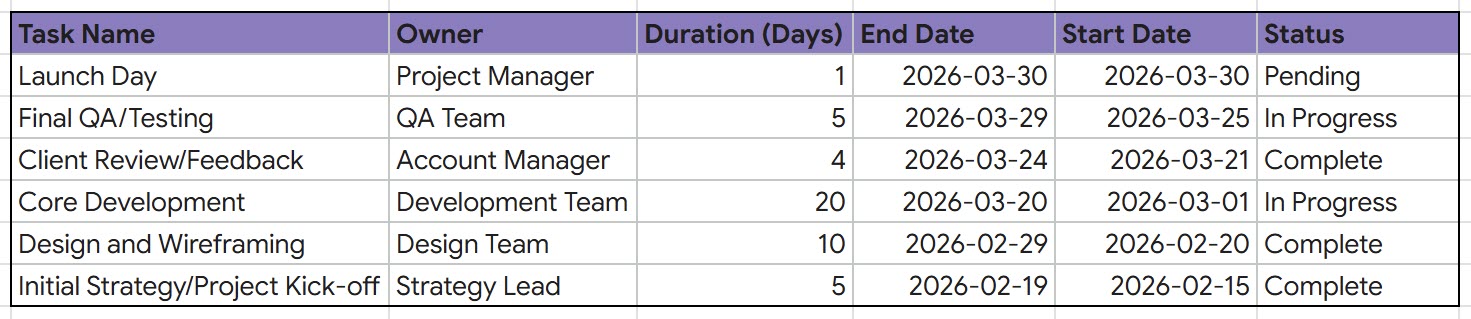
  • Task Name: The specific action item.
  • Owner: Who is responsible?
  • Duration: How much time does the task require?
  • End Date: The date the task must finish to stay on track.
  • Start Date: Calculated by subtracting duration from the end date.
  • Status: What is happening with the task?
Screenshot of a workback schedule template in Google Sheets showing project tasks with columns for task name, owner, duration, end date, start date, and status

Simple workback schedule template created in Google Sheets, displaying project tasks organized by owner, timeline, and completion status for backward planning from launch day

There are Limitations with the Manual Method

While a workback plan template in Google Sheets is better than no plan, it still carries significant issues with it, and we’ll go into this now. Spreadsheets are static; they don’t understand the relationship between tasks. 

Example: If your Final Design phase is delayed by two days, a manual workback schedule won’t automatically shift the start dates of all the preceding tasks. You need to manually recalculate every cell.

Furthermore, spreadsheets lack real-time collaboration features like:

  1. Task comments
  2. File attachments
  3. Status labels

All of these are essential for a dynamic workback plan. You end up with Version 1, Version 2, and FINAL_v3 files scattered across your Drive. This leads to confusion and missed deadlines. I am sure you can use a Google Sheets template for a one-person project with five tasks. For anything more complex, you need a tool that handles the logic for you, and that’s where Kanbanchi comes in. Before we get into that, we need to examine the key challenges of manual workback plans. 

Core Challenges of Manual Workback Planning

Relying on a manual workback plan, whether it’s scribbled on a whiteboard or buried in a spreadsheet, introduces risks that can derail even the most organized teams. When your project depends on a fixed deadline, these manual hurdles become expensive. There are four main issues.

1. Information Trap

The biggest issue with a manual workback schedule is that it is disconnected from the actual work. While the plan states you should be designing today, your designer may be in meetings and not available. The spreadsheet doesn’t talk to your team’s actual tasks; the plan quickly becomes an outdated artifact rather than a living guide.

2. No Automatic Rescheduling

In a real-world workback schedule, tasks are intertwined. If a stakeholder requires two additional days to provide feedback, every subsequent task in your workback plan must shift. In a manual sheet, you must locate and update each date yourself. One typo during this process can ruin the accuracy of the entire timeline.

3. Communications Become a Problem

  1. Where do the actual project files live? Usually in a separate folder. 
  2. Where do the discussions happen? Usually in email or messengers. 

When your workback plan template is just a list of dates, you lose the context of the work. Team members spend more time searching for information than actually executing the plan.

4. No Visibility in Real-Time

With a manual workback schedule, you can’t see progress at a glance. You have to ask for status updates, wait for replies, and then manually update the sheet. This information lag makes it impossible to pivot quickly when a deadline is at risk. Manual planning creates the illusion of control, but automation provides the certainty. By moving away from manual methods, you eliminate the administrative burden and allow your team to focus on what they do best: hitting those milestones.

Automating Your Timeline: Use Kanbanchi’s Gantt Charts

If a spreadsheet is a static map, Kanbanchi’s Gantt Charts provide a live GPS for your workback plan. It doesn’t just show you where you are going; it recalculates the route every time you hit a detour. For anyone looking to move beyond a simple workback schedule template, Kanbanchi provides the automation required to handle professional-grade timelines within the familiar Google Workspace environment.

Kanbanchi Gantt chart showing a project workback schedule with tasks, dependencies, and milestones from November 2025 to January 2027

Workback plan created on the Gantt chart in Kanbanchi. Yes, that’s the one with the ideal match for the Start Date!

Why Kanbanchi Gantt Charts are Perfect for Workback Planning

A workback schedule relies heavily on task relationships. Kanbanchi’s Gantt view makes these relationships easy to see and work with:

  • Visual Dependencies: Join tasks, so you can easily see that Job B can’t start until Job A is completed. If you move a task back from a deadline, all the other tasks move with it without you having to do anything.
  • End Goal Tracker: Set your final deadline as an End Goal. It’ll give your team a clear target to aim for.

Kanbanchi’s Integration is the Secret

Your workback schedule isn’t an island. It pulls in the tools your team already uses:

  • Google Calendar Sync: Your workback dates are automatically synced to your team’s calendars.
  • Google Drive or OneDrive Integration: Attach the specific brief or asset to the task card so the how is always next to the when.
  • SharePoint Integration: access project boards from the SharePoint sites your team already uses to collaborate
  • Gmail add-on: convert your emails into actionable tasks on your timeline.

By using an automated workback plan template in Kanbanchi, your schedule becomes a dynamic engine that drives the project forward, ensuring the final deadline remains genuinely achievable rather than aspirational.

Step-by-Step: Managing a Workback Plan with Kanbanchi

Ready to build your own workback plan? We’re glad to hear it. All the theory is great, but being able to see a plan mapped out isreally key to getting to grips with it. We’re here to help. Follow this simple workflow to transform your final deadline into an actionable, automated plan.

Kanbanchi Gantt chart showing a project workback schedule with tasks, dependencies, and milestones from December 2025 to November 2026

This is how your workback schedule will look. I’m sure you already recognize this image 😉

1. Pin Your Deadline

  1. Open your project board
  2. Switch to the Gantt Chart view
  3. Create a card for your final goal (e.g., Product Launch/Team Event)
  4. Place it on your hard deadline date. 
  5. Right-click the card and convert it to a Milestone. This creates your anchor point.

2. Build your Sequence Backwards

Create cards for the tasks that must happen immediately before that milestone: 

  1. If your launch is on Friday, your Final Review might need to be on Wednesday. 
  2. Drag these cards onto the Gantt chart, working from right to left.

3. Establish Task Dependencies

This is the most critical step for a workback plan: 

  1. Open your milestone card
  2. Choose the preceding task 

By linking your tasks in reverse, you create a logical chain. If your milestone date must move, the entire workback schedule moves with it.

4. Define Task Length and Who Works on it

Once the task sequence is set:

  1. Click into each card to add the subcards or checklists to define particular tasks
  2. Share your board with the team members 
  3. Assign team members, and they will receive a notification

5. Monitor via the Kanban Board

While the Gantt chart is your Planning hub, the Kanban Board is your Action hub. 

  1. Your team can move cards from To Do to In Progress as they work. 
  2. You can check the Gantt view at any time to see how real-time progress on the board affects the long-term workback schedule.

By following this step-by-step approach, you take the complexity out of backward planning. You aren’t just creating a list; you’re building a dynamic system that helps you meet your deadlines.

With Kanbanchi, You Can Control Your Deadlines: They Won’t Control You!

Ultimately, a workback plan is about one thing: certainty. It moves you away from the hit-and-hope planning of forward scheduling and into a world where every task has a purpose and a place relative to your goal. By combining this powerful backward-planning logic with Kanbanchi, you give your team a significant competitive advantage. If your team uses Google, you also get the familiarity of Google Workspace with the heavy-lifting power of a professional Gantt chart.

Ready to hit your next deadline without the last-minute panic? Start building your automated workback schedule in Kanbanchi today and see the difference that backward planning can make.

TRY KANBANCHI FOR FREE NOW

FAQ: Everything You Need to Know About Workback Plans

As usual, we’ll end with some of the most common questions teams have about using workback plans. 

What is a workback plan exactly?

In short, it is a project management method where you start with the final deadline and work backward to determine the start date and the timing of all necessary tasks. It ensures that your schedule is driven by the end goal rather than current capacity.

Is a workback schedule the same as a Gantt chart?

No. A workback schedule is a methodology, while a Gantt chart is a tool. You can use a Gantt chart to visualize and automate your workback plan. In Kanbanchi, the Gantt chart is the best way to manage a workback schedule because it handles the backward logic automatically.

When should I use a workback plan instead of a traditional one?

Use a workback plan whenever you have a non-negotiable deadline. This includes product launches, marketing campaigns, events, or regulatory compliance projects. If the “Due Date” cannot be moved, you should plan backward.

Can I use a workback schedule template in Google Sheets?

Yes, you can find a workback schedule template in Google Sheets to get started, but be mindful of the manual maintenance required. For professional projects, using a dedicated tool like Kanbanchi prevents the errors associated with manual data entry and static templates.

What is the most significant benefit of a workback plan?

The Aha! moment. It shows you exactly when you need to start. Many teams realize their current project is already behind before it starts because they didn’t account for the backward timeline. A workback plan brings that reality to light early enough to fix it.


    MultipleAuthors\Classes\Objects\Author Object
    (
        [term_id] => 973
        [term:MultipleAuthors\Classes\Objects\Author:private] => 
        [metaCache:MultipleAuthors\Classes\Objects\Author:private] => Array
            (
                [user_email] => olga.alekseeva@kanbanchi.com
                [user_id] => 20
                [first_name] => Olga Alekseeva
                [last_name] => 
                [job_title] => Growth hacking expert with over 10 years of experience with Kanbanchi
                [description] => Olga wears multiple hats across marketing, sales, product, and ops after 10+ years in the SaaS world. She is passionate about helping teams streamline their workflows with Kanbanchi and Google Workspace or Microsoft 365. "When I'm not optimizing processes or writing guides, I'm probably tweaking our product roadmap or diving into the latest productivity tools".
                [user_url] => https://linkedin.com/in/olgksv
            )
    
        [userObject:MultipleAuthors\Classes\Objects\Author:private] => WP_User Object
            (
                [data] => stdClass Object
                    (
                        [ID] => 20
                        [user_login] => olga.alekseeva
                        [user_pass] => $wp$2y$10$WuiuvYMj7CDnLrRbWchEkuBwKzmbBakK64Uk5c68bDY3qA46MFam6
                        [user_nicename] => olga-alekseeva
                        [user_email] => olga.alekseeva@kanbanchi.com
                        [user_url] => https://linkedin.com/in/olgksv
                        [user_registered] => 2025-09-03 15:47:58
                        [user_activation_key] => 
                        [user_status] => 0
                        [display_name] => Olga Alekseeva
                    )
    
                [ID] => 20
                [caps] => Array
                    (
                        [editor] => 1
                        [author] => 1
                        [contributor] => 1
                        [wpseo_editor] => 1
                        [wpseo_manager] => 1
                    )
    
                [cap_key] => wp_capabilities
                [roles] => Array
                    (
                        [0] => editor
                        [1] => author
                        [2] => contributor
                        [3] => wpseo_editor
                        [4] => wpseo_manager
                    )
    
                [allcaps] => Array
                    (
                        [moderate_comments] => 1
                        [manage_categories] => 1
                        [manage_links] => 1
                        [upload_files] => 1
                        [unfiltered_html] => 1
                        [edit_posts] => 1
                        [edit_others_posts] => 1
                        [edit_published_posts] => 1
                        [publish_posts] => 1
                        [edit_pages] => 1
                        [read] => 1
                        [level_7] => 1
                        [level_6] => 1
                        [level_5] => 1
                        [level_4] => 1
                        [level_3] => 1
                        [level_2] => 1
                        [level_1] => 1
                        [level_0] => 1
                        [edit_others_pages] => 1
                        [edit_published_pages] => 1
                        [publish_pages] => 1
                        [delete_pages] => 1
                        [delete_others_pages] => 1
                        [delete_published_pages] => 1
                        [delete_posts] => 1
                        [delete_others_posts] => 1
                        [delete_published_posts] => 1
                        [delete_private_posts] => 1
                        [edit_private_posts] => 1
                        [read_private_posts] => 1
                        [delete_private_pages] => 1
                        [edit_private_pages] => 1
                        [read_private_pages] => 1
                        [wpseo_bulk_edit] => 1
                        [copy_posts] => 1
                        [ppma_edit_post_authors] => 1
                        [ppma_edit_own_profile] => 1
                        [wpseo_edit_advanced_metadata] => 1
                        [wpseo_manage_options] => 1
                        [view_site_health_checks] => 1
                        [editor] => 1
                        [author] => 1
                        [contributor] => 1
                        [wpseo_editor] => 1
                        [wpseo_manager] => 1
                    )
    
                [filter] => 
                [site_id:WP_User:private] => 1
            )
    
        [hasCustomAvatar:MultipleAuthors\Classes\Objects\Author:private] => 1
        [customAvatarUrl:MultipleAuthors\Classes\Objects\Author:private] => Array
            (
                [url] => https://www.kanbanchi.com/wp-content/uploads/2025/09/photo_2024-04-10_17-25-16.jpg
                [url2x] => https://www.kanbanchi.com/wp-content/uploads/2025/09/photo_2024-04-10_17-25-16.jpg
            )
    
        [avatarUrl:MultipleAuthors\Classes\Objects\Author:private] => 
        [avatarBySize:MultipleAuthors\Classes\Objects\Author:private] => Array
            (
                [96] => 
                [80] => 
                [50] => 
            )
    
    )
    
  • Growth hacking expert with over 10 years of experience with Kanbanchi

    Olga wears multiple hats across marketing, sales, product, and ops after 10+ years in the SaaS world. She is passionate about helping teams streamline their workflows with Kanbanchi and Google Workspace or Microsoft 365. "When I'm not optimizing processes or writing guides, I'm probably tweaking our product roadmap or diving into the latest productivity tools".

    All articles
Share

Try Kanbanchi now

  • Collaborate seamlessly
    with your team
  • Integrate Kanbanchi
    with Google or Microsoft
  • Manage all your work in one place
Start for free

Start using Kanbanchi now

Start your free trial