-  views

What is Workflow Management? A Complete Guide to Streamlining Your Team

Try Kanbanchi now

Start your free trial

 

Workflow management and team streeamlining illustration

You’ve got the right talent on your team. You’ve got the right tools. You’re all motivated to succeed, yet…you collectively feel like you’re wading through treacle in boots! Okay, time for a question: What is workflow management and how do we do it?

Somehow, no matter how hard you try:

  • Tasks get buried
  • Deadlines slip through the cracks
  • Who is doing what job is difficult to pinpoint

Sound familiar? Don’t worry, it’s not a people problem. It’s a workflow management problem.

These days, and particularly when much work happens digitally, simply doing the work isn’t enough. What you need is a repeatable, transparent, and optimized method to move a project from raw idea to finished result.

That is exactly what workflow management is all about. It’s the invisible engine that powers high-performing teams, especially those already living and breathing within the Google Workspace ecosystem.

Little wonder then that the market is booming; this year, it experienced almost 48% growth as SME leaders seek to find ways to manage projects and streamline results successfully.

In this guide, we’re going to peel back the layers of workflow management. We’ll clarify exactly what a workflow management system is, how to choose the right workflow management software, and why Kanbanchi should be your favoured choice of workflow management tool, helping you move from a chaotic workday to a streamlined success story.

Defining the Basics: What is Workflow in Project Management?

Before we dive into software and systems, we need to get back to basics. If we can’t define the flow, we certainly can’t manage it.

So, what is workflow in project management? At its simplest, a workflow is a series of repeatable steps that make it easy to complete a specific task or process. Think of it as a map, or a plan.

While Project Management is the high-level coordination of goals, budgets, and stakeholders, Workflow is the granular path your team takes to get there.

Every workflow, no matter how complex, consists of three core components:

  • Inputs: The resources required to start the work, like a creative brief, a customer request, or some raw data or stats.
  • Transformation: The actual work being performed, for instance, designing graphics, writing code, or analyzing data.
  • Outputs: The final result or deliverable, so think about a published article, a shipped product, or a resolved customer support ticket.

Illustration of three workflow components

Workflow vs. Process: What’s the Difference?

It’s easy to get these two confused, but here is a simple way to remember them:

  1. Process: What you want to achieve.
  2. Workflow: The sequence of steps you take to make it happen.

Why Does A Workflow Matter for Your Team?

Without a defined workflow, team members are left to guess. They might waste lots of time:

  • searching for files
  • asking for updates
  • duplicating efforts

…than actually doing the work for which they were hired! And that’s not good for anyone.

By defining your workflow, you create predictability. When everyone knows that Step A always leads to Step B, bottlenecks become visible, and efficiency becomes your default setting rather than a lucky accident.

*More content related to workload management here

Understanding the Tech: What is a Workflow Management System (WMS)?

So, now we can go with the flow! That’s great, but how do we keep it moving? This is where we transition from a concept to a structure. If you’ve ever wondered, “What is a workflow management system?” Then think of it as the digital scaffolding for your team’s productivity.

A Workflow Management System (WMS) is a defined infrastructure for setting up, executing, and monitoring a sequence of tasks. It isn’t just a list of jobs; it’s a developed ecosystem that routes information to the right person at the right time.

The Core Functions of a WMS

A proper workflow management system will do these three things brilliantly:

  1. Mapping: It’ll allow you to visualize a project’s path from start to finish.
  2. Execution: It’ll manage the hand-off between team members. So, when Team Member A finishes their task, the system automatically lets Team Member B know.
  3. Monitoring: It’ll provide a bird’s-eye view for managers to see where tasks are piling up.
But…Methodology Matters More Than Just Tools

It is a common mistake to think that buying an app automatically gives you a system. A decent software system will often be a combination of technology and methodology.

For example, many teams use the Kanban methodology. In this setup, work items move through visual stages: To Do, Doing, Done

To Do, Doing, Done lists in Kanbanchi

Kanban board in Kanbanchi with the lists “To Do”, “Doing”, and “Done”

The system is the set of rules (such as “No more than three tasks in ‘Doing’ at once”), while the software is what hosts those rules.

Hidden Benefits of a Workflow Management System

Why bother turning it into a formal process? Well, it really does matter. The following three steps might convince you.

  1. Reduced Manual Labour: There’s no need for a Team Leader to continually tell everyone what to do next.
  2. Audit Trails: Everyone can see exactly when a task was completed and who handled it, which is crucial for compliance and performance reviews.
  3. Scalability: A system allows you to onboard large numbers of new employees without the entire process collapsing.

So, you can see, a workflow management system turns chaos into calm. It takes the guesswork out of the workday and keeps all your team members on track.

Choosing the Right Workflow Management Software

OK, so all this is great, but how do you find the right workflow management software for your unique team?

There are lots of options on the market, and it’s easy to get distracted by a tool crammed with features you’ll never use. To avoid this, focus on the core capabilities that turn a digital list into a high-powered engine. Feel free to check out our list of the best workflow management software for 2026.

Essential Features to Look For in Workflow Management Software

The best workflow management software should feel like an extension of your team, not a burden they have to manage. We reckon you should look for these  four non-negotiables:

  1. Visual Interface: Whether it’s Kanban boards, Gantt charts, or List, your software must make the workflow visible at a glance.
  2. Customizable Templates: Why reinvent the wheel? A good tool offers prebuilt workflows for standard processes such as employee onboarding and content creation.
  3. Real-Time Analytics: If you can’t measure it, you can’t improve it. Your software should provide data to build reports on task duration and team capacity.
  4. Scalability: Before committing to buying a tool, ask yourself: Will it scale? A tool might be great for managing a simple checklist today, but can it handle complex projects that require multi-team input next year?

That’s where Kanbanchi comes in. With native Google Workspace integration, it balances ease of use for beginners with powerful features for experienced team members.
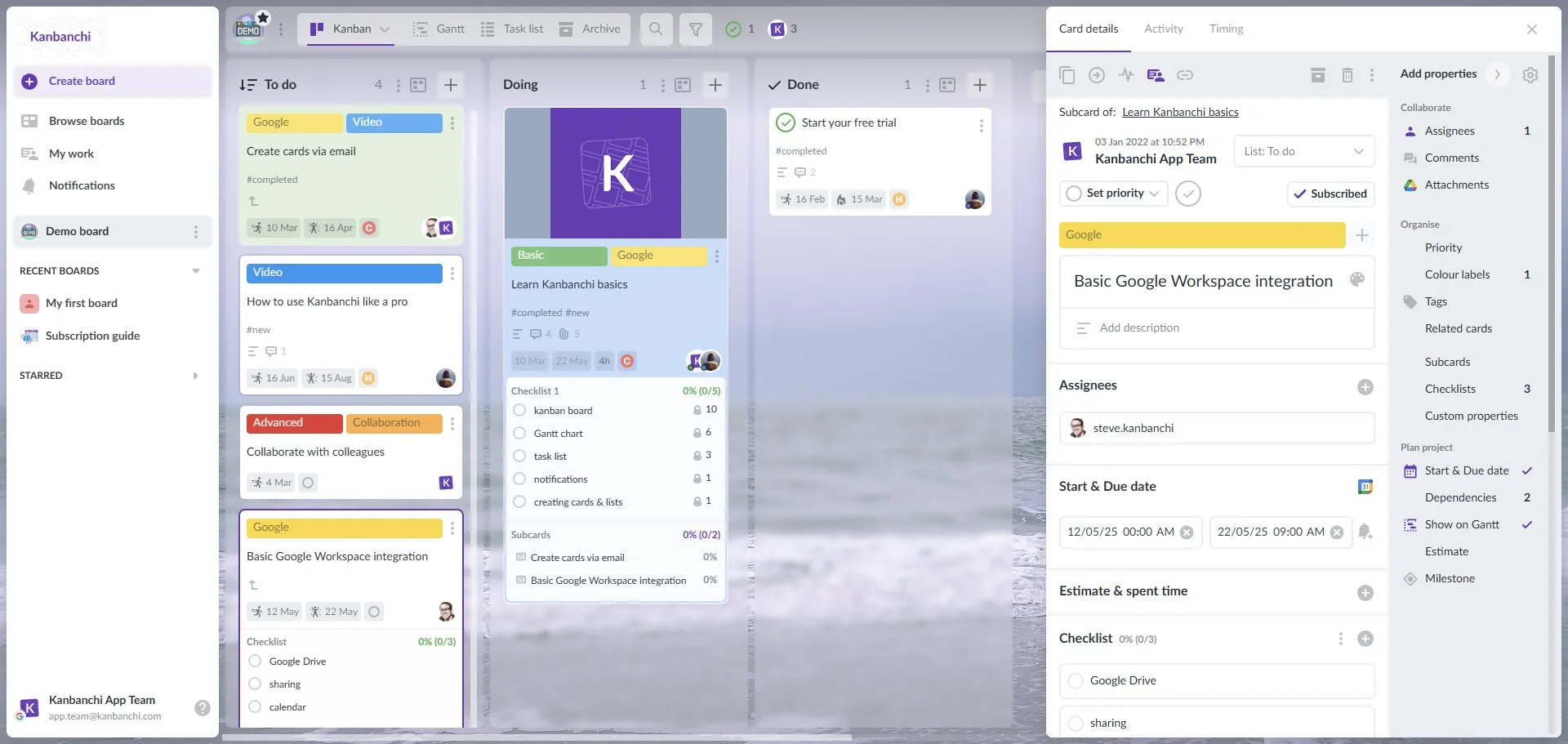
Kanbanchi interface example when using Google account

Kanbanchi interface showcasing the Kanban board and the integration with Google Workspace

In the next section, we’ll explore why this balance is especially critical for those already working within Google Workspace.

Why You Need a Workflow Management Tool in Google Workspace

If your team is already using Google Workspace, you’re sitting on a goldmine of productivity. But here’s the reality: Google is fantastic for creating (Docs), communicating (Gmail), and storing (Drive), but it doesn’t provide a native, enterprise-grade way to orchestrate.

Without a dedicated workflow management tool, your system likely consists of a dozen open tabs and a frantic search through Drive folders to find the latest version of a file.

The Context-Switching Tax Conundrum

The biggest killer of efficiency isn’t a lack of effort; it’s something called the context-switching tax. Let’s explain it! Every time a team member leaves their work, say, to check a spreadsheet status or locate an email, they lose focus. It’s not just made-up mumbo-jumbo; an actual study by UC Irvine found it takes an average of 23 minutes to return to deep work after distraction.

By integrating a workflow tool like Kanbanchi directly into your Google environment, you eliminate this friction.

Why Google Workspace Needs a Brain

Google Tasks is great for personal to-do lists, and Sheets can track data, but they aren’t built for complex workflows. A specialized workflow management tool acts as the central brain, connecting these individual apps:

  • From Gmail to Action: Instead of emails gathering dust in an inbox, the right tool converts them directly into trackable tasks.
  • From Drive to Workflow: Files shouldn’t sit idle in folders; they should be attached to the specific steps in a process where they are needed most.
  • From Calendar to Reality: Deadlines shouldn’t just be dates; they should be dynamic triggers that alert the team when a project is at risk.

Seamless Security and Access

One of the most overlooked benefits of using a tool built for Google is security. When your workflow management software lives within your Google domain, you don’t have to manage a separate set of passwords or permissions. If a team member has access to the Drive folder, they have access to the workflow.

It keeps your data where you already trust it, on Google’s servers, while giving you the visual oversight that Google’s native apps lack.

How Kanbanchi can Master your Workflow Management

So, if Google Workspace is the engine, Kanbanchi is the dashboard and steering wheel! It’s specifically designed to be the ultimate workflow management software for teams who don’t want to leave the Google ecosystem.

Unlike standalone tools that force you to jump between different platforms, Kanbanchi lives where you already work. It’s not just an add-on; it’s a fully fledged workflow management system seamlessly built into your daily routine.

Kanbanchi takes the mystery out of who’s doing what task by offering multiple ways to view your workflow:

  1. Kanban Board: Perfect for day-to-day operations. Drag and drop cards from “Doing” to “Review” to watch the workflow progress in real time.
  2. Gantt Chart: Essential for long-term planning. It shows how tasks overlap and allows you to manage dependencies so Task B never starts before Task A is finished.
  3. List View: For those who prefer a streamlined, high-level table view of every action item across the board.

The real “magic” happens in the integration. In Kanbanchi, you can:

  • Attach Google Drive files directly to tasks with a single click.
  • Sync your project deadlines with your Google Calendar.
  • Turn an email into a task directly from your Gmail sidebar.
  • Receive data from Google forms right on your boards

By using Kanbanchi as your primary workflow management tool, you aren’t just managing tasks; you’re building a transparent, high-speed highway for your business processes. You’ll get the most powerful visualization tools and native compatibility with Google Workspace. For seamless project management solutions with Google Workspace – try Kanbanchi Free Today.

FAQ on Workflow Management with Kanbanchi

We get it, it can be a confusing topic to navigate, and we might not have covered absolutely everything. If you have any burning questions remaining, we’ve got them answered below!

What is workflow management?

At its core, workflow management is the practice of identifying, organizing, and coordinating tasks to produce a specific outcome. It is the process of ensuring that work flows from start to finish as efficiently as possible, without unnecessary delays or manual errors.

What is a workflow management system?

A WMS is the overarching framework, combining software and established procedures, that a team uses to execute its workflows. It serves as the operating system for your projects, routing tasks to the right people and tracking progress.

What is the difference between workflow and project management?

Project management is about the Big Picture, the goals, resources, and deadlines for a specific endeavor. Workflow management is about the Daily Grind, the repeatable, step-by-step processes used to complete the tasks that make up those projects.

Is Kanbanchi considered workflow management software?

Yes! Kanbanchi is workflow management software designed for the Google Workspace ecosystem. It provides visual boards, automation, and tracking tools to turn a messy list of tasks into a streamlined, professional workflow.

Can a small business benefit from a workflow management tool?

Absolutely. In fact, small businesses often benefit the most because they have fewer resources to waste. A tool like Kanbanchi enables a small team to operate like a large one by automating repetitive handoffs and ensuring nothing is overlooked as the business scales.

How do I get started with workflow management?

Start by mapping out a single process you frequently perform (e.g., client onboarding). List every step, identify who is responsible for each, and then move that process into a tool like Kanbanchi. Once you visualize it, the bottlenecks will become obvious, and you can start optimizing.

SIGN-UP FOR A FREE TRIAL NOW

    MultipleAuthors\Classes\Objects\Author Object
    (
        [term_id] => 973
        [term:MultipleAuthors\Classes\Objects\Author:private] => 
        [metaCache:MultipleAuthors\Classes\Objects\Author:private] => Array
            (
                [user_email] => olga.alekseeva@kanbanchi.com
                [user_id] => 20
                [first_name] => Olga Alekseeva
                [last_name] => 
                [job_title] => Growth hacking expert with over 10 years of experience with Kanbanchi
                [description] => Olga wears multiple hats across marketing, sales, product, and ops after 10+ years in the SaaS world. She is passionate about helping teams streamline their workflows with Kanbanchi and Google Workspace or Microsoft 365. "When I'm not optimizing processes or writing guides, I'm probably tweaking our product roadmap or diving into the latest productivity tools".
                [user_url] => https://linkedin.com/in/olgksv
            )
    
        [userObject:MultipleAuthors\Classes\Objects\Author:private] => WP_User Object
            (
                [data] => stdClass Object
                    (
                        [ID] => 20
                        [user_login] => olga.alekseeva
                        [user_pass] => $wp$2y$10$WuiuvYMj7CDnLrRbWchEkuBwKzmbBakK64Uk5c68bDY3qA46MFam6
                        [user_nicename] => olga-alekseeva
                        [user_email] => olga.alekseeva@kanbanchi.com
                        [user_url] => https://linkedin.com/in/olgksv
                        [user_registered] => 2025-09-03 15:47:58
                        [user_activation_key] => 
                        [user_status] => 0
                        [display_name] => Olga Alekseeva
                    )
    
                [ID] => 20
                [caps] => Array
                    (
                        [editor] => 1
                        [author] => 1
                        [contributor] => 1
                        [wpseo_editor] => 1
                        [wpseo_manager] => 1
                    )
    
                [cap_key] => wp_capabilities
                [roles] => Array
                    (
                        [0] => editor
                        [1] => author
                        [2] => contributor
                        [3] => wpseo_editor
                        [4] => wpseo_manager
                    )
    
                [allcaps] => Array
                    (
                        [moderate_comments] => 1
                        [manage_categories] => 1
                        [manage_links] => 1
                        [upload_files] => 1
                        [unfiltered_html] => 1
                        [edit_posts] => 1
                        [edit_others_posts] => 1
                        [edit_published_posts] => 1
                        [publish_posts] => 1
                        [edit_pages] => 1
                        [read] => 1
                        [level_7] => 1
                        [level_6] => 1
                        [level_5] => 1
                        [level_4] => 1
                        [level_3] => 1
                        [level_2] => 1
                        [level_1] => 1
                        [level_0] => 1
                        [edit_others_pages] => 1
                        [edit_published_pages] => 1
                        [publish_pages] => 1
                        [delete_pages] => 1
                        [delete_others_pages] => 1
                        [delete_published_pages] => 1
                        [delete_posts] => 1
                        [delete_others_posts] => 1
                        [delete_published_posts] => 1
                        [delete_private_posts] => 1
                        [edit_private_posts] => 1
                        [read_private_posts] => 1
                        [delete_private_pages] => 1
                        [edit_private_pages] => 1
                        [read_private_pages] => 1
                        [wpseo_bulk_edit] => 1
                        [copy_posts] => 1
                        [ppma_edit_post_authors] => 1
                        [ppma_edit_own_profile] => 1
                        [wpseo_edit_advanced_metadata] => 1
                        [wpseo_manage_options] => 1
                        [view_site_health_checks] => 1
                        [editor] => 1
                        [author] => 1
                        [contributor] => 1
                        [wpseo_editor] => 1
                        [wpseo_manager] => 1
                    )
    
                [filter] => 
                [site_id:WP_User:private] => 1
            )
    
        [hasCustomAvatar:MultipleAuthors\Classes\Objects\Author:private] => 1
        [customAvatarUrl:MultipleAuthors\Classes\Objects\Author:private] => Array
            (
                [url] => https://www.kanbanchi.com/wp-content/uploads/2025/09/photo_2024-04-10_17-25-16.jpg
                [url2x] => https://www.kanbanchi.com/wp-content/uploads/2025/09/photo_2024-04-10_17-25-16.jpg
            )
    
        [avatarUrl:MultipleAuthors\Classes\Objects\Author:private] => 
        [avatarBySize:MultipleAuthors\Classes\Objects\Author:private] => Array
            (
                [96] => 
                [80] => 
                [50] => 
            )
    
    )
    
  • Growth hacking expert with over 10 years of experience with Kanbanchi

    Olga wears multiple hats across marketing, sales, product, and ops after 10+ years in the SaaS world. She is passionate about helping teams streamline their workflows with Kanbanchi and Google Workspace or Microsoft 365. "When I'm not optimizing processes or writing guides, I'm probably tweaking our product roadmap or diving into the latest productivity tools".

    All articles
Share

Try Kanbanchi now

  • Collaborate seamlessly
    with your team
  • Integrate Kanbanchi
    with Google or Microsoft
  • Manage all your work in one place
Start for free

Start using Kanbanchi now

Start your free trial