
In this Article:
Try Kanbanchi now
Start your free trial


Operations management (OM) is a vital piece of the modern business world that shouldn’t be overlooked. It’s the element that drives business efficiency by controlling a range of areas from the production process to service delivery.
In terms of operations management software (OMS), this consists of a range of digital tools that make it easier to carry out OM effectively. The best OMS solutions can be used to centralize, optimize and automate the day-to-day business activities on a recurring basis.
This might make it sound like project management, but there are some crucial differences. It differs because project management covers temporary tasks while operations management software needs to be used on recurring tasks.
We’ll be looking at the key features you need to know about, and how this kind of software is necessary in different industries such as retail, marketing and manufacturing. Each company needs to find a way to make this software work perfectly for them. Modern businesses need to deal with complex issues that require modern solutions.
What is operations management software, and how does it help your business to become more efficient? We’ll show you how a dedicated OMS gives you the flexibility and power needed to deal with the main issues that you come across daily.
Kanbanchi provides the ideal approach, with an integrated OMS that offers a low learning curve for Google Workspace users. Find out how you can implement it and how it will help your company to run its operations more smoothly.
Let’s look in more detail at the difference between operations management and project management. The OM approach focuses on the business’s ongoing and repeatable processes that need to be optimised. It also looks at how to make the existing systems as efficient as possible. This means that an operations management system covers areas such as maintenance, internal service requests, and fulfilment.
On the other hand, project management is all about temporary pieces of work. They have clear start and end dates, with defined tasks to be completed to allow you to progress from one stage to another. This could be a project for the launch of a new product or the work needed to open a new building, for example. Each project is managed separately, but they may overlap with interdependencies that need to be managed.
It’s easy to see why people get confused about both of these processes. Part of the reason for this is that effective OMS tends to include various PM features that are extremely effective in both types of work. This is why it’s possible to use Kanbanchi’s visual boards to deal with both types of work. It has Gantt charts and kanban boards among its tools, allowing you to track stand-alone projects and also to manage recurring tasks.
OM is something that requires that the systems can handle two key elements: continuity and automation. This is why an operations management tool works best when it can take care of repetitive tasks time and time again without any fuss. You need OM software that you can trust to handle those tasks over and over again.
By choosing the right OMS, you get access to a selection of tools that work perfectly in many industries and situations. However, if you also run traditional projects, this same software can be used to keep them on track and make sure that all the team members are fully informed of any changes. There’s no need to choose different types of software when Kanbanchi can do it all for you.
When you start looking for an OMS that suits your business, there are several features to take into account that will help you make a good decision. These are the non-negotiable features that ensure that the system works for you at all times. What is operations management software without these features? The truth is that it wouldn’t be anywhere near as effective as you need it to be.
Read more articles about Operations
What is operational management software in terms of its uses in various industries? The right software to manage business operations can be used effectively in many different industries. By looking at a few examples, we can see how this works in each case.
In this industry, a solid OMS approach is needed to drive a number of processes all the way through production and delivery. An example comes from the advanced planning and scheduling that this tool offers. Rather than relying on manual planning that can lead to issues like bottlenecks and conflicting demands on resources, real-time planning is carried out using automatically generated schedules.
We can also see the positive effect an operation management system has on the quality control process. Without a reliable OMS, you might find that errors and defects slip through the net and only get discovered when it’s too late. The OMS can ensure that high-quality data is collected and analysed with every step of the process, reducing the risk of faulty products.
Inventory tracking and supply chain coordination are made simpler with an OMS. The system is used to work out whether there are shortages at any point and how best to fulfil orders. This keeps your supply chain ticking over and means that you don’t run out of supplies due to human oversight.
Centralized inventory management is one of the main concerns in the retail world. This provides real-time control over the stock and synchronises across the different channels to ensure that orders can be met smoothly.
Automated order processing is another element to take into account that the right operation management software can resolve. This is how an order can go all the way through the process to deliver without the need for human interaction. An OMS can also use an integrated CRM for customer insights. This is a way to get accurate updates that allow the team to stay in control of their processes without affecting the customer.
The right OMS can be used to excellent effect in a marketing context. This covers areas like managing internal request handling. It provides a clear channel for all requests, with automated templates and a way to handle the highest priority requests first.
We can also look at operations manager software in the context of approval workflows for content and campaigns. This could include rule-based routing that sends each request to the right person or department for approval. The use of a Gantt chart layout means that no approvals should cause a knock-on effect through being delayed.
This is a way to automate the process of onboarding new recruits using a standard process flow that removes the risk of missing out on nything important. The kanban function in Kanbanchi allows you to set up a series of tasks that need to be followed, with a clear path across the screen.
Issues like requesting leave and setting up training courses can be done in this way, too. The system is used to ensure that all mandatory fields are completed and that any interdependencies are taken into account at the start.
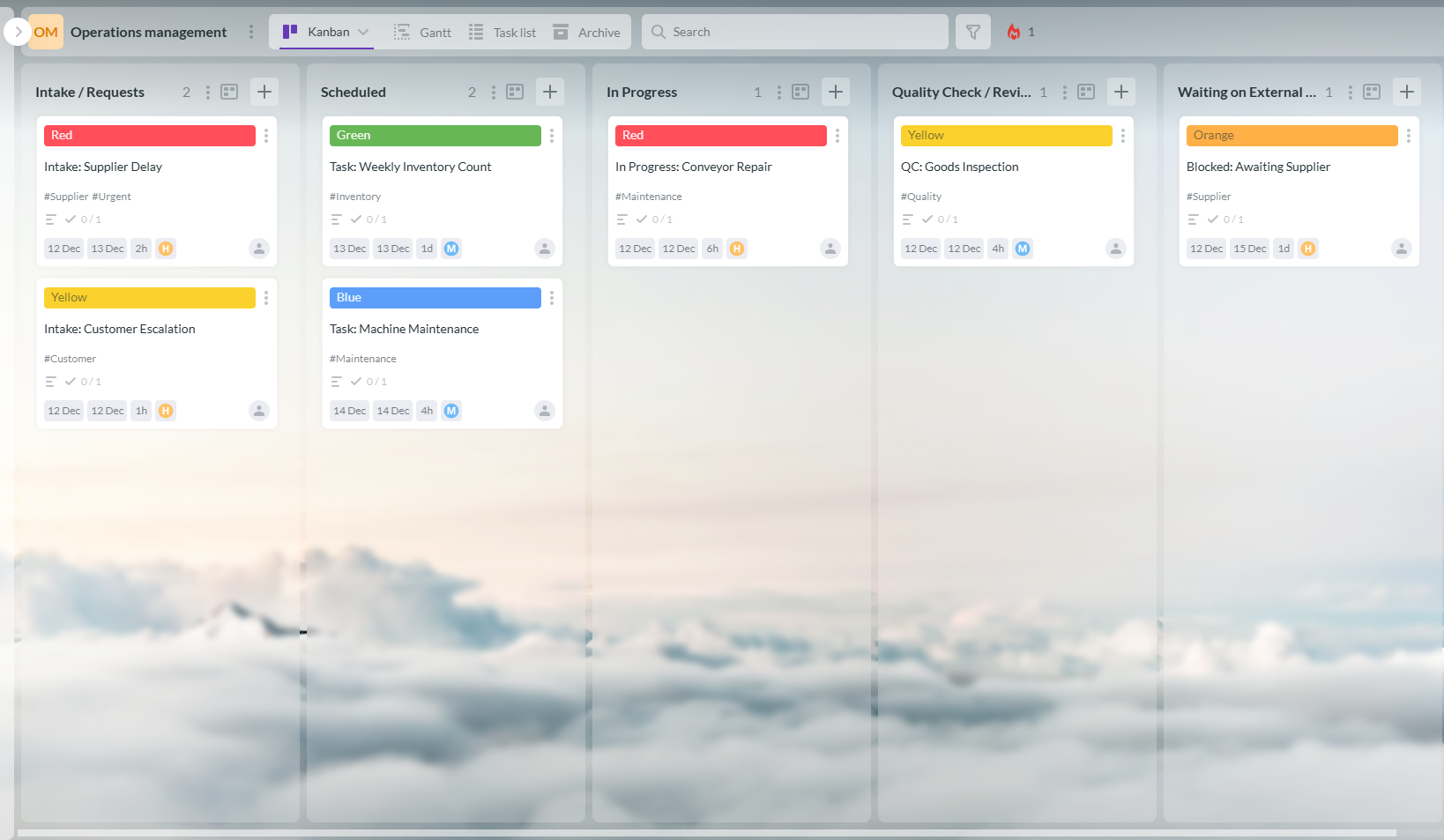
This screenshot showcases a Kanbanchi board used as operations management software, highlighting columns for intake, scheduling, in-progress tasks, quality checks, and completed items to streamline operational workflows.
Kanbanchi is the ideal integrated Operations Management Solution. It’s a particularly effective choice for teams that are already using Google Workspace, since its integration with the Google tool leads to a smoother learning curve.
As a native Google Workspace tool. Kanbanchi is a sensible choice for many companies looking to manage their tasks more effectively using a software operations management approach. In terms of OM, the following are the main benefits that it offers.
This aspect of OM is one of the most interesting for any business that has to deal with large amounts of documentation, such as contracts and compliance documents. It allows real-time collaboration and makes sure that everyone in the team always has access to the latest version of every file.
The ability to edit documents together in real-time is a major bonus with software for operations management. Working in this helps to cut out misunderstandings and also reduces the need for emails to go back and forward while you’re trying to resolve any issues.
The kanban approach helps by adding a visual aspect to the flow of work, such as IT tickets and HR requests. This is something that has traditionally lacked visibility and transparency, but by using the visual flow on a kanban board, it becomes a lot clearer for everyone to understand and follow.
This boosts efficiency and can also help reduce bottlenecks in the process. It is achieved by turning each request into a card that flows through the different stages indicated by the columns on the board. Doing this improves service efficiency and reduces confusion about who should be handling each request or what stage they’re at.
Having a single location where you can check on the current situation of diverse areas like fulfilment, marketing, and HR is another major benefit of using Kanbanchi’s board-based approach.
This is a rapid-fire and highly efficient way of seeing the health of the overall business at any time. It also helps make dependencies and handoffs between departments clearer. Multiple boards can be created on Kanbanchi, with interdependencies that allow users to see the bigger picture.
Plan, prioritize, and manage your projects effortlessly with Kanbanchi - the all-in-one project management tool built for Google Workspace users.
Get a free trialBearing in mind the advantages that we just looked at, you may feel ready to take the next steps. The good news is that implementing Kanbanchi as an OMS for your recurring processes is simple.
Many businesses can expect a positive ROI after a year or 18 months. However, the exact details depend on the type of software that you choose, your industry, and how well the implementation is carried out.
When it comes to operations management software, Kanbanchi offers full Google Workspace integration and a smooth setup process that lets you get started and receive the benefits right away.
With its deep, native integration into the Google Workspace ecosystem, Kanbanchi offers the opportunity to use a project management solution that exists in the familiar Google environment. This means a shallow learning curve for new users.


In this Article:
Start using Kanbanchi now
Start your free trial