
In this Article:
Try Kanbanchi now
Start your free trial


Restaurant project management software isn’t just for big chains. It’s the difference between “we’re slammed” and “we’re in control” when menus change, and teams rotate. With kitchen, service, and leadership priorities colliding daily, the right system keeps work visible, assigned, and moving.
In this case study, we’ll show how restaurants use Kanbanchi boards and timelines to coordinate menu launches, staff training, and renovations, with Google/Microsoft integration built in.
Restaurants run on dozens of micro-projects that overlap: menu updates, seasonal hiring, vendor switches, equipment maintenance, training refreshers, and marketing pushes that all hit at once. When those initiatives live in chats and spreadsheets, the work becomes invisible. Owners see negative outcomes like late tickets, missing prep, or inconsistent service, but can’t see the real bottleneck – lack of coordination.
That’s why many operators start looking for kitchen workflow management tools, but quickly realize that “workflow” isn’t only the “back-of-house”. The “front-of-house” needs the same clarity: who’s training whom, which service changes go live this weekend, what’s still waiting on signage, and what’s blocked by a supplier lead time.
This is where Kanbanchi fits: a visual, board-based system that helps teams coordinate work in real time while staying inside the ecosystem they already use. In Google Workspace deployments, Kanbanchi integrates with apps like Google Drive, Gmail, Calendar, Forms, and Sheets, letting teams attach Drive files, create Calendar events, and even create cards from Gmail without changing how they communicate day to day. If your organization leans towards Microsoft, Kanbanchi also supports Microsoft 365 (including working from OneDrive and signing in with Microsoft accounts).
Also, there are plenty of other software solutions specific to restaurant management. They may offer some niche functionality, but they are often too expensive for SMB cafes and restaurants.
Most restaurants don’t fail on effort; they fail on “promises” that aren’t tracked end-to-end. A promise could be: “Sunday brunch launches flawlessly,” “new line cook is fully competent in 10 shifts,” or “renovation doesn’t reduce quality.” Kanbanchi gives you a clean way to turn each promise into a board, then standardize how your team executes it.
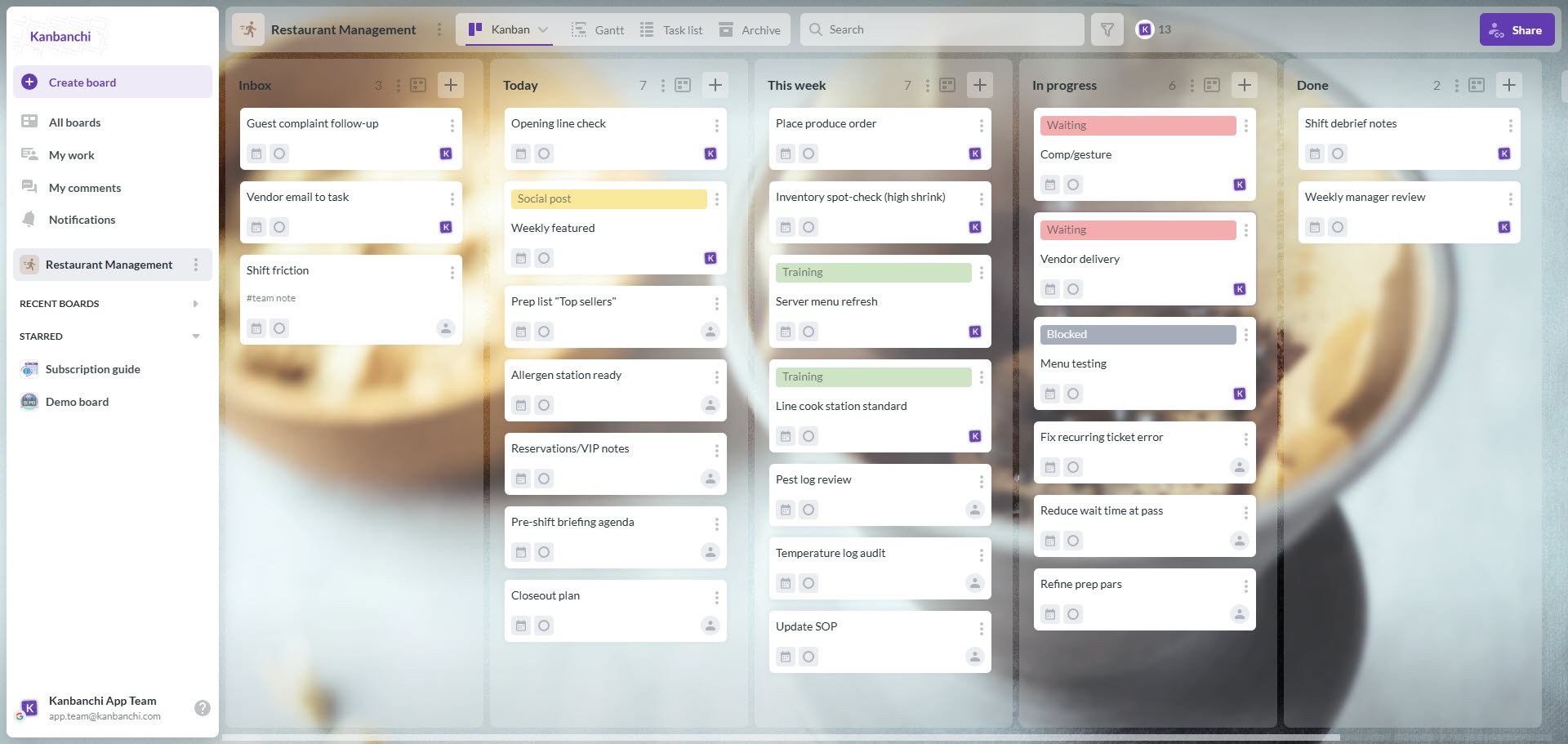
Restaurant Operations Kanbanchi board demonstrating how restaurant project management software keeps food service task management clear
Here’s a practical board architecture restaurants can reuse (literally, you can sign up for a free trial now and replicate this in 10 minutes):
A key difference between “we have a board” and “we have a system” is turning repeatable work into templates. In Kanbanchi’s Google Workspace context, boards can live as files in Google Drive and be shared according to Google policies, making it easy to duplicate and distribute templates across locations without reinventing the wheel each time. Also, the built-in template system (boards, cards, checklists) helps repeat processes in seconds.
Start a free Kanbanchi trial now
If you’re specifically trying to formalize food service task management, think in terms of “definition of done” for each card. For example, “New dessert goes live” might require: allergen sheet approved, prep list updated, plating photo printed at pass, FOH tasting complete, POS buttons verified, and first-week feedback review booked.
Harbor & Hearth is a chef-driven restaurant group with two concepts:
They were planning three major initiatives in the same quarter:
Leadership had already invested in specialized restaurant systems (POS, scheduling), but still struggled to coordinate cross-functional projects, especially when tasks spanned kitchen, service, vendors, and marketing.
Their recurring pain points looked familiar:
The group wanted three things:
Kanbanchi’s Google Workspace integration helped managers keep documents in Drive, attach them to work items, and create tasks from Gmail when a vendor email arrived, without rebuilding the restaurant’s entire tech stack. The ownership team also liked that Kanbanchi offers tiered pricing, starting at a low per-user monthly cost for its entry plan, and the option to pay less per user as more people are added.
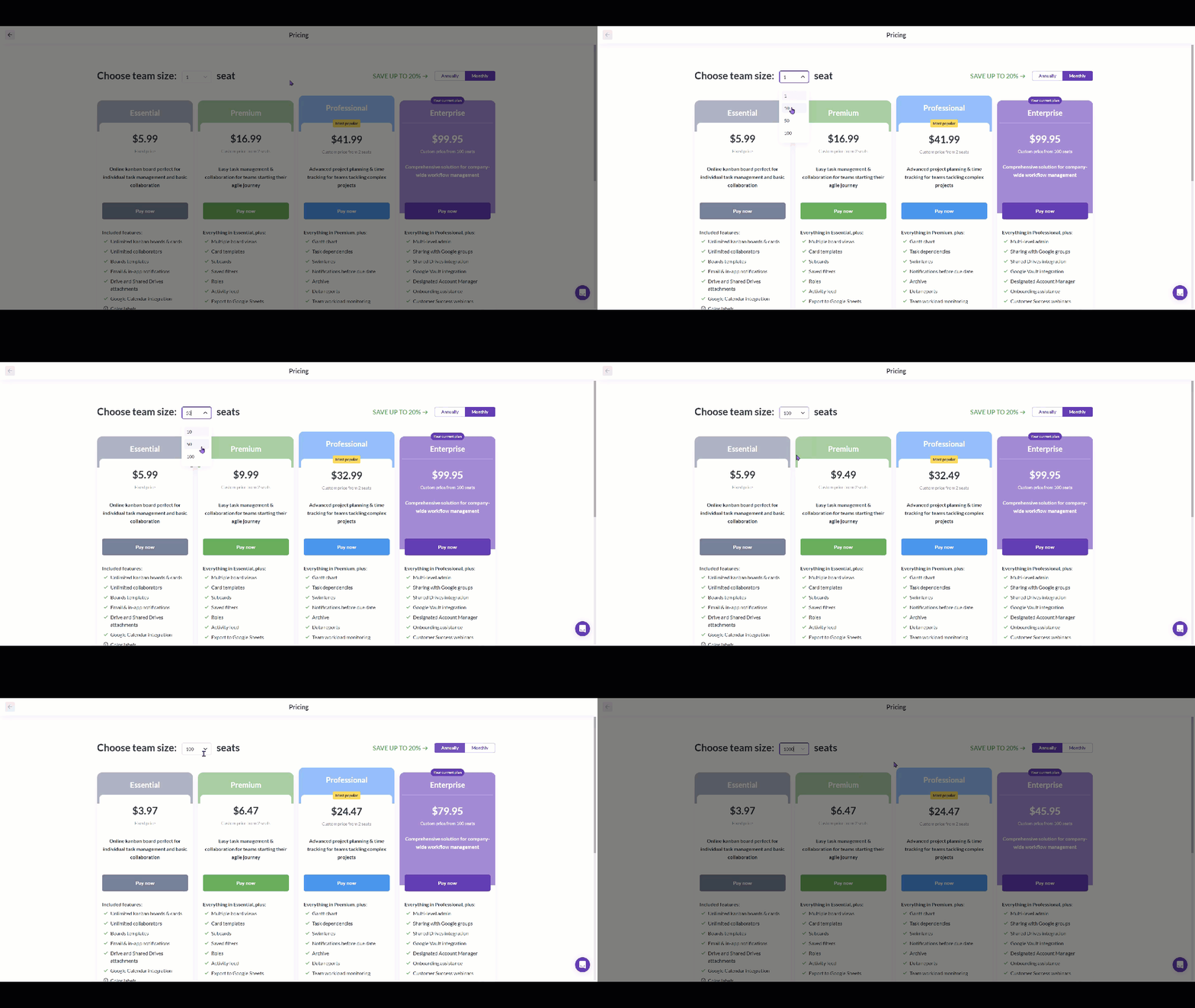
This pricing view highlights Kanbanchi’s tiered plans, so restaurants can start small and scale their restaurant project management software as more managers and leads join. It’s a practical fit when you want food service task management and kitchen workflow management tools without overbuying features
They rolled out Kanbanchi in a deliberate sequence to avoid overwhelming staff.
Previously, menu launches were “done” when the kitchen was ready. Until the first service exposed gaps (missing allergen notes, inconsistent descriptions, untrained servers, wrong POS modifiers). Harbor & Hearth rebuilt the launch as a sequence of visible commitments.
They used one card per menu item and a repeatable checklist that included:
Two specific practices made a measurable difference (in their internal estimates):
This is also where they realized they didn’t just need kitchen workflow management tools; they needed a workflow bridge between the kitchen and the service team to keep the guest experience consistent.
Like many restaurants, Harbor & Hearth had strong leaders, but too much knowledge lived in people’s heads. When one trainer went on leave, training quality dipped. They created a “Training Pipeline” board with role-based templates:
Each new hire became a card with:
This made food service task management concrete: training wasn’t “watch and learn,” it was visible progress with clear criteria.
The bistro’s partial kitchen-line remodel created a risky overlap: construction tasks, equipment lead times, temporary workflow changes, and peak-volume services. They ran the remodel as a project with:
This is where Kanbanchi acted as a practical center for restaurant renovation project management. Not by replacing contractors, but by ensuring the restaurant side (menus, staffing coverage, temporary prep plans, safety signage, communication) stayed coordinated.
Encouraged by the consistency they gained, leadership began pre-planning a third concept. Instead of waiting until the lease was signed to scramble, they built a “Location 3 Readiness” board with phases:
They treated restaurant opening project coordination as a discipline: every deliverable had an owner, dependency, and deadline. When something slipped (a permit update, a vendor delay), it didn’t become gossip; it became a visible blocker with a resolution path.
Adoption fails when systems feel like extra work. Harbor & Hearth succeeded by making the board reduce work immediately. Use this rollout sequence:
If you operate in Google Workspace, Kanbanchi’s ability to attach Drive files, add Calendar events, and export data to Sheets can reduce tool switching and keep execution tied to the documents staff already use. If you operate in Microsoft 365, Kanbanchi also highlights OneDrive-based work and Outlook-based task creation as part of its Microsoft positioning.
For teams doing a big refresh, treat restaurant renovation project management like guest service: communicate early, set expectations, and document the temporary workflow so the team isn’t improvising during a rush. And if you’re building a new unit, formalize restaurant opening project coordination early, before the “everything is urgent” phase begins.
Dedicated restaurant platforms are excellent at what they’re built for: scheduling, POS, payroll, tip management, inventory, and labor tracking. But those systems often don’t solve the cross-functional “project” layer: launching, training, renovating, and coordinating between teams.
Here’s a practical way to think about it:
| Tool type | What it’s best at | Typical pricing model | Integration angle |
|---|---|---|---|
| Kanbanchi | Visual boards + timelines for operational projects; tasks, dependencies, and real-time collaboration inside productivity suites | Public pricing starts from a low per-user monthly plan (entry tier at $16.99/user/month) | Designed for Google Workspace integration (Drive/Gmail/Calendar/Sheets) and also positioned for Microsoft 365/OneDrive usage |
| Toast (restaurant platform) | POS + operational modules (varies by package) | Software tiers are often quoted per month/per terminal; reviews commonly cite $0/month starter and paid tiers like $69/month (with add-ons and hardware varying) | Has a Google partnership that adds ordering via Google search experiences (as described in independent reviews) |
| 7shifts (restaurant scheduling platform) | Scheduling, labor tools, and team communication | Commonly priced per month; published pricing summaries show a free plan and paid plans (e.g., $29.99/month tier in GetApp listings) | Often used alongside POS systems, pricing listings reference POS integration as part of platform capabilities |
Kanbanchi can be less expensive when your main problem is coordination rather than replacing POS/scheduling. A per-user collaboration tool starting at a low monthly price can be cheaper than deploying multiple location-based restaurant modules. Especially when you only need a project layer for managers and leads (not every hourly employee).
The bigger win, though, is operational: keeping your documents, approvals, and communication tied to the tasks. In Google Workspace environments, Kanbanchi’s native-style integration (Drive file storage, Gmail-based task creation, Calendar events, Sheets export) keeps planning and execution in one place. In Microsoft-heavy environments, Kanbanchi’s Microsoft 365 positioning (including OneDrive-based access and Outlook-related workflows) helps teams avoid splitting work across disconnected systems.


In this Article:
Start using Kanbanchi now
Start your free trial