Growth hacking expert with over 10 years of experience with Kanbanchi
This case study breaks down how DevSync Labs uses Kanbanchi as a software development project management tool, from agile Kanban boards to sprint planning features, to turn chaos into consistent, predictable workflows. For development teams overwhelmed by spreadsheets, uncoordinated tools, and last-minute scrambles, DevSync’s transformation provides a proven path to efficiency.
When they approached Kanbanchi, their 18-person engineering team was stuck in a cycle of missed sprints, unclear backlog priorities, and disjointed code reviews. Six months later, the team had cut sprint delivery time by 35%, reduced release cycle bottlenecks by 50%, and improved sprint completion rates from 60% to 90%.
Software Development Project Pain Points
Before Kanbanchi, DevSync’s team faced the same frustrations plaguing many engineering teams: disjointed workflows, poor visibility, and wasted time on administrative tasks. These issues weren’t just annoying; they directly impacted deliverables and team morale.
First, their backlog was a disorganized list of 100+ unranked user stories, stored in a shared Excel spreadsheet. Engineers spent 2-3 hours weekly just figuring out which tasks to prioritize, leading to missed deadlines and misaligned priorities. “We’d start a sprint with one set of goals, then pivot halfway because a ‘high-priority’ task was buried at the bottom of the sheet,” says Mia, DevSync’s engineering manager.
Second, release cycles were unpredictable. Without a visual way to track feature progress, the team often discovered last-minute roadblocks (like unapproved PRs or missing dependencies) just days before deployment. This led to 4-week release cycles that frequently slipped to 5 or 6 weeks. It frustrated both the team and the clients.
Third, software engineering workflow management suffered from poor communication. Backend and frontend teams operated in silos, lacking a straightforward method to track the connections between their tasks. “We’d finish a backend API, only to find the frontend team was waiting on a different data format,” says Liam, a backend lead. “It was a constant game of catch-up.”
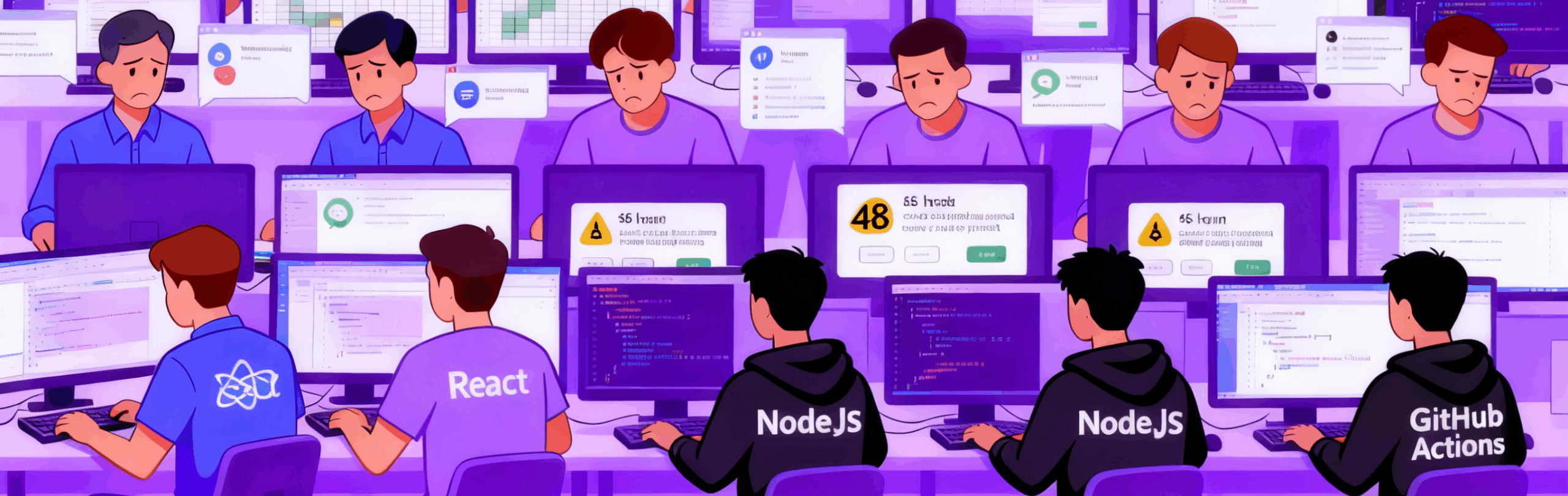
Finally, programming project coordination tools were scattered: Trello for basic task tracking, Slack for code review updates, and GitHub for repository management. Switching between these tools costs the team 15+ hours weekly. Time that could have been spent coding. A frontend engineer, Raj, recalls: “I’d push code to GitHub, then have to message the team in Slack, then go to update my Trello card, and sometimes also add a line in Google spreadsheet for a supervisor. It felt like half my day was spent updating statuses.”
Meet the Client: DevSync Labs Development Team Profile
DevSync Labs is a mid-sized SaaS startup building customer relationship management (CRM) tools for small businesses. Their 18-person development team is split into three groups: 6 frontend engineers (working with React), eight backend engineers (using Node.js), and 4 DevOps specialists (managing CI/CD pipelines with GitHub Actions).
Before Kanbanchi, the team followed Scrum but relied on manual processes to track sprints. Their typical workflow involved:
Weekly sprint planning meetings (2-3 hours long) to rank tasks from the Excel backlog.
Daily standups (30+ minutes) to update each other on task statuses.
End-of-sprint retrospectives focused on fixing missed deadlines, not preventing them.
Initial metrics painted a clear picture of inefficiency:
60% sprint completion rate (only 3 out of 5 planned sprints finished on time).
4-week average release cycles for new features.
48-hour average time to complete code reviews.
6/10 engineer satisfaction score (from an internal survey).
The team needed a unified tool that could tie their dev workflows together without adding more complexity.
The Evaluation Process: Why DevSync Chose Kanbanchi
DevSync’s team evaluated three popular programming project coordination tools before choosing Kanbanchi: Jira, Asana, and Kanbanchi. They focused on criteria that mattered most to engineering teams: integration with the tools they already use, ease of customization for agile workflows, and visual tracking for sprints and releases.
Jira was the first tool they tested. While it offered robust features, it felt overly complex for their needs. “We spent 2 weeks setting up Jira, and we still couldn’t figure out how to set it up properly,” Mia explains. “It felt like we needed a full-time admin to manage it, something we couldn’t afford.”
Next, they tried Asana. It was easier to use, but it lacked dev-specific features. “Asana’s boards were too generic,” Raj says. “We couldn’t track code reviews or release timelines; we’d have to build workarounds for everything.”
Kanbanchi stood out for its focus on software development project management. From the start, it checked all their boxes:
Pre-Built Agile Templates: A ready-to-use “Agile Development” template with columns for Backlog, To Do, In Progress, Code Review, and Done.
Visual Release Timelines: Gantt charts to track feature deadlines and deployment cycles.
Google Workspace Sync: Since DevSync used Google Workspace (Gmail, Calendar, Drive, Docs), Kanbanchi’s seamless integration made onboarding easy.
Affordable Scalability: Pricing that worked for their 18-person team, with room to grow.
“The moment we saw Kanbanchi’s Google integration, we knew it was the right fit,” Mia says. “It didn’t just add another tool; it connected the tools we already used.”
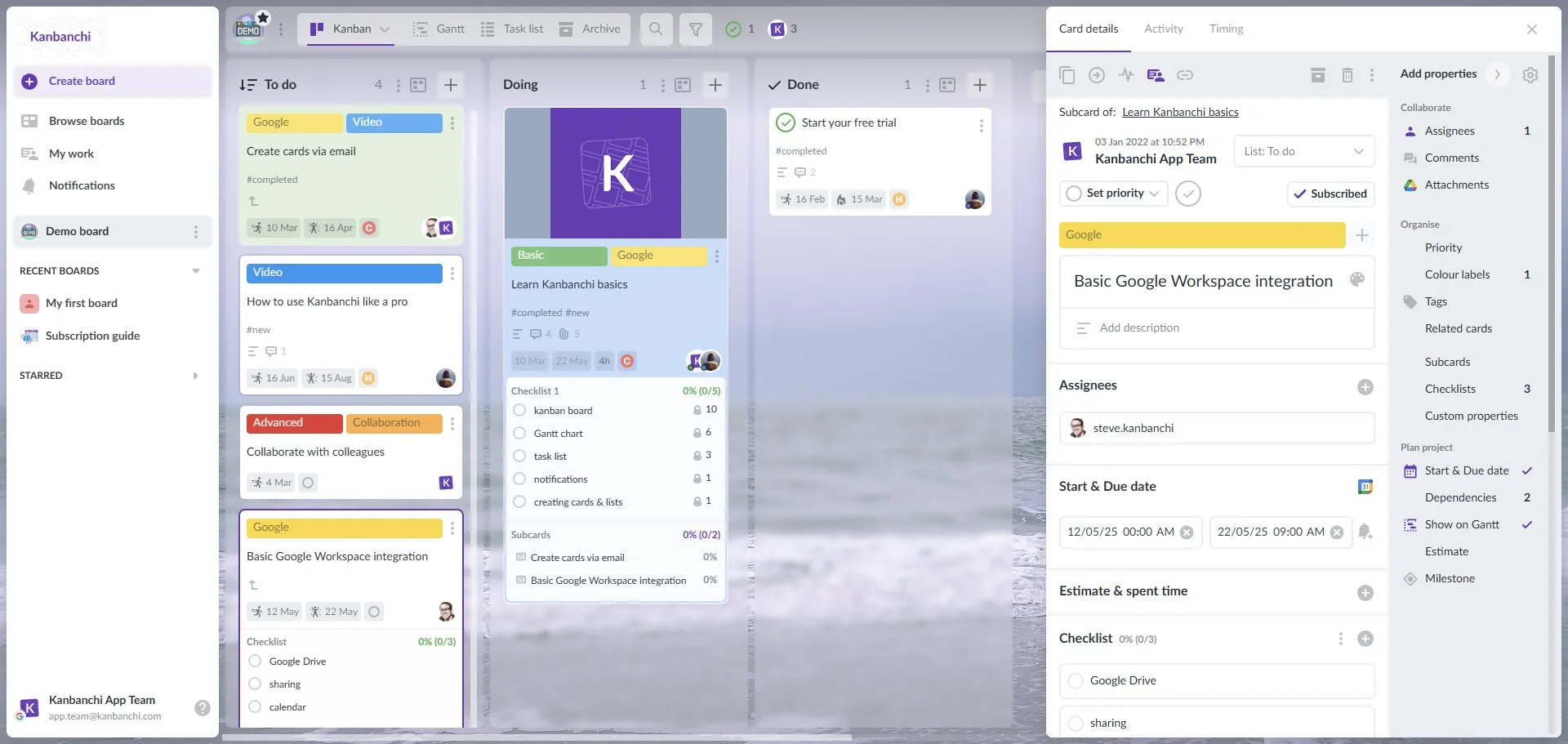
Kanbanchi interface example when using a Google account
Implementation Strategy: Rolling Out Kanbanchi Across the Dev Team
DevSync’s team rolled out Kanbanchi in 4 phases over 6 weeks, focusing on minimal disruption to ongoing sprints. They followed a “train the trainer” approach, with Mia and two senior engineers leading the charge.
Phase 1: Initial Setup (Week 1)
The team started by creating three core boards in Kanbanchi:
Sprint Board: For tracking current sprint tasks (columns: Backlog → To Do → In Progress → Code Review → Done).
Backlog Board: For prioritizing user stories (with labels for “High Priority,” “Medium Priority,” and “Low Priority”).
Release Timeline Board: For visualizing feature deadlines and deployment dates.
They customized the boards to match their tech stack by adding labels for “Frontend,” “Backend”/“DevOps,” adding links to GitHub repositories to tasks, and setting up notifications for updates.
Phase 2: Team Training (Weeks 2-3)
Instead of a single long workshop, the team held 1-hour weekly training sessions focused on specific features:
Week 2: Navigating the Sprint Board and adding links to GitHub PRs.
Week 3: Using the Gantt chart and prioritizing the Backlog Board.
They also created a “Kanbanchi Cheat Sheet” with step-by-step guides for repetitive tasks (e.g., “How to add a GitHub PR link to a Kanbanchi card”). “We kept training short because engineers hate sitting through long demos,” Mia says. “Most people picked it up in a day.”
Phase 3: Full Sprint Migration (Weeks 4-5)
The team ran their first full Kanbanchi-powered sprint in Week 4. They imported their existing backlog from Excel (using Kanbanchi’s CSV upload tool) and assigned tasks to team members. By Week 5, 90% of the team was using Kanbanchi daily. The time savings won over the few holdouts: “I used to spend 30 minutes a day updating Trello, Google Sheets, and messaging colleagues on Slack,” Raj says. “Now it’s all automatic, I can focus on coding.”
Phase 4: Optimization (Week 6+)
After the first sprint, the team made minor tweaks to improve workflows:
Added a “Blocked” column to the Sprint Board for tasks stuck on dependencies.
Set up automation: If a task stays in “Code Review” for 24+ hours, it sends an alert to the engineering manager.
Set up notifications: Team members get a message when a task is assigned to them or is moved to a particular list.
Kanbanchi Features That Transformed Dev Workflows
Kanbanchi’s dev-specific features solved DevSync’s most significant pain points, turning disjointed processes into a single source of truth. Here’s how they used key tools to streamline agile development task management:
1. Custom Agile Kanban Boards
The Sprint Board became the team’s command center. Columns were tailored to their workflow:
Backlog: Unassigned user stories, sorted by priority.
To Do: Tasks picked for the current sprint.
In Progress: Tasks being worked on (with assignees and due dates).
Code Review: Tasks with links to GitHub PRs (with reviewer names).
Done: Completed tasks (auto-archived at the end of the sprint).
Engineers could drag-and-drop tasks between columns, and everyone had real-time visibility into progress. “No more asking, ‘Is that task done?’” Liam says. “We just look at the card on the board.”
2. Gantt Chart View
The Release Timeline Board, which they primarily view in the Gantt chart view, gave the team a visual way to track feature deadlines. They added milestones for “PR Freeze,” “Testing,” and “Deployment,” and dragged tasks to align with these dates. “We used to discover roadblocks 2 days before release,” Mia says. “Now we see them 2 weeks in advance. We can reassign tasks or adjust timelines early.”
3. Backlog Prioritization
The Backlog Board lets the team rank user stories with drag-and-drop ease. They used color-coded labels to flag priority: red for “High Priority” (must-have features), yellow for “Medium” (nice-to-have), and green for “Low” (future sprints). “Sprint planning went from 3 hours to 1 hour,” Mia says. “We just pull top-priority tasks from the backlog. No more debating what to work on.”
4. Code Review Workflows
The “Code Review” column became a central hub for PRs. Each task included:
A link to the GitHub PR.
The name of the assigned reviewer.
A checklist for approval (e.g., “Tests pass,” “Code follows style guide”).
Reviewers could mark tasks as “Approved” or “Needs Changes” directly in Kanbanchi, and the team got alerts when reviews were done. “Code review time dropped from 48 hours to 24 hours,” Liam says. “No more PRs getting lost in Slack.”
Measurable Results: The Transformation Metrics
Six months after implementing Kanbanchi, DevSync’s software development project management metrics improved dramatically. The team tracked key indicators to measure success, and the results spoke for themselves:
Metric
Before Kanbanchi
After Kanbanchi
Improvement
Sprint Completion Rate
60%
90%
+30%
Sprint Delivery Time
21 days
13.6 days
-35%
Release Cycle Time
4 weeks
2.8 weeks
-30%
Code Review Time
48 hours
24 hours
-50%
Engineer Satisfaction Score
6/10
9/10
+30%
The time savings added up quickly. With 18 engineers saving 15 hours weekly, DevSync recovered 1,170 hours in the first 5 months. This time went into building new features instead of updating task statuses.
Client satisfaction also improved. Faster release cycles meant clients got new features sooner, and fewer bugs (thanks to better code review tracking) led to a 25% increase in positive feedback. “We used to apologize for missed deadlines,” Mia says. “Now clients praise us for being on time.”
Team Testimonials: What DevSync’s Engineers Say
Kanbanchi’s impact wasn’t just in metrics; it changed how the team worked daily. Here’s what they had to say:
Liam (Backend Lead): “The Gantt chart view eliminated our biggest stressor: last-minute scrambles. We can see feature deadlines weeks in advance, so we catch roadblocks early. For example, last month, we noticed a backend API would miss the release. We reallocated resources and hit the deadline anyway. That never would have happened before.”
Priya (DevOps Manager): “Tracking deployments alongside sprint tasks has cut our release cycle by 30%. I can see which features are ready for deployment, which are in testing, and which are stuck, all in one place. No more chasing engineers for updates.”
Mia (Engineering Manager): “Kanbanchi made me a better manager. I don’t have to spend hours in standups or spreadsheets. I check the board and know exactly how the sprint is going. The automation alerts me to problems (like a task stuck in code review) before they become crises. It’s like having a second set of eyes on the team.”
Best Practices: Software Development Project Management with Kanbanchi
DevSync’s experience offers actionable tips for other teams looking to use Kanbanchi for software engineering workflow management:
Customize Your Board to Match Your Agile Framework
Don’t use generic columns, but tailor them to your process. For Scrum teams, add “Sprint Backlog” and “Code Review” columns. For Kanban teams, include “Work in Progress” limits to prevent bottlenecks. DevSync added a “Blocked” column to flag tasks stuck on dependencies. This cut their “stuck task” time by 40%.
Use Labels to Categorize Tasks
Add labels for task type (“Bug Fix,” “Feature,” “Tech Debt”) and team (“Frontend,” “Backend,” “DevOps”). This makes it easy to filter the board; for example, a frontend engineer can quickly see all “Frontend” tasks in the sprint.
Set Up Automation for Routine Tasks
Don’t waste time on repetitive work. DevSync used Kanbanchi’s automation to auto-archive “Done” tasks at the end of the sprint, receive notifications when a task is assigned to someone or moves to another list, create backups and exports, and more.
Train Teams on Core Features First
Avoid overwhelming engineers with too many features. Start with the core. Once they’re comfortable, add more tools like the Gantt chart.
ROI Analysis: The Business Impact
For DevSync, Kanbanchi delivered tangible ROI both in time savings and revenue. Here’s how it added up:
Total annual ROI: ~$1.6 million. For a tool that costs $10 per user monthly ($2,160 annually for 18 users), the return was massive. “Kanbanchi was the cheapest, most impactful tool we’ve ever adopted,” Mia says.
Master Software Development Project Management with Kanbanchi
DevSync’s transformation proves that the right software development project management tool doesn’t just add efficiency, it changes how teams work. By unifying their workflows, integrating with dev tools, and providing visual tracking, Kanbanchi turned a struggling engineering team into a high-performing one.
The results speak for themselves: 35% faster sprints, 50% fewer bottlenecks, and a team that’s happier and more productive. For engineering leaders tired of disjointed tools and missed deadlines, Kanbanchi offers a simple, affordable solution.
Use the “Agile Development” template to set up your first dev board in 10 minutes and join thousands of dev teams that have turned chaos into consistency.
Frequently Asked Questions (FAQ)
How many sprints can we track in Kanbanchi at once?
As many as you need. Most teams track 1-2 active sprints on a “Sprint Board” and future tasks on a “Backlog Board.” Kanbanchi has no limits on boards or tasks, so it scales with your team.
Is Kanbanchi suitable for both small (5-person) and large (50+ person) dev teams?
Absolutely. Small teams love the simplicity (no complex setup), while large teams use features like team-specific boards (e.g., “Frontend Sprint Board,” “Backend Sprint Board”) and cross-board reporting to stay coordinated.
Can we customize the Gantt chart to match our deployment cycles?
Yes. The Gantt chart lets you set milestones (e.g., “PR Freeze,” “UAT,” “Production Deployment”) and adjust dates by dragging tasks. You can also filter by team or feature type to focus on what matters.
How long does it take to train a dev team on Kanbanchi?
Most teams are comfortable with core features (boards, Google Drive integration) in 1 hour. For advanced features (automation, reporting), plan a second 30-minute workshop. DevSync’s 18-person team was thoroughly trained in 2 weeks (1 hour per week).
Getting Started: Set Up Kanbanchi for Your Dev Team
Ready to streamline your application development project tracking? Follow these steps to set up Kanbanchi for your engineering team in 10 minutes:
Sign up for a Kanbanchi Trial
Use the “Agile Development” template. When creating a new board, select the “Agile Development” template. It comes with pre-built columns (Backlog, To Do, In Progress, Code Review, Done) and labels for dev teams.
Integrate Your Tools
Import Your Existing Backlog. Use Kanbanchi’s CSV upload tool to import your backlog from Excel, Trello, or Jira. Map columns (e.g., “Task Name” → “Card Title,” “Priority” → “Label”) to avoid manual data entry.
Train Your Team on Core Features. Hold a 30-minute workshop to cover:
Growth hacking expert with over 10 years of experience with Kanbanchi
Olga wears multiple hats across marketing, sales, product, and ops after 10+ years in the SaaS world. She is passionate about helping teams streamline their workflows with Kanbanchi and Google Workspace or Microsoft 365. "When I'm not optimizing processes or writing guides, I'm probably tweaking our product roadmap or diving into the latest productivity tools".
Buy and manage subscriptions, distribute seats for your team members, control subscription status (current number of seats and expiration date) right in the app.
Emails come and emails go. We receive tons of emails with tasks from our directors/managers/colleagues. Gmail task management becomes part of our work despite that Gmail isn't a tool for task management.
Buy and manage subscriptions, distribute seats for your team members, control subscription status (current number of seats and expiration date) right in the app.
Emails come and emails go. We receive tons of emails with tasks from our directors/managers/colleagues. Gmail task management becomes part of our work despite that Gmail isn't a tool for task management.