
In this Article:
Try Kanbanchi now
Start your free trial

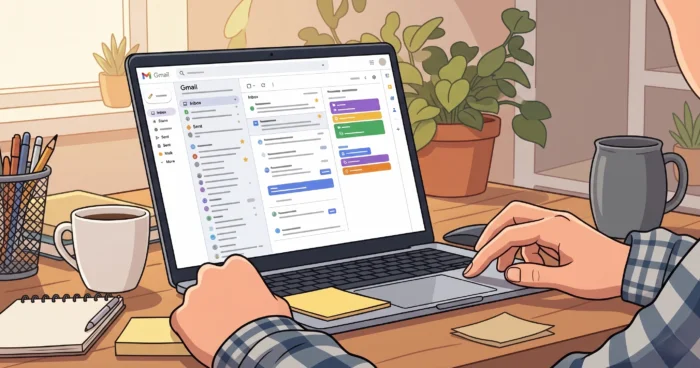
Work may start in Gmail, but projects rarely finish there. The right Gmail task management software turns a message into a named task with an owner, due date, context, files, and follow-up status, so work doesn’t disappear inside an inbox. For Google Workspace teams, Kanbanchi is a strong fit because it connects familiar Google work habits with visual task boards, timelines, and team-level tracking.
It is a tool or workflow that can convert Gmail messages into trackable tasks with owners, deadlines, notes, attachments, and status updates.
Gmail task management software helps teams move work from private inboxes into shared systems where progress can be planned, tracked, and reported. Gmail, Google’s mailbox provider with 1.8 billion users, is where requests arrive, while task management covers planning, tracking, testing, and reporting throughout the work lifecycle.
Google’s own system includes Google Tasks, which lets users keep to-dos that sync across devices. That is useful for personal follow-up. Team projects need more structure: assignments, shared boards, priorities, dependencies, file context, and visibility across departments.
Gmail is excellent for receiving work, but a project task needs a lifecycle beyond the message thread.
For broader Google Workspace task management, the workflow in the Google Workspace Task Management Guide shows how Gmail, Drive, Calendar, Docs, Sheets, and task boards can work together rather than as separate tools.
The best way to manage project tasks from Gmail is to turn each actionable email into a shared task, assign one accountable owner, set a due date, attach the original context, and track it on a project board. This keeps Gmail as the intake channel while the board becomes the source of truth.
A clean workflow prevents two common failures: treating every email as urgent, and assuming a reply means the work is done. Email threads are communication records. Tasks are commitments.
Your mind is for having ideas, not holding them.
That quote from David Allen, Getting Things Done fits Gmail work perfectly. If your team relies on memory, stars, or unread messages, the system will break as soon as volume rises.
Google Tasks is good for personal reminders, while project-grade workflows are better for shared ownership, visual planning, and reporting. The right choice depends on whether the work belongs to one person or a team.
Google Tasks can create simple to-dos and reminders from Gmail. It syncs across devices. That simplicity is its strength. It is not the same as project management.
| Option | Best for | Strength | Limitation |
|---|---|---|---|
| Kanbanchi | Google Workspace teams managing projects from Gmail and Drive | Visual Kanban boards, timelines, Gantt-style planning, task assignment, and team visibility | Best when teams want a structured project workflow, not just personal reminders |
| Google Tasks | Personal to-dos from Gmail | Fast, native, simple, mobile-friendly | Limited project reporting and shared workflow depth |
| TasksBoard | Full-screen Google Tasks users | Expands Google Tasks into a larger board view | Still depends on Google Tasks structure |
| Asana, ClickUp, Monday.com | Cross-platform project teams | Strong general project management features | May feel separate from Google Workspace habits |
| Trello | Lightweight visual boards | Easy Kanban-style cards | Needs setup to connect deeply with Google-based workflows |
A Reddit-style question often appears in search results: “Can you do project management with Google Workspace?” The practical answer is yes, but not with Gmail alone. Gmail handles intake, Google Drive handles files, Calendar handles time, and a shared task board handles execution.
Kanbanchi handles Gmail-based project tasks by giving Google Workspace teams a visual place to organize email-driven work into cards, boards, timelines, and assigned responsibilities. Instead of asking people to manage projects from inbox labels, the Kanbanchi platform helps teams move work into a shared project structure.
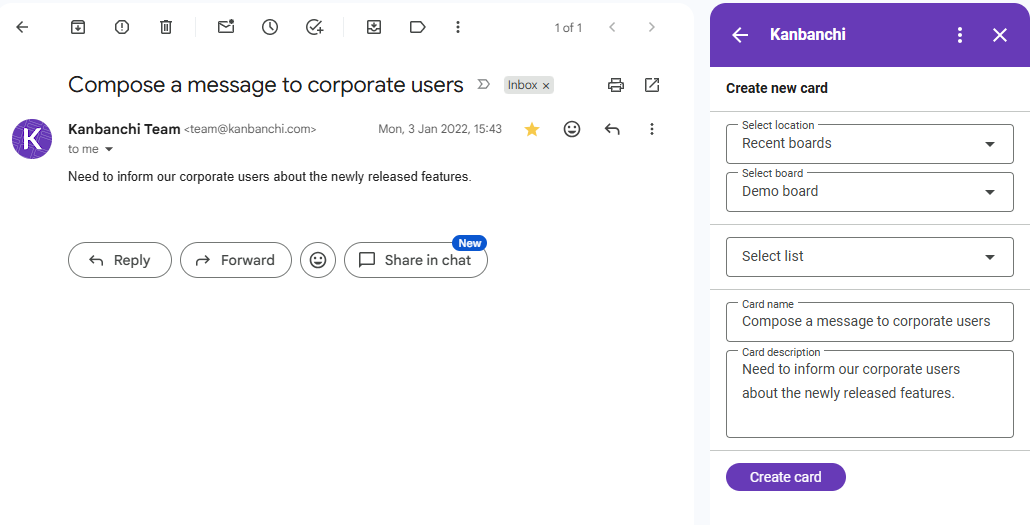
The strongest use case is simple: a client, manager, or teammate sends a Gmail message that requires action. The team captures that request, converts it to a task card with the Kanbanchi Gmail add-on, adds context from Google Drive, assigns an owner, sets a deadline, and tracks it through a board.
For teams managing schedules, the Gantt chart will be another useful tool from Kanbanchi’s set. It is useful when email tasks need deadlines, milestones, and project timing rather than a flat checklist.
If a team uses Gmail for communication, Google Tasks may be used for individual reminders or for very small teams of two, for example. Larger teams will feel the need for a shared board for project commitments that need ownership, deadlines, and visibility. Mixing these roles causes confusion, so each tool should have a clear job.
Gmail is not broken because tasks get lost there. It was built for messaging. The problem starts when teams treat an inbox as a planning system, reporting tool, archive, and deadline tracker at the same time.
| Work type | Use Gmail | Use Google Tasks | Use a shared board |
|---|---|---|---|
| Quick reply to one person | Yes | Optional | No |
| Personal reminder | Optional | Yes | No |
| Client request with several steps | Intake only | No | Yes |
| Cross-functional project | Updates only | No | Yes |
| Work with Drive files and approvals | Context only | Limited | Yes |
| Weekly status reporting | No | No | Yes |
A practical rule helps: if someone else needs to know the status, move it out of the inbox. If a manager may ask “who owns this?” or “when will it be done?”, it belongs on a shared board.
The rise of generative AI makes this split even more important. Research by Dwivedi, Kshetri, Hughes, and others in the International Journal of Information Management examines how AI tools affect work, policy, and practice. AI can summarize emails, but teams still need accountable task systems.
To set up an email-to-task workflow in Gmail, define what counts as an actionable message, create a task capture method, assign owners, add due dates, connect files, and review the board daily. The workflow should be simple.
Key insight: The workflow should reduce inbox checking, not create another place people must constantly monitor.
The most important features are Gmail capture (how easy it is to convert an email to a task card), task ownership, due dates, Google Drive context, visual boards, notifications, reporting, and secure archiving. Nice design helps, but the real value is preventing work from being forgotten after the first reply.
Feature checklists can get noisy. Focus on whether the tool answers five management questions: what needs to happen, who owns it, when it is due, what is blocking it, and where is the source material?
| Feature | Why it matters | Team impact |
|---|---|---|
| Gmail-to-task capture | Turns requests into work items | Less manual copying |
| Assigned owners | Creates accountability | Fewer “I thought you had it” moments |
| Due dates and reminders | Adds time control | Better follow-through |
| Drive file links | Keeps source material close | Less searching |
| Kanban board | Shows work status visually | Easier standups |
| Timeline or Gantt view | Shows deadlines and dependencies | Better planning |
| Comments and activity history | Records decisions | Cleaner handoffs |
| Archive and search | Preserves completed work | Stronger audits and retrospectives |
Gmail-based task management fails when teams keep ownership, deadlines, and status buried in threads instead of moving them into a shared system. The main risk is not email volume itself, but unclear responsibility.
Common mistakes include:
Teams should also separate project archives from inbox archives. Gmail search is useful, but completed work often needs board history, decision notes, and related files.
Teams should expect Gmail task workflows to become more AI-assisted, but still dependent on human ownership, project structure, and clear review habits. AI will help classify messages, draft summaries, and suggest tasks, while managers will still decide priorities and accountability. In practical terms, Gmail may become better at detecting action items, but detection is not delivery.
The durable advantage will go to teams with clean workflows. AI performs better when inputs are structured, so clear owners, statuses, and deadlines will matter more, not less.
These answers cover the questions teams most often ask when moving from inbox-based follow-up to structured project task management.
Gmail can support task capture, reminders, and follow-up, but it should not be the full task manager for team projects. Use Gmail for communication and intake, then move actionable work into Google Tasks or a shared project board where ownership, dates, status, and files are easier to track.
Google Tasks is enough for simple personal to-dos, especially when a user wants reminders connected to Gmail and Google Calendar. It is usually too limited for cross-functional project management because teams need shared boards, reporting, dependencies, workload visibility, and a reliable record of completed work.
The best workflow is to capture the email as a task, rewrite the title as an action, assign one owner, set a due date, attach related Drive files, and track progress on a shared board. Gmail remains the communication channel, while the board becomes the operational source of truth.
Remote teams should use clear intake rules, one shared board, visible statuses, and regular reviews. They should avoid private inbox-only task tracking because distributed work depends on shared context. Comments, file links, due dates, and activity history help teammates understand progress across time zones.
Yes, Kanbanchi is designed for teams that already work in Google Workspace and want project tasks connected to visual boards, Drive-based files, due dates, and shared progress tracking. If your team wants to turn Gmail requests into organized project work, head to kanbanchi.com and map one real workflow first.
Gmail task management software works best when it stops treating email as the workplace and starts treating it as the front door. Keep Gmail for messages, use Google Tasks for personal reminders, and move project work onto a shared board with owners, dates, files, and status.
Your next step is practical: pick one recurring Gmail-driven process, such as client requests, approvals, hiring, IT tickets, or content reviews. Define the task fields, build a simple board, and run it for two weeks. If the team can answer “who owns it, when is it due, and what is blocking it?” without searching inboxes, the workflow is working. You can try it with Kanbanchi.
Sign up for a free trial of Kanbanchi now

In this Article:
Start using Kanbanchi now
Start your free trial