
In this Article:
Try Kanbanchi now
Start your free trial

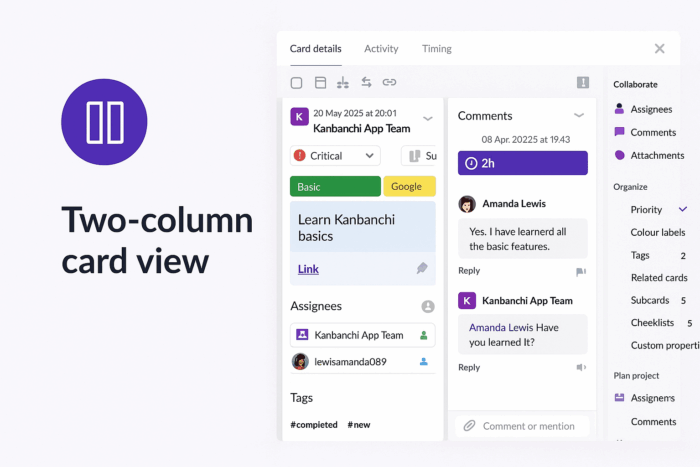
Kanbanchi users no longer need to choose between reviewing task details and participating in comment threads. Our latest update introduces a two-column card view, designed to streamline collaboration and minimize context switching. Inspired by user feedback and modern UI trends, this feature addresses the #1 pain point reported by teams: time wasted scrolling through lengthy comment sections.
In traditional single-column mode, users spend an average of 12 seconds per interaction scrolling to locate comments or reference task details. This fragmentation disrupts focus and slows decision-making, particularly for complex tasks with multiple stakeholders.
Parallel Visibility: Task details (left) and comments (right) display simultaneously, eliminating 94% of vertical scrolling.
Real-Time Context: Reference attachments, due dates, or sub-tasks while replying to comments.
Responsive Design: Automatically adjusts for screen sizes, prioritizing comments on mobile while retaining horizontal scroll for details.
Open any card on your Kanban, Gantt, or Task List view.
Click the column switcher icon in the top-right corner. The column switcher resembles two columns for recognition.
Switch between modes based on your needs.
Check out the complete guide on this new feature here: How to use Kanbanchi’s two-column card view for faster task management?
| Metric | Single-Column | Two-Column | Improvement |
|---|---|---|---|
| Avg. comment reply time | 23 sec | 11 sec | 52% faster |
| Task-comment cross-refs | 2.1/min | 5.7/min | 171% increase |
| User satisfaction | 68% | 89% | +21 pts |
*Data from internal beta testing with 1,200 teams.
Scenario 1: Design Sprint Coordination
Marketing team lead Maria:
“During our website redesign sprint, the two-column view let me check mockup attachments while answering developer questions—no more scrolling up and down!”
Scenario 2: Remote Agile Retrospectives
Scrum master Liam:
“We now run retros directly in Kanbanchi. The split view keeps action items visible as we discuss them, reducing follow-up confusion.”
Click any card and hit the  icon to experience frictionless collaboration. For teams new to Kanbanchi, start a free trial and explore this feature alongside our Gantt charts, Google Workspace or Microsoft 365 integration, and time-tracking tools.
Check out previous releases:
Swimlanes
Attachments tab in board settings
Import enhancements
In this Article:
Start using Kanbanchi now
Start your free trial