
Does Google Drive have a task manager?
Google Drive is a place where your files are stored in the cloud. Yet, it is not just a storage place for work and home but a suite of valuable tools for collaboration. However, is there a Google Drive task manager?
Google Drive is part of Google Workspace. If you want to read more about applying it to your business, check out our next article about Google Workspace features.
Google Drive for Collaboration
To understand why a task manager matters here, it helps to know what Drive actually offers for teamwork. The pack of Google Docs, Google Sheets, and Google Slides provides a way to collaborate side by side, with changes synced instantly across devices and the cloud.
You have two spaces to locate your data. My Drive stores personal files and folders that you create and own. Shared Drives hold files your team is collaborating on. A great option, especially for larger teams where collaborators need to easily find and access files.
Teams adopting Google Workspace get a solid starter pack of tools for cooperation. But managing projects and keeping track of workflow is a different need, and Drive does not address it natively.
Google Drive Does Not Have a Built-In Task Manager
Google Drive does not have a built-in task manager. For teams that need to go beyond file storage and document collaboration – tracking who owns what, what is in progress, what is blocked, and what is done – you need a dedicated tool that works alongside Drive rather than replacing it.
For a broader look at what Google Workspace offers for task management and where the gaps are, the Google Workspace task management FAQ covers the full picture.
Kanbanchi as a Google Drive Task Manager
Kanbanchi copes with the role of a Google Drive task manager perfectly well. Just like working with Google files, you can observe all the changes made by your team members in real-time on Kanbanchi boards.
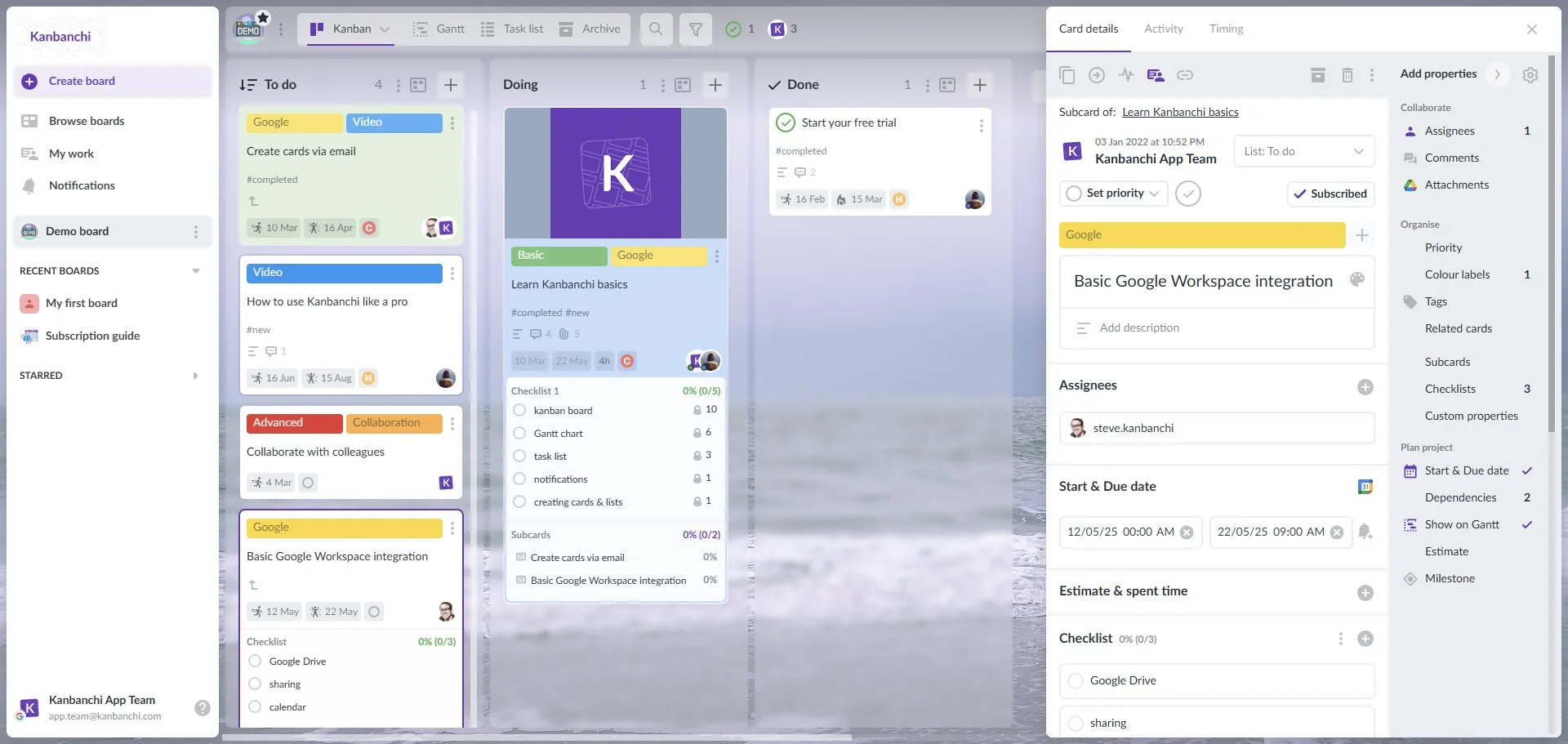
When you want to share your Kanbanchi board with your team, you can invite users individually with specific permission levels. The permission levels in Kanbanchi match those you see when sharing any other Google file. Alternatively, you can move your board to a Shared Drive, making it accessible to your whole team exactly as any other shared file would be.
You can also attach files from Google Drive securely. Kanbanchi does not have access to the content of your files; it simply creates links between the interface and your file. So you do not have to worry about the confidentiality of your data. It is only you who decides who has access to the content of your files.
Kanbanchi is a full-featured task management platform that includes a Kanban board, Gantt chart, reports, time tracker, and recurring cards. It integrates seamlessly with Google Drive and creates a secure, organized connection between your tasks and your files, so your project board and your Drive documents always stay in sync.