
In this Article:
Try Kanbanchi now
Start your free trial


Think about the last big project you tackled. Was it plain sailing, or were you all lost at sea, rudderless and without an anchor? If it’s the latter, you’re not alone. Here’s a stat to startle: According to Marketing Week, “Around two-thirds (67%) of SMEs have no marketing action plan, with more than half (54%) not even having a business plan”.
The issue isn’t coming up with the big idea. In fact, that’s the easy part. It’s the execution that feels like a mountain to climb. You have the goal, the ambition, the talent, but without a roadmap, these essentials can quickly turn into a chaotic mess of missed deadlines and the not-so-welcome “who was doing what?” questions.
What’s the solution? Well, this is where the action plan steps in. It is the bridge between a dream and reality. The difference between saying “we should grow our sales” and actually hitting a 10% revenue target by Q4.
We’re here, as always, to help you. In this guide, we’ll move beyond simple to-do lists and explore how sophisticated teams use Kanbanchi to turn static plans into dynamic, living workflows within the Google Workspace or Microsoft ecosystem.
We’ll start with a simple breakdown of what an action plan is. Basically, it’s a detailed document that outlines:
Those are needed to achieve a goal. If a project plan is the what and the why, the action plan is the how. Once you have all these in place, it becomes much easier to
Everyone involved in the project can see everything they need to at a glance, and it feels like a workable timeline rather than a lot of disjointed information and lost paper (or email) trails. In the world of SMEs, the action plan meaning goes beyond just a simple list of tasks. It is a strategic commitment. It identifies:
It’s a holistic document that gives a “whole world” overview to everyone who needs to see it. So, why do businesses need one for their project management work?
You might ask: Why bother writing it all down? Can’t we just start working? Well, you can, but it can often lead to:
While winging it might work for a one-off solo afternoon task for a worker, it’s a recipe for disaster in a team environment. Action plans are used to:
Without a plan of action, goals are just wishes. With one, it’s the gateway to achieving project success with as few pain points as possible. That’s all great, but what does a good action plan look like? We’ll explore this in our next section.
Read more Productivity blogs here, Workload Management here.
Put simply, an action plan isn’t just a block of text; it’s a structural framework. If you were to look at a high-performing team’s action plan, what would you see? While the format can vary from a spreadsheet to a Kanban board, the core components remain the same.
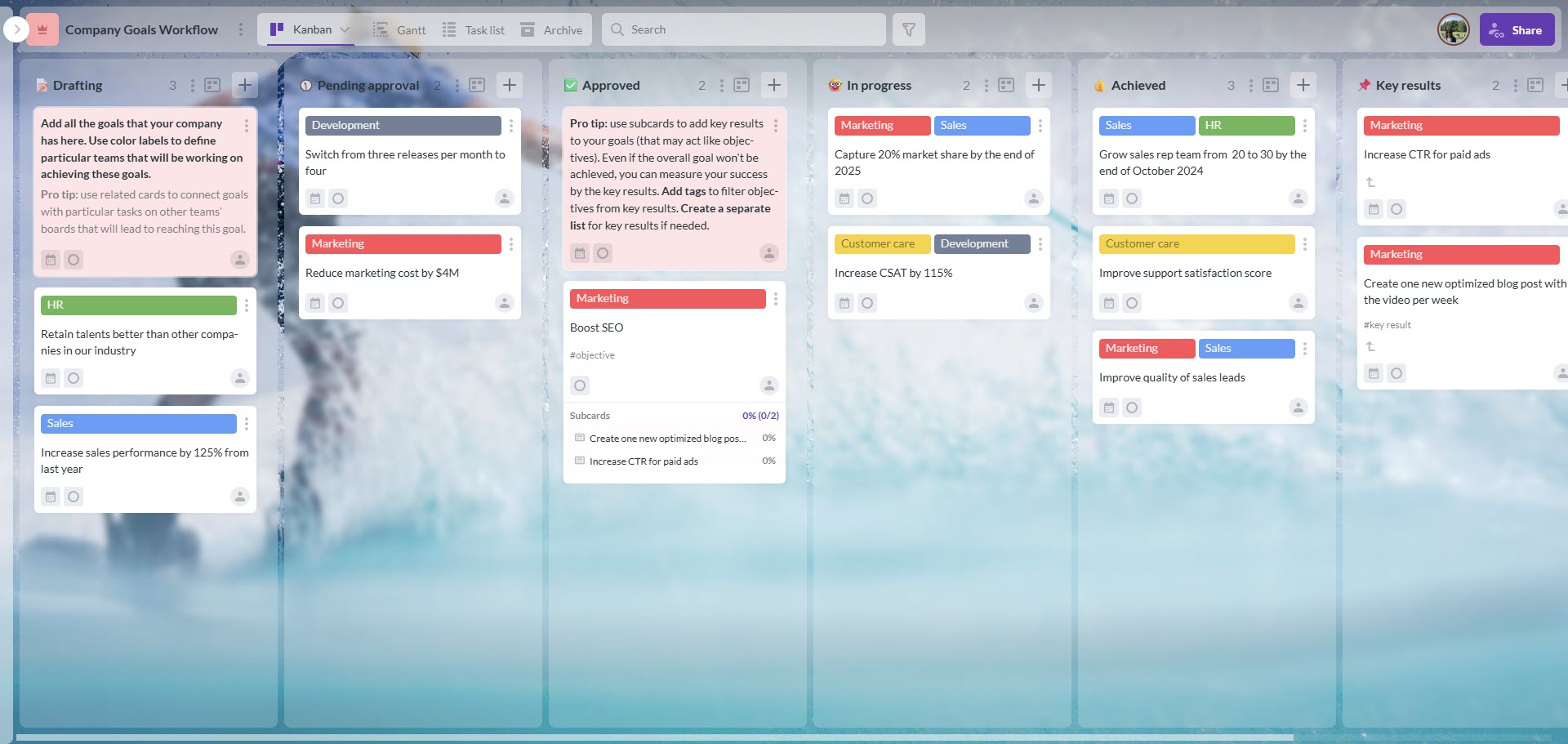
This “Company Goals Workflow” kanban board serves as a clear action plan example, illustrating how to structure high-level objectives into trackable stages with defined success metrics
To answer the question “what does an action plan look like?”, we think you should expect to see these five elements:
Every plan starts with a destination. It’s important to point out what it shouldn’t be. It can be simply “get better at marketing.” It should be based around a SMART goal:
If you can’t base a goal around these five points, then it might not be your ultimate endpoint. What’s the nature and scope of your project?: It might be “to get X product to market by April 2026”. There, you have a goal, and you just need to work out how (or not) it can be achieved.
This is the meat and bones of the document. You break the big goal into smaller, bite-sized tasks. If the goal is a product launch, tasks might include:
Get those in place, and your work suddenly looks more achievable and less disorganized.
An action plan without names is just a suggestion! Every single task must have a Designated Driver, the one person who is ultimately responsible for its completion.
You could base your responsibilities around MOCHA or RACI management templates to add extra clarity and efficiency to the work you’re doing.
Without steady timelines and deadlines, no one knows what they’re aiming for as an end goal. Every task you create needs a start date and an end date. This creates a sense of urgency and allows you to visualize the project’s duration.
It’s also a good idea to allow for delays, mistakes, or pain points that crop up en route, so factoring in a little extra time here and learning how to adjust deadlines accordingly keeps everything on track and helps to keep stress levels lower.
How do you know the task was done well? Your action plan should include Success Criteria. This might be:
These can be helpful after a project is completed and reviewed, as they help you see what went well, what didn’t, and what can be tweaked the next time. Those are the key steps to have in place, but what would they look like when put into action in a real-world example? That’s what we’ll take you through next.
You may also be interested in:
What is a Workback Plan/Workback Schedule? The Essential Guide to Backward Planning with Kanbanchi
Building an action plan doesn’t have to be an administrative nightmare. The goal is to create a roadmap that helps, not hinders. Whether you are using a whiteboard or a sophisticated tool like Kanbanchi, the logic remains the same. Let’s look at how this would work with a specific marketing project.
Before you list a single task, you must know exactly where you are going. A vague goal leads to a vague plan. As we outlined above, use the SMART framework.
Instead of “increase the brand’s social media presence,” say “increase LinkedIn engagement by 25% by the end of Q3.”
You’ve added clarity to the goal and put in a specific endpoint. This will be your ultimate achievement throughout the planning process.
Gather your team and list every single thing that needs to happen to reach that goal. Don’t worry about the order yet, just get the tasks out of your heads.
If a task takes more than a few days, it’s too big. Break it down. “Launch client’s website” is a project, but “write the homepage copy” is a task.
Not all tasks are created equal. Some are blockers, meaning other tasks can’t start until they’re done. Identify Dependencies: For instance, you can’t design a website without the brand guidelines.
Identify the 20% of tasks that will yield 80% of the results. Then prioritize them.
This is where many action plan examples fail. They list the work but not the workers. So, you must assign one lead. Each task requires one person to be responsible. Then you must check everyone’s availability: So, does this specific designer have the 10 hours required for this task next week? If not, your plan is already broken.
A list of dates is hard for the human brain to process quickly. This is where visualization becomes your superpower and where a tool like Kanbanchi steps in to bridge the gap.
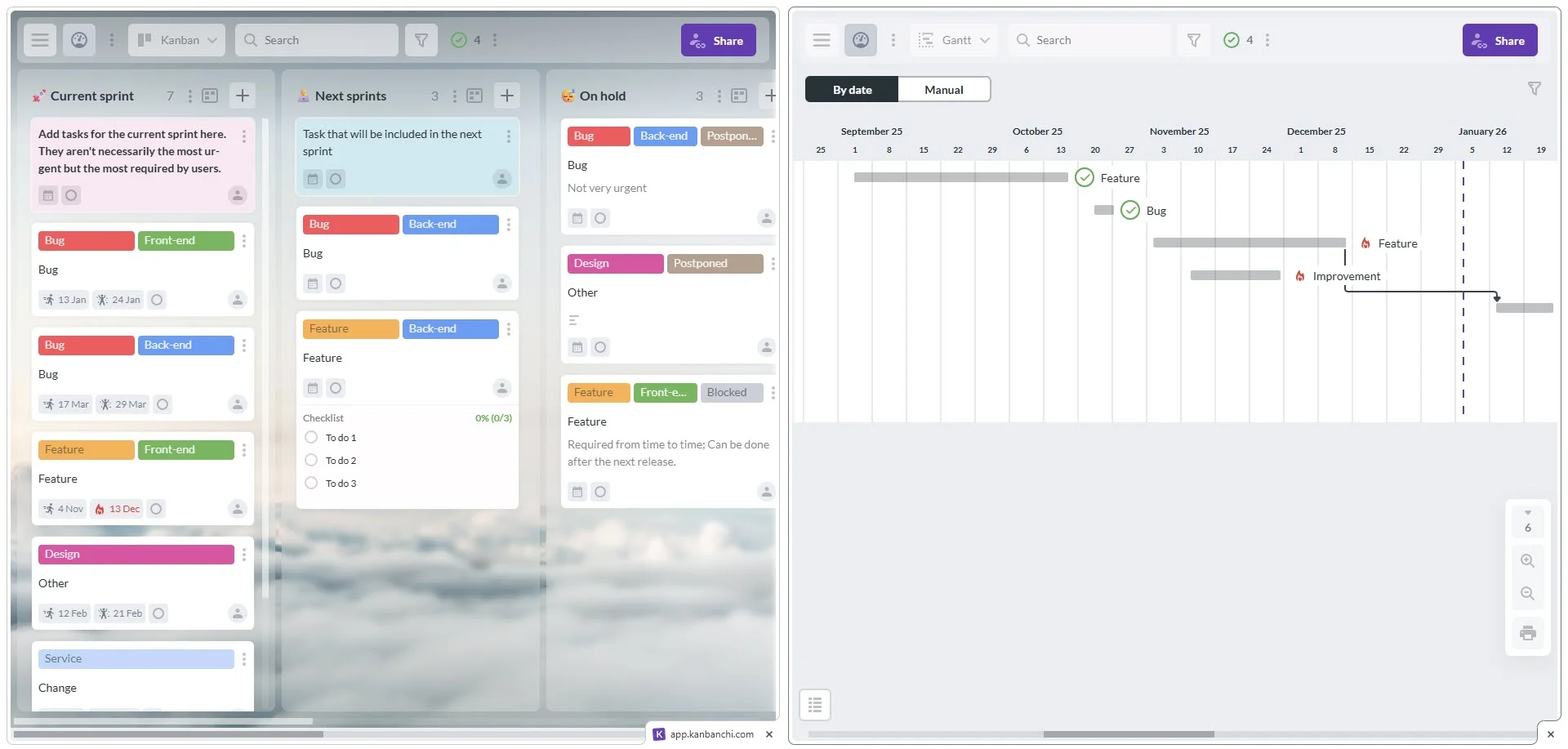
Kanbanchi’s dual-view capability: switch between Kanban board and Gantt chart within the same project or use Chrome split view to open them at the same time
SIGN UP FOR A FREE TRIAL TODAY
What many SMEs forget is that an action plan is not a set-it-and-forget-it document. It is a living entity. Think of it as a sourdough starter when making bread.
Flexibility is the key to execution with any action plan, and while everyone’s eyes should be on the prize, it’s also wise to make sure you’re not getting ahead of yourself or losing sight of what matters in pursuit of the end goal. A quick weekly check-in stops all this.
With this in mind, let’s now take a look at more specific examples of business and team goals for action plans.
More productivity blogs to read
Sometimes, seeing is believing. To show you what a professional action plan example for business versus a personal goal action plan would look like, let’s look at three different examples of an action plan in, …well, action!
We’ll look at:
Imagine your team is launching a new software feature. Your action plan may look like this:
| Task | Owner | Deadline | Status |
|---|---|---|---|
| Finalize Beta Testing Report | Sarah (QA) | Oct 15 | In Progress |
| Create Product Landing Page | Mike (Dev) | Oct 20 | Not Started |
| Draft Launch Email Sequence | Emily (Mktg) | Oct 22 | Done |
| Set Up Social Media Ads | Emily (Mktg) | Oct 25 | Not Started |
For a marketing team, action plan examples often focus on consistency and output.
Action plans for goals aren’t just for big corporations. They work for your career too. Here’s a specific example for personal professional development.
Whether it’s a massive corporate shift or a small team project, these examples show that a plan of action is simply about taking the big and making it small.
You could build an action plan in a paper notebook or a basic spreadsheet. But as soon as a deadline shifts or a teammate finishes a task, these static formats become obsolete.
Kanbanchi is the bridge between planning and doing. It transforms your plan of action from a stagnant list into a high-performance engine. Here’s how:
Kanbanchi has built-in tools to support all core components of your action plan that we discussed earlier:
Not everyone processes information the same way. Kanbanchi offers multiple views to suit your team’s needs:
Remember our rule about assigning one lead? In Kanbanchi, you don’t just write a name; you assign a user to it.
Kanbanchi fits seamlessly with your Google Drive, OneDrive, or SharePoint. If your team is already familiar with Google and its easy-to-use ecosystem, there’s no learning curve for you.
Most action plan examples for business fail because the plan is often kept in a piecemeal fashion. With Kanbanchi, your action plan lives where you work.

Kanbanchi integrates directly into Google Drive, making it the best project management tool for teams using Google Workspace
When you choose a tool like Kanbanchi that effortlessly melds seamlessly with your systems, workflow, and team, success is a given. Your project management becomes one less thing to worry about. The team will focus on what really matters. Stakeholders will always be able to get to the heart of the matter without endless meetings and email chains that get lost and create frustration.
Try Kanbanchi today and see for yourself!
So, by now, you should have a pretty good idea of how to plan and execute a great action plan for you and your team. Still have a few burning questions we’ve not covered? No worries, we’ve got a final run through of some last thoughts.
Think of the project plan as the Blueprint and the action plan as the Work Schedule. The project plan covers the big picture (budget, stakeholders, scope), while the action plan focuses on the granular steps needed to execute that vision.
Daily or weekly. An action plan is only useful if it reflects reality. If a task is delayed, the plan should be updated immediately to show the knock-on effect on the final deadline.
In business, it’s a tactical document. It’s the boots on the ground strategy that ensures a company’s high-level goals are actually being worked on by the staff every day.
You can, but it’s difficult to scale. Sheets lacks the visual flow of a Kanban board and doesn’t offer automated notifications. Moving from a spreadsheet to Kanbanchi is usually the first step toward professional project management.

In this Article:
Start using Kanbanchi now
Start your free trial