
In this Article:
Try Kanbanchi now
Start your free trial


These days, the conversation around the best software for product management 2026 is no longer a luxury but a genuine requirement for SMEs and large organizations. A product manager, these days, has a monumentally tough gig. It’s not just a one-size-fits-all job; they’re person who acts as a bridge to connect market opportunities with customer needs, and fit them neatly into the business’s main objectives.
They’ve then got to translate them into a product that’s got real value. Today’s Product Managers have got to be:
…and all at the same time.
It’s a demanding job that goes way above “just” task tracking. Thus, the software they use has to meet standards. It requires a sophisticated system that’ll manage the entire product lifecycle, from the initial spark of an idea to the final launch. And done seamlessly, too.
When one person is expected to juggle:
Without any decent software infrastructure, an already complex job can suddenly feel chaotic, creating stressors and burnout.
In turn, this can lead to missed deadlines and loss of focus. The market is honestly saturated with options, and choosing the wrong tool can not only be a financial drain but also have a disastrous impact on your work. The true challenge lies in finding a comprehensive, integrated product management solution that works seamlessly across all departments.
Never fear, Kanbanchi is here, and this guide will provide a detailed, objective analysis of the current product management software landscape. We’re going to dissect the essential features required for success:
…and compare the top contenders in each category. Come along for the journey with us to discover how Kanbanchi stands up in the current climate.
Product management is a holistic discipline built upon three fundamental pillars:
Any software hoping to succeed as a product management solution must effectively support all three areas. Failure in just one of these risks can derail the entire product’s timeline. Generic tools can be problematic. Many teams initially attempt to use generic project trackers or spreadsheets. Don’t get us wrong, they’re OK for tactical execution, such as managing tasks, deadlines, and resources for a single project. However, they almost universally fail to address the complexity of product management. Why do these generic systems fall short? They lack the necessary framework to serve several crucial purposes:
Project tools focus on output; product tools must focus on outcomes, that is to say, delivering value and meeting strategic goals.
Product data, such as user interviews, market research, financial models, and development tasks, can become fragmented. Generic tools can’t turn this information into a single source of truth for decision-making.
They treat all tasks equally, missing the critical processes of developing ideas and linking work directly to an overarching product strategy. The result is a workflow operating in silos, where strategic goals are easily disconnected from the rest of the team’s work.
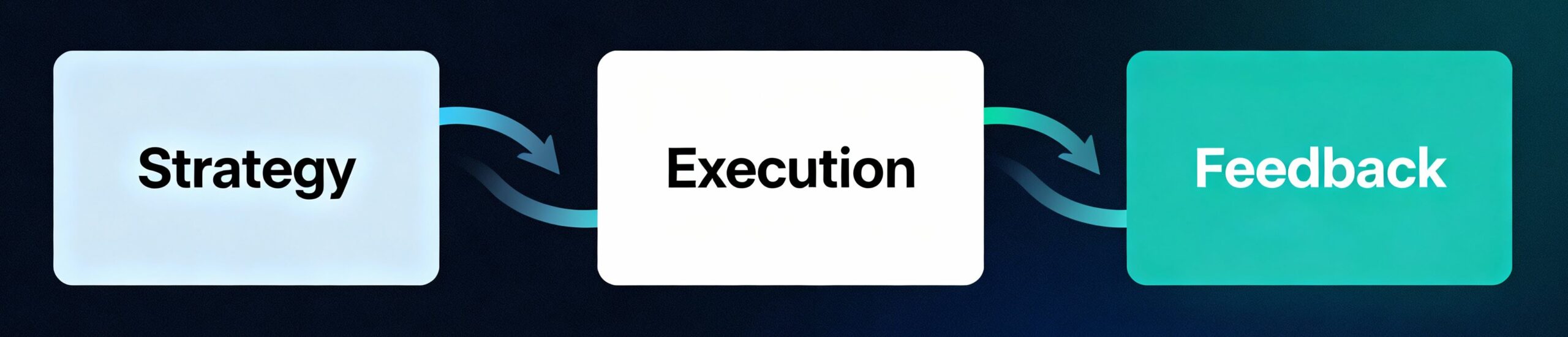
The first pillar is to ask, “Why are you building something?” Product strategy defines the market need and the key metrics (OKRs or KPIs) that’ll lead to a winning product.
A top-tier product management solution must align with this thinking. It should allow PMs to easily map out potential features and initiatives that align with measurable business objectives.
This capability provides clarity to stakeholders and protects the team from overworking and burnout. The first pillar is all about why you are building something. Product strategy defines the market need, the competitive advantage, and the key metrics (OKRs or KPIs) that determine success.
Strategy set? Now it’s time to execute it. This involves coordinating all the different teams, whoever they are. Modern product teams typically rely on Agile methodologies like Scrum or Kanban to manage it all.
The right tool acts to ensure everyone involved in the project understands where they’re up to. It’ll support flexible working whilst keeping everyone on track and meeting deadlines. When the execution phase is well managed, it drastically reduces the time it takes to get a product to market.
The final pillar ensures continuous improvement. The most successful products are built and tested regularly, constantly incorporating customer and market feedback.
A modern product management system centralizes customer feedback, feature requests, and reports. It then provides prioritization frameworks, such as RICE or MoSCoW, to score those ideas based on impact, effort, and strategic alignment.
After considering these three concepts and working out what you require, you can start thinking about making informed decisions about the type of software you’ll need for your product management.
The best product management app must go beyond simple task management to support all the demands of a PM’s role. It needs to be the central nervous system for all product-related decisions. When evaluating the market, the following features are essential for team members:
A roadmap is the primary communication tool for a PM. It should be dynamic and visual. Basically, anyone who picks it up can make sense of it. It’ll have different visualization modes to suit different stakeholders. This includes timelines for executives and detailed, feature-based views (like Gantt or Kanban) for development teams.
The next step is the ability to link tasks and features visually. It helps PMs identify potential blockers and forecast deadlines effectively. Last of all, stakeholders should be able to click on a roadmap item and immediately see the underlying feature details, attached specifications, and current status without leaving the view.
Successful PMs prioritize effectively. The software they use should enable them to make objective, data-driven decisions rather than relying on gut feeling. The ability to add and calculate custom prioritization scores, such as using RICE (Reach, Impact, Confidence, Effort) or MoSCoW (Must, Should, Could, Won’t), is key. This allows for quantitative ranking of features. With a feature like backlog management, PMs can continuously refine and edit upcoming work based on strategic alignment and calculated scores.
The tool needs to capture ideas, requests, and pain points, grab all this info, analyze it, and turn it into digestible data. So there needs to be a single place to collect all raw data. What this’ll do is prevent valuable feedback from getting lost in emails or spreadsheets. Added to this is the ability to link specific pieces of feedback directly to the feature or initiative being developed, ensuring the team understands the “why” behind their work.
Product delivery is a team sport. The chosen software must facilitate effortless cross-functional work without forcing teams to switch contexts or platforms. Every team member must be able to view the item’s live status and receive instant alerts when a decision is made or a task is completed. The software should tightly integrate with document platforms (such as Google Drive or Microsoft OneDrive) so that Product Requirements Documents (PRDs) and design files are always accessible directly from the task card.
Built-in communication tools for real-time discussion on specific features or tasks keep conversations organized and actionable. A platform that offers this integrated set of features instantly elevates its status from a simple tracker to a true product roadmapping software that drives the best strategic outcomes.
More blog posts on IT and development
More blog posts on Product Management
Kanbanchi is without doubt one of the best software for product management in 2025, especially if your team is already utilizing Google Workspace.
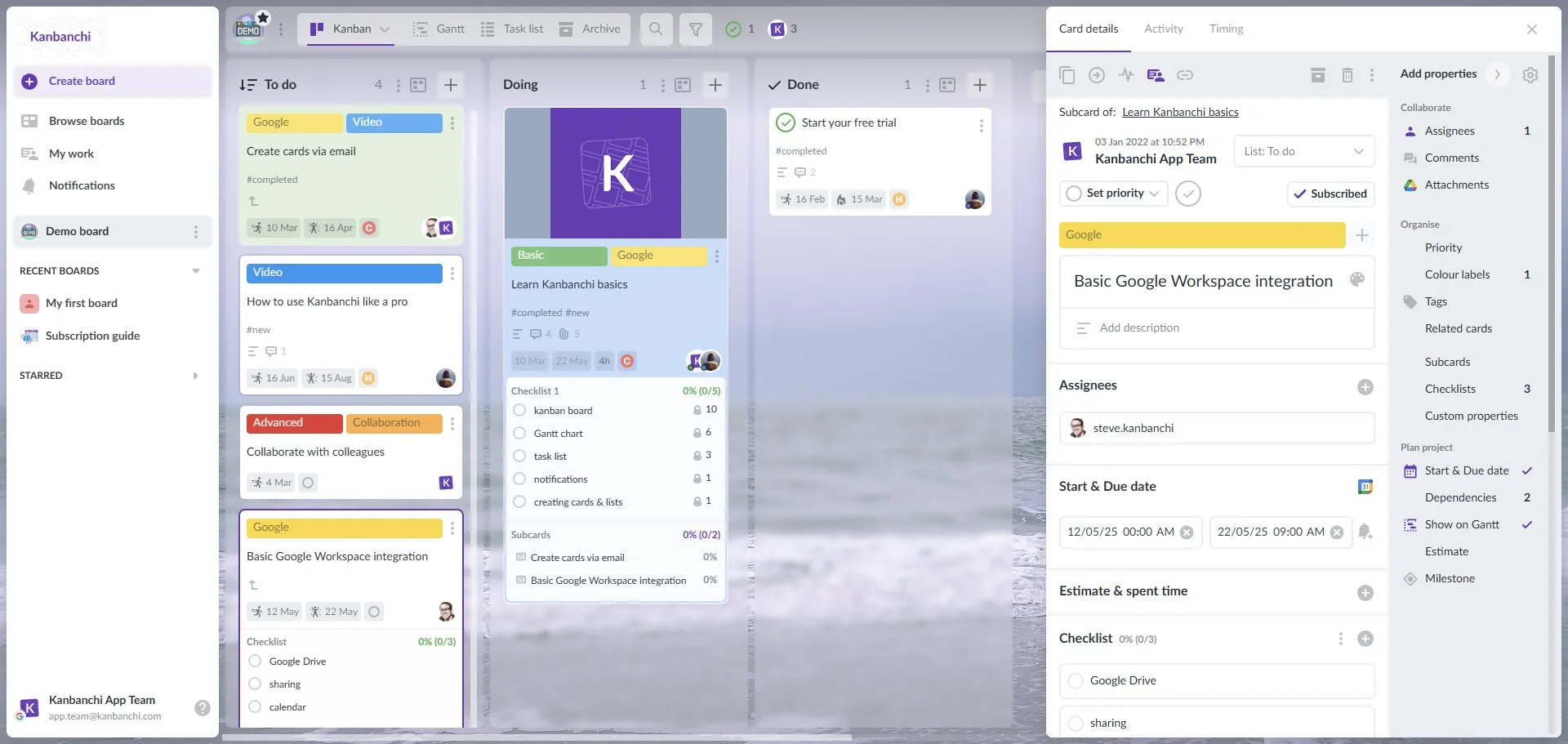
Kanbanchi interface showcasing the Kanban board and the integration with Google Workspace
Competitors like Jira, Productboard, and Aha! do offer robust features, but they often introduce:
Kanbanchi solves this by offering a secure, feature-rich product management system that’s natively integrated with Google Workspace. But wait! It’s more than just a Kanban board; it’s a complete product management solution built from the ground up to operate within the environment your team already collaborates in. This seamless integration eliminates the constant context-switching and data fragmentation that plague multi-tool environments.
Kanbanchi offers plenty of viewing options, which is essential when you need to present a product roadmap to your stakeholders. It’ll allow PMs to tailor the view to their audience, whether executives or external partners.
The Gantt Chart View transforms your prioritized backlog into a professional, shareable product timeline. You can visually set start and end dates, map critical dependencies between features, and track the overall health of your project portfolio. This visual clarity is invaluable for aligning expectations with leadership.
The Kanban Board View serves the development team simultaneously. Cards represent features or user stories and move through lists such as “Ideas”, “Prioritized”, and “In Development”. This real-time visual flow ensures everyone knows exactly what to work on next, fostering an Agile delivery culture.
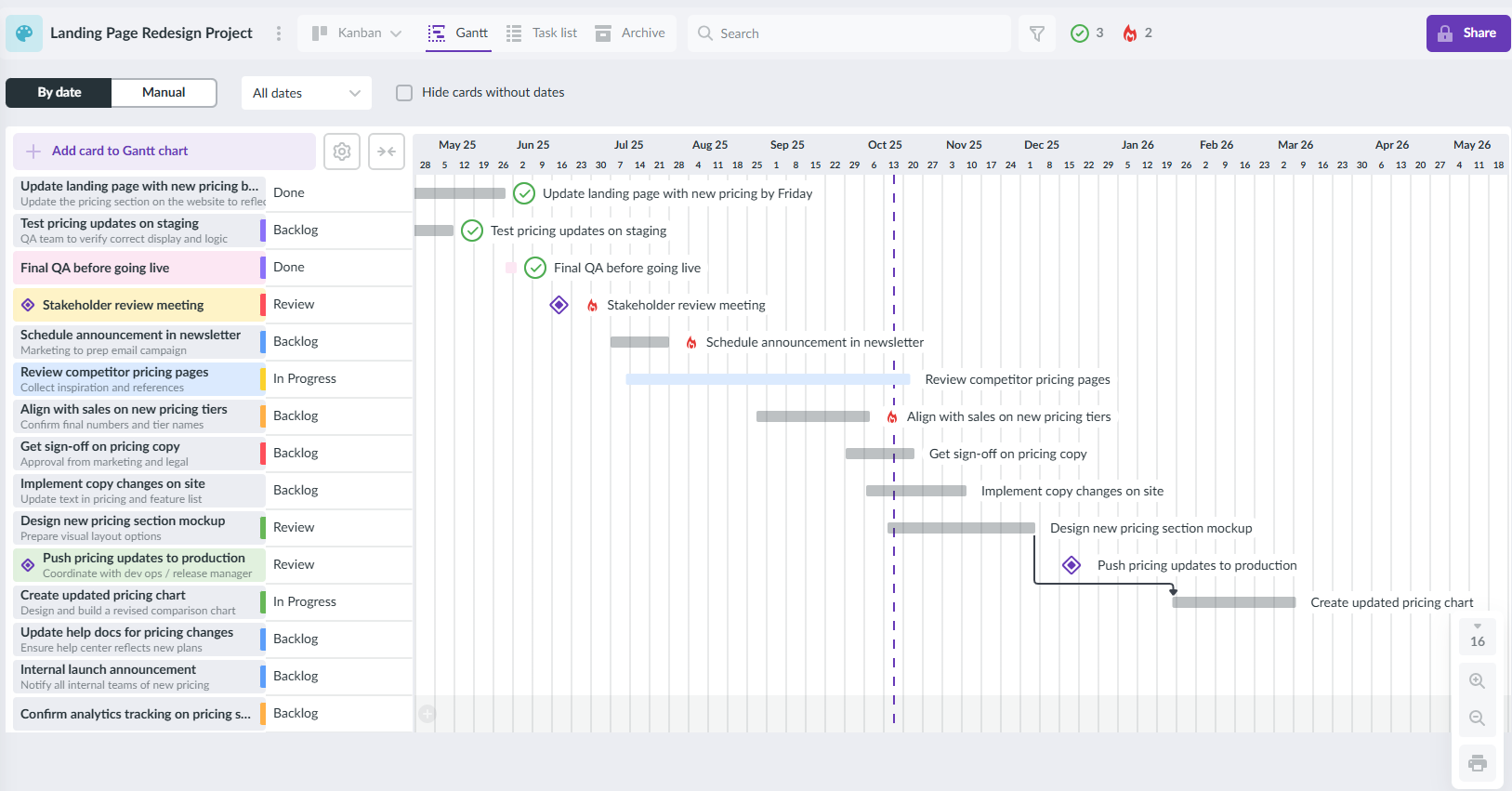
Kanbanchi Gantt chart provides you with a professional, shareable product timeline
The true power of Kanbanchi for a Google Workspace user lies in its deep integration with Google Drive, Docs, and Sheets. This is a game-changer for documentation management.
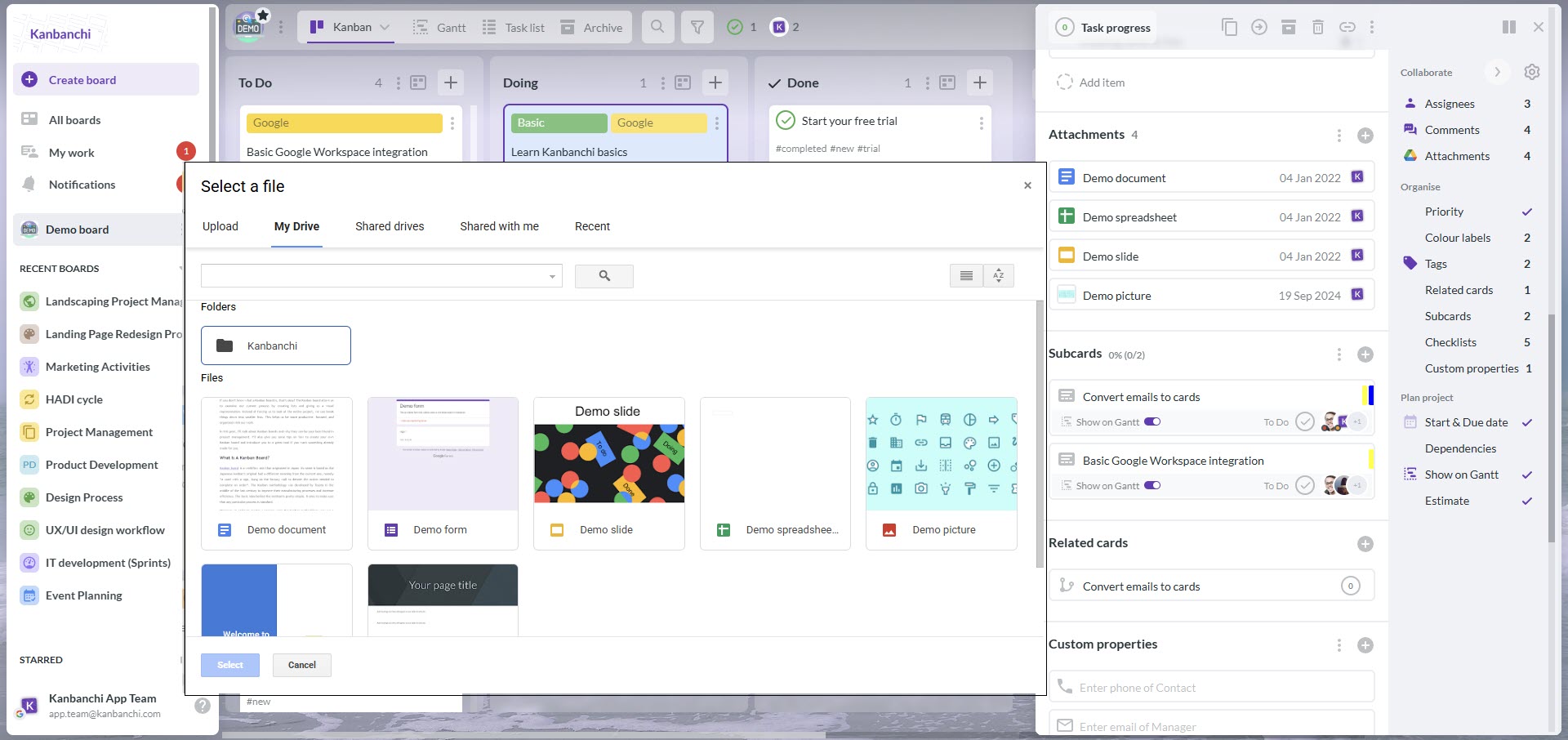
Attaching documents from Google Drive to cards in Kanbanchi saves your file structure
What is the best product management software? Well, we think we have the answer. Kanbanchi provides tools to prioritize a backlog, making it easy to turn ideas into reality.
By offering this blend of strategic roadmapping, tactical execution, and native integration, Kanbanchi provides a streamlined, single-tool environment that is simply unparalleled for Google Workspace-centric teams. It is built for product managers who value clarity, integration, and efficiency.
To understand the practical advantage of Kanbanchi, consider a PM team responsible for a SaaS platform’s feature backlog. The goal? To maximize customer impact while minimizing development effort, answering the question: “What is the best product management software?”
The team uses a single Kanbanchi board for the product backlog. The first column is “Ideas/Requests,”. Features are entered from various sources:
Initially, these features are unstructured and overwhelming.
To impose objectivity, the PM defines specific Custom Fields on the Kanbanchi cards to measure the RICE framework:
As the team edits the backlog, they populate the custom fields for each feature card. The backlog is filtered and sorted in descending order by RICE Score. This ensures development focus remains on features that deliver the most strategic benefit.
For example, a card titled “Single Sign-On (SSO) Integration” might have a high Reach and Impact but also high Effort. A more minor feature, “Export to PDF,” might have lower metrics but an extremely low Effort, making its RICE score surprisingly competitive.
Once a feature is prioritized, the PM attaches the completed Product Requirements Document (PRD) directly from Google Docs or OneDrive/SharePoint to the Kanbanchi card. The card then moves to the “In Design” column (assigned to the designer) and finally to “In Development” (assigned to the engineering lead).
The engineering team can view the exact RICE score, the attached specs, and the latest discussions. All centralized on a single Kanbanchi card. When the work is complete, the card moves to “Shipped,” closing the loop and providing a clear audit trail of the entire product journey, confirming Kanbanchi’s effectiveness as a key product development tool.
Adopting a new tool should not be a complex, multi-month implementation project. One of Kanbanchi’s greatest benefits is the speed and simplicity of setting up a robust product management workflow. Our discussion that follows shows how to provide a rapid, actionable path to creating your strategic roadmap and delivery tracker using the top product management software in 2026.
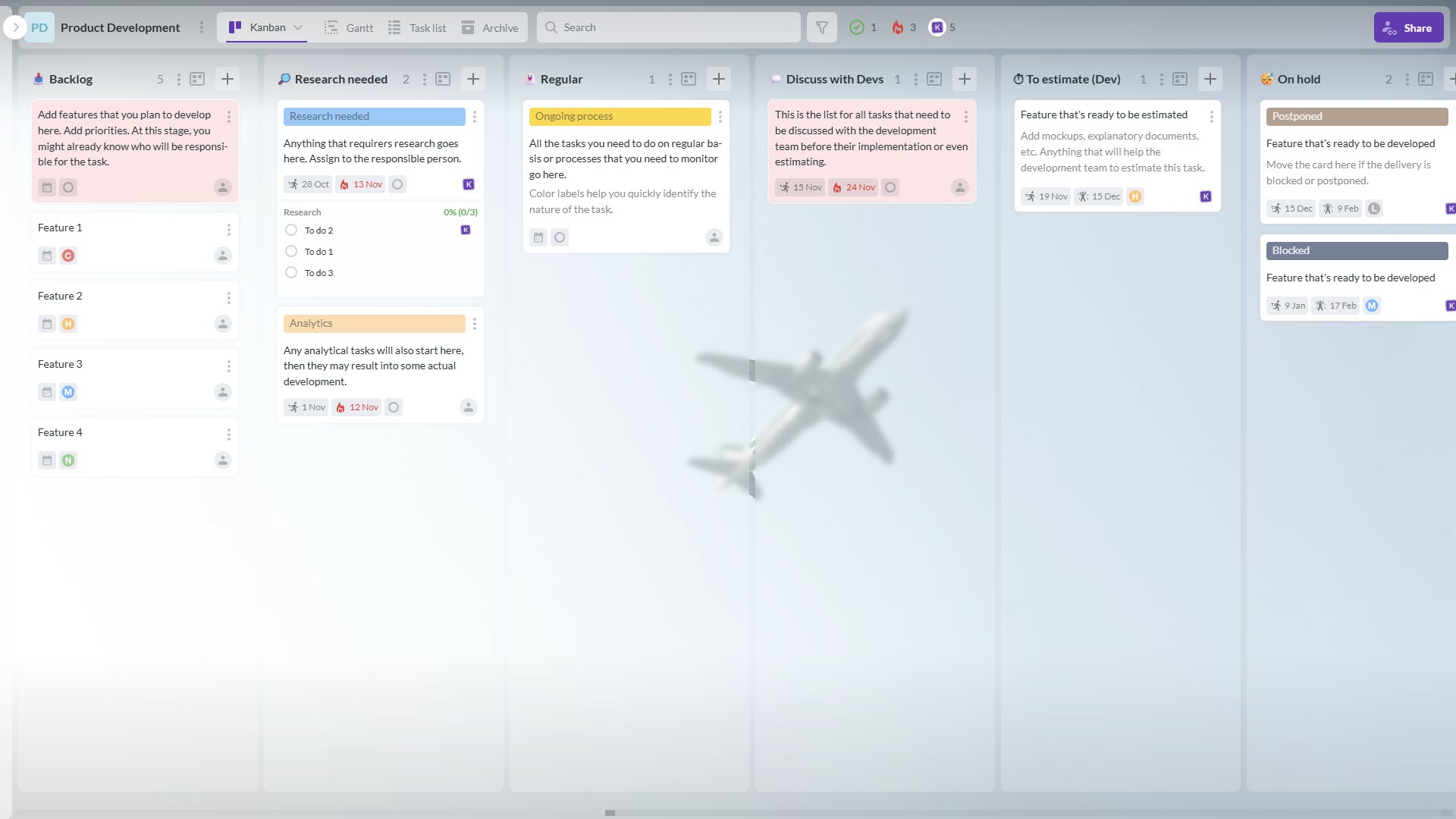
A template of the product development Kanbanchi board that can be found in the application
Start by organizing your work logically. Instead of a single massive board, create separate Kanbanchi boards aligned with your team structure or major product lines. This segmentation keeps the focus clear and helps manage permissions effectively.
The columns on your Kanban board should reflect the stages an idea must pass through to become a feature. For a comprehensive product lifecycle, you might want to consider these columns:
A single Kanbanchi card should represent each feature or significant user story.
Leverage the native Google Workspace or OneDrive/SharePoint integration. Open the card details and attach your product documentation:
This ensures all crucial context is instantly available to anyone reviewing the feature’s status.
Once the cards have estimated Effort and a defined start/due date (which you can set in the card details), switch to the Gantt view. This instantly converts your feature backlog into a visual project timeline. Use the Gantt chart to:
By following these steps, your team will have implemented a complete product roadmapping software system within a unified platform, achieving maximum efficiency. It really is as simple as that.
Still have a few questions we’ve not answered? Our FAQ section should help convince you that Kanbanchi is the superior product management software choice.
A product roadmap is a visual, high-level summary that outlines a product’s strategic vision, direction, and priorities over time. It is essential because it aligns all internal and external stakeholders, executives, engineering, sales, and marketing, around a shared understanding of what the team is building, and most importantly, why they are building it. It acts as a living strategic compass, not a rigid checklist.
Jira and Aha! are powerful but often complex, requiring deep configuration and external integrations to fully support product roadmapping. Kanbanchi is more straightforward and more intuitive for sharing, especially for stakeholders who may not be so tech-savvy. It offers a visual Gantt view that can be printed instantly without requiring external users to navigate app interfaces. Crucially, its native Google/Microsoft integration significantly simplifies user management and access permissions.
Deep integration, like that offered by Kanbanchi, removes friction and prevents documentation silos. Since PMs write PRDs and strategy documents in Google Docs, having Kanbanchi natively connect to Google Drive means the requirements attached to a feature card are always the latest version. This centralizes the product delivery process, eliminating context switching and ensuring the development team is constantly working from the correct, up-to-date specifications.
While we ourselves say that generic tools typically can’t handle product management requirements, a truly integrated platform like Kanbanchi is specifically designed to handle all three pillars. It uses its Kanban board for execution tracking and its Gantt chart for strategic roadmapping. Furthermore, features such as Custom Fields for scoring and the ability to natively attach feedback documentation directly from Google Drive or OneDrive/SharePoint sites to feature cards ensure that the entire feedback-to-strategy loop is contained within a single seamless application.
Want to check Kanbanchi out in action?



In this Article:
Start using Kanbanchi now
Start your free trial