
In this Article:
Try Kanbanchi now
Start your free trial


Modern business teams can feel overwhelmed due to the sheer volume of work that they need to handle. With new incoming requests, shifting deadlines, and urgent updates, finding the best way to keep track of daily tasks at work has become vital.
The feeling of task overload is something that most of us are now familiar with. When every fresh notification feels like it should be a priority and you feel that the risk of tasks falling through the gap has increased, you’re likely to feel more stressed. This is when productivity gets lower, too.
Taking control means moving from reactive firefighting mode into proactive management. This can be done effectively by using an efficient task tracking system. However, for it to work, we need to have a single source of truth (SSOT) at its heart.
The SSOT needs to be easily accessed on a centralized platform. This is where all of the project requirements, deadlines, and communication are kept. You don’t need to hunt for information or guess anything.
Rather than keeping pieces of information in different places, or silos, you’re making sure that all the emails, chats, and notes are right there for everyone in the team to find. It’s a safe and more organized way to work that perfectly fits the modern, remote team structure
This approach permits a more efficient way of working that helps team members to work together more effectively. It gives team managers a way to track their team’s progress and predict when current tasks should end, as well as accurately predict the duration of future tasks.
More articles on Task management here
For many teams, their current systems are holding them back rather than allowing them to progress. The system that they have for managing work isn’t built around a single, cohesive strategy. Instead, it has a series of diverse tools that they need to use.
While each tool may work perfectly well on its own, they have not been designed to form a single system that makes life easier for everyone. Because of this, you might end up with a messy patchwork of sticky notes, confusing email threads, and mental to-do lists.
A list-based system where everyone has their own idea of what needs to be done is a recipe for fragmentation and failure. When your vital information is scattered across the team, no one knows what anyone else is doing.
You might have an excellent chat app for communication and a solid calendar for keeping track of upcoming tasks. But if a single source of truth is lacking, you can’t expect to bring it all together.
This situation leads to you spending more time looking for information than completing tasks. If your time is being wasted by looking for documents, this is something known as context switching.
It’s a shift in your daily work routine that can make your productivity drop by as much as 40%, according to research. As for the lack of visual flow, this means that no one in the team can see the big picture.
They can’t understand where the bottleneck is forming or how much work is currently in progress. With no visual representation of the workflow, a list-based system spread across different platforms is blind to the volume of work.
Without a visual representation, you can’t see that there are five tasks all stalled at the approval stage. Or that one team member is overloaded while others are free.
Many workflow systems are reactive instead of proactive. Since they lack a centralized dashboard for everyone in the team to share, there is a risk that data becomes siloed and isn’t noticed by someone who needs to know about it.
The lack of real-time synchronization is often a major problem that takes away a project’s momentum. If there is no shared dashboard, colleagues might not know what each other is working on or grasp the urgency of their current tasks.
Tracking your daily tasks doesn’t have to be overly complex or time-consuming. However, there are some common techniques that you need to be aware of.
The human brain can’t be expected to handle all of the different moving parts in a project, so take a look at these ways of lowering the stress.
This technique takes its name from the US President who designed it. It’s a method that forces you to categorize each of your tasks based on urgency and importance. The tasks then fall into one of the following quadrants.
| Quadrant | Type | Description |
|---|---|---|
| 1 | Urgent & Important | Holds the most vital tasks. These are both urgent and important. |
| 2 | Not Urgent & Important | Where you have your next batch. They’re not urgent, but they’re important, so they help to fuel high growth. |
| 3 | Urgent & Not Important | Has urgent but not important tasks. This is where you’re likely to find tasks that can be delegated or scheduled for a future date. |
| 4 | Not Urgent & Not Important | Has the tasks that are neither urgent nor important. You might want to delete them or schedule them for much later. |
When you’re forced to put a task into one of these four sections, it removes the risk of analysis paralysis. This also helps to lower the level of cognitive load by giving the user a clear path forward.
It can be a relief to finally see a sense of order in a crowded inbox. Even if many of them are urgent or important, it’s unlikely that they all fit into this category. So, you get a clear sense of where your priorities lie.
By time blocking, you’re reclaiming chunks of your day for specific tasks. This means that you’re not relying on a generic to-do list that gives you a lot of time to fit in various tasks; you’re making sure that a specific job is marked as needing your full attention.
It takes away the stress that can be felt when your calendar is packed, and you feel that you’re not getting anywhere. You don’t need to worry about what you need to do next, since your calendar is leading the way.
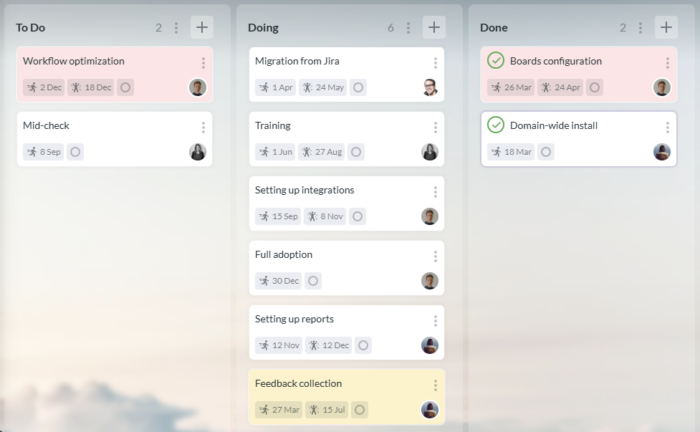
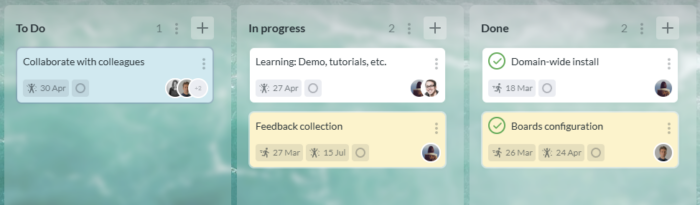
The Kanban board provides a visual workflow style that originated in the Japanese manufacturing sector. It shows you the workflow divided into columns that show stages like To Do, In Progress, and Done.
You see your tasks move across the columns, giving you a clear visual representation of progress. One of the key benefits of this method is that it lets you instantly spot any bottleneck. If ten cards are sitting at the same stage, that’s a clear warning signal.
This phrase has been around for a long time, since it was Mark Twain who coined it. The overall idea is that you do the most difficult task as your first job in the morning. By getting it out of the way early, the rest of the day should be comparatively easier.
The truth is that most people spend a lot of their day trying to avoid the hardest tasks. This means that they may be anxious until it’s finally done. By removing this weight from your mind early in the morning, you should feel more comfortable looking forward to the rest of the day.
This interesting technique sees you split your working day into intervals of 25 minutes. The idea is to allow periods of deep focus. Each of these 25-minute intervals is followed by a five-minute break to allow you to recharge.
The Pomodoro Technique then ensures that you get a longer break of between 15 and 30 minutes after you complete four of the intense periods of work. There are some solid reasons for using it, as it helps to fight the mental fatigue that comes from working for a long time without a break.
Choosing the right task management system is a crucial decision that will determine how well your work flows. It’s easy to see why this is viewed as the foundation upon which areas such as your productivity and team collaboration are built.
For many people, this falls into the simple choice of manual or digital. It’s easy to see why so many opt for the apparent simplicity of manual choices like a physical notebook. This appears to give a classic approach to tracking tasks that everyone is familiar with.
Using a pen and paper to write tasks and then cross them out gives the sense of satisfaction that comes from physically marking an item as completed.
This could be a simple yet functional approach for someone who only needs to manage a small number of their own tasks with no notifications or software updates. There is no learning curve to take into account.
However, the key drawback is that this is a static approach to task management. A handwritten document isn’t easy to re-order, amend, or share. So it doesn’t translate well to a collaborative environment.
When you need to collaborate with other team members, the tasks written in a notebook are invisible to everyone but the person who holds that book. This leads to information silos where communication gaps appear, and constant status meetings are needed to keep everyone on the same page.
This also gives you advanced options like attaching a file, collaborative real-time editing, and accurate tracking. The digital method of tracking tasks leads to a single source of truth where every stakeholder and team member can see that a task has changed status or what is holding it up.
In this way, there is far less need for status updates and email threads about the tasks. Project briefs can be attached to tasks, and automated deadlines can be set up with reminders, giving you the best way to track tasks at work with minimal effort.
The question here is only “What is the best task management software?” You need to choose depending on your criteria. Read our recent guide to help define for yourself.
Perhaps the key point here is in the scalability. We’ve seen that manual task tracking is possible on small projects where a single person needs to know what is happening at all times. As the team grows, this is no longer realistic, as more people need to know what each other is doing.
By being able to view an entire team’s workload instantly, you can get a sense of control over the subject that simply isn’t possible otherwise. You also have the option of drilling down for more details or using digital tools to take a closer look at the most important aspects.
If you want to manage your tasks professionally, you need to move beyond simple lists and introduce visual flow. This is the only way to make complex information accessible and useful for everyone who needs to see it.
An approach using Kanban boards and Gantt charts lets you look at the work needing to be done in different ways. By using both of them wisely, you can stay on top of your daily momentum as well as your long-term strategy with the best way to track work tasks.
Kanban is a workflow process that is designed to let you visualize the current status easily. A series of cards moves across the board, typically covering stages like “to do”, “in progress”, and “done”.
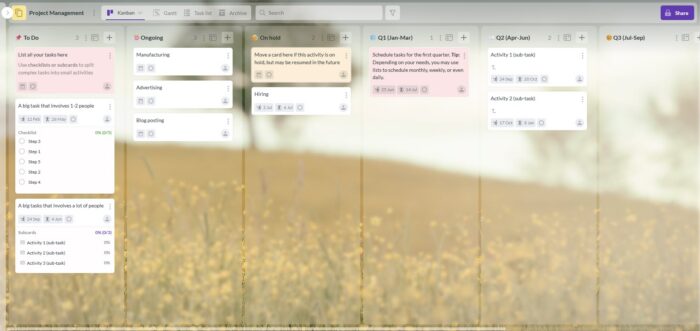
It’s a clever way for teams to immediately understand their current workload. This is also an approach that lets you manage your workflow by making any bottlenecks obvious before it’s too late.
The visual nature of this approach means that the path to completion is clear for everyone who looks at it. This visual approach allows resourcing to be carried out more efficiently, avoiding the common problem of overloading some team members while others are free.
You could look at the Kanban board as being a sort of live dashboard. It shows you exactly where your resources are currently being used and where the project’s greatest risks lie.
A Kanban board is ideal for keeping on top of your daily workflow, but it isn’t the tool that you need to carry out high-level planning at a strategic level. This is best done using a Gantt chart, which is a horizontal bar chart giving you a visual representation of the project over time.
It lets you see how long your tasks should last, as well as the overlaps and dependencies that they share. Understanding these dependencies is particularly important since you need to know if task A has to be completed before task B can begin, or if a small delay somewhere could cause a disaster elsewhere.
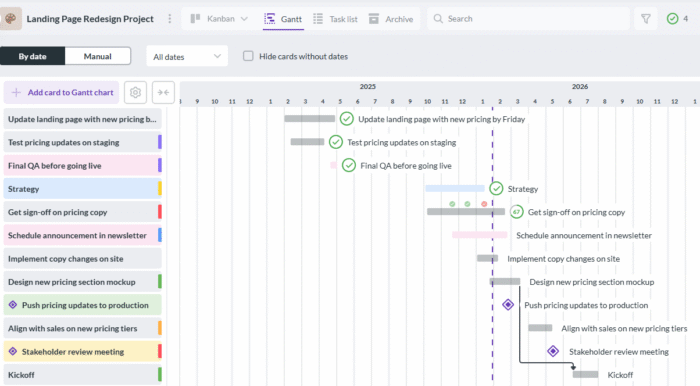
The Gantt chart makes these relationships as clear as day with just a simple glance. This means that your deadlines don’t collide, so that you can allocate your resources correctly and in advance.
We’ve seen the benefits of both of these approaches, but how do you decide which one to use as the best way to track tasks at work? The truth is that you need to use both of them to get a balanced approach to keeping track of all your tasks.
By using both of these tools, you can synchronize your work across a single digital platform. This gives a fluid workflow that is the best way to track work tasks and lets you zoom in on the details or zoom out to look at the overall strategy.
Effective task management is the plan that most teams start with, but they often run into issues such as the tool fatigue that’s caused by having to navigate between different apps that aren’t connected.
Finding files, checking deadlines, and replying to messages can turn into a chore when you need to enter and exit a variety of applications. Kanbanchi solves this issue by working as a native app or layer inside the Google Workspace ecosystem.
Instead of forcing you to enter each app as a guest, it lets you enter as part of your daily workflow that connects all the different elements seamlessly.
The seamless integration with Google Workspace or Microsoft 365 environment is one of the key aspects that allows teams to use their existing tools in a more complete workflow. The process allows you to sign in with your Google or Microsoft credentials and immediately start using the tools you’re already familiar with. No separate account is needed, and there is no need to go through a steep learning curve as you discover that the best way to keep track of tasks at work is simple.

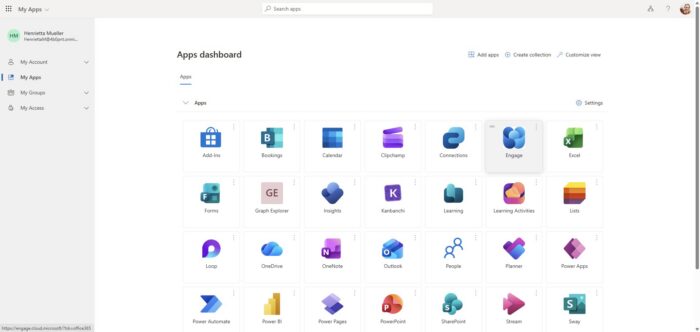
Start your free Kanbanchi trial today
As we’ve seen, keeping track of tasks at work becomes more difficult when there are other team members involved. By giving real-time updates and clear ownership status, Kanbanchi makes it easier for teams to work together.
The process of centralizing your tasks onto a single visual card ensures that they remain visible at all times. This means that there is no longer any need to waste time hunting for information, calling clarification meetings, or writing long email threads.
The unified approach creates the best way to keep track of tasks at work. It turns something that was holding you back into a tool that gives you a competitive advantage.
Read more: What is Task Management Software? The Ultimate Guide to the Best Team Tools


In this Article:
Start using Kanbanchi now
Start your free trial