-  views

15 Best Wrike Alternatives for Project Management in 2026 (Compared)

Try Kanbanchi now

Start your free trial

 

Logos of Wrike alternatives

If you’re at all familiar with project management software, then Wrike is a name you’ll likely know. For years, it has been a fixture, praised for its powerful features and high level of personalization. We’ve done the heavy lifting, providing an objective comparison of the 15 best Wrike alternatives for 2026. We will dive into:

  1. Key features
  2. Pricing
  3. Ideal use cases 

If we’re dealing in honest truths, when the word “powerful” is used, it can often be mistaken for “complex with a steep learning curve”, and it can end up putting a lot of customers off. Why? Well, the project management software space has expanded very rapidly in recent years. Many specialized tools offer good value coupled with simplicity to meet specific team needs. 

Statistics show that 54% of project management professionals say they still lack effective collaboration technology, and there’s a real need for change. Before we go on, ask yourself a few questions:

  • Are you an organization deeply rooted in the Google Workspace ecosystem?
  • Microsoft 365? 
  • Do you find yourself paying for Wrike features you never actually use? 
  • Does your team need a solution that lets them start working from day one without configuring the system for a week? 
Do any of these questions resonate?

It’s time to look seriously at the alternatives. See, for Google Workspace users, the right Wrike alternative should feel like an organic extension of Drive, Gmail, or Calendar. Not an external tool demanding constant context switching. For Microsoft users, the solution should be easily accessible from the apps list and should be able to connect to corporate SharePoint, etc.

This article is your practical roadmap to finding a superior project management solution to Wrike. To help you choose the platform that truly fits your team, not the one that requires your team to fit it. Ready to find a replacement that offers clarity without the complexity? Then this article is for you.

Want to read more articles related to Project Management? – Click here

Why Teams Seek Alternatives to Wrike

Wrike is robust, but sometimes, an overabundance of features creates more friction than flow. When an enterprise tool tries to be everything to everyone, it often becomes prohibitively complex. What do the teams that need simple, efficient task management do then? They start searching for Wrike competitors. The reasons are usually rooted in a mix of usability, cost, and ecosystem fit.

  1. Learning Curve: Wrike’s extensive customization and feature-rich environment mean new users often face a significant learning curve. Training a large, diverse team on a highly complex platform consumes time and resources, reducing the initial adoption rate. Teams shouldn’t need a three-week certification course just to manage PM tasks!
  2. Pricing Issues: Wrike has shifted its focus to the enterprise market, and its pricing model has become complex. For mid-sized teams or agencies, it’s now disproportionately expensive. You’ll pay a premium for advanced features your team won’t use. If you’re using only 20% of the functionality, the remaining 80% is wasted.
  3. Poor Integration with Google: While Wrike integrates with Google, the connection is rarely as seamless as users require. Teams relying on Gmail for communication, Drive for assets, and Calendar for scheduling need a tool that lives inside Google, not just one that loosely connects to it.
  4. Over-Engineering Simple Projects: Not every project requires resource leveling, portfolio management, and a custom workflow engine. For teams managing content creation, marketing campaigns, or even simple cross-departmental tasks, Wrike’s heavy framework can feel like overkill, leading to slower processes and user frustration.

Ultimately, the best alternatives to Wrike succeed by offering a simplified, targeted solution. They provide the necessary power without the unnecessary baggage, giving teams a clearer path to focus on the work itself.

Essential Criteria for Evaluating Wrike Competitors

Scales with the alternatives

Choosing the right project management tool isn’t about picking the one with the most logos on its feature page; it’s about aligning the tool’s core strengths with your team’s specific pain points. When evaluating the top Wrike alternatives 2026, focus on these five critical factors to ensure you find a tool that delivers maximum ROI and minimal frustration.

1. Pricing Model and Scalability

  • Wrike Check: Wrike’s pricing can increase significantly for some features as advanced security.
  • Alternative Focus: Look for transparent pricing that scales predictably with your team size and ensures the core features you need (like Kanban boards) aren’t locked behind the highest tiers.

2. Native Ecosystem Integration

  • Wrike Check: Integration is often limited to Zapier or basic calendar exports.
  • Alternative Focus: For Google Workspace users, this is non-negotiable. You need a tool that stores data natively in Google Drive. Allows creating tasks from emails in Gmail. Works with Google Calendar. In the same way, teams using Microsoft 365 would need their project management app to connect to their corporate SharePoint, for example.

3. Ease of Use and Onboarding

  • Wrike Check: Known for a steep learning curve that requires dedicated training.
  • Alternative Focus: The tool must be intuitive. If a team member can’t understand the basics in under an hour, the adoption rate will suffer. Look for a clean, logical UI that prioritizes visual management.

4. Task Visualization and Flexibility

  • Wrike Check: Offers multiple views, but customization can make them unwieldy.
  • Alternative Focus: Ensure the tool supports the views your team actually uses. For agile teams, robust Kanban is a must. For project planners, a clear, drag-and-drop Gantt chart view is essential. The ability to switch between these views seamlessly, all linked to the same task data, is key.

5. Customization vs. Complexity

  • Wrike Check: High customizability can lead to configuration paralysis.
  • Alternative Focus: Does the tool offer the right kind of flexibility? This means priorities, labels, and tags, but without forcing an admin to spend weeks setting up complex, proprietary structures.

By focusing on these points, you move beyond mere feature comparisons and target the core issue: finding a platform that genuinely simplifies and enhances your existing workflow, rather than forcing you to learn a whole new operating system. So, with all this considered, what are the best alternatives to Wrike on the market? We’ll consider these next.

15 Best Wrike Alternatives

What’s best to look for when finding the top Wrike competitors? We must look for tools that offer equal or better functionality in key areas like:

  1. Visual project management
  2. Collaboration
  3. Ease of deployment (particularly within a specific ecosystem like Google Workspace)

Here’s a detailed look at some of the best Wrike alternatives for enterprise teams, SMBs, and SMEs:

1. Kanbanchi

Kanbanchi was purpose-built for Google Workspace, making it the most seamless Wrike alternative for organizations already living in the Google cloud. This is where native integration shines for most SMEs. Later on, Kanbanchi also developed a separate version that is Microsoft environment-friendly. 

The Kanbanchi Advantage: Your Kanbanchi boards are stored as files in your Google Drive. Sharing a project board is as simple as sharing a Google Doc. This eliminates the need for separate accounts, passwords, or data security concerns outside of the Google ecosystem. Similarly, for Microsoft users, boards are files in OneDrive or SharePoint.

Kanbanchi board sharing settings combined with Google Drive's sharing

Kanbanchi boards are files inside Google Drive and follow the same sharing settings. Can be easily accessed with a Google account.

Wrike Comparison: Kanbanchi offers three superb views: Kanban, Gantt Chart, and List view. Switching between visualizing tasks, timelines, and the list of all tasks makes it ideal for managers who need both macro and micro views.

Pros

  1. Native Google Workspace Integration: Unmatched integration with Drive, Gmail (create tasks from email), and Calendar.
  2. Ease of Use: Intuitive, clean interface with a near-zero learning curve.
  3. Visual Project Management: Excellent Kanban, Time Tracker, and one-click Gantt chart views.
  4. Cost-Effective: Clear pricing that scales well for growing teams.

Cons

  1. Doesn’t have the ultra-deep, hyper-specific feature set of Wrike (e.g., highly complex resource allocation).
  2. Primarily focused on Google Workspace, though Microsoft 365 integration is also available, and this version is constantly developing.

2. ClickUp

ClickUp is known for an ambitious goal: to replace all other workplace apps. It’s highly customizable and flexible, making it a strong choice for those who found Wrike lacking in view options.

Wrike Comparison: It matches Wrike in customization but often surpasses it in sheer view volume (over 15!). However, this flexibility can sometimes lead to complexity, much like Wrike itself.
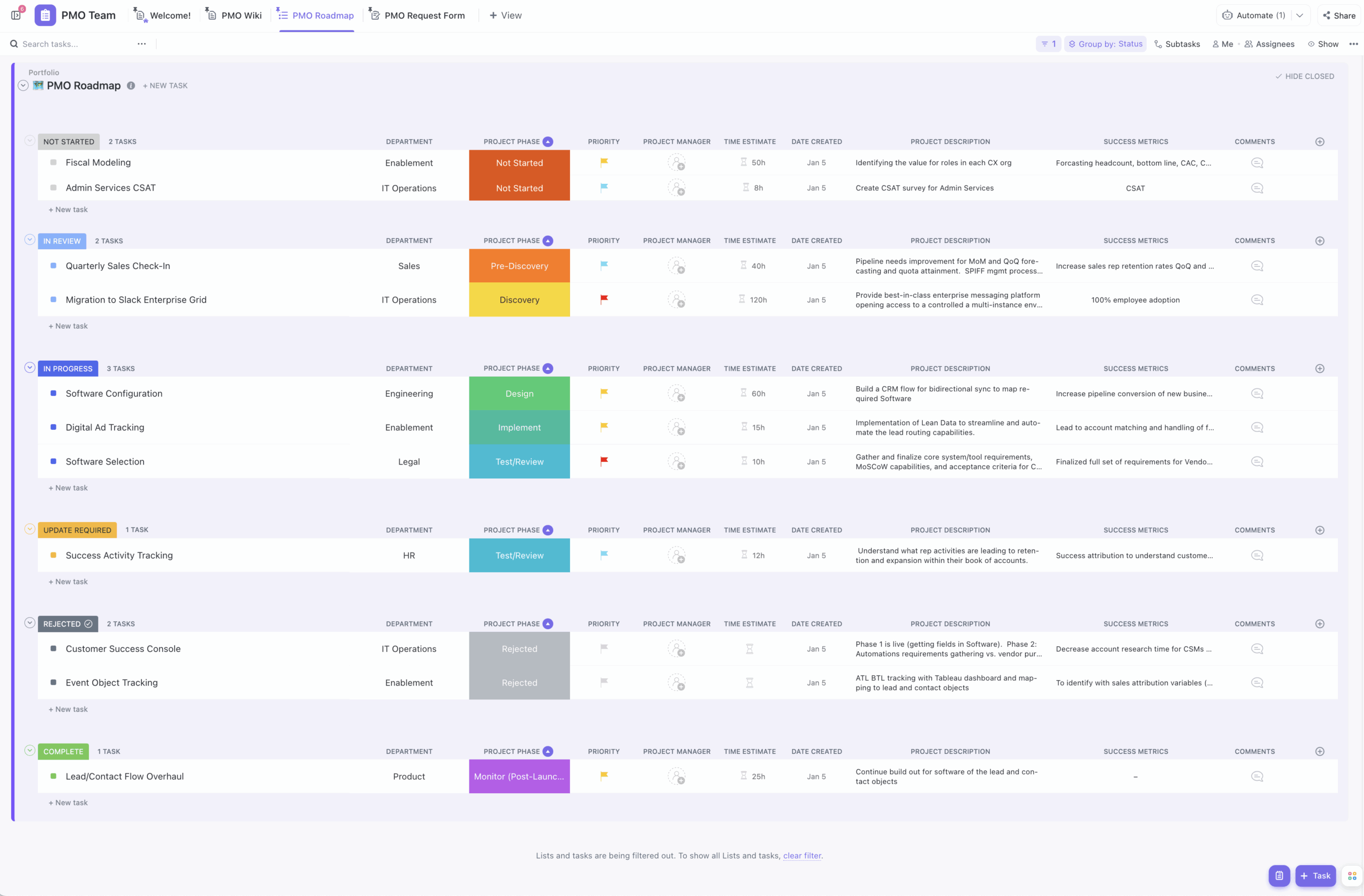
Illustration of ClickUp complex interface

Larger projects may feel overwhelming in ClickUp

Pros

  1. Highly flexible with numerous views (Kanban, List, Table, Calendar, etc.). 
  2. Excellent for all-in-one teams looking to consolidate tools.

Cons

  1. The constant updates and sheer volume of features can be overwhelming and introduce bugs.
  2. Can suffer from setup and organization overhead.

3. Asana

Asana is the darling of marketing and creative teams, with a focus on beautiful, structured, list-based projects. It emphasizes task clarity and simple collaboration.

Wrike Comparison: Simpler and cleaner than Wrike, Asana offers a much gentler learning curve. It’s often chosen by teams who felt Wrike was too heavy for their creative workflows.

Asana offers creative teams-friendly interface

Creative production board in Asana offering clean UI with the possibility of switching views

Pros

  1. Clean UI
  2. Strong third-party integrations

Cons

  1. It can struggle with complex timeline dependencies (Gantt-style), though it’s improved in paid tiers. 
  2. Not natively Google Workspace or Microsoft-focused

4. Monday.com

Monday.com (Work OS) is built on a colorful, customizable table interface. Its strength lies in its ability to adapt to almost any use case, from project management to CRM to HR tracking.

Wrike Comparison: Similar to Wrike, Monday.com targets the “Work OS” space, but its visual, spreadsheet-like interface is arguably easier to pick up than Wrike’s multi-layered hierarchy.

Monday.com interface

Monday.com features easy to comprehend spreadsheet-like interface

Pros

  1. Highly adaptable and visually engaging. 
  2. Excellent automation features.

Cons

  1. Can be expensive
  2. Complex functions often require the highest-tier plans. 
  3. The core structure is less project-management-centric than Kanban/Gantt tools.

5. Jira

A go-to alternative for technical, software development, and agile teams. Jira excels at managing complex Scrum and Kanban workflows and provides deep issue tracking.

Wrike Comparison: While Wrike can be configured for Agile, Jira is the native environment for it. It is more technical than Wrike and often requires a dedicated admin.

Jira Software offering features for technical teams and development teams

Jira Software works perfectly for technical teams, but may require much effort when setting it up for non tech-savvy teams

Pros

  1. Good choice for engineering and IT teams. 
  2. Integrated with other Atlassian products (Confluence, Bitbucket).

Cons

  1. Overkill for non-technical teams (marketing, HR). 
  2. UI is notoriously complex and developer-focused.

6. Trello

Trello is famous for its elegant simplicity and drag-and-drop usability, making it a fantastic alternative for teams looking to de-Wrike their lives.

Wrike Comparison: Trello is the opposite end of the spectrum from Wrike; it prioritizes speed and simplicity over deep reporting and rigid structure. However, it leads to a lack of many professional features needed by business teams and to the need for many add-ons (power-ups) and additional setup.

Trello power-ups collection

Configuring Trello boards with more than a thousand add-ons from their collection may require a significant amount of time

Pros

  1. The easiest tool to learn. 
  2. Great for ad-hoc tasks, small projects, and personal organization. 

Cons

  1. Struggles with large, complex, or cross-board projects. 
  2. Reporting and time-tracking features require Power-Ups (paid add-ons).

7. Microsoft Project/Planner

For teams committed to the Microsoft 365 environment, this is the most logical alternative. Project is the enterprise-grade tool; Planner is the simpler Kanban option.

Wrike Comparison: Microsoft Project is often viewed as Wrike’s traditional rival, powerful, complex, and aimed at certified PMs. Planner is the simplified, collaborative counterpart.

Microsoft Planner task board integrated with Microsoft 365 tools

Microsoft Planner offers simple task organization for smaller teams; larger teams will need more robust features of MS Project, which will be more costly

Pros

  1. Deep integration with Teams, SharePoint, and Outlook.

Cons

  1. Project is notoriously difficult to use and requires training. 
  2. Planner can be too simple for complex task dependencies.

8. Airtable

Airtable is a spreadsheet with superpowers, allowing users to build custom databases and views (Grid, Kanban, Calendar, Gallery).

Wrike Comparison: It’s more flexible than Wrike in its structure, appealing to users who need a relational database to organize their work. It’s less of a pure PM tool and more of a custom workflow builder.

Airtable database interface resembling a table

Airtable positioning itself as the digital operations platrofm

Pros

  1. Highly flexible data management. 
  2. Great for content calendars and operational databases.

Cons

  1. Not a true Gantt/timeline tool at its core. 
  2. It can become complex and expensive quickly as tables grow.

9. Teamwork

Designed specifically for client-facing agencies and service teams, Teamwork focuses heavily on client collaboration, time tracking, and profitability reporting.

Wrike Comparison: More project-centric and less of a Work OS than Wrike. Its core strength lies in tracking billable hours and client-side access control.
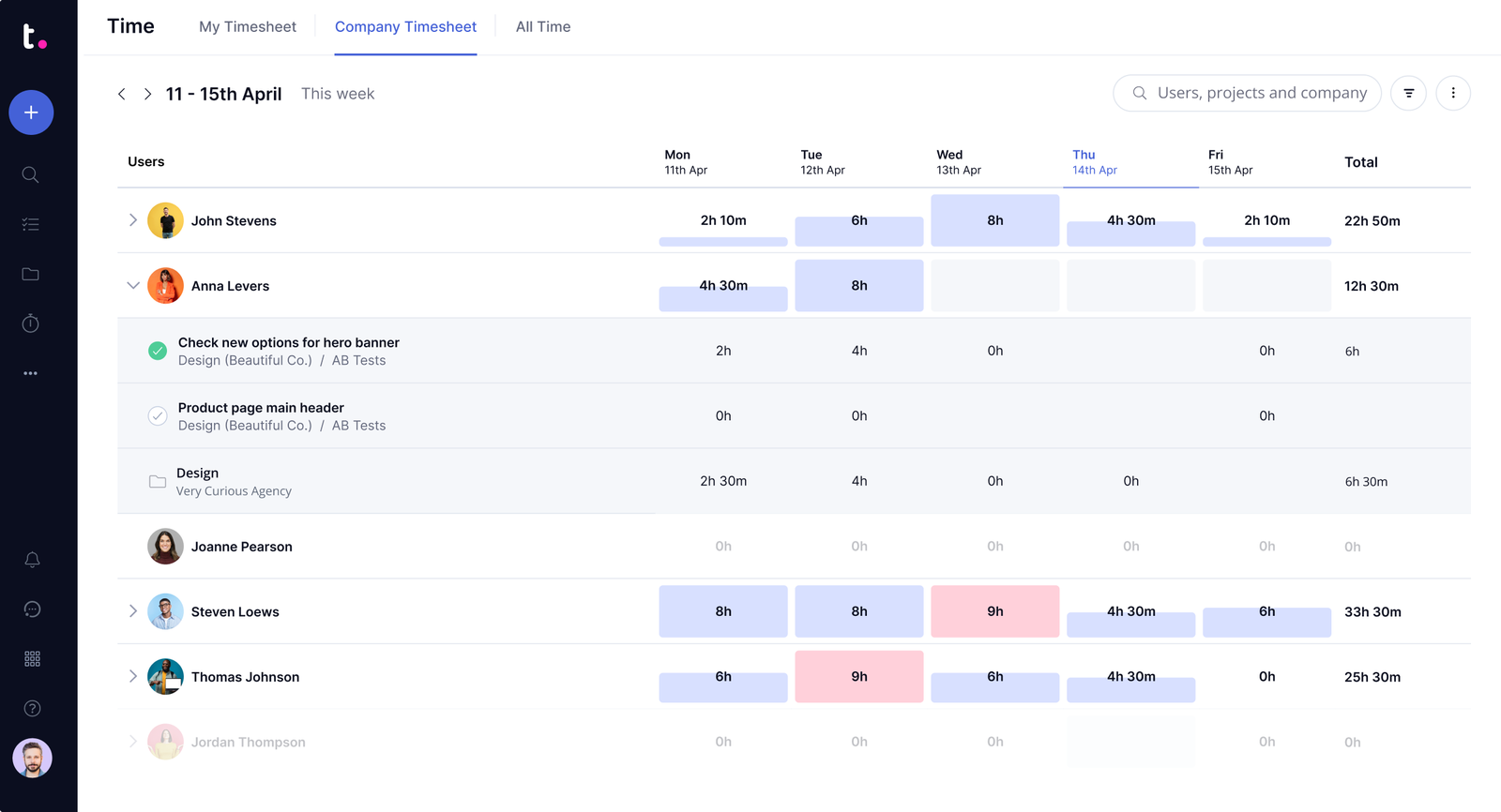
Timesheet in Teamwork

Teamwork’s timesheet will show you the time spent on tasks; this data can be used to issue invoices or for internal time tracking

Pros

  1. Superb feature set for agencies, including invoicing and client permissions. 
  2. Excellent customer support.

Cons

  1. It can be slow and clunky. 
  2. The UI is functional but less slick than rivals such as Asana or Monday.com.

10. Smartsheet

A powerful platform based on a familiar spreadsheet interface. Smartsheet is often used for large-scale operations and portfolio management, providing a hybrid of spreadsheet functionality and PM features.

Wrike Comparison: Similar enterprise-level power to Wrike, but delivered via a row-and-column interface familiar to anyone who uses Excel.
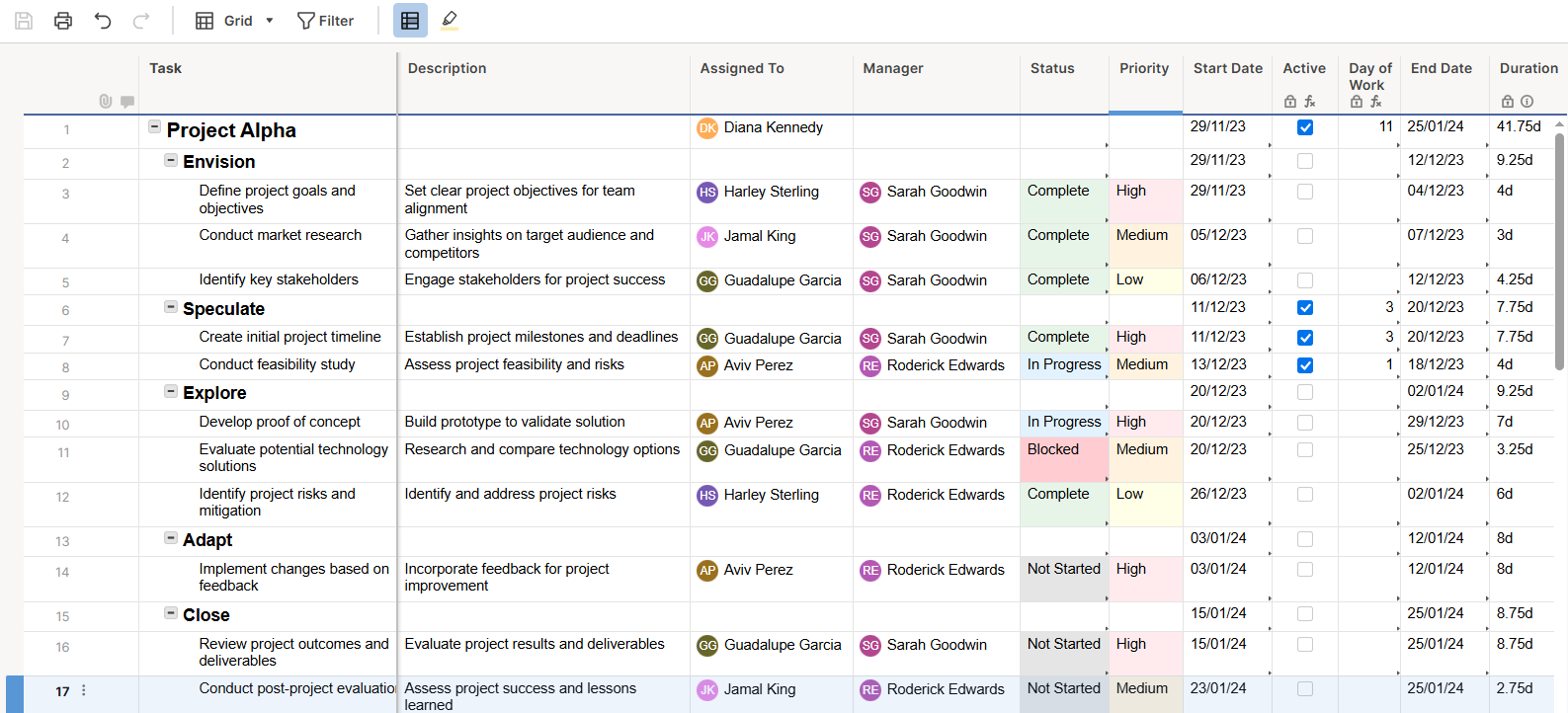
Smartsheet project tracker in spreadsheet view with tasks and timelines

Smartsheet’s spreadsheet-style interface for task tracking is familiar to Excel users

Pros

  1. Excellent reporting features.
  2. Highly customizable via formulas and automation.

Cons

  1. Expensive and complex. 
  2. The learning curve is substantial for those unfamiliar with advanced spreadsheet logic.

11. Workfront (Adobe Workfront)

A robust enterprise-level solution, Workfront is particularly popular in large marketing departments.

Wrike Comparison: Highly similar to Wrike in its enterprise focus, aiming to manage work across the entire organization, primarily in the creative industry.

Adobe Workfront offers the tool for large creative teams

Adobe Workfront is focused on large creative teams, providing them with the tools to track tasks, create and launch campaigns, and communicate in one place

Pros

  1. Deep capabilities for resource management, capacity planning, and portfolio management.

Cons

  1. Exclusively for large enterprises operating in the creative industry
  2. Pricing and complexity are beyond the needs of mid-market teams.

12. Basecamp

A great, simple tool. Basecamp provides a centralized hub for communication, documents, and tasks with a deliberately pared-down feature set.

Wrike Comparison: A complete philosophical opposite of Wrike, designed to eliminate feature bloat.
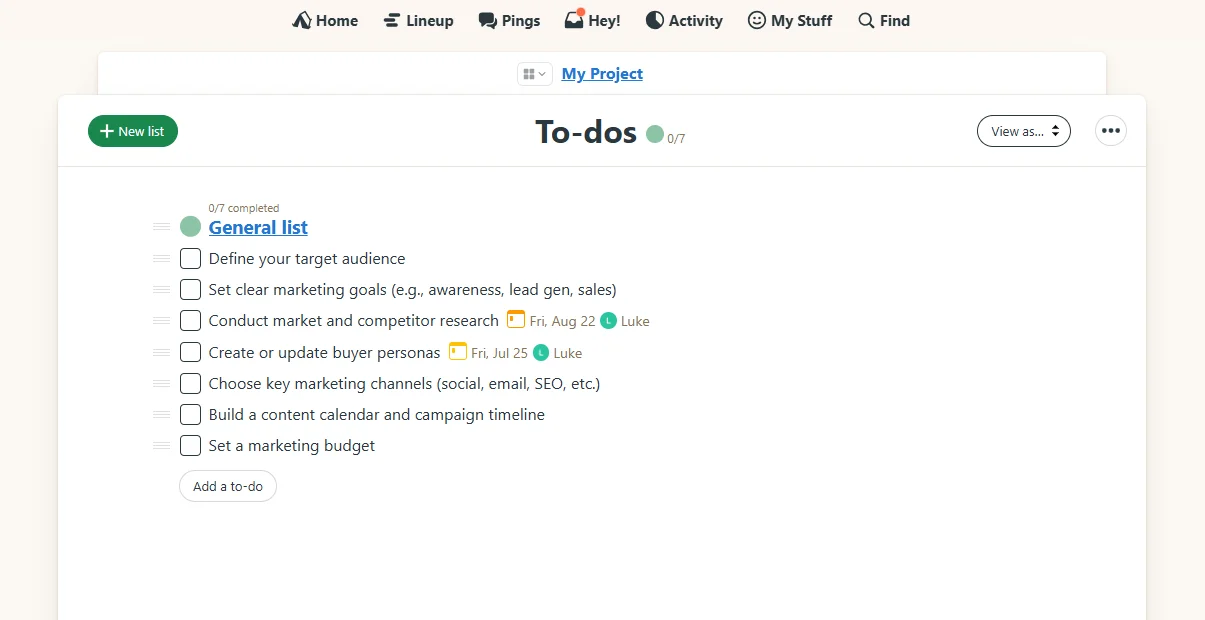
Basecamp project management dashboard

Basecamp offers a simple, flat-rate platform for task management, team communication, and client collaboration

Pros

  1. Fixed, low pricing regardless of team size. 
  2. Great for simple, client-facing communication.

Cons

  1. Lacks advanced features like Gantt charts and time tracking.
  2. No complex reporting.

13. MeisterTask

A sleek, intuitive Kanban-based tool that is deeply integrated with MindMeister (mind mapping).

Wrike Comparison: Much simpler and more visually appealing for teams that rely on Kanban visualization.

Meister Task Kanban board

Meister Task offers a very simple Kanban board that will support task tracking; however, features beyond this are limited

Pros

  1. Excellent for visual thinkers and teams who map out ideas before building boards. 
  2. Strong automation features.

Cons

  1. Features beyond Kanban and basic task management are limited.

14. Notion

A flexible, customizable workspace that acts as a wiki, notes app, and task manager combined.

Wrike Comparison: Like Airtable, it offers a high degree of custom database building, but is more focused on documentation and knowledge management than strict project control.
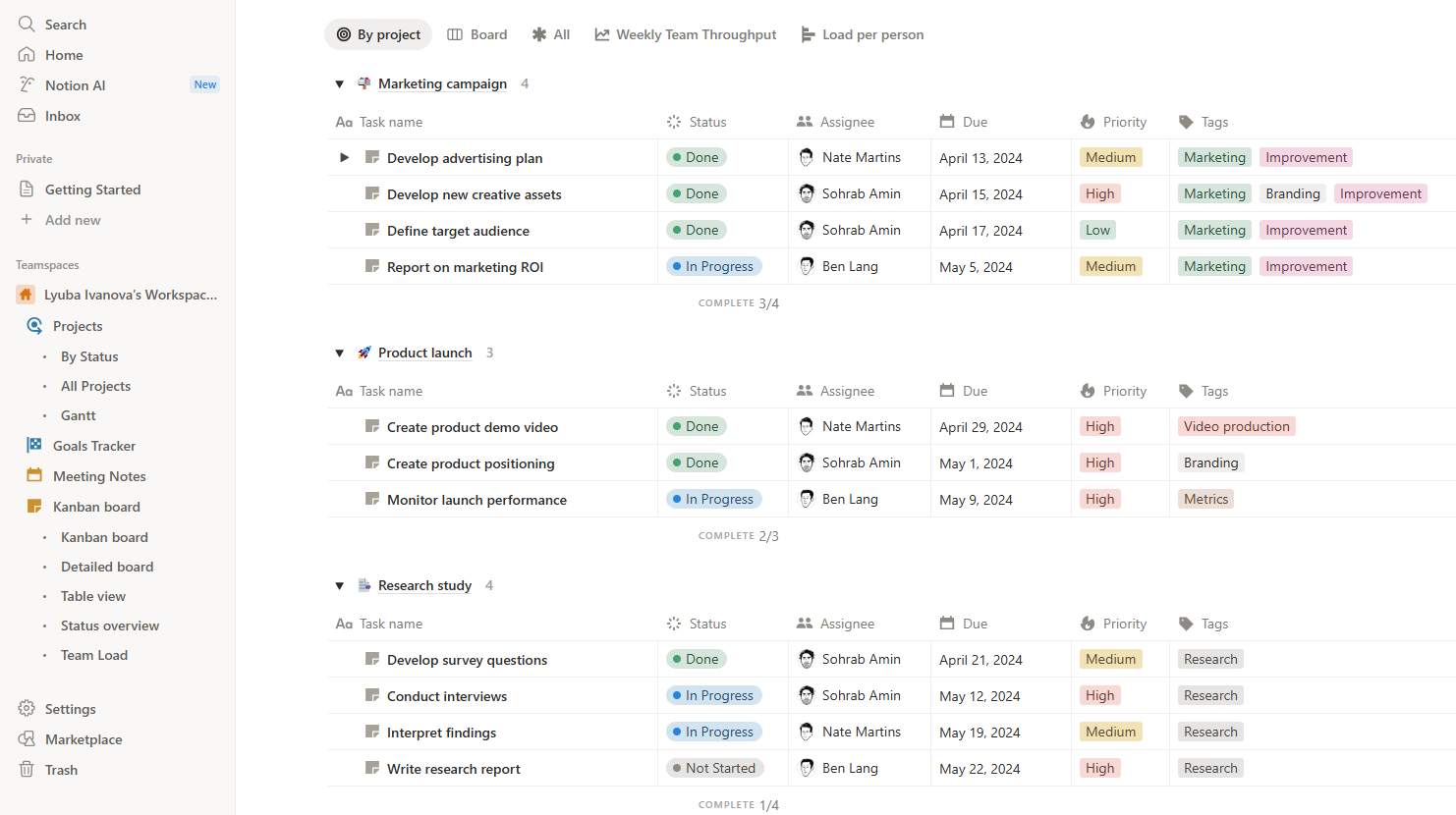
Notion workspace with Kanban board, tasks, and notes

Notion’s flexible modular interface with tasks, notes, and custom databases allows you to build your own workspace and introduce any level of customization

Pros

  1. Excellent for consolidating documentation and tasks. 
  2. Highly flexible.

Cons

  1. Requires significant time investment to build and maintain the structure. 
  2. Not a native PM tool.

15. Scoro

A comprehensive work management solution designed for professional service companies, integrating project management, CRM, and financial data.

Wrike Comparison: Targets similar all-in-one use cases as Wrike but with a heavier focus on integrating sales, billing, and project progress.
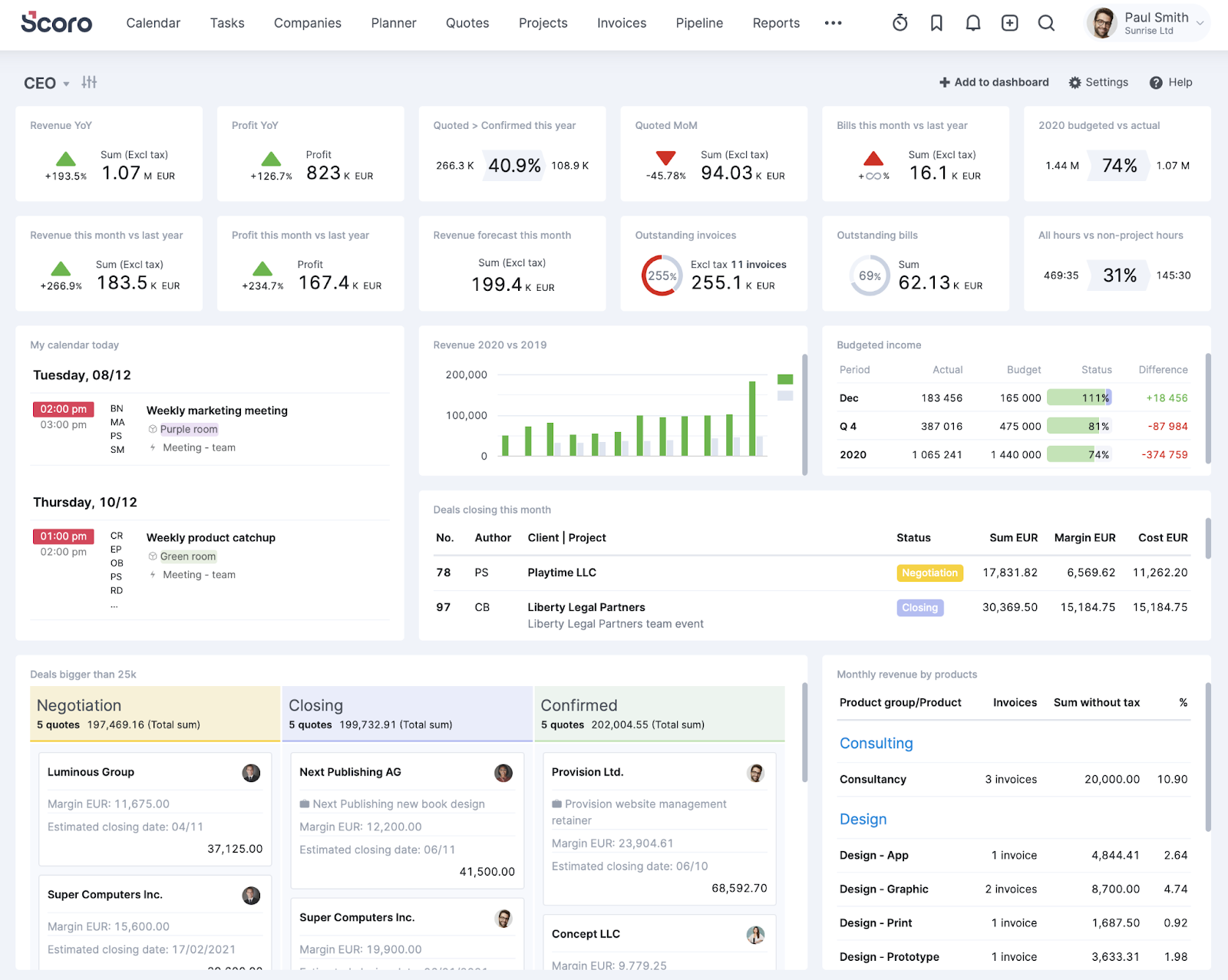
Scoro dashboard used for reporting

Scoro’s sophisticated dashboards are an excellent tool for reporting, but may feel too complex for some teams

Pros

  1. Excellent financial and utilization reporting for agencies.

Cons

  1. Expensive. 
  2. It can be overkill for internal teams that don’t need the financial management features.

Optimizing Your Project Workflow with Kanbanchi

Let’s be honest: migrating from any enterprise solution can feel like a daunting task. But when you choose a tool that is a native fit for your existing ecosystem, the process is streamlined dramatically. 

For Google Workspace users, Kanbanchi provides a move with no real learning curve, plus an upgrade in simplicity and integration. What’s not to love about that? 

Kanbanchi’s strength lies in transforming Google’s power into an intuitive project management tool. 

Content Marketing Workflow in Kanbanchi

Want to know more? Here’s a simplified example of how a Marketing Team can manage its Content Creation workflow in Kanbanchi more easily than it could in Wrike.
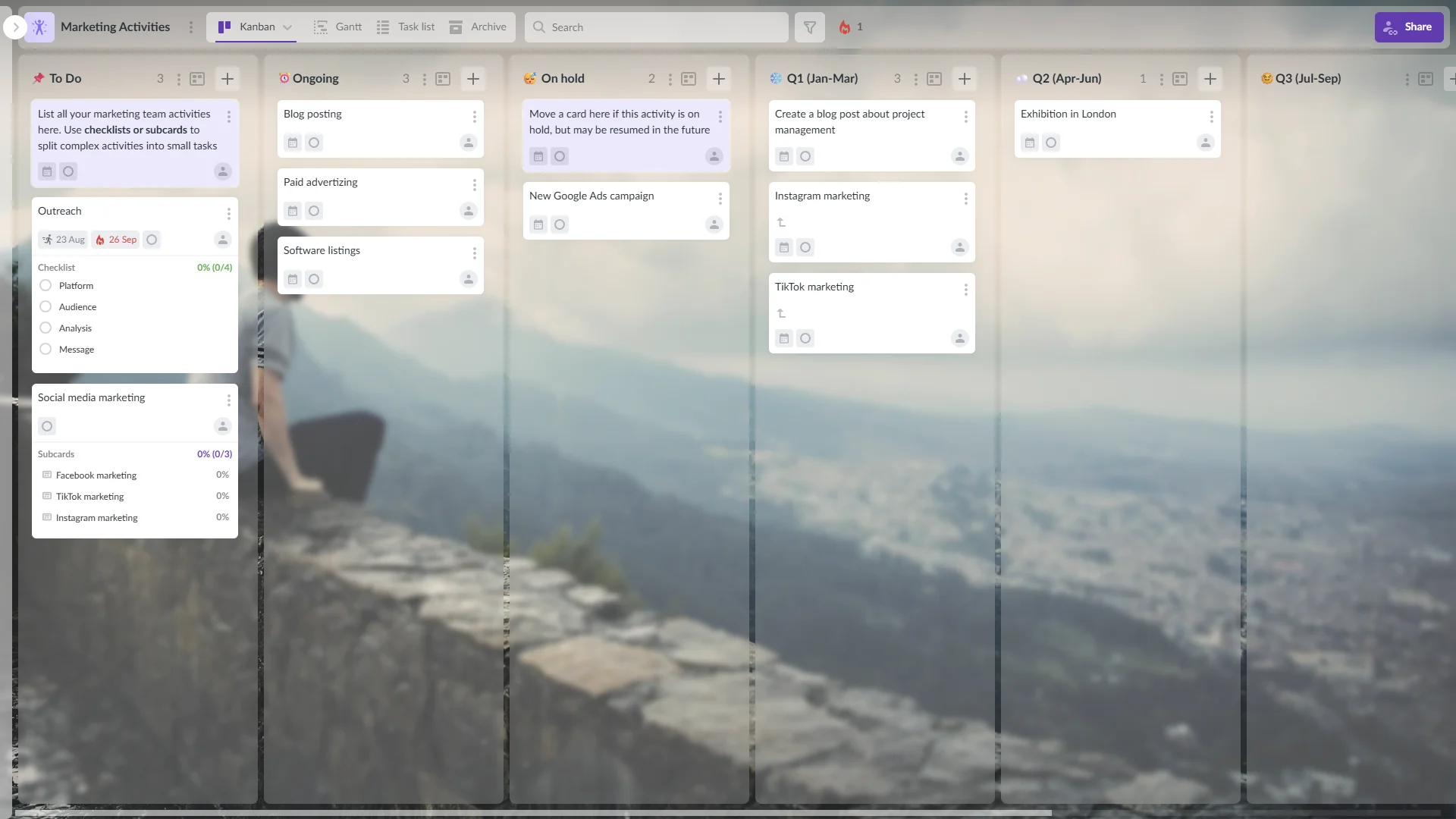
Kanbanchi project management software

Kanbanchi provides a Google Workspace-integrated platform with Kanban boards and Gantt charts for marketing teams and campaign workflows

1. Idea Capture (Gmail/Board Email)

An idea for a new blog post arrives in the Project Manager’s Gmail inbox. Instead of copying and pasting, they use the Kanbanchi add-on to turn the email directly into a task card. This eliminates context switching and data entry. Alternatively, non-Gmail users use the Board email feature instead of the Gmail add-on.

2. Content Creation (Google Drive/OneDrive/SharePoint)

The assigned writer clicks into the task card and attaches the working Google Doc directly from Google Drive. All project assets and the board itself are stored, accessed, and secured within Drive. Similarly, Microsoft users attach files from OneDrive or SharePoint.

3. Scheduling tasks for external teams (for Google Calendar users)

The PM sets the card’s start and due dates. Because Kanbanchi integrates with Google Calendar, these dates can appear on shared Calendars. Even external teams without access to corporate Kanbanchi boards can see tasks on Google Calendar.

4. Workflow Visualization (Kanban)

The card moves visually across the Kanban board, for example:

  • To Do
  • Writing in Progress
  • Editor Review
  • Done

Team members know exactly where the work stands with a single glance.

5. Tracking & Reporting (Gantt Chart)

When the Head of Marketing needs a progress report, they click the Gantt Chart view. The Kanban data instantly transforms into a timeline that shows task dependencies and overall project progress, making it ideal for executive reporting.

6. Task Refinement (Subcards)

The Editor can use Subcards to break down the Editor Review task into smaller steps: Fact Check, Tone Check, and Grammar Polish. Each subcard can be assigned to a different person (or just tracked individually), ensuring no detail is missed. This ensures a clean task hierarchy without overcomplicating the main board.

This shows how Kanbanchi can serve as the organizational glue, integrating Drive, Gmail, and Calendar into a single, cohesive project view. It’ll reduce the administrative overhead that often makes Wrike cumbersome…

Wrike vs. Kanbanchi: Key Difference

How does Wrike stack up against Kanbanchi? We’ve outlined the ways below so you’ve got a great at-a-glance view. 

Feature Focus Wrike Kanbanchi
Primary Goal Comprehensive, customizable platform for all organizational work (Work OS). Visual project management and collaboration inside the Google ecosystem.
Ecosystem Fit An independent, complex tool that integrates externally with various systems. Built natively for Google Workspace (Drive, Gmail, Calendar). Recently introduced the Microsoft version.
Ease of Use High learning curve; requires dedicated training and admin. Near-zero learning curve; intuitive and visually simple.
Pricing High cost, often requiring custom quotes for full feature access. Transparent, cost-effective, and scales predictably.
Ideal User Large enterprises and complex IT/PMO offices need deep custom resource management. Google Workspace teams, marketing agencies, and SMEs prioritize integration and simplicity. Enterprise teams desire seamless collaboration between departments.

If your team values a tool that:

  • reduces context switching
  • feels instantly familiar
  • uses Google’s own sharing and security model

Then Kanbanchi will address all this and more. Ready to make the change and switch to software that’s intuitive, has no learning curve, and will fit into your existing business systems? Thought so…

TRY KANBANCHI FREE TODAY

FAQs about Wrike Competitors

We’re going to end our roundup with a few commonly asked questions about Wrike’s competitors. 

What is the best free Wrike alternative?

For Google Workspace users, Kanbanchi offers a free plan that lets new users test its core features and see the benefits of native Google integration before committing to a paid plan.

Which tool is better than Wrike for agencies?

Tools like Kanbanchi are often preferred by agencies over Wrike. Kanbanchi is the ideal choice for agencies that use Google Workspace for all client content, as it allows seamless file management and collaboration directly via Drive and Calendar.

What are Wrike alternatives for enterprise teams?

For teams needing Wrike’s power without Wrike itself, strong enterprise alternatives include Smartsheet (for spreadsheet-based teams), Kanbanchi (to ensure smooth cross-department collaboration), and Jira (for technical and development teams). These tools offer the scalability and security features required by large organizations.

Why do Wrike alternatives often focus on a specific niche?

Many Wrike alternatives, like Kanbanchi or Jira, focus on a niche to provide a better user experience and deeper integration than a generalist tool can offer. By specializing, they eliminate features users don’t need, reduce complexity, and lower the barrier to entry.

Want to check for yourself? – Sign up for a free trial of Kanbanchi now.

    MultipleAuthors\Classes\Objects\Author Object
    (
        [term_id] => 973
        [term:MultipleAuthors\Classes\Objects\Author:private] => 
        [metaCache:MultipleAuthors\Classes\Objects\Author:private] => Array
            (
                [user_email] => olga.alekseeva@kanbanchi.com
                [user_id] => 20
                [first_name] => Olga Alekseeva
                [last_name] => 
                [job_title] => Growth hacking expert with over 10 years of experience with Kanbanchi
                [description] => Olga wears multiple hats across marketing, sales, product, and ops after 10+ years in the SaaS world. She is passionate about helping teams streamline their workflows with Kanbanchi and Google Workspace or Microsoft 365. "When I'm not optimizing processes or writing guides, I'm probably tweaking our product roadmap or diving into the latest productivity tools".
                [user_url] => https://linkedin.com/in/olgksv
            )
    
        [userObject:MultipleAuthors\Classes\Objects\Author:private] => WP_User Object
            (
                [data] => stdClass Object
                    (
                        [ID] => 20
                        [user_login] => olga.alekseeva
                        [user_pass] => $wp$2y$10$WuiuvYMj7CDnLrRbWchEkuBwKzmbBakK64Uk5c68bDY3qA46MFam6
                        [user_nicename] => olga-alekseeva
                        [user_email] => olga.alekseeva@kanbanchi.com
                        [user_url] => https://linkedin.com/in/olgksv
                        [user_registered] => 2025-09-03 15:47:58
                        [user_activation_key] => 
                        [user_status] => 0
                        [display_name] => Olga Alekseeva
                    )
    
                [ID] => 20
                [caps] => Array
                    (
                        [editor] => 1
                        [author] => 1
                        [contributor] => 1
                        [wpseo_editor] => 1
                        [wpseo_manager] => 1
                    )
    
                [cap_key] => wp_capabilities
                [roles] => Array
                    (
                        [0] => editor
                        [1] => author
                        [2] => contributor
                        [3] => wpseo_editor
                        [4] => wpseo_manager
                    )
    
                [allcaps] => Array
                    (
                        [moderate_comments] => 1
                        [manage_categories] => 1
                        [manage_links] => 1
                        [upload_files] => 1
                        [unfiltered_html] => 1
                        [edit_posts] => 1
                        [edit_others_posts] => 1
                        [edit_published_posts] => 1
                        [publish_posts] => 1
                        [edit_pages] => 1
                        [read] => 1
                        [level_7] => 1
                        [level_6] => 1
                        [level_5] => 1
                        [level_4] => 1
                        [level_3] => 1
                        [level_2] => 1
                        [level_1] => 1
                        [level_0] => 1
                        [edit_others_pages] => 1
                        [edit_published_pages] => 1
                        [publish_pages] => 1
                        [delete_pages] => 1
                        [delete_others_pages] => 1
                        [delete_published_pages] => 1
                        [delete_posts] => 1
                        [delete_others_posts] => 1
                        [delete_published_posts] => 1
                        [delete_private_posts] => 1
                        [edit_private_posts] => 1
                        [read_private_posts] => 1
                        [delete_private_pages] => 1
                        [edit_private_pages] => 1
                        [read_private_pages] => 1
                        [wpseo_bulk_edit] => 1
                        [copy_posts] => 1
                        [ppma_edit_post_authors] => 1
                        [ppma_edit_own_profile] => 1
                        [wpseo_edit_advanced_metadata] => 1
                        [wpseo_manage_options] => 1
                        [view_site_health_checks] => 1
                        [editor] => 1
                        [author] => 1
                        [contributor] => 1
                        [wpseo_editor] => 1
                        [wpseo_manager] => 1
                    )
    
                [filter] => 
                [site_id:WP_User:private] => 1
            )
    
        [hasCustomAvatar:MultipleAuthors\Classes\Objects\Author:private] => 1
        [customAvatarUrl:MultipleAuthors\Classes\Objects\Author:private] => Array
            (
                [url] => https://www.kanbanchi.com/wp-content/uploads/2025/09/photo_2024-04-10_17-25-16.jpg
                [url2x] => https://www.kanbanchi.com/wp-content/uploads/2025/09/photo_2024-04-10_17-25-16.jpg
            )
    
        [avatarUrl:MultipleAuthors\Classes\Objects\Author:private] => 
        [avatarBySize:MultipleAuthors\Classes\Objects\Author:private] => Array
            (
                [96] => 
                [80] => 
                [50] => 
            )
    
    )
    
  • Growth hacking expert with over 10 years of experience with Kanbanchi

    Olga wears multiple hats across marketing, sales, product, and ops after 10+ years in the SaaS world. She is passionate about helping teams streamline their workflows with Kanbanchi and Google Workspace or Microsoft 365. "When I'm not optimizing processes or writing guides, I'm probably tweaking our product roadmap or diving into the latest productivity tools".

    All articles
Share

Try Kanbanchi now

  • Collaborate seamlessly
    with your team
  • Integrate Kanbanchi
    with Google or Microsoft
  • Manage all your work in one place
Start for free

Start using Kanbanchi now

Start your free trial