-  views

Microsoft Project Management: The Modern Blueprint for Teams Using Microsoft 365 and Kanbanchi

Try Kanbanchi now

Start your free trial

 

A team in the office discussing what they should use for project management

Introduction: Project Management in a New Era

Project management has evolved from static Gantt charts and endless status meetings into a dynamic, digital-first discipline. Today’s teams are often distributed across cities, countries, or even continents. They need tools that are accessible, flexible, and collaborative, allowing everyone to stay aligned, productive, and motivated – no matter where they are.

Microsoft has long been a leader in productivity software, and its suite of project management solutions is no exception. With Microsoft 365, organizations can centralize communication, document sharing, and task tracking. Yet, as projects become more complex and teams more agile, many organizations are looking for solutions that go beyond the basics, tools that are visual, customizable, and deeply integrated into the Microsoft ecosystem.

There is also a more immediate reason some teams are reviewing their setup right now. Microsoft Project Online is being retired in September 2026, and teams that rely on it are actively looking for what comes next. Whether you are managing that transition or simply trying to get more from your existing Microsoft tools, the question is the same: is your current setup actually helping your team move faster, or is the tool itself creating friction?

Enter Kanbanchi, a visual project management platform that now works with Microsoft accounts. Kanbanchi brings Kanban boards, Gantt charts, time tracking, and automation directly into the Microsoft environment, giving teams a new level of clarity and control.

This article explores the full landscape of Microsoft project management, how it’s changing, and how you can combine Microsoft’s native tools with Kanbanchi for a truly modern project management experience.

Read more articles about Project Management here

The Core Tools of Microsoft Project Management

Microsoft Project: The Gold Standard

Microsoft Project is a staple for professional project managers. It offers powerful scheduling, resource allocation, and reporting tools. With its advanced Gantt charts and dependency management, it’s ideal for large, complex projects where every detail matters.

Microsoft Planner: Visual Simplicity

For many teams, Microsoft Planner is the perfect balance of structure and simplicity. Its board-based interface lets users create buckets, assign tasks, and move cards through stages. It integrates with Teams and Outlook, so updates and reminders are always just a click away.

Microsoft To Do: Personal Productivity

Microsoft To Do is a straightforward app for managing daily tasks. It syncs across devices and integrates with Outlook, making it easy to keep both work and personal responsibilities organized.

Microsoft Teams and OneDrive: The Collaboration Backbone

Microsoft Teams is the digital meeting room for modern organizations, supporting chat, video, and file sharing. OneDrive ensures that all project documents are securely stored and accessible from anywhere.

Many teams find themselves caught between Planner being too simple for real project work and Microsoft Project being too complex for everyday use. That middle ground is where the most friction lives, and where teams start looking for alternatives.

The Hidden Challenges of Using Microsoft Project

While Microsoft Project’s feature list is impressive, the reality of using it daily can be quite different for the average team. Power comes at a price, and for many organizations, that price is efficiency.

The steep learning curve

Microsoft Project is a specialized professional tool that requires extensive training to use effectively. For teams that simply need to move work through a clear process, the complexity becomes a barrier rather than a benefit. Keeping a detailed project file up to date can easily become a full-time job for a dedicated manager, rather than a collaborative effort shared across the team.

The fragmentation gap

Because Microsoft splits functionality across Planner and Project, teams often end up switching between tools, using Planner for simple tasks and Project for real planning. Information does not always flow seamlessly between these apps, creating situations where different stakeholders are looking at different versions of the same plan.

Ecosystem friction for Google Workspace teams

For teams that have moved to Google Workspace, integrating Microsoft Project into their workflow adds a layer of friction that rarely pays off. File storage lives in Drive, not OneDrive. Calendars are in Google Calendar, not Outlook. Sign-in is through Google. Forcing a team that works in Google’s environment into the rigid structure of Microsoft Project often leads to low adoption and a tool that nobody opens.

High total cost of ownership

Licensing for Microsoft Project is typically separate from standard Microsoft 365 Business plans. Costs scale quickly when every user who needs to edit a schedule requires their own Project Plan license, and many companies end up paying for enterprise-level features their teams never actually use.

The Need for Visual Project Management

While Microsoft’s built-in tools provide a solid foundation, they can fall short for teams that crave more visual oversight and agile processes. Microsoft Project can be overwhelming for new users, while Planner, though intuitive, lacks advanced features like Gantt charts and time tracking.

This is where Kanbanchi shines. By bringing visual boards and timelines into the Microsoft ecosystem, Kanbanchi empowers teams to see their work at a glance, spot bottlenecks, and adapt quickly to changes.
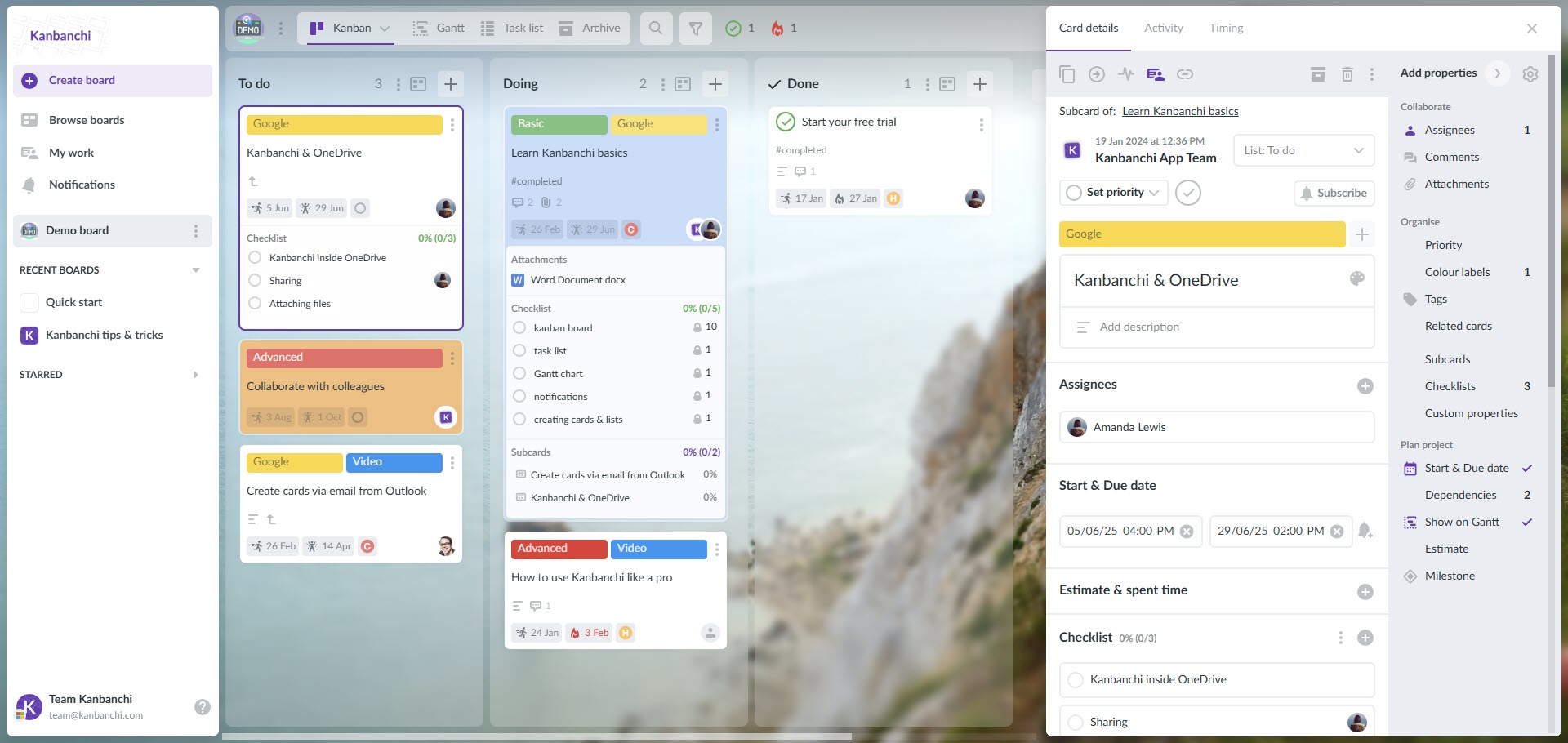
Kanbanchi: A Visual Layer for Microsoft Project Management

Kanbanchi interface example when using Microsoft environment

What Makes Kanbanchi Unique?

Kanbanchi is a comprehensive project management platform that integrates directly with Microsoft 365. Users can sign in with their Microsoft account, connect Kanbanchi to OneDrive and/or SharePoint, and have their admin roll it out across the entire organization.

Key features include:

  • Kanban Boards: Organize tasks visually, move cards through custom stages, and keep everyone in sync.
  • Gantt Charts: Lay out project schedules, manage dependencies, and adjust plans as needed.
  • Time Tracking: Track how much effort goes into each task and make informed decisions about resource allocation.
  • Automation: Set up rules and triggers to handle repetitive tasks automatically.
  • Instant Collaboration: Comment, attach files, and update tasks in real time, all within the Microsoft environment.
  • Centralized Information: All project content and documents stay within your company’s secure Microsoft cloud.

Sign up for a free trial of Kanbanchi

Real-World Examples: Microsoft Project Management with Kanbanchi

Agile Product Development

Development teams use Kanbanchi’s boards to manage sprints, track bugs, and prioritize new features. Gantt charts help visualize release calendars, while Teams integration keeps communication flowing.

Marketing Campaigns

Marketing teams plan campaigns using boards, assign tasks, and monitor deadlines. Gantt views provide a high-level look at campaign progress, and files are easily shared via OneDrive.

HR and Onboarding

HR departments create onboarding boards, track each new hire’s journey, and ensure all documentation is completed. Time tracking helps measure onboarding efficiency.

Operations and Support

Operations teams use Kanbanchi to manage daily processes, assign support tickets, and track resolution times. Custom reports offer insights into team performance.

How to Transition Your Projects from Microsoft to Kanbanchi

Making the switch from the Microsoft environment to a Google-integrated or standalone Kanbanchi workflow does not have to cause disruption. The goal is to reduce friction and get your team working with software they actually enjoy using.

Step 1: Audit your current workflows

Before moving any data, review your existing Microsoft Project or Planner files. Identify the critical paths and note which dependencies and milestones are essential to preserve. Use this as an opportunity to clean up the backlog: archive old items that no longer serve the project rather than migrating everything as-is.

Step 2: Use seamless import tools

You do not need to manually recreate every task. Use Kanbanchi’s CSV import or direct migration support to bring structured data across from your existing tools. Map assignees, due dates, and custom fields from Microsoft to Kanbanchi’s card properties before importing.

Step 3: Re-establish your visual model

Once your data is in Kanbanchi, set up your Kanban board and organize imported tasks into clear lists: Backlog, In Progress, Review, Done, for immediate visual clarity. For more complex schedules, switch to the Gantt view. Your dates and dependencies will be ready for adjustment.

Step 4: Connect the dots

For Microsoft 365 teams, attach project documentation directly to cards from OneDrive or SharePoint, and sync card due dates with your existing calendar. For Google Workspace teams, the same connections work with Google Drive and Google Calendar. Either way, your team’s project work stays close to the files and schedules they already use every day.

Tips for Successful Microsoft Project Management with Kanbanchi

  • Standardize Processes: Develop templates for recurring projects to ensure consistency.
  • Automate Routine Work: Use Kanbanchi’s automation to handle repetitive processes.
  • Integrate Communication: Link Teams and Kanbanchi for seamless updates and feedback.
  • Monitor Progress: Use Gantt charts and reports to monitor milestones and identify bottlenecks.
  • Invest in Training: Help your team get the most from both Microsoft and Kanbanchi with regular training.

Related article: Project Management Software for Microsoft: Visualize, Track, and Succeed

Frequently Asked Questions

What is the difference between Microsoft Planner and Microsoft Project?

Microsoft Planner is built for lightweight, visual task management using a simple card-based model. It is ideal for teams managing basic workflows or ad hoc tasks. Microsoft Project is an enterprise-level tool designed for complex portfolio management, offering advanced scheduling, Gantt charts, and resource leveling. The gap between them is where most mid-sized teams struggle.

Is Microsoft Project included in Microsoft 365?

Generally, no. While tools like Microsoft Planner and Teams are included in many Business and Enterprise subscriptions, Microsoft Project requires a separate Project Plan license, which adds significantly to the total cost of ownership.

Which Microsoft tool is best for agile project management?

Microsoft Planner is the most agile-friendly within the Microsoft ecosystem due to its Kanban board structure. However, many agile teams find it too limited for real sprint management, while Microsoft Project is too rigid. This is why teams often look for tools like Kanbanchi that offer both visual agility and advanced planning in one place.

What happens to Microsoft Project Online in September 2026?

Project Web App and all associated data will become inaccessible. Teams currently using Project Online should begin planning their transition now.

Can I manage Microsoft projects using Google Workspace?

Yes, but the integration is often not seamless. File storage, calendar syncing, and authentication all create friction when mixing Microsoft Project with a Google Workspace environment. For teams in the Google ecosystem, a Google-native Kanbanchi version is usually a more efficient fit

Conclusion: Visual, Agile, and Connected Project Management

The world of project management is moving toward more visual, agile, and integrated solutions. Microsoft’s ecosystem provides a strong foundation, but as projects grow more complex and teams become more distributed, the gap between what the tools offer and what teams actually need becomes harder to ignore.

Whether you are navigating the Microsoft Project Online retirement, bridging the gap between Planner and Project, or simply looking for a cleaner way to connect project work to the files and calendars your team already uses, combining Microsoft 365 with Kanbanchi gives teams the clarity and control they need without the learning curve.


Try Kanbanchi today

    MultipleAuthors\Classes\Objects\Author Object
    (
        [term_id] => 973
        [term:MultipleAuthors\Classes\Objects\Author:private] => 
        [metaCache:MultipleAuthors\Classes\Objects\Author:private] => Array
            (
                [user_email] => olga.alekseeva@kanbanchi.com
                [user_id] => 20
                [first_name] => Olga Alekseeva
                [last_name] => 
                [job_title] => Growth hacking expert with over 10 years of experience with Kanbanchi
                [description] => Olga wears multiple hats across marketing, sales, product, and ops after 10+ years in the SaaS world. She is passionate about helping teams streamline their workflows with Kanbanchi and Google Workspace or Microsoft 365. "When I'm not optimizing processes or writing guides, I'm probably tweaking our product roadmap or diving into the latest productivity tools".
                [user_url] => https://linkedin.com/in/olgksv
            )
    
        [userObject:MultipleAuthors\Classes\Objects\Author:private] => WP_User Object
            (
                [data] => stdClass Object
                    (
                        [ID] => 20
                        [user_login] => olga.alekseeva
                        [user_pass] => $wp$2y$10$WuiuvYMj7CDnLrRbWchEkuBwKzmbBakK64Uk5c68bDY3qA46MFam6
                        [user_nicename] => olga-alekseeva
                        [user_email] => olga.alekseeva@kanbanchi.com
                        [user_url] => https://linkedin.com/in/olgksv
                        [user_registered] => 2025-09-03 15:47:58
                        [user_activation_key] => 
                        [user_status] => 0
                        [display_name] => Olga Alekseeva
                    )
    
                [ID] => 20
                [caps] => Array
                    (
                        [editor] => 1
                        [author] => 1
                        [contributor] => 1
                        [wpseo_editor] => 1
                        [wpseo_manager] => 1
                        [administrator] => 1
                    )
    
                [cap_key] => wp_capabilities
                [roles] => Array
                    (
                        [0] => editor
                        [1] => author
                        [2] => contributor
                        [3] => wpseo_editor
                        [4] => wpseo_manager
                        [5] => administrator
                    )
    
                [allcaps] => Array
                    (
                        [moderate_comments] => 1
                        [manage_categories] => 1
                        [manage_links] => 1
                        [upload_files] => 1
                        [unfiltered_html] => 1
                        [edit_posts] => 1
                        [edit_others_posts] => 1
                        [edit_published_posts] => 1
                        [publish_posts] => 1
                        [edit_pages] => 1
                        [read] => 1
                        [level_7] => 1
                        [level_6] => 1
                        [level_5] => 1
                        [level_4] => 1
                        [level_3] => 1
                        [level_2] => 1
                        [level_1] => 1
                        [level_0] => 1
                        [edit_others_pages] => 1
                        [edit_published_pages] => 1
                        [publish_pages] => 1
                        [delete_pages] => 1
                        [delete_others_pages] => 1
                        [delete_published_pages] => 1
                        [delete_posts] => 1
                        [delete_others_posts] => 1
                        [delete_published_posts] => 1
                        [delete_private_posts] => 1
                        [edit_private_posts] => 1
                        [read_private_posts] => 1
                        [delete_private_pages] => 1
                        [edit_private_pages] => 1
                        [read_private_pages] => 1
                        [wpseo_bulk_edit] => 1
                        [copy_posts] => 1
                        [ppma_edit_post_authors] => 1
                        [ppma_edit_own_profile] => 1
                        [wpseo_edit_advanced_metadata] => 1
                        [wpseo_manage_options] => 1
                        [view_site_health_checks] => 1
                        [switch_themes] => 1
                        [edit_themes] => 1
                        [activate_plugins] => 1
                        [edit_plugins] => 1
                        [edit_users] => 1
                        [edit_files] => 1
                        [manage_options] => 1
                        [import] => 1
                        [level_10] => 1
                        [level_9] => 1
                        [level_8] => 1
                        [delete_users] => 1
                        [create_users] => 1
                        [unfiltered_upload] => 1
                        [edit_dashboard] => 1
                        [update_plugins] => 1
                        [delete_plugins] => 1
                        [install_plugins] => 1
                        [update_themes] => 1
                        [install_themes] => 1
                        [update_core] => 1
                        [list_users] => 1
                        [remove_users] => 1
                        [promote_users] => 1
                        [edit_theme_options] => 1
                        [delete_themes] => 1
                        [export] => 1
                        [bcn_manage_options] => 1
                        [manage_security] => 1
                        [restrict_content] => 1
                        [list_roles] => 1
                        [create_roles] => 1
                        [delete_roles] => 1
                        [edit_roles] => 1
                        [cfdb7_access] => 1
                        [ppma_manage_authors] => 1
                        [ppma_manage_layouts] => 1
                        [ppma_manage_custom_fields] => 1
                        [ppma_manage_author_categories] => 1
                        [iwc_read_posts] => 1
                        [iwc_create_posts] => 1
                        [iwc_edit_posts] => 1
                        [iwc_delete_posts] => 1
                        [iwc_read_users] => 1
                        [iwc_create_users] => 1
                        [iwc_edit_users] => 1
                        [iwc_delete_users] => 1
                        [iwc_read_comments] => 1
                        [iwc_create_comments] => 1
                        [iwc_edit_comments] => 1
                        [iwc_delete_comments] => 1
                        [iwc_upload_files] => 1
                        [iwc_read_media] => 1
                        [iwc_edit_media] => 1
                        [iwc_delete_media] => 1
                        [iwc_read_terms] => 1
                        [iwc_create_terms] => 1
                        [iwc_edit_terms] => 1
                        [iwc_delete_terms] => 1
                        [editor] => 1
                        [author] => 1
                        [contributor] => 1
                        [wpseo_editor] => 1
                        [wpseo_manager] => 1
                        [administrator] => 1
                    )
    
                [filter] => 
                [site_id:WP_User:private] => 1
            )
    
        [hasCustomAvatar:MultipleAuthors\Classes\Objects\Author:private] => 1
        [customAvatarUrl:MultipleAuthors\Classes\Objects\Author:private] => Array
            (
                [url] => https://www.kanbanchi.com/wp-content/uploads/2025/09/photo_2024-04-10_17-25-16.jpg
                [url2x] => https://www.kanbanchi.com/wp-content/uploads/2025/09/photo_2024-04-10_17-25-16.jpg
            )
    
        [avatarUrl:MultipleAuthors\Classes\Objects\Author:private] => 
        [avatarBySize:MultipleAuthors\Classes\Objects\Author:private] => Array
            (
                [96] => 
                [80] => 
                [50] => 
            )
    
    )
    
  • Growth hacking expert with over 10 years of experience with Kanbanchi

    Olga wears multiple hats across marketing, sales, product, and ops after 10+ years in the SaaS world. She is passionate about helping teams streamline their workflows with Kanbanchi and Google Workspace or Microsoft 365. "When I'm not optimizing processes or writing guides, I'm probably tweaking our product roadmap or diving into the latest productivity tools".

    All articles
Share

Try Kanbanchi now

  • Collaborate seamlessly
    with your team
  • Integrate Kanbanchi
    with Google or Microsoft
  • Manage all your work in one place
Start for free

Start using Kanbanchi now

Start your free trial