
In this Article:
Try Kanbanchi now
Start your free trial


The enterprise project management software solution market has significantly expanded in recent years. In fact, it’s predicted to reach a staggering $20.47 billion by 2030.
The astonishing growth in this sector is driven by the need for every company, from SMEs to large organizations, to have the right tools at their fingertips. Using software like this can significantly improve workforce collaboration, help streamline workflows, and enhance overall efficiency.
In increasingly competitive markets and complex, fast-paced modern enterprise business environments, it’s crucial to have the best possible project management solutions from the get-go.
Which industries does it serve best, and who would use it? The answer is…almost every one you can think of! We’ll outline them in more detail as we go on.
Consider this: every project a business undertakes (across all industries) requires a team of skilled employees who often span more than one sector of the company. Every worker in that setup needs to collaborate effectively and quickly.
…And that’s where EPM software steps in.
It allows everyone to see, at a glance:
Whilst larger enterprises traditionally used EPM software, it is now being adopted by SMEs to help with these tasks. This has become more evident as the availability of cloud-based software has increased. Not only are these more affordable, but they’re easier to learn and implement.
Software like this can be used to assist with everything from task planning and allocation, through to finance matters such as invoicing and accounting. Larger enterprises will adopt EPM software systems to maintain their operations across multiple sites and locations globally, too.
It makes all aspects of project management easier, from the initial planning and design through to the final sprint for the finish line.
Not only that, investing in great EPM solutions can help everyone connect and work together, without the need for endless emails and meetings. It will also help automate more time-consuming repetitive tasks, freeing any team to focus on what matters—delivering a winning performance that brings results.
So, how do you know which EPM software to choose? We can help.
In this article, we’ll provide detailed reviews of the 10 best project management software for businesses, including their advantages, disadvantages, prices, and more, so you can make the best choice based on the needs of your business, your workforce, and the projects you need to deliver on.
Put simply, enterprise project management software is a scalable tool that helps SMEs and larger businesses to plan and execute complex projects that span many different departments.
Virtually any industry you can think of can find a way to utilize EPMs, from construction to healthcare to retail. How they use it may differ, but each business can reap the benefits of what it can offer:
“Excellent!” you might say to yourself. “But how are enterprise project management systems different from conventional project management tools?”
The main takeaway is that EPM software is an integrative framework that offers a holistic overview of the project’s landscape. When a project is laid out properly within the interface of the platform you choose, you’ll be able to see how every part of it lines up with the main strategic goals that your business has.
From initial concept through to final delivery and all points in between – not to mention the sudden changes and significant decisions that team leaders need to make! – stakeholders can easily collaborate with everyone involved in the project, from team leaders to others in the supply chain.
Anyone involved in the project will be able to view its progress in real time. Should you hit any bumps in the road, leaders can make decisions quickly and take decisive action to keep everything on track.
It’s worth noting that there are some key differences between enterprise project management and project management organisation, and we’ll outline these below:
| Key Differences | |
|---|---|
| Enterprise Project Management | Aligns projects with the company’s strategic goals. Establishes standardized methodologies. This approach optimizes resource utilization across various project portfolios. It’s more of a strategic partner that contributes to the overall success of a company. |
| Project Management Organisation | This approach focuses exclusively on managing individual projects or programs. Ensures that projects adhere to a strict timeline. Remain within budget. End the project according to the defined scope. |
Looking at this closely, it becomes clear how both the EPM software and PMO methodology have their place in project planning and efficient management. But it’s also important to understand why business owners consider EPM software useful for large companies.
At the end of the day, project management software for enterprises offers a streamlined and straightforward strategic approach for companies aiming to deliver maximum value by optimizing resource allocation while mitigating business risks.
It offers an overarching view of all the component parts of a project, yet also dives deeply into the details so that everyone involved in the core deliverables can clearly see their goals.
What are the main features of project management for enterprise software? There are several component parts that make these types of project management tools unique:
For SMEs and larger corporations, there are some clear, core strategic and operational advantages to investing in enterprise project portfolio management software.
Aside from the obvious advantages of saving time and automating tasks with AI features across many platforms, what are the other benefits of this kind of software, and how can it help business progression?
When it comes to selecting the right enterprise project management tools for your SME, what are the main points to consider?
It’s important to say that every company will have differing needs, and each project will have its own unique considerations, so it’s good to have a few ideas to make an informed choice.
There will always be a project management software program to fit the needs of most companies, regardless of their size. Some are even suitable for sole traders who want an individual account for their business.
From SMEs to larger corporations, the tool you pick will need to consider:
We’ve already seen how versatile the applications for this kind of software are. Pretty much any industry can use them, whatever they’re delivering. When considering this type of software, it’s important to recognise that every team will have differing needs, both within the company and also within the scope of the project. Consider everyone’s requirements individually.
For instance, will you need functions such as advanced task management, resource allocation, or time tracking? Does your business need functions that are going to help with invoicing, finance management, or come to think of it even an integrated customer service platform?
Finally, it’s got to be a good idea to look for scalable solutions that can adapt to your organization’s growth and evolving processes.
Financial considerations are key, as budgetary constraints can sometimes make enterprise project management systems out of reach, particularly for sole traders, freelancers, and smaller businesses, or those looking to invest but without a large budget.
Finding a value for money tool that has all the primary functions you need, and can ultimately be scaled up as your company grows, is key. We’ll cover more about this in our review section below, as there are pitfalls to consider with this.
Next, think about your desired enterprise project management methodology. Will the new software integrate with your existing systems OK? Consider the tools you use such as CRM, finance, or other development models. Do you currently use any other platforms, like Trello or Slack, that allow for seamless merger and transition with the new software platform you’re considering? Some do and others don’t!
We’ve put together a brief overview of what we think are the 10 best enterprise project software management programs for 2025.
We’ll go into them in more depth as we go on, so you can have a fuller picture of everything they have to offer.
| Name | Good for | Advantages | Cost |
|---|---|---|---|
| Kanbanchi | Customization and flexibility | Superior integration with Google Workspace. Powerful collaboration tools for real-time updates. High degree of customization to adapt to different workflows. Clean, optimized interface. Easy to adapt to for all. | From as low as $3.97 per month. |
| Asana | Intuitive task management | Link individual tasks and project milestones to broader objectives. Centralized communication. | From $13.49 per month billed annually. |
| ClickUp | Will scale as your business grows | Offers tailored workflows. Multiple ways to view projects. | From $12/month per user; enterprise pricing available. |
| Monday | User-friendly interface | Real-time reporting is good. Has built-in collaboration tools. | From $19/month per user; enterprise pricing available. |
| ProofHub | A simple, all-in-one platform | All project details are kept in one place. Clear tracking of tasks. | From $45 per month, billed annually. |
| SmartSheet | Offers a simple spreadsheet-based platform | Real-time collaboration. Multiple project views. | From $19/month per user; enterprise pricing available upon request. |
| Jira | Combining with other Atlassian products | Adaptable workflows. Supports different methodologies like Kanban. | From $7.53 per month. |
| Microsoft Planner | Taking a structured approach to project management | Integrates easily with Microsoft 365. Promotes good teamwork. | From $10.00 per month. |
| Celoxis | Businesses that want an AI feature in their software | Customizable dashboards for real-time project performance views. Has 24/7 human support. | From $10.00 per month. |
| Zoho Projects | If you need an affordable plan | Workflow automation. Has a team discussion forum. | From $3.20 per month, but billed annually. |
So that’s a very brief overview of what our recommendations can offer. Let’s take some time to dive deeper into each of these project management software tools to see what they have to offer SMEs and other business users.
We’ve outlined all the major features of each software program, added in their core integration features, and set out their pros and cons, too.
Find the enterprise management software solution to suit your team today.
Here are 10 of the best enterprise management software solutions for business. We’ll outline all their special standalone features for you. We’ll also let you know our honest opinions about the advantages and disadvantages.
From here, it becomes easier to see which program will fit with your company’s needs.
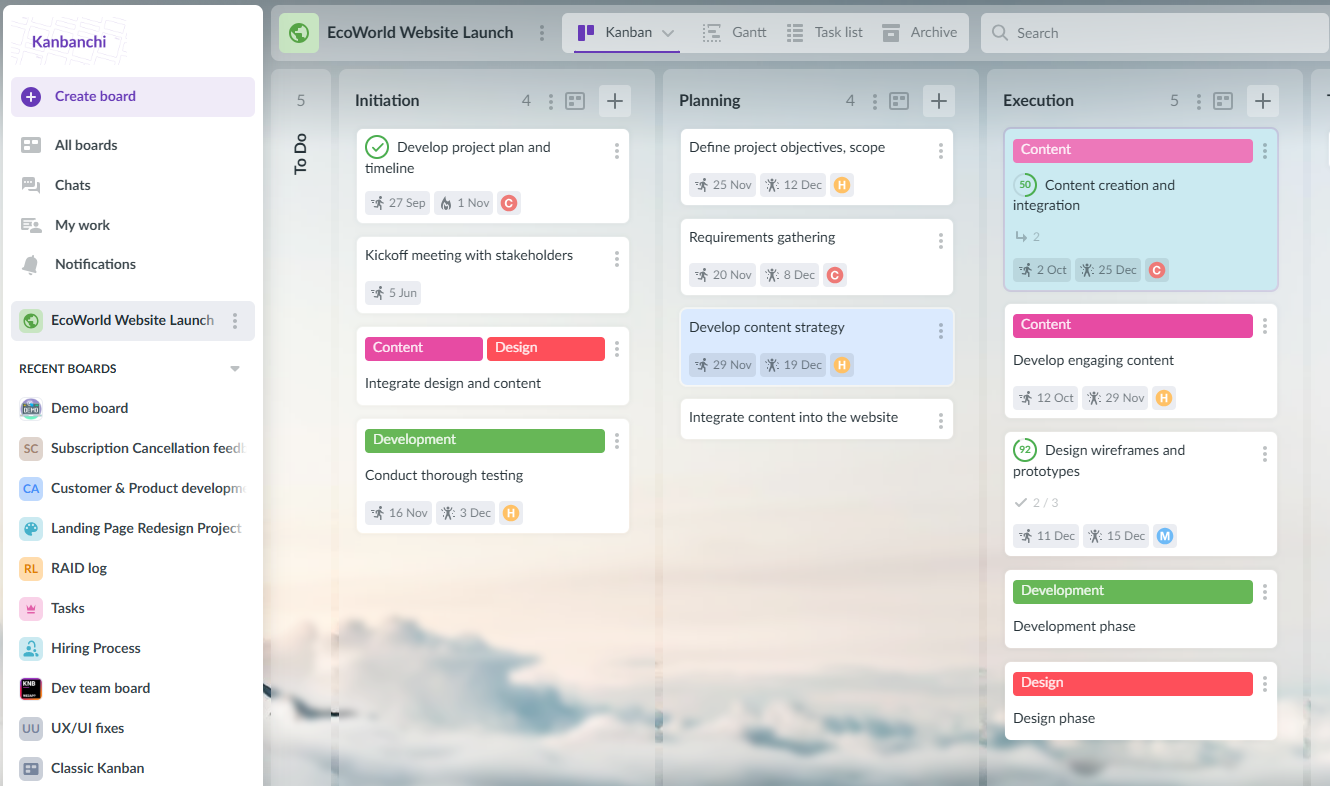
Kanbanchi offers a clean and intuitive Kanban-based layout with native Google Drive and Calendar integration for seamless collaboration
Kanbanchi is a focused Kanban-based project management tool designed specifically for Google Workspace users. It combines simple visual task management with deep Google integration, making it ideal for teams already using Gmail, Drive, and Calendar. While not as comprehensive as Trello, it excels at streamlined workflow management within the Google ecosystem.
Start your free trial with Kanbanchi today

Asana connects tasks, team updates, and goals into one shared workspace to improve clarity and productivity
Asana positions itself as ‘not just a tool, more like a teammate’, thanks to its AI capabilities that help automate tasks. It offers integration with design apps like Adobe Creative Cloud and Figma, so it’s a good choice for creatives. Users can access and manage their work on the Asana mobile apps for iOS and Android, making it good for on-the-go use. Essential when hotdesking or WFH.
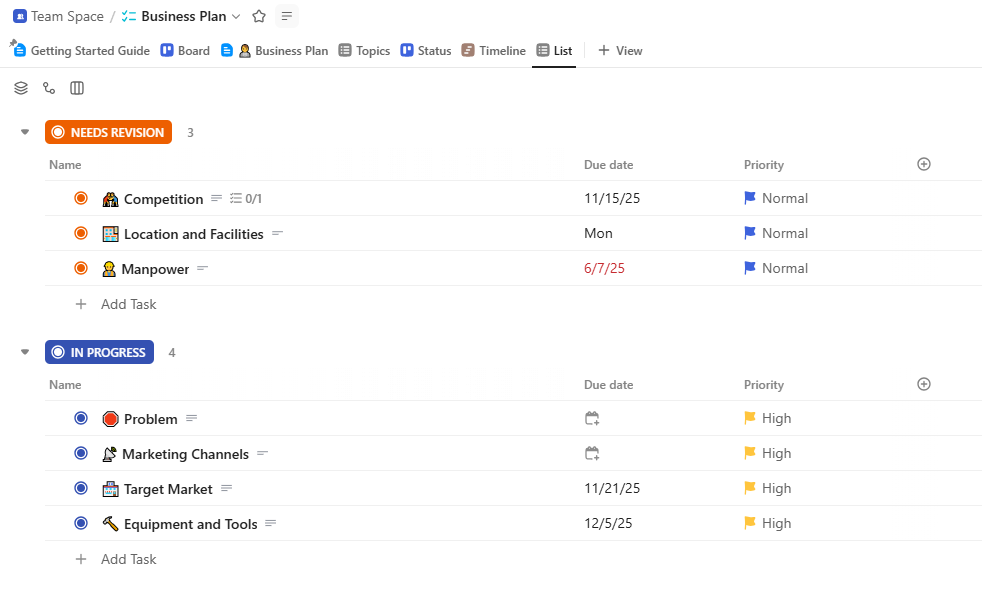
ClickUp adapts to various work styles, offering flexible views like Kanban, Gantt charts, and timelines for dynamic team environments
Praised for its flexibility, ClickUp is an efficient, highly customizable software platform. It’s therefore suitable for a wide variety of teams across different industries, from marketing to science-based sectors and human resources. It benefits from an internal chat feature, which keeps all conversations about specific projects central.

Monday.com combines visual project boards with automation and communication tools to support collaboration across teams
This cloud-based program is best known as a project management tool, but Monday also offers sales pipeline management and a centralized platform for customer communication. This makes it a good choice for sales-driven and marketing teams. Noted for its time tracking features, it is a superb platform for measuring team efficiency and planning future projects with greater accuracy.
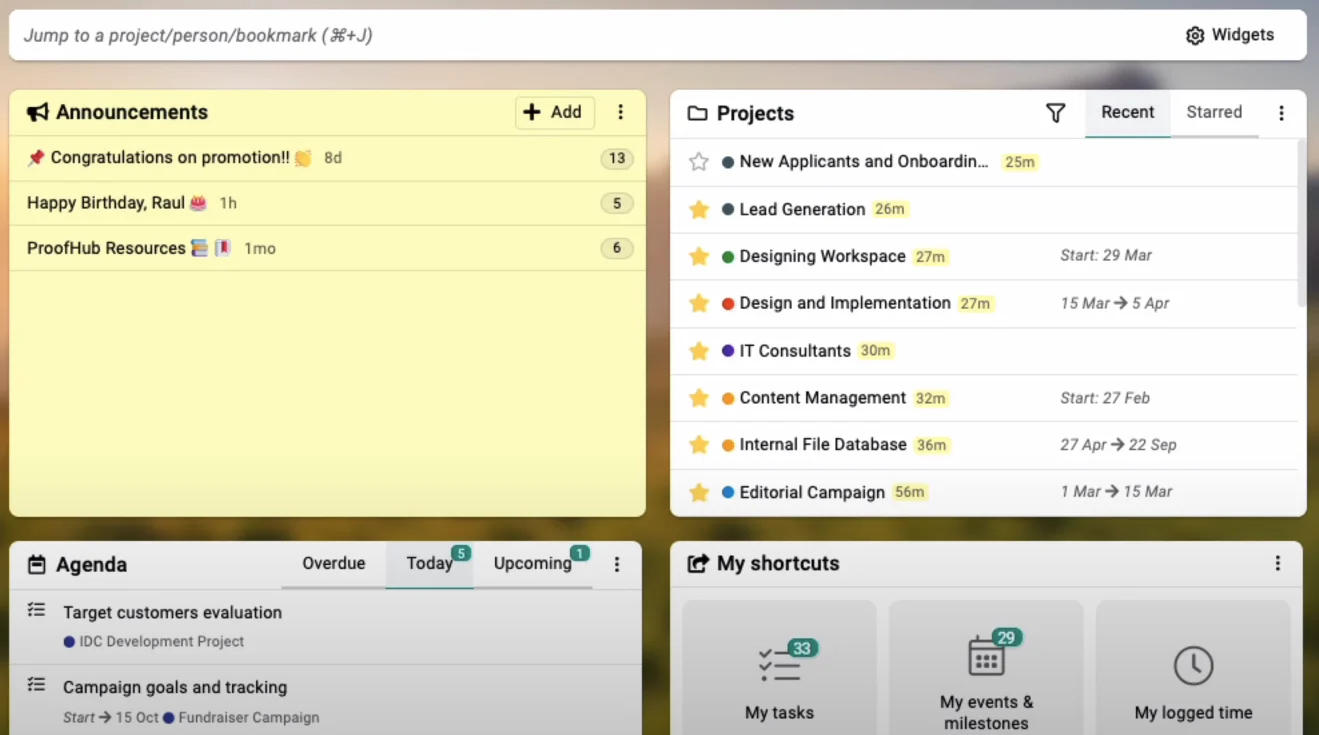
ProofHub keeps teams aligned with simplified planning, proofing, and time tracking in one place
Key to ProofHub’s popularity is its no-frills simplicity. It’s a pared-down, web-based platform that offers a flat rate of pricing, making it more affordable than most. It negates the need for businesses to use lots of tools for one project. One of its core standout features is that it offers proofing and file management for speedy feedback on documents and collaborative work.
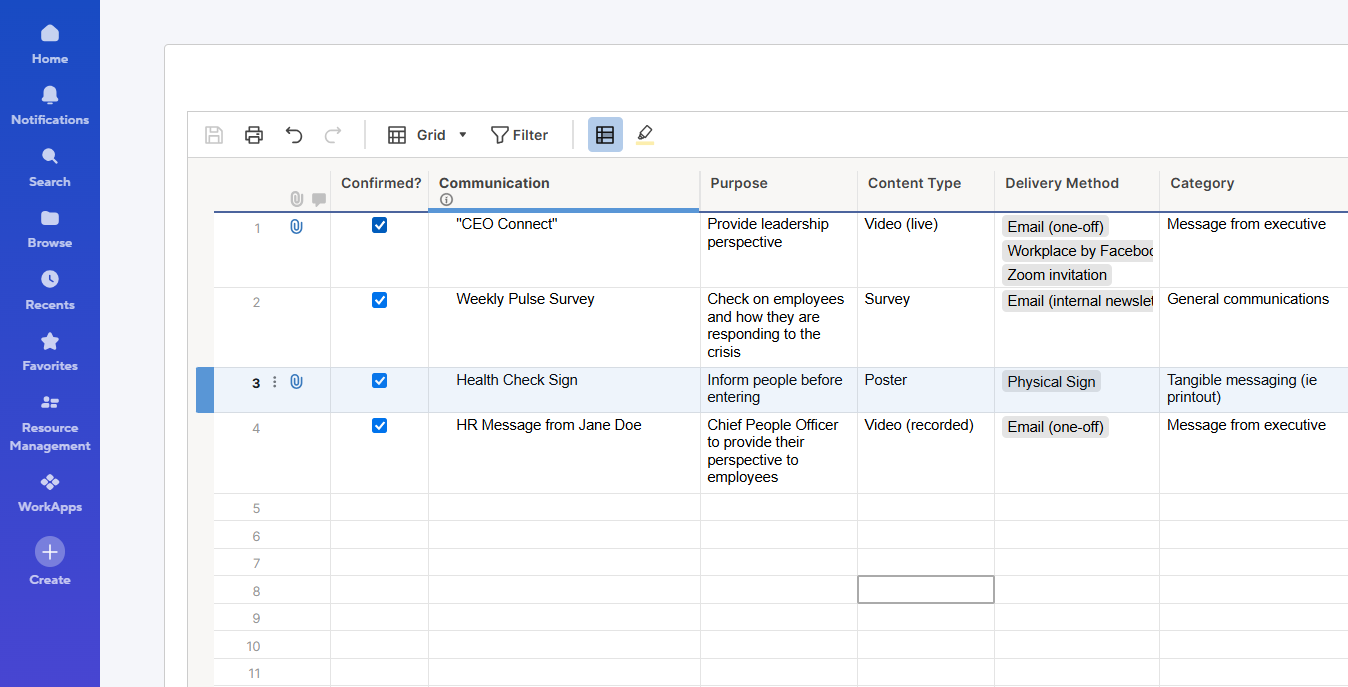
Smartsheet brings advanced automation and reporting to a familiar spreadsheet experience for enterprise-level control
If your team likes the reassuring familiarity of a spreadsheet interface, then SmartSheet might be a go-to. However, unlike traditional spreadsheet programs and functions, it offers much more in terms of collaboration, productivity tools, and automation. Think of it as being a bit like Excel or Google Sheets with added oomph. This could make it a wise choice for teams that manage larger portfolios and complex tasks or projects.
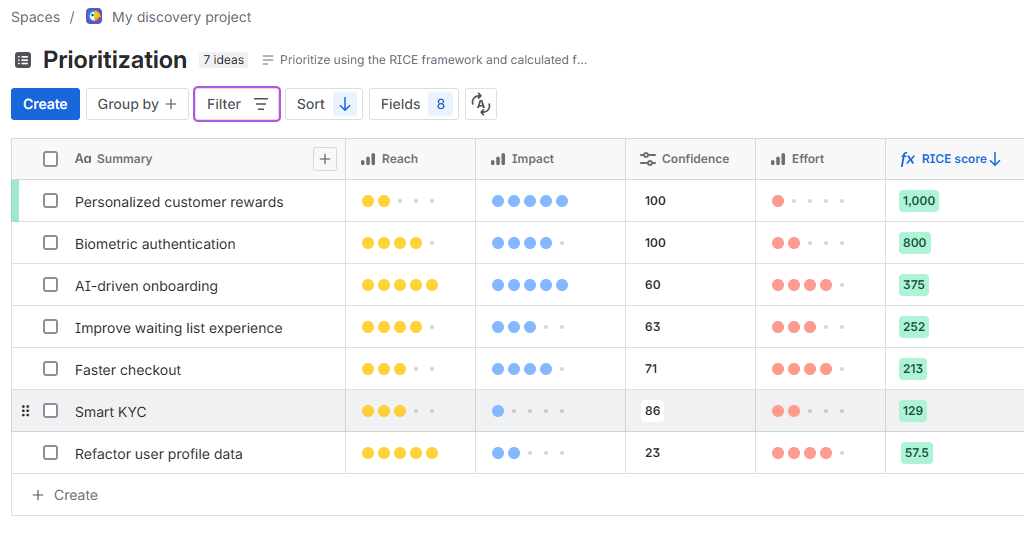
Jira enables software teams to plan sprints, track issues, and scale Agile workflows across the organization
Already familiar with Atlassian’s products? Jira is part of their family, though it didn’t start out as a project management software. The in-house software teams initially developed it for bug-tracking purposes and it gained popularity from there. Focused on Agile methodology it comes with Scrum and Kanban support.

Microsoft Planner works seamlessly with Microsoft 365 apps, offering simple task organization for smaller teams
Teams that are loyal to Microsoft may find that their eponymously named Planner is the project management tool that’s a winner for them. It’s perhaps better suited to less complex project planning, but as you’d expect, it dovetails neatly with all the other programs in the Microsoft ecosystem to provide a highly centralized work experience.
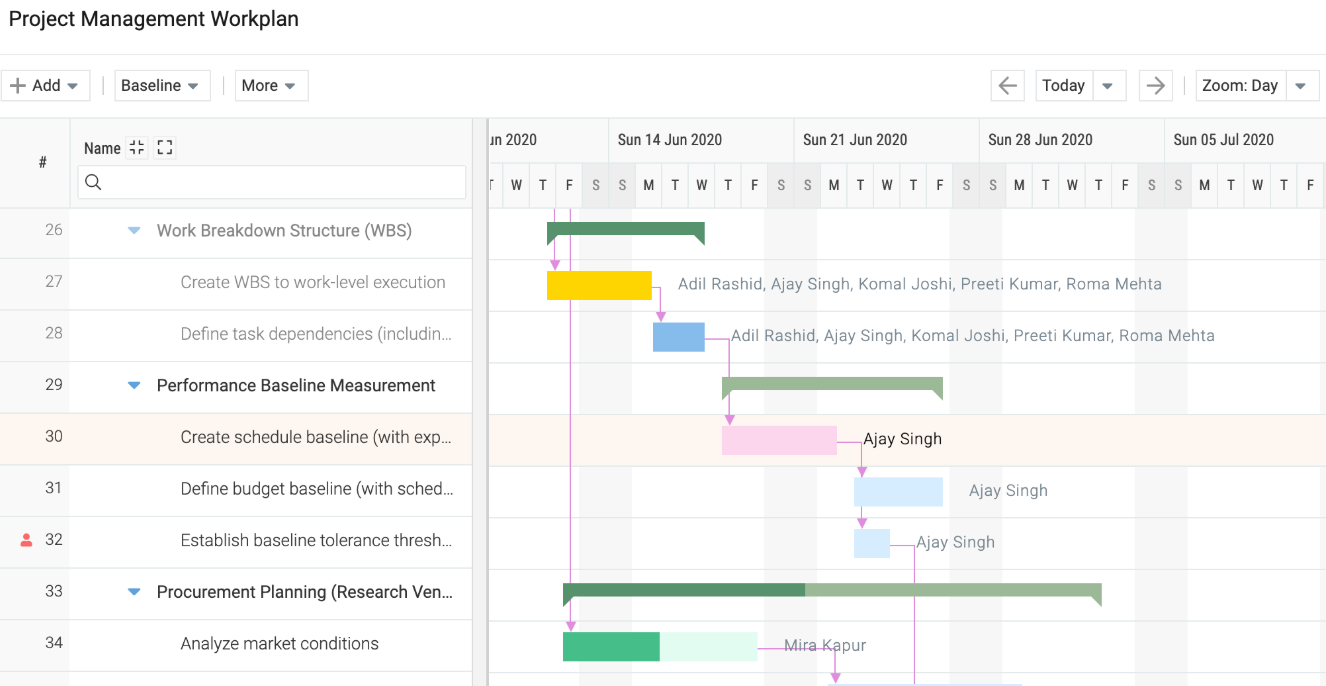
Celoxis delivers detailed portfolio insights and long-term capacity planning, making it ideal for complex enterprise environments
Celoxis is one of the better choices for larger enterprises, having been developed over a 20-year span and used by many high-end companies over that period, including Deloitte. It’s built to handle complex projects with multiple strands, and when in use, it can offer a very comprehensive 360-degree view of the overall health of a company’s project portfolio.
Special Features Assessment
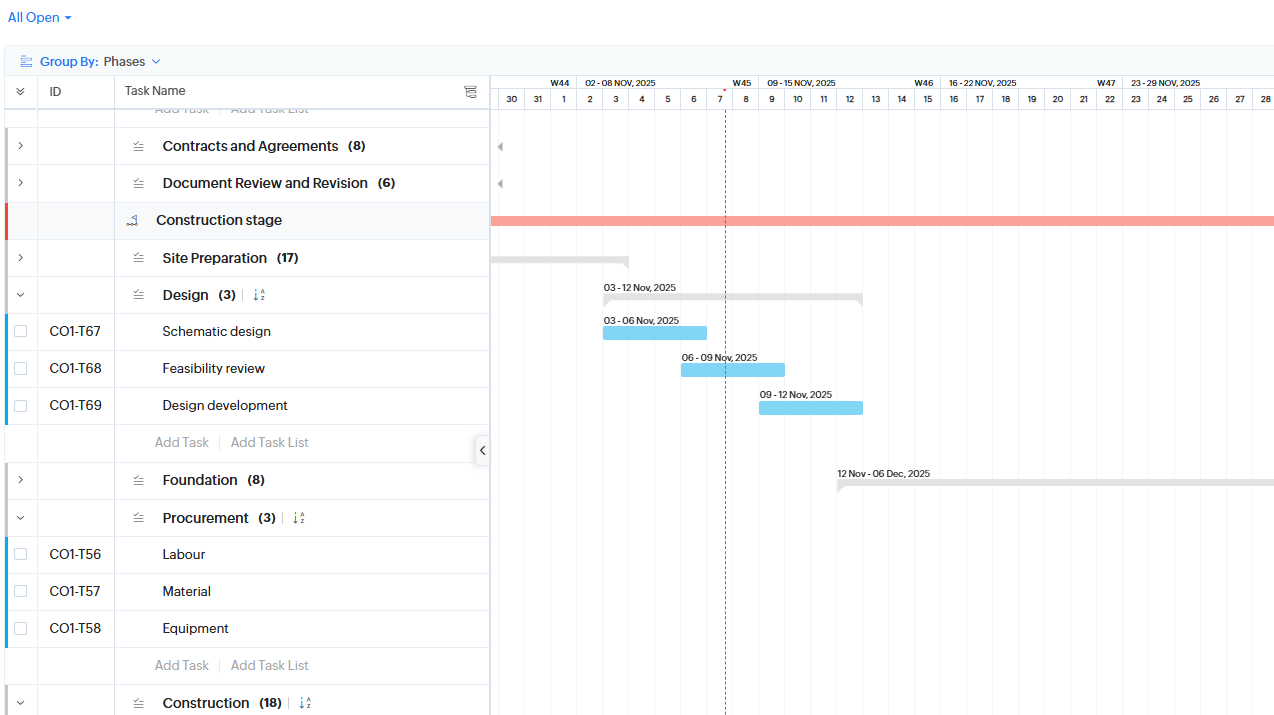
Zoho Projects supports customizable automation, visual workflows, and collaboration tools within the Zoho ecosystem
Whilst Zoho is known for its email platform, it’s got a notable project management software program. It’s a cloud-based program that will offer adaptability for teams that are already familiar with its business software. Offering Kanban boards for a visual workflow, classic lists, and Gantt charts for a timeline perspective, this solution is versatile and easy to adapt to.
By now, you’ll have a better idea of the best project management enterprise software solution for your company. There are a lot of options that can seem overwhelming at first glance.
However, in case you needed any more help with your choice, we’ve put together a final checklist of the top things to consider when making a decision that suits your employees and your company as a whole.
Of course, every enterprise has unique needs, and so will every project that you undertake.
Start by considering:
To recap, here are the main key selection criteria companies should evaluate before purchasing:
What is enterprise task management software? Quite simply, it’s the key to bringing together your team to deliver the very best results they can. Sure, you can work well without it, but with it, your projects will become easier to view, manage, and finish.
The value of enterprise project management apps can’t be underestimated as more businesses strive to deliver high-quality projects and scale up their operations and services.
Investing for the first time might feel daunting, but once you do, your company won’t look back. There are plenty of platforms that offer free trials of their products, including us here and Kanbanchi. With these, you can experience everything enterprise management software has to offer before you decide to commit.
As we move into the future, EMPO’s prospects will improve as it integrates more features, such as AI tools, to automate additional tasks and make management and leadership even easier on a day-to-day basis.
When you try out Kanbanchi’s range of project management software, you’ll notice the difference. So, why not get in touch and see what we can offer you?
Sign up with Kanbanchi today and try our software



In this Article:
Start using Kanbanchi now
Start your free trial