-  views

Fitness Center Project Management Success Story: How Gym Owners Use Kanbanchi for Operations and Training Programs

Try Kanbanchi now

Start your free trial

 

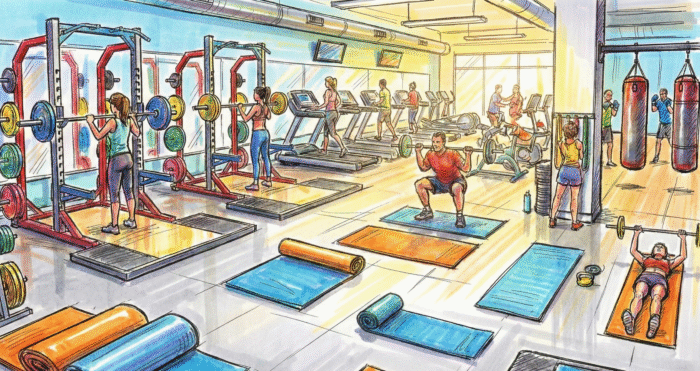
An illustration of a bustling gym floor with members using weights, cardio equipment, and boxing zones, representing the diverse operational needs managed by fitness center project management software

Gym owners don’t fail because they lack passion; they struggle because growth multiplies details, and without fitness center project management, equipment upkeep, trainer schedules, member programming, and facility projects all start competing for attention at the same time.

Power PNY (a recognizable stand-in for the real gym name) hit that growth wall and chose to standardize how work moves from “idea” to “done” using Kanbanchi’s visual boards, timelines, and collaboration tools.

This case study shows how Power PNY integrated maintenance requests, training-program cycles, and internal communication into a single, repeatable system, enabling staff to spend more time coaching and improving member outcomes rather than chasing updates.

Fitness Center Project Management That Connects Facility Operations, Staff Schedules, and Training Delivery

At Power PNY, the goal wasn’t to “use more software.” The goal was to reduce chaos. Leadership wanted a practical way to coordinate facility tasks, program delivery, and trainer responsibilities without turning coaches into administrators. Kanbanchi gave them a structure where everyone can see priorities, ownership, and deadlines at a glance.

Background: A Gym That Outgrew Spreadsheets

Power PNY started like many successful training facilities: strong coaching, loyal members, and a schedule that kept getting fuller. Growth was great. Until it made simple work hard. As new classes were added and more trainers joined the roster, the gym’s internal coordination started to rely too heavily on informal communication:

  • Maintenance issues were mentioned in chat, then forgotten.
  • Member program milestones were planned, but not consistently tracked.
  • Schedule changes caused last-minute scrambling.
  • Facility projects (new equipment, floor repairs, upgrades) lived in someone’s head.

The result wasn’t a dramatic breakdown; it was a thousand small inefficiencies. Coaches wasted energy double-checking who was doing what. Managers spent too much time in “status mode.” And members occasionally felt the consequences: delayed fixes, inconsistent check-ins, or unclear program steps.
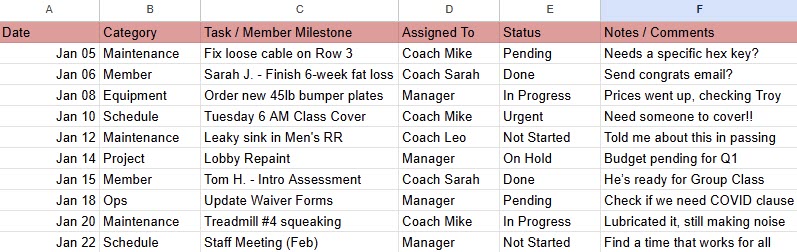
A cluttered digital spreadsheet with the gym operations

A typical “catch-all” gym operations spreadsheet. While functional for a small business, the mix of maintenance logs, scheduling emergencies, and member milestones quickly becomes a manual bottleneck as staff and membership counts grow

That’s when Power PNY committed to building a consistent operating system for fitness center project management. One that could scale with their membership and staff count.

The Requirements: What Power PNY Needed

Power PNY didn’t want a complicated platform that would require weeks of training. They needed something that staff could actually use daily, especially coaches who live on the floor, not in admin dashboards.

Their checklist came down to a few non-negotiables:

  1. A visual system that matches how people naturally think about work (“Where is this task now?”).
  2. Clear ownership and due dates for accountability.
  3. Calendar for multi-week initiatives like training blocks and facility upgrades.
  4. Easy collaboration, so updates don’t disappear in message threads.
  5. Lightweight structure that supports flexibility as programs change.

Kanbanchi is a good fit because it makes work visible on boards while also supporting timeline planning for longer initiatives. Instead of creating separate systems for “operations” and “training,” Power PNY could keep everything in one app.

The Rollout: Starting Small To Win Adoption

Power PNY rolled out Kanbanchi in phases to avoid overwhelming the team.

Phase 1: One Board That Everyone Trusted

They began with a single operations board for the whole facility. The goal was adoption, not perfection. Staff needed to form a habit: if something needs to happen, it becomes a card.

Phase 2: Templates for Consistency

Once the team used the board naturally, managers built simple templates for repeatable work: cleaning routines, equipment checks, onboarding sequences, and program-cycle milestones.

Phase 3: Gantt Charts and Google Calendar Integration for Visibility

After task tracking became consistent, the gym implemented timeline planning for training programs and facility projects, and integrated it into the shared and personal Google calendars. Everyone could see what was coming, not just what was already overdue.
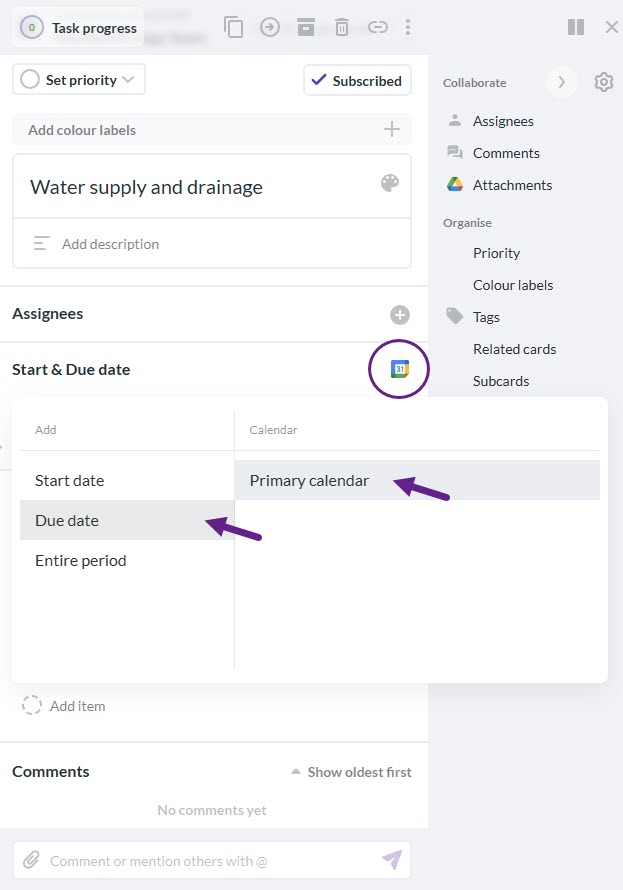
A software interface for a task titled "Water supply and drainage." A dropdown menu shows options to add a "Due date" to a "Primary calendar" via a Google Calendar icon. Purple arrows and circles highlight the integration steps, demonstrating how project management software connects to a personal calendar

By integrating task due dates directly into a responsible person’s Google Calendar, Power PNY ensured that facility maintenance and other tasks were visible in the workflow staff already used

This phased approach reduced resistance. Instead of forcing a “new system,” they made the system reflect the gym’s real workflow.

System Design: The Boards That Run the Gym

Power PNY organized Kanbanchi around a few core boards that mirrored the gym’s responsibilities. The structure was simple: separate boards for separate realities, but consistent rules everywhere.

Board 1: Facility Operations

This board handles everything needed to keep the building safe, clean, and functional. It includes:

  • Cleaning and safety routines (daily/weekly/monthly).
  • Equipment inspection and repair requests.
  • Vendor coordination and follow-ups.
  • Supplies restock and inventory reminders.
  • Front-desk tasks affecting member experience.

This is where gym management task tracking became real. Instead of guessing what was handled, staff could open the board and see current priorities, owners, and deadlines. And because this board also covered recurring work, it turned gym management task tracking into a prevention tool, not just a reaction tool.

Example Workflow Columns
  1. New / Reported
  2. Scheduled
  3. In progress
  4. Waiting (vendor/parts/approval)
  5. Done (with comments)

Managers also added a rule: if a card sits in one list for too long, it gets discussed in a short weekly check-in. No drama, just visibility.

Board 2: Training Programs

Power PNY runs training in cycles: onboarding, assessment, program blocks, retests, and progress reviews. The coaching team needed a shared system that made these cycles easy to execute consistently. Their Training Programs board includes cards for:

  1. Onboarding steps for new members.
  2. Initial assessments and goal-setting sessions.
  3. Program block design and internal review.
  4. Weekly coaching focus notes.
  5. Retest schedules and check-ins.
  6. Special challenges (e.g., strength cycle, conditioning month).

To keep coaching aligned, they standardized cards so that every trainer knows what “complete” means. This also reduced repetitive questions like “What exactly do we do for Week 4 check-ins?”

Here’s where personal trainer project coordination mattered most. When coaches can see who owns each milestone (assessment, modification, retest, follow-up), fewer members slip through gaps. Over time, consistent personal trainer project coordination made progress tracking more reliable and improved the member experience, because athletes felt “seen” and supported, not randomly checked on.

Board 3: Class Coverage & Staff Scheduling

Schedule changes are unavoidable in fitness. The problem is how those changes get handled. Power PNY created a board to manage:

  1. Coverage requests.
  2. Shift swaps.
  3. Approvals and confirmations.
  4. Handover notes for substitute coaches.
  5. Special event staffing requirements.

Instead of long chat threads, the board made swaps and substitutions trackable. That reduced miscommunication and awkward last-minute confusion.

Board 4: Community Events & High-Intensity Training Operations

Power PNY also hosts challenges, in-house competitions, and high-energy community events. Those events involve:

  • Heat schedules.
  • Staff assignments.
  • Equipment setup.
  • Music/AV planning.
  • Sign-ups and reminders.
  • Post-event clean-up and resets.

Rather than treating events as “random busy weeks,” they ran them like structured projects. For example, they do their “CrossFit week” every four months. This is where they effectively used Kanbanchi, like CrossFit box management software, with visible tasks, deadlines, and responsibilities. As events grew in complexity, they continued using Kanbanchi in a way that resembled CrossFit box management software: timeline planning for deadlines and boards for execution.

Timeline Planning: Seeing the Month Before It Happens

Boards handle execution. Timelines handle planning. Power PNY used Gantt charts to map:
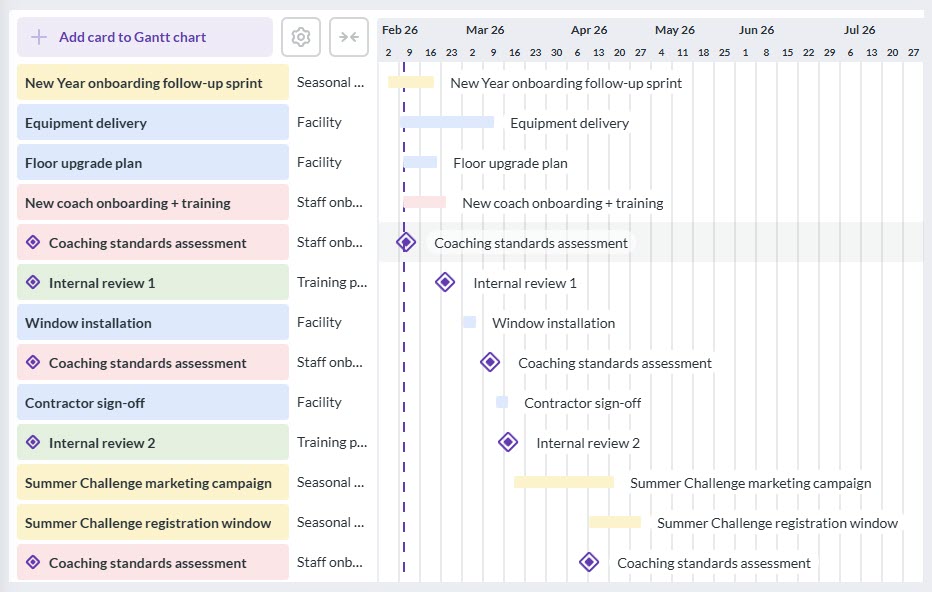
  • Training program blocks (start/end dates, internal review points).
  • Facility projects (floor upgrades, equipment deliveries, contractor dates).
  • Seasonal campaigns (New Year onboarding, summer challenges).
  • Staff onboarding and training timelines.
A screenshot of a Kanbanchi Gantt chart for a gym, displaying timeline bars for "Equipment delivery," "Floor upgrade plan," and "Summer Challenge marketing campaign"

Example of facility projects, staff onboarding milestones, seasonal campaigns, and training blocks on a shared fitness studio workflow management Gantt chart

They went even further than having one Gantt chart. They started adding those events to shared Google calendars and individual calendars. Kanbanchi made it super easy for them with the native Google Calendar integration.

This solved a persistent problem: people used to plan in their heads. Now plans were visible. Coaches knew what was coming. Managers could spot conflicts early (like a big facility upgrade overlapping with a major event week).

This is one reason the gym’s fitness studio workflow management matured quickly. Instead of separate “ops planning” and “coaching planning,” a Gantt chart and adding events to calendars created a shared calendar of commitments. And as their team grew, consistent fitness studio workflow management helped new hires understand how work moves through the gym without needing constant reminders.

Collaboration Rules: Making Updates Impossible to Miss

Tools don’t fix communication. Rules do. Power PNY adopted a few simple practices:

  1. Every task lives as a card (no “I’ll remember”).
  2. Every card has an owner (if others help – use roles).
  3. Due dates are required for anything time-sensitive.
  4. Updates happen in the card comments, not scattered across chats.
  5. Completed work includes a quick note (what happened, what to watch, what’s next).

This reduced the mental load on managers. It also made coaching collaboration smoother because important context stayed attached to the task.

Tracking Member Progress Without Turning Coaching Into Paperwork

Power PNY did not want to create a “bureaucracy of fitness.” They wanted enough structure to support consistency while keeping coaching human. They used Kanbanchi to track progress through a simple checklist:

  1. Onboarding completed.
  2. Assessment recorded.
  3. Program assigned.
  4. First 2-week check-in done.
  5. Retest scheduled.
  6. Retest completed.
  7. Adjustments logged.

This approach helped the gym deliver more consistent outcomes. It also created a stronger feedback loop: if a member stalled, the team could see exactly where the process broke down. This is where the system became more than operations; it became a performance engine. And it doesn’t add a lot of work for coaches, because they can open Kanbanchi on their phones and mark those checklist items as done the very same minute they complete them.
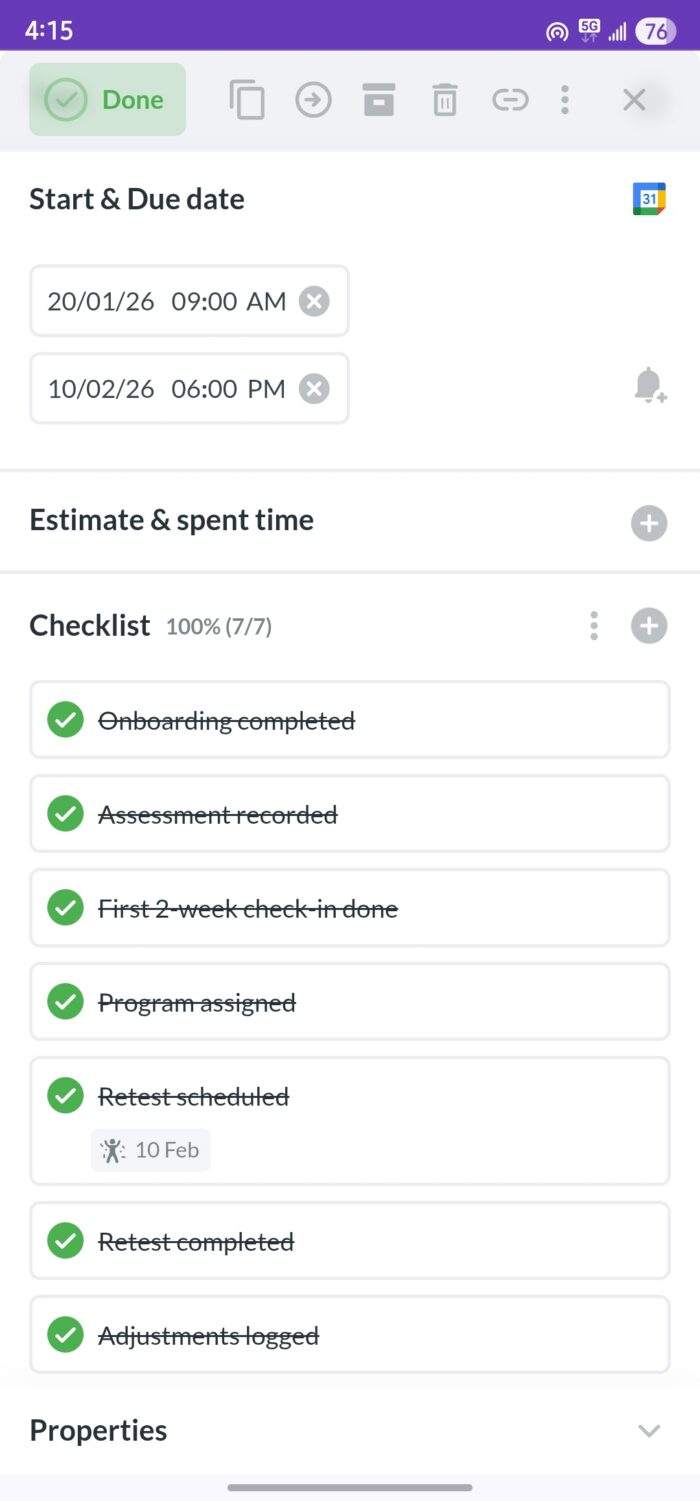
A mobile screenshot of a Kanbanchi task card showing a fully completed client progress checklist with items like "Onboarding completed," "Program assigned," and "Retest scheduled

Coaches can update client progress checklists in Kanbanchi directly from their phones the moment a session ends

Results: What Changed With Kanbanchi

Power PNY observed improvements across multiple areas because the work became visible and repeatable.

1) Equipment and facility upkeep stopped being reactive

Instead of waiting for something to break, the gym ran preventive maintenance more consistently. Repairs were tracked with owners and due dates, which reduced “mystery tasks” and repeated requests.

2) Fewer schedule surprises

Coverage requests and substitutions became cleaner. Everyone could see what was pending vs. confirmed, reducing confusion.

3) Training programs run with fewer gaps

Coaches had shared visibility into check-ins, retests, and special programming milestones. That meant better continuity for members.

4) Less time spent chasing updates

Managers and coaches wasted less time asking “What’s the status?” because the status was on the board. And most importantly: the gym established a scalable approach to fitness center project management that didn’t depend on one person being the “human reminder system.”

START YOUR FREE KANBANCHI TRIAL TODAY

What Gym Owners Can Copy: A Practical Mini Playbook

If you want to replicate Power PNY’s success, start with a structure you can maintain.

  1. Build one Operations board first.
  2. Add templates for recurring tasks (cleaning, inspections, onboarding).
  3. Create a Training Programs board for program cycles and member milestones.
  4. Add a Coverage board for trainer schedule changes and handoffs.
  5. Use a Gantt chart for any initiative longer than two weeks.

Then enforce two rules:

  1. Every task has an owner
  2. Every task has a due date when timing matters.

Try Kanbanchi for free for your business
Check out more case studies from different industries

    MultipleAuthors\Classes\Objects\Author Object
    (
        [term_id] => 973
        [term:MultipleAuthors\Classes\Objects\Author:private] => 
        [metaCache:MultipleAuthors\Classes\Objects\Author:private] => Array
            (
                [user_email] => olga.alekseeva@kanbanchi.com
                [user_id] => 20
                [first_name] => Olga Alekseeva
                [last_name] => 
                [job_title] => Growth hacking expert with over 10 years of experience with Kanbanchi
                [description] => Olga wears multiple hats across marketing, sales, product, and ops after 10+ years in the SaaS world. She is passionate about helping teams streamline their workflows with Kanbanchi and Google Workspace or Microsoft 365. "When I'm not optimizing processes or writing guides, I'm probably tweaking our product roadmap or diving into the latest productivity tools".
                [user_url] => https://linkedin.com/in/olgksv
            )
    
        [userObject:MultipleAuthors\Classes\Objects\Author:private] => WP_User Object
            (
                [data] => stdClass Object
                    (
                        [ID] => 20
                        [user_login] => olga.alekseeva
                        [user_pass] => $wp$2y$10$WuiuvYMj7CDnLrRbWchEkuBwKzmbBakK64Uk5c68bDY3qA46MFam6
                        [user_nicename] => olga-alekseeva
                        [user_email] => olga.alekseeva@kanbanchi.com
                        [user_url] => https://linkedin.com/in/olgksv
                        [user_registered] => 2025-09-03 15:47:58
                        [user_activation_key] => 
                        [user_status] => 0
                        [display_name] => Olga Alekseeva
                    )
    
                [ID] => 20
                [caps] => Array
                    (
                        [editor] => 1
                        [author] => 1
                        [contributor] => 1
                        [wpseo_editor] => 1
                        [wpseo_manager] => 1
                        [administrator] => 1
                    )
    
                [cap_key] => wp_capabilities
                [roles] => Array
                    (
                        [0] => editor
                        [1] => author
                        [2] => contributor
                        [3] => wpseo_editor
                        [4] => wpseo_manager
                        [5] => administrator
                    )
    
                [allcaps] => Array
                    (
                        [moderate_comments] => 1
                        [manage_categories] => 1
                        [manage_links] => 1
                        [upload_files] => 1
                        [unfiltered_html] => 1
                        [edit_posts] => 1
                        [edit_others_posts] => 1
                        [edit_published_posts] => 1
                        [publish_posts] => 1
                        [edit_pages] => 1
                        [read] => 1
                        [level_7] => 1
                        [level_6] => 1
                        [level_5] => 1
                        [level_4] => 1
                        [level_3] => 1
                        [level_2] => 1
                        [level_1] => 1
                        [level_0] => 1
                        [edit_others_pages] => 1
                        [edit_published_pages] => 1
                        [publish_pages] => 1
                        [delete_pages] => 1
                        [delete_others_pages] => 1
                        [delete_published_pages] => 1
                        [delete_posts] => 1
                        [delete_others_posts] => 1
                        [delete_published_posts] => 1
                        [delete_private_posts] => 1
                        [edit_private_posts] => 1
                        [read_private_posts] => 1
                        [delete_private_pages] => 1
                        [edit_private_pages] => 1
                        [read_private_pages] => 1
                        [wpseo_bulk_edit] => 1
                        [copy_posts] => 1
                        [ppma_edit_post_authors] => 1
                        [ppma_edit_own_profile] => 1
                        [wpseo_edit_advanced_metadata] => 1
                        [wpseo_manage_options] => 1
                        [view_site_health_checks] => 1
                        [switch_themes] => 1
                        [edit_themes] => 1
                        [activate_plugins] => 1
                        [edit_plugins] => 1
                        [edit_users] => 1
                        [edit_files] => 1
                        [manage_options] => 1
                        [import] => 1
                        [level_10] => 1
                        [level_9] => 1
                        [level_8] => 1
                        [delete_users] => 1
                        [create_users] => 1
                        [unfiltered_upload] => 1
                        [edit_dashboard] => 1
                        [update_plugins] => 1
                        [delete_plugins] => 1
                        [install_plugins] => 1
                        [update_themes] => 1
                        [install_themes] => 1
                        [update_core] => 1
                        [list_users] => 1
                        [remove_users] => 1
                        [promote_users] => 1
                        [edit_theme_options] => 1
                        [delete_themes] => 1
                        [export] => 1
                        [bcn_manage_options] => 1
                        [manage_security] => 1
                        [restrict_content] => 1
                        [list_roles] => 1
                        [create_roles] => 1
                        [delete_roles] => 1
                        [edit_roles] => 1
                        [cfdb7_access] => 1
                        [ppma_manage_authors] => 1
                        [ppma_manage_layouts] => 1
                        [ppma_manage_custom_fields] => 1
                        [ppma_manage_author_categories] => 1
                        [iwc_read_posts] => 1
                        [iwc_create_posts] => 1
                        [iwc_edit_posts] => 1
                        [iwc_delete_posts] => 1
                        [iwc_read_users] => 1
                        [iwc_create_users] => 1
                        [iwc_edit_users] => 1
                        [iwc_delete_users] => 1
                        [iwc_read_comments] => 1
                        [iwc_create_comments] => 1
                        [iwc_edit_comments] => 1
                        [iwc_delete_comments] => 1
                        [iwc_upload_files] => 1
                        [iwc_read_media] => 1
                        [iwc_edit_media] => 1
                        [iwc_delete_media] => 1
                        [iwc_read_terms] => 1
                        [iwc_create_terms] => 1
                        [iwc_edit_terms] => 1
                        [iwc_delete_terms] => 1
                        [editor] => 1
                        [author] => 1
                        [contributor] => 1
                        [wpseo_editor] => 1
                        [wpseo_manager] => 1
                        [administrator] => 1
                    )
    
                [filter] => 
                [site_id:WP_User:private] => 1
            )
    
        [hasCustomAvatar:MultipleAuthors\Classes\Objects\Author:private] => 1
        [customAvatarUrl:MultipleAuthors\Classes\Objects\Author:private] => Array
            (
                [url] => https://www.kanbanchi.com/wp-content/uploads/2025/09/photo_2024-04-10_17-25-16.jpg
                [url2x] => https://www.kanbanchi.com/wp-content/uploads/2025/09/photo_2024-04-10_17-25-16.jpg
            )
    
        [avatarUrl:MultipleAuthors\Classes\Objects\Author:private] => 
        [avatarBySize:MultipleAuthors\Classes\Objects\Author:private] => Array
            (
                [96] => 
                [80] => 
                [50] => 
            )
    
    )
    
  • Growth hacking expert with over 10 years of experience with Kanbanchi

    Olga wears multiple hats across marketing, sales, product, and ops after 10+ years in the SaaS world. She is passionate about helping teams streamline their workflows with Kanbanchi and Google Workspace or Microsoft 365. "When I'm not optimizing processes or writing guides, I'm probably tweaking our product roadmap or diving into the latest productivity tools".

    All articles
Share

Try Kanbanchi now

  • Collaborate seamlessly
    with your team
  • Integrate Kanbanchi
    with Google or Microsoft
  • Manage all your work in one place
Start for free

Start using Kanbanchi now

Start your free trial