
In this Article:
Try Kanbanchi now
Start your free trial

Has your team finally outgrown shared spreadsheets? The natural choice is to invest in a proper project management tool. But while this move should feel like a relief (think automated workflows and centralized data), it can create even more inefficiencies if you don’t choose one that fits your daily workflows.
Kanbanchi vs ClickUp is one of the most common comparisons at that crossroads, especially if you’re already using Google Workspace. These tools share some similarities, but pricing and day-to-day experience are where differences quickly arise.
Keep reading as we explain what each platform actually costs and how long it takes to get your team productive.
Want to store your project boards in Google Drive? Kanbanchi is the stronger pick in terms of project management software for Google Workspace. It features an interface that takes minutes to understand and pricing that doesn’t hide add-ons. ClickUp is a good choice if you need a single platform to replace docs, chat, track projects across departments, and have the setup time to make that work. But if getting your team productive in days rather than weeks is the priority, Kanbanchi wins for Google Workspace project management.
| Platform | Kanbanchi | ClickUp |
|---|---|---|
| G2 | 4.7 / 5 | 4.6 / 5 |
| Capterra | 4.5 / 5 | 4.6 / 5 |
G2 users consistently rate Kanbanchi highly for ease of setup and support quality. Although ClickUp’s G2 score is strong, “learning curve” ranks as its second most-cited complaint. ‘Ease of Setup’ is ClickUp’s lowest-rated metric on G2, at 8.2 out of 10.
ClickUp is one of the most feature-dense project management platforms available, offering over 1,000 integrations.
It promises to work for teams of all sizes, from early-stage startups to large enterprise operations, with a single workspace that combines every productivity tool you currently use – boards, documents, chat, whiteboards, goals, and time tracking, with a growing AI layer called ClickUp Brain. Whether it delivers on this promise, however, depends heavily on how much configuration time your team has and the complexity of your workflows.
Kanbanchi is project management software for Google Workspace that also works with Microsoft 365.
One of Kanbanchi’s biggest advantages is its ability to store projects directly in your Google Drive rather than a separate system. Permissions follow your existing Google Admin setup, and adding or removing a team member from a board works the exact same way as sharing a Drive file.
Something else that makes Kanbanchi unique is its 3-in-1 structure. It combines Kanban board software and Gantt chart with a time tracker, meaning you won’t have to purchase separate subscriptions for each. The benefit? Teams that switch to this platform get up and running from the first session.
| Feature | Kanbanchi | ClickUp |
|---|---|---|
| Kanban board | Yes (all plans) | Yes (all plans) |
| Gantt chart | Yes (Professional+) | Yes (Unlimited+) |
| Time tracking | Yes (Professional+) | Yes (Unlimited+) |
| Swimlanes | Yes (Professional+) | Yes (Business+) |
| Team workload view | Yes (Professional+) | Yes (Business+) |
| Task dependencies | Yes (Professional+) | Yes (Unlimited+) |
| Recurring tasks | Yes (Premium+) | Yes (Unlimited+) |
| Custom fields | Yes (Professional+) | Yes (Unlimited+) |
| Workflow automation | Recurring cards, templates, status-based rules | 5,000 runs/month on Business |
| Built-in Docs and Chat | No | Yes |
| AI features | None built-in | ClickUp Brain (add-on, $9+/user/month) |
| Google Workspace (native) | Yes – boards stored as Drive files | Connector (Gmail, Drive, Calendar, Chat) |
| Microsoft 365 integration | Yes | Partial |
| Mobile app (iOS & Android) | Yes | Yes |
| Free plan | Yes (unlimited users, unlimited projects, 36 active cards per project) | Yes (unlimited tasks; 100MB storage; lifetime caps on Gantt and custom fields) |
| SOC 2 Type II | Yes | Yes |
| SSO | Google/Microsoft (all plans) | Google SSO (Business+); SAML (Enterprise) |
| Open API | No | Yes |
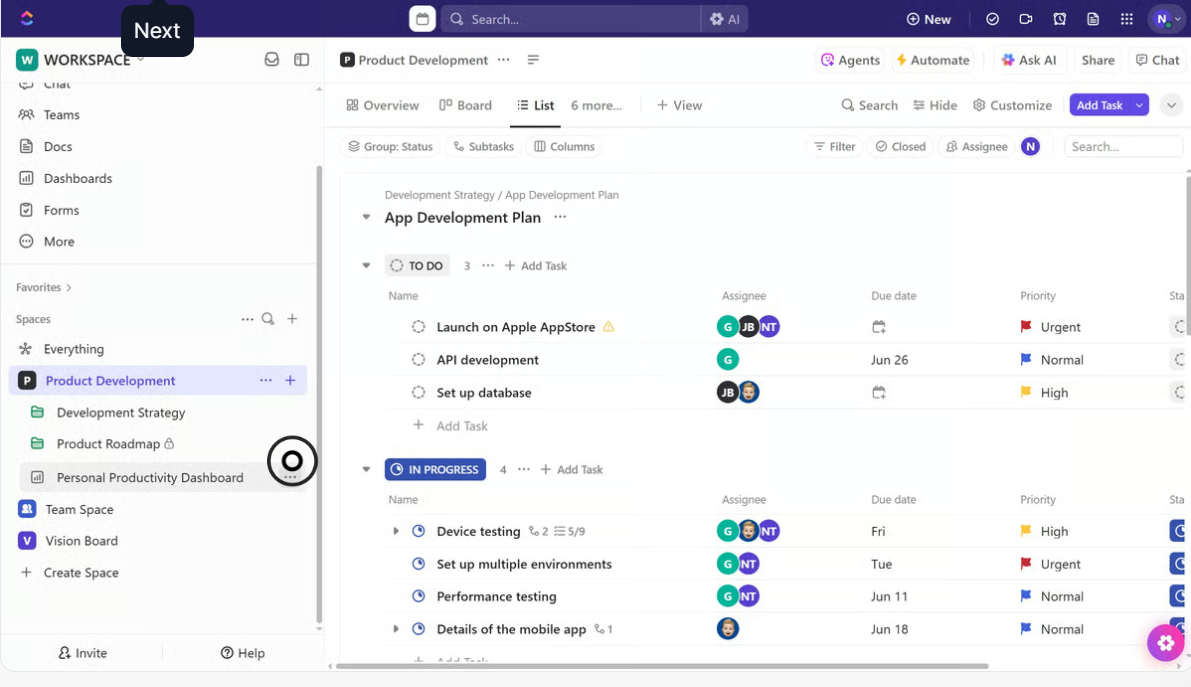
Open ClickUp and you’ll see a sidebar with multiple features presented at once: spaces, folders, lists, views, dashboards, and goals. The setup may be ideal for experienced managers, but for those new to project management software (or moving from a simple shared spreadsheet tool), it feels like a lot to process.
This is something acknowledged in many ClickUp reviews across G2 and Capterra, with the steep “learning curve” being the platform’s second most-cited complaint. Ease of Setup also scores 8.2 out of 10 on G2, ClickUp’s lowest measured metric.
With Kanbanchi, your board is the center of the product, and the Gantt chart, workload view, and time tracker are all accessible without leaving it.
You’ll find this interface immediately familiar if you use Google products every day, as the layout and interaction patterns match what you already know from Drive and Docs. No extra training is required to understand how to navigate projects – you can simply start working straightaway.
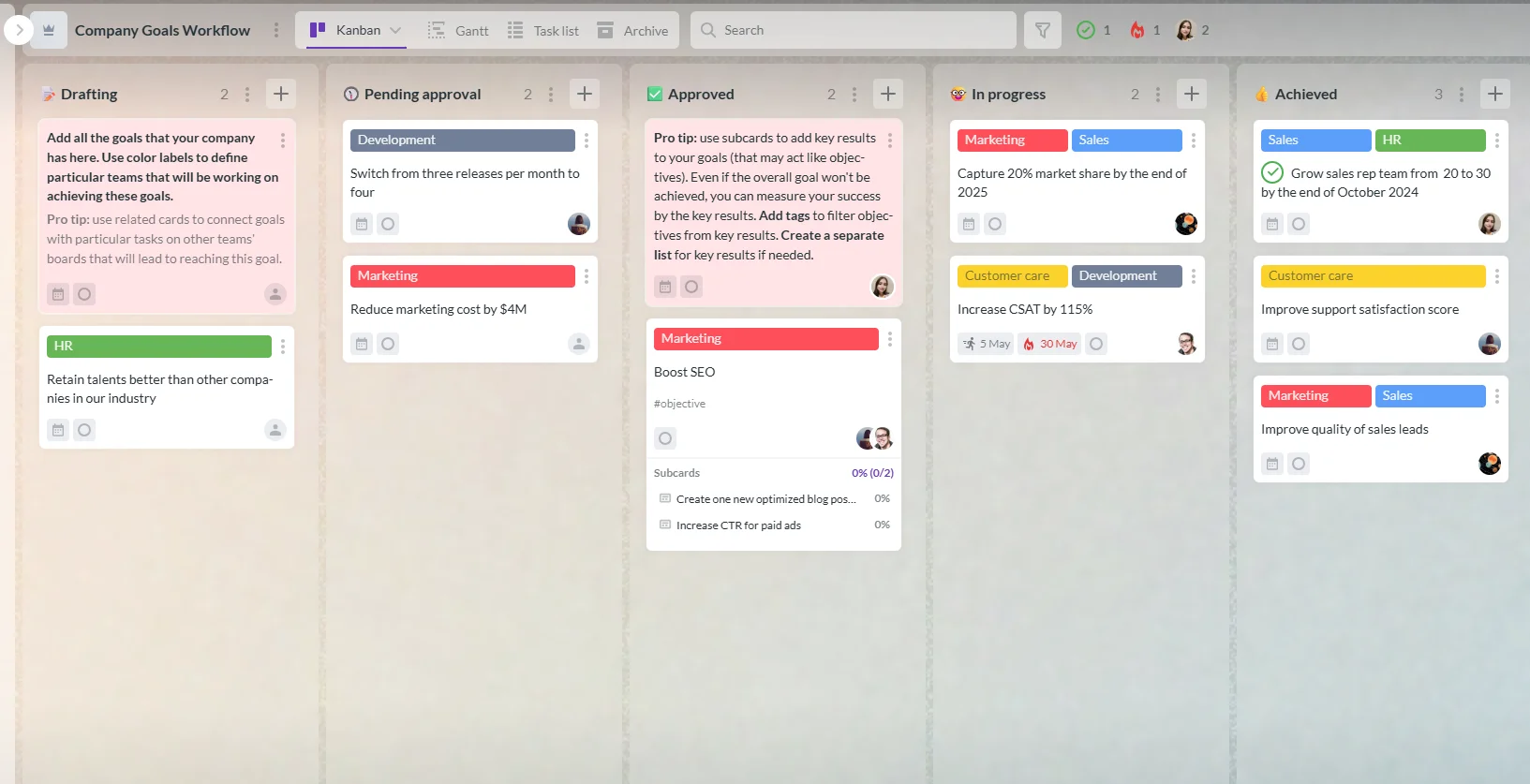
A Kanbanchi board is something a new team member can be invited to and start using within a single session. ClickUp users typically don’t see this outcome on day one, and this gap in time-to-productivity is a real cost worth considering when choosing between the two platforms.
One area where the Kanbanchi vs ClickUp difference is clear is speed of onboarding, particularly for organizations without a dedicated IT function.
| Milestone | Kanbanchi | ClickUp |
|---|---|---|
| First board created | Under 10 minutes via Google sign-in | 30–60 minutes including workspace and folder setup |
| First team using the tool | Same day | 1–3 days |
| Advanced views active (Gantt, Workload) | Day 1–2 on Professional plan | 1–2 weeks |
| Team comfortable day-to-day | First week | 3–4 weeks |
| Admin confident with settings | Same day (inherits Google Admin) | 1–2 weeks |
ClickUp’s depth in features and customization creates an average adoption timeline of three to four weeks. While that’s not a criticism of the product’s depth, it is a real operational cost to consider if you can’t run a parallel transition period, which is why speed matters when selecting a Google Workspace project management tool. ClickUp offers ClickUp University and onboarding webinars specifically to help with this.
You can be productive with Kanbanchi from day one. Boards appear in Google Drive the way any file does, and sharing follows the same process as sharing a Google Doc. The permission structure doesn’t require a separate admin setup, either, meaning your team skips the learning-a-new-permission-system step entirely.
Flexibility is something users love about ClickUp, with over 15 unique project views. You can see lists, boards, Gantt charts, timelines, mind maps, calendars, and workloads, meaning every team member can work in the way that best suits them – without duplicating information.
While Kanbanchi has some similar views (Kanban board, List View, Gantt chart, Team Workload, Swimlanes, and the personal My Work view), they’re much more focused and don’t require any extra configuration. Fewer views means less chance of your team experiencing decision fatigue, but if you need mind maps or whiteboards, ClickUp may be a better choice here.
Both tools offer time tracking software. But where they differ is the software’s purpose: Kanbanchi’s card-level feature is best if you’re billing by the hour or feeding project data into Looker Studio, while ClickUp suits more formalized timesheet processes.
With Kanbanchi, you start a timer on a specific task and stop it when finished, so the entry logs directly against that card. Your data also exports to Google Sheets without additional setup.
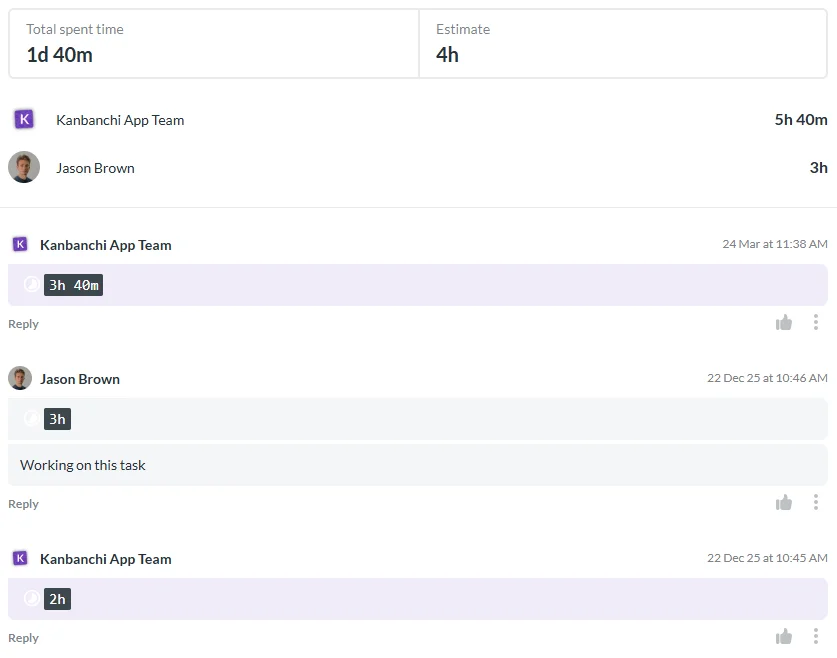
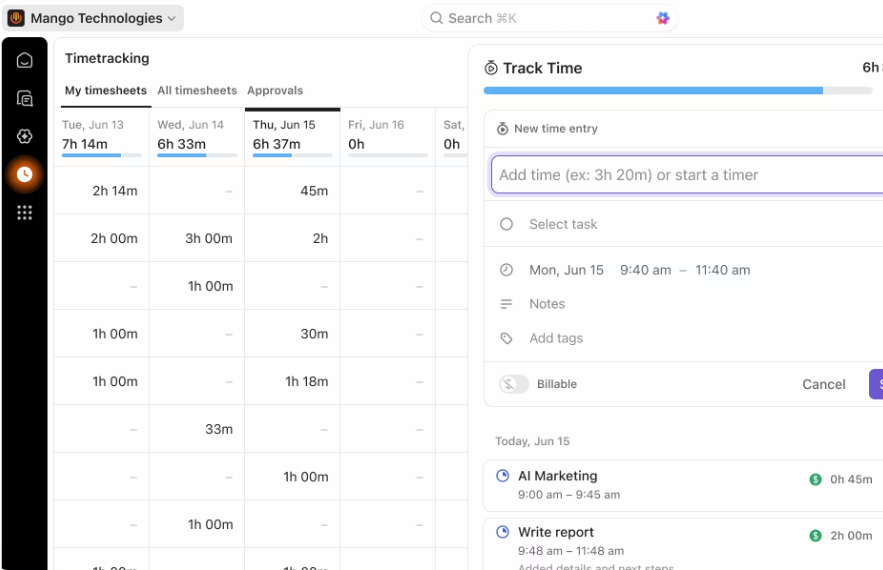
ClickUp’s time tracking helps you manage multiple billing relationships simultaneously, as you can track time across several workspaces. You can also generate time reports by user or projects, and set estimated time targets, making it a more capable option in this category.
Need to run complex multi-stage workflows, but want to avoid purchasing a separate automation tool? ClickUp has an automation layer that runs 5,000 workflows per month with the Business Plan. This rule builder includes task state changes, assignment events, date conditions, and custom field updates.
Most organizations running standard workflows will enjoy Kanbanchi’s lighter automation. It’s not a direct replacement for ClickUp’s rule engine, but it does cover plenty of repeatable work needs, like:
We’ll cover this add-on in more detail in the pricing section, but for context here, ClickUp Brain is an extra AI feature that can be added to any ClickUp plan. It offers a set of features capable of being built into any project workflow, from summarizing tasks and generating descriptions to running natural language search across your workspace.
Kanbanchi’s project management software for Google Workspace currently has no native AI features, so keep this in mind before making your final decision.
ClickUp has all the security certifications you’d expect from a good project management platform, including SOC 2, ISO 27001, GDPR, and HIPAA (with HIPAA availability on the Enterprise plan). It also offers permission controls, although custom roles and SAML SSO with SCIM provisioning are only available on Enterprise.
The permission model works differently with Kanbanchi, since your boards are already integrated into Google Drive as native files. As we’ve mentioned, access management follows your existing Google Admin setup rather than a separate system inside the project management tool.
This means that adding or removing someone from a board works just like sharing a Drive file! Google SSO is available on all plans, including free, while you’ll have to purchase the Business plan or above to access this integration via ClickUp.
Kanbanchi’s Enterprise plan adds multi-level admin, Shared Drives support, and Google Vault integration for legal hold and eDiscovery. This Vault integration is a real differentiator for Kanbanchi, especially if you have record retention obligations – your project boards are subject to the same eDiscovery policies as Gmail and Drive content.
And the best part? There’s no additional configuration required here, meaning a simpler setup process.
ClickUp has an integration catalog with over 1,000 project management, development, marketing, and operational tools. Some of the standouts are Slack, GitHub, GitLab, Figma, Zendesk, Zoom, and HubSpot.
And if you want to use tools that don’t offer native integrations, there’s an open API for custom connections. ClickUp is therefore the stronger option if you’re running a broader tool stack and need everything linked.
Rather than third-party tools, Kanbanchi offers six core Google Workspace integrations:
No public API means teams needing deep connections to external systems will find ClickUp more capable. But if you work mainly on Google Workspace, these six integrations cover the practical workflow completely.
The best project management software for Google Workspace isn’t always the one with the longest connector list – it’s the one that most naturally integrates into the infrastructure you already run. Native file storage in Drive and full Google Admin permission inheritance matter far more than a third-party connector count for Google Workspace project management teams, and that’s where Kanbanchi has a clear advantage.
If you need a project management tool that works on the go, Kanbanchi and ClickUp are solid options.
ClickUp’s mobile app handles day-to-day task management well generally, especially for quick updates and progress checking. However, users on G2 and Capterra regularly note that complex functions, including custom dashboard editing and detailed Gantt chart work, are better on desktop
The mobile experience on Kanbanchi is similar, allowing you to check in and update cards, leave comments, track time, and manage your personal task view.
Both platforms can help you keep projects moving, but neither app is a full replacement for desktop on more complex project work.
Support quality may not seem like an important factor during the evaluation stage, but it will matter when you’re six months in and a configuration issue stops your workflow.
A pattern that appears consistently across ClickUp’s user reviews is depth of knowledge from the tool’s customer support. Many customers experience formulaic responses when they initially contact support, and are directed to help center articles that address the surface-level version of their question. These responses also aren’t tailored to their specific setup, and getting to someone with genuine product knowledge takes longer than the problem itself warranted.
On the flip side, support quality is one reason those switching from larger platforms describe Kanbanchi as their preferred ClickUp alternative. Users say that responses are much quicker and that the support team understands the product in depth. This means they’re able to approach problems in terms of what the organization is actually trying to accomplish, rather than offering generic responses.
Kanbanchi’s Professional plan includes priority support, and the Enterprise plan adds a designated account manager and structured onboarding assistance for larger migrations.
If you’re part of a smaller organization without a dedicated tech or implementation manager, the difference between being redirected to help center documentation and receiving a tailored answer to your problem is huge.
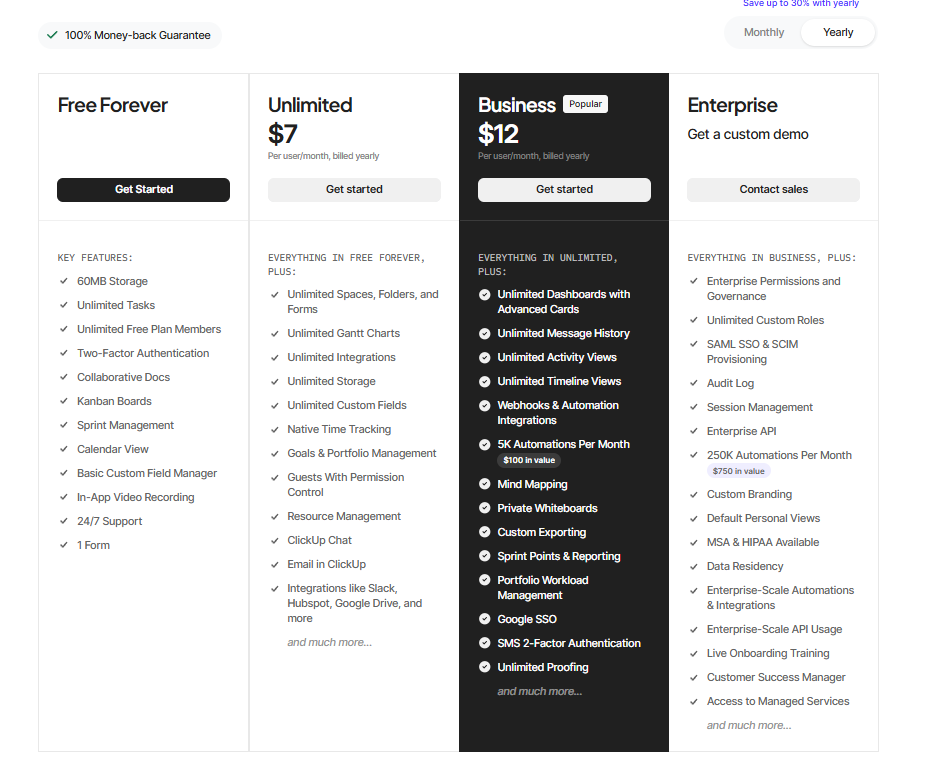
ClickUp has four main pricing tiers:
Something you may not notice until you’re already using the platform is those additional AI costs we previously mentioned. They apply to every plan: Brain AI adds $9 per user, per month, while Everything AI adds $28. Let’s consider what this means for you.
A Business plan user at $12 per month becomes $21 per month with Brain AI, or $40 per month with Everything AI. If you’ve got 15 people on your team, you’ll initially expect to pay just $180 monthly. But adding Brain AI brings that to $315, or $600 for Everything AI.
You may not realize it, but upgrading your ClickUp plan requires upgrading your entire workspace. Every team member must commit to Business Pricing, even if just one person needs advanced automations. Accessing these Business-tier features can quickly bump up the cost of investing in a project management tool, especially for large or growing organizations.
Kanbanchi also offers a range of pricing plans, plus a free trial of the highest level Enterprise tier. And what’s great about these tiers is that Google Drive integration is included on every one (including the free plan!), with the Premium plan adding even deeper integrations – export to Google Sheets and data collection from Google Forms.
Each pricing plan is customizable from two seats, with per-seat discounts that grow as team size increases. Educational institutions and nonprofits are also eligible for a 25% discount on all annually billed plans, other than Essential.
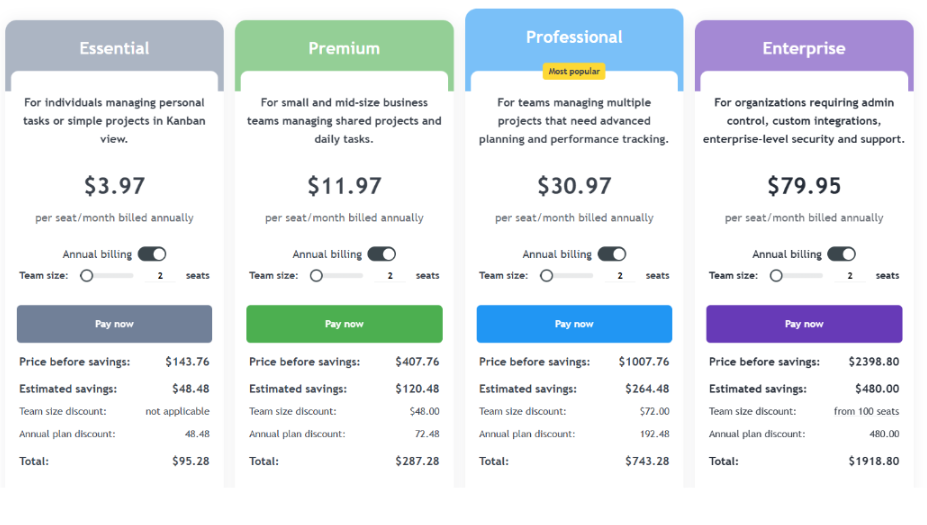
Let’s consider how much Kanbanchi and ClickUp would cost for a team of 15 people:
| Scenario | ClickUp | Kanbanchi |
|---|---|---|
| Base plan (annual) | $2,160/yr (Business) | ~$4,764/yr (Professional) |
| With Brain AI | $3,780/yr | No AI add-on cost |
| With Everything AI | $7,200/yr | No AI add-on cost |
Here, you can see that ClickUp is cheaper at the Business plan level for small teams, without those extra ClickUp Brain AI features.
But at 15 users with Everything AI, ClickUp costs nearly double Kanbanchi Professional per year. It also excludes the native Drive storage, Google Admin integration, or support model that Kanbanchi includes as standard.
| Choose Kanbanchi if… | Choose ClickUp if… |
|---|---|
| Your team runs on Google Workspace and wants project boards stored directly in Drive | You need a single platform to consolidate docs, chat, and project tracking across departments |
| You want your team productive in days without a formal onboarding program | Your team has IT resource available for a 3–4 week setup and configuration phase |
| You need Kanban, Gantt, and time tracking without managing multiple subscriptions | You need 1,000-plus integrations or a custom API connection to an external system |
| Compliance, Google Vault support, or Google Admin control is a requirement | AI-assisted project management features are a priority for your team |
| Support quality matters and you want responses from people who know the product deeply | You need advanced multi-stage workflow automation built into the platform |
| You want pricing that scales predictably as seat count grows | Your team is already using other ClickUp features and wants consolidation |
Both project management tools we’ve discussed are solid choices. But the truly stronger choice in this Kanbanchi vs ClickUp review, especially if you need to get projects moving without a multi-week configuration phase, is Kanbanchi. It works as a simple project management tool for Google Workspace teams new to the category, and scales into more complex workflows without requiring a platform switch or a long onboarding period.
If you want to run your entire project from one place, ClickUp deserves some serious consideration. Any thorough ClickUp review will acknowledge its genuine breadth of features, including the AI-assisted project management add-ons, which require a large time and resource investment to properly set up.
Just make sure you’re aware of the total costs before investing. The base plan price isn’t what you’ll pay with Brain AI, and the workspace-wide upgrade requirement increases per-user costs higher than expected as you add features.
But the best way to find out whether Kanbanchi really is the right project management tool for you is to try it out. Start a free trial today and have your first board running in under ten minutes.
Whether Kanbanchi is better than ClickUp depends on your setup. Kanbanchi is best for Google Workspace teams that want fast setup, native Drive integration, and support that solves real problems. ClickUp suits those needing a single platform to cover multiple functions. Kanbanchi is best if onboarding speed and day-to-day support quality matter most
The clearest difference between Kanbanchi vs ClickUp is focus versus breadth. ClickUp covers project management, documents, chat, goals, and AI in one platform, with a corresponding setup and learning curve. Kanbanchi focuses on doing fewer things well inside Google Workspace, with a 3-in-1 interface that most users can pick up in one session.
ClickUp connects to Gmail, Drive, Calendar, and Chat via integrations, but project data is stored in ClickUp’s own infrastructure rather than in Google Drive. This makes the setup process difficult if your IT governance already runs through Google Admin. Kanbanchi stores boards as native Drive files, extending your existing Google Admin controls rather than creating a parallel permission system.
The ClickUp free plan caps storage at 100MB and limits Gantt charts and custom fields to 100 lifetime uses each. These are permanent caps, not monthly resets. Once you hit the limit, the feature locks until you upgrade. Kanbanchi’s free plan works differently. It’s unlimited in time and features, with a limit of 36 active cards per board and no feature lockouts based on usage.
Kanbanchi is the most widely recommended ClickUp alternative for Google Workspace teams, as it stores your boards directly in Drive. It also integrates natively with Gmail, Calendar, and Sheets, and has a clean interface that teams describe as immediately intuitive. As a simple project management tool for Google-first organizations, it offers the shortest setup period from sign-up to productive use.
ClickUp’s base plans run from $7 to $12 per user, per month on annual billing. AI features cost an extra $9 to $28 per user, per month and are not included in any plan. Kanbanchi’s Essential plan is $3.97 per user, per month (annual billing), with team-level pricing on higher plans that becomes more cost-effective as seat count grows.
Read more articles related to Project Management
In this Article:
Start using Kanbanchi now
Start your free trial