
In this Article:
Try Kanbanchi now
Start your free trial

Picking a project management tool may seem straightforward at first glance. That’s until you’re three weeks into onboarding and realize the pricing page didn’t quite cover the full story.
In this Kanbanchi vs Zoho Projects guide, we compare both options for Google Workspace teams who are looking for specifics: real costs, onboarding time, integration depth, and support quality. Read on for our honest verdict.
Quick Verdict
Kanbanchi is the right project management pick for Google Workspace teams wanting a fast setup and a clean interface that feels native to the tools they already use. Zoho Projects works well for larger organizations already embedded in the Zoho ecosystem or teams that need enterprise-level project tracking at a low per-seat price. Go with Kanbanchi if your team runs on Google Workspace and wants to boost productivity from day one.
User ratings at a glance: Kanbanchi scores 4.5-4.7/5 across G2 and Capterra, with reviewers consistently rating it higher than Zoho Projects for everything from ease of use and setup to ongoing product support. Zoho Projects holds a solid 4.3-4.5/5, with its strongest endorsements around value for money.
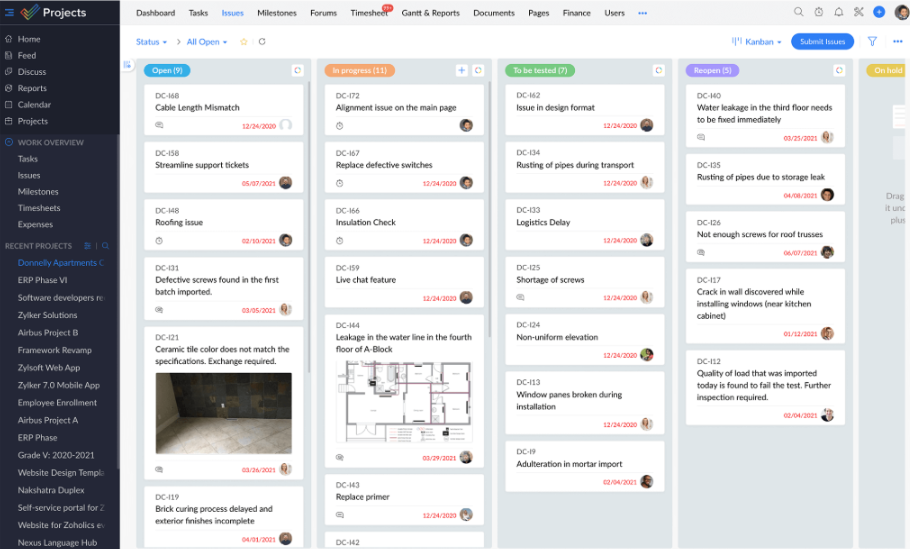
Designed by Indian software company Zoho Corporation, Zoho Projects is just one of the company’s 50+ business applications. This project management platform targets teams of all sizes but is best-suited to organizations already using Zoho CRM, Zoho Desk, or Zoho Analytics. And it’s those native integrations where Zoho delivers the most value.
The platform offers Kanban boards, Gantt charts, time tracking, a built-in issue tracker, Blueprint automation, and Zia AI features for task generation and translation. Its four pricing tiers include a free plan and an Enterprise plan that adds cross-project Gantt, critical path analysis, and custom roles. Zoho Projects supports 25 languages and has a reasonably broad set of third-party integrations, including Slack, Microsoft Teams, GitHub, Figma, and Zapier.
That breadth is Zoho’s genuine selling point for teams already embedded in its ecosystem. Whether its depth works for or against you depends largely on your team’s size. Consider your existing tool stack and appetite for a steeper setup process, too.
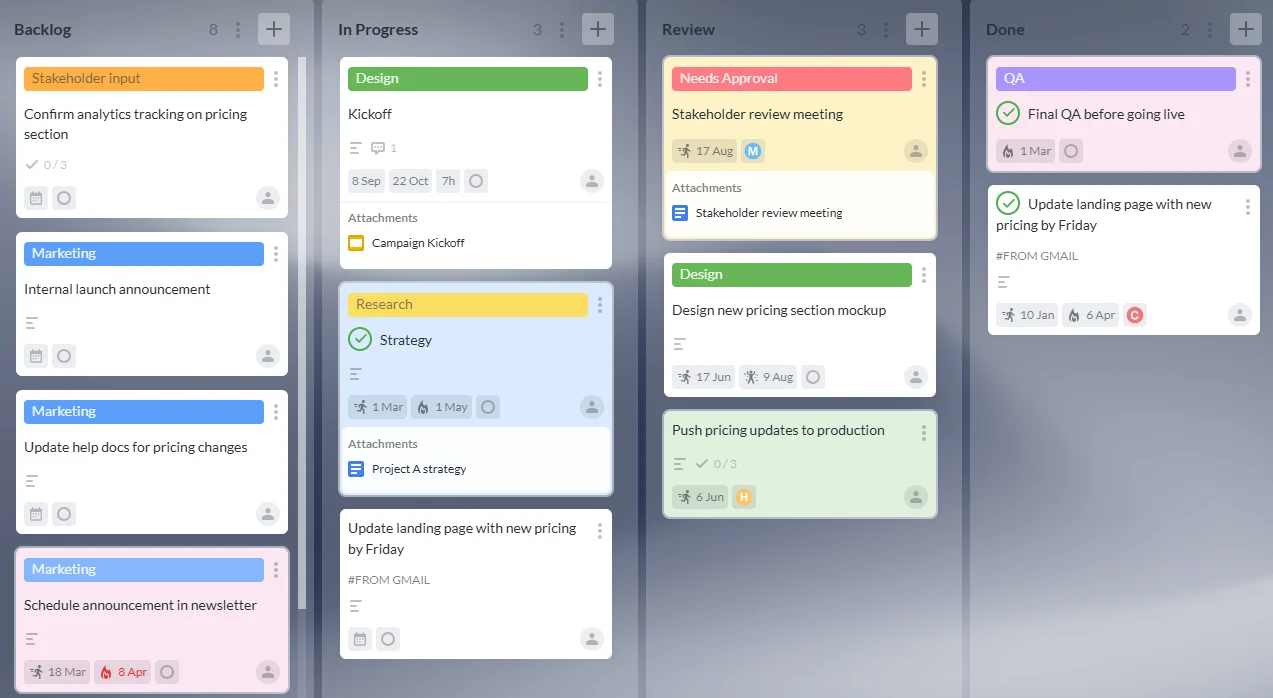
Kanbanchi is a project management tool designed for Google Workspace. It’s the strongest kanban board Google Workspace option on the market for Drive-first teams, with a Microsoft 365 version added later.
Kanbanchi stores your boards directly as files in Google Drive or Shared Drives. It doesn’t bolt on a Google sign-in as an afterthought. Instead, your project lives inside the same storage infrastructure your IT admin already manages, with enterprise-grade security credentials to safeguard all data.
One of Kanbanchi’s clearest differentiators is its three-in-one interface structure: a Kanban board, a Gantt chart, and a Time Tracker. Teams can plan, track, and log time without switching tools or platforms. It achieves this with an intentionally clean interface – a decision that has earned Kanbanchi consistent praise from users who describe it as immediately intuitive, particularly compared to more complex alternatives.
| Feature | Kanbanchi | Zoho Projects |
|---|---|---|
| Kanban board | Yes (all plans) | Yes (all plans) |
| Gantt chart | Yes (Professional+) | Yes (all paid plans) |
| Time tracking | Yes (Professional+) | Yes (Premium+) |
| Swimlanes | Yes (Professional+) | Yes |
| Team workload view | Yes (Professional+) | Yes (Premium+) |
| Task dependencies | Yes (Professional+) | Yes (Premium: within project; Enterprise: cross-project) |
| Recurring tasks | Yes (Premium+) | Yes (Premium+) |
| Custom fields | Yes (Professional+) | Yes (Enterprise+) |
| Workflow automation | Recurring cards, email-to-card, status automation | Blueprint automation (Premium+) |
| AI features | None built-in | Zia AI: task creation, summaries, translation (Premium+) |
| Multi-project support | Run multiple projects simultaneously across boards | Multi-project dashboards (Enterprise+) |
| Critical path analysis | No | Yes (Enterprise+) |
| Built-in issue tracker | No | Yes (all plans) |
| Google Workspace (native) | Yes – boards stored as Drive files | Connector (SSO, Drive link, Calendar sync) |
| Microsoft 365 integration | Yes | Partial (Teams, SharePoint) |
| Mobile app (iOS & Android) | Yes | Yes |
| Free plan | Yes (unlimited users, unlimited projects, 36 active cards per project) | Yes (5 users, 3 projects) |
| SOC 2 Type II | Yes | Yes |
| SSO | Via Google / Microsoft Workspace | Enterprise+ (native SSO) |
Kanbanchi and Zoho Projects both include similar core project management features. Where we found that Zoho differs, however, is with its lack of native Google Workspace file storage and the paywall on custom fields (Enterprise only). Kanbanchi doesn’t have critical path analysis or a built-in issue tracker. It also currently doesn’t offer native AI features. But for most Google Workspace SMBs, those trade-offs fall clearly in Kanbanchi’s favor.
Google Workspace integration is where Kanbanchi vs Zoho Projects diverges most sharply for IT-conscious teams. Both tools connect to Google apps, but the nature of that connection is completely different.
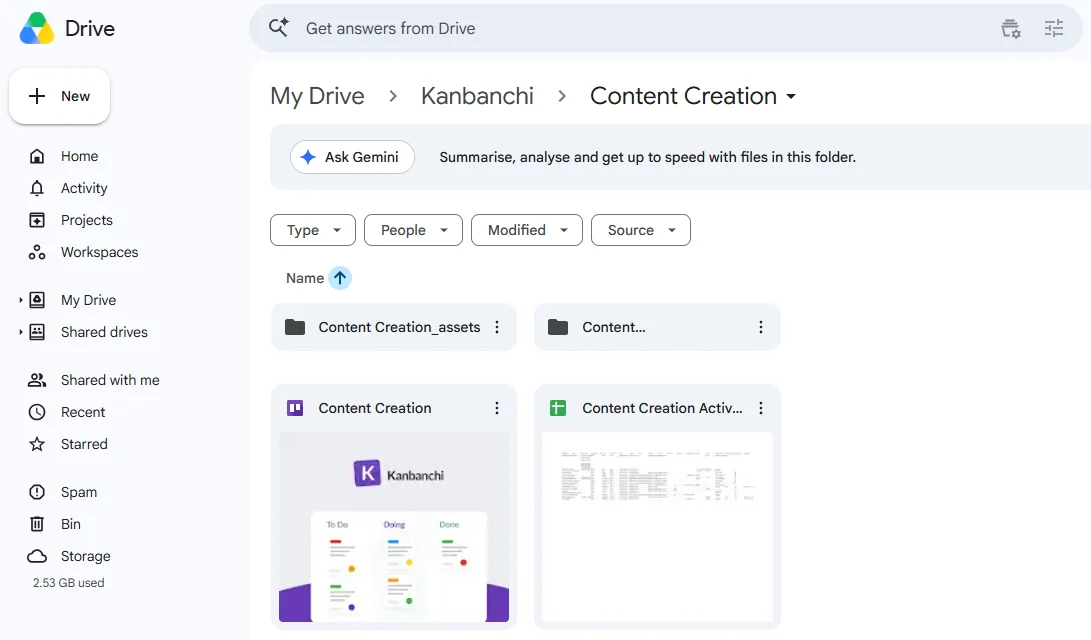
One of Kanbanchi’s key distinctions is how it stores your boards: in Google Drive or Shared Drive. That means you don’t need to manually revoke access through a separate platform if a team member leaves. Google Admin handles everything instead, including permissions and sharing rules.
But the practical implications go even further if you’re an organization with records retention obligations – think healthcare providers and legal or financial services. Kanbanchi rather handily supports Google Vault. Project boards can be subject to your organization’s legal hold and eDiscovery policies, the same way Gmail and Drive content already is.
Other Google Workspace integrations worth highlighting include:
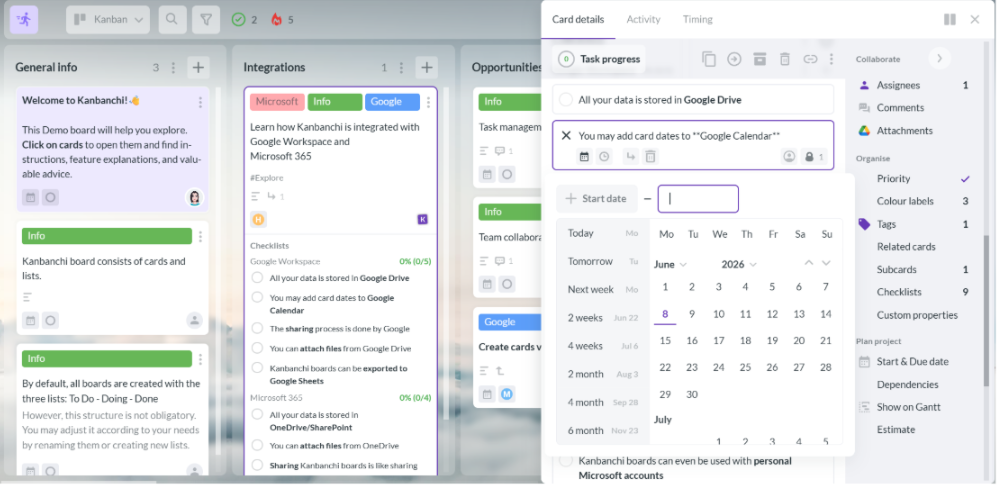
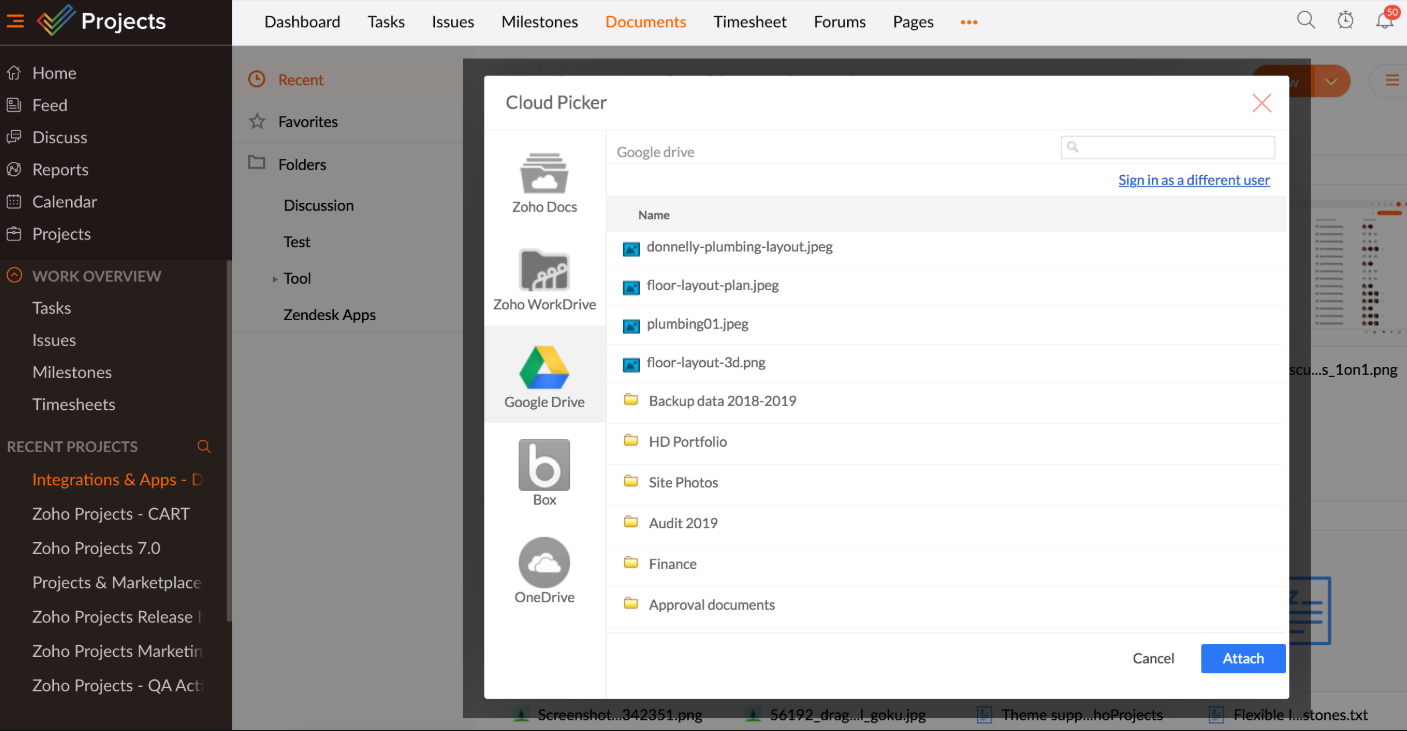
Zoho Projects supports Google Workspace sign-in, Google Drive file linking, Google Calendar sync, and smart chip integration with Google Docs. These are solid integration points. Teams can authenticate with their Google account and link Drive files to tasks.
But if you follow strict data governance requirements, it’s important to note that Zoho doesn’t directly integrate with Google Workspace. Access and onboarding management, alongside project data, sit outside your Google Admin controls, unlike Kanbanchi.
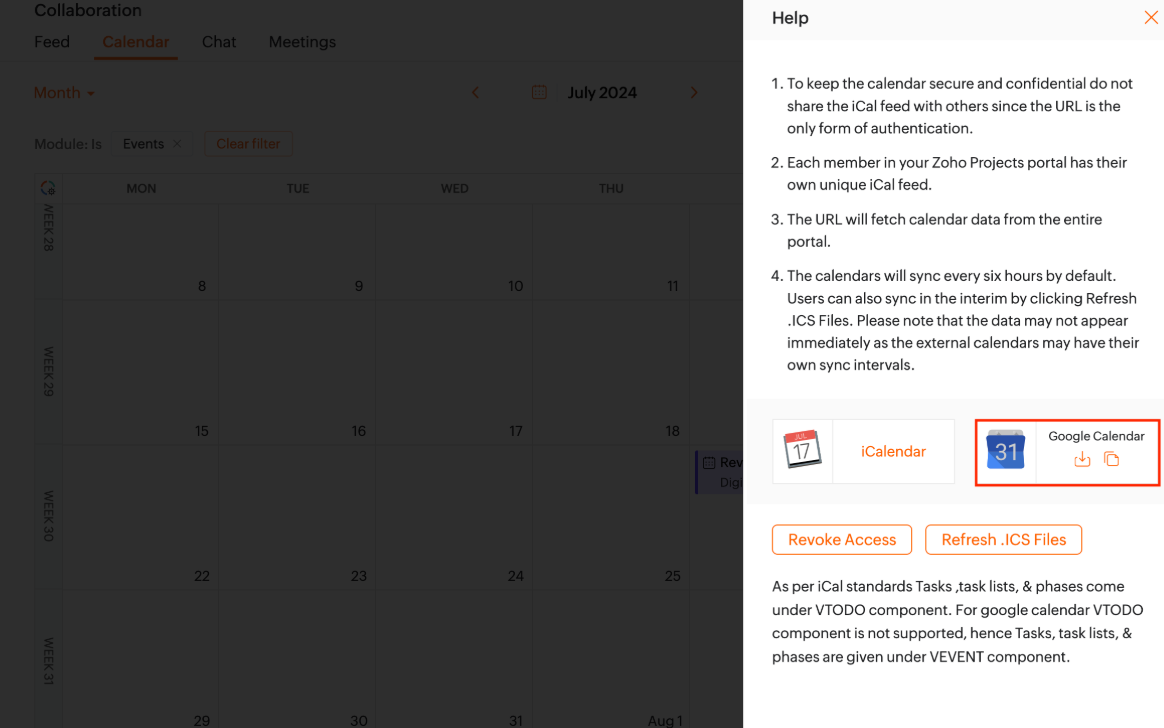
Neither integration is broken. But for teams that already run compliance and IT through Google Admin, Kanbanchi simply extends that existing structure rather than creating a parallel one.
Let’s not forget about onboarding, either.
Getting a team onto a new tool is not just a technical exercise, even for mid-size organizations without dedicated project managers or IT resources. If the tool takes three weeks to feel comfortable, that three-week period is three weeks of half-productivity and tool abandonment risk. You’ll also encounter mounting frustration within your team.
If you’re looking at project management software for Google Workspace in particular, the onboarding question is where Kanbanchi vs Zoho Projects diverges most sharply.
| Milestone | Kanbanchi | Zoho Projects |
|---|---|---|
| First board created | Under 10 minutes (Google sign-in, board = Drive file) | 30–60 minutes (account setup, portal configuration, invites) |
| First team using the board | Same day for Google Workspace teams | 1–3 days (learning navigation, project structure) |
| Gantt chart and time tracking active | Day 1–2 on Professional plan | 1–2 weeks (Blueprint and timesheet configuration) |
| Team comfortable with day-to-day use | First week | 2–3 weeks |
| Admin confident with settings and permissions | Same day (inherits Google Admin) | 1–2 weeks (custom roles, profiles, workflow rules) |
Zoho Projects’ onboarding takes 2-3 weeks on average before teams feel comfortable, according to G2 user reviews. That’s not necessarily a criticism of Zoho’s functionality – it’s a reflection of the platform’s genuine depth of features and third-party integrations.
For Google Workspace teams using Kanbanchi, the first session feels much more familiar. There’s no new mental model to build from scratch; simply sign in and create a board that appears in your Drive, then invite your team the same way you’d share any Drive file.
This onboarding timeline benefits SMBs without IT functions or in-house project management experts most. If someone on the team has to figure out the tool while also doing their actual job, it’s a real operational cost. Kanbanchi’s first-session productivity is a genuine advantage in that context.
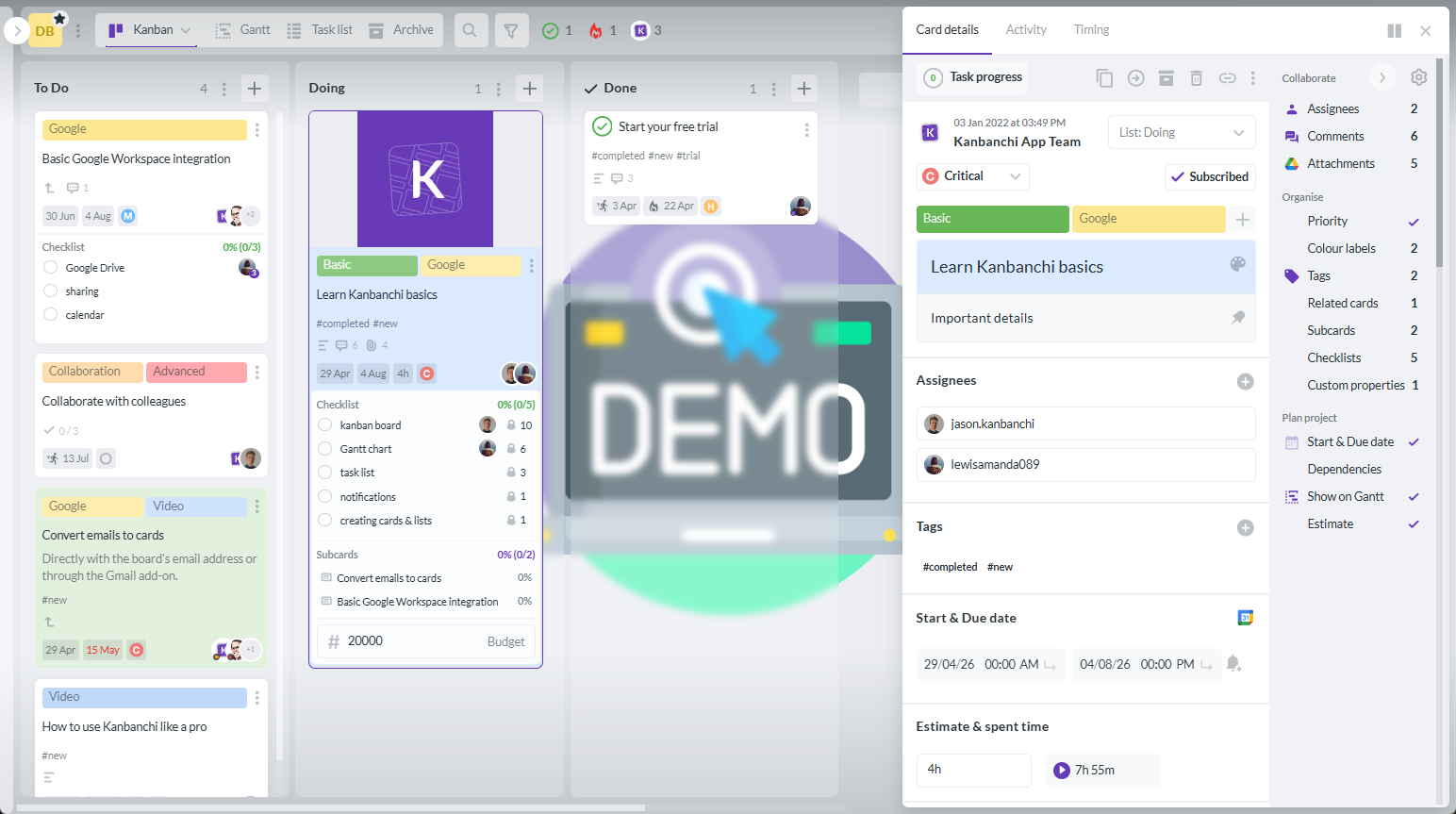
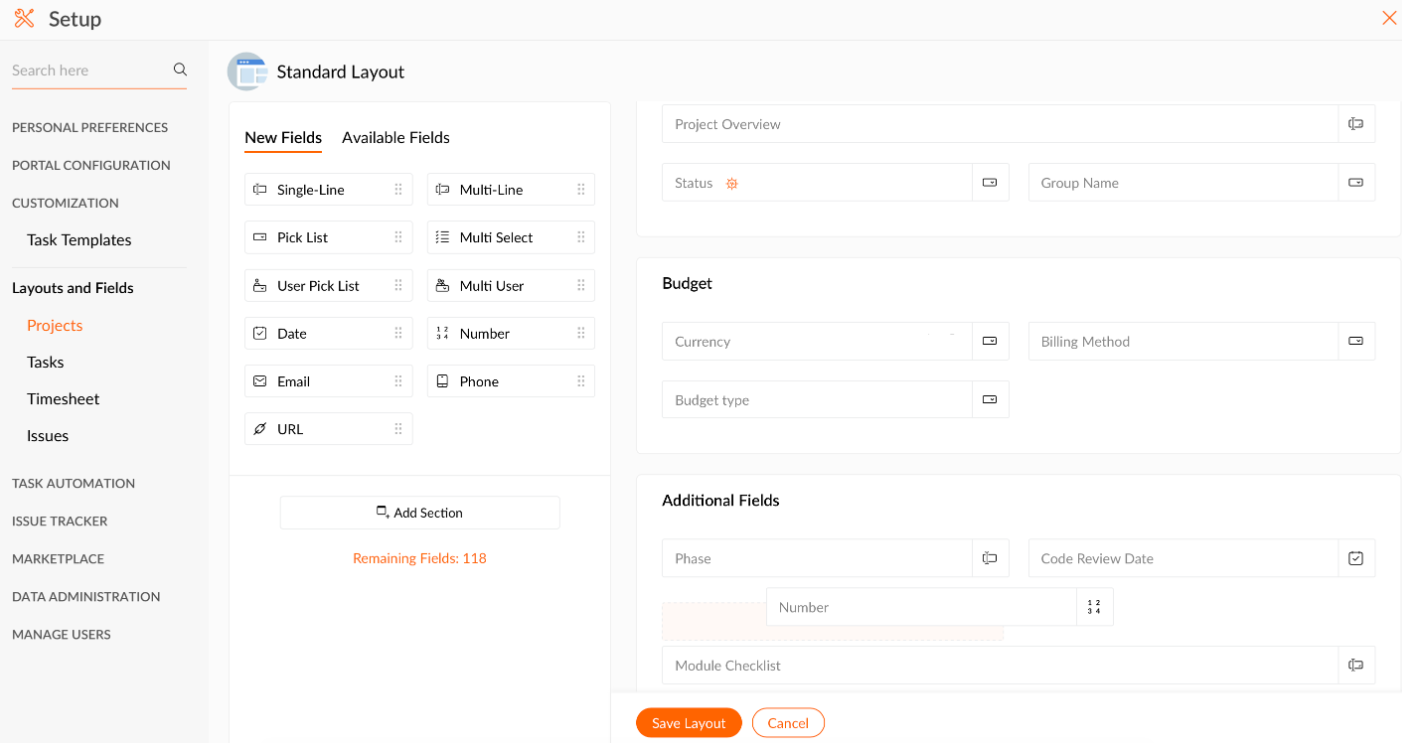
Both tools offer Gantt charts, but they differ in where the feature sits within the product.
Kanbanchi’s Gantt chart is one view of the same board you work in every day. Cards created on the Kanban board appear on the Gantt automatically when they have dates. You can:
The data model is unified, meaning there’s no separate Gantt project file to maintain alongside your board. As a Gantt chart tool within Google Workspace, this single-view approach is something very few Zoho Projects alternatives match.
Zoho Projects also has strong Gantt functionality – cross-project Gantt visibility and critical path analysis are standout features at the Enterprise tier. They’re genuinely useful if you’re managing multiple interdependent projects simultaneously, and they represent a real capability gap relative to Kanbanchi.
They’re unlikely to be decisive for most SMBs running one or two projects at a time. But for a 50-person team coordinating several parallel workstreams, Zoho’s Enterprise Gantt is worth serious consideration for team workload management.

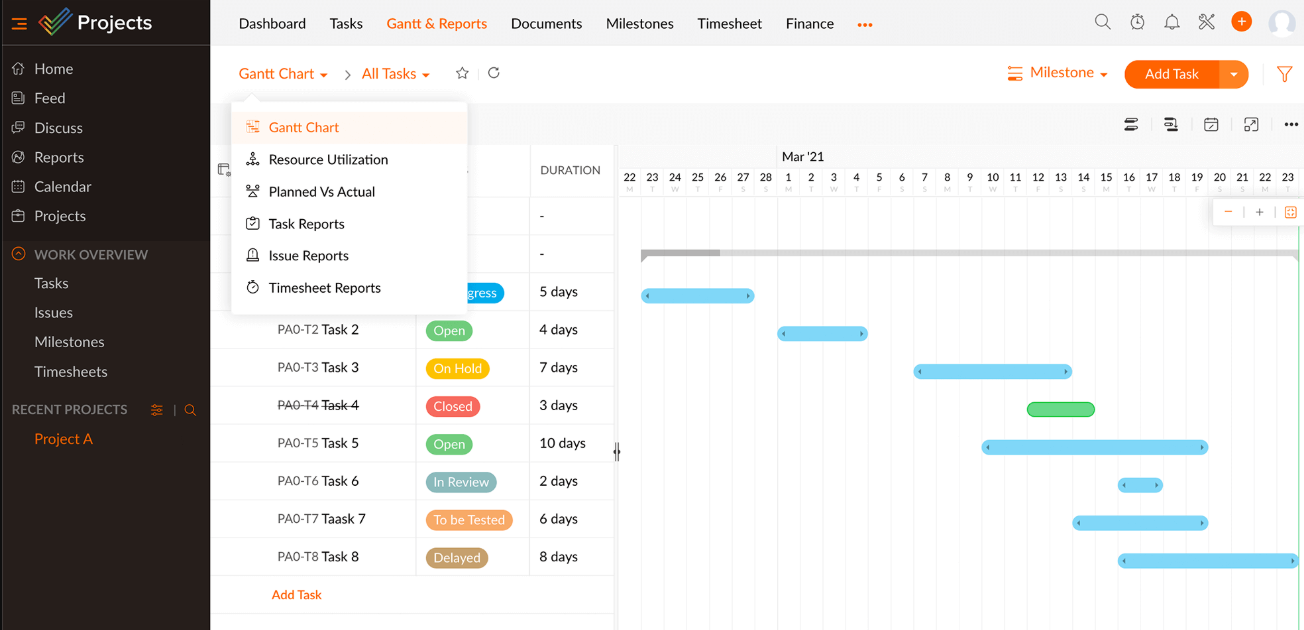
Kanbanchi’s time tracking software works within the card: you start a timer on a specific task and stop it when you’re done. The time entry then appears in the card’s history. Time data can be exported directly to Google Sheets, making it straightforward to feed into invoicing tools or reporting dashboards in Looker Studio. The workflow is clean and requires no additional setup, especially if you’re a freelancer or an agency billing by the hour.
Zoho Projects takes a more structured approach with its formalized timesheet approval process, including multi-level approval workflows (Premium+) and multi-user timesheet views (Ultimate). However, if you just need to know where time is going, Kanbanchi’s simpler model is faster to use day to day.
Zoho Projects includes Blueprint, a visual workflow automation builder that lets you define rules for how tasks move through stages. It’s a well-built feature and the kind of thing you would otherwise need Zapier for. Zoho’s Zia AI layer adds task description generation, translation across 25+ languages, and project insights summaries – practical features that Kanbanchi currently doesn’t offer.
Comparing Kanbanchi vs Zoho Projects also brings up questions about the ecosystem costs.
Zoho Projects is one piece of a larger suite. Teams that need advanced reporting beyond what Projects provides are directed to Zoho Analytics (a separate subscription). Those needing a dedicated agile sprint tool are pointed to Zoho Sprints (another product). For deep resource management, Zoho People enters the picture.
Each of these is a capable product. But what if you don’t want a multi-tool stack? Kanbanchi’s 3-in-1 structure keeps your projects more contained, from planning to time logging. The automation is lighter here, too: recurring cards, card templates, email-to-card creation, and status-based automation.
Overall, Zoho Blueprint is the stronger choice if you need to automate complex multi-stage workflows. For teams that want reliable recurring tasks and consistent card structures, Kanbanchi’s ecosystem covers the practical basics.
A key advantage of Zoho Projects is its broader third-party footprint when it comes to integrations. Alongside creating custom integrations, supported by a REST API, you can connect the software to any of the following tools:
On the other hand, Kanbanchi’s integrations center on Google Workspace and Microsoft 365 depth rather than third-party volume. It doesn’t currently offer an open API, so export to Google Sheets or Excel and email-to-card workflows are the bridge to other systems.
If your project management tool needs to sit at the center of a broader tool stack and communicate with multiple external services, Zoho Projects has a stronger integration ecosystem. In fact, most Zoho Projects alternatives lack its REST API breadth.
However, Kanbanchi’s native integration is deeper and more reliable than anything Zoho currently offers within the Google environment. Particularly if you need project management software for Google Workspace. It’s the only option that treats Google Drive as primary storage rather than a connected service.
And these benefits extend to mobile, too…
Both Kanbanchi and Zoho Projects offer mobile options that allow you to take project management on the go. However, many Zoho users say that the more complex features, like detailed Gantt chart editing and advanced reporting, work better on a desktop.
So, the Zoho mobile experience may cover more ground, making it functional for those updates you need to make when you’re out-of-office, but it isn’t a full desktop replacement.
Ever had a great customer support experience, where the operator really got to the crux of the issue? Or, conversely, one that made you slam down your laptop lid in frustration?
That’s why support quality really matters when it comes to comparing project management software. And it’s one of the clearest separators in our Kanbanchi vs Zoho Projects comparison.
Kanbanchi users consistently call out support as a genuine strength. Not in the generic ‘fast response times’ sense, but in the specific sense that support staff understands the product deeply. They speak to actual business problems rather than just feature questions, and don’t follow a script.
Trying to configure a board workflow? That support interaction quality distinction matters most when you need the more complex issues (not just resetting a password!) solving right now.
You can even access priority support on Kanbanchi’s Professional Plan. Or, the Enterprise tier adds a designated account manager and onboarding assistance, which is useful for larger teams making a considered migration.
Zoho Projects offers 24/5 live chat and phone support on paid plans, which is a solid service commitment. But where the support differs from Kanbanchi is its consistency. It’s difficult reaching someone who can solve a complex configuration issue. You’ll often receive scripted initial responses, too.
Pricing is where Kanbanchi vs Zoho Projects gets interesting. Affordability is a headline strength for Zoho, but let’s take a look at what each tier actually includes.
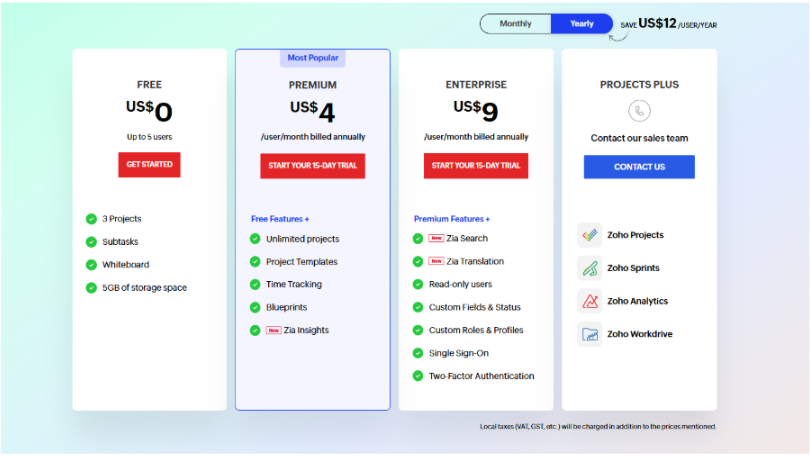
Zoho’s pricing is per user, per month. It’s billed annually, and you can choose between the following tiers:
A 15-day free trial is also available on all paid plans, with no credit card required.
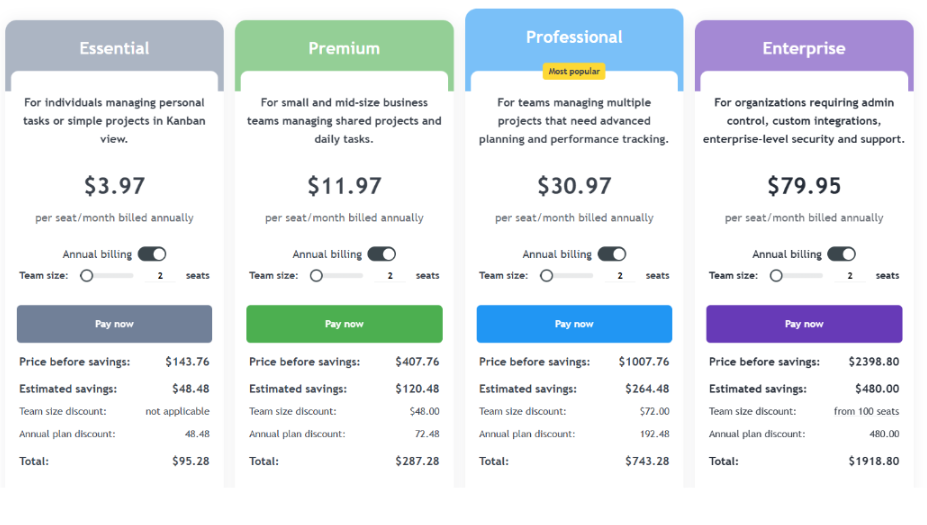
Kanbanchi uses a different annual billing model. It offers fixed or per-team custom pricing that actually gets cheaper per user as your seat count grows:
A free trial is available if you’d like to find the right plan before committing, which reverts to a 36-card limit once it finishes. And good news if you’re an educational institution or a nonprofit, you qualify for a 25% discount on all annually billed plans other than Essential.
Got a small team of 10? Zoho Projects Premium works out to $40/month ($4 x 10) billed annually. Kanbanchi Professional at 10 seats costs more on a per-user basis, particularly for smaller team sizes, though the price per user decreases with scale.
But the real question is: is Kanbanchi’s added value worth its higher price point? Let’s take a look beyond the figures and examine the features beneath them:
The Professional plan includes its native Google Drive architecture (which effectively eliminates a storage management overhead) and a SOC 2 Type II / ISO-27001 security posture that carries weight in regulated industries. And not forgetting priority support. If your team is already in Google Workspace, the operational simplicity of Kanbanchi has a value that doesn’t show up on a per-seat comparison.
Is the budget the primary constraint? Zoho Projects Premium offers genuine feature depth at a low price point, making it ideal for project management for small teams. If your team is comfortable with a longer setup curve, few Zoho project alternatives match this.
Let’s run these costs over a 12-month period.
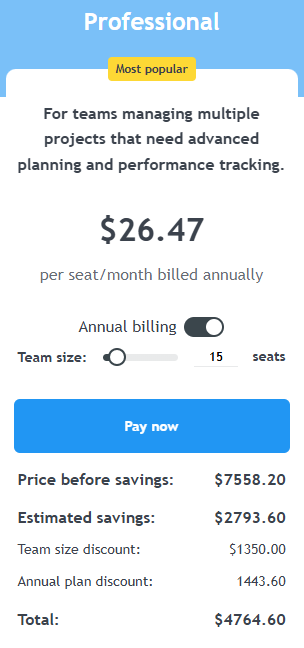
A 15-person team using Zoho Projects Premium will pay $720 per year. This price sounds competitive, right? But eventually, teams of this size will naturally need more than what Projects can offer – Zoho points users who need custom reporting dashboards toward Zoho Analytics, for example, which starts at $24 per month just for the Basic package.
The real pricing difference between Kanbanchi vs Zoho Projects is that Kanbanchi Professional for 15 seats costs $26.47 per seat, per month. This works out to $4764.50 per year.
That’s much higher than Zoho Projects on a straight per-seat basis, but all the tools you need are already included: Gantt, time tracking, and workload views. There’s no need to pay for extra tool subscriptions, and there are no additional costs for organizations already on Google Workspace, either.
Cons
| Choose Kanbanchi if… | Choose Zoho Projects if… |
|---|---|
| Your team runs on Google Workspace and wants project boards that live inside Drive | You are already using Zoho CRM, Zoho Desk, or other Zoho tools and want native cross-app integration |
| You need a tool your team can pick up without a formal onboarding program | Your team has IT resource for setup and is comfortable with a 2–3 week learning curve |
| You want Kanban, Gantt, and time tracking in one interface without managing multiple subscriptions | You need cross-project dashboards or critical path analysis for complex, multi-project environments |
| Compliance, data governance, or Google Vault support is a requirement | Budget is the primary constraint, and you need Gantt + time tracking at the lowest possible per-seat cost |
| Support quality is important, and you want to speak to someone who knows the product deeply | You need workflow automation via Blueprint or AI-powered features like Zia translation for multilingual teams |
| You are a Microsoft 365 team looking for a clean, integrated PM tool | You want a permanent free tier for a small team of up to 5 people on 3 projects |
So, which project management tool is genuinely the right choice for you? We’d recommend Kanbanchi for the majority of Google Workspace teams.
It offers more operational value, particularly for leaner organizations, by integrating your project boards naturally into Google Drive. If you can’t afford lengthy onboarding or a separate access management process, that’s a real benefit.
Any thorough Zoho Projects review will confirm it earns genuine credit for its pricing, its feature depth. Its own ecosystem integrations are strong, too.
If your team is already in the Zoho world, or you need critical path analysis and advanced multi-project tracking at an enterprise scale, Zoho Projects is a credible choice. And often a cost-effective one. It’s also worth knowing there are several Zoho Projects alternatives in the market, but most don’t come close on price at the entry tier.
But if your team lives in Google Drive and wants a kanban board for Google Workspace that extends into full project planning, the Kanbanchi vs Zoho Projects decision is an easy one. Everything from its clean interface and 3-in-1 feature set to the support quality adds up to a product that’s easier to adopt and sustain over time.
And the best way to test that? See it for yourself.
Start your free Kanbanchi trial today and discover how it fits inside your Google Workspace from the first session.
Whether Kanbanchi is better than Zoho Projects depends on your team’s setup. Kanbanchi is the stronger choice for Google Workspace teams that want fast setup and native Drive integration. Zoho Projects is a credible choice for those who prefer a broader ecosystem of connected Zoho apps, but overall Kanbanchi offers more operational value for leaner organizations.
The biggest difference between Kanbanchi and Zoho projects is depth versus simplicity. Zoho Projects is a feature-heavy platform with AI tools, Blueprint automation, and cross-project dashboards built for complex workflows. Kanbanchi focuses on doing fewer things exceptionally well, all inside Google Workspace, from Kanban boards and Gantt charts to time tracking.
Zoho Projects is a capable option for small teams, particularly at its Premium tier ($4/user/month), which includes Gantt charts and time tracking at a competitive price. However, small teams on Google Workspace often find Kanbanchi easier to adopt, with shorter setup times and customer support that responds within hours rather than days.
Yes, Kanbanchi is built specifically for Google Workspace and stores every project board as a file in Google Drive. It integrates natively with Gmail, Google Calendar, Shared Drives, and Google Vault, making it the most deeply embedded Google Workspace project management option currently available.
Zoho Projects charges per user per month, starting at $4 for its Premium plan. Kanbanchi uses a seat-based model that becomes more cost-effective as team size grows, although the Essential plan is fixed at $3.97 per user, per month for annual billing. For small teams needing Gantt and time tracking, Zoho is often cheaper per seat. But for larger teams, Kanbanchi’s included support and Drive architecture add more value.
Yes, Kanbanchi’s Gantt chart tool is included in the Professional plan and supports task dependencies, milestone tracking, and timeline visualization. It sits alongside the Kanban board and Time Tracker in a single interface, so teams can switch between views without leaving the platform or paying for a separate tool.
Read more articles related to Project Management
In this Article:
Start using Kanbanchi now
Start your free trial