
In this Article:
Try Kanbanchi now
Start your free trial


Managing a landscaping business involves juggling multiple moving pieces. Crews need to know where to go and what to do; weather can throw timelines completely off track, and equipment must be maintained across projects. Clients expect clear communication on progress, especially during peak seasons when multiple jobs run simultaneously. Without the right landscaping project management software, these tasks can quickly spiral out of control. Visual workflow management tools like Kanbanchi provide landscaping companies with a simple yet powerful way to organize projects and coordinate crews. By combining garden design task management with real-time updates, landscape contractor project tools help outdoor service teams stay on the same page regardless of location.
Landscaping businesses face unique operational challenges that differ significantly from typical office-based project scenarios. These challenges create bottlenecks and lost revenue when not managed properly.
Weather remains one of the most unpredictable factors in outdoor service operations. A rain forecast can shift an entire week of work within hours. Crews need immediate notification when weather conditions change, or they risk wasting time traveling to job sites that aren’t ready. Without proper garden maintenance workflow software, these last-minute changes create confusion and costly delays.
It becomes increasingly complex as landscaping companies grow. Larger operations manage multiple crews across different projects and locations simultaneously. Ensuring the right crew arrives at the right location with the right equipment requires careful planning. When crews show up to a job without the necessary tools or materials, the entire day’s schedule falls apart.
Another significant challenge for outdoor service businesses lies here. Landscaping equipment represents a substantial investment that must be maintained, serviced, and allocated efficiently across projects. When equipment breaks down unexpectedly or maintenance schedules are missed, crews can’t complete their work. Tracking which equipment is at which site and when it needs servicing becomes overwhelming without landscape equipment tracking software.
Expectations have increased dramatically in recent years. Clients want regular updates on project status and completion timelines, especially for seasonal projects. They want to see progress photos, understand when crews will arrive, and know how weather delays affect their schedules. Poor communication leads to frustrated clients and negative reviews that damage a business’s reputation.
This is another layer of complexity to landscaping operations. Coordinating delivery schedules for plants, mulch, stone, and other materials to align with project timelines requires precision. Materials arriving too early can die or deteriorate, while late deliveries halt work and frustrate crews. This coordination challenge multiplies when managing multiple projects simultaneously.
Kanbanchi is a visual project management tool that simplifies complex workflows through intuitive Kanban boards. The Kanban methodology uses visual boards where tasks move through columns representing different stages of completion, making the entire workflow easy to see at a glance. For landscaping businesses, this visual approach solves several industry-specific challenges. Instead of digging through spreadsheets or long email chains, crew managers can see all projects, their current status, and who’s responsible in a single view. This transparency reduces miscommunication and keeps everyone aligned.
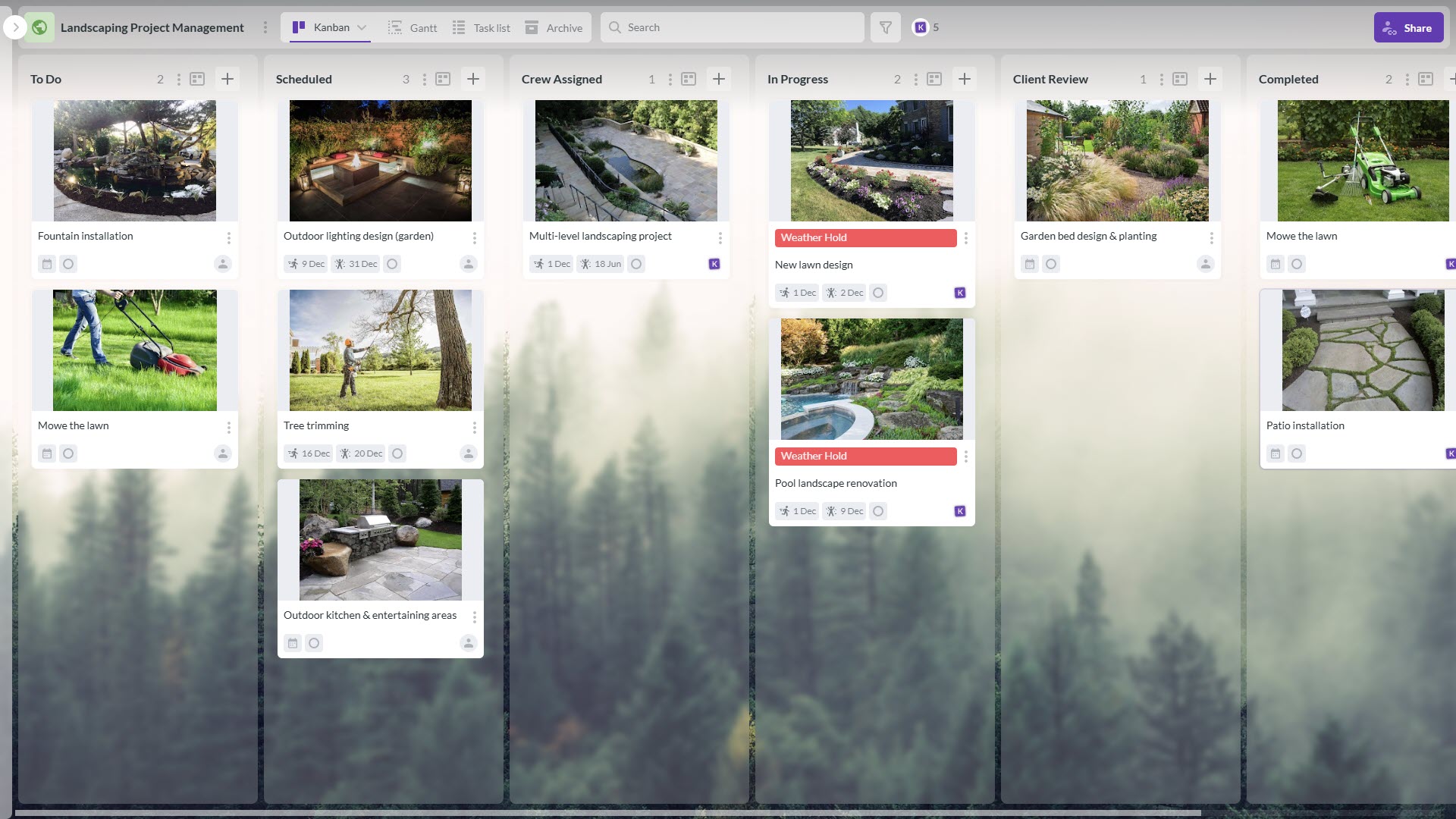
Example of the Kanbanchi board customized to serve as the landscaping project management software
Kanbanchi offers specific features that address landscaping operational needs directly.
The integration with Google Workspace tools provides additional benefits for businesses already using Google apps. Boards are stored directly in Google Drive with the same sharing permissions, task dates can be added to Google Calendar for schedule management, and files can be attached seamlessly from Drive to project cards. This integration means no separate logins, no duplicate data entry, and a familiar interface that requires minimal training.
Consider a landscaping company managing four concurrent projects during its busiest summer season. Project 1 involves a new garden design installation currently in the planning phase, waiting for plant delivery. Project 2 is seasonal maintenance for a corporate client, 50% complete and in progress. Project 3 covers a pool landscape renovation that was recently started with a crew on-site. Project 4 tracks ongoing equipment maintenance schedules to keep all tools operational.
On the Kanbanchi board, each project gets its own card or dedicated section. Visual columns show stages like “To do”, “Scheduled”, “Crew Assigned”, “In Progress”, “Client Review”, and “Completed.” This layout provides instant clarity about where every project stands.
When rain is forecasted for the pool renovation site, the project manager applies a visual label “Weather Hold”. They add a note explaining the delay: “Postponed due to heavy rain forecast. Rescheduled for next Tuesday.” The assigned crew sees this update in real-time on their mobile devices. The client receives communication about the reschedule. This visual transparency prevents confusion and keeps everyone aligned.
For the garden installation waiting on plants, the manager sets up the card with a checklist of preparation tasks: site prep, soil amendment, irrigation installation, and planting. As the delivery date approaches, they attach the plant list and design drawings from Google Drive directly to the card. When plants arrive, they simply move the card to “Crew Assigned” and tag the installation team.
The corporate maintenance project runs smoothly because crews can see their daily assignments clearly. Each maintenance visit appears as a card with specific tasks listed in the checklist: mow lawns, trim hedges, weed flower beds, and apply fertilizer. As crews complete each item, they check it off, and the card’s progress bar updates automatically. The corporate client can see this progress through a shared view, maintaining confidence in the service.
Equipment maintenance tracking happens on a separate board where each piece of equipment has its own card showing maintenance schedules, last service dates, and upcoming needs. When the primary mower requires an oil change, it appears as a task assigned to the maintenance team. This systematic approach ensures nothing gets forgotten and equipment stays in top condition.
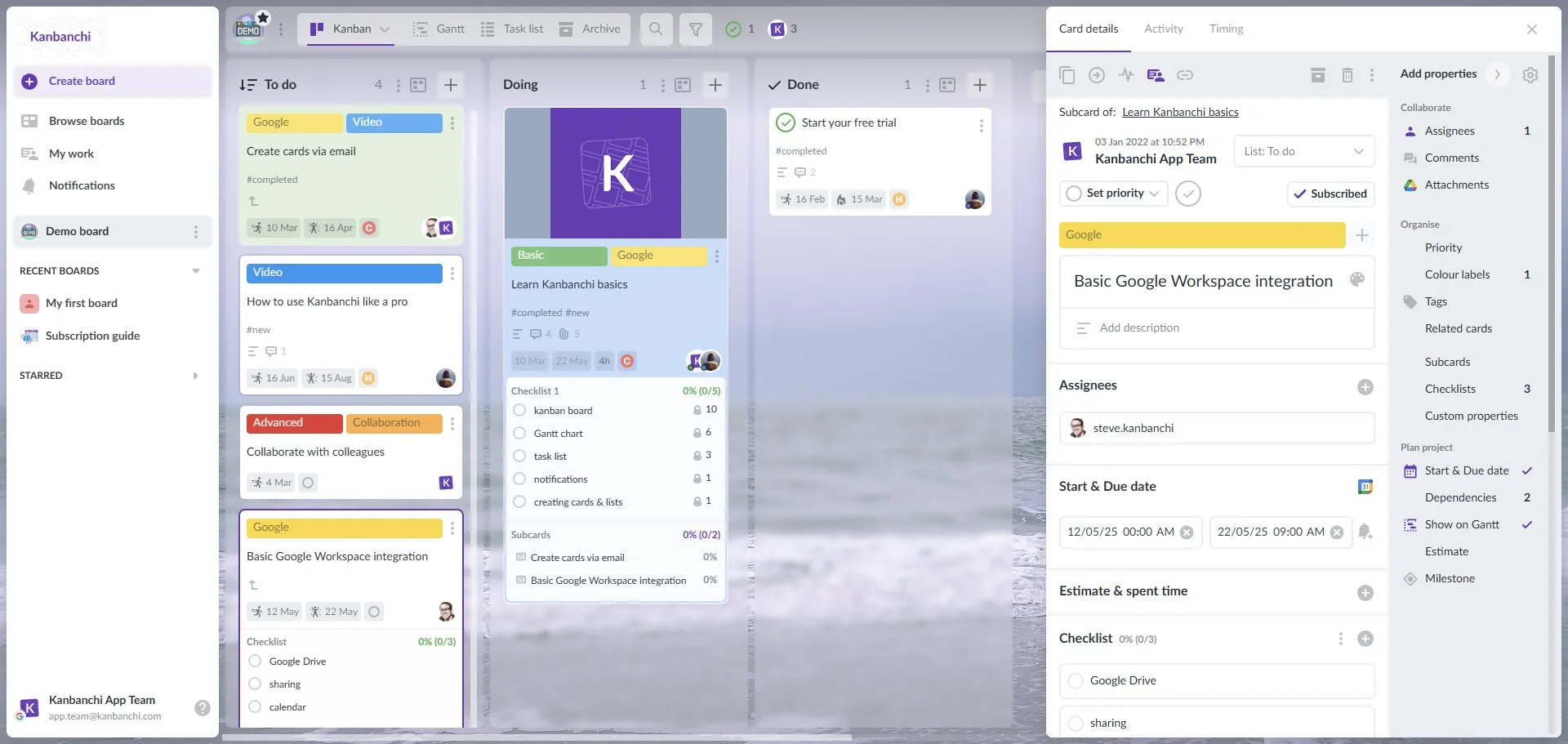
Kanbanchi interface showcasing Kanban board that can serve multiple purposes, including the equipment tracking
Specific Kanbanchi features being used in this scenario include custom columns representing landscaping workflow stages, tags for project type and crew identification, checklists for multi-step tasks, calendar view showing scheduled work dates, activity streams showing all project updates, and file attachments for plans and photos.
Kanbanchi helps landscaping managers coordinate team schedules and work assignments through its visual assignment system. Each task can be assigned to specific crew members or teams, and managers can filter the board by crew to see what everyone is working on. This visibility prevents overloading some crew members while others remain underutilized.
Before crews head out each morning, they can view their day’s assignments with all relevant details. Each card shows the job location, tasks to complete, equipment needed, and estimated time. This preparation eliminates confusion and ensures crews arrive at job sites ready to work.
When a crew finishes a job early, they update the task status immediately by moving the card to “Completed.” If they encounter a problem, they add a comment to the card explaining the issue. The manager sees these updates instantly and can reassign resources or adjust other crews’ schedules accordingly. This responsiveness keeps operations running smoothly even when unexpected situations arise.
Instead of frantically making phone calls to reschedule, the manager can quickly reassign tasks to other available crews. They drag the affected cards to different team members, and those crews receive notifications about their new assignments. This visual system makes it easy to balance workload and maintain productivity despite disruptions.
A landscape crew arrives at a job site and opens Kanbanchi on a tablet. They see their assigned tasks for the day in order of priority. Each task includes a description, checklist items for that specific job, and a timeline. As they complete each task, they move the card to “In Progress” and then “Completed,” uploading before and after photos as proof. The office manager sees these updates in real-time and can adjust the next crew’s schedule accordingly.
When a manager assigns a task to a crew member, that person receives an email notification with a direct link to the card. They can also filter their board view to see only tasks assigned to them, making it easy to focus on their specific responsibilities without distraction.
Equipment maintenance schedules can be tracked effectively on dedicated Kanbanchi boards. A separate board functions as an equipment management system where all landscaping tools, vehicles, and machinery are tracked with maintenance schedules, last service dates, and upcoming maintenance needs. This systematic approach prevents costly breakdowns and extends equipment life.
1. Preventive maintenance tasks are set up as recurring cards for routine services such as oil changes, blade sharpening, tire checks, and equipment cleaning. These tasks appear automatically on the schedule, so nothing falls through the cracks. When a mower reaches its scheduled service interval, the card moves into the “Due Soon” column, alerting the maintenance team to take action.
2. Plant and material inventory coordination uses similar tracking methods. Cards represent incoming deliveries of plants, mulch, stone, and other materials. Each delivery card shows the order date, expected arrival, quantity, and which project needs these materials. By coordinating delivery dates with project timelines on the same board, managers avoid storage issues and ensure materials arrive exactly when needed.
3. Urgent repairs get immediate attention through the visual system. When equipment breaks down, a crew member creates a task immediately, assigns it to the appropriate person or vendor, and marks it as high priority with a red tag. The card moves through the workflow from “Reported” to “Scheduled” to “In Progress” to “Completed.” Everyone can see the repair status and plan around equipment availability.
4. Seasonal adjustments are planned in advance using the board’s timeline view. Before peak seasons, the team reviews the inventory board to ensure adequate stock. They create cards for bulk material orders and equipment tune-ups. During the off-season, equipment service cards are scheduled for major maintenance and proper storage procedures. This seasonal planning prevents last-minute scrambles and keeps operations running smoothly year-round.
The equipment board shows every Monday when the maintenance team reviews upcoming needs. They see that the primary lawn mower needs an oil change due next week and the leaf blower requires blade replacement. These tasks are assigned and tracked through completion. When a crew member notices the truck battery getting weak, they create a “Vehicle Maintenance” task and assign it to the equipment manager. The task moves through the workflow systematically, ensuring nothing gets forgotten and equipment stays in top condition.
Weather-related schedule changes represent one of landscaping’s biggest challenges, and Kanbanchi addresses this through flexible workflow management. A dedicated weather-hold label provides a clear visual space for tasks temporarily halted due to weather conditions.
When the weather is predicted to improve, rescheduling is as straightforward as dragging tasks to new dates on the calendar view. The visual nature of the board makes it easy to see which days have capacity for rescheduled work and which crews can take on additional tasks.
Companies can plan project timelines around rainy seasons, frost dates, and peak growth periods. By setting realistic schedules that account for expected weather delays, they reduce stress and maintain more reliable timelines.
When a project experiences weather delays, the card is updated with a note explaining the situation and showing the new timeline. Clients who have access to a shared view can see this information directly. Trust is maintained because clients understand their project hasn’t been forgotten, but the weather requires schedule adjustments.
A five-day installation project scheduled for mid-June illustrates this in practice. On day three, severe thunderstorms are forecasted for days four and five. The project manager immediately applies the “Weather Hold” label and sets new dates for the following week. The card receives an update: “Postponed due to severe weather forecast. Rescheduled for June 18-19.” The assigned crew receives a notification on their phones. Everyone knows the plan and can adjust accordingly. When the storm passes, tasks move back to “In Progress,” and work resumes without confusion.
You may also be interested in other Kanbanchi blog articles for businesses; check them out!
Don’t let spreadsheets and fragmented communication hold your landscaping business back. Start your free Kanbanchi trial today and experience how visual workflow management can streamline operations, improve crew coordination, and delight clients.



In this Article:
Start using Kanbanchi now
Start your free trial