-  views

11 Best Paymo Alternatives for Teams in 2026: Expert Guide

Try Kanbanchi now

Start your free trial

 

A diverse group of professional colleagues sitting in a circle while collaborating on project management schedules, Gantt charts, and task checklists displayed on clipboards

For years, Paymo has been a reliable all-in-one project management solution for freelancers and small agencies. It successfully combines:

  1. Task management
  2. Time tracking, and 
  3. Invoicing. 

It always works solidly as a tool, but sometimes your team needs a heavier hitter. Ask yourself these questions:

  • Have you noticed friction? 
  • Perhaps your team is spending more time jumping between Paymo and your Google Drive than actually working?
  • Or maybe your complex projects have outgrown the linear logic of a simple task list. 
Is there a smoother way to handle the chaos?

The all-in-one promise only works if the tool scales with your ambition. If you feel like you are fighting against your software rather than flowing with it, you are likely part of the growing wave of managers seeking Paymo alternatives.

In 2026, the best project management software should not just be another tab you’ve got to have open on your screen, but one you largely ignore. It should be an extension of your productivity ecosystem. 

Whether you need deeper resource planning, more visual freedom, or a tool that lives natively inside your Workspace, the right alternative is out there.

In this comprehensive guide, Kanbanchi is diving deep into the 11 best Paymo alternatives. We will look at where Paymo falls short, which features you absolutely cannot compromise on, and how to find the Command Center that feels built specifically for your team’s unique rhythm.

Want to read more articles related to Project Management? – Click here

Why Teams Search for Paymo Alternatives

These days, the need for versatile project management software is non-negotiable. The Project Management Institute noted that over 11% of investment is wasted due to poor project performance, which explains why many PMs are paying more attention to execution discipline than ever before. 

Also, growth is a two-way street. As your agency or department expands, the tools that once felt efficient can start to feel restrictive. 

Paymo has carved out a niche by bundling time tracking and billing, but as teams mature, they often hit a wall of too many features. 

The Integration Gap

The most common reason for the switch? Integration. Most modern teams live in Google Workspace or Microsoft 365. 

While Paymo offers integrations, they often feel like bridges rather than a native experience. You have to manually sync files or hop between platforms to view a calendar event, which means you’re constantly switching between programs, adding up to hours of lost productivity every month.

The Complexity Paradox

Paymo aims to be simple, yet for many, its interface can feel cluttered. Teams often report a steep learning curve for non-technical users who just want to see their tasks.

Conversely, power users frequently find the project planning capabilities, such as advanced Gantt dependencies or resource leveling, lacking the heft required for enterprise-level coordination.

Pricing at Scale

What works for a solo freelancer often becomes a budget headache for a 50-person agency. As you add more collaborators, the cost-to-feature ratio in Paymo can become less competitive.
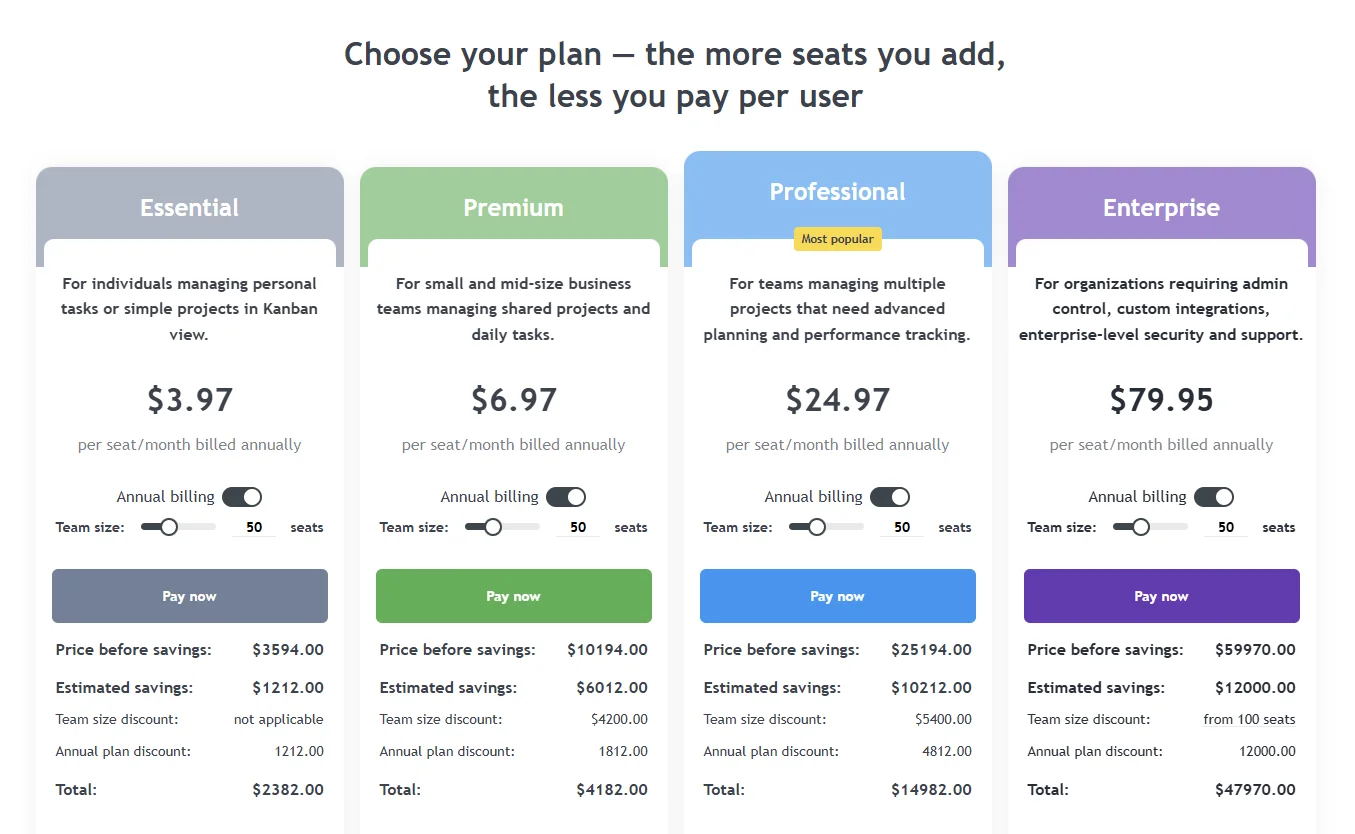
A screenshot of the pricing interface showing tiered plan options and a team size slider that calculates volume discounts for expanding organizations
Example of Kanbanchi that offers a modern pricing model prioritizing scalability by offering volume-based discounts, ensuring that larger teams pay a lower rate per seat as their organization grows

Teams start looking for tools that offer more flexible One Data Model views (Kanban, Gantt, List, and Workload) without charging a premium for every minor upgrade.

Visual Flexibility

In Paymo, the model is often very structured. But sometimes, a project manager needs to see the world through a different lens. 

If you cannot switch from a Kanban board to a Team Workload view in one click, using the exact same data, you aren’t working at peak efficiency.

Is it time to switch? If your all-in-one tool has become a one-more-hurdle tool, the answer is usually a resounding yes.

Read some of our positive success stories here

Core Features to Look for in a Paymo Alternative

Choosing a replacement for Paymo is not just about finding another task list. It is about identifying the specific gaps that are slowing your team down. When you evaluate your options, look for these four foundational pillars.

1. Native Ecosystem Integration

Your project management tool should not feel like an island. If you use Google Workspace, look for a tool that integrates deeply with Google Drive, Calendar, and Gmail. 

You should be able to attach a spreadsheet or sync a deadline without leaving your board. This eliminates the manual bridge work that eats up your afternoon.

2. One Data Model, Multiple Views

A true Paymo alternative must be versatile. You need a system where a single piece of data can be viewed in multiple ways. 

Use a Kanban board for daily flow, a Gantt chart for long-term planning, and a List view for bulk editing. If you have to recreate a task to see it on a timeline, the tool is failing you.

3. Real-Time Resource Management

One of the biggest reasons teams leave Paymo is the need for better ‘people visibility’, that is to say, looking at a project and knowing who is doing what, when, and for how long. Look for a Team Workload view. 

This allows you to see exactly who is overbooked across all projects. It turns guesswork into data-driven scheduling, ensuring no one on your team reaches a breaking point.

4. Integrated Time Tracking

You do not have to sacrifice Paymo’s best feature to get better project management. The ideal alternative includes built-in timers that tie directly to your tasks. 

When time tracking is part of the workflow rather than an afterthought, your invoicing becomes more accurate, and your budget forecasting becomes more reliable.

Find more blogs about Google Workspace here

Top 11 Paymo Alternatives (At a glance and detailed comparison)

All this considered, we’ve put together a list of what we think are the 11 best alternatives to Paymo that are worth considering if your team needs that work glow-up.

SoftwareBest For
KanbanchiGoogle Workspace familiarity and integration
WrikeVery complex workflows
MondayTeams that want lots of visuals
AsanaTeam accountability
Zoho ProjectsBudget-conscious teams
nTaskSmall teams of users
TrelloAn inexpensive and easy-to-navigate layout
HarvestFreelancers who want simplicity
AvazaBusiness consultants and freelancers
TeamworkClients and agencies

Here is a fuller breakdown of the leading contenders for your new project home. Each of these tools offers a different strength, from enterprise-grade planning to simple, visual collaboration.

1. Kanbanchi: Best for Google Workspace

Kanbanchi is an excellent, user-friendly alternative to Paymo for teams deeply integrated into the Google Workspace ecosystem. It provides superior visual Kanban boards, Gantt charts, and time tracking that sync directly with Google Drive and Calendar.
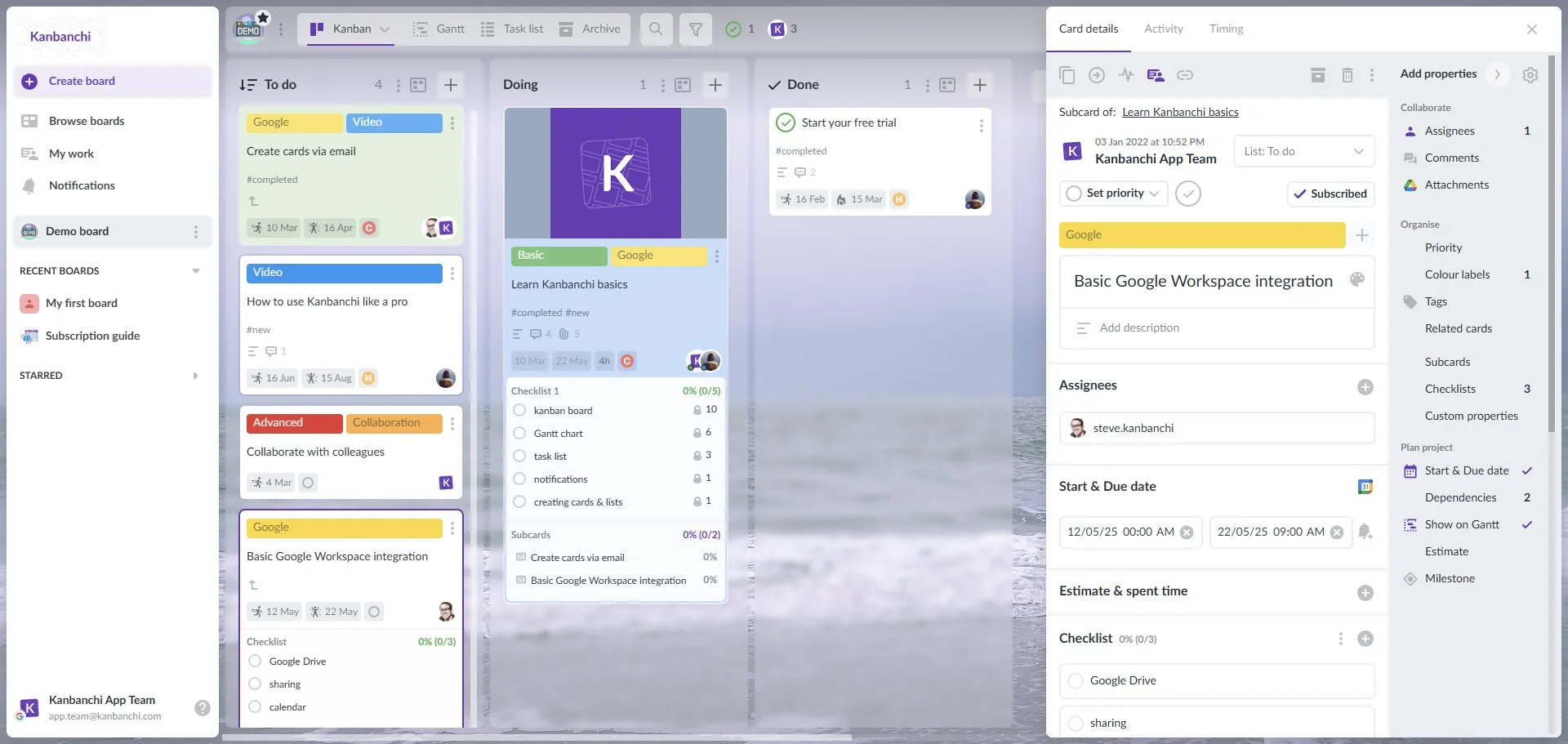
Kanbanchi interface example when using Google account

Pros

  1. Seamless, real-time integration with Gmail, Drive, and Calendar
  2. Features an intuitive Kanban board interface that is often easier to adopt
  3. Offers in-app time tracking and task management suitable for team collaboration
  4. Provides enterprise-grade security

Cons

  1. If your team isn’t familiar with Google Workspace, it might not be right for you

WHY NOT START A FREE TRIAL WITH KANBANCHI TODAY? 

2. Wrike: Best for Complex Workflows

Wrike is a powerhouse for teams that need deep customization. It offers advanced reporting and request forms that automate how tasks enter your system. While it has a steeper learning curve than Paymo, it handles thousands of tasks across multiple departments, unmatched by them.
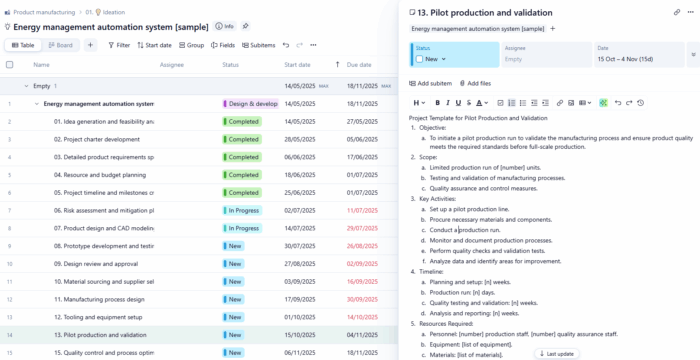
Wrike project dashboard with real-time analytics and custom workflows

Pros

  1. Highly scalable
  2. Decent level of automation
  3. Solid analytics

Cons

  1. Can feel overwhelming for small teams
  2. Higher price point

3. Monday.com: Best for Visual Customization

If you love color-coding and highly visual interfaces, monday.com is a strong choice. It is famous for its Pulse system, which makes tracking the status of any item incredibly intuitive. It is excellent for creative agencies that need to see project health at a glance.
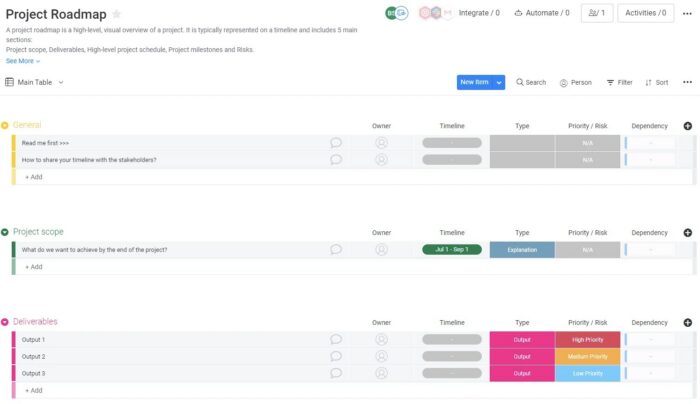
A colorful Monday.com high-level project roadmap view showing timelines and status columns for cross-departmental teams

Pros

  1. Extremely user-friendly
  2. Hundreds of templates
  3. Good mobile app

Cons

  1. Some advanced features are locked behind expensive tiers
  2. Can be pricey for smaller teams

4. ClickUp: Best for Feature Variety

ClickUp is the everything app. It packs almost every feature imaginable into one platform, including docs, goals, and even a built-in email client. For teams that want to consolidate five different apps into one, ClickUp is the most aggressive option.
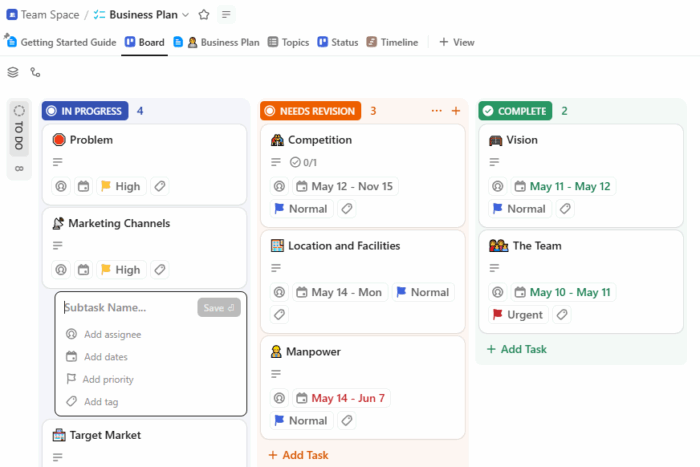
ClickUp workspace for all-in-one project and team collaboration

Pros

  1. Massive feature set
  2. High level of hierarchy

Cons

  1. The interface can feel cluttered
  2. Can be slow at times

5. Asana: Best for Team Accountability

Asana excels at showing who is doing what and when. Its focus on clean design and task dependencies makes it a favorite for marketing and operations teams. It lacks Paymo’s native invoicing, but it integrates seamlessly with almost every billing tool on the market.
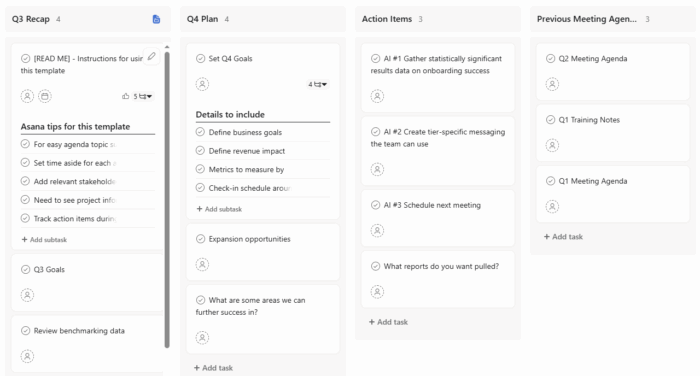
Asana project management dashboard with collaborative task tracking

Pros

  1. Elegant UI
  2. Good dependency tracking
  3. Strong Tasks view

Cons

  1. Limited native time tracking compared to Paymo
  2. Can be glitchy and slow from time to time

6. Zoho Projects: Best for Budget-Conscious Teams

For teams that need a solid feature set without the big tech price tag, Zoho Projects is a reliable workhorse. It includes Gantt charts and time tracking out of the box. If you already use the Zoho ecosystem for CRM or Mail, it is a logical fit.
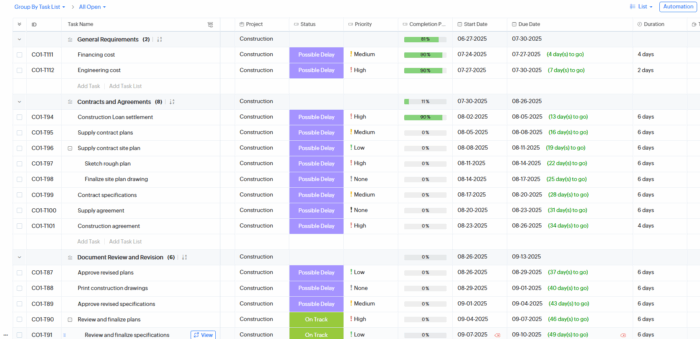
Zoho Projects project management interface

Pros

  1. Very affordable
  2. Built-in time tracking
  3. Good Gantt tools

Cons

  1. The UI can feel a bit dated
  2. Software is less fluid than its competitors

7. nTask: Best for Smaller Teams

nTask is a highly affordable, comprehensive project management alternative to Paymo. It is best suited for small- to mid-sized teams focused on task management, time tracking, Gantt charts, and issue tracking.
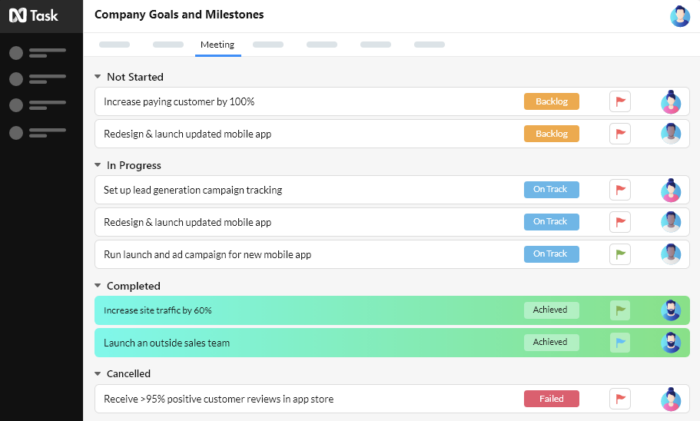
The nTask interface showing the "Company Goals and Milestones" dashboard with tasks organized into Not Started, In Progress, Completed, and Cancelled lists

Pros

  1. Affordable pricing
  2. Built-in issue tracking
  3. Decent time tracking

Cons

  1. Limited integrations
  2. Caps on team size

8. Trello: Best for Basics

Trello is a highly visual, easy-to-use Kanban alternative to Paymo, ideal for small teams that need simple task management without the steep learning curve. While Paymo excels in native, detailed time tracking and invoicing, Trello focuses on workflow visualization, using Power-Ups to bridge the gap for tracking needs.
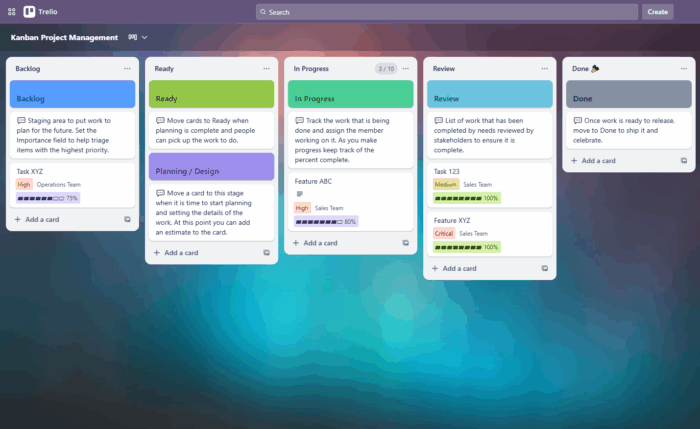
Trello board view – visual project management tool similar to Asana

Pros

  1. Extremely easy to use
  2. Great Kanban boards
  3. Flexible with add-ons (Power-Ups)

Cons

  1. Limited advanced features
  2. Not ideal for time tracking or invoicing

9. Harvest: Best for Time Tracking

Harvest is an effective alternative to Paymo for teams prioritizing simple time tracking and invoicing over robust project management. While Paymo provides native task management, Harvest acts as a focused tool designed to track hours and expenses for invoicing.
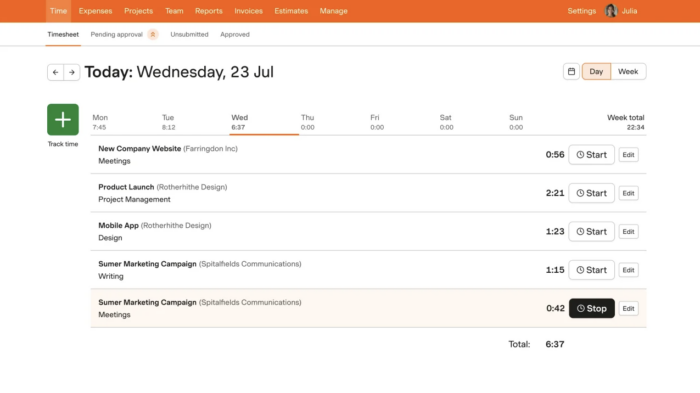
A screenshot of the Harvest timesheet interface showing tracked hours for various projects like a mobile app design and a product launch

Pros

  1. Best-in-class time tracking
  2. Easy invoicing
  3. Lightweight and fast

Cons

  1. Limited project management features
  2. Not ideal for complex workflows

10. Avaza: Best for Freelancers

Avaza is widely considered a top alternative to Paymo, especially for freelancers, consultants, and small businesses. Teams looking for an all-in-one platform that combines project management, time tracking, expense management, and invoicing will find it here.
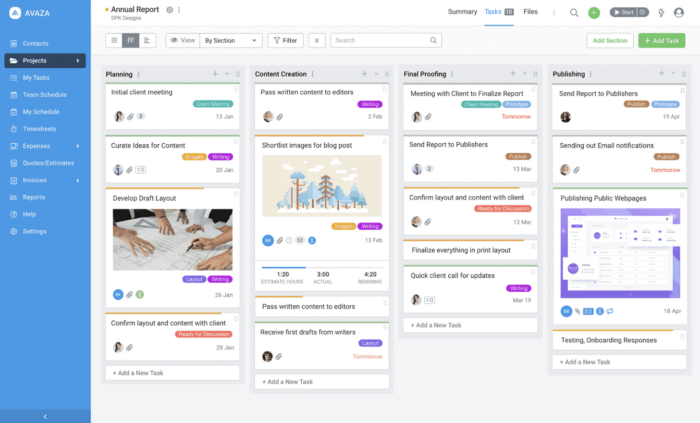
A screenshot of the Avaza project management interface featuring a visual Kanban board for an "Annual Report" project with organized task columns and status labels

Pros

  1. Quotes, timesheets, and invoicing are tightly integrated
  2. Easy to learn
  3. Good all-in-one tool

Cons

  1. Limited collaboration features
  2. Weak audit/change tracking

11. Teamwork: Best for Clients and Agencies

It’s an excellent, client-focused alternative to Paymo, ideal for agencies and teams needing robust project management, time tracking, and client collaboration. While Paymo provides built-in invoicing, Teamwork excels in project planning and client portals. Teamwork is better for scaling teams, though usually more expensive.
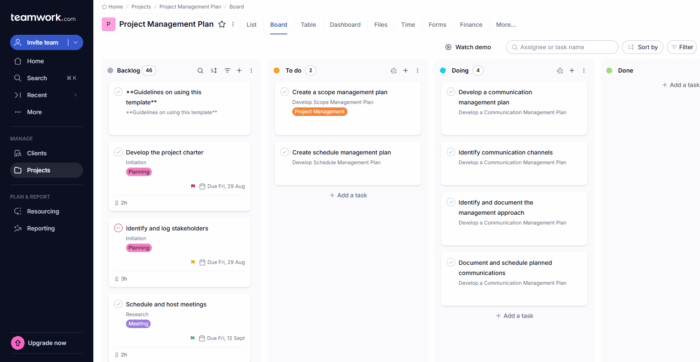
Teamwork interface with client project tracking and invoicing features

Pros

  1. Built for client services (billing, time tracking)
  2. Strong project profitability tools
  3. Good reporting

Cons

  1. Interface less modern
  2. Can feel feature-heavy

Kanbanchi: The Ultimate Google Native Alternative to Paymo

If your team lives in Google Workspace, the search for Paymo alternatives usually ends here. Kanbanchi is not just another app that integrates with Google. It is built specifically for the Google ecosystem. This means it’s a natural extension of your Drive, Gmail, and Calendar.

Deep Google Workspace Integration

Most tools require a bridge to talk to your files. In Kanbanchi, the integration is native. 

  1. You can attach files directly from your Drive or Shared Drives. 
  2. You can sync your board deadlines with Google Calendar in real time. 
  3. You can even turn an email into a task without leaving your inbox. 

This reduces the friction that usually slows teams down when switching between platforms.

The Visual Command Center

Kanbanchi moves beyond the simple lists found in Paymo. It uses a One Data Model approach across multiple perspectives. 

You can start with a Kanban board to manage your daily workflow. With one click, you can switch to a professional Gantt chart to manage dependencies. Need to see who is overbooked? Switch to the Team Workload view. The data stays the same. Only the view changes.

Scalable for Any Workflow

Whether you are a small agency or a large enterprise, Kanbanchi scales with you. You can use simple boards for basic task tracking or evolve into sophisticated environments. Use Epic cards and Subcards to manage complex project hierarchies. Set custom properties to track industry-specific data. Add milestones to mark significant project events on your timeline.

How to Migrate Your Data from Paymo Successfully

Moving your team to a new home does not have to be a headache. Successful migration is all about preparation and clean data.

Step 1: Export Your Paymo Data

Start by using Paymo’s export feature to download your project data into a CSV format. This ensures you have a portable version of your tasks, time entries, and client details.

Step 2: Map Your Fields

Before you import, check how Paymo’s fields align with your new tool. In Kanbanchi, your Paymo Lists might become board lists, and your Tasks will become cards. Ensure your assignees and dates are ready for the transition.

Step 3: Run a Pilot Board

Don’t move everything at once. Pick one active project and migrate it first. This allows your team to get comfortable with the new interface before you move the entire portfolio.

Kanbanchi: Your Paymo Alternative

Kanbanchi is a secure, workable option to Paymo that’ll make all the difference to your team’s workflow. If you’re already using Google Workspace, then there’ll be no need to transition and no upskilling needed.
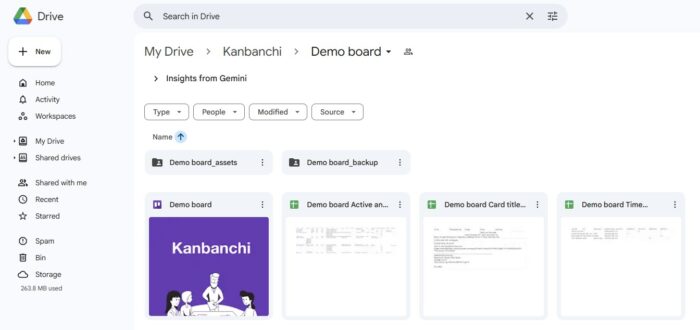
Kanbanchi inside Google Drive
Kanbanchi integrates seamlessly with Google Drive and fits within its structure

It’s easy to install, and even easier to work with. So, if you’ve been finding that the software you’re currently using is slowing you down and making your work life harder than it needs to be, there’s never been a better time to make the move. Try Kanbanchi for your next project and see how it can grow your success.

Start Kanbanchi trial now

FAQ on Choosing the Best Paymo Alternative

Our guide wraps up with some of the most common questions you might have about choosing the right alternative to Paymo for you and your team. 

What is the best free Paymo alternative? 

Many tools offer free tiers for small teams. However, for professional features like Gantt charts and time tracking, Kanbanchi offers a highly competitive price point for Google Workspace users.

Does Kanbanchi include time tracking? 

Yes. Kanbanchi features a built-in Time Tracker. You can set estimates, track actual spent time, and export time reports for billing and analysis.

Is it hard to switch from Paymo to Kanbanchi? 

The transition is usually very smooth. Because Kanbanchi uses a familiar visual board model and lives inside Google Workspace, the learning curve is minimal for most teams.

Can I manage multiple projects at once? Absolutely. 

Kanbanchi includes a Portfolio View that allows you to monitor the health and progress of multiple boards on a single screen.

Do you have any other questions about what Kanbanchi can offer?
Get in touch via our contact form.
    MultipleAuthors\Classes\Objects\Author Object
    (
        [term_id] => 973
        [term:MultipleAuthors\Classes\Objects\Author:private] => 
        [metaCache:MultipleAuthors\Classes\Objects\Author:private] => Array
            (
                [user_email] => olga.alekseeva@kanbanchi.com
                [user_id] => 20
                [first_name] => Olga Alekseeva
                [last_name] => 
                [job_title] => Growth hacking expert with over 10 years of experience with Kanbanchi
                [description] => Olga wears multiple hats across marketing, sales, product, and ops after 10+ years in the SaaS world. She is passionate about helping teams streamline their workflows with Kanbanchi and Google Workspace or Microsoft 365. "When I'm not optimizing processes or writing guides, I'm probably tweaking our product roadmap or diving into the latest productivity tools".
                [user_url] => https://linkedin.com/in/olgksv
            )
    
        [userObject:MultipleAuthors\Classes\Objects\Author:private] => WP_User Object
            (
                [data] => stdClass Object
                    (
                        [ID] => 20
                        [user_login] => olga.alekseeva
                        [user_pass] => $wp$2y$10$WuiuvYMj7CDnLrRbWchEkuBwKzmbBakK64Uk5c68bDY3qA46MFam6
                        [user_nicename] => olga-alekseeva
                        [user_email] => olga.alekseeva@kanbanchi.com
                        [user_url] => https://linkedin.com/in/olgksv
                        [user_registered] => 2025-09-03 15:47:58
                        [user_activation_key] => 
                        [user_status] => 0
                        [display_name] => Olga Alekseeva
                    )
    
                [ID] => 20
                [caps] => Array
                    (
                        [editor] => 1
                        [author] => 1
                        [contributor] => 1
                        [wpseo_editor] => 1
                        [wpseo_manager] => 1
                        [administrator] => 1
                    )
    
                [cap_key] => wp_capabilities
                [roles] => Array
                    (
                        [0] => editor
                        [1] => author
                        [2] => contributor
                        [3] => wpseo_editor
                        [4] => wpseo_manager
                        [5] => administrator
                    )
    
                [allcaps] => Array
                    (
                        [moderate_comments] => 1
                        [manage_categories] => 1
                        [manage_links] => 1
                        [upload_files] => 1
                        [unfiltered_html] => 1
                        [edit_posts] => 1
                        [edit_others_posts] => 1
                        [edit_published_posts] => 1
                        [publish_posts] => 1
                        [edit_pages] => 1
                        [read] => 1
                        [level_7] => 1
                        [level_6] => 1
                        [level_5] => 1
                        [level_4] => 1
                        [level_3] => 1
                        [level_2] => 1
                        [level_1] => 1
                        [level_0] => 1
                        [edit_others_pages] => 1
                        [edit_published_pages] => 1
                        [publish_pages] => 1
                        [delete_pages] => 1
                        [delete_others_pages] => 1
                        [delete_published_pages] => 1
                        [delete_posts] => 1
                        [delete_others_posts] => 1
                        [delete_published_posts] => 1
                        [delete_private_posts] => 1
                        [edit_private_posts] => 1
                        [read_private_posts] => 1
                        [delete_private_pages] => 1
                        [edit_private_pages] => 1
                        [read_private_pages] => 1
                        [wpseo_bulk_edit] => 1
                        [copy_posts] => 1
                        [ppma_edit_post_authors] => 1
                        [ppma_edit_own_profile] => 1
                        [wpseo_edit_advanced_metadata] => 1
                        [wpseo_manage_options] => 1
                        [view_site_health_checks] => 1
                        [switch_themes] => 1
                        [edit_themes] => 1
                        [activate_plugins] => 1
                        [edit_plugins] => 1
                        [edit_users] => 1
                        [edit_files] => 1
                        [manage_options] => 1
                        [import] => 1
                        [level_10] => 1
                        [level_9] => 1
                        [level_8] => 1
                        [delete_users] => 1
                        [create_users] => 1
                        [unfiltered_upload] => 1
                        [edit_dashboard] => 1
                        [update_plugins] => 1
                        [delete_plugins] => 1
                        [install_plugins] => 1
                        [update_themes] => 1
                        [install_themes] => 1
                        [update_core] => 1
                        [list_users] => 1
                        [remove_users] => 1
                        [promote_users] => 1
                        [edit_theme_options] => 1
                        [delete_themes] => 1
                        [export] => 1
                        [bcn_manage_options] => 1
                        [manage_security] => 1
                        [restrict_content] => 1
                        [list_roles] => 1
                        [create_roles] => 1
                        [delete_roles] => 1
                        [edit_roles] => 1
                        [cfdb7_access] => 1
                        [ppma_manage_authors] => 1
                        [ppma_manage_layouts] => 1
                        [ppma_manage_custom_fields] => 1
                        [ppma_manage_author_categories] => 1
                        [iwc_read_posts] => 1
                        [iwc_create_posts] => 1
                        [iwc_edit_posts] => 1
                        [iwc_delete_posts] => 1
                        [iwc_read_users] => 1
                        [iwc_create_users] => 1
                        [iwc_edit_users] => 1
                        [iwc_delete_users] => 1
                        [iwc_read_comments] => 1
                        [iwc_create_comments] => 1
                        [iwc_edit_comments] => 1
                        [iwc_delete_comments] => 1
                        [iwc_upload_files] => 1
                        [iwc_read_media] => 1
                        [iwc_edit_media] => 1
                        [iwc_delete_media] => 1
                        [iwc_read_terms] => 1
                        [iwc_create_terms] => 1
                        [iwc_edit_terms] => 1
                        [iwc_delete_terms] => 1
                        [editor] => 1
                        [author] => 1
                        [contributor] => 1
                        [wpseo_editor] => 1
                        [wpseo_manager] => 1
                        [administrator] => 1
                    )
    
                [filter] => 
                [site_id:WP_User:private] => 1
            )
    
        [hasCustomAvatar:MultipleAuthors\Classes\Objects\Author:private] => 1
        [customAvatarUrl:MultipleAuthors\Classes\Objects\Author:private] => Array
            (
                [url] => https://www.kanbanchi.com/wp-content/uploads/2025/09/photo_2024-04-10_17-25-16.jpg
                [url2x] => https://www.kanbanchi.com/wp-content/uploads/2025/09/photo_2024-04-10_17-25-16.jpg
            )
    
        [avatarUrl:MultipleAuthors\Classes\Objects\Author:private] => 
        [avatarBySize:MultipleAuthors\Classes\Objects\Author:private] => Array
            (
                [96] => 
                [80] => 
                [50] => 
            )
    
    )
    
  • Growth hacking expert with over 10 years of experience with Kanbanchi

    Olga wears multiple hats across marketing, sales, product, and ops after 10+ years in the SaaS world. She is passionate about helping teams streamline their workflows with Kanbanchi and Google Workspace or Microsoft 365. "When I'm not optimizing processes or writing guides, I'm probably tweaking our product roadmap or diving into the latest productivity tools".

    All articles
Share

Try Kanbanchi now

  • Collaborate seamlessly
    with your team
  • Integrate Kanbanchi
    with Google or Microsoft
  • Manage all your work in one place
Start for free

Start using Kanbanchi now

Start your free trial