-  views

Shooting for Success: How Photography Studios Use Kanbanchi to Organize Bookings and Shoots

Try Kanbanchi now

Start your free trial

 

Photo studio workflow management illustration of photographers running a studio shoot with lights, reflector, and seamless backdrop

Photo studio workflow management is where creative ambition meets operational reality: inquiries arrive fast, dates change, files multiply, and deadlines don’t care how inspired you feel. This case study shows how an Albania-based studio team and two Thai freelance photographers used Kanbanchi’s Kanban boards, Gantt charts, and file attachments (via Google Workspace and Microsoft ecosystems) to keep shoots, edits, and approvals moving without losing the human touch.

Photo Studio Workflow Management on One Board

The team in Tirana, let’s call them Illyria Visual Studio (a boutique space known locally for fashion lookbooks, product shoots, and wedding work), hit a familiar ceiling: the calendar looked full, but the business felt fragile. They were juggling spreadsheet bookings, chat threads with clients, paper notes for equipment, and a Google Drive full of documents.

What changed wasn’t “working harder.” It was building a single source of truth where every booking could become a trackable project, every task had an owner, and every deliverable lived next to its context. Kanbanchi is suitable because it supports day-to-day execution through a visual Kanban board while also providing managers with the Gantt chart for planning and reporting.

Just as importantly, it didn’t force the studio to abandon the tools they already had. Kanbanchi is positioned as a Google Workspace-first approach to working, and it’s also used by teams that require Microsoft-compatible environments, enabling the studio to collaborate with clients and contractors across different file ecosystems.

Meet the Two “Teams” in This Case Study

Illyria Visual Studio is a small but busy operation: a studio manager/producer, two in-house photographers, one retoucher, and a rotating bench of assistants. Their work splits into two streams:

  • Booked studio sessions (products, portraits, brand content): high volume, repeatable steps, frequent reschedules.
  • Campaign-style projects (seasonal lookbooks, wedding seasons): fewer projects, but more dependencies and more stakeholders.

On the other side are two Thai freelancers who regularly collaborate with European clients and studios:

  • Narin Suksan (Bangkok): product and food photographer who delivers fast turnarounds for e-commerce and boutique hospitality brands.
  • Ploy Wattanapan (Chiang Mai, often on the road): portrait and micro-wedding photographer who coordinates second shooters, florists, and venues, often across time zones.

Both freelancers had the classic solo-operator challenge: they could shoot all day, but the admin work (quotes, shot lists, revisions, file delivery, invoicing) expanded endlessly. They weren’t looking for more “apps.” They wanted photography business task management that didn’t feel like corporate overhead, yet still kept every promise to every client.

The studio, meanwhile, simply needed a dependable rhythm: inquiry → deposit → pre-production → shoot → selects → edit → approval → delivery → archive.

Setting Up Kanbanchi For Bookings, Gear, and Client Tracking

Illyria’s rollout started with one rule: “If it’s not on the board, it doesn’t exist.” They built three boards and standardized the flow so that new bookings didn’t require new decision-making.
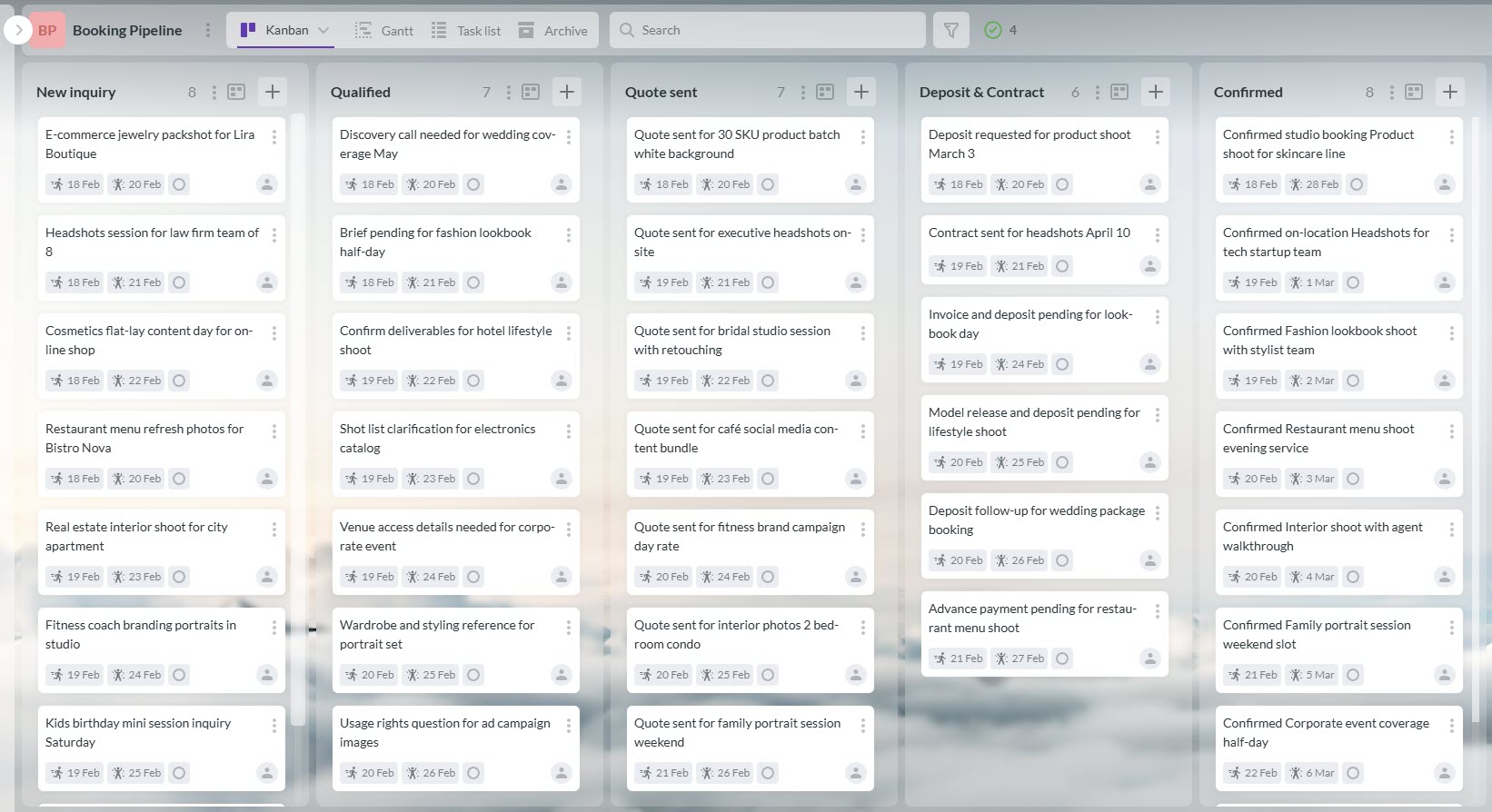
Booking pipeline Kanban board for photo studio workflow management in Kanbanchi

Replica of the Illyria’s booking pipeline board in Kanbanchi

1) Booking Pipeline Board: From Inquiry to Confirmed Date

This board became their studio booking management system without buying niche scheduling software. Each client inquiry is entered as a card with a few mandatory fields: project type, proposed date/time, package, location (in-studio/on-site), and payment status.

Lists look like this:

  • New inquiry
  • Qualified (needs call/needs quote)
  • Quote sent
  • Deposit pending
  • Confirmed
  • Shot delivered (waiting on selects)
  • Completed/Archived

They use comments to add notes like“prefers warmer skin tones,” “no visible brand labels,” “deliver web + print crops”, “needs steam/iron,” “backup strobe trigger,” “allow 30 minutes for set build”. Because Kanbanchi emphasizes collaboration inside cards (comments, mentions, and attachments), the manager stopped forwarding long email threads to the retoucher and assistants. Instead, context lives where the work lives.

2) Equipment & Resource Board: Preventing Double-Booked Gear

Instead of tracking gear in a spreadsheet that only one person updated, they created a board with cards representing equipment kits:

  • “Studio Strobe Kit A”
  • “Product Table + Sweep + Clamps”
  • “Location Audio Kit”
  • “Travel Tripods + Sandbags”

When a booking moved to Confirmed, the producer linked the shoot card to the necessary kit cards and assigned owners (who are responsible for prep and return). That alone cut “day-before panic, because it exposed conflicts early. Especially on weekends when weddings overlapped with commercial work.

For the Thai freelancers, this same concept worked on a smaller scale. Narin kept a “Rentals & Returns” list with cards for borrowed lenses and props; Ploy used a “Second Shooter Checklist” card template to make sure batteries, cards, and backup bodies were always accounted for.

3) Shoot-to-Delivery Board: Creative Work With Real Deadlines

This was the heartbeat: one card per job, moving through a repeatable production system.

  1. Pre-production (brief, mood board, shot list)
  2. Shoot day ready (gear + call sheet + props)
  3. In progress (shooting)
  4. Culling/selects
  5. Retouching
  6. Client review
  7. Final delivery
  8. Done/Archive

Here, the studio leaned heavily on file attachments, so the card became the “project folder without the hunt.” Kanbanchi case studies repeatedly highlight the practice of attaching key documents from Google Drive or OneDrive directly to cards to reduce searching and maintain alignment.

Where the Gantt View Mattered (and why it wasn’t “too much”)

Illyria’s producer loved the Kanban view for daily execution, but planning a month of overlapping shoots required a timeline. That’s exactly the hybrid value described in Kanbanchi’s own case-study framing: teams can execute in Kanban while leadership uses Gantt chart planning for the same underlying tasks.

That’s where photo shoot project planning tools stopped being theoretical. The team wasn’t making prettier plans; they were preventing broken promises.
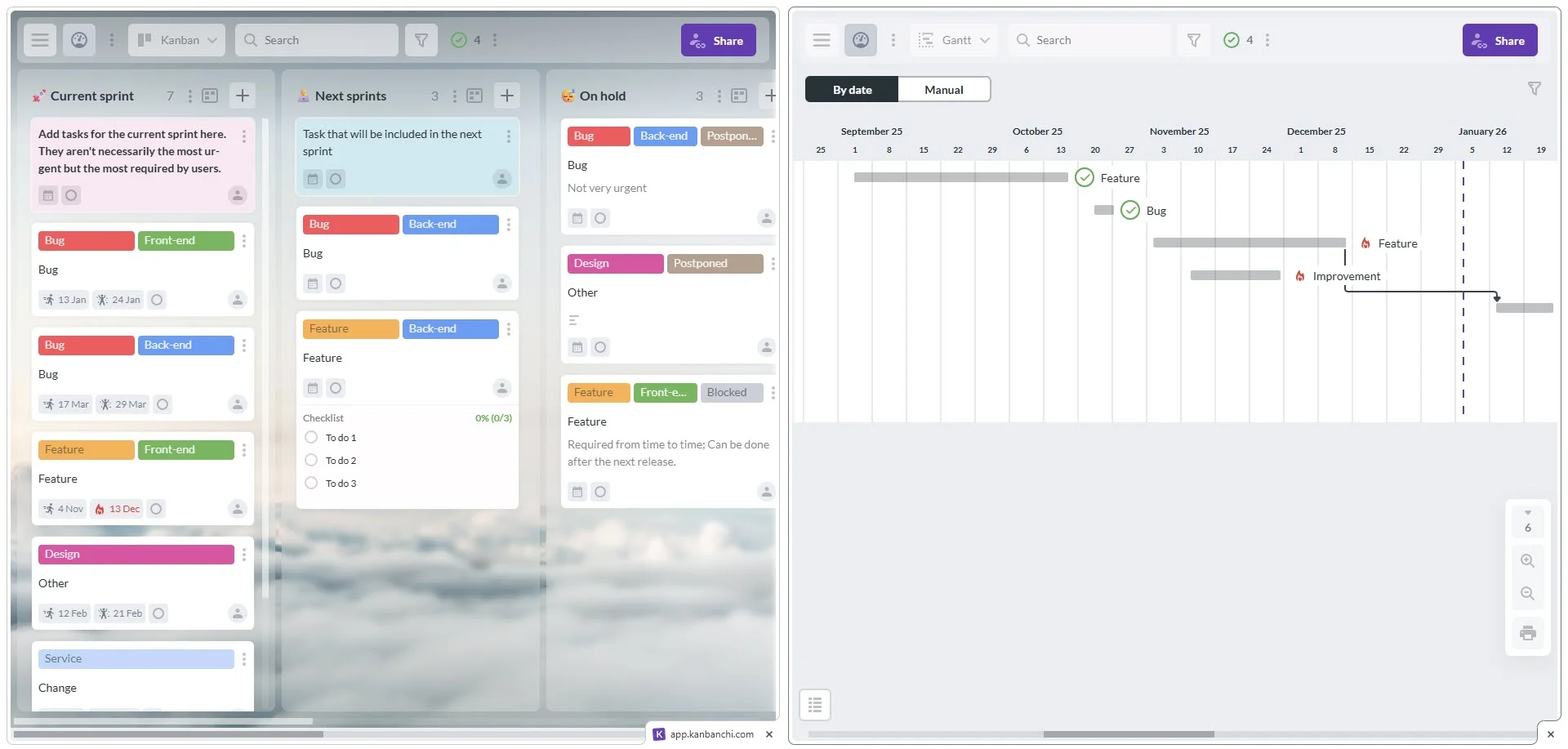
Side-by-side comparison of Kanbanchi's Kanban board view (left) and Gantt chart view (right), demonstrating easy view switching in a single project management tool

Switch between Kanban board and Gantt chart within the same project (or just open them in Chrome split view)

Start your free trial with Kanbanchi now

Results: Fewer Rescheduling Mistakes, Faster Handoffs Between Roles, and More  

Within the first eight weeks, Illyria Visual Studio reported three tangible changes:

  1. Fewer rescheduling mistakes
    When a client moved a shoot, the producer updated the project card once. Assistants, retouchers, and the client-facing manager all saw the same truth. No more “I thought it was next Tuesday.”
  2. Faster handoffs between roles
    The retoucher stopped receiving half-context “please fix this ASAP” messages. Each card contained select reference notes and the delivery deadline.
  3. Clearer client communication without extra meetings
    Instead of status calls, the studio sent short updates tied to milestones (“Selects delivered today, first edit Friday, review window 48 hours”). Clients felt the studio was more “buttoned up,” even though the creative process remained flexible.

The freelance photographers saw different wins:

  • Narin reduced admin drag by reusing card templates for common jobs (menus, product batches, monthly content days).
  • Ploy built a reliable pre-shoot ritual: every wedding card had the same checklist, the same backup plan, and the same “deliverables map” so she could explain timelines confidently.

Beyond the board: Standardization, Onboarding, and Creative Headspace

At this stage, the studio also realized their board wasn’t just internal, it was becoming a lightweight photography project management software system they could adapt to different project types without rebuilding the workflow from scratch.

And the operational benefits compounded. When Illyria added two seasonal assistants, onboarding wasn’t a lecture; it was: “Open the board. This is how we work.” Kanbanchi case studies in other industries emphasize the impact of standardized templates and consistent structures on setup time and adoption.

A subtle but important cultural shift happened, too: the producer stopped being the “human router” for every question. The board carried the load, and people asked better questions because they could see the full chain of work.

This is also where the studio booking management system’s value became obvious: bookings weren’t just dates on a calendar; they were operational commitments with tasks, assets, and owners.

And because the freelancers collaborated with Illyria on overflow edits and occasional second shooting, the studio could invite them into specific boards as needed, keeping each project’s context contained rather than scattered across chats.

Finally, the biggest “creative” benefit was emotional: the team could focus on photography again. The work felt lighter because nothing important was hiding. That’s the point where photo studio workflow management showed up again, not as a buzzword, but as the difference between a studio that’s busy and a studio that’s stable.

Copy This Workflow: A Practical Template You Can Adapt

If you want to replicate Illyria and the freelancers’ approach, start simple and build in layers. Kanbanchi’s case-study guidance across industries consistently points to structured rollout: templates first, then rituals, then deeper integrations.

Step 1: Build Two Templates, not Ten

Create one “Standard Studio Session” template and one “Campaign/Wedding” template. Each template card should include:

  • A checklist (pre-pro, shoot day, post)
  • A deliverables list (what formats, how many images, where delivered)
  • A client-approval step (so “done” means approved)

This is where photography business task management becomes real: it’s not about tracking tasks for the sake of tracking – it’s about making sure the unglamorous steps (contracts, deposits, releases, backups) don’t sabotage the glamorous ones.

Step 2: Use Kanban for Flow, Gantt for Promises

Run daily execution in Kanban columns (“Ready,” “In progress,” “Client review,” “Done”). Use Gantt only for milestone promises and resource conflicts – exactly the split that Kanbanchi’s hybrid Kanban-Gantt positioning is built around. This is also the second moment where photo shoot project planning tools earns its keep: you’re not planning every breath – you’re protecting deadlines and capacity.

Step 3: Attach Files to Where Decisions Happen

Make one rule: briefs, mood boards, selects, and “style references” live on the card. Kanbanchi case studies repeatedly describe attaching Drive-hosted documents to cards to reduce searching and keep teams aligned on the latest version. If you use Microsoft storage, keep the same rule: just attach and share the Microsoft-side link consistently (SharePoint/OneDrive).

Step 4: Add One Ritual that Prevents Chaos

Illyria’s ritual was a 15-minute “tomorrow check” at the end of each day:

  1. Confirm call time and location
  2. Confirm gear kit and backups
  3. Confirm who is responsible for setup/return
  4. Confirm what the client must bring (products, outfits, talent)

Ploy’s ritual was similar but wedding-specific: a quick review of the timeline card, vendor contacts, and her “rain plan” checklist before she went to sleep.

Step 5: Measure only what you will actually use

Illyria didn’t track vanity metrics. They tracked:

  • Late deliveries
  • Reschedule the confusion incidents
  • Average time from selects to the first edit

That feedback loop made improvements obvious and kept the team motivated.

Done well, you end up with a system that scales smoothly: more bookings don’t automatically mean more stress, because the workflow has structure. That’s the final promise of photo studio workflow management creative teams can stay creative, while the business runs as it deserves to.


    MultipleAuthors\Classes\Objects\Author Object
    (
        [term_id] => 973
        [term:MultipleAuthors\Classes\Objects\Author:private] => 
        [metaCache:MultipleAuthors\Classes\Objects\Author:private] => Array
            (
                [user_email] => olga.alekseeva@kanbanchi.com
                [user_id] => 20
                [first_name] => Olga Alekseeva
                [last_name] => 
                [job_title] => Growth hacking expert with over 10 years of experience with Kanbanchi
                [description] => Olga wears multiple hats across marketing, sales, product, and ops after 10+ years in the SaaS world. She is passionate about helping teams streamline their workflows with Kanbanchi and Google Workspace or Microsoft 365. "When I'm not optimizing processes or writing guides, I'm probably tweaking our product roadmap or diving into the latest productivity tools".
                [user_url] => https://linkedin.com/in/olgksv
            )
    
        [userObject:MultipleAuthors\Classes\Objects\Author:private] => WP_User Object
            (
                [data] => stdClass Object
                    (
                        [ID] => 20
                        [user_login] => olga.alekseeva
                        [user_pass] => $wp$2y$10$WuiuvYMj7CDnLrRbWchEkuBwKzmbBakK64Uk5c68bDY3qA46MFam6
                        [user_nicename] => olga-alekseeva
                        [user_email] => olga.alekseeva@kanbanchi.com
                        [user_url] => https://linkedin.com/in/olgksv
                        [user_registered] => 2025-09-03 15:47:58
                        [user_activation_key] => 
                        [user_status] => 0
                        [display_name] => Olga Alekseeva
                    )
    
                [ID] => 20
                [caps] => Array
                    (
                        [editor] => 1
                        [author] => 1
                        [contributor] => 1
                        [wpseo_editor] => 1
                        [wpseo_manager] => 1
                        [administrator] => 1
                    )
    
                [cap_key] => wp_capabilities
                [roles] => Array
                    (
                        [0] => editor
                        [1] => author
                        [2] => contributor
                        [3] => wpseo_editor
                        [4] => wpseo_manager
                        [5] => administrator
                    )
    
                [allcaps] => Array
                    (
                        [moderate_comments] => 1
                        [manage_categories] => 1
                        [manage_links] => 1
                        [upload_files] => 1
                        [unfiltered_html] => 1
                        [edit_posts] => 1
                        [edit_others_posts] => 1
                        [edit_published_posts] => 1
                        [publish_posts] => 1
                        [edit_pages] => 1
                        [read] => 1
                        [level_7] => 1
                        [level_6] => 1
                        [level_5] => 1
                        [level_4] => 1
                        [level_3] => 1
                        [level_2] => 1
                        [level_1] => 1
                        [level_0] => 1
                        [edit_others_pages] => 1
                        [edit_published_pages] => 1
                        [publish_pages] => 1
                        [delete_pages] => 1
                        [delete_others_pages] => 1
                        [delete_published_pages] => 1
                        [delete_posts] => 1
                        [delete_others_posts] => 1
                        [delete_published_posts] => 1
                        [delete_private_posts] => 1
                        [edit_private_posts] => 1
                        [read_private_posts] => 1
                        [delete_private_pages] => 1
                        [edit_private_pages] => 1
                        [read_private_pages] => 1
                        [wpseo_bulk_edit] => 1
                        [copy_posts] => 1
                        [ppma_edit_post_authors] => 1
                        [ppma_edit_own_profile] => 1
                        [wpseo_edit_advanced_metadata] => 1
                        [wpseo_manage_options] => 1
                        [view_site_health_checks] => 1
                        [switch_themes] => 1
                        [edit_themes] => 1
                        [activate_plugins] => 1
                        [edit_plugins] => 1
                        [edit_users] => 1
                        [edit_files] => 1
                        [manage_options] => 1
                        [import] => 1
                        [level_10] => 1
                        [level_9] => 1
                        [level_8] => 1
                        [delete_users] => 1
                        [create_users] => 1
                        [unfiltered_upload] => 1
                        [edit_dashboard] => 1
                        [update_plugins] => 1
                        [delete_plugins] => 1
                        [install_plugins] => 1
                        [update_themes] => 1
                        [install_themes] => 1
                        [update_core] => 1
                        [list_users] => 1
                        [remove_users] => 1
                        [promote_users] => 1
                        [edit_theme_options] => 1
                        [delete_themes] => 1
                        [export] => 1
                        [bcn_manage_options] => 1
                        [manage_security] => 1
                        [restrict_content] => 1
                        [list_roles] => 1
                        [create_roles] => 1
                        [delete_roles] => 1
                        [edit_roles] => 1
                        [cfdb7_access] => 1
                        [ppma_manage_authors] => 1
                        [ppma_manage_layouts] => 1
                        [ppma_manage_custom_fields] => 1
                        [ppma_manage_author_categories] => 1
                        [iwc_read_posts] => 1
                        [iwc_create_posts] => 1
                        [iwc_edit_posts] => 1
                        [iwc_delete_posts] => 1
                        [iwc_read_users] => 1
                        [iwc_create_users] => 1
                        [iwc_edit_users] => 1
                        [iwc_delete_users] => 1
                        [iwc_read_comments] => 1
                        [iwc_create_comments] => 1
                        [iwc_edit_comments] => 1
                        [iwc_delete_comments] => 1
                        [iwc_upload_files] => 1
                        [iwc_read_media] => 1
                        [iwc_edit_media] => 1
                        [iwc_delete_media] => 1
                        [iwc_read_terms] => 1
                        [iwc_create_terms] => 1
                        [iwc_edit_terms] => 1
                        [iwc_delete_terms] => 1
                        [editor] => 1
                        [author] => 1
                        [contributor] => 1
                        [wpseo_editor] => 1
                        [wpseo_manager] => 1
                        [administrator] => 1
                    )
    
                [filter] => 
                [site_id:WP_User:private] => 1
            )
    
        [hasCustomAvatar:MultipleAuthors\Classes\Objects\Author:private] => 1
        [customAvatarUrl:MultipleAuthors\Classes\Objects\Author:private] => Array
            (
                [url] => https://www.kanbanchi.com/wp-content/uploads/2025/09/photo_2024-04-10_17-25-16.jpg
                [url2x] => https://www.kanbanchi.com/wp-content/uploads/2025/09/photo_2024-04-10_17-25-16.jpg
            )
    
        [avatarUrl:MultipleAuthors\Classes\Objects\Author:private] => 
        [avatarBySize:MultipleAuthors\Classes\Objects\Author:private] => Array
            (
                [96] => 
                [80] => 
                [50] => 
            )
    
    )
    
  • Growth hacking expert with over 10 years of experience with Kanbanchi

    Olga wears multiple hats across marketing, sales, product, and ops after 10+ years in the SaaS world. She is passionate about helping teams streamline their workflows with Kanbanchi and Google Workspace or Microsoft 365. "When I'm not optimizing processes or writing guides, I'm probably tweaking our product roadmap or diving into the latest productivity tools".

    All articles
Share

Try Kanbanchi now

  • Collaborate seamlessly
    with your team
  • Integrate Kanbanchi
    with Google or Microsoft
  • Manage all your work in one place
Start for free

Start using Kanbanchi now

Start your free trial