
In this Article:
Try Kanbanchi now
Start your free trial

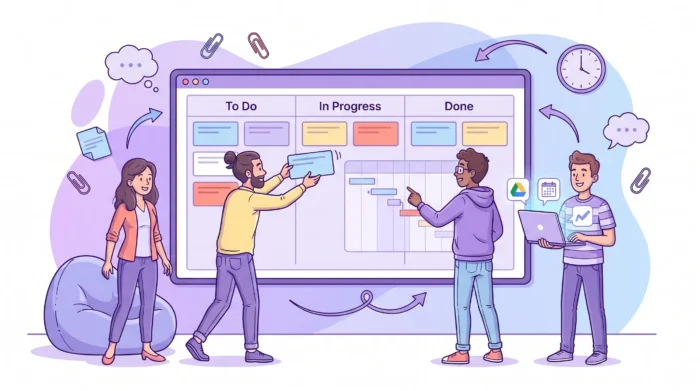
Fast growth is a good problem, until every project starts depending on a founder’s memory, a private spreadsheet, or a Slack thread nobody can find. The right project management tools for startups do more than organize tasks. They create a shared operating system for who owns what, what is blocked, what is due next, and where the work lives.
For a startup that expects to scale quickly, the challenge is not simply choosing a popular app. It is choosing a system your team can adopt now, then keep using when you add new hires, customers, departments, compliance requirements, and more complex project timelines.
In the earliest stage, a simple checklist often feels enough. A founder, a developer, and a marketer can coordinate through chat, meetings, and a shared document. But once the team reaches even 5 to 10 people, hidden work becomes expensive.
The warning signs usually appear in predictable ways. Launch dates move because dependencies were not visible. Customer requests sit in inboxes instead of becoming assigned tasks. New hires ask the same questions repeatedly because there is no central project history. Leadership spends more time asking for updates than making decisions.
A scaling startup needs lightweight structure. Too much process slows experimentation. Too little process creates confusion, rework, and missed opportunities. Good software sits between those extremes.
Many teams make the mistake of buying the most feature-rich platform they can find. Then the tool becomes another project to manage. A better approach is to start with the smallest workflow that gives everyone visibility.
For most startups, that means a visual task board, clear ownership, due dates, file attachments, comments, priorities, and a simple way to see timelines. As the company grows, you can add dependencies, time tracking, reporting, templates, permissions, and governance.

A startup project management tool should help the team move faster, not force everyone into unnecessary administration. When you evaluate options, look for capabilities that support today’s speed and tomorrow’s complexity.
Visual boards are useful because they show work status at a glance. A Kanban board with columns such as Backlog, Ready, In Progress, Review, and Done helps everyone understand where tasks stand without waiting for a meeting.
For startups, this is especially valuable when priorities change often. Cards can move as work evolves, and the team can quickly see bottlenecks. If too many cards sit in Review, the issue is no longer hidden. If one person owns all urgent work, the imbalance becomes visible.
A startup can survive with a basic task board for a while, but launches, funding milestones, customer implementations, hiring plans, and product releases need dates. That is where timeline planning becomes essential.
A Gantt chart or timeline view helps leaders see how tasks relate over time. If design is late, development may be late. If legal review is delayed, a partnership launch may slip. Timeline visibility is especially important when one small team is handling several high-stakes initiatives at once.
Startups should avoid creating extra places to store work. If your company already uses Google Workspace or Microsoft 365, your project management tool should fit into that environment.
For Google Workspace teams, this may include Google Drive attachments, Shared Drives, Gmail-to-task workflows, Google Calendar sync, and export options for reporting. For Microsoft 365 teams, compatibility with OneDrive or SharePoint helps keep files and project context connected.
The goal is simple: tasks, documents, communication, and schedules should reinforce each other instead of living in separate silos.
Fast-scaling teams often underestimate work. This is not because people are careless. It happens because early-stage work is uncertain, cross-functional, and constantly interrupted by urgent customer or investor needs.
Time tracking helps startups compare estimates with actual effort. Over time, this improves planning, pricing, hiring decisions, and workload balance. It also helps team leads understand whether delays come from unclear priorities, unrealistic deadlines, or resource constraints.
Startups that sell to larger customers quickly face procurement, security, privacy, and compliance questions. A tool that feels fine for five people may become risky when external partners, contractors, or enterprise customers are involved.
Look for project management software that supports controlled sharing, role clarity, backup options, and alignment with your company’s file storage policies.
You may also be interested in other Kanbanchi blog articles for startups.
The right tool depends on your stage, but it should not force you to migrate every six months. This does not mean every startup needs an enterprise setup on day one. It means the tool you choose should let you add structure gradually. Use this table to understand what matters as your startup scales.
| Startup stage | Main project risk | Tool capabilities to prioritize | Sign you are ready to upgrade your process |
|---|---|---|---|
| 2 to 5 people | Work lives in founders’ heads | Simple boards, owners, due dates, comments | Tasks are missed unless someone reminds the team manually |
| 6 to 15 people | Priorities compete across functions | Kanban boards, file attachments, filters, notifications | Weekly meetings become status-reporting sessions |
| 16 to 50 people | Deadlines and dependencies become harder to manage | Gantt chart, calendar sync, templates, time tracking | Launch dates slip because teams cannot see upstream blockers |
| 50+ people | Teams need governance and repeatability | Permissions, reporting exports, backups, standardized templates | Leadership needs portfolio-level visibility and audit-friendly processes |
Tool sprawl is one of the most common scaling problems. A startup begins with one project board, then adds a spreadsheet, then a roadmap tool, then a time tracker, then a separate reporting dashboard. Before long, nobody knows which source is accurate.
A better evaluation process starts with the work itself.
Before comparing software, write down how work actually moves through your team. For example, a product workflow might move from Idea to Research, Design, Development, QA, Release, and Done. A marketing workflow might move from Brief to Draft, Review, Approved, Scheduled, and Published.
This exercise prevents you from choosing a tool based on attractive features that do not match your daily reality. It also helps you create board templates that new hires can understand quickly.
Different roles need different views of the same work. A founder may want a timeline of major launches. A team lead may want a board showing blocked tasks. An operations manager may want a Task list view for filtering by owner, priority, or due date.
The key is not to create separate systems for each role. The best setup lets teams switch views while working from the same underlying tasks.
| View | Best for | Startup use case |
|---|---|---|
| Kanban board | Daily execution and bottleneck visibility | Sprint work, content production, customer onboarding |
| Gantt chart | Deadlines, dependencies, and milestone planning | Product launches, fundraising preparation, implementation projects |
| List view | Fast filtering and task review | Operations checklists, hiring pipelines, admin workflows |
| Calendar view or sync | Date-based coordination | Campaign deadlines, meetings, release dates, customer commitments |
| Time tracking | Estimation and workload analysis | Client work, support load, implementation effort, sprint retrospectives |
A tool only works if the team uses it. For startups, adoption usually depends on three factors: how quickly people understand the interface, how well the tool fits existing apps, and whether it reduces manual updates.
If a project management platform requires weeks of configuration before the first team can use it, it may be too heavy for a startup. If it integrates with the apps your team already uses every day, adoption becomes much easier.
Fast-moving startups often start in one tool and later realize they need more structure. Before committing, check whether the platform supports imports from common systems or CSV files. Also check whether you can export board data for analysis or reporting.
Data portability matters because your projects become part of your company’s operating history. You should not have to lose context when your process matures.
Kanbanchi is built for teams that want visual project management inside the productivity ecosystem they already use. It is especially relevant for startups using Google Workspace, and it also supports Microsoft 365 compatibility.
For a startup that wants to scale fast without building a complicated project management stack, Kanbanchi combines several core capabilities in one tool.

Kanbanchi boards help teams organize tasks as cards across workflow stages. Teams can assign work, add comments, use text and color tags, set priorities, attach files, and filter tasks as needed. This makes it easier for founders and team leads to see what is happening without interrupting everyone for updates.
Because boards can be created and shared in Google Workspace, teams can align collaboration with existing company policies. This is useful when the startup grows beyond the founding team and needs clearer access control.
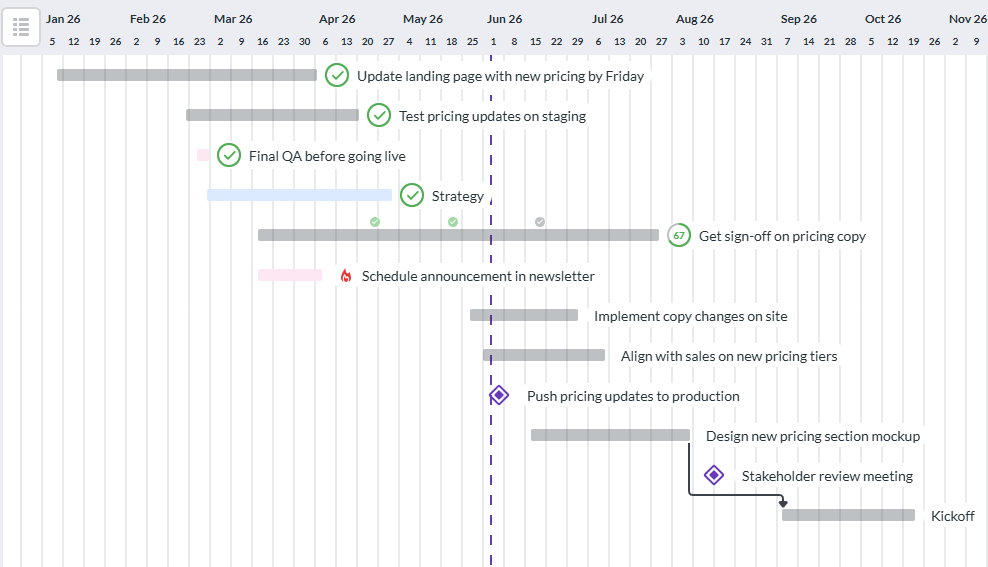
When execution needs date-based planning, Kanbanchi lets teams convert a board into a Gantt chart. This is helpful for product releases, go-to-market plans, hiring projects, client onboarding, and operational rollouts.
The advantage for startups is continuity. Your team can work visually on a board while leadership reviews the same project through a timeline lens.

Kanbanchi includes time tracking directly on cards. Team members can start a timer on a task, and timing data is recorded for review. Over time, this helps teams understand where effort goes and improve planning accuracy.
For startups working with limited headcount, this is valuable. It can reveal whether a function needs more support, whether a process is too manual, or whether the team is spending too much time on low-value work.
Kanbanchi integrates with Google Drive, Shared Drives, Gmail, Google Calendar, and Google Sheets. Teams can attach files from Drive, create cards from Gmail, sync dates with Calendar, and export board data to spreadsheets.
Start a free trial of Kanbanchi now
The rollout should be simple enough to complete in a few days, not months. Start with one high-value workflow and expand only after the team sees benefits.
First, choose one project type that creates recurring coordination pain. This could be product releases, customer onboarding, marketing campaigns, or hiring. Build a board that mirrors the real workflow, then create cards for active work only. Avoid importing every old task at the beginning.
Second, define what every card must include. A good startup default is owner, due date, priority, short description, and relevant file attachments. If a card is large enough to hide multiple responsibilities, break it into subcards or checklist items.
Third, agree on operating habits. For example, the team may update cards before standups, review blocked work twice a week, and move completed items during a Friday review. A tool cannot replace team discipline, but it can make the right habits easier.
Fourth, add timeline planning when the team starts managing deadlines across functions. Use a Gantt chart for launches and milestone-heavy work, while keeping the board as the daily execution view.
Finally, review the system every month. Remove unused fields, simplify columns, create templates for repeated projects, and adjust permissions as the team grows.
The first mistake is treating project management as a documentation task instead of an execution system. If the board is only updated after work is already complete, it becomes a historical archive, not a management tool.
The second mistake is creating too many boards too early. Separate boards can be useful, but they also fragment visibility. Use swimlanes, tags, filters, or templates where possible before splitting every initiative into its own workspace.
The third mistake is ignoring governance until an enterprise customer asks for it. Access rules, file ownership, board backups, and external sharing practices should be considered before sensitive project information spreads across uncontrolled tools.
The fourth mistake is measuring activity instead of outcomes. A long list of completed tasks does not always mean the startup is moving toward the right goal. Connect tasks to milestones, customer commitments, revenue goals, or operational improvements whenever possible.
The best tool is the one your team will actually use and can keep using as work becomes more complex. For many startups, that means a visual board for execution, a timeline view for planning, file and calendar integration, time tracking, and enough security controls to support growth.
Move beyond spreadsheets when tasks require multiple owners, frequent status changes, file attachments, dependencies, recurring workflows, or real-time collaboration. Spreadsheets can track work, but they often become hard to maintain when a startup adds people and parallel projects.
Not for every task. However, startups benefit from Gantt charts when managing launches, customer implementations, hiring plans, fundraising preparation, or any project with dependencies and fixed deadlines. A Gantt chart helps teams see how delays affect the bigger schedule.
Start with one workflow, a few clear columns, and simple card requirements. Add features only when the team has a real need for them. The goal is to increase visibility and accountability, not to create a process for its own sake.
Yes. Kanbanchi is designed to work closely with Google Workspace, including Google Drive, Shared Drives, Gmail, Google Calendar, and Google Sheets. It gives startups Kanban boards, Gantt charts, time tracking, and collaboration features without forcing teams to leave their existing workspace.
If your team is already building its operating system around Google Drive, you may also find this guide to Google Drive project management useful for structuring folders, permissions, and project files.
Related article: How a Bootstrapped B2B SaaS Shifted from 23% to 78% Team Purchases in Just One Year
Fast-growing startups need speed, but speed without visibility turns into chaos. The right project management tool gives your team a shared place to plan, execute, track, and improve work as the company grows.
If your startup runs on Google Workspace or Microsoft 365 and needs a practical way to connect boards, timelines, time tracking, files, and team collaboration, explore Kanbanchi. Start with one workflow, scale it into a repeatable system, and give your team the clarity it needs to move faster with confidence.
Start free trial of Kanbanchi now


In this Article:
Start using Kanbanchi now
Start your free trial