
In this Article:
Try Kanbanchi now
Start your free trial


A project schedule is where a project becomes real. Goals, ideas, and deliverables are useful, but teams still need to know what happens first, what depends on what, who owns each task, and whether the deadline is realistic.
For business owners, team leads, and project managers, a well-built project schedule does more than organize dates. It creates shared visibility. It helps leaders spot bottlenecks early, coordinate people across departments, and keep clients or stakeholders informed without chasing updates in emails and meetings.
This guide explains what a project schedule is, how it differs from related planning documents, how to create one step by step, and what best practices help teams keep schedules practical instead of theoretical.
More articles on project management
A project schedule is a time-based plan that shows when project work will happen. It usually includes tasks, start dates, due dates, durations, dependencies, milestones, assignees, and sometimes resource availability or estimated effort.
In simple terms, a project schedule answers four questions:
The Project Management Institute describes schedule management as a core part of managing timely project completion, which is why scheduling is not just an administrative exercise. It is a control system for delivery.
A project schedule can be simple or advanced. A small team may start with a task board and due dates. A larger cross-functional team may need a Gantt chart, dependencies, milestones, workload visibility, and time tracking. The right level of detail depends on the complexity of the work and the number of people involved.
These terms are often used together, but they are not identical. Understanding the difference helps teams avoid planning gaps.
| Term | Main purpose | Typical contents | Best used for |
|---|---|---|---|
| Project plan | Defines how the project will be managed | Scope, goals, stakeholders, budget, risks, communication, governance | Aligning stakeholders before and during delivery |
| Project schedule | Shows when work will happen | Tasks, dates, durations, dependencies, milestones, owners | Managing execution and deadlines |
| Project timeline | Visualizes key events over time | Major phases, milestones, important deadlines | Communicating the big picture quickly |
The project plan is broader. It explains the overall approach. The project schedule is more operational. It turns the plan into dated work. The project timeline is usually a simplified visual view of the most important dates.
A useful project schedule needs enough structure to guide execution, but not so much detail that the team stops updating it. Most schedules include the following elements.
Tasks are the individual pieces of work required to complete the project. A task should be specific enough that someone can own it and mark it complete.
For example, “launch website” is too broad to manage as one task. It may need to be broken down into “approve homepage copy,” “design pricing page,” “configure analytics,” “complete QA testing,” and “publish production version.”
Dates show when work begins and ends. Duration estimates show how long each task is expected to take. Both matter because a due date without a realistic duration can create false confidence.
For example, if a task is due Friday but requires five business days of focused work and cannot start until Thursday, the schedule is already broken.
Dependencies show relationships between tasks. If task B cannot begin until task A is complete, that relationship should be visible.
Common dependencies include approvals, handoffs, technical prerequisites, procurement steps, and client feedback. When dependencies are hidden, delays appear to come out of nowhere.
Milestones mark important checkpoints. Unlike tasks, they usually do not represent work themselves. They represent meaningful progress, such as “design approved,” “beta release ready,” or “client sign-off received.”
Milestones help leaders report progress without listing every task in the project.
Every scheduled task should have an owner. This does not mean one person does all the work, but one person should be accountable for moving the task forward.
For larger teams, resource planning also matters. If the same specialist is assigned to five tasks in the same week, the schedule may look fine on paper but fail in reality.
A baseline is the approved version of the schedule that you compare against actual progress. Status updates show what is not started, in progress, blocked, or complete.
Without a baseline, it is hard to learn from delays. Without status, the schedule becomes a static document instead of a management tool.
You do not need to build a perfect schedule on the first attempt. In fact, the best schedules usually improve through review, feedback, and adjustment. Use the steps below to create a schedule your team can actually follow.
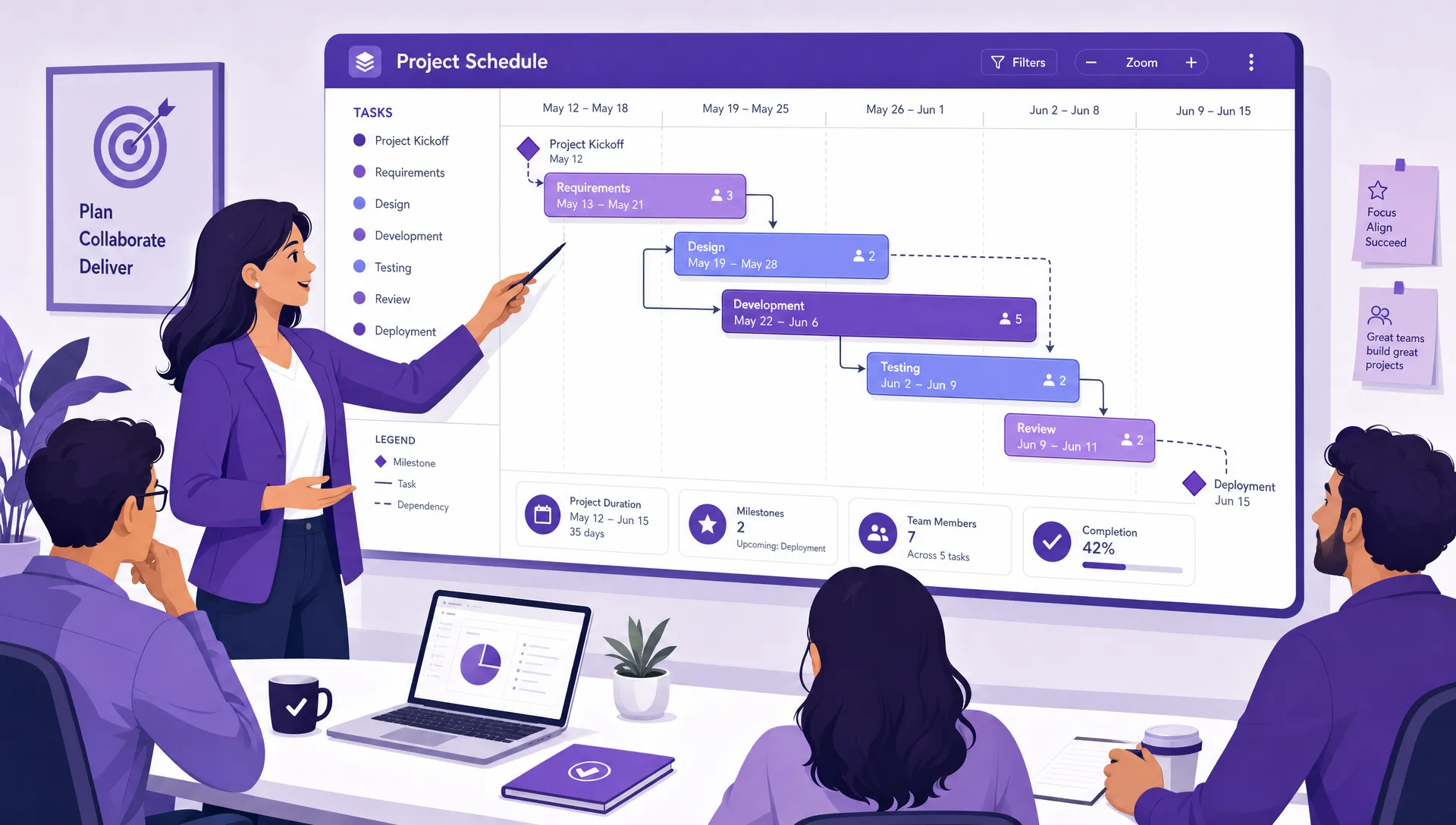
A project schedule connects task ownership, sequencing, milestones, and deadlines so teams can see how work moves from planning to delivery
Start by clarifying what the project is supposed to deliver. A schedule is only useful if it is tied to a clear outcome.
Ask what the finished result should look like, what is included, what is excluded, and who must approve the work. This prevents the schedule from expanding every time a new idea appears.
For example, “improve onboarding” is not a clear enough outcome. “Launch a new customer onboarding email sequence for three product plans by September 30” is much easier to schedule.
Once the outcome is clear, identify the deliverables and break them into tasks. Each task should be small enough to estimate and assign.
A practical test is simple: can one person understand what needs to be done, estimate the effort, and report whether it is blocked? If not, the task is probably too large.
For teams managing many tasks at once, visual project boards are helpful because they show work in stages such as planned, in progress, review, and done. If you need a deeper explanation of this format, Kanbanchi’s project boards guide explains how visual boards support project tracking and collaboration.
Estimate how long each task will take and how much effort it requires. Duration and effort are related, but they are not the same.
A task may require only two hours of effort but take three days to complete because it depends on stakeholder feedback. Another task may require eight hours of focused work and be completed in one day if the right person is available.
For better estimates, review similar past projects, ask the people who will do the work, and include time for review cycles. Optimistic estimates are one of the most common reasons schedules fail.
Next, map out which tasks depend on others. Look for approvals, technical dependencies, vendor timelines, legal reviews, shared resources, and fixed external deadlines.
This is where many teams discover that their preferred deadline is not realistic. That is useful information. It is better to identify a scheduling conflict before the project starts than explain a missed deadline after the fact.
Put tasks in the order they need to happen. Some work can happen in parallel, while other work must be completed sequentially.
A Gantt chart is especially useful at this stage because it shows task bars across time and makes overlaps, gaps, and dependencies easier to see. Kanbanchi lets teams convert board work into a Gantt Chart, which helps connect day-to-day task management with timeline planning.
Assign each task to an owner and check whether the workload is realistic. This step is often skipped, but it is essential.
A schedule that assumes everyone is available at 100 percent capacity will usually fail. People attend meetings, handle urgent work, take time off, and support other projects. Build the schedule around real availability, not ideal availability.
Milestones make it easier to monitor whether the project is on track. Add them at natural checkpoints, such as completion of discovery, design approval, development completion, testing, launch, or handover.
Review points are also useful. These are moments when the team checks progress, risks, and upcoming dependencies. For fast-moving projects, weekly reviews may be enough. For complex projects, more frequent check-ins may be needed.
A project schedule should be visible to the people responsible for the work. If the schedule lives in a private file that only one manager updates, it will quickly become disconnected from reality.
Share the schedule, collect feedback, and keep it updated as work progresses. When dates change, record why. Over time, this helps your team improve estimates and prevent the same problems from recurring.
Here is a simplified example for a website redesign project. The exact structure will vary by team, but the logic is the same: define tasks, sequence work, assign owners, and track milestone dates.
| Phase | Task | Owner | Dependency | Target date |
|---|---|---|---|---|
| Discovery | Confirm project goals and stakeholders | Project lead | None | Aug 3 |
| Discovery | Audit current website pages | Marketing manager | Goals confirmed | Aug 7 |
| Content | Draft updated homepage copy | Content lead | Audit complete | Aug 14 |
| Design | Create homepage wireframe | Designer | Goals confirmed | Aug 14 |
| Design | Approve visual design | Project sponsor | Wireframe and copy ready | Aug 21 |
| Development | Build homepage template | Developer | Design approved | Sep 4 |
| QA | Test homepage across devices | QA owner | Template built | Sep 10 |
| Launch | Publish redesigned homepage | Web manager | QA complete | Sep 15 |
This schedule is intentionally simple, but it reveals important management information. The homepage cannot be built until the design is approved. QA cannot begin until development is complete. If the project sponsor delays approval, the launch date may be affected.
A more advanced version might include task duration, risk level, status, estimated hours, actual hours, and links to files. In Kanbanchi, teams working in Google Workspace can attach files from Google Drive to cards, create tasks from Gmail, sync dates with Google Calendar, and use board, list, and Gantt views to manage the same work from different angles.
Different projects need different scheduling formats. The best option depends on complexity, team habits, and how much visibility leaders need.
A task list schedule is the simplest format. It includes tasks, owners, and due dates. This works well for small projects with few dependencies.
The downside is that task lists can hide sequencing problems. If twenty tasks are due in the same week, the list may not show whether the team has enough capacity or whether one delay will affect the rest of the project.
A calendar schedule places work on specific dates. It is useful for events, campaigns, meetings, publishing calendars, and deadline-driven projects.
Calendars are easy to understand, but they may not show task dependencies clearly. They are best when paired with a task board or timeline view.
A Kanban-style schedule organizes tasks by workflow stage. It helps teams see what is planned, active, blocked, or done. This is especially useful for ongoing work and teams that need visual clarity.
Kanban boards are not only for Agile software teams. Marketing, operations, HR, finance, education, and executive teams can all use boards to manage scheduled work.
A Gantt chart shows tasks across a timeline. It is useful when projects have dependencies, phases, and multiple workstreams.
Gantt charts help leaders understand whether the deadline is achievable and how a delay in one task may affect later tasks. They are particularly valuable for cross-functional projects where timing and handoffs matter.
A schedule should help the team make better decisions. If it becomes a document people ignore, it is not serving its purpose. These best practices help keep schedules practical.
Managers can define goals and deadlines, but the people doing the work usually understand the effort and risks best. Involve them before the schedule is approved.
This improves estimate quality and increases ownership. People are more likely to follow a schedule they helped shape.
Not every task has the same value. If you schedule low-impact work before critical work, the project may stay busy but fail to move forward.
Before locking dates, decide which tasks matter most. Kanbanchi’s guide on how to prioritize tasks in project management can help teams choose what should happen first when time and capacity are limited.
Hidden dependencies create surprise delays. If approval, feedback, procurement, or another team’s work is required, put that dependency directly into the schedule.
This helps leaders manage risk early. It also prevents unrealistic expectations, such as asking a developer to start work before design specifications are complete.
Stakeholders usually do not need every task detail. They need to know whether the project is moving through important checkpoints.
Milestones make reporting cleaner. Instead of saying “we completed 37 of 62 tasks,” you can say “discovery is complete, design approval is due Friday, and development starts Monday.”
Many schedules fail because they assume every task will be accepted the first time. In real projects, drafts need comments, designs need revisions, tests reveal issues, and stakeholders ask questions.
Build review and rework time into the schedule. This is not pessimism. It is realistic planning.
A schedule created at the start of the project is based on what you know at that moment. As work progresses, new information appears.
Review the schedule frequently enough to catch issues early. For many teams, a weekly schedule review works well. During the review, check overdue tasks, blocked work, upcoming milestones, workload conflicts, and changes to scope.
If your team regularly struggles with unrealistic estimates, time tracking can help. Comparing estimated time with actual time shows where planning assumptions are wrong.
Kanbanchi includes a Time Tracker that lets teams track time on cards and review timing data. This can help managers improve future schedules and understand where work is taking longer than expected.
Even experienced teams make scheduling mistakes. The key is to recognize them early and adjust.
| Mistake | Why it hurts delivery | Better approach |
|---|---|---|
| Scheduling from the final deadline backward without validating effort | Creates a plan that looks organized but cannot be executed | Estimate work first, then compare with the desired deadline |
| Assigning tasks without checking capacity | Overloads key people and causes hidden delays | Confirm availability before finalizing dates |
| Ignoring dependencies | Makes delays appear suddenly | Map dependencies before sequencing work |
| Treating the schedule as fixed no matter what changes | Encourages unrealistic reporting and missed expectations | Update the schedule when scope, risk, or capacity changes |
| Tracking dates but not status | Leaders cannot see what is blocked | Use visible statuses such as planned, in progress, blocked, and done |
The best schedules are structured but flexible. They give the team a clear path while allowing leaders to respond when reality changes.
You can create a project schedule in a spreadsheet, calendar, task app, Gantt chart tool, or project management platform. The right choice depends on how your team works.
A spreadsheet may be enough for a one-person project or a simple list of deadlines. But as soon as multiple people, dependencies, files, discussions, and status updates are involved, spreadsheets often become hard to maintain.
Look for a scheduling tool that supports the way your team already collaborates. For Google Workspace teams, this often means integration with Google Drive, Gmail, and Google Calendar. For Microsoft 365 teams, compatibility with OneDrive and SharePoint can reduce friction.
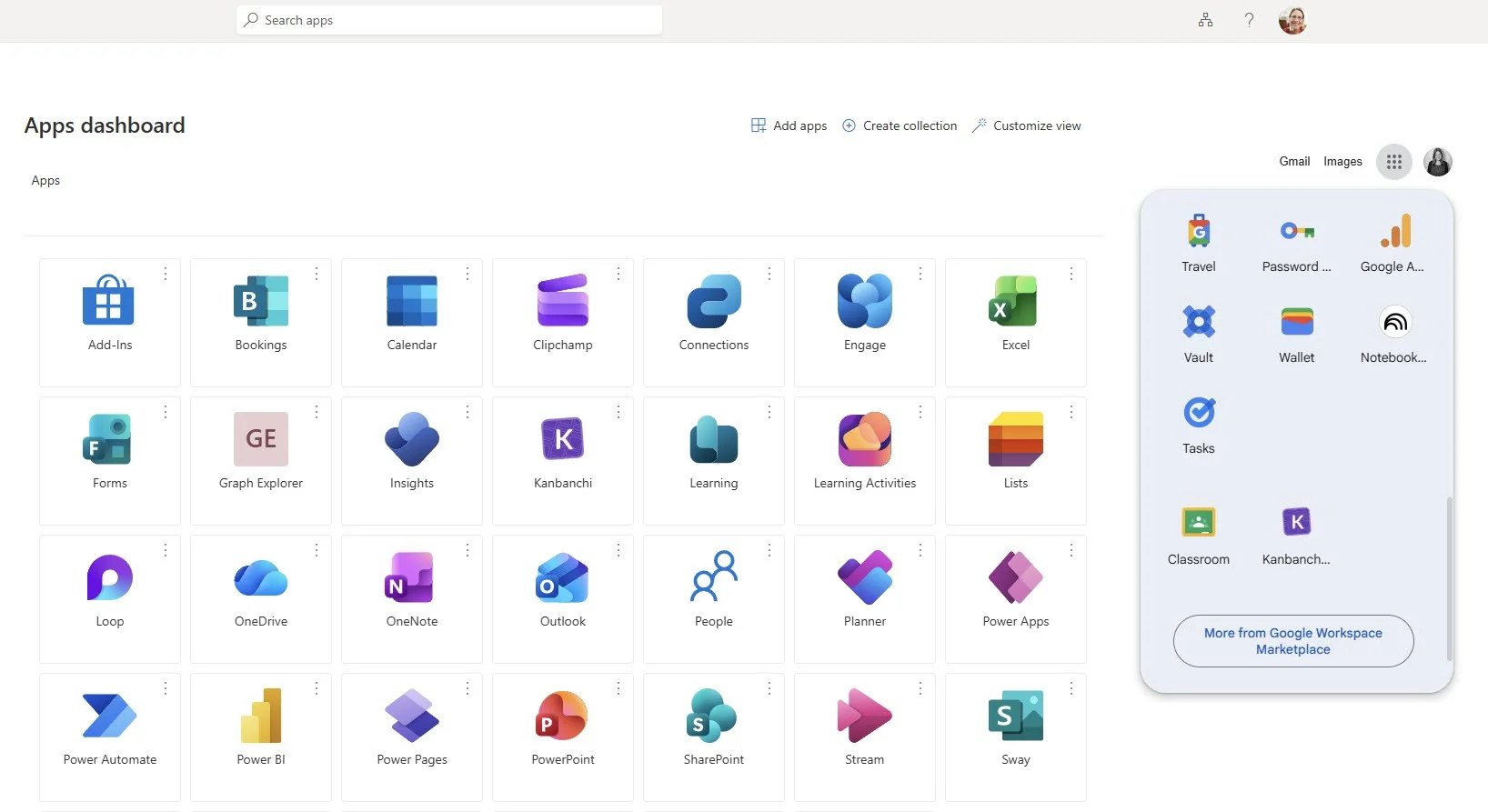
For example, Kanbanchi simplifies access for your team by pinning the task and project management tool directly to the Microsoft or Google app launchers you use every day
Kanbanchi is designed for teams that want project scheduling, task tracking, and collaboration in one place. Teams can manage work on Kanban boards, plan timelines with a Gantt Chart, track time, attach files from Google Drive or Shared Drives, create cards from Gmail, sync with Google Calendar, and export board data to Google Sheets.
If you are comparing options, Kanbanchi’s article on project schedule tools that keep deadlines realistic explains the strengths and limits of spreadsheets, calendars, Gantt charts, Kanban boards, and all-in-one platforms.
A project schedule is working when it helps the team make decisions, not just document intentions. You should be able to answer these questions quickly:
If those answers require searching through messages, spreadsheets, and meeting notes, the schedule is not visible enough. A good schedule should create a shared source of truth for both execution and leadership reporting.
A project schedule is a time-based view of project work. It shows tasks, dates, durations, dependencies, owners, and milestones so the team can understand what needs to happen and when.
A project schedule is usually more detailed and operational. It includes task-level information such as owners, dependencies, and dates. A project timeline is typically a higher-level visual summary of phases, milestones, and major deadlines.
The first step is defining the project scope and final outcome. Without a clear outcome, it is difficult to identify the right tasks, estimate effort, or decide which deadlines are realistic.
A realistic project schedule is based on actual task effort, dependencies, team capacity, review time, and known constraints. It should be reviewed regularly and updated when scope, priorities, or availability changes.
The best tool depends on your team’s needs. Small projects may work in spreadsheets or calendars. Teams managing dependencies, files, owners, and timelines often benefit from a project management platform with Kanban boards, Gantt charts, and collaboration features.
A project schedule is most valuable when it stays connected to daily work. Dates, dependencies, and milestones should not sit in a static file while updates happen somewhere else.
With Kanbanchi, teams can plan and manage projects inside the Google Workspace or Microsoft 365 environment they already use. Build visual boards, switch to a Gantt Chart for timeline planning, track time on tasks, attach project files, and keep everyone aligned from planning through delivery.
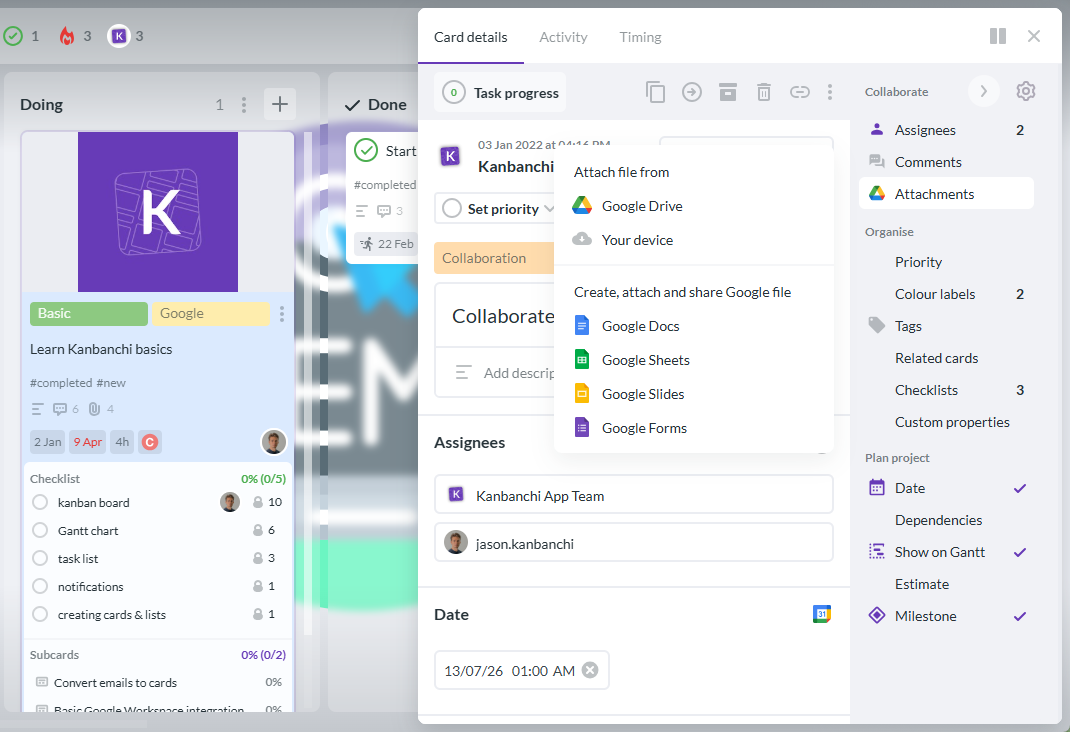
For example, Kanbanchi allows not only attaching files from your Google Drive, but also creating new Google files without leaving your task management app
If your team needs a clearer way to schedule work and track progress, Kanbanchi can help you move from scattered updates to one shared project workspace.


In this Article:
Start using Kanbanchi now
Start your free trial