
In this Article:
Try Kanbanchi now
Start your free trial


The office isn’t always an in-person workplace anymore. It’s an:
We’re all finally getting used to the debate over whether remote work actually, well, works…
In fact, it’s long over. It’s not a temporary fix or a trendy perk; it’s now standard operating procedure for many successful SMEs.
But there is an uncomfortable truth we’ve got to have a chat about. That is, managing a project when your team is spread across three continents and five time zones is always going to be fundamentally different from managing one across a conference table.
At its simplest, it is the art and science of
…to reach a goal without the benefit of physical proximity. It’s about replacing the tap on the shoulder with real digital transparency. It’s about moving from accidental communication to intentional collaboration.
If you are a remote project manager, you aren’t just tracking deadlines.
And most importantly
Whether you are leading a distributed SME team for the first time or looking to optimize a long-standing remote department, this guide is your roadmap.
We’ll dive into
Let’s bridge the gap between remote failure and remote success. We’re going to begin our deep dive by looking at the main pain points when you’re a team managing projects remotely.
Let’s be honest: remote work isn’t all pajamas and no commutes. It’s hard.
When you remove the physical office, you also remove the hundreds of micro-interactions that keep a project on track.
To master remote project management, you must first identify the silent productivity killers that thrive in an environment where everyone dresses casually and can brew up anytime they like, but still need to deliver the work on time…
In a face-to-face conversation, a lot of meaning travels without words. You can see when a colleague looks stressed, or overhear something that corrects a misunderstanding before it turns into a problem
You may have seen the 55/38/7 formula (55% body language, 38% tone of voice, 7% spoken words). It gets stretched a long way past what the original research covered, which was how people read attitude and feeling, not communication in general.
The underlying point still holds. In a remote setting, you are often limited to text.
Without clear protocols, busy work increases as people spend more time clarifying tasks than actually doing them.
Not as fun as it initially might sound, sadly!
Managing a distributed team often means that while one person is finishing their morning coffee in New York, another is heading to bed in Singapore.
Finding synchronous time for meetings becomes a logistical nightmare.
Projects can stall for 12 hours while someone waits for approval from a colleague on the other side of the world.
Remote workers often feel like they are working in a vacuum. If a manager can’t see the work being done, they might default to micromanagement. Conversely, high-achievers might be overlooked because they aren’t the loudest voices in the Slack channel.
There will be different personalities on your team, and some of them will never be as vocal as you would like. A weekly group call gives you the loudest version of the truth. Scheduled one-to-ones give you the rest of it, and they are usually the only reliable way to hear from someone who would never interrupt a call to raise a problem.
When teams are remote, information tends to scatter. A brief is in an email, the feedback is in a chat app, and the latest version of the file is on someone’s local desktop.
Without centralized remote project management software, your team spends half their day playing digital detective. Managing these challenges isn’t about working harder; it’s about working differently. It requires a shift from monitoring presence to measuring progress.
Success in a remote environment isn’t an accident; it’s a deliberate architectural choice. You can’t rely on watercooler moments to fix a broken process.
Instead, you need to build a framework that thrives on independence and clarity.
In a distributed team, the meeting shouldn’t be your default. If you wait for everyone to be online at the same time to make a decision, your project will move at a snail’s pace.
Shift to status by default.
Every task should have enough context (descriptions, files, checklists) so that a colleague can pick it up at 3:00 AM their time without needing to call you.
Use comments on specific task cards rather than broad chat channels.
It keeps the work in context and makes it easier to keep on top of conversations related to specific tasks.
What a task needs to carry in order to be readable on its own is a bigger subject than it sounds. Our guide to team task management covers it properly.
Ambiguity is the enemy of the remote project manager. You must establish a universal language for your team.
Create a Team Operating Manual that outlines these rules. When everyone follows the same playbook, the need for constant check-in meetings evaporates.
If you want to go further, writing down what has to be true for a task to enter and leave each column is the single fix for status meaning different things to different people. There is more on that in Kanban task management.
Ambiguity about tasks is one problem. Ambiguity about why the work matters is another.
Remote teams need goals that survive without a manager in the room to interpret them. SMART is the old standby for a reason: Specific, Measurable, Attainable, Relevant, Time-bound.
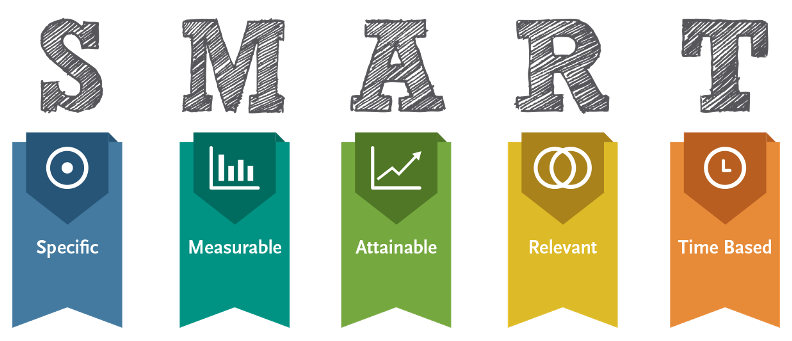
“Improve our onboarding” is not something a distributed team can act on independently. “Cut client onboarding from fourteen days to seven by the end of Q3” is.
Start broad in your planning session. What does this project need to achieve for the business? Then work down to targets each person can check their own progress against, without having to ask you.
Remote projects benefit from shorter cycles. Instead of a three-month project, break work into one- or two-week sprints; they’re much easier to manage
Use Kanban boards to see tasks move from Backlog to Done.
If time zones allow, a 15-minute sync may work. But async communication works better when it can be an automated bot that collects “What I did yesterday” and “What I’m doing today” updates.
Trust is the currency of remote work. Since you won’t just be nipping out to get coffee or lunch, you have to make space for some non-work chatter…
Whether it’s a dedicated Coffee Chat or Watercooler channel, or a monthly virtual game session, a team that likes each other works better together.
Your software is your virtual office. If the office is cluttered, confusing, or hard to get into, your team won’t want to show up.
The most common mistake teams make is using too many tools. If:
…you’ve created a digital monster for your team to fight every day. The best project management software for remote teams acts as a hub that connects everything.
The main things to keep in mind when looking for a remote project management tool are these four points.
If two people open the same board, they must see the same thing at the same time. No continually refreshing the page is required.
Gantt charts for the managers to see the timeline, and Kanban boards for the team to see the daily tasks.
Remote work means working from anywhere. The tool must be as powerful on a tablet or phone as it is on a desktop.
It should play nice with the tools you already use (Google Drive, Calendar).
If you want to see how specific products compare on these points, our roundup of project management software for remote teams goes tool by tool.
Security shouldn’t come at the cost of accessibility. If a tool is so locked down that a freelancer can’t join a board in under five minutes, it’s not built for the speed of your business (or anyone’s).
If you’re on your way to being convinced that remote project management software is the way forward for you and your team, we think you’ll love Kanbanchi.
Below, we’re going to outline all the reasons why, so you can make an informed decision on what to do next.
More articles about Remote Work here
If your team is already using Google Workspace, you have the world’s best communication and storage tools at your fingertips.
But here’s the thing: Gmail and Drive aren’t project managers. To truly bridge the gap, you need a layer that turns your files and emails into a cohesive plan.
Kanbanchi is designed to be that layer. It doesn’t just integrate with Google; it lives inside it, creating a seamless environment for remote project management. Everything that is tricky about managing multiple tools and apps evaporates when you use our software.
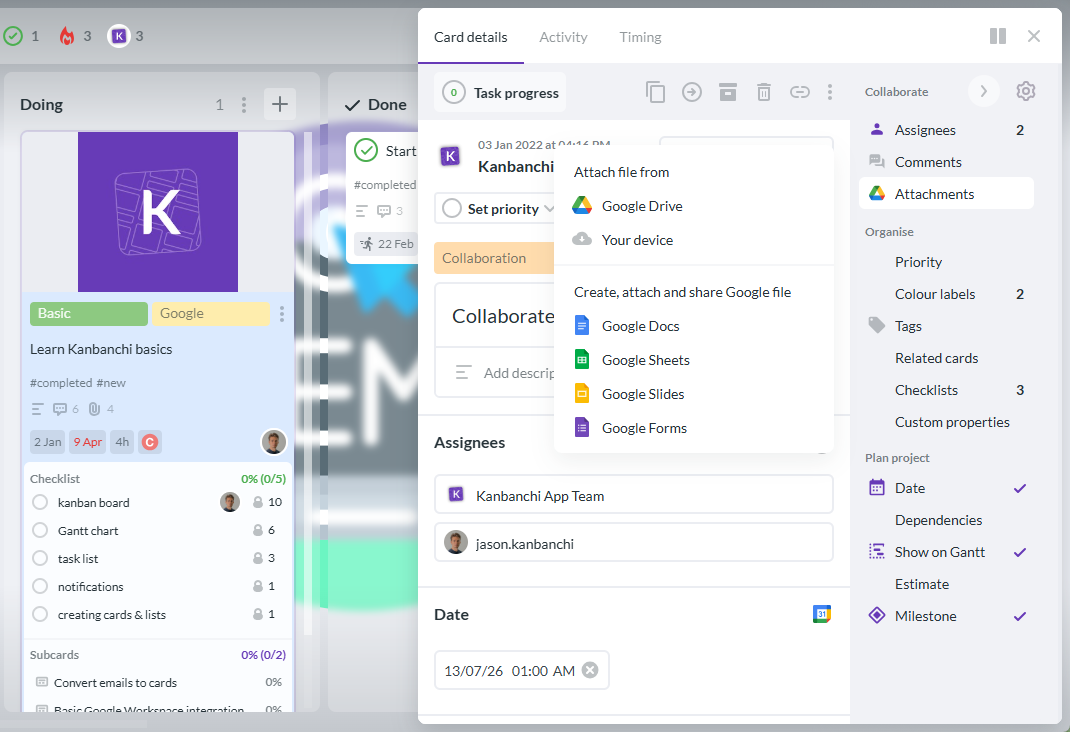
As an example, Kanbanchi allows not only attaching files from your Google Drive, but also creating new Google files without leaving your task management app
Most remote tools require you to move your data to their servers.
Kanbanchi keeps your data where it belongs: in your Google Drive. That should give you peace of mind. Why? It means you get:
Remote teams often struggle with stale data and cards that don’t refresh often enough.
In Kanbanchi, when a developer in Berlin moves a card to Done, a manager in San Francisco sees it happen in real-time.
This instant feedback loop replaces dozens of “Is this finished?” Slack messages that just end up causing more stress and confusion for everyone.
Every Kanbanchi card is a mini-workspace.
You can
…all in one place. For a remote project manager, this means everything you need to oversee a task is accessible with a single click.
Start a free trial of Kanbanchi now
One of the greatest fears in distributed team management is the invisible worker. There is a real line between tracking work and monitoring people, and it is worth knowing exactly where it sits. We went into that properly in remote project tracking without surveillance. The short version: track the work, not the person.
When you can see the progress bars on a Kanban board, you don’t need to ask for a status update. The board is the update.

In Kanbanchi, you can see task cards grouped by workflow stage, with owners, due dates, color labels, priorities, and more
Give your team the what and the when, then let them decide the how. Remote work thrives on trust.
It’s easy to overwork a remote employee because you can’t see the physical pile of paper on their desk.
Kanbanchi’s Workload View allows managers to see exactly how many tasks are assigned to each person.
If one person is underwater, drag and drop their tasks to someone with more capacity.
Solve the problem before the employee even knows they’re heading toward a deadline crisis.
A good remote project manager uses historical data to plan the future.
Kanbanchi’s reporting tools show you how long tasks actually take versus how long you thought they would take. Use these insights to set more realistic deadlines and improve your team’s flow over time.
The great thing about Kanbanchi is that, as it’s already Google native, your remote team can get to grips with it straight away. If they’re familiar with that landscape, they’ll be able to master ours in no time.
The familiarity of the tool means your team will want to use it, and it’ll boost their productivity when they need to get to grips with a very important project.
By choosing a tool born in Google, like Kanbanchi, you aren’t just buying new software that’ll be installed and then forgotten about after a couple of weeks.
It’s likely to become the vital link in your workflow, which means all your projects are a success from the moment they land in your inbox to the final review and delivery.
Plan, prioritize, and manage your projects effortlessly with Kanbanchi - the all-in-one project management tool built for Google Workspace users.
Get a free trialWe’ll end with a quick round-up of some of the most popular queries users have about how to properly navigate remote project management in today’s digital landscape.
If there’s anything particular you’d like to discuss with us, and you want to start your free trial with Kanbanchi, then get in touch, and we can get the ball rolling.
The primary hurdles are:
Overcoming these requires a shift from accidental communication to intentional, tool-driven transparency.
Success hinges on three things:
You must have a single source of truth for all tasks, document every process so it can be followed asynchronously, and pivot your management style to focus on results and output rather than the amount of time spent at the keyboard.
The best tool is the one that integrates seamlessly with your existing workflow.
For teams already using Google Workspace, Kanbanchi removes the friction of switching platforms. Boards live in Drive, and there’s no separate login to manage. Other popular options include Asana or Monday.com, but these often require separate data silos and additional logins.
Avoid invasive monitoring software. Track the work instead of the person: what stage a task is in, whether it’s blocked, how long similar work usually takes. That answers the questions a manager actually needs answered, and it doesn’t teach your team to manage how they appear in the system. We covered where that line sits in remote project tracking without surveillance.

In this Article:
Start using Kanbanchi now
Start your free trial