-  views

Effortless Wedding Planning: Why Kanbanchi is the Preferred Task Management Software for Wedding Planners

Try Kanbanchi now

Start your free trial

 

An illustration showing a bride and groom next to a laptop and smartphone displaying Kanbanchi, utilizing it as their wedding planning task management software.

Wedding planning is an intricate dance of logistics, design, emotion, and rigorous deadline management. For the modern wedding planner, the days of relying on three-ring binders, scattered sticky notes, and disjointed spreadsheets are over. To scale a business and maintain sanity, professionals need a digital command center. They need robust task management software for wedding planners that creates a single source of truth for every couple, every vendor, and every minute of the big day.

Kanbanchi has emerged as a powerhouse in this space, particularly for planners who use the Google Workspace ecosystem. By blending the visual simplicity of Kanban boards with the rigorous analytical power of Gantt charts, Kanbanchi bridges the gap between creative vision and logistical execution. This comprehensive guide explores how to leverage Kanbanchi to streamline workflows, manage vendor relationships, and deliver flawless events.

The Modern Planner’s Dilemma: Complexity vs. Clarity

The average wedding involves over 2,000 individual decisions. From selecting the font for the invitation to confirming the entrée vegetarian count, the mental load on a planner is immense. When you multiply this by 15, 20, or 30 weddings a year, the potential for error skyrockets. Many professionals struggle because their tools are fragmented. You might use Trello for tasks, Excel for budgets, Google Drive for contracts, and Gmail for communication.

The Need for Integrated Wedding Project Management Tools

To combat this, planners require wedding project management tools that integrate these functions. A planner needs to see the contract, payment deadline, and task status in a single view.

This is where Kanbanchi differentiates itself. It is not just another app; it is a layer that sits on top of your Google Drive. It treats your Google Drive files as project assets within a project management interface, eliminating the need to switch between tabs. By centralizing data, Kanbanchi reduces the cognitive load, allowing planners to focus on design and client experience rather than administrative data entry.

Why Kanbanchi is the Premier Task Management Software for Wedding Planners

Choosing the right software is a business-critical decision. While generic tools are available, Kanbanchi offers features that align perfectly with the event-planning workflow.
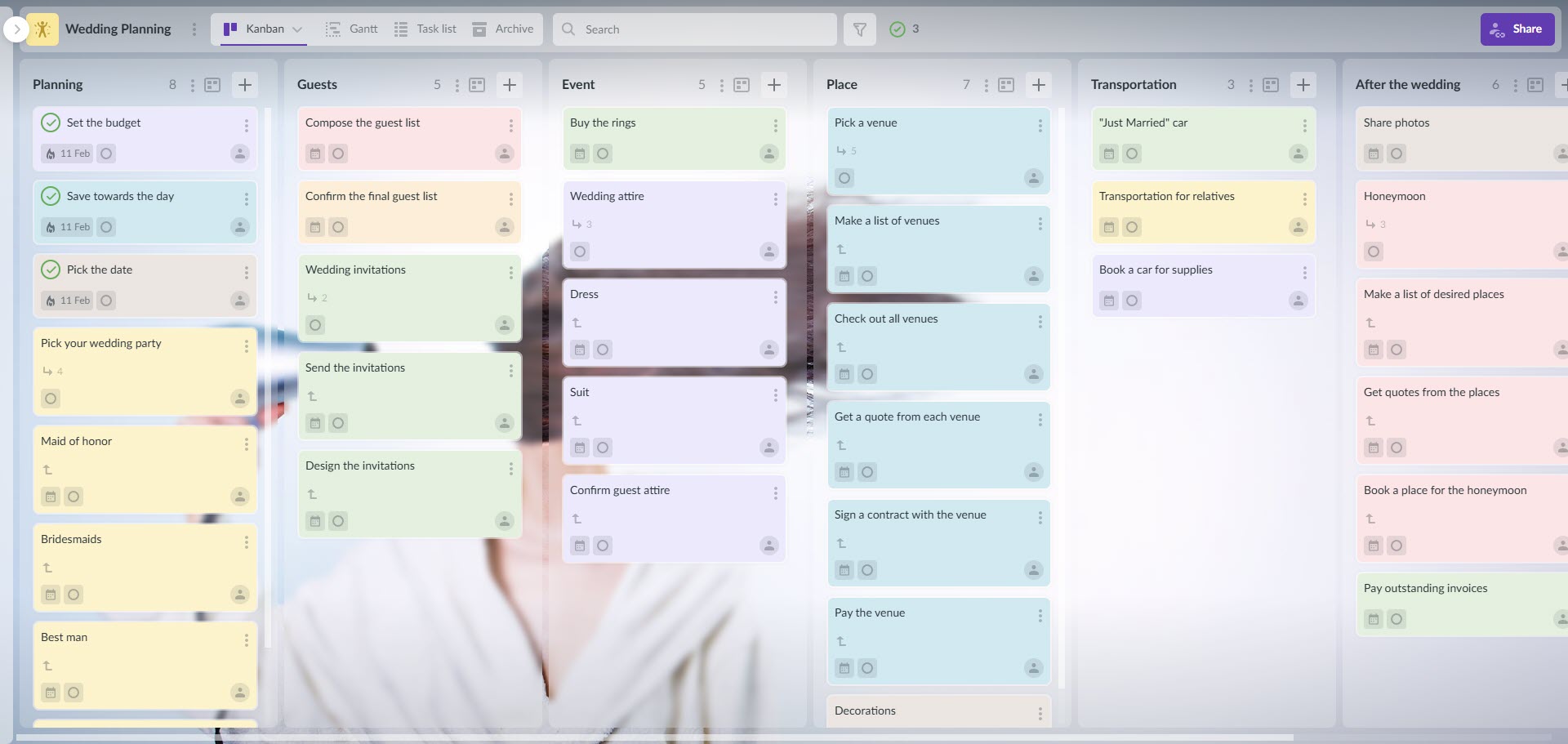
A screenshot of a detailed Kanbanchi board titled "Wedding Planning," featuring columns for "Guests," "Event," and "Place," illustrating the organization capabilities of wedding planning task management software.

Whether for your own big day or a client’s event, efficient wedding planning task management software visualizes every detail from guest lists to transportation in one unified workflow

1. Visualizing the Workflow with Kanban Boards

The Kanban method allows you to visualize work as cards moving through stages. For a wedding planner, this is intuitive because weddings are stage-based projects.

Suggested Board Columns for Wedding Organization:

  • Inquiry: Contract sent, Deposit received, Welcome packet sent.
  • Vendor Sourcing: Researching venues, contacting photographers, scheduling tastings.
  • Design Phase: Mood board creation, floral mockups, linen selection.
  • Logistics and Timeline: Transportation manifests, hotel blocks, run-of-show drafting.
  • Coordination: Final walkthroughs, confirming vendor meals, and seating chart finalization.
  • Post-Event: Thank you notes, photo gallery delivery, and final invoicing.

As you move a card titled “Book DJ” from Sourcing to Logistics, you get an instant visual indicator of progress. This visual nature makes it the ideal task management software for wedding planners, as it allows you to see the health of every project at a glance.

2. Mastering Dependencies with Gantt Charts

While Kanban is great for status, it doesn’t always show the relationship between tasks. You cannot mail invitations until the design is approved. You cannot create the seating chart until RSVPs are in.

Kanbanchi’s Gantt chart view visualizes these dependencies. If the venue booking is delayed by two weeks, the Gantt chart will automatically show you how that delay impacts the catering tasting and the save-the-date mailout. This predictive capability is vital for maintaining the strict timelines required in bridal event planning applications.

3. The Google Workspace Superpower

The primary reason planners choose Kanbanchi is its seamless Google integration.

  • Drive Integration: You can attach files from Google Drive directly to a Kanbanchi card. When you click on the “Catering” task, the menu PDF and the signed contract are right there. No searching through folders.
  • Calendar Sync: Every card with a due date can be added to your Google Calendar. This ensures you never miss a payment deadline or a vendor meeting.
  • Gmail Integration: Turn client emails directly into tasks. If a bride emails you a request to change the color palette, you can convert that email into a Kanbanchi card with one click, ensuring the request doesn’t get buried in your inbox.

Building the Ultimate Wedding Planning Workflow

Let’s break down how to construct a foolproof workflow using wedding planning workflow tools within Kanbanchi. This system takes you from the initial client inquiry to the final breakdown of the event.

Phase 1: Client Onboarding and Setup

Consistency is the key to scaling. With Kanbanchi, you can create a “Master Wedding Template.” When a new client signs, you simply duplicate this board.

The Onboarding Checklist Card:

  • Send Welcome Guide.
  • Create a shared Google Drive folder.
  • Schedule “Vision Meeting.”
  • Set up a budget tracker spreadsheet.

By using templates, you ensure that no step is ever missed, regardless of how busy your season gets.

Phase 2: Vendor Management and Curation

Managing a team of 15+ vendors requires extreme organization. In Kanbanchi, you can use “Tags” or “Labels” to categorize tasks by vendor type (e.g., Florist, Venue, Entertainment).

Stage Action in Kanbanchi Benefit
Selection Create cards for potential vendors in the “Sourcing” column. Attach their PDF brochures. Compare options side-by-side with pricing and visual portfolios attached.
Contracting Move chosen vendor to “Pending Contract.” Set a due date for signature. Ensures legal documents are processed promptly.
Payment Create subtasks for “Deposit,” “Interim Payment,” and “Final Balance.” Sync dates to Google Calendar. Never miss a payment deadline, protecting your client from late fees.
Coordination Use the “Comments” section of the card to log communication notes (e.g., “DJ requires 6ft table”). Creates a communication log for the wedding day team.

Phase 3: The Design Process

Wedding planning is visual. Kanbanchi cards allow for “Cover Images.” You can upload the floral mood board as the cover of the “Flowers” card. When you look at your board, it isn’t just text; it is a visual representation of the wedding’s aesthetic. This visual cue is helpful when juggling multiple weddings with different styles (e.g., Rustic vs. Modern Glam).

Phase 4: Client Collaboration

One of the most difficult aspects of the job is wedding coordinator task tracking while keeping the client informed but not overwhelmed. Kanbanchi allows for flexible sharing permissions.

  • The “Client View”: You can share a specific board with your clients. They will be able to see everything with the “view-only” mode.
  • Assigning Tasks: You can assign tasks to the couple, such as “Provide Guest Addresses” or “Select First Dance Song.”
  • Transparency: Clients can see the progress of tasks, which significantly reduces the number of “Just checking in!” texts and emails you receive. They feel secure seeing the board move forward.

START YOUR FREE TRIAL OF KANBANCHI NOW

Advanced Features for Power Users

Once you have mastered the basics, Kanbanchi offers advanced features that elevate it above standard bridal event planning applications.

Time Tracking for Billing

Many planners charge flat fees, but some charge hourly for extra consultations or add-on services. Kanbanchi has a built-in time tracker. You can track exactly how many hours you spent sourcing vintage glassware for a specific client. This data is crucial for accurate billing and for analyzing the profitability of your packages.

Archive for Historical Data

Once a wedding is complete, you don’t delete the board; you archive it. This creates a searchable database of past events.

  • Need to know which DJ you used for the Smith wedding three years ago? Search the archive.
  • Need to see how long the permitting process took for a tented wedding? Check the archive.
  • Need a template for a destination wedding? Duplicate a past board from the archive.

This institutional memory is invaluable for growing a team. New assistants can learn from past boards, understanding the cadence and complexity of the work without needing you to explain every detail.

Subcards or Checklists for Granular Detail

Sometimes a task is too big for a single card. “Catering” is a massive task. Kanbanchi allows you to break this down into subcards (essentially a board within a card).
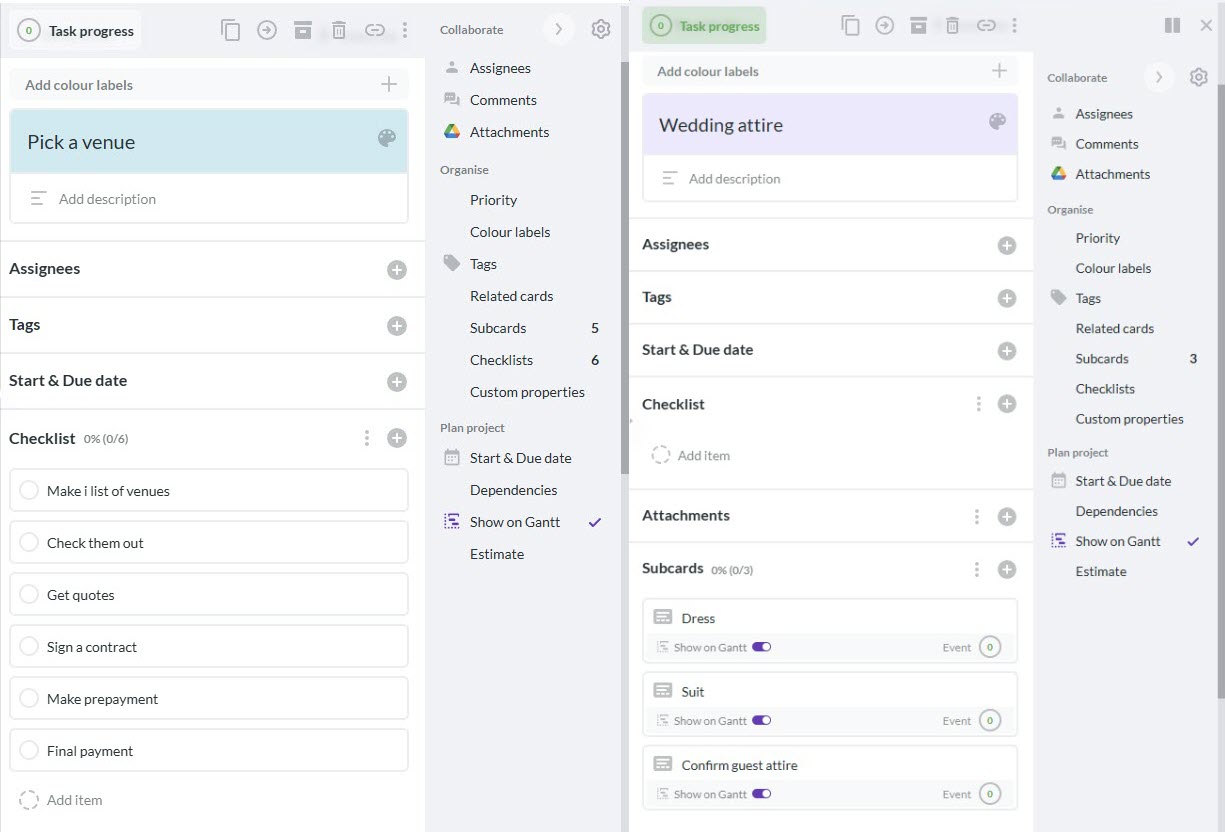
  • Parent Card: Catering
  • Subcards/Checklist: Menu Selection, Dietary Restrictions List, Bar Package Review, Linen Selection, Final Headcount Submission.
A split screenshot from Kanbanchi showing a "Pick a venue" card with a checklist alongside a "Wedding attire" card with subcards, demonstrating the structural depth of wedding planning task management software.

Keep your main project board clutter-free by using subcards or checklists

This hierarchy keeps your main board clean while allowing for infinite depth of detail where necessary.

The “Day-Of” Execution: From Board to Reality

The ultimate test of any task management software for wedding planners is how it performs on the day of the event. When the pressure is on, you cannot be fumbling with complex software.

Mobile Accessibility

Kanbanchi is fully responsive and works on mobile devices and tablets.

  • Scenario: You are at the venue, and the cake arrives. Open the Kanbanchi app, open the “Cake” card, and review the attached sketch to confirm the design is correct.
  • Scenario: The florist asks where to place the ceremony arch. Open the “Ceremony Layout” card and open the floor plan PDF.

The “Run of Show” Board

Many planners create a specific board solely for the wedding weekend.

  • Columns: Friday Rehearsal, Saturday Morning, Ceremony Setup, Reception Setup, Strike/Cleanup.
  • Cards: Specific actions with assigned team members (e.g., “Assistant A: Pin boutonnieres,” “Assistant B: Line up bridal party”).

This ensures that your entire team is synced. You can even use the “Checklist” feature to ensure critical items (like the marriage license!) are physically in hand before moving to the next stage.

Comparing Kanbanchi to Other Tools

Why choose Kanbanchi over Asana, Trello, or Aisle Planner?

Versus Trello: Trello is a great Kanban tool, but its Gantt chart capabilities are often paid “Power-Ups” or third-party integrations that can be clunky. Kanbanchi has a professional-grade Gantt chart built in.

Versus Aisle Planner: Aisle Planner is a fantastic industry-specific tool, but it is a walled garden. It doesn’t integrate deeply with Google Drive. If you prefer the flexibility of Google Docs and Sheets, Kanbanchi is the better bridge.

Versus Asana: Asana is powerful but can be complex and expensive for small teams. Kanbanchi’s pricing and interface are often more accessible for boutique planning firms.

Implementation: How to Start Using Kanbanchi Today

If you are ready to upgrade your wedding planning workflow tools, follow this implementation guide:

  1. Audit Your Current Process: Write down every step you take for a wedding, from the first phone call to the final wave goodbye.
  2. Create Your Template: Build this workflow into a Kanbanchi board. Add checklists, standard attachments (like your contract templates), and labels.
  3. Beta Test with One Client: Don’t move all 20 clients at once. Pick a new client or a simple event to test the system.
  4. Train Your Team: Show your assistants how to move cards and check off items. Effective wedding coordinator task tracking relies on everyone using the system correctly.

Check out more case studies from different industries

Conclusion

The wedding industry is built on the promise of perfection. Clients trust you with one of the most significant days of their lives. To honor that trust, you need back-end systems that are robust, reliable, and efficient.

Kanbanchi offers the perfect balance of visual creativity and logical structure. It streamlines the chaos of vendor management, simplifies client communication, and ensures that no detail, however small, slips through the cracks. By centralizing your workflow within the Google ecosystem, Kanbanchi frees you from the drudgery of administrative shuffling, allowing you to focus on what you do best: creating magic.

As a dedicated task management software for wedding planners, Kanbanchi is not just a tool; it is a growth partner. It allows you to handle more weddings with less stress, turning the overwhelm of planning into a streamlined, manageable, and enjoyable process.

Next Steps

Stop letting the logistics overshadow the design. Start your free trial of Kanbanchi today, and create your first board. Experience the peace of mind that comes with total organizational control.

    MultipleAuthors\Classes\Objects\Author Object
    (
        [term_id] => 973
        [term:MultipleAuthors\Classes\Objects\Author:private] => 
        [metaCache:MultipleAuthors\Classes\Objects\Author:private] => Array
            (
                [user_email] => olga.alekseeva@kanbanchi.com
                [user_id] => 20
                [first_name] => Olga Alekseeva
                [last_name] => 
                [job_title] => Growth hacking expert with over 10 years of experience with Kanbanchi
                [description] => Olga wears multiple hats across marketing, sales, product, and ops after 10+ years in the SaaS world. She is passionate about helping teams streamline their workflows with Kanbanchi and Google Workspace or Microsoft 365. "When I'm not optimizing processes or writing guides, I'm probably tweaking our product roadmap or diving into the latest productivity tools".
                [user_url] => https://linkedin.com/in/olgksv
            )
    
        [userObject:MultipleAuthors\Classes\Objects\Author:private] => WP_User Object
            (
                [data] => stdClass Object
                    (
                        [ID] => 20
                        [user_login] => olga.alekseeva
                        [user_pass] => $wp$2y$10$WuiuvYMj7CDnLrRbWchEkuBwKzmbBakK64Uk5c68bDY3qA46MFam6
                        [user_nicename] => olga-alekseeva
                        [user_email] => olga.alekseeva@kanbanchi.com
                        [user_url] => https://linkedin.com/in/olgksv
                        [user_registered] => 2025-09-03 15:47:58
                        [user_activation_key] => 
                        [user_status] => 0
                        [display_name] => Olga Alekseeva
                    )
    
                [ID] => 20
                [caps] => Array
                    (
                        [editor] => 1
                        [author] => 1
                        [contributor] => 1
                        [wpseo_editor] => 1
                        [wpseo_manager] => 1
                    )
    
                [cap_key] => wp_capabilities
                [roles] => Array
                    (
                        [0] => editor
                        [1] => author
                        [2] => contributor
                        [3] => wpseo_editor
                        [4] => wpseo_manager
                    )
    
                [allcaps] => Array
                    (
                        [moderate_comments] => 1
                        [manage_categories] => 1
                        [manage_links] => 1
                        [upload_files] => 1
                        [unfiltered_html] => 1
                        [edit_posts] => 1
                        [edit_others_posts] => 1
                        [edit_published_posts] => 1
                        [publish_posts] => 1
                        [edit_pages] => 1
                        [read] => 1
                        [level_7] => 1
                        [level_6] => 1
                        [level_5] => 1
                        [level_4] => 1
                        [level_3] => 1
                        [level_2] => 1
                        [level_1] => 1
                        [level_0] => 1
                        [edit_others_pages] => 1
                        [edit_published_pages] => 1
                        [publish_pages] => 1
                        [delete_pages] => 1
                        [delete_others_pages] => 1
                        [delete_published_pages] => 1
                        [delete_posts] => 1
                        [delete_others_posts] => 1
                        [delete_published_posts] => 1
                        [delete_private_posts] => 1
                        [edit_private_posts] => 1
                        [read_private_posts] => 1
                        [delete_private_pages] => 1
                        [edit_private_pages] => 1
                        [read_private_pages] => 1
                        [wpseo_bulk_edit] => 1
                        [copy_posts] => 1
                        [ppma_edit_post_authors] => 1
                        [ppma_edit_own_profile] => 1
                        [wpseo_edit_advanced_metadata] => 1
                        [wpseo_manage_options] => 1
                        [view_site_health_checks] => 1
                        [editor] => 1
                        [author] => 1
                        [contributor] => 1
                        [wpseo_editor] => 1
                        [wpseo_manager] => 1
                    )
    
                [filter] => 
                [site_id:WP_User:private] => 1
            )
    
        [hasCustomAvatar:MultipleAuthors\Classes\Objects\Author:private] => 1
        [customAvatarUrl:MultipleAuthors\Classes\Objects\Author:private] => Array
            (
                [url] => https://www.kanbanchi.com/wp-content/uploads/2025/09/photo_2024-04-10_17-25-16.jpg
                [url2x] => https://www.kanbanchi.com/wp-content/uploads/2025/09/photo_2024-04-10_17-25-16.jpg
            )
    
        [avatarUrl:MultipleAuthors\Classes\Objects\Author:private] => 
        [avatarBySize:MultipleAuthors\Classes\Objects\Author:private] => Array
            (
                [96] => 
                [80] => 
                [50] => 
            )
    
    )
    
  • Growth hacking expert with over 10 years of experience with Kanbanchi

    Olga wears multiple hats across marketing, sales, product, and ops after 10+ years in the SaaS world. She is passionate about helping teams streamline their workflows with Kanbanchi and Google Workspace or Microsoft 365. "When I'm not optimizing processes or writing guides, I'm probably tweaking our product roadmap or diving into the latest productivity tools".

    All articles
Share

Try Kanbanchi now

  • Collaborate seamlessly
    with your team
  • Integrate Kanbanchi
    with Google or Microsoft
  • Manage all your work in one place
Start for free

Start using Kanbanchi now

Start your free trial