
In this Article:
Try Kanbanchi now
Start your free trial

Ever watched a high-performing pit crew during a Formula 1 race? Within seconds, there’s a dozen specialists descending upon one car. One handles the front jack, others swap the tires, and someone else clears the air intake. They don’t wait for their turn in a linear sequence; they swarm the vehicle to return it to the track in record time.
When it comes to Agile software development, we often do the exact opposite. We end up in a situation where work ends up fragmented, tasks get split up into even smaller jobs and each team member gets lost! The result: Jobs remain “In Progress” for weeks, held up by delays or by waiting for a team member to become available to carry out the work.
Let’s ask a question: Does your Sprint board look like a graveyard of nearly-finished tasks?
If the answer to that is: “Yes, yes it does!” It’s time to talk about Agile swarming.
We’ve put together a guide that’s going to:
Ready to stop starting and start finishing? Let’s get into the mechanics of the swarm and how it can work for you and your team.
At its very heart, swarming in Agile is a collaborative technique in which the entire team (or a significant portion of them) focus on a single backlog item until it is complete.
Instead of having five people working on five different tasks simultaneously, you’ve five people working together to clear the highest-priority item off the board first, before moving onto the next task.
Think of it as the antidote to the “I’ve finished my bit, now I’m starting something new!” mindset that creates bottlenecks and prevents teams fromworking together as effectively as they could.
You might be thinking: Does swarming really matter? The answer is that, yes, it really does. We’ll tell you why:
In a traditional team setup, work moves like a relay race with each worker passing the baton on to the next as they go. However, in a swarm, work moves like a pack of cyclists drafting off one another. By focusing on Flow rather than how resources are utilized, teams can:
OK, so we’ll stick with the sporting analogies. So, say traditional project management is a relay race (where one person runs their lap and hands off the baton), then Agile swarming is more like a rugby scrum.
So, how does this work in a practical, day-to-day software or project environment? It isn’t just about everyone jumping on a task at once; it’s about coordinated focus, and that’s what we’ll consider next in our guide.
Most teams suffer from a high Work in Progress (WIP) limit. Everyone has their tasks, resulting in a board full of tickets that are 90% complete but 0% delivered. This can lead to bottlenecks, delays and frustration.
Swarming exists to flip the script. Instead of asking:
“What can I start today?”
Team members ask:
“How can I help finish what we’ve already started?”
When a high-priority team project hits a roadblock, for instance, a complex piece of code or a tricky design requirement, the team doesn’t let it sit there getting further behind and more ‘blocked’. Instead, they work proactively and consider how to respond to it.
A problem with a project has been noticed, and there’s a three-step plan for dealing with it:
A team member has identified a problem with a project.
This usually occurs when a task remains in the same column for 24-48 hours.
During the Daily Stand-Up meeting, the team agrees to swarm the item.
This is where the magic happens: team members work together to resolve the issue and keep everything on track.
Example: A developer might write unit tests, the primary coder might build the logic, and a designer might simultaneously clarify the UI requirements with the Product Owner.
Getting to grips with the psychological shift is the hardest part of defining what is swarming. We’re creatures of habit when it comes to work; we know what our strengths are, and our roles are defined clearly. However, when it comes to a swarm, you stop being the Coding Guy or the QA Girl. You all become Contributors to the Goal.
Wait! Does this mean everyone is typing on the same keyboard? Not necessarily. Swarming can look like Pair Programming, but it can also look like three people working on different sub-tasks of the same project.
The swarming agile mindset ensures that the team’s collective brainpower is laser-focused on moving the needle on the most important thing first.
We hear you, and we get it. It’s a valid question, and a common fear among managers, that swarming is inefficient. If four people work on one task, aren’t we wasting three people’s time?
Actually, the opposite is true. According to Lean principles, the most expensive thing in a project is Idle Work (work waiting for a person), not Idle People.
Swarming reduces the Lead Time, i.e., the time it takes for an idea to become a finished feature, dramatically. It’s better to have one feature 100% finished than five features 20% finished.
When you view Agile swarming through the lens of ROI, finishing high-value items faster always beats maintaining a high volume of nearly done work.
To truly understand swarming in Scrum, we must look to the Sprint Goal. In a traditional Scrum setup, during Sprint Planning, tasks are often divided by specialty. So, for instance, John takes the API, Sarah takes the CSS, as that’s what they know best and always do.
The problem: If the API is more complex than expected, John is overwhelmed while Sarah finishes early and starts a new task that wasn’t even the top priority. This is what we call the Resource Utilization Trap.
There’s a better solution to all this that keeps everyone on track and engaged in their work.
In a swarming scrum environment, the team views the Sprint Backlog as a shared responsibility.
We’ve put together a comparison table so you can see the benefits of swarming in Scrum at a glance, and make the right decision on task management for you and your team. Here’s how it looks.
| Feature | Traditional Management | Swarming in Scrum |
|---|---|---|
| Focus | Individual “To-Do” lists | The Sprint Goal |
| Success Metric | Personal busy-ness | Feature completion (Done) |
| Bottlenecks | Tasks stay “Blocked” | Team converges to clear blocks |
| Knowledge | Siloed in specialists | Shared across the “swarm” |
When your team adopts the swarm methodology, you move away from a mindset of:
“That’s not my job.”
Toward a culture of:
“We win as a team.”
It turns the Sprint board from a static list into a living, breathing ecosystem of collaboration.
Read more articles on Agile project management.
Why go through the effort of restructuring how your team works? Because the swarm methodology isn’t just a nice-to-have, it’s a performance multiplier. When a team stops acting like a group of individuals and starts acting like a single organism, the output shifts from busy work to business value.
Here are four reasons why top-tier Agile teams are obsessed with swarming:
The most obvious benefit of agile swarming is speed. When multiple people focus on one story, that story moves from To Do to Done in a fraction of the time.
In a swarming scrum environment, code reviews and quality assurance occur in real time. Instead of finishing a feature and throwing it over the garden wall to a tester (who then finds a bug and throws it back), the tester is involved from the start.
Have you ever had a project grind to a halt because your lead developer went on vacation? This can be a real problem for teams, and swarming in agile helps solve it. By working together on complex tasks, junior members learn the architecture from seniors, and specialists share their secrets to success with generalists.
There is a unique psychological high that comes from crushing a difficult task as a group. Swarming replaces the isolation of individual tickets with the camaraderie of a shared mission. No one is left to struggle alone with a difficult bug for three days.
Hopefully, we’re convincing you that Agile swarming can be a valuable solution for your team. So, next, we’ll look at ways in which you can kick-start it for your next big project and see the benefits.
You don’t need a massive team reorganization to start using the swarm methodology. In fact, swarming works best when it happens organically.
Not every task will require a swarm. If it’s routine and straightforward, one person is fine.
You should trigger a swarm when:
Your project is underway, and you’ve identified one or more of these points. So, the next question is, how do you organize your first swarm to tackle the problems in the right way, to keep everything on track?
Here’s how to effectively plan your first swarm and see how it can make a difference to how your team tackles project backlogs.
Look at your board and find the item closest to the Done column that is currently stalled.
During the Daily Stand-up, the person owning the stalled task requests assistance.
Even in a swarm, people need direction. One person might focus on the core logic, another on documentation, and another on testing.
Swarming shouldn’t last forever. Try swarming for 2 hours or until the specific block is cleared.
After the task is done, take a moment to ask: “How much faster was that than working alone?”
Pro Tip: Limit Your WIP: The secret to successful agile swarming is a low Work in Progress (WIP) limit. If your team of five has ten tasks In Progress, swarming is impossible. Try limiting your In Progress column to 3 items. This forces the team to collaborate because they literally aren’t allowed to start anything new until the current work is finished.
You can’t manage what you can’t see. In a distributed team or a fast-paced Google Workspace environment, swarming in agile only works if the distress signal is visible to everyone instantly. If the bottleneck is hidden in a spreadsheet or a long email thread, the swarm will never form.
This is where Kanbanchi becomes your team’s secret weapon. Built specifically for Google Workspace, it turns the abstract concept of flow into a visual reality. Here are three reasons why Kanbanchi works in this situation:
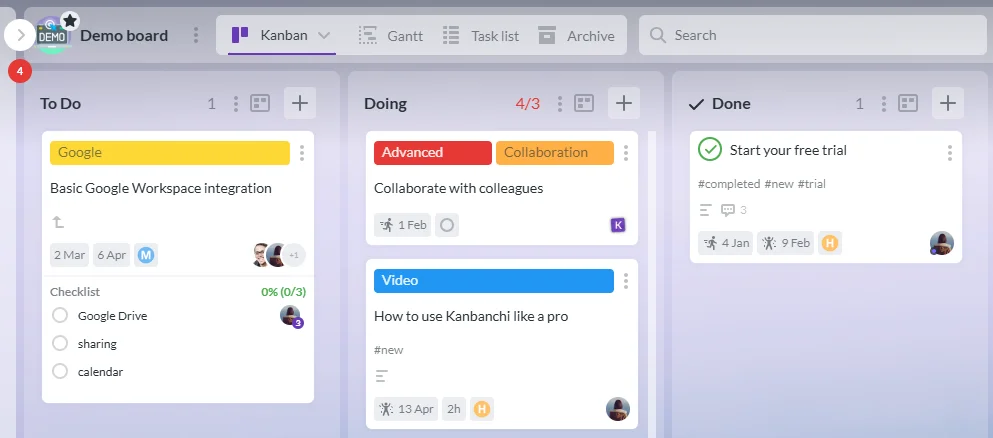
Kanbanchi WIP tasks illustrating swarming in Agile for collaborative focus on high-priority work.
To start agile swarming, you first need to see where the “pile-up” is happening. Kanbanchi’s Kanban boards allow you to set WIP (Work in Progress) Limits.

GIF demonstrates how Agile teams use swarming in Kanbanchi, breaking work into subcards and checklists for focused, collaborative task completion.
Once the team decides to swarm a specific User Story, Kanbanchi makes the collaboration seamless:
Since Kanbanchi is built into Google Workspace, swarming doesn’t require learning a new, complex interface. You can attach Google Docs for requirements, Sheets for data mapping, or Jamboards for brainstorming directly to the Kanbanchi card. Your team stays in their familiar environment, focusing on the work rather than the tool.
Swarming in agile is a decisive shift from individual output to collective outcome. It requires trust, a bit of ego-checking, and the right visual tools to succeed.
By adopting a finish-over-start mindset and using Kanbanchi to highlight your team’s flow, you’ll stop seeing a board full of In Progress and start seeing a board full of Done. Net result? Happier team members who feel they’ve contributed fully to the success of a project, and satisfied clients who’ll trust you time and again.
Ready to see your team swarm to success?
Try Kanbanchi for Google Workspace today and turn your bottlenecks into breakthroughs.
As ever, we’ll end our guide by taking a look at some of the most frequently asked questions on the topic, so we’ve got every ‘i’ dotted and every ‘t’ crossed.
Got any other burning issues? You can get in touch with us, and we’d be happy to talk you through any other agile swarming topics you’d like to know about.
Not quite. Pair programming is two people on one keyboard. What is swarming? It’s broader. It might involve a developer, a tester, and a designer all working on different aspects of the same story simultaneously to get it across the finish line.
It usually shortens the cycle. While individual tasks might seem to take more man-hours, the Lead Time (concept to delivery) is much faster because you eliminate the “waiting time” between handoffs.
You shouldn’t. If you swarm on everything, you lose the benefits of focus. Use the Save the Swarm methodology for high-priority items, complex blockers, or when the Sprint Goal is at risk.
In Kanbanchi, use the Activity Tracker and Time Tracking features. You can view each team member’s contributions on a single card, ensuring accountability while maintaining collaboration.
START KANBANCHI FREE TRIAL NOW



In this Article:
Start using Kanbanchi now
Start your free trial